
 100% FREE ACCESS
10th Standard Syllabus & Materials
10th Standard
TN 10th English Prose - 4 - The Attic Important Questions And Answers Study Material - QB365 Set A
NEW10th Standard
TN 10th English Supplementary - 3 - The Story of Mulan Important Questions And Answers Study Material - QB365 Set A
NEW10th Standard
TN 10th English Poem - 3 - I am Every Woman Important Questions And Answers Study Material - QB365 Set A
NEW10th Standard
TN 10th English Prose - 3 - Empowered Women Navigating The World Important Questions And Answers Study Material - QB365 Set A
NEW10th Standard
TN 10th English Supplementary - 2 - Zigzag Important Questions And Answers Study Material - QB365 Set A
NEW10th Standard
TN 10th English Poem - 2 - The Grumble Family Important Questions And Answers Study Material - QB365 Set A

Published on: 06/12/2019
Visual Communication
Download Tamil Nadu 10th Standard Science question papers, model tests, one-mark questions, important questions, and public exam papers in PDF format. Free study materials and answer keys for TN State Board students.
Questions + Answers key
Take MCQ Science Test1.
Windows and LINUX are examples of________
Files
Folders
Operating Systems
Programs
2.
Which button is presses to run the script?
Green flag
Red flag
Blue flag
Yellow flag
3.
In Scratch, the characters are known as_________
Sprite
Stage
Element
Script
4.
Which one is used to draw and edit pictures?
Notepad
Paint
Scratch
Windows OS
5.
Notes can be collected, edited and printed using______
Paint
Scratch
Notepad
LINUX
6.
Which button we use to select a required program?
Program button
Program button
My Computer
Start Button
7.
Multiple files are stored in a ___________.
Script Editor
Paint
Notepad
Folder
8.
The output of any application is commonly known as______
File
Folder
Disk
Output
9.
10.
Which is used to edit programs?
Inkscape
script editor
stage
sprite
11.
Which is used to build scripts?
Script area
Block palette
stage
sprite
12.
All files are stored in the _____________
Folder
box
Pai
scanner
13.
14.
Write a short note on script editor.
15.
Write a note on 'Visual Communication Device'.
16.
Write the uses of 'Note Pad' and 'Paint' app.
17.
Distinguish file and folder.
18.
What is Sprite?
19.
Write a short note on editor and its types.
20.
What is Scratch?
21.
In a biology period, the teacher drew the heart of rabbit on the board and explained its structure and functions. After the class, your friend told you that he finds it difficult to understand the concept and felt he wanted a detailed explanation.
(i) In what way the teaching can be made easily understandable?
(ii) Do you think using technologies like Visual Communication help students to understand the difficult concepts in a simple way?
(iii) By what means the Visual Communication improve the learning ability?
22.
Explain in detail the uses and main parts of the 'SCRATCH' animation software.
23.
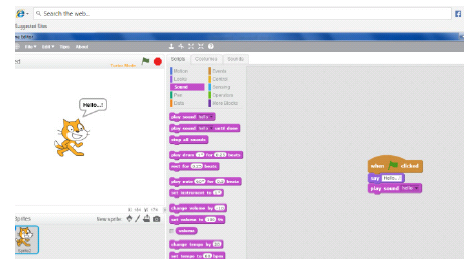
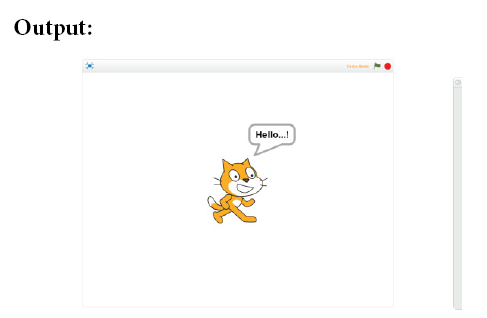
Program for print the word “Hello” with sound
24.
Which is important - Hardware or Software?
25.
If you are an artist, which computer applications will be relevant for you?
26.
In what way computer can help to improve your studies?
1.
(c)
Operating Systems
2.
(a)
Green flag
3.
(a)
Sprite
4.
(b)
Paint
5.
(c)
Notepad
6.
(d)
Start Button
7.
(d)
Folder
8.
(a)
File
9.
(a)
10.
(b)
script editor
11.
(a)
Script area
12.
(a)
Folder
13.
(d)
14.
Script editor is where you edit your programs or your sprite's pictures.
The script editor has three main parts:
(i) Script area: Where you build scripts.
(ii) Block menu: Where you choose the category of blocks (programming statements) to use.
(iii) Block palette: Where you choose the block to use.
15.
The device which helps in explaining the concepts easily through pictures is known as 'Visual Communication Device: For example photos, audio-visuals, drawings, animations all these can be created easily with the help of computer. Cinema is a good example for 'Visual Communication Device'.
16.
Note Pad: It can be used to type notes, edit it and save it as a file.
Paint App: Paint app can be used to used to draw and edit pictures.
17.
| File | Folder | ||
|---|---|---|---|
| (i) | The output from any application is referred as 'File' | 1. | A folder is a storage space,contains multiple files. |
| (ii) | A file cannot contain a folder | 2. | A folder can contain many files. |
18.
The characters on the background of a Scratch window are known as Sprite. Usually a cat appears as a sprite when the Scratch window is opened. The software provides facilities to make alternations in sprite.
19.
The script editor where you edit programs or your sprites pictures. The script editor has three main parts.
i) Script area
ii) Block menu
iii) Block palette.
20.
Scratch is a software used to create animations, cartoons and games easily. Scratch, on the other hand, is a visual programming language. It is developed in the Massachusetts Institute of Technology (MIT). Media Lab to make programming easier and more fun to learn.
21.
(i) Pictures and Audio-Visuals give us more understanding than teaching and writing on black board. So, any visual representation of the concepts would help us to understand better and make teaching simple
(ii) Yes. Visual Communication helps us to easily conceptualize complicated theorems and concepts. When the teacher shows pictures / videos that represent the concept, we would easily relate to its application and firmly understand the concept without any mis-perception
(iii) Pictures, Audio-Visuals, animations provide additional information and helps us to easily correlate the concepts. We could easily remember the visuals than black board writing, and visualize it, so that we do not forget and we could easily recollect at the time of examination.
22.
'Scratch' is a software used to create animations, cartoons and games easily. Scratch, on the other hand, is a Visual Programming Language. It was developed in the Massachusetts Institute of Technology (MIT) Media Lab to make programming easier and more fun to learn.
Scratch Environment Editor:
(i) The Scratch editor has three main parts: They are Stage, Sprite and Script editor.
(ii) Stage: Stage is the background appearing when we open the scratch window. The background will most often be white. You can change the background colour as you like.
(iii) Sprite: The characters on the background of a Scratch window are known as Sprite. Usually a cat appears as a sprite when the Scratch window is opened. The software provides facilities to make alternations in sprite.
(iv) Script editor / Costume editor: Where you edit your programs or your sprite's pictures.
The script editor has three main parts :
(a) Script area: Where you build scripts.
(b) Block menu: Where you choose the category of blocks (programming statements) to use.
(c) Block palette: Where you choose the block to use.
23.
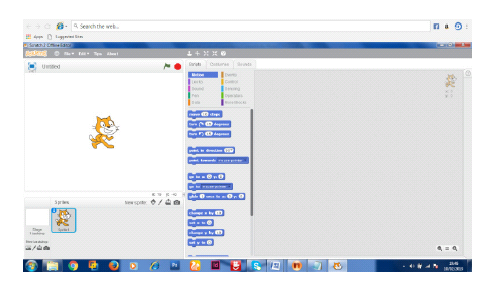
1. Click events in script option
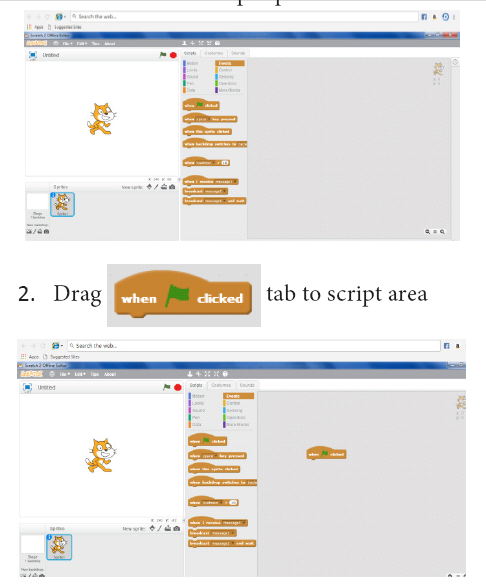
3. Click Looks in script option. Drag “say” to script area.
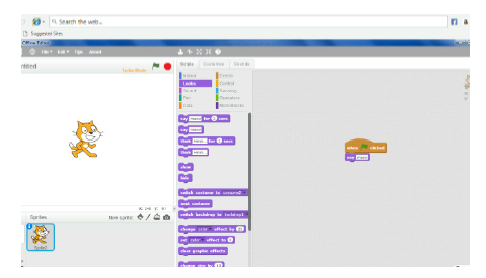
4. Type “Hello “ word in say tab.
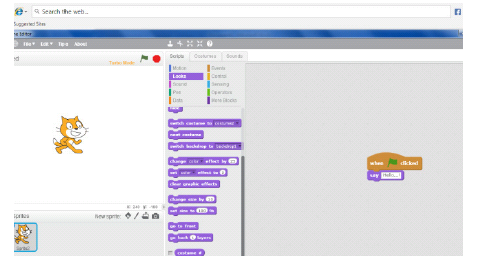
5.Click sounds in script option. Drag play sound to script area. Choose the hello sound from the audio file.
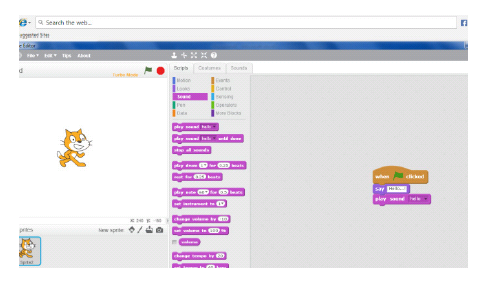
6. From File menu choose the Save option.
7. Click the green flag at the top right corner of the stage window to run the program
24.
Both are integral part of the computer and dependent to each other
25.
If I were an artist, I would be using Paint application to draw images.
26.
(i) Computer helps me to explore ideas and concepts in more depth, such as by using a multimedia CD - ROM or DVD with interactive exercises.
(ii) Computer also helps my teacher to prepare good study material with audio - visuals, images and animation

10th Standard Syllabus & Materials
10th Standard
TN 10th English Prose - 2 - The Night the Ghost Got in Important Questions And Answers Study Material - QB365 Set A
NEW10th Standard
TN 10th English Supplementary - 1 - The Tempest Important Questions And Answers Study Material - QB365 Set A
NEW10th Standard
TN 10th English Poem - 1 - Life Important Questions And Answers Study Material - QB365 Set A
NEW10th Standard
TN 10th English Prose - 1 - His First Flight Important Questions And Answers Study Material - QB365 Set A



Tamilnadu Stateboard 10th Standard Subjects
Tamilnadu Stateboard Standards





