
 100% FREE ACCESS
12th Standard Syllabus & Materials
12th Standard
TN 12th Computer Applications மின்னணு தரவு பரிமாற்றம் Sample Question Papers Study Material - QB365 Set A
NEW12th Standard
TN 12th Computer Applications மின் - வணிக பாதுகாப்பு அமைப்புகள் Sample Question Papers Study Material - QB365 Set A
NEW12th Standard
TN 12th Computer Applications மின்னணு செலுத்தல் முறைகள் Sample Question Papers Study Material - QB365 Set A
NEW12th Standard
TN 12th Computer Applications மின் - வணிகம் Sample Question Papers Study Material - QB365 Set A
NEW12th Standard
TN 12th Computer Applications திறந்த மூல கருத்துருக்கள் Sample Question Papers Study Material - QB365 Set A
NEW12th Standard
TN 12th Computer Applications வலையமைப்பு வடமிடல் Sample Question Papers Study Material - QB365 Set A

Published on: 05/09/2019
Computerized Accounting System-Tally
Download Tamil Nadu 12th Standard Accountancy question papers, model tests, one-mark questions, important questions, and public exam papers in PDF format. Free study materials and answer keys for TN State Board students.
Questions + Answers key
Take MCQ Accountancy Test
1.
Which of the following options is used to view Trial Balance from Gateway of Tally?
Gateway of Tally -> Reports -> Trial Balance
Gateway of Tally -> Trial Balance
Gateway of Tally -> Reports -> Display -> Trial Balance
None of these
2.
In which voucher type credit purchase of furniture is recorded in Tally
Receipt voucher
Journal voucher
Purchase voucher
Payment voucher
3.
Rs. 25,000 withdrawn from bank for office use. In which voucher type, this transaction will be recorded?
Contra Voucher
Receipt Voucher
Payment Voucher
Sales Voucher
4.
Salary account comes under which of the following head?
Direct Incomes
Direct Expenses
Indirect Incomes
Indirect Expenses
5.
Accounting report prepared according to the requirements of the user is
Routine accounting report
Special purpose report
Trial balance
Balance sheet
6.
What is a group in Tally ERP 9?
7.
State any five accounting reports.
8.
What is automated accounting system?
9.
10.
11.
The following balance sheet has been prepared from the books of Pearl on 1-4-2018.
| Liabilities | Rs. | Assets | Rs. |
|---|---|---|---|
| Capital | 2,26,000 | Buildings | 1,00,000 |
| Sundry creditors: | Furniture | 10,000 | |
| Maya A/c | 24,000 | Stock | 20,000 |
| Sundry debtors | |||
| Peter | 50,000 | ||
| Cash in hand | 15,000 | ||
| Cash at bank | 55,000 | ||
| 2,50,000 | 2,50,000 |
During the year the following transactions took place.
(a) Wages paid by cash Rs. 2,000
(b) Salaries paid by cheque Rs. 5,000
(c) Cash purchases made for Rs. 3,000
(d) Good purchased on credit from Yazhini Rs. 15,000
(e) Goods sold on credit to Jothi Rs. 25,000
(f) Payment made to Yazhini through NEFT Rs. 5,000
(g) Cash received from Peter Rs. 30,000
(h) Cash sales made for Rs. 6,000
(i) Depreciate buildings at 10%
(j) Closing stock on 31.03.2019 Rs. 15,000
You are required to prepare trading and profit and loss account for the year ended 31-03-2019 and a balance sheet as on that date using Tally.
12.
Record the following transactions in Tally.
1. Robert commenced a transport business with a capital of Rs.1,00,000
2. An account was opened with State Bank of India and deposited Rs. 30,000
3. Purchased furniture by paying cash Rs. 10,000
4. Goods purchased on credit from Mohaideen for Rs. 20,000
5. Cash sales made for Rs. 8,000
6. Goods purchased from Rathinam for Rs. 5,000 and money deposited in CDM
7. Goods sold to Rony on credit for Rs. 60,000
8. Money withdrawn from bank for office use Rs. 9,000
9. Part payment of Rs.10,000 made to Mohaideen by cheque
10. Rony made part payment of Rs. 5,000 by cash
11. Salaries paid to staff through ECS Rs. 6,000
12. Wages of Rs. 3,000 paid by cash
13. Purchased stationery from Pandian Ltd. on credit Rs. 4,000
13.
Explain any five applications of computerised accounting system.
1.
(c)
Gateway of Tally -> Reports -> Display -> Trial Balance
2.
(b)
Journal voucher
3.
(a)
Contra Voucher
4.
(d)
Indirect Expenses
5.
(b)
Special purpose report
6.
Group is a collection of ledgers of the same nature. There are predefined groups of accounts which are widely used in accounts of many orgaisation groups are categorised as primary group and sub - groups.
7.
Routine accounting reports include
(a) Day books / Journal
(b) Ledger
(c) Trial balance
(d) Income statement
(e) Balance sheet
(f) Cash flow statement
8.
(i) Automated accounting is an approach to maintain up-to-date accounting records with the aid of accounting software.
(ii) Under manual accounting system entries are made in different books of accounts while accounting software packages sallow manual entry in one field or one place.
9.
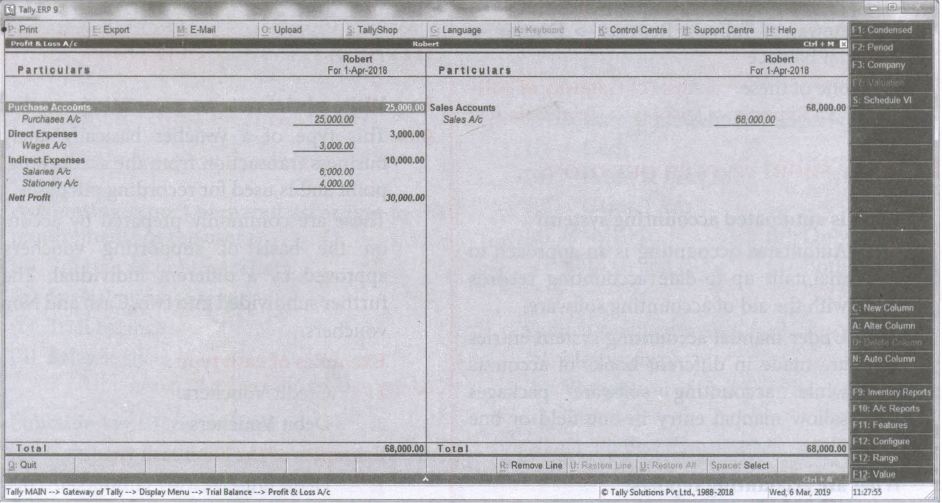
10.
11.
Following steps are to be followed to enter the transactions in Tally ERP 9
1. To create company:
Company Info > Create Company
Type the Name as Peral and keep all other fields as they are and choose 'Yes' to accept.
2. To maintain accounts only:
Gateway of Tally > F11 Accounting Features > General > Maintain accounts only: Yes > Accept Yes
3. To create ledger accounts with opening balances:
Gateway of Tally > Masters > Accounts Info> Ledgers> Single Ledger> Create
| Creation of | Name | Under | Opening balance | Accept |
|---|---|---|---|---|
| Bright’s Capital A/c | Bright’s Capital A/c | Capital Account | 2,26,000 | Yes |
| Ramesh A/c (Sundry creditors) | Ramesh A/c | Sundry Creditors | 24,000 | Yes |
| Machinery A/c | Machinery A/c | Fixed Assets | 1,00,000 | Yes |
| Furnitures A/c | Furnitures A/c | Fixed Assets | 10,000 | Yes |
| Opening stock | Opening stock | Stock-in -Hand | 20,000 | Yes |
| Shankar A/c (Sundry debtors) | Shankar A/c | Sundry Debtors | 50,000 | Yes |
| Cash in hand | Cash | Cash-in-Hand | 15,000 | Yes |
| Cast at bank | Bank | Bank Accounts | 55,000 | Yes |
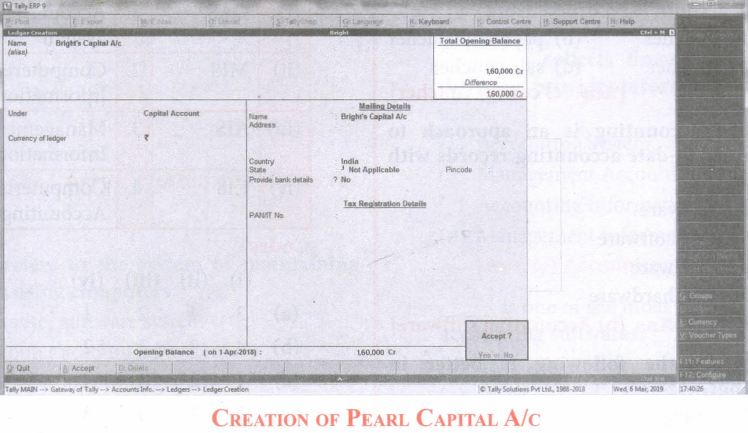
Note:
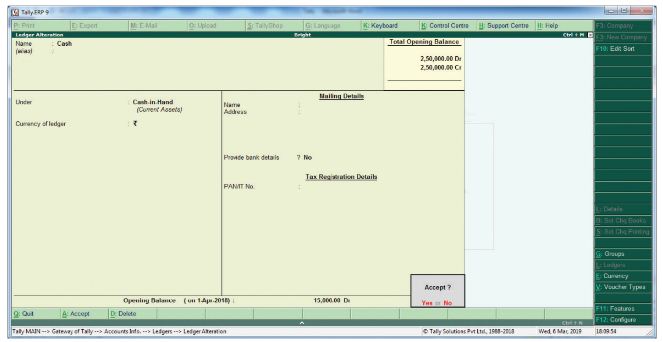
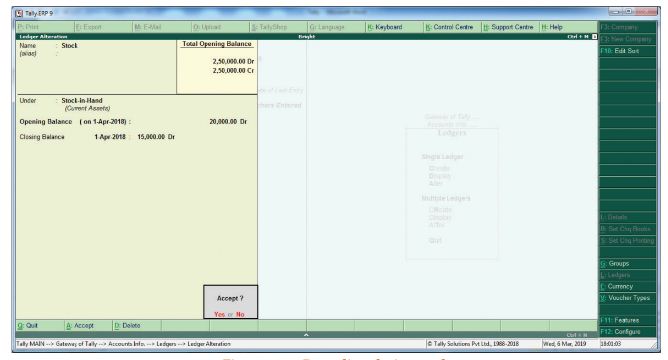
Cash account need not be created as it is a default ledger. Only the opening balance has to be recorded by altering the cash account.
To record the opening balance of Cash
Gateway of Tally > Masters > Accounts Info > Ledgers > Single Ledger > Alter
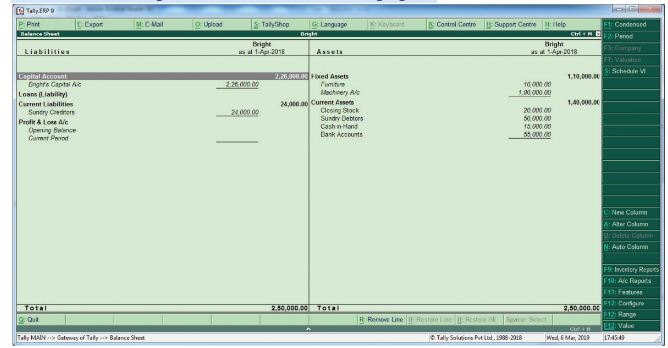
After creating the ledgers and recording the opening balances of ledger accounts the balance sheet of Bright is shown as in the following figure:
4. To create ledger accounts for transactions
| Creation of | Name | Under | Accept |
| Wages A/c | Wages A/c | Direct Expenses | Yes |
| Salaries A/c | Rent A/c | Indirect Expenses | Yes |
| Purchases A/c | Purchases A/c | Purchases Account | Yes |
| Senthamarai A/c | Senthamarai A/c | Sundry Creditors A/c | Yes |
| Sales A/c | Sales A/c | Sales Account | Yes |
| Pushparaj A/c | Pushparaj A/c | Sundry Debtors A/c | Yes |
| Depreciation A/c | Depreciation A/c | Indirect Expenses | Yes |
5. To enter transactions through vouchers
Gateway of Tally > Transactions > Accounting Vouchers
Example: Wages of Rs. 2,000 paid by Cash
F5: Payment Voucher
Account: Cash
Particulars: Wages A/c
Amount: Rs. 2,000
Narration: Wages paid by cash
Accept: Yes
In the similar way, record the other transactions. Use Payment Voucher for Salaries paid and payment to Senthamarai.
Use Purchase Voucher for credit purchases from Senthamarai and cash purchases.
Use Sales Voucher for credit sales to Pushparaj and cash sales.
Use Receipt Voucher for cash received from Shankar.
Use Journal Voucher for depreciation.
To record closing stock:
Since maintain accounts only is set to 'Yes' and integrate accounts and inventory is set to "No" under accounting features. Stock has to be recorded manually. Hence the closing stock has to be recorded by altering the stock account and while entering the data of closing stock, the date of opening stock has to be entered. The following procedure is to be followed:
Gateway of Tally > Masters > Accounts Info > Ledgers > Single Ledger > Alter > Stock > Closing balance > Date (opening date) > Amount > Accept Yes
6. To view reports:
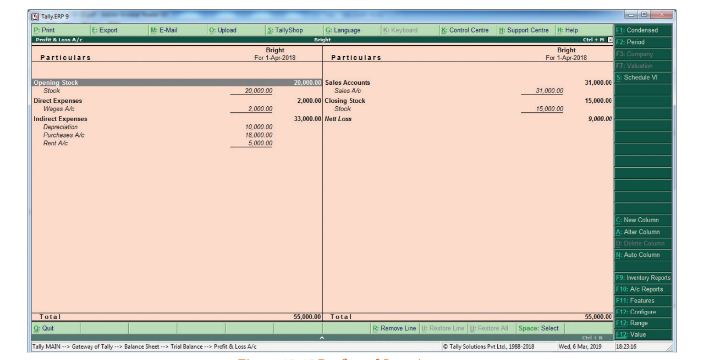
(i) To view Profit and Loss Account:
F10: A/c Reports > Profit & Loss A/c > Alt + F1 (detailed) (or)
Gateway of Tally > Report > Profit & Loss A/c > Alt + F1 (detailed)
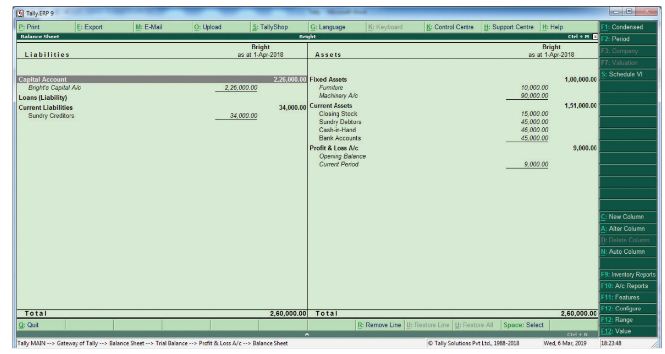
(ii) To view Balance sheet:
F10: A/c Reports > Balance sheet > Alt + F1 (detailed) (or)
Gateway of Tally > Reports > Balance Sheet > Alt + F1 (detailed)
12.
| S.NO. | Particulars | Debit Rs. | Credit Rs. | Voucher type | Group | |
|---|---|---|---|---|---|---|
| (1) | Cash A/c | Dr. | 1,00,000 | Receipt | Cash -in -Hand | |
| To Robert’s Capital A/c | 1,00,000 | Voucher | Capital Account | |||
| (2) | State Bank of India A/c | Dr. | 30,000 | Contra | Bank Accounts | |
| To Cash A/c | 30,000 | Voucher | Cash-in-Hand | |||
| (3) | Furniture A/c | Dr. | 10,000 | Payment | Fixed Assets | |
| To Cash A/c | 10,000 | Voucher | Cash-in-Hand | |||
| (4) | Purchases A/c | Dr. | 20,000 | Purchase | Purchase Accounts | |
| To Mohaideen A/c | 20,000 | Voucher | Sundry Creditors | |||
| (5) | Cash A/c | Dr. | 8,000 | Sales | Cash-in-Hand | |
| To Sales A/c | 8,000 | Voucher | Sales Accounts | |||
| (6) | Purchases A/c | Dr. | 5,000 | Purchase | Purchase Accounts | |
| To Cash A/c | 5,000 | Voucher | Cash-in-Hand | |||
| (7) | Rony A/c | Dr. | 60,000 | Sales | Sundry Debtors | |
| To Sales A/c | 60,000 | Voucher | Sales Accounts | |||
| (8) | Cash A/c | Dr. | 9,000 | Contra | Cash-in-Hand | |
| To Bank A/c | 9,000 | Voucher | Bank Accounts | |||
| (9) | Mohaideen A/c | Dr. | 10,000 | Payment | Sundry Creditors | |
| To Bank A/c | 10,000 | Voucher | Bank Accounts | |||
| (10) | Cash A/c | Dr. | 5,000 | Receipt | Cash -in -Hand | |
| To Arun A/c | 5,000 | Voucher | Sundry Debtors | |||
| (11) | Salaries A/c | Dr. | 6,000 | Payment | Indirect Expenses | |
| To Bank A/c | 6,000 | Voucher | Bank Accounts | |||
| (12) | Wages A/c | Dr. | 3,000 | Payment | Direct Expenses | |
| To Cash A/c | 3,000 | Voucher | Cash-in-Hand | |||
| (13) | Stationery A/c | Dr. | 4,000 | Journal | Indirect Expenses | |
| To Pandian Ltd. A/c | 4,000 | Voucher | Sundry Creditors |
Following steps are to be followed to enter the transaction in Tally ERP 9
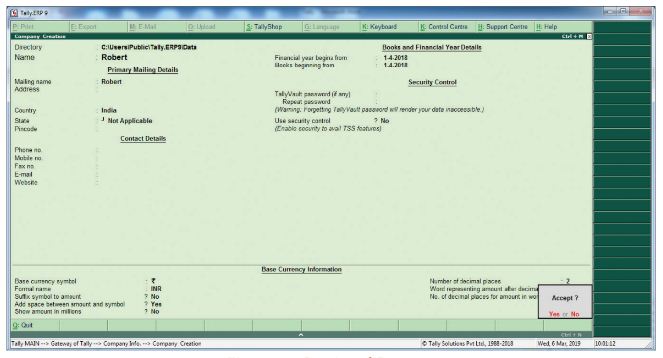
1. To create company
Company Info > Create Company
Type the Name as Robert and keep all other fields as they are and choose ‘Yes’ to accept.
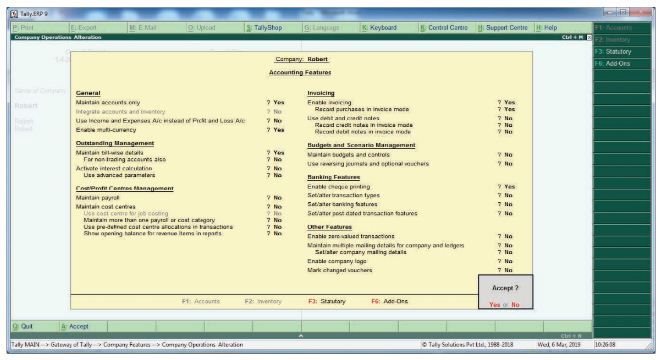
2. To maintain accounts only
Gateway of Tally > F11 Accounting Features > General > Maintain accounts only: Yes > Accept> Yes
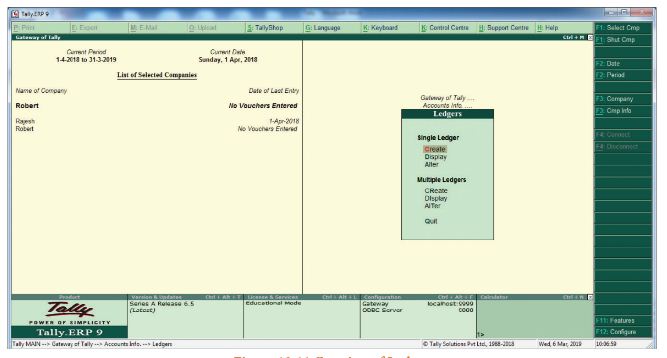
3. To Create ledger accounts
Gateway of Tally > Masters > Accounts Info > Ledgers > Single Ledger > Create
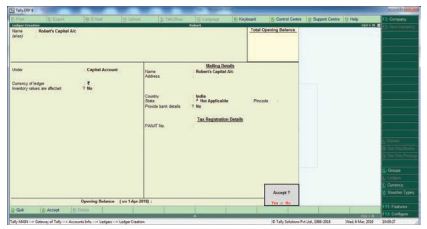
(i) To Create Devi's Capital A/c
Name: Devi's Capital A/c
Under Capital Account
Accept: Yes
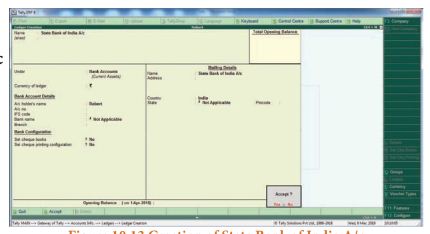
(ii) To Create Indian Bank A/c
Name: Indian Bank A/c
Under: Bank Accounts
Accept: Yes
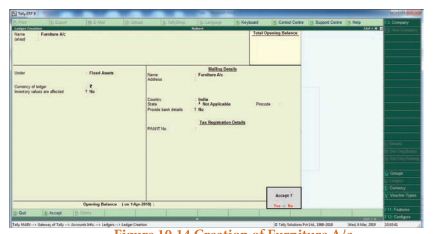
(iii) To Create Furniture A/c
Name: Furniture A/c
Under: Fixed Assets
Accept: Yes
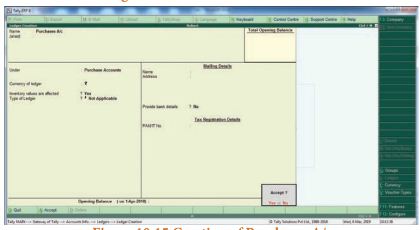
(iv) To Create Purchases A/c
Name: Purchases A/c
Under: Purchase
Accept: Yes
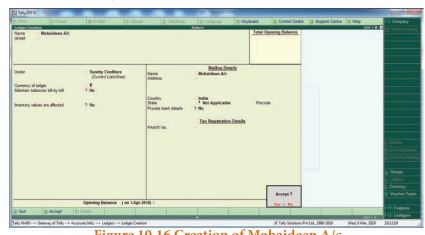
(v) To Create Mohaideen A/c
Name: Mohaideen A/c
Under: Sundry Creditors
Accept: Yes
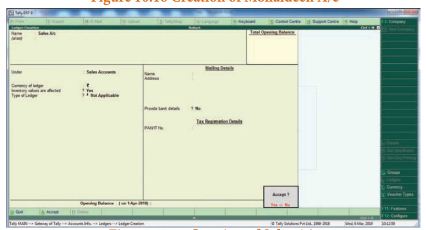
(vi) To Create Sales A/c
Name: Sales A/c
Under: Sales Account
Accept: Yes
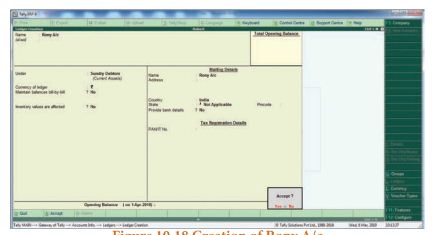
(vii) To create Rony A/c
Name: Rony A/c
Under: Sundry Debtors
Accept: Yes
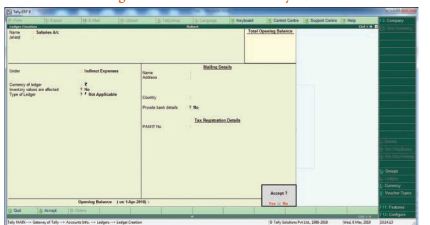
(viii) To create Salaries A/c
Name: Salaries A/c
Under: Indirect Expenses
Accept: Yes
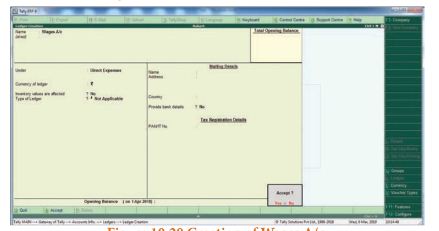
(ix) To create Wages A/c
Name: Wages A/c
Under: Direct Expenses
Accept: Yes
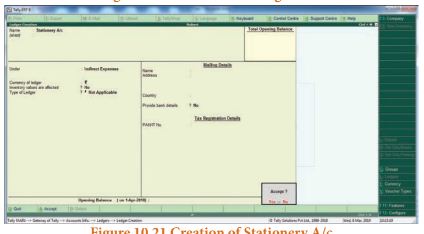
(x) To create Stationery A/c
Name: Stationery A/c
Under: Indirect Expenses
Accept: Yes
(xi) To create Pandian Ltd. A/c
Name: Pandian Ltd. A/c
Under:Sundry Creditors
Accept: Yes
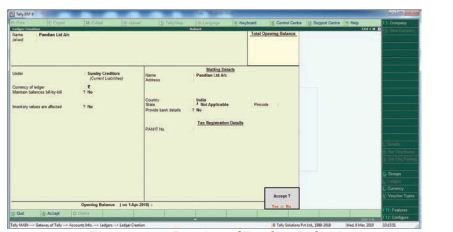
4. To enter transactions through vouchers
Gateway of Tally > Transactions > Accounting Vouchers
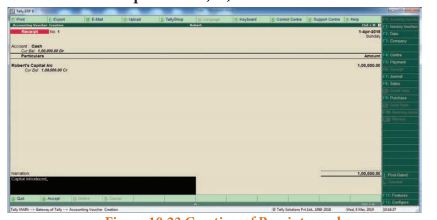
(i) Robert commenced a transport business with a capital of Rs. 1,00,000
F6: Receipt Voucher: Accounts: Cash
Particulars: Robert Capital A/c (Choose from List of Ledgers Accounts)
Enter the amount of Capital Rs. 1,00,000
Narration: Capital Introduced
Accept: Yes
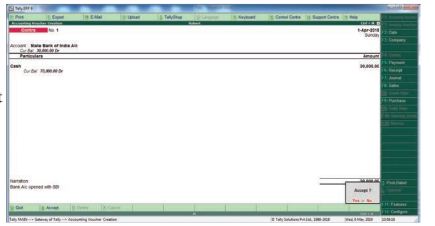
(ii) An account was opened with State Bank of India and deposited Rs. 30,000
F4: Contra Voucher
Accounts: State Bank of India
Particulars: Cash
Amount: Rs. 30,000
Narration: Opened bank account in SBI
Accept: Yes
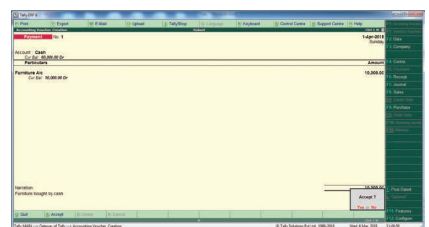
(iii) Purchased Furniture by paying cash Rs. 10,000
F5: Payment Vouchers
Account: Cash
Particulars: Furniture A/c
Amount: Rs. 15,000
Narration: Furniture bought by Cash
Accept: Yes
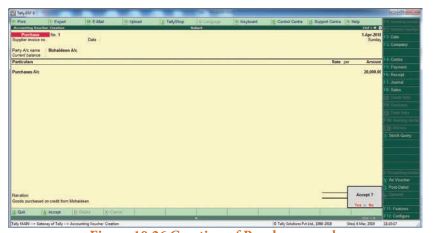
4 Goods purchased on credit from Mohaideen for Rs. 20,000
F9: Purchase voucher
Party A/c name: Mohaideen A/c
Particulars: Purchases A/c
Amount: Rs. 20,000
Narration: Goods purchased on
credit from Mohaideen
Accept Yes
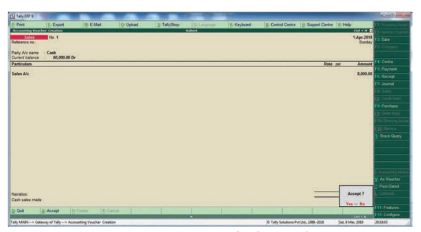
(5) Cash sales made for Rs. 8,000
F8: Sales Voucher,
Account: Cash
Particulars: Sales A/c
Amount: Rs. 8,000
Narration: Cash Sales Mode
Accept: Yes
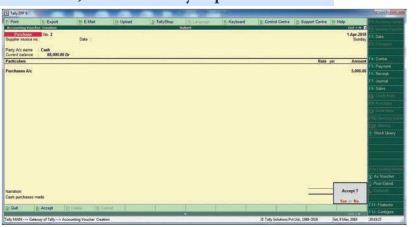
(6) Goods purchased from Rathinam for Rs. 5,000 and money deposited in CDM
F9: Purchase Voucher
Account: Bank
Particulars: Purchase A/c
Amount: Rs. 5,000
Narration: Goods Purchased
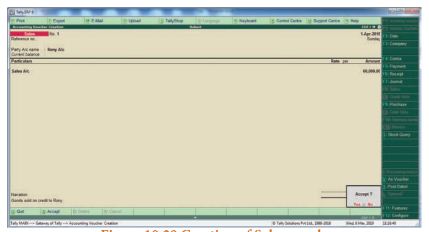
(vii) Goods sold to Rony on credit for Rs. 60,000
F8: Sales Voucher
Party: A/c Name: Rony A/c
Particulars: Sales A/c
Amount: Rs. 70,000
Narration: Goods sold on credit to Rony
Accept: Yes
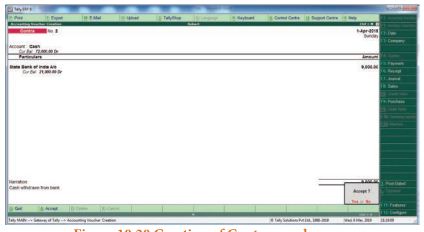
(viii) Money withdrawn from bank for office use Rs. 9,000
F4: Contra Voucher
Account: Cash
Particulars: State Bank of India A/c
Amount: Rs. 9,000
Narration: Cash withdrawn from bank
Accept: Yes
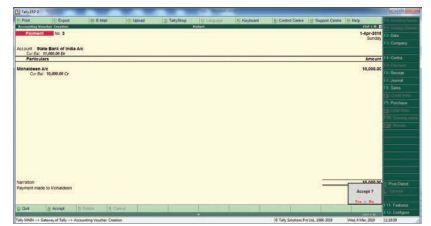
(ix) Part payment of Rs 10,000 to Mohaideen by cheque
F5: Payment Vouchers
Account: State Bank of India
Particulars: Mohaideen A/c
Amount: Rs.10,000
Narration: Payment made to
Mohaideen by cheque
Accept Yes
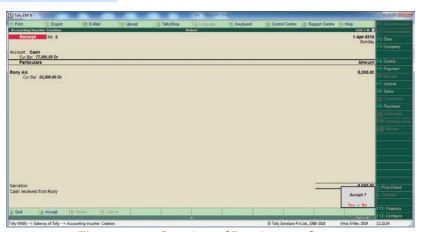
(x) Rony made part payment of Rs. 5,000 by cash
F6: Receipt voucher
Account: Cash
Particulars: Rony A/c
Amount: Rs. 5,000
Narration: Cash received from Rony
Accept Yes.
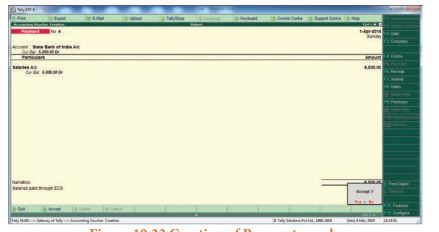
(xi) Salaries Paid to Staff through ECS Rs. 6,000
F5: Payment Vouchers
Account: Indian Bank
Particulars: Salaries A/c
Amount: Rs 6,000
Narration: Salaries paid through ECS,
Accept: Yes
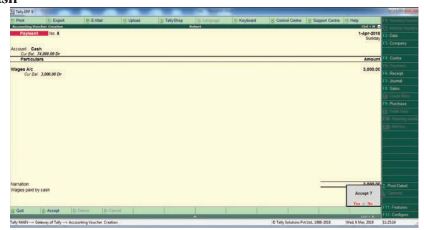
(xii) Wages of Rs. 3,000 paid by cash
F5: Payment voucher
Account: Cash
Particulars: Wages A/c
Amount: Rs. 3,000
Narration: Wages paid by cash
Accept Yes
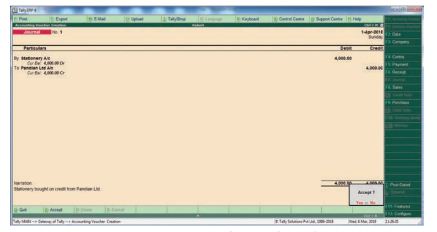
(xiii) Purchased stationery from Pandian Ltd. on credit Rs.4,000
F7: Journal Voucher
Particulars: Computer A/c
Account: Muthu Ltd.
Amount: Rs. 4,000
Narration: Stationery bought on credit from Pandian Ltd.
Accept: Yes
To view reports
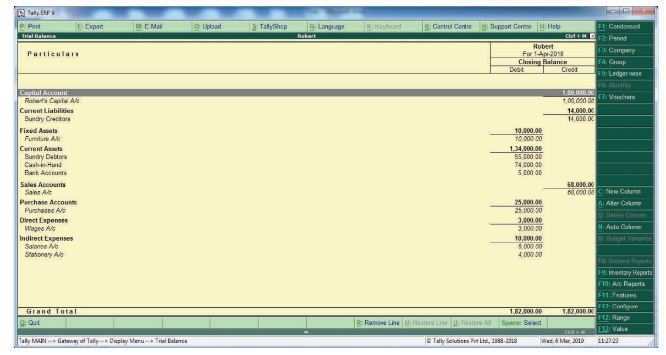
(i) To view Trial Balance
Gateway of Tally > Reports > Display > Trial Balance > Alt + F1 (detailed)
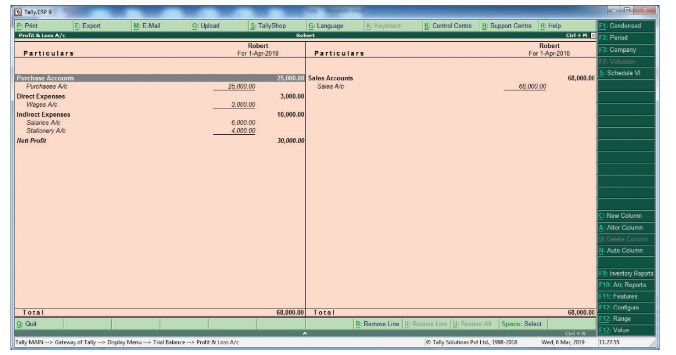
(ii) To view profit and loss Account
F10: A/c Reports > Profit & Loss A/c > Alt + F1 (detailed) or
Gateway of Tally > Reports > Profit & Loss A/c Alt + F1 (detailed)
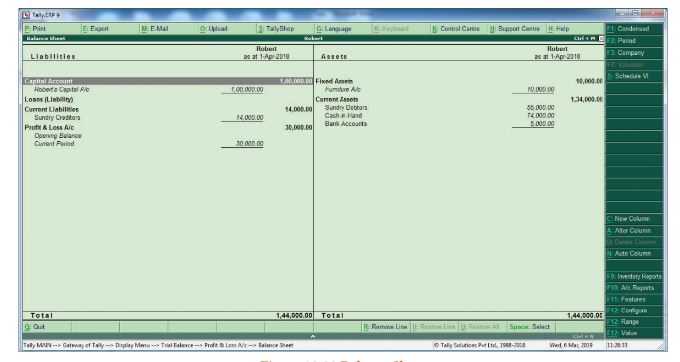
(iii) To view Balance sheet
F10: A/c Reports > Balance sheet > Alt + F1 (detailed)
Gate of Tally > Reports > Balance Sheet > Alt + F1 (detailed)
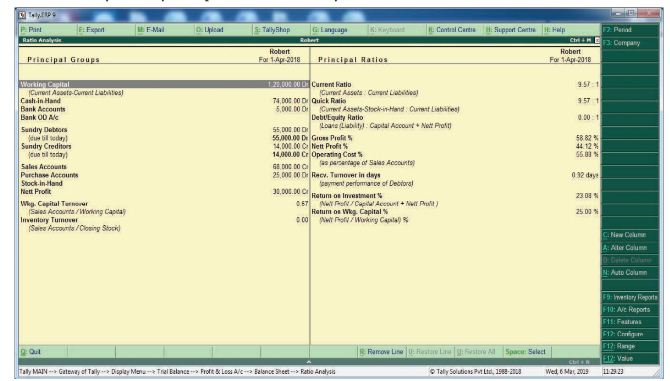
(iv) To view Ratio Analysis
F10: A/c Reports > Ratio Analysis (or)
Gateway of Tally > Reports > Ratio Analysis
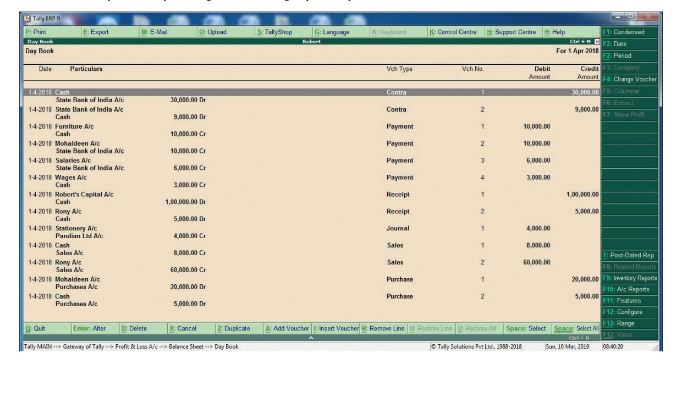
(v) To view Day book
F10: A/c Reports > Day Book > Alt + F1 (detailed (or)
Gateway of Tally > Reports > Display > Day Books > Alt + F1 (detailed)
13.
The applications of CAS are as follows:
(i) Maintaining accounting records:
In CAS, accounting records can be maintained easily and efficiently for long time period. It facilitates fast and accurate retrieval of data and information.
(ii) Inventory management:
CAS facilitates efficient management of inventory. Updated information about availability of inventory, level of inventory, etc., can be obtained instantly.
(iii) Report generation:
CAS helps to generate various routine and special purpose reports.
(iv) Data import/export:
Accounting data and information can be imported from or exported to other users within the organisation as well as outside the organisation.
(v) Taxation:
CAS helps to compute various taxes and to deduct these and deposit the same to the Government account.

12th Standard Syllabus & Materials
12th Standard
TN 12th Computer Applications களப்பெயர் முறைமை (DNS) Sample Question Papers Study Material - QB365 Set A
NEW12th Standard
TN 12th Computer Applications வலையமைப்பு எடுத்துக்காட்டுகள் மற்றும் நெறிமுறைகள் Sample Question Papers Study Material - QB365 Set A
NEW12th Standard
TN 12th Computer Applications கணினி வலையமைப்பு ஓர் அறிமுகம் Sample Question Papers Study Material - QB365 Set A
NEW12th Standard
TN 12th Computer Applications PHP-உடன் MySQL-ஐ இணைத்தல் Sample Question Papers Study Material - QB365 Set A



Tamilnadu Stateboard 12th Standard Subjects

Maths

Chemistry

Physics

Biology

Computer Science

Business Maths and Statistics

Economics

Commerce
Accountancy

History

Computer Applications
Biology
Computer Technology
Computer Applications
Computer Science
Business Maths and Statistics
Commerce
Economics
Maths
Chemistry
Physics
Computer Technology
History
Accountancy

Tamil

English

French
Tamilnadu Stateboard Standards
