
 100% FREE ACCESS
12th Standard Syllabus & Materials
12th Standard
TN 12th Computer Applications மின்னணு தரவு பரிமாற்றம் Sample Question Papers Study Material - QB365 Set A
NEW12th Standard
TN 12th Computer Applications மின் - வணிக பாதுகாப்பு அமைப்புகள் Sample Question Papers Study Material - QB365 Set A
NEW12th Standard
TN 12th Computer Applications மின்னணு செலுத்தல் முறைகள் Sample Question Papers Study Material - QB365 Set A
NEW12th Standard
TN 12th Computer Applications மின் - வணிகம் Sample Question Papers Study Material - QB365 Set A
NEW12th Standard
TN 12th Computer Applications திறந்த மூல கருத்துருக்கள் Sample Question Papers Study Material - QB365 Set A
NEW12th Standard
TN 12th Computer Applications வலையமைப்பு வடமிடல் Sample Question Papers Study Material - QB365 Set A

Published on: 12/10/2019
Connecting PHP and MYSQL
Download Tamil Nadu 12th Standard Computer Applications question papers, model tests, one-mark questions, important questions, and public exam papers in PDF format. Free study materials and answer keys for TN State Board students.
Questions + Answers key
Take MCQ Computer Applications Test
1.
Write a note PHP MySQL database connection.
2.
3.
Differentiate mysqli_affected_rows( ) Function and mysqli_fetch_assoc( ) Function.
4.
Write is the purpose of MySQLi function available.
5.
Write the Syntax for MySQLi Queries.
6.
Write a short note on parameters of mysqli_connect( ) function?
7.
Explain MySQLi Queries with examples.
8.
Explain in details types of MySQL connection method in PHP.
9.
Explain the Database error handling and management process in PHP?
10.
Discuss in detail about MySQL functions with example.
1.
Database Connections: Accessing MySQL Database, connect to Database Server machine via PHP scripting language using Mysqli_connect() Function.
Syntax:
mysqli_connect("Server Name","User Name","Password","DB Name");
This function requires four parameters to connect to database server. Database Server name, Database username, password and Database Name.
2.
3.
| mysqli_affected rows( ) | mysqli_fetch_assoc( ) |
|---|---|
| It returns the number of affected rows in the prearvious SELECT, INSERT UPDATE, REPLACE, or DELETE query. | It fetches a result rowas an associative aray |
| Return value: An integer >0 indicates the number of rows affected (0 indicates that no records were affected. '-1' indicates that the query returned an error). |
Returns an associative array of strings representing the fetched row. NULL if there are no more rows in result set. |
| Syntax: mysqli_affected_rows (connection); |
Syntax: mysqli fetch_as-soc(result); |
4.
In PHP Scripting language many functions are available for MySQL Database connectivity and executing SQL queries. MySQLi is extension in PHP Scripting language which gives access to the MySQL database. MySQLi extension was introduced version 5.0.0.
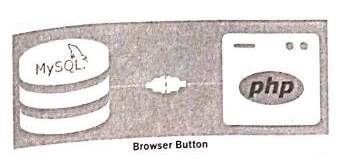
The MySQLi extension contains the following important functions which are related to MySQL database connectivity and management.
i) Mysqli_connect() Function
ii) Mysqli_close() Function
iii) Mysqli_query() Function
5.
Syntax:
mysqli_query("Connection Object","SQL Query")
6.
(i) Four Parameters are used to connect to the Database server.
(ii) They are
1.$ servername -> Database Server server IP address
2.$ susername -> Database Server User Name
3.$ password -> Database Server Password
4.$ DB_Name -> Database Name
7.
Performing Queries: The main goal of MySQL and PHP connectivity is to retrieve and manipulate the data from MySQL database server. The SQL query statements are help in PHP MySQL extension to achieve the objective of MySQL and PHP connection. “mysqli_query” is a function, that helps to execute the SQL query statements in PHP scripting language.
Syntax:
mysqli_query(“Connection Object”,“SQL Query”)
Example:
$con=mysqli_connect(“localhost”,“my_user”,“my_password”,“Student_DB”);

$sql=“SELECT student_name,student_age FROM student”;mysqli_query($con,$sql);
8.
Database Connections: Before accessing MYSQL Database, connect to Database Server machine via PHP scripting language using Mysqli_connect() Function.
Syntax:
mysqli_connect(“Server Name”,“User Name”,“Password”,“DB Name”);
This function requires four parameters to connect to database server. Database Server name, Database username, password and Database Name.
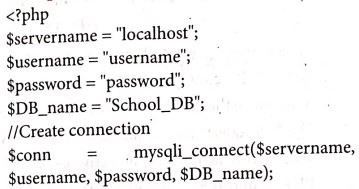
Managing Database Connections: The below code describes managing database connection methods and features.
<?php
 $servername = “localhost”;

$username = “username”;

$password = “password”;

SDB_name = “School_DB”;

$conn = mysqli_connect($servername, $username, $password,$DB_name);

if(!$conn){

die(“Connection failed: “ . mysqli_connect_error( ));

}

echo “Connected successfully”;

?>
In the above code snippet, four variables are used to connect to the Database server. They are
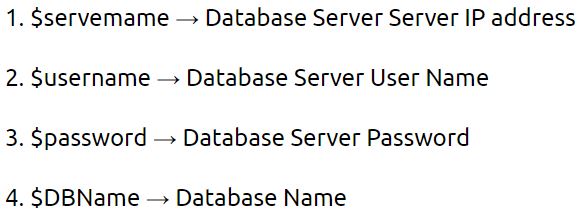
The mysqli_connect function uses these variables and connect Database server to PHP. If connection gets fail, output will be printed with MySQL error code. Otherwise connection is success.
9.
Error handling is the process of catching errors raised by our program and then taking appropriate action.
Different error handling methods are
Simple "die ()" statements;
Custom error and error triggers;
Error reporting.
(i) Using the die () function:-
Example:
$file = fopen("Welcome.txt", "r");
?>
Above example shows a simple script that opens a text file. If the file does not exists you might get an error like this.
Warning:
fopen (welcome.txt) [function.fopen]: failed to open stream: No such file or directory in
C:\webfolder\test.php on line 2
To prevent the user from getting an error message like the one above, test whether the file before we
try to access it.
if (!file_exists ("welcome.txt"))
{
die ("File not found");
} else
{
file = fopen ("Welcome.txt", "r");
}
Now if the file does not exists you get an error like this
File not found
The code above is more efficient than the earlier code, because it uses a simple error handling mechanism to stop the script after the error.
However, simply stopping the script is not always the right way to go. Let's take a look at alternative php functions for handling errors.
(ii) Creating a custom Error Handler
Creating a custom error handler is quite simple. Simply create a special function that can be called when an error occurs in PHP.
This function must be able to handle a minimum of two parameters (error level and error message) but can accept up to five parameters.
Syntax:
error_function (error_level, error_message, error_file, error_line, error_context)
(iii) Error report levels:
These error report levels are the different types of error the user defined error handler can be used for:
E_WARNING, E_NOTICE, E_USER_ERROR, E_USER_WARNING, E_USER_NOTICE,... etc.
Set Error Handler:
The default error handling for PHP is the built-in error handle;
Example:
To use our custom error handle for all errors:
set_error_handler("Custom Error");
10.
MySQL function in PHP:
In PHP Scripting language many functions are available for MySQL Database connectivity and executing SQL queries.
MySQLi is extension in PHP scripting language which gives access to the MYSQL database. MySQLi extension was introduced version 5.0.0,
The MySQLi extension contains the following important functions which are related to MySQL database connectivity and management.
i) Mysqli_connect() Function
ii) Mysqli_close() Function
iii) Mysqli_query() Function
(i) Database Connections:
Before accessing MySQL Database, connect to Database Server machine via PHP scripting language using Mysqli_connect() Function.
Syntax :
mysqli_connect("Server Name "User Name","Password"DB Name");
This function requires four parameters to connect to database server. Database Server name, Database username, password anda Database Name.
(ii) Managing Database Connections :
The below code describes managing database connection methods and features.
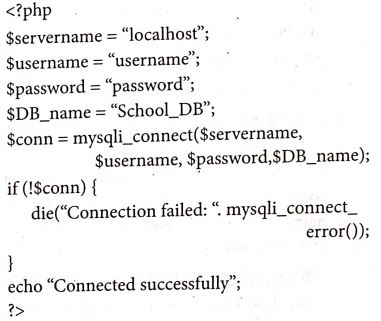
The mysqli_connect function uses these variables to connect Database server to PHP. If connection gets fail, output will be printed with MySQL error code. Otherwise connection is success.
(iii) Performing Queries :
The main goal of MySQL and PHP connectivity is to retrieve and manipulate the data from MYSQL database server. The SQL query statements help in PHP MySQL extension to achieve the objective of MYSQL and PHP connection. "mysqli_query" is a function, that helps to execute the SQL query statements in PHP scripting language.
Syntax:
mysqli_query("Connection Object","SQL Query")
Example:
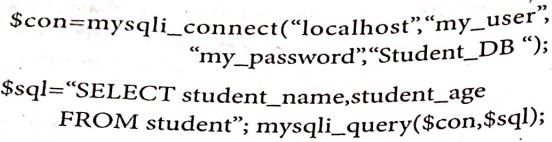
Closing Connection :
mysqli_close() Function is used to close an existing opened database connection between PHP scripting and MySQL Database Server.

12th Standard Syllabus & Materials
12th Standard
TN 12th Computer Applications களப்பெயர் முறைமை (DNS) Sample Question Papers Study Material - QB365 Set A
NEW12th Standard
TN 12th Computer Applications வலையமைப்பு எடுத்துக்காட்டுகள் மற்றும் நெறிமுறைகள் Sample Question Papers Study Material - QB365 Set A
NEW12th Standard
TN 12th Computer Applications கணினி வலையமைப்பு ஓர் அறிமுகம் Sample Question Papers Study Material - QB365 Set A
NEW12th Standard
TN 12th Computer Applications PHP-உடன் MySQL-ஐ இணைத்தல் Sample Question Papers Study Material - QB365 Set A



Tamilnadu Stateboard 12th Standard Subjects

Maths

Chemistry

Physics

Biology

Computer Science

Business Maths and Statistics

Economics

Commerce

Accountancy

History
Computer Applications
Biology
Computer Technology
Computer Applications
Computer Science
Business Maths and Statistics
Commerce
Economics
Maths
Chemistry
Physics
Computer Technology
History
Accountancy

Tamil

English

French
Tamilnadu Stateboard Standards
