
 100% FREE ACCESS
12th Standard Syllabus & Materials
12th Standard
TN 12th Computer Applications மின்னணு தரவு பரிமாற்றம் Sample Question Papers Study Material - QB365 Set A
NEW12th Standard
TN 12th Computer Applications மின் - வணிக பாதுகாப்பு அமைப்புகள் Sample Question Papers Study Material - QB365 Set A
NEW12th Standard
TN 12th Computer Applications மின்னணு செலுத்தல் முறைகள் Sample Question Papers Study Material - QB365 Set A
NEW12th Standard
TN 12th Computer Applications மின் - வணிகம் Sample Question Papers Study Material - QB365 Set A
NEW12th Standard
TN 12th Computer Applications திறந்த மூல கருத்துருக்கள் Sample Question Papers Study Material - QB365 Set A
NEW12th Standard
TN 12th Computer Applications வலையமைப்பு வடமிடல் Sample Question Papers Study Material - QB365 Set A

Published on: 20/01/2020
Download Tamil Nadu 12th Standard Computer Applications question papers, model tests, one-mark questions, important questions, and public exam papers in PDF format. Free study materials and answer keys for TN State Board students.
Questions + Answers key
Take MCQ Computer Applications Test
1.
What are the Limitations of E-Commerce
2.
Explain in detail about Open NMS.
3.
Write in detail about the classification of smart cards
4.
List the steps involved in Crimping process for making Ethernet cables
5.
Explain the following
1. Primary Key
2. Foreign Key
3. Candidate Key
4. Super Key
5. Composite key
6.
Write the steps to Drawing a Rounded Corner Rectangle
7.
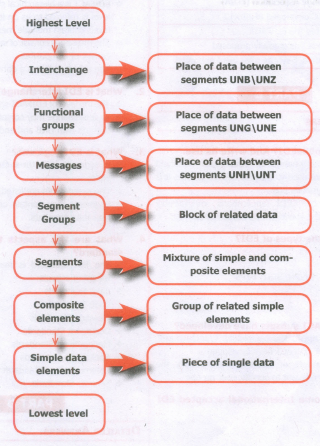
Draw the structure of UN/EDIFACT message
8.
How Multimedia is used in Business systems?
9.
Describe the subsets of payment fraud.
10.
List the basic rules of Domain Name?
11.
Explain file uploading method in PHP.
12.
Explain in detailed about Third Generation of Mobile Networks.
13.
Write in detail about The Interner Explosion?
14.
Briefly explain various types of EDI.
15.
Explain encryption technology.
16.
Briefly explain Electronic Account transfer and its types.
17.
Explain any five E-Commerce revenue models.
18.
List out the Benefits of Open Source Software
19.
20.
Explain in detail Techniques of Animation.
1.
(i) E-Commerce also has some limitations. The following are the major drawbacks of E-Commerce for a business organization.
(ii) In E-Commerce, the customer should wait between placing the order and having the product in hand.
(iii) The doubts about the period of returning, will the returned goods reach source in time, refunds, exchange, and postage make one tiresome.
(iv) Privacy issues are serious in E-Commerce.
(v) In E-Commerce generating consumer information is inevitable. Not all the companies use the personal information they obtained to improve services to consumers.
(vi) Many companies misuse the information and make money out of it.
(vii) It is true that privacy concerns are a critical reason why people get cold feet about online shopping Physical product disputes are a major disadvantage in E-Commerce.
(viii) In online shopping, we would see only the pictures the seller had chosen for us.
(ix) The Internet needs to survive the trip from the supplier to the consumer. This makes the customers turn back towards traditional supply chain arrangements.
(x) It is pretty hard to knock on their door to complain or seek legal recourse. Further, even if the item is sent, it is easy to. start bothering whether or not it will ever arrive on time.
2.
(i) Open NMS (Network Management System) is a free and open-source initiative grade network monitoring and management platform.
(ii) It is established and maintained by a community of users, developers and by the Open NMS Group.
(iii) It offering services, training, and support.
The goal is for Open NMS
(i) The goal is for Open NMS to be an actually distributed, scalable management application platform for all features of the FCAPS (Fault, Configuration, Accounting, Performance, Security) network management model.
(ii) Presently the emphasis is on Fault and Performance Management.
It was intended to cope tens of thousands of devices from a single server as well as achieve unlimited devices using a cluster of servers.
Features:
(i) OpenNMS comprises a discovery engine to routinely configure and manage network devices without operator intervention. It is written in Java and is issued under the GNU (General Public License.)
(ii) OpenNMS is the World's first software for Network monitor and management with opensource options.
OpenNMS- Types:
There are two types in this Meridian and Horizon.
Meridian: When we need stability and long term support choose Meridian which is best for Enterprises as well as businesses.
Horizon:
(i) It is used where innovation occurs frequently.
(ii) It is Best for IT-ecosystem, new technology monitoring.
History:
(i) OpenNMS was Released in 1999 by Steve Giles, Brian Weaver, and Luke Rindfuss.
(ii) In 2004 OpenNMS Group was created by Balog, Matt Brozowski, and David Hustace.
(iii) It is written in Java and can run on all type of platform.
(iv) It gives us Event management & Notification, Discovery & Provisioning, service monitoring, and Data Collection.
(v) Won a lot of awards for best of opensource software.
3.
(i) Contact smart cards
1. Contact smart cards have a contact area of approximately 1 square centimeter, comprising several gold plated contact pads.
2. These pads provide electrical connectivity only when inserted into a reader, which is also used as a communications medium between the smart card and a host. e.g. a point of sale terminal(POS).
(ii) Contactless smart cards
1. Contactless smart card is empowered by RF induction technology.
2. Unlike contact smart cards, these cards require only near proximity to an antenna to communicate.
3. Smartcards, whether they are contact or contactless cards do not have an internal power source.
4. Instead, they use an inductor to capture some of the interrupting radio-frequency signal, rectify it and power the card's processes.
4.
(i) Cut the cable with desired length
(ii) Strip the insulation sheath about 1 inch from both ends of the cable and expose the twisted pair wires
(iii) After stripping the wire, untwist the smaller wires and arrange them into the proper wiring scheme, T568B preferred generally.
(iv) Bring the wires tighter together and cut them down so that they all have the same length (1/2 inch).
(v) Insert the all 8 colored wires into the eight grooves in the connector. The wires should be inserted until the plastic sheath is also inside the connector.
(vi) Use the crimping tool to lock the RJ45connector on the cable. It should be strong enough to handle manual traction. Now it is ready for data transmission.
(vii) Use a cable tester to verify the proper connectivity of the cable, if need.
5.
1. Primary Key:
(i) This key of relational table identifies each record in the table in a unique way.
(ii) A primary key which is a combination of more than one attribute is called a composite primary key.
(iii) The candidate key that is chosen to perform the identification task is called the primary key
2. Foreign Key:
(i) A foreign key is a "copy" of a primary keythat has been exported from one relation into another to represent the existence of a relationship between them
(ii) A foreign key is a copy of the whole of its parent primary key i.e if the primary key is composite, then so is the foreign key.
(iii) Foreign key values do not (usually) have to be unique.
(iv) Foreign keys can also be null.
(v) A composite foreign key cannot have some attribute(s) null and others non-null.
3. Candidate Key:
(i) Each super key is called a candidate key.
(ii) A candidate key is selected from the set of Super Key.
(iii) While selecting candidate key, redundant attributes should not be taken.
(iv) The candidate key is also known as minimal super keys.
4. Super Key:
(i) An attribute or group of attributes, which is sufficient to distinguish every tuple in the relation from every other one is known as Super Key.
5. Composite Key (Compound Key):
(i) A key with more than one attribute to identify rows uniquely in a table is called Composite key.
(ii) This is also known as Compound Key.
6.
To draw a rounded-corner rectangle:
1. Double-click the Rectangle tool in the toolbox. The Rounded Corners dialog box appears
2. Choose a corner setting from the preset shapes
3. Click on OK. The cursor changes to a crosshair.
4. Click and drag anywhere on the screen
5. Release the mouse button when the rectangle is the desired size. Press the Shift key as you draw to constrain the shape to a rounded corner square.
7.
8.
(i) Business applications for multimedia include presentations, training, and internet protocols and soon.
(ii) The marketing and advertising agencies are using animation techniques for sales promotion.
(iii) Multimedia is used very commonly for building employee ID.
(iv) High resolution projectors are common for multimedia presentations on the road.
(v) Cell phones and personal digital assistants with Bluetooth and Wi-Fi communication technology makes multimedia communication for business more effiCiently.
9.
Payment frauds have subsets like Friendly fraud (when customer demands false reclaim or refund), Clean fraud (when a stolen credit card is used to make a purchase) Triangulation fraud (fake online shops offering cheapest price and collect credit card data) etc.
10.
(i) Domain can consist of Alphabets a through z, and the digits 0 through 9.
(ii) Hyphens are allowed, but hyphens can not be used as first character of a domain name.
(iii) Spaces are not allowed
(iv) Special symbols (such as !, $, &, _ and so on) are not permitted .
(v) Domain names have the minimum length of 2, and the maximum length of 63 characters. The entire name may be at most 253 characters long.
(vi) Domain names are not case-sensitive. (It may be upper, lower or mixing of both case letters).
11.
1. File upload is the best feature to select one file from the local machine to server machine.
2. Form tag is used to mention a method as POST or GET and encrypt attribute mentioned as "multipart/form-data".
3. In the < Input > tag mention type="file" attribute shows the input field as a file-select control, with a "Browse" button next to the input control.
4. The form above sends data to a file.
5. In Server machine "php.ini" file, search for the file_uploads directive, and set it to On: "file_uploads = On"
6. After submitting the upload button the request reaches to the file.
7. In the file $FILES variable collects all uploaded file information such as name of the file, size of the file and extension of the file etc.
8. All the details are checked thoroughly and the errors are saved in an array variable.
9. The file finally moves under the image directory if the array error variable is empty.
12.
(i) Third generation of mobile systems merges different mobile technology standards, and uses higher frequency bands for transmission and Code Division Multiple Access to delivery data rates of up to 2Mbit/s supports multimedia services (MMS: voice, video and data) .
(ii) European standard is UMTS(Universal Mobile Telecommunication Systems).
(iii) Mobile phones systems continue to use digital transmission with SIM authentication for billing systems and for data incorruption.
(iv) Data transmission used a WCDMA. WCDMA stands for (Wideband Code Division Multiple Access).
(v) One technique to obtain data rates between 384kbit/s and 2048kbit/s. Few 3G suppliers use ATM (Asynchronous Transfer Mode) for their 'over the air' network with in MPLS(Multiprotocol Label Switching) or IP for theirs backbone network.
(vi) Mobility still supported at layer2, and hence like 2G it still prohibits seamless roaming beyond heterogeneous access networks and routing domains.
(vii) The transmission were band frequencies are between 1900 and 2200 MHz. All UMTS license holders at the UK holds a 20-year license with the condition that 80% population coverage is achieved by 31 December 2007.
(viii) The present third generation licensed operators in the UK can be seen below as at August 2004.
13.
The Internet Explosion
(i) Internet is simply defined as the World Wide Web connection of individual networks which operated by academic, industry, government, and private parties.
(ii) The Internet served to interconnect with laboratories engaged at government research, and from 1994 it is expanded to serve millions of user and a multiple purpose in all parts of this universe.
(iii) In few years, the Internet built itself as a highly powerful platform that changed their way we do business and the way we communicate. Internet promotes as the universal source of information of billions of people, at work, at home, at school. Internet gave high communication medium, has given an international, "Globalised" at all dimension of the world.
(iv) Internet is growing all the time. By two things, have marked its evolution nowadays the mobile technology and social web. These two innovations have been changed the people life style to use Internet. We may find many communities in social web. Facebook was created in 2004 but gowned into world wide network all over more than 2,230 million active users.
(v) Mobile technology on hand made possible to great reach of Internet and increase the Internet user all over the world.
(vi) The Internet allows all to be democratic in mass media. Anyone can have a webpage in
(vii) Internet with very low investment. Similarly any business can reach a very large market directly, economically and fast, no matter of location or size of their business. Almost anyone that who san read and write can have a access and a presence in World Wide Web with very low investment. People everywhere can express and publish their ideas and opinions via blogging.
14.
The types of EDI were constructed based on how EDI communication connections and the conversion were organized. Thus based on the medium used for transmitting EDI documents the following are the major EDI types:
(i) Direct EDI
(ii) EDI via VAN
(iii) EDI via FTP/VPN, SFTP, FTPS
(iv) Web EDI
(v) Mobile EDI
1. Direct EDI/point-to-point : It is also called as Point-to-Point EDI. It establishes a direct connection between various business stakeholders and partners individually. This type of EDI suits to larger businesses with a lot of day to day business transactions.
2. EDI via VAN : EDI via VAN (Value Added Network) is where EDI documents are transferred with the support of third party network service providers.Many businesses prefer this network model to protect them from the updating ongoing complexities of network technologies.
3. EDI via FTP/VPN, SFTP, FTPS : When protocols like FTP/VPN, SFTP and FTPS are used to exchange of EDI based documents through the Internet or Intranet it is called as EDI via FTP/VPN, SFTP, FTPS.
4. Web EDI : Web based EDI conducts EDI using an web browser via the Internet. Here the businesses are allowed to use any browser to transfer data to their business partners.Web based EDI is easy and convenient for small and medium organizations.
5. Mobile EDI - When smartphones or other such handheld devices are used to transfer EDI documents it is called as mobile EDI.Mobile EDI applications considerably increase the speed of EDI transactions.
15.
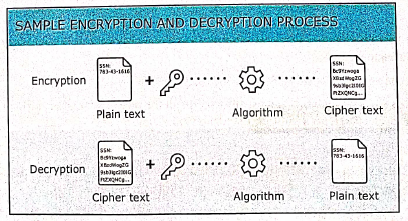
Encryption technology is an effective information security protection. It is defined as converting a plaintext into meaningless ciphertext using encryption algorithm thus ensuring the confidentiality of the data. The encryption or decryption process use a key to encrypt or decrypt the data. At present two encryption technologies are widely used. They are symmetric key encryption system and an asymmetric key encryption system. Thre figure below shows the Data Encryption and Decryption process:
16.
Apart from card based payment systems there are many alternative electronic payment systems. With the advent of computers, network technologies and electronic communications a large number of alternative electronic payment systems have emerged. These include ECS (Electronic Clearing Services), EFT (Electronic funds transfers), Real Time Gross Settlement system (RTGS) etc. These Electronic Payment systems are used in tendering cash in domestic and international transactions.
Electronic Clearing Services (ECS):
Electronic Clearing Service can be defined as repeated transfer of funds from one bank account to multiple bank accounts or vice versa using computer and Internet technology. The payer instructs the bank to debit from his bank account and credit it to one or more payee bank account provided amounts and dates of the payments earlier. This system provides the convenience of paperless payments. ECS can be used for both credit and debit purposes i.e. for making bulk payments or bulk collection of amounts.
Electronic Funds Transfer:
Electronic Funds Transfer (EFT) is the "electronic transfer" of money over an online network. The amount sent from the sender's bank branch is credited to the receiver's bank branch on the same day in batches. Unlike traditional processes, EFT saves the effort of sending a demand draft through post and the inherent delay in reaching the money to the receiver. Banks may charge commission for using this service. EFT is a widely used method for moving funds from one account to another in B2B business models.
Real Time Gross Settlement:
Real Time Gross Settlement System (RTGS) is a payment system particularly used for the settlement of transactions between financial institutions, especially banks. As name indicates, RTGS transactions are processed at the realtime. RTGS payments are also called as push payments that are initiated ("triggered") by the payer. RTGS payments are generally large-value payments, i.e. high-volume transactions.
Real-time gross settlement transactions are:
Unconditional: the beneficiary will receive funds regardless of whether he fulfills his obligations to the buyer or whether he would deliver the goods or perform a service of a quality consistent with the order.
Irrevocable: a correctly processed transaction cannot be reversed and its money cannot get refunded (the so-called settlement finality).
17.
(i) Auction website is a kind of website, that auctions items on the Internet and levies some commission from the sales.
e.g. https://www.ebay.com/
(ii) Banner advertisement website displays advertisements of other companies in its websites and thereby earns revenue.
(iii) Bulk-buying website collect a number of users together where every one wants to buy similar items - the site negotiates a discount with the supplier and takes commission. e.g. https://www.alibaba.com/
(iv) Digital publishing sites effectively host the e-books or magazines on the web. They make profits in anumber of wayssuch as advertising, selling etc., https://wordpress.org/
(v) Licensing sites allow other websites to make use of their software. For example, the search engines which allow a visitor of the site to search within the website more easily.
(vi) Name-your-own-price websites are just like normal retail sites. In contrast, the buyer negotiates with the retailer for a particular product or service. https://in.hotels.com/
(vii) Online Shopping mall website allows multi E-Commerce traders to assemble together on a single website. Often these sellers would be related to each other, for example they may all sell luxury goods. This site would take a percentage of their profit.
18.
OSS projects are collaboration opportunities that improve skills and build connections in the field.
Domains that developers can contribute to the open source community include:
1. Communication tools.
2. Distributed revision control systems.
3. Bug trackers and task lists.
4. Testing and debugging tools.
(i) There are many open source softwares. So, we can select and use any software that suits our needs.
(ii) The complete options of the software can be used without any cost and restrictions.
(iii) We can share our ideas with the team. write the required code and share it with many.
(iv) As we can identify the programming techniques of group members, we can learn many ideas and make our program writing skills more efficient.
(v) The coding in open source software are being groomed by many enthusiastical members of the groups. So, if we report problems that we have in the program they are quickly mended by the group's effort.
(vi) As we can make changes to the open source software, we can add the most required features in the software.
(vii) Many open source software are very user friendly.
19.
20.
1. Animation is the process of displaying images with continuous movement.
2. In animation, the screen object is a vector image in animation.
3. Using numerical transformations the movement of that image along its path is calculated for their defining coordinates.
4. The least frame rate of atleast 16 frame/sec gives the impression of smoothness and for natural looking it should be atleast 25 frame/sec.
5. Animations may be in two or three dimensional.
6. The two dimensional animation, bring an image alive, that occur on the flat X and Y axis of the screen, while in three dimensional animation it occurs along the three axis X, Y and Z.
7. The two basic types of animations are (1) Path animation and (2) Frame animation.
(1) Path Animation
It involves moving an object on a screen that has a constant background.
E.g. A cartoon character may move across the screen regardless of any change in the background or the character.
(2) Frame Animation
In frame animations, multiple objects are allowed to travel simultaneously and the background also changes.

12th Standard Syllabus & Materials
12th Standard
TN 12th Computer Applications களப்பெயர் முறைமை (DNS) Sample Question Papers Study Material - QB365 Set A
NEW12th Standard
TN 12th Computer Applications வலையமைப்பு எடுத்துக்காட்டுகள் மற்றும் நெறிமுறைகள் Sample Question Papers Study Material - QB365 Set A
NEW12th Standard
TN 12th Computer Applications கணினி வலையமைப்பு ஓர் அறிமுகம் Sample Question Papers Study Material - QB365 Set A
NEW12th Standard
TN 12th Computer Applications PHP-உடன் MySQL-ஐ இணைத்தல் Sample Question Papers Study Material - QB365 Set A



Tamilnadu Stateboard 12th Standard Subjects

Maths

Chemistry

Physics

Biology

Computer Science

Business Maths and Statistics

Economics

Commerce

Accountancy

History
Computer Applications
Biology
Computer Technology
Computer Applications
Computer Science
Business Maths and Statistics
Commerce
Economics
Maths
Chemistry
Physics
Computer Technology
History
Accountancy

Tamil

English

French
Tamilnadu Stateboard Standards
