
 100% FREE ACCESS
12th Standard Syllabus & Materials
12th Standard
TN 12th Maths Applications of Matrices and Determinants Sample Question Papers Study Material - QB365 Set A
NEW12th Standard
TN 12th Computer Applications மின்னணு தரவு பரிமாற்றம் Sample Question Papers Study Material - QB365 Set A
NEW12th Standard
TN 12th Computer Applications மின் - வணிக பாதுகாப்பு அமைப்புகள் Sample Question Papers Study Material - QB365 Set A
NEW12th Standard
TN 12th Computer Applications மின்னணு செலுத்தல் முறைகள் Sample Question Papers Study Material - QB365 Set A
NEW12th Standard
TN 12th Computer Applications மின் - வணிகம் Sample Question Papers Study Material - QB365 Set A
NEW12th Standard
TN 12th Computer Applications திறந்த மூல கருத்துருக்கள் Sample Question Papers Study Material - QB365 Set A

Published on: 16/09/2019
Download Tamil Nadu 12th Standard Computer Applications question papers, model tests, one-mark questions, important questions, and public exam papers in PDF format. Free study materials and answer keys for TN State Board students.
Questions + Answers key
Take MCQ Computer Applications Test
1.
Difference between TCP/IP and OSI Reference Model.
2.
Define computer networking and Internet. Explain different developments on computer network and Internet.
3.
Explain the process File handling.
4.
Explain ‘for’ loop with example.
5.
Explain the if elseif else statement. With suitable example.
6.
Explain the Multidimensional Array.
7.
Explain the process of Webserver installation.
8.
List the basic concepts of ER Model with suitable example
9.
Write the steps to draw a star using polygon tool?
10.
1.
| No. | TCP/IP | OSI |
| 1. | It is client server model. ie. when the client requests for service it is provided by the server. | It is conceptual model. |
| 2. | It is standard protocol used for every network including the internet. | It is not a protocol but a reference model used for understanding and designing the system architecture. |
| 3. | It is four layered model. | It has seven layers. |
| 4. | TCP / IP follows vertical approach. | OSI model supports horizontal approach. |
| 5. | It is Tangible | It is not Tangible |
| 6. | It is follows top to bottom approach | It is follows a bottom-up approach |
2.
A set of computers connected together for the purpose of sharing resources is called as computer networks.
Internet is the most common resource shared everywhere.
Developments: (Computer networking)
1. Here computer networks were faster, the Internet became full sterength and wireless communications has been transformed the way of business performed.
2. By the usage of latest technologies, such as cloud computing, are being used to allow globally without sacrificing security or limitating user access.
3. In E-banking we can pay or receive money from or to the customer may be easily done via gateways or by online payments were much easier.
4. Company renewals, license, other certificates bill payments, receipts, invoice, stock maintenance, can be done.
5. Network at home plays main role to access all such as E-banking, E-learning, E-governance, E-health, telemedicine, call centre video conferencing, digitalization of memories, can easy to access and use by avoiding lot of times and stacked at queue.
6. From the house we ordered delicious food from various hotels and restaurants at time without delay can be brought via Internet.
7. Mobile computers, such as laptop, tablet, and hand held computers were fastest growing segment.
8. Very fast and easiest way to cover all the people, who they are connected in social network media. For example whatsapp, facebook, twitter blogs, pintrest, linkedIn, classmates and so on. Through the above social media we share our taughts in different formats and different size of files.
Developments: (Internet)
1. Now a days the Internet plays a vital role.
2. Internet provides all the information and services to us.
3. Now a days we order anything and everything (food, clothes, stationaries, vegetables etc) through online (Internet)
4. Online services providers are flipkart, Amazon, snap deal etc to buy products via internet and have the product at door steps.
5. Online payments help in sending and receiving money via payment gateway using this Internet.
6. Internet is running all time 24x7 - 365 days.
7. A person who sale or buy anything and anytime that is main advantage of Internet.
8. E-Governance made easier to collect their certificates through online.
9. E-Banking plays an important role in our day to day life, via Internet.
10. The speed and efficiency was very much better than of done by counter at bank.
11. Now a days online payment were done via Internet.
12. For example on older days internet explorer, yahoo, being were powerful search engine.
13. Google stepped in with user friendly gmail, youtube, googledrive, google maps, etc.. and are useful applications.
3.
In the file handling process following task can be included
(i) open file for read and write
(ii) close file
(iii) perform operations on file
(iv) write results
With PHP we can handle file easily. There are various in built functions available for file handling for PHP.
Using file handling we can open, create, upload and edit files in PHP before working with file. We must open the file first using fopen() function.fopen() function is used in a following manner to perform this task.
$fp = fopen(
In the above code, we have used two parameters while using fopen() function.
filename to open mode in which file is to be opened.
The function will return a file pointer if the file is successfully opened, otherwise it will return false.
Modes we use in the file handling
| Mode | Description |
| r | Read only mode |
| r+ | Read and write mode |
| W | Write mode only |
| W+ | Write and read model |
| a | Append file mode |
| a+ | Read and append mode |
| x | It used to create and open a file only for writing purpose. |
4.
'for loop' is called as the entry-check loop.
The for loop is used to execute a block of code a specific number of times.
Syntax:
for (initialization; condition; increment / decrement)
{
//code to be executed;
}
The initialization part is executed only once at the beginning of the loop. It is used to initialize variables. The condition is evaluated before each iteration of the loop. If it is true, the code block is executed. If it is false, the loop is terminated. The increment/ decrement part is executed after each iteration of the loop. It is used to update variables.
Example 1
To print the numbers from 1 to 5 in ascending order
for ( i = 1; i<=5; i++)
{
echo i. "<br>";
}
Output:
1
2
3
4
5
Example 2
To print the numbers from 5 to 1 in descending order
for (i = 5; i<=1; i--)
{
echo i. "<br>";
}
Output:
5
4
3
2
1
5.
If elseif else statement in PHP:
If-elseif-else statement is a combination of if-else statement. More than one statement can execute the condition based on user needs.
Syntax:
if (1st condition)
{
Execute statement(s) if condition is true;
}
elseif(2nd condition)
{
Execute statement(s) if 2nd condition is true;
}
else
{
Execute statement(s) if both conditions are false;
}
Example Program:
$Pass_Mark=35;
$first_class=60;
$Student_Mark= 70;
if ($Student_Mark > = $first_ class){
echo "The Student is eligible for the promotion with First Class";
}
elseif ($Student_Mark >= $Pass_Mark){
echo "The Student is eligible for the promotion";
}
else {
echo "The Student is not eligible for the promotion";
} ?>
6.
Multidimensional Arrays:
Array containing one or more arrays is called multidimensional array. PHP accepts array with two, three four or more levels.
Example:
// A two-dimensional array
$student=array
(
array("Iniyan", 100, 96),
array("Kavin", 60, 59),
array("Nilani", 1313, 139)
);
echo $$student [0][0].": Tamil Mark: ".$student [0][1].". English mark: ".$student [0] [2]."< br >";
echo $$student [1][0].": Tamil Mark: ".$student [1][1].". English mark: ".$student [1] [2]."< br >";
echo $$student [2}[0].": Tamil Mark:".$student [2][1].".English mark: ".$student [2] [2]."< br >
? >
7.
The following are the steps to install and configure Apache Httpd webserver and PHP module in windows server machine.
Step 1:
Go to Apache foundation website and download the Httpd webserver software.
https://httpd.apache.org/download.cgi.
Step 2:
After downloading MSI file from Apache foundation website, user launches the MSI file and clicks next.
Click on next and next button finish the installation on server machine.
Software takes default port number 130 or 130130.
Once the user finished, webserver software is installed and configured on server hardware machine as a service.
Step 3:
To test the installation of Apache Httpd webserver, enter the following URL. from your web browser which is installed in your client machine.
https://localhost:130/ (or) https://localhost:130130
The output page that says "Its works"
Step 4:
Administrator user can start, stop and restart the webserver service at any time via windows control panel.
Once the services stops, the client machine will not receive the response message from server machine.
Step 5.
Webserver's configuration setting file "httpd.conf" is located in the conf directory under the apache installation directory.
Edit this file and enable the PHP module to run PHP scripting language.
8.
ER Modeling basic concepts: The basic concepts of ER model consists of
1. Entity or Entity type
2. Attributes
3. Relationship
(i) Entity (or) Entity type
(i) An Entity can be real-world object (or) animation which is easily identifiable by anyone even by a common man.
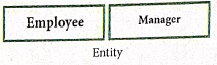
(ii) Example: In a company's database Employee, HR, Manager are considered as entities, where each of these entity will be having their own attributes.An entity is represented by a rectangular box.
Types of Entity:
(a) Strong Entity
(b) Weak Entity
(c) Entity Instance
(i) Strong Entity
1. Strong entity is not depend on other entity and it will have a primary key.
2. It is represented by one rectangle.

3. For Example Roll Number. Everyone Roll Number varies and it will not be same.
(ii) Weak Entity
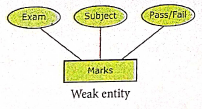
1. A weak entity is dependent on other entities and it doesn't have any primary key like strong entity.
2. It is represented by double rectangle.

3. For Example, "Marks" is the weak entity and there is no primary key or unique id. It is depend on the existence of the other entity.
(iii) Entity Instance
1. Instances are the values for the entity. So an Entity Instance denotes the category values for the given entity.
Entities Instances
| Entities | Instances |
| Human | Male, Female |
| Animals | Dog, cats, lion |
| Jobs | Engineer, Doctor, Lawyer |
| Actors | Ajith, Vijay, Vikram |
| Electronics | Laptop, Mobile |
2. Attributes
An attribute is the information about that entity and it will entity describe, quantity, qualify, classify and specify and entity. An attribute will always have a single value, that value can be a number or character or string.
Types of attributes :
(i) Key Attribute
(ii) Simple Attributes
(ii) Composite Attributes
(iv) Single Valued Attribute
(v) Multi Valued Attribute
3. Relationship Type
In ER Model, relationship exists between two entities. Three types of relationships are available and the Entity-Relationship (ER) diagram is based on the three types listed below
(i) One-to-One relationship: Consider two entities A and B. One-to-one (1:1) relationship is said to exist in a relational database design, if 0 or 1 instance of entity A is associated with 0 or 1 instance of entity B, and 0 or 1 instance of entity B is associated with 0 or I instance of entity A.
(ii) One-to-Many relationship: Consider two entities A and B. One-to-many (1:N) relationship is said to exist in a relational database design, for 1 instance of entity A there exists 0 or 1 or many instances of entity B, but for 1 instance of entity B there exists 0 ur 1 instance of entity A.
(iii) Many-to-Many relationship: Consider two entities A and B. many-to-many (M:N) relationship is said to exist in a relational database design, for 1 instance of entity A there exists 0 or 1 or many instances of entity B, and for 1 instance of entity B there exists 0 or 1 or many instance of entity A.
In reality one-to-one are in less usage, where as one-to-many and many-to-many are commonly used. However in relational database, many-to-many are converted into one-to-many relationships.
9.
Drawing a star using polygon tool.
To draw a Star
(i) Click on the Polygon tool from the toolbox. The cursor changes to a crosshair.
(ii) Click and drag anywhere on the screen. As you drag, a Polygon appears.
(iii) Release the mouse button when the Polygon is of the desired size.
(iv) Choose Element → Polygon settings in the menu bar. Now polygon settings dialogue box appears.
(v) Type 5 in the Number of sides text box.
(vi) Type 50% in star inset textbox.
(vii) Click OK. Now the required star appears on the screen.
10.


12th Standard Syllabus & Materials
12th Standard
TN 12th Computer Applications வலையமைப்பு வடமிடல் Sample Question Papers Study Material - QB365 Set A
NEW12th Standard
TN 12th Computer Applications களப்பெயர் முறைமை (DNS) Sample Question Papers Study Material - QB365 Set A
NEW12th Standard
TN 12th Computer Applications வலையமைப்பு எடுத்துக்காட்டுகள் மற்றும் நெறிமுறைகள் Sample Question Papers Study Material - QB365 Set A
NEW12th Standard
TN 12th Computer Applications கணினி வலையமைப்பு ஓர் அறிமுகம் Sample Question Papers Study Material - QB365 Set A



Tamilnadu Stateboard 12th Standard Subjects

Maths

Chemistry

Physics

Biology

Computer Science

Business Maths and Statistics

Economics

Commerce

Accountancy

History
Computer Applications
Biology
Computer Technology
Computer Applications
Computer Science
Business Maths and Statistics
Commerce
Economics
Maths
Chemistry
Physics
Computer Technology
History
Accountancy

Tamil

English

French
Tamilnadu Stateboard Standards
