
 100% FREE ACCESS
12th Standard Syllabus & Materials
12th Standard
TN 12th Computer Applications மின்னணு தரவு பரிமாற்றம் Sample Question Papers Study Material - QB365 Set A
NEW12th Standard
TN 12th Computer Applications மின் - வணிக பாதுகாப்பு அமைப்புகள் Sample Question Papers Study Material - QB365 Set A
NEW12th Standard
TN 12th Computer Applications மின்னணு செலுத்தல் முறைகள் Sample Question Papers Study Material - QB365 Set A
NEW12th Standard
TN 12th Computer Applications மின் - வணிகம் Sample Question Papers Study Material - QB365 Set A
NEW12th Standard
TN 12th Computer Applications திறந்த மூல கருத்துருக்கள் Sample Question Papers Study Material - QB365 Set A
NEW12th Standard
TN 12th Computer Applications வலையமைப்பு வடமிடல் Sample Question Papers Study Material - QB365 Set A

Published on: 06/01/2020
Control Structures
Download Tamil Nadu 12th Standard Computer Science question papers, model tests, one-mark questions, important questions, and public exam papers in PDF format. Free study materials and answer keys for TN State Board students.
Questions + Answers key
Take MCQ Computer Science Test
1.
How many types of alternative or branching statements does python provides?
3
4
2
increase than 3
2.
What can be learned through alternative or branching statement?
looping
decision making
functions
classes
3.
The following statements is an example of
Print ("ONE")
Print ("Four")
iterative
branching
sequential
looping
4.
5.
The condition in the if statement should be in the form of
Arithmetic or Relational expression
Arithmetic or Logical expression
Relational or Logical expression
Arithmetic
6.
Write a note on the parameters used in print () statement.
7.
Draw a flow chart that defines the execution of if-else statement.
8.
What is meant by alternative or branching?
9.
Write note on range () in loop.
10.
Define control structure.
11.
Write a python program to print all numbers from 10 to 15 using while loop.
12.
Write a note on simple if statement with an example.
13.
List the differences between break and continue statements.
14.
Write the syntax of while loop.
15.
Write note on if..else structure.
16.
Write a program in python to display the following output.
1
1 2
1 2 3
1 2 3 4
1 2 3 4 5
17.
Explain Jump statement in python.
18.
Write a program to display multiplication table for a given number.
19.
Write a program to display all 3 digit odd numbers.
1.
(a)
3
2.
(b)
decision making
3.
(c)
sequential
4.
(c)
5.
(c)
Relational or Logical expression
6.
(i) print can have end, sep as parameters. end parameter can be used when we need to give any escape sequences like '\t' for tab, '\n' for new line and so on.
(ii) sep as parameter can be used to specify any special characters like, (comma) (semicolon) as separator between values
7.
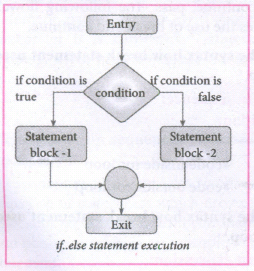
8.
There may be situations in our real life programming where we need to skip a segment or set of statements and execute another segment based on the test of a condition. This is called alternative or branching.
9.
The range() is a built-in function, to generate series of values between two numeric intervals.
The syntax of range() is as follows:
range (start,stop,[step])
Where,
start - refers to the initial value
stop - refers to the final value
step - refers to increment value, this is optional part.
10.
A program statement that causes a jump of control from one part of the program to another is called control structure or control statement.
11.
Example: Program to illustrate the use of while loop - to print all numbers from 10 to 15
i=10 # intializing part of the control variable
while (i<=15): # test condition
print (i, end='\t') # statements - block 1
i=i+1 # Updation of the control variable
Output:
10 11 12 13 14 15
12.
Simple if statement: Simple if is the simplest of all decision making statements. Condition should be in the form of relational or logical expression.
Syntax:
if
statements-block1
In the above syntax if the condition is true statements - block 1 will be executed.
Example: Program to check the age and print whether eligible for voting
x=int (input("Enter your age :"))
if x > = 18:
print ("You are eligible for voting")
Output 1:
Enter your age: 34
You are eligible for voting
Output 2:
Enter your age: 16
>>>
13.
| Break | Continue |
| The break statement terminates the loop containing it. | The continue statement is used to skip the remaining part of a loop. |
| Control of the program flows to the statement immediately after the body ot the loop. | Control of the program flows start with next iteration |
| Syntax : break | Syntax : continue |
14.
Syntax :
while <condition>;
statements block 1
[else:
statements block2]
15.
(i) The if.. else statement provides control to check the true block as well as the false block,
(ii) Syntax :
if
statemets-block 1
else :
statement-block 2
(iii) if..else statement thus provides possibilities and the condition determines which BLOCK is to be executed.
16.
i=1
while (i < = 6):
for j in range (1,i):
print (j,end='\t')
print (end='\n')
i+=1
Output:
1
1 2
1 2 3
1 2 3 4
1 2 3 4 5
17.
The jump statement in Python, is used to unconditionally transfer the control from one part of the program to another. There are three keywords to achieve jump statements in Python: break, continue, pass. The following flowchart illustrates the use of break and continue.
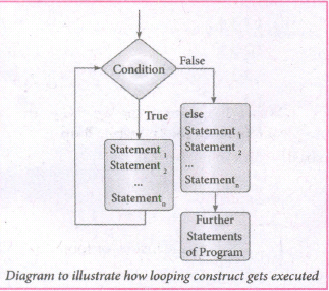
(i) break statement: The break statement terminates the loop containing it. Control of the program flows to the statement immediately after the body of the loop. A while or for loop will iterate till the condition is tested false, but one can even transfer the control out of the loop (terminate) with help of break statement. When the break statement is executed, the control flow of the program comes out of the loop and starts executing the segment of code after the loop structure. If break statement is inside a nested loop (loop inside another loop), break will terminate the innermost loop.
Syntax:
break
(ii) Continue statement: Continue statement unlike the break statement is used to skip the remaining part of a loop and start with next iteration.
Syntax:
continue
(iii) Pass statement: pass statement is generally used as a placeholder. When we have a loop or function that is to be implemented in the future and not now, we cannot develop such functions or loops with empty body segment because the interpreter would raise an error. So, to avoid this we can use pass statement to construct a body that does nothing.
Syntax:
pass
18.
Multiplication table :
num =int(input("Enter the number: "))
print("multiplication Table of", num)
for i in range(1,11):
print (num,"x",i, "= ",num*i )
Output :
Enter the number : 6
Multiplication Table of 6
6 x 1 = 6
6 x 2 = 12
6 x 3 = 18
6 x 4 = 24
6 x 5 = 30
6 x 6 = 36
6 x 7 = 42
6 x 8 = 48
6 x 9 = 54
6 x 10 = 60.
19.
for i in range (100, 1000):
if a%2==1:
print b
Output :
101,103,105,107,...........,997,999

12th Standard Syllabus & Materials
12th Standard
TN 12th Computer Applications களப்பெயர் முறைமை (DNS) Sample Question Papers Study Material - QB365 Set A
NEW12th Standard
TN 12th Computer Applications வலையமைப்பு எடுத்துக்காட்டுகள் மற்றும் நெறிமுறைகள் Sample Question Papers Study Material - QB365 Set A
NEW12th Standard
TN 12th Computer Applications கணினி வலையமைப்பு ஓர் அறிமுகம் Sample Question Papers Study Material - QB365 Set A
NEW12th Standard
TN 12th Computer Applications PHP-உடன் MySQL-ஐ இணைத்தல் Sample Question Papers Study Material - QB365 Set A



Tamilnadu Stateboard 12th Standard Subjects

Maths

Chemistry

Physics

Biology
Computer Science

Business Maths and Statistics

Economics

Commerce

Accountancy

History

Computer Applications
Biology
Computer Technology
Computer Applications
Computer Science
Business Maths and Statistics
Commerce
Economics
Maths
Chemistry
Physics
Computer Technology
History
Accountancy

Tamil

English

French
Tamilnadu Stateboard Standards
