
 100% FREE ACCESS
12th Standard Syllabus & Materials
12th Standard
TN 12th Maths Applications of Matrices and Determinants Sample Question Papers Study Material - QB365 Set A
NEW12th Standard
TN 12th Computer Applications மின்னணு தரவு பரிமாற்றம் Sample Question Papers Study Material - QB365 Set A
NEW12th Standard
TN 12th Computer Applications மின் - வணிக பாதுகாப்பு அமைப்புகள் Sample Question Papers Study Material - QB365 Set A
NEW12th Standard
TN 12th Computer Applications மின்னணு செலுத்தல் முறைகள் Sample Question Papers Study Material - QB365 Set A
NEW12th Standard
TN 12th Computer Applications மின் - வணிகம் Sample Question Papers Study Material - QB365 Set A
NEW12th Standard
TN 12th Computer Applications திறந்த மூல கருத்துருக்கள் Sample Question Papers Study Material - QB365 Set A

Published on: 19/08/2019
Forms and Files
Download Tamil Nadu 12th Standard Computer Applications question papers, model tests, one-mark questions, important questions, and public exam papers in PDF format. Free study materials and answer keys for TN State Board students.
Questions + Answers key
Take MCQ Computer Applications Test
1.
Form tag is used to mention a method as ______.
POST
GET
Either a or b
None of these
2.
________ is the best feature to select one file from the local machine to server machine
File upload
Files
Forms
All of these
3.
Which of the following is a back-end application?
CGI
ASP Script
PHP Script
All of these
4.
Which of the following is not a Server side programming?
PHP
JSP
Python
All of these
5.
_____ is a process of checking the input data submitted by the user from client _machine.
File
Form
Validation
All of these
6.
In the web development, user access website or web pages from ________.
Remote server machine
Remote client machine
Remote machine
All of these
7.
Which of the following functions reads the entire contents of a file?
fgets()
file_get_contents()
fread()
readfile()
8.
What does fopen() function do in PHP?
It used to open files in PHP
It used to open Remote Server
It used to open folders in PHP
It used to open Remote Computer
9.
Which directive determines whether PHP scripts on the server can accept file uploads?
file_uploads
file_upload
file_input
file_intake
10.
When you use the \$_GET variable to collect data, the data is visible to..
none
only user
everyone
selected few
11.
What is fopen ( ) function?
12.
What is the main objective of PHP and HTML form controls?
13.
What are the most important concepts in PHP development process?
14.
What are the basic HTML form controls available?
15.
Define HTML form controls.
16.
Write the Validation rules for HTML input fields.
17.
An HTML code to demonstrate From and For controls (Login form)
18.
Sample PHP program to open and closing a file.
19.
Write the purpose Get method and Post method.
20.
Write the features Form Handling.
21.
Explain file uploading method in PHP.
22.
Explain in detail of File handling functions in PHP.
23.
File Select
24.
Radio box
25.
Checkbox
26.
Buttons
27.
Text
1.
(c)
Either a or b
2.
(a)
File upload
3.
(d)
All of these
4.
(c)
Python
5.
(c)
Validation
6.
(b)
Remote client machine
7.
(b)
file_get_contents()
8.
(a)
It used to open files in PHP
9.
(a)
file_uploads
10.
(c)
everyone
11.
fopen ( ) is a system function available in PHP.
12.
Main objective of PHP and HTML form controls are to collect data from users.
13.
Forms and files are most important concepts that the PHP web development processes.
14.
The following control are available in HTML forms:
(i) Text inputs
(ii) Buttons
(iii) Checkbox
(iv) Radio box
(v) File Select
(vi) Form Tag
15.
HTML form controls are used to collect data from user.
16.
Validation rules for HTML input field:
| Name (text Input) | : | Must contain letters and white-spaces |
| Email (Text Input) | : | Must contain @ and .strings |
| Website (Text Input) | : | Must contain a valid URL |
| Radio | : | Must be selectable minimum one value |
| Check Box | : | Must be checkable minimum one value |
| Drop Down menu | : | Must be selectable minimum one value |
17.
< html >
< head >
< title > Login Form < /title >
< body >
< h3 align=center > TamiiNadu State Council of
EducationalResearchand Training, Chennai < /h3 >
< Form Action = "mailto:abcd.xyz@com"
method =post >
< p > User Name:
OUTPUT:
< Input type = text name="user_name" size = 20 maxlength = 15 > < /p >
< p > Password:
< Input type = password name="pass" size = 20 maxlength = 15 > < /p >
< Input type = reset value = "Clear" >
< Input type = submit value = "Login" >
< /Form >
< /body >
< /html >
18.
i) Text(Notepad) file:
AJAX = Asynchronous JavaScript and XML
CSS = Cascading Style Sheets
HTML = Hyper Text Markup Language
PHP = PHP Hypertext: Preprocessor
SQL = Structured Query Language
SVG = Scalable Vector Graphics
XML = EXtensible Markup Language
ii) PHP File:
< ?php
$myfile = fopen("webdictionary.txt", "r'') or
die("Unable to open file!'');
echo fread( $myfile, filesize("webdictionary.
txt'')); fclose($myfile);
? >
iii) OUTPUT
AJAX = Asynchronous JavaScript and XML
CSS = Cascading Style Sheets
HTML = Hyper Text Markup Language
PHP = PHP Hypertext Preprocessor
SQL = Structured Query Language
SVG = Scalable Vector Graphics
XML = EXtensible Markup Language
19.
The GET and POST methods are used for sending the data to the server and the main difference between them is that GET methods append the data to the URI defined in form's action attribute POST methods attaches data to the requested body.
20.
(i) To get form data, we need to use PHP $_GET and S_POST.
(ii) To retrieve data from get request, we need to use $_GET and for post request $_POST.
(iii) We can send limited amount of data through get request and large amount of data through post request.
21.
1. File upload is the best feature to select one file from the local machine to server machine.
2. Form tag is used to mention a method as POST or GET and encrypt attribute mentioned as "multipart/form-data".
3. In the < Input > tag mention type="file" attribute shows the input field as a file-select control, with a "Browse" button next to the input control.
4. The form above sends data to a file.
5. In Server machine "php.ini" file, search for the file_uploads directive, and set it to On: "file_uploads = On"
6. After submitting the upload button the request reaches to the file.
7. In the file $FILES variable collects all uploaded file information such as name of the file, size of the file and extension of the file etc.
8. All the details are checked thoroughly and the errors are saved in an array variable.
9. The file finally moves under the image directory if the array error variable is empty.
22.
File handling is an important activity of all web application development process.
Files are processed for different tasks using the following events :
(i) PHP Open a File,
(ii) PHP Read a File,
(iii) PHP Close a File,
(iv) PHP Write a File,
(v) PHP Appending a File and
(vi) PHP uploading a File.
(1) PHP Open a File : fopen() is a system function available in PHP. This function helps to open a file in the server. It contains two parameters one for the file and the other one specifies in which mode the file should be opened (Read/Write).
Syntax:
$file_Object= fopen("FileName", "Read/
WriteMode") or die("Error Message!");
Example:

$myfile = fopen("Student.txt", "r")
or die("Unable to open file!");
?>
(ii) PHP Read a File: The fread() function reads from an open file. The file object comes from fopen function.
Syntax:
fread($file_Object,filesize("FileName"));
Example:
fread($myfile,filesize("Student.txt"));
?>
(iii) PHP Close a File: The fclose() function is used to close an opened file. The file object comes from fopen function.
Syntax:
fclose($file_Object);
Example:
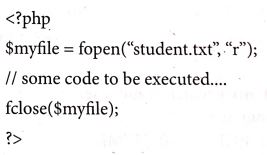
(iv) PHP write a File: The fwrite() function is used to write to a file.
Syntax:

23.
Select file
24.
Only one value
25.
More than one value
26.
Submit Reset and Cancel
27.
Textbox and text area

12th Standard Syllabus & Materials
12th Standard
TN 12th Computer Applications வலையமைப்பு வடமிடல் Sample Question Papers Study Material - QB365 Set A
NEW12th Standard
TN 12th Computer Applications களப்பெயர் முறைமை (DNS) Sample Question Papers Study Material - QB365 Set A
NEW12th Standard
TN 12th Computer Applications வலையமைப்பு எடுத்துக்காட்டுகள் மற்றும் நெறிமுறைகள் Sample Question Papers Study Material - QB365 Set A
NEW12th Standard
TN 12th Computer Applications கணினி வலையமைப்பு ஓர் அறிமுகம் Sample Question Papers Study Material - QB365 Set A



Tamilnadu Stateboard 12th Standard Subjects

Maths

Chemistry

Physics

Biology

Computer Science

Business Maths and Statistics

Economics

Commerce

Accountancy

History
Computer Applications
Biology
Computer Technology
Computer Applications
Computer Science
Business Maths and Statistics
Commerce
Economics
Maths
Chemistry
Physics
Computer Technology
History
Accountancy

Tamil

English

French
Tamilnadu Stateboard Standards
