
 100% FREE ACCESS
12th Standard Syllabus & Materials
12th Standard
TN 12th Computer Applications மின்னணு தரவு பரிமாற்றம் Sample Question Papers Study Material - QB365 Set A
NEW12th Standard
TN 12th Computer Applications மின் - வணிக பாதுகாப்பு அமைப்புகள் Sample Question Papers Study Material - QB365 Set A
NEW12th Standard
TN 12th Computer Applications மின்னணு செலுத்தல் முறைகள் Sample Question Papers Study Material - QB365 Set A
NEW12th Standard
TN 12th Computer Applications மின் - வணிகம் Sample Question Papers Study Material - QB365 Set A
NEW12th Standard
TN 12th Computer Applications திறந்த மூல கருத்துருக்கள் Sample Question Papers Study Material - QB365 Set A
NEW12th Standard
TN 12th Computer Applications வலையமைப்பு வடமிடல் Sample Question Papers Study Material - QB365 Set A

Published on: 20/01/2020
Download Tamil Nadu 12th Standard Computer Science question papers, model tests, one-mark questions, important questions, and public exam papers in PDF format. Free study materials and answer keys for TN State Board students.
Questions + Answers key
Take MCQ Computer Science Test
1.
Explain the components of DBMS.
2.
Write the key differences between Histogram and bar graph.
3.
Explain different types arguments used in python with an example.
4.
Write a program to calculate area and circumference of a circle.
5.
Write a program to read the CSV file and store A column value in A list for sorting.
6.
Explain the selection sort Algorithm with an example.
7.
Explain the representation of Abstract datatype using rational numbers.
8.
hat is the use of HAVING clause. Give an example python script
9.
Write a SQL statement to create a table for employee having any five fields and create a table constraint for the employee table.
10.
What is the purpose of range( )? Explain with an example.
11.
Explain about string operators in python with suitable example.
12.
Explain the scope of variables with an example.
13.
Write a detail note on if..else..elif statement with suitable example.
14.
Explain the concept of Dynamic programming with suitable example.
15.
Explain input() and print() functions with examples.
16.
Write any five benefits in using modular programming.
17.
What is a List? Why List can be called as Pairs. Explain with suitable example.
18.
Explain with example Pure and impure functions.
19.
Identify in the following program
| let rec gcd a b:= if b <> 0 then gcd b (a mod b) else return a: |
i) Name of the function
ii) Identify the statement which tells it is a recursive function
iii) Name of the argument variable
iv) Statement which invoke the function recursively
v) Statement which terminates the recursion
20.
Write a program to generate in the Fibonacci series and store it in a list. Then find the sum of all values.
1.
The Database Management System can be divided into five major components as follows:
(i) Hardware
(ii) Software
(iii) Data
(iv) Procedures / Methods
(v) Database Access Languages
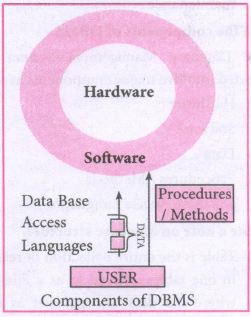
(i) Hardware: The computer, hard disk, I/O channels for data, and any other physical component involved in storage of data
(ii) Software: This main component is a program that controls everything. The DBMS software is capable of understanding the Database Access Languages and interprets into database commands for execution.
(iii) Data: It is that resource for which DBMS is designed. DBMS creation is to store and utilize data.
(iv) Procedures/Methods: They are general instructions to use a database management system such as installation of DBMS, manage databases to take backups, report generation, etc
(v) DataBase Access Languages: They are the languages used to write commands to access, insert, update and delete data stored in any database.
Examples of popular DBMS: Dbase, FoxPro
2.
| S.No | Histogram | Bar graph |
| i) | Histogram refers to a graphical representation; that displays data by way of bars to show the frequency of numerical data. | A bar graph is a pictorial representation of data that uses bars to compare different categories of data. |
| ii) | A histogram represents the frequency distribution of continuous variables. | Conversely, a bar graph is a diagrammatic comparison of discrete variables. |
| iii) | Histogram presents numerical data | Bar graph shows categorical data |
| iv) | Items of the histogram are numbers, which are categorised together, to represent ranges of data. | As opposed to the bar graph, items are considered as individual entities. |
| v) | A histogram, this cannot be done, as they are shown in the sequence of classes. | In the case of a bar graph, it is quite common to rearrange the blocks, from highest to lowest. |
| vi) | The width of rectangular blocks in a histogram mayor may not be same | The width of the bars in a bar graph is always same. |
3.
(i) Required Arguments:
"Required Arguments" are the arguments passed to a function in correct positional order. Here, the number of arguments in the function call should match exactly with the function definition. Atleast one parameter to prevent syntax errors to get the required output.
(ii) Example:
def printstring(str):
print ("Example - Required arguments")
print (str)
return
# Now you can call printstring() function
printstring ("Welcome")
Output:
Example - Required arguments
Welcome
(iii) When the above code is executed, it produces the following error.
Traceback (most recent call last):
File "Req-arg.py", line 10, in
printstring()
TypeError: printstring() missing 1 required positional argument: 'str'
(iv) Instead of printstring() in the above code if we use printstring ("Welcome") then the output is
Output:
Example - Required arguments
Welcome
Keyword Arguments:
Keyword arguments will invoke the function after the parameters are recognized by their parameter names. The value of the keyword argument is matched with the parameter name and so, one can also put arguments in improper order (not in order).
(ii) Example:
def printdata (name):
print ("Example-1 Keyword arguments")
print ("Name :":name)
return
# Now you can call printdatat() function
printdata(name = "Gshan")
(iii) When the above code is executed, it produces the following output:
Output:
Example-1 Keyword arguments
Name:Gshan
Default Arguments:
In Python the default argument is an argument that takes a default value if no value is provided in the function call. The following example uses default arguments, that prints default salary when no argument is passed.
Example:
def printinfo( name, salary = 3500):
print ("Name: ", name)
print ("Salary: ", salary)
return
printinfo("Mani")
(iii) When the above code is executed, it produces the following output
Output:
Name: Mani
Salary: 3500
(iv) When the above code is changed as print info("Ram,":2000) it produces the following output:
Output:
Name: Ram
Salary: 2000
Syntax - Variable-Length Arguments:
(i) def function_name(*args):
function_body
return_statement
(ii) Example:
def printnos (*nos):
for n in nos:
print(n)
return
# now invoking the printnos() function
print ('Printing two values')
printnos (1,2)
print ('Printing three values')
printnos (10,20,30)
Output:
Printing two values
1
2
Printing three values
10
20
30
4.
class Circle:
pi=3.14
def _init_(self.radius):
self.radius=radius
def area(self):
return Circle. pi*(self.radius**2)
def circumference(self):
return 2*Circle.pi*self.radius
r=int(input("Enter Radius: "))
Ce=Circle(r)
print("The Area =",C.area())
print("The Circumference =", Cxircumferencet())
5.
# sort a selected column given by user leaving the header column
import csv
# other way of declaring the filename
inFile= 'c:\\pyprg\\sample6.csv'
# opening the csv file which is in the same location of this
python file
F=open(inFile', 'r')
# reading the File with the help of csv.reader()
reader = csv.reader(F)
# skipping the first row(heading)
next(reader)
# declaring a list
arrayValue = [ ]
a = int(input ("Enter the column number 1 to 3:-"))
# sorting a particular column-cost
for row in reader:
arrayValue.append(row[a])
arrayValue.sort ( )
for row in arrayValue:
print (row)
F.close ( )
6.
(i) The selection sort is a simple sorting algorithm that improves on the performance of bubble sort by making only one exchange for every pass through the list.
(ii) This algorithm will first find the smallest elements in array and swap it with the element in the first position of an array, then it will find the second smallest element and swap that element with the element in the second position, and it will continue until the entire array is sorted in respective order.
(iii) This algorithm repeatedly selects the next smallest element and swaps in into the right place for every pass. Hence it is called selection sort.
Pseudo code:
(i) Start from the first element i.e., index-(), we search the smallest element in the array, and replace it with the element in the first position.
(ii) Now we move on to the second element position, and look for smallest element present in the sub-array, from starting index to till the last index of sub - array.
(iii) Now replace the second smallest identified in step-2 at the second position in the or original array, or also called first position in the sub array.
(iv) This is repeated, until the array is completely sorted.
(v) Let's consider an array with values {13, 16, 11, 18, 14, 15}
(vi) Below, we have a pictorial representation of how selection sort will sort the given array respective order.
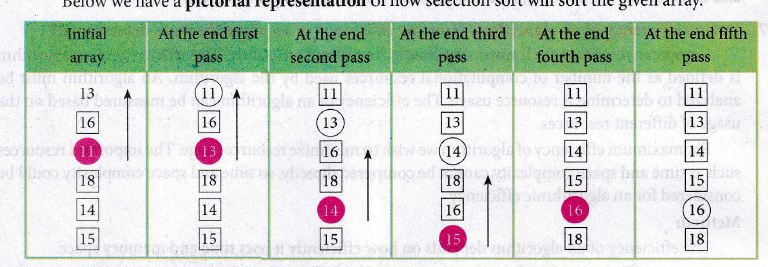
(i) In the first pass, the smallest element will be 11, so it will be placed at the first position.
(ii) After that, next smallest element will be searched from an array.
(iii) Then leaving the first element, next smallest element will be searched. It get 13 as smallest, so it will be placed at the second position.
(iv) Then leaving 11 and 13. It will search for the next smallest element and put it at third position and keep doing this until array is sorted.
(v) Finally, it will get the sorted array end of the pass.
7.
(i) The basic idea of data abstraction is to structure programs so that they operate on abstract data. That is, our programs should use data in such a way, as to make as few assumptions about the data as possible.
(li) At the same time, a concrete data representation is defined as an independent part of the program.
(iii) Any program consist of two parts. The two parts of a program are, the part that operates on abstract data and the part that defines a concrete representation, is connected by a small set of functions that implement abstract data in terms of the concrete representation.
(iv) To illustrate this technique, let us consider an example to design a set of functions for manipulating rational numbers.
(v) Example: A rational number is a ratio of integers, and rational numbers constitute an important sub-class of real numbers. A rational number such as 8/3 or 19/23 is typically written as : < numerator > /< denominator >
(vi) where both the < numerator > and <denominator>
(vii) However, you can create an exact representation for rational numbers by combining together the numerator and denominator.
(viii) As we know from using functional abstractions, we can start programming productively before you have an implementation of some parts of our program.
(ix) Let us begin by assuming that you already have a way of constructing a rational number from a numerator and a denominator. You also assume that, given a rational number, you have a way of selecting its numerator and its denominator component.
8.
HAVING clause is used to filter data based on7the group functions. This is similar to WHERE condition but can be used , only with group functions. Group functions cannot be used in WHERE Clause but can be used in HAVING clause.
Example:
import sqlite3
connection = sqlite3.connect("Academy.db")
cursor = connection.cursorO
cursor.execute("SELECT GENDER,COUNT(GENDER) FROM Student GROUP BY GENDER HAVING COUNT( GENDER> 3")
result = cursor.fetchall( )
co = [i[o] for i in cursor. description]
print(co)
print(result)
Output:
['gender', 'COUNT(GENDER)']
[('M', 5)]
9.
Table constraint:
Table constraint apply to a group of one or more columns. The Syntax tor a table created with Constraint is given as below:
CREATE TABLE <table_name>
(<column name> <datatype>[<size>]
<column constraint>,
(<column name> <data type> [<size>]
<column constraint).....
<table constraint>(<column name>, [<column name>..........])............);
Following is an example for employee table with "NOT NULL' column constraint. This constraint enforces a field to always contain a value.
CREATE TABLE employee (No int NOT NULL PRIMARY KEY,
NAME varchar(50), Age int (10), Address varchar(50)
PhoneNo int(10), Pincode int (6) PRIMARY KEY (NAME, PhoneNo);
The above command creates a table "employee" in which the field No of integer type is defined NOT NULL, which means this field must have values. The field NAME is of char type. The fields NAME, PhoneNo, have table constraint.
10.
The range( ) is a function used to generate a series of values in Python. Using range( ) function, you can create list with series of values. The range( ) function has three arguments.
Syntax:
range (start value, end value, step value)
where,
(i) start value - beginning value of series. Zero is the default beginning value.
(ii) end value - upper limit of series. Python takes the ending value as upper limit - l.
(iii) step value - It is an optional argument, which is used to generate different interval of values.
Example:
Generating whole numbers upto 10.
for x in range (1,11):
print(x)
Output:
1
2
3
4
5
6
7
8
9
10
Creating a list with series of values :
(i) Using the range( ) function, a list can be created with series of values, To convert the result of range( ) function into list, one more function called list ( ). The list ( ) function makes the result of range ( ) as a ist.
(ii) Syntax: List_Varibale = list ( range ( ))
(iii) Example
Generating first 10 even numbers
for x in range (2, 11, 2):
print (x)
Output:
2
4
6
8
10
(iv) In the above code, list( ) function takes the result of range( ) as Even_List elements. Thus, Even_List list has the elements of first five even numbers. Similarly, we can create any serie of values using range( ) function. The following example explains how to create a list with squares of first 10 natural numbers.
Example : Generating squares of first 10 natural numbers
for x in range(1,11) :
S=x**2
squares.append(s)
print (squares)
Output : [1, 4, 9, 16, 25, 36, 49, 64, 81, 100)
11.
String Operators:
Python provides the following operators for string operations. These operators are useful to manipulate string.
(i) Concatenation (+):
Joining of two or more strings is called as Concatenation. The plus (+) operator is used to concatenate strings in python.
Example:
>>> "welcome" + "Python"
'welcome python'
(ii) Append (+ =):
Adding more strings at the end of an existing string is known as append. The operator += is used to append a new string with an existing string.
Example:
>>> str1 = "welcome to"
>>> str1 + = "Learn Python"
>>> print (str1)
Welcome to Learn Python
(iii) Repeating (*):
The multiplication operator (*) is used to display a string in multiple number of times.
Example:
>>> str1= "welcome "
>>> print (str1 *4)
Welcome Welcome Welcome Welcome
(iv) String slicing:
Slice is a substring of a main string.
A substring can be taken from the original string by using [ ] operator and index or subscript values. Thus [ ] is also known as slicing operator. Using slice operator, we have to slice one or more substrings from a main string.
General format of slice operation:
str[start:end]
Where start is the beginning index and end is the last index value of a character in the string. Python takes the end value less than one from the actual index specified.
Example: I
Slice a single character from a string
>>>str 1 = "THIRUKKURAL"
>>>print (str 1 [0])
T
(v) Stride when slicing string:
Example :
>>>str1 = "Welcome to learn python"
>>>print(str1[::-2])
Output :
nhy re teolW
12.
Scope of variable refers to the part of the program, where it is accessible, i.e., area where the variables refer (use). The scope holds the current set of variables and their values. The two types of scopes-local scope and global scope.
Local Scope: A variable declared inside the function's body is known as local variable.
Rules of local variable:
(i) A variable with local scope can be accessed only within the function that it is created in.
(ii) When a variable is created inside the function the variable becomes local to it.
(iii) A local variable only exists while the function is executing.
(iv) The formal parameters are also local to function.
(v) Example: Create a Local Variable
def loc():
y=0 # local scope
print(y)
loc()
Output:
0
Global Scope: A variable, with global scope can be used anywhere in the program. It can be created by defining a variable outside the scope of any function.
Rules of global Keyword:
The basic rules for global keyword in Python are:
(i) When we define a variable outside a function, it's global by default. You don't have to use global keyword.
(li) We use global keyword to modify the value of the global variable inside a function.
(iii) Use of global keyword outside a function has no effect.
Example: Accessing global Variable From Inside a Function
c = 1 # global variable
def add():
print(c)
add()
Output:
1
13.
Nested if..elif..else statement :
(i) When we need to construct a chain of if statement(s) then 'elif' clause can be used instead of 'if else'.
(ii) Syntax:
if < condition - 1>:
statements-block 1
elif < condition - 2>:
statements-block 2
else:
statements-block n
(iii) In the syntax of if..elif ..else mentioned above, condition -1 is tested if it is true then statements-block 1 is executed, otherwise, the control checks condition-2, if it is true statements-block 2 is executed and even if it fails statements-block n mentioned in else part is executed.
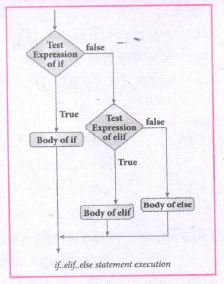
(iv) 'elif' clause combines if..else-if ..else statements to one if..elif ... else. 'elif' can be considered to be abbreviation of 'else if'. In an 'if' statement there is no limit of 'elif' clause that can be used, but an 'else' clause if used should be placed at the end.
(v) Example: # Program to illustrate the use of nested if statement
| Average | Grade |
| > = 80 and above | A |
| > = 70 and < 80 | B |
| > = 60and < 70 | C |
| > = 50 and < 60 | D |
| Otherwise | E |
m1 = int (input("Enter mark in first subject:"))
m2 = int (input("Enter mark in second subject:"))
avg = (m1+m2)/2
if avg > =80:
print ("Grade : A")
elif avg > =70 and avg < 80:
print ("Grade : B")
elif avg > =60 and avg < 70:
print ("Grade : C")
elif avg > =50 and avg < 60:
print ("Gradec: D")
else:
print("Grade : E")
Output 1:
Enter mark in first subject : 34
Enter mark in second subject : 78
Grade : D
Output 2:
Enter mark in first Subject : 67
Enter mark in second subject : 73
Grade: B
14.
(i) Dynamic programming is an algorithmic design method that can be used when the solution to a problem can be viewed as the result of a sequence of decisions.
(ii) Dynamic programming approach is similar to divide and conquer. The given problem is divided into smaller and yet smaller possible sub-problems.
(iii) Dynamic programming is used whenever problems can be divided into similar subproblems. so that their results can be reused to complete the process.
(iv) Dynamic programming approaches are used to find the solution in optimized way. For every inner subproblem, dynamic algorithm will try to check the results of the previously solved sub-problems.
(v) The solutions of overlapped sub-problems are combined in order to get a better solution.
Steps to doDynamic programming :
(i) The given problem will be divided into smaller overlapping sub-problems.
(ii) An optimum solution for the given problem can be achieved by using result of smaller sub-problem.
(iii) Dynamic algorithms uses Memoization
Fibonacci Series - An example :
(i) Fibonacci series generates the subsequent number by adding two previous numbers. Fibonacci series starts from two numbers -Fib 0 & Fib 1. The initial values of Fib 0 & Fib l can be taken as 0 and 1.
(ii) Fibonacci series satisfies the following conditions:
Fibn = Fiba-1 + Fiba-2
(iii) Hence, a Fibonacci series for the n value 8 can look like this
Fib8 = 0 1 1 2 3 5 8 13
Fibonaeci Iterative Algorithm with Dynamic programning approach : The following example shows a simple Dynamic programning approach for the generation ot Fibonacci series.
Initialize f0 = 0, f1 = 1.
Step- 1: Print the initial values of Fibonacci f0 and f1
Step- 2: Calculate Fibonacci fib \(\leftarrow \) f0+ f1
Step- 3: Assign f0 \(\leftarrow \) f1, f1 \(\leftarrow \) fib
Step- 4: Print the next consecutive value of Fibonacci fib
Step- 5: Go to step-2 and repeat until the specified number of terms generated
Example:
if we generate Fibonacci series up to 10 digits, the algorithm will generate the series as shown below:
The Fibonacci series is:
0 1 1 2 3 5 8 13 21 34 55.
15.
1. The print () Function:
ln Python, the print() function is used to display result on the screen. The syntax for print ( ) is as follows:
Example:
print ("String to be displayed as output")
print (variable)
print ("String to be displayed as output", variable)
print ("String1", variable, "string 2", variable, "String 3",....)
Example:
>>> print("Welcome to python Programming'")
welcome to Python Programoming
>>>x = 5
>>> y = 6
>>> z= X+Y
>>> print (z)
>>> print ("The sum =", z)
The sum = 11
>>>print ("The sum of", x, "and", y, "is", z)
The sum of 5 and 6 is 11.
The print () evaluates the expression before printing it on the monitor. The print () displays an entire statement which is specified within print(). Comma(,) is used as a separator in print () to print more than one item.
input () function:
In Python, input) function is used to accept data as input at run time. The syntax for input () function is
Syntax:
Variable = input ("prompt String')
Where, prompt string in the Syntax is a statement or message to the user, to knowwhat input can be given.
If a prompt string is used, it is displayed on the monitor; the user can provide expected data from the input device. The input() takes whatever is typed from the Keyboard and stores the entered data in the given Variable. If prompt string is not given in input() no message is displayed on the screen, then, the user will not know what is to be typed as input.
Example 1:
input () with prompt String
>>>City=input ("Enter your city:")
Enter your city: Madurai
>>>print ("I am from", city)
I am from Madurai
Example 2:
input() without prompt string
>>> city = input ()
Rajarajan
>>>print ("I am from", city)
I am from Rajarajan
in Example 2, the input () is not having any pronmpt string, thus the user will not know what is to be typed as input. If the user inputs irrelevant data as given in the above example then the output will be unexpected. So, to make your program more interactive, provide prompt string with input (). The input () accepts all data as string or characters but not as numbers. Ifa numerical value is entered, the input values should be explicitly converted into numeric data type. The int) function is used to convert string data as integer data explicitly.
Example 3:
X=int (input ("Enter Number 1:"))
Y= int (input ("Enter Number 2:" ))
print ("The Sum =", x + y)
Output:
Enter Number 1: 34
Enter Number 2:56
The Sum =90.
16.
(i) Less code to be written.
(ii) A single procedure can be developed for reuse, eliminating the need to retype the code many times.
(iii) Programs can be designed more easily because a small teana deals with only a
small part of the entire code.
(iv) Modular programming allowS many programmers to collaborate on the same
application.
(v) The code is stored across multiple files.
(vi) Code is short, sirnple and easy to understand.
(vii) Errors can easily be identified, as they are localized to a subroutine or function.
(viii) The same code can be used in man applications.
(ix) The scoping of variables can easily be controlled.
17.
List :
(i) List is constructed by placing expressions within square brackets separated by commas. Such an expression is called a list literal. List can store multiple values. Each value can be of any type and can even be another list.
Example for List [10, 20].
(ii) The elenments of a list can be accessed in two ways. The first way is via our familiar method of multiple assignment, which unpacks a list into its elements and binds each elenment to a different name.
Ist := [10, 20]
x, y = lst
(iii) In the above example x will become l0 and y will become 20. A second method for accessing the elements in a list is by the element selection operator.
(iv) Unlike a list literal, a square-brackets expression directly following another expression does not evaluate to a list value, but instead selects an element from the value of the preceding expression.
lst [0]
10
Ist [1]
20
(v) In both the example mentioned above mathematically we can represent list similar to a set.
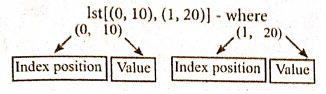
Pair :
Any way of bundling two values together into one can be considered as a pair. Lists are a common methodto do so. Therefore List can be called as Pairs.
18.
Pure functions:
(i) Pure functions are functions which will give exact result when the same arguments are passed.
(ii) For example the mathematical function sin (0) always results 0. This means that every time you call the function with the same arguments, you wil always get the same result.
(iii) A function can be a pure function provided it should not have any external variable which will alter the behavior of that variable.
let us see an Example:
Let square x : =
return: x * x
(iv) The above function square is a pure function because it will not give different results for same input.
(v) There are various theoretical advantages of having pure functions. One advantage is that if a function is pure, then if it is called several times with the same arguments, the compiler only needs to actually call the function once.
Example:
let length s:=
i:= 0
let i:= 0;
if i<strlen (s) then
-- Do something which doesn't affect s
++1
(vi) If it is compiled, strlen (s) is called each time and strlen needs to iterate over the whole of 's'. If the compiler is smart enough to work out that strlen is a pure function and that 's' is not updated in the loop, then it can remove the redundant extra calls to strlen and make the loop to execute only one time.
(vii) From these what we can understand, strlen is a pure function because the function takes one variable as a parameter, and accesses it to find its length. This function reads external memory but does not change it, and the value returned derives from the external memory accessed
Impure functions:
(i) The variables used inside the function may cause side effects through the functions which are not passed with any arguments. In which cases the function is called impure function.
(ii) When a function depends on variable or functions outside of its definition block, you can never be sure that the function will behave the same every time it's called. For example, the mathematical functions random ( ) will give different outputs for the same function call.
Example:
let randomnumber:=
a := random()
if a > 10 then
return: a
else
return: 10
(iii) Here the function Random is impure as it is not sure what will be the result when we call the function
19.
(i) gcd
(ii) let rec gcd
(iii) a, b
(iv) gcd(a mod b)
(v) return a
20.
Program:
a=-1
b=1
n=int(input("Enter no. of terms: "))
i=0
sum=0
Fibo=[]
while i
Fibo.append(s)
sum+es
a=b
b=s
i+s = 1
print("Fibonacci series upto "+ str(n) +" terms is : " + str(Fibo))
print("The sum of Fibonacci series: ",sum)
Output:
Enter no. of terms: 10
Fibonacci series upto 10 terms is: [0, 1, 1, 2, 3, 5, 8, is, 21, 34]
The sum of Fibonacci series: 88

12th Standard Syllabus & Materials
12th Standard
TN 12th Computer Applications களப்பெயர் முறைமை (DNS) Sample Question Papers Study Material - QB365 Set A
NEW12th Standard
TN 12th Computer Applications வலையமைப்பு எடுத்துக்காட்டுகள் மற்றும் நெறிமுறைகள் Sample Question Papers Study Material - QB365 Set A
NEW12th Standard
TN 12th Computer Applications கணினி வலையமைப்பு ஓர் அறிமுகம் Sample Question Papers Study Material - QB365 Set A
NEW12th Standard
TN 12th Computer Applications PHP-உடன் MySQL-ஐ இணைத்தல் Sample Question Papers Study Material - QB365 Set A



Tamilnadu Stateboard 12th Standard Subjects

Maths

Chemistry

Physics

Biology
Computer Science

Business Maths and Statistics

Economics

Commerce

Accountancy

History

Computer Applications
Biology
Computer Technology
Computer Applications
Computer Science
Business Maths and Statistics
Commerce
Economics
Maths
Chemistry
Physics
Computer Technology
History
Accountancy

Tamil

English

French
Tamilnadu Stateboard Standards
