
 100% FREE ACCESS
12th Standard Syllabus & Materials
12th Standard
TN 12th Computer Applications மின்னணு தரவு பரிமாற்றம் Sample Question Papers Study Material - QB365 Set A
NEW12th Standard
TN 12th Computer Applications மின் - வணிக பாதுகாப்பு அமைப்புகள் Sample Question Papers Study Material - QB365 Set A
NEW12th Standard
TN 12th Computer Applications மின்னணு செலுத்தல் முறைகள் Sample Question Papers Study Material - QB365 Set A
NEW12th Standard
TN 12th Computer Applications மின் - வணிகம் Sample Question Papers Study Material - QB365 Set A
NEW12th Standard
TN 12th Computer Applications திறந்த மூல கருத்துருக்கள் Sample Question Papers Study Material - QB365 Set A
NEW12th Standard
TN 12th Computer Applications வலையமைப்பு வடமிடல் Sample Question Papers Study Material - QB365 Set A

Published on: 12/11/2019
Download Tamil Nadu 12th Standard Computer Science question papers, model tests, one-mark questions, important questions, and public exam papers in PDF format. Free study materials and answer keys for TN State Board students.
Questions + Answers key
Take MCQ Computer Science Test
1.
The different kinds of plot created using
Matplotlib
Matplot
Plotlib
Matliplot
2.
Which of the following clause is often used with aggregate functions to group the result?
ORDERBY
WHERE
GROUP BY
DISTINCT
3.
In which of the following data organized in a way that, it can be easily accessed, managed and updated?
Database
DBMS
Structure
Object
4.
_______ file cannot store charts or graphs.
Excel
MsWord
CSV
Openoffiee calc
5.
Find the odd man out
Statement
Operator
Identifier
Keyword
6.
Which of the following variable can be accessed inside or outside of all the functions in a program?
Local
Global
Enclosed
Built-in
7.
CDT expansion is
Collective Data Type
Class Data Type
Concrete Data Type
Central Data Type
8.
Observe the output figure. Identify the coding for obtaining this output.
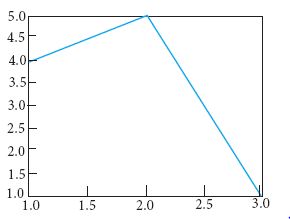
import matplotlib.pyplot as plt
plt.plot([1,2,3],[4,5,1])
plt.show()
import matplotlib.pyplot as plt
plt.plot([1,2],[4,5])
plt.show()
import matplotlib.pyplot as plt
plt.plot([2,3],[5,1])
plt.show()
import matplotlib.pyplot as plt
plt.plot([1,3],[4,1])
plt.show()
9.
The clause used to sort data in a database
SORT BY
ORDER BY
GROUP BY
SELECT
10.
Which of the following class declaration is correct?
class class_name
class class_name<>
class class_name:
class class_name[ ]
11.
Which of the following set operation includes all the elements that are in two sets but not the one that are common to two sets?
Symmetric difference
Difference
Intersection
Union
12.
What will be the output of the following code?
str1 = "Chennai Schools"
str1[7] = "-"
Chennai-Schools
Chenna-School
Type error
Chennai
13.
14.
Time complexity of bubble sort in best case is
θ (n)
θ (nlogn)
θ (n2)
θ (n(logn) 2)
15.
Which of the following is a unit of code that is often defined within a greater code structure?
Subroutines
Function
Files
Modules
16.
Write a note on simple if statement with an example.
17.
Write a note on time/space trade off
18.
Write a short note an syntax for function types.
19.
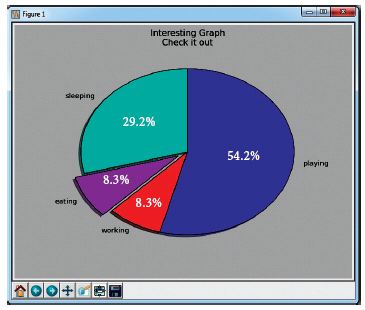
Write the plot for the following pie chart output.
20.
What is the difference between Select and Project command?
21.
What will be the output of the following code?
list = [2**x for x in range(5)]
print (list)
22.
23.
Why access control is required?
24.
Differentiate Concrete data type and abstract datatype.
25.
Differentiate BETWEEN AND NOT BETWEEN keywords.
26.
What is local variable?
27.
Write a note on main (sys.argv [1]).
28.
Write the syntax for the following
(i) Creating objects
(ii) Accessing class members
29.
Write a python program to find the sum of odd numbers between. 10 and 20.
30.
Construct on algorithm that arranges meetings between these two types so that they change their color to the third type. In the end, all should display the same color.
31.
What is set in Python?
32.
Write short notes on Exponent data?
33.
What is Mapping?
34.
Write a python program to check whether the given string is palindrome or not.
35.
Explain the components of DBMS.
36.
Write a python program to execute the following C++ program.
C++ program:
/*Write a C++ program using a user defined
function to function cube of a number. */
// Now select File⇾New in Notepad and type the C++ program
#include
using namespace std;
// Function declaration
int cube(int num),
int main( )
{
int num;
int c;
cout<< "Enter any number: "<<endl;
cin >>num;
c = cube(num);
cout<< "Cube of" << num<< " is "<< c;
return 0;
}
//Function to find cube of any number
int cube(int num)
{
return (num * num * num);
}
// Save this file as cube_file.cpp
37.
Explain Jump statement in python.
38.
Write a program to read the CSV file through python using reader ( ) method.
39.
Explain the concept access control.
40.
Explain the representation of Abstract datatype using rational numbers.
41.
Write the Python script to display all the records of the following table using fetchmany()
| Icode | ItemName | Rate |
| 1003 | Scanner | 10500 |
| 1004 | Speaker | 3000 |
| 1005 | Printer | 8000 |
| 1008 | Monitor | 15000 |
| 1010 | Mouse | 700 |
42.
Consider the following employee table. Write SQL commands for the qtns.(i) to (v).
| EMP CODE | NAME | DESIG | PAY | ALLOWANCE |
| S1001 | Hariharan | Supervisor | 29000 | 12000 |
| P1002 | Shaji | Operator | 10000 | 5500 |
| P1003 | Prasad | Operator | 12000 | 6500 |
| C1004 | Manjima | Clerk | 8000 | 4500 |
| M1005 | Ratheesh | Mechanic | 20000 | 7000 |
(i) To display the details of all employees in descending order of pay.
(ii) To display all employees whose allowance is between 5000 and 7000.
(iii) To remove the employees who are mechanic.
(iv) To add a new row.
(v) To display the details of all employees who are operators.
43.
Explain the scope of variables with an example.
1.
(a)
Matplotlib
2.
(c)
GROUP BY
3.
(a)
Database
4.
(a)
Excel
5.
(a)
Statement
6.
(b)
Global
7.
(c)
Concrete Data Type
8.
(a)
import matplotlib.pyplot as plt
plt.plot([1,2,3],[4,5,1])
plt.show()
9.
(b)
ORDER BY
10.
(c)
class class_name:
11.
(a)
Symmetric difference
12.
(c)
Type error
13.
(b)
14.
(a)
θ (n)
15.
(b)
Function
16.
Simple if statement: Simple if is the simplest of all decision making statements. Condition should be in the form of relational or logical expression.
Syntax:
if
statements-block1
In the above syntax if the condition is true statements - block 1 will be executed.
Example: Program to check the age and print whether eligible for voting
x=int (input("Enter your age :"))
if x > = 18:
print ("You are eligible for voting")
Output 1:
Enter your age: 34
You are eligible for voting
Output 2:
Enter your age: 16
>>>
17.
(i) A space-time or time-memory trade off is a way of solving in less time by using more storage space or by solving a given algorithm in very little space by spending more time.
(ii) To solve a given programming problem, many different algorithms may be used. Some of these algorithms may be extremely time-efficient and others extremely spaceefficient.
(iii) Time/space trade off refers to a situation where you can reduce the use of memory at the cost of slower program execution, or reduce the running time at the cost of increased memory usage.
18.
The syntax for function types
x\(\rightarrow \)y
x1 \(\rightarrow \)x2\(\rightarrow \)y
x1 \(\rightarrow \) .... \(\rightarrow \)x n\(\rightarrow \)y
The 'x' and 'y' are variables indicating types. The type x \(\rightarrow \) y is the type of a function that gets an input of type 'x' and returns an output of type 'y'. Where as x1\(\rightarrow \) x2 -\(\rightarrow \) y is a type of a function that takes two inputs, the first input is of type 'x1' and the second input of type 'x1', and returns an output of type 'y'. Likewise x1 \(\rightarrow \)...\(\rightarrow \)x n\(\rightarrow \)y has type 'x' as input of n arguments and 'y' type as output.
19.
Plot:
import matplotlib.pyplot as plt
sizes = [105, 30, 30, 195]
label= ["sleeping", "eating", "working", "playing"]
plt.pie (sizes, labels = labels, autopct = "%.2f")
plt, axes ( ). set_aspect ("equal")
plt.show ( )
20.
| Select | Project |
|---|---|
| 1. Symbol - σ | 1. Symbol - π |
| 2. Selecting a subset with tuples | 2. Contains a vertical subset of relation. |
| 3. Select filters out all tuples that don't satisfy the condition. |
3. Projection eliminates all attributes of the input relation except in the projection list. |
21.
Output: [1,2,4,8,16]
22.
23.
(i) Access control is a security technique that regulates who or what can view or use resources in a computing environment.
(ii) It is a fundamental concept in security that minimizes risk to the object.
(iii) In other words access control is a selective restriction of access to data.
(iv) In object oriented programming languages is implemented through access modifiers.
24.
| S.No | Concrete data type | Abstract data type |
| (i) | Concrete Data Types or structures (CDT's) are direct implementations of a relatively simple concept | Abstract Data Types (ADT's) offer a high level view (and use) of a concept independent of its implementation. |
| (ii) | A concrete data type is a data type whose representation is known. | Abstract data type the representation of a data type is unknown. |
25.
| BETWEEN | NOT BETWEEN |
|---|---|
| The BETWEEN keyword defines a range of values the record must fall into to make the condition true. | The NOT BETWEEN is reverse of the BETWEEN operator where the records not satisfying the condition are displayed. |
26.
A variable declared inside the function's body or in the local scope is known as local variable.
27.
maintsv (sys.argv[1]) Accepts the program file (Python program) and the input file (C++file) as a list(array). argv[0] contains the Python program which is need not to be passed because by default _main_ contains source code reference and argv (1) contains the name of the C++ file which is to be processed.
28.
(i) Object - name = class_name ()
(ll) Object - name = class_member
29.
s = 0
for i in range (11, 21, 2)
s=s+i
print (s)
30.
let rec monochromatize a b c :=
if a > 0 then
a, b, c:= a-1, b-1, c+2
else
a:=0, b:=0, c:= a + b + c
return c
31.
(i) In Python, a set is another type of collection data type. A'Set is a mutable and an unordered collection of elements without duplicates.
(ii) That means the elements within a set cannot be repeated. This feature used to include membership testing and eliminating duplicate elements.
32.
An Exponent data contains decimal digit part, decimal point, exponent part followed by one or more digits.
33.
The process of binding a variable name with an object is called mapping = (equal to sign) is used in programming languages to map the variable and object.
34.
str1 = input ("Enter a string:")
str2 ="
index=-1
for i in str1:
str2 += str1[index]
index -=1
print ("'The given string = {} \n The Reversed string = {}".format(str1, str2))
if (str1==str2):
print ("Hence, the given string is Palindrome")
else:
print ("Hence, the given is not a palindrome")
Output:1
Enter a string: malayalam
The given string = malayalam
The Reversed string = malayalam
Hence, the given string is Palindrome
Output: 2
Enter a string: welcome
The given string = welcome
The Reversed string = emoclew
Hence, the given string is not a palindrome
35.
The Database Management System can be divided into five major components as follows:
(i) Hardware
(ii) Software
(iii) Data
(iv) Procedures / Methods
(v) Database Access Languages
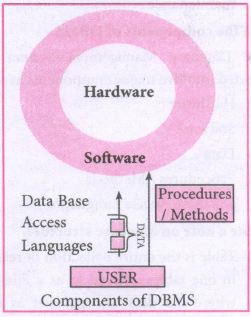
(i) Hardware: The computer, hard disk, I/O channels for data, and any other physical component involved in storage of data
(ii) Software: This main component is a program that controls everything. The DBMS software is capable of understanding the Database Access Languages and interprets into database commands for execution.
(iii) Data: It is that resource for which DBMS is designed. DBMS creation is to store and utilize data.
(iv) Procedures/Methods: They are general instructions to use a database management system such as installation of DBMS, manage databases to take backups, report generation, etc
(v) DataBase Access Languages: They are the languages used to write commands to access, insert, update and delete data stored in any database.
Examples of popular DBMS: Dbase, FoxPro
36.
# Save the File as fun.py
# Program that compiles and executes a .cpp file
# Python fun.py -i c:\pyprg\cube_file.cpp
Python Program:
import sys, os, getopt
def main(argv):
cpp_file ="
exe_file ="
opts,args = getopt.getopt(argv, "i:",['ifile='])
for 0, a in opts:
if 0 in ("-i", "--ifile"):
cpp_file = a + '.cpp'
exe_file = a + '.exe'
run(cpp_file, exe_file)
def run(cpp_file, exe_file):
print("Compiling" + cpp_file)
os.system('g++ ' + cpp_file + '-o' + exe_ file)
print("Running" + exe_file)
print(" ----------------- ")
print
os.system( exe_file)
print
if _name_ =='_main_':
main(sys.argv[1:])
37.
The jump statement in Python, is used to unconditionally transfer the control from one part of the program to another. There are three keywords to achieve jump statements in Python: break, continue, pass. The following flowchart illustrates the use of break and continue.
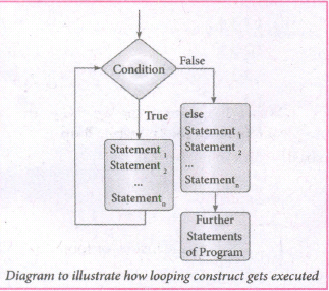
(i) break statement: The break statement terminates the loop containing it. Control of the program flows to the statement immediately after the body of the loop. A while or for loop will iterate till the condition is tested false, but one can even transfer the control out of the loop (terminate) with help of break statement. When the break statement is executed, the control flow of the program comes out of the loop and starts executing the segment of code after the loop structure. If break statement is inside a nested loop (loop inside another loop), break will terminate the innermost loop.
Syntax:
break
(ii) Continue statement: Continue statement unlike the break statement is used to skip the remaining part of a loop and start with next iteration.
Syntax:
continue
(iii) Pass statement: pass statement is generally used as a placeholder. When we have a loop or function that is to be implemented in the future and not now, we cannot develop such functions or loops with empty body segment because the interpreter would raise an error. So, to avoid this we can use pass statement to construct a body that does nothing.
Syntax:
pass
38.
import csv
csv.register_dialect('myDialect', delimiter = ',',skipinitialspace = True)
F=open('c:\\pyprg\\sample2.csv', 'r')
reader = csv.reader(F, dialect = 'myDialect')
for row in reader:
print(row)
F.close( )
39.
(i) Access control is a security technique that regulates who or what can view or use resources in a computing environment.
(ii) It is a fundamental concept in security that minimizes risk to the object.
(iii) In other words access control is a selective restriction of access to data. IN Object oriented programming languages it is implemented through access modifiers.
(iv) Classical object-oriented languages, such as C++ and Java. control the access to class members by public, private and protected keywords.
(v) Private members of a class are denied access from the outside the class. They can be handled only from within the class.
(vi) Public members (generally methods declared in a class) are accessible from outside the class. The object of the same class is required to invoke a public method. This arrangement of private instance variables and public methods ensures the principle of data encapsulation.
(vii) Protected members of a class are accessible from within the class and are also available to its sub-classes. No other process is permitted access to it. This enables specific resources of the parent class to be inherited by the child class.
(viii) Python doesn't have any mechanism that effectively restricts access to any instance variable or method. Python prescribes a convention of prefixing the name of the variable or method with single or double underscore to emulate the behaviour of protected and private access specifiers.
(ix) All members in a Python class are public by default. whereas by default in C++ and java they are private. Any member can be accessed from outside the class environment in Python which is not possible in C++ and java.
40.
(i) The basic idea of data abstraction is to structure programs so that they operate on abstract data. That is, our programs should use data in such a way, as to make as few assumptions about the data as possible.
(li) At the same time, a concrete data representation is defined as an independent part of the program.
(iii) Any program consist of two parts. The two parts of a program are, the part that operates on abstract data and the part that defines a concrete representation, is connected by a small set of functions that implement abstract data in terms of the concrete representation.
(iv) To illustrate this technique, let us consider an example to design a set of functions for manipulating rational numbers.
(v) Example: A rational number is a ratio of integers, and rational numbers constitute an important sub-class of real numbers. A rational number such as 8/3 or 19/23 is typically written as : < numerator > /< denominator >
(vi) where both the < numerator > and <denominator>
(vii) However, you can create an exact representation for rational numbers by combining together the numerator and denominator.
(viii) As we know from using functional abstractions, we can start programming productively before you have an implementation of some parts of our program.
(ix) Let us begin by assuming that you already have a way of constructing a rational number from a numerator and a denominator. You also assume that, given a rational number, you have a way of selecting its numerator and its denominator component.
41.
Creating database:
Sql_command = " "
CREATE TABLE Hardware (
lcode INTEGER PRIMARY KEY.
ltem_Name VARCHAR(20),
Rate DEClMAL(5,2));" "
Program: To display the records using fetchmany()
import sqlite3
connection = sqlite3.connect ("Material.db")
cursor = connection.cursor()
cursor. execute ("SELECT * FROM Hardware")
print("fetching first 5 records:")
result = cursor.fetchmany(5)
print(result)
Output:
fetching first 5 records:
[(1003, 'Scanner', "10500'), (1004, 'Speaker', '3000'), (1005, 'Printer', '8000'), (1008, 'Monitor', '15000'),
(1010, 'Mouse', '700')]
42.
(i) SELECT * FROM Employee ORDER BY PAY DESC;
(ii) SELECT * FROM Employee WHERE ALLOWANCE
BETWEEN 5000 AND 7000;
(iii) DELETE FROM Employee WHERE DESIG='Mechanic';
(iv) ALTER TABLE employee ADD Age Varchar(50);
(v) SELECT * FROM Employee WHERE DESIG='Operator';
43.
Scope of variable refers to the part of the program, where it is accessible, i.e., area where the variables refer (use). The scope holds the current set of variables and their values. The two types of scopes-local scope and global scope.
Local Scope: A variable declared inside the function's body is known as local variable.
Rules of local variable:
(i) A variable with local scope can be accessed only within the function that it is created in.
(ii) When a variable is created inside the function the variable becomes local to it.
(iii) A local variable only exists while the function is executing.
(iv) The formal parameters are also local to function.
(v) Example: Create a Local Variable
def loc():
y=0 # local scope
print(y)
loc()
Output:
0
Global Scope: A variable, with global scope can be used anywhere in the program. It can be created by defining a variable outside the scope of any function.
Rules of global Keyword:
The basic rules for global keyword in Python are:
(i) When we define a variable outside a function, it's global by default. You don't have to use global keyword.
(li) We use global keyword to modify the value of the global variable inside a function.
(iii) Use of global keyword outside a function has no effect.
Example: Accessing global Variable From Inside a Function
c = 1 # global variable
def add():
print(c)
add()
Output:
1

12th Standard Syllabus & Materials
12th Standard
TN 12th Computer Applications களப்பெயர் முறைமை (DNS) Sample Question Papers Study Material - QB365 Set A
NEW12th Standard
TN 12th Computer Applications வலையமைப்பு எடுத்துக்காட்டுகள் மற்றும் நெறிமுறைகள் Sample Question Papers Study Material - QB365 Set A
NEW12th Standard
TN 12th Computer Applications கணினி வலையமைப்பு ஓர் அறிமுகம் Sample Question Papers Study Material - QB365 Set A
NEW12th Standard
TN 12th Computer Applications PHP-உடன் MySQL-ஐ இணைத்தல் Sample Question Papers Study Material - QB365 Set A



Tamilnadu Stateboard 12th Standard Subjects

Maths

Chemistry

Physics

Biology
Computer Science

Business Maths and Statistics

Economics

Commerce

Accountancy

History

Computer Applications
Biology
Computer Technology
Computer Applications
Computer Science
Business Maths and Statistics
Commerce
Economics
Maths
Chemistry
Physics
Computer Technology
History
Accountancy

Tamil

English

French
Tamilnadu Stateboard Standards
