
 100% FREE ACCESS
12th Standard Syllabus & Materials
12th Standard
TN 12th Maths Applications of Matrices and Determinants Sample Question Papers Study Material - QB365 Set A
NEW12th Standard
TN 12th Computer Applications மின்னணு தரவு பரிமாற்றம் Sample Question Papers Study Material - QB365 Set A
NEW12th Standard
TN 12th Computer Applications மின் - வணிக பாதுகாப்பு அமைப்புகள் Sample Question Papers Study Material - QB365 Set A
NEW12th Standard
TN 12th Computer Applications மின்னணு செலுத்தல் முறைகள் Sample Question Papers Study Material - QB365 Set A
NEW12th Standard
TN 12th Computer Applications மின் - வணிகம் Sample Question Papers Study Material - QB365 Set A
NEW12th Standard
TN 12th Computer Applications திறந்த மூல கருத்துருக்கள் Sample Question Papers Study Material - QB365 Set A

Published on: 06/01/2020
Lists, Tuples, Sets and Dictionary
Download Tamil Nadu 12th Standard Computer Science question papers, model tests, one-mark questions, important questions, and public exam papers in PDF format. Free study materials and answer keys for TN State Board students.
Questions + Answers key
Take MCQ Computer Science Test
1.
Which of the following operator can be used to alter the range of elements in the list?
= =
::
=
2.
In list, the negative index number begin with
0
1
-1
0.1
3.
The keys in Python, dictionary is specified by
=
;
+
":"
4.
Which of the following Python function can be used to add more than one element within an existing list?
append()
append_more()
extend()
more()
5.
If List=[17,23,41,10] then List.append(32) will result
[32,17,23,41,10]
[17,23,41,10,32]
[10,17,23,32,41]
[41,32,23,17,10]
6.
Differentiate append () and extend () function.
7.
What is nested list? Give example.
8.
Write the syntax of creating list. Give example.
9.
What is set in Python?
10.
Write the syntax of creating a Tuple with n number of elements.
11.
Explain the concept of list comprehension with an example programs.
12.
What is the output for the following code?
13.
How will you change the list elements in Python? Give an example.
14.
What are the difference between List and Dictionary?
15.
List out the set operations supported by python.
16.
Explain with an example how will you return multiple values in tuples.
17.
How will you access elements of a list using for loop? Explain with an example.
18.
Explain the different set operations supported by python with suitable example.
19.
What the different ways to insert an element in a list. Explain with suitable example.
1.
(c)
=
2.
(c)
-1
3.
(d)
":"
4.
(c)
extend()
5.
(b)
[17,23,41,10,32]
6.
In Python, append( ) function is used to add a single element and extend( ) function is used to add more than one element to an existing list.
7.
(i) Mylist contains another list as an element. This type of list is known as "Nested List': Nested list is a list containing another list as an element.
(ii) Example: Mylist = [ "Welcome", 3.14, 10, [2,4,6] ]
8.
Syntax:
Variable = [element-1, element-2, element-3 ................ elernent-n]
Example:
Marks = [10,23,41,75]
Fruits = ["Apple", "Orange", "Mango", "Banana"]
MyList = [ ]
9.
(i) In Python, a set is another type of collection data type. A'Set is a mutable and an unordered collection of elements without duplicates.
(ii) That means the elements within a set cannot be repeated. This feature used to include membership testing and eliminating duplicate elements.
10.
Syntax:
# Tuple with n number elements
Tuple_Name (E1, E2, E3.......En)
# Elements of a tuple without parenthesis
Tuple_Name = El, E2, E3 ................. En
11.
(i) List comprehension is a simplest way of creating sequence of elements that satisfy a certain condition.
(ii) Syntax:
List = [ expression for variable in range ]
(iii) Example: Generating squares of first 10 natural numbers using the concept of List comprehension.
> > > squares = [x ** 2 for x in range(1, 11) ]
> > > print (squares)
Output:
[1, 4, 9, 16, 25, 36, 49, 64, 81, 100]
12.
MyList = [2, 4, 5, 8, 10]
print ("MyList elements before update ... ")
for x in MyList:
print (x)
MyList[2] = 6
print ("MyList elements after updation ... ")
for y in MyList:
print (y)
Output:
MyList elements before update ...
2
4
5
8
10
MyList elements after updation ...
2
4
6
8
10
13.
In Python, the lists are mutable, which means they can be changed. A list element or range of elements can be changed or altered by using simple assignment operator (=).
Example:
MyList = [1,3,5,7,9]
print ("List Odd numbers ... ")
for x in MyList:
print (x)
MyList[0:5] = 2, 4, 6, 8, 10
print ("List Even numbers ... ")
for y in MyList:
print (y)
14.
(i) List is an ordered set of elements. But, a dictionary is a data structure that is used for matching one element (Key) with another (Value).
(ii) The index values can be used to access a particular element. But, in dictionary key represents index. Remember that, key may be a nunmber of a string.
(iii) Lists are used to look up a value whereas a dictionary is used to take one value and look up another value.
15.
Set Operations :
(i) Union : It includes all elements from two or more sets.
(ii) Intersection : It includes the common elements in two sets.
(iii) Difference : It includes all elements that are in first set (say set A) but not in the second set (say set B).
(iv) Symmetric difference : It includes all the elements that are in two sets (say sets A and B) but not the one that are common to two sets.
16.
(i) A function can return only one value at a time, but Python returns more than one value from a function. Python groups multiple values and returns them together.
(ii) Example: Program to return the maximum as well as minimum values in a list
def Min_Max(n):
a = max(n)
b = min(n)
return (a, b)
Num = (12, 65, 84, 1, 18, 85, 99)
(Max_Num, Min_Num) = Min_Max(Num)
print("Maximum value = ", Max_Num)
print("Minimum value = ", Min_Num)
(iii) Output:
Maximum value = 99
Minimum value = 1
17.
(i) In Python, 'for loop' is used to access all the elements in a list one by one. This is just like the for keyword in other programming language such as C++.
(ii) Syntax:
for index_var in list:
print (index_var)
(iii) Here, dex_var represents the index value of each element in the list. Python reads this "for" statement like English: "For (every) element in (the list of) list and print (the name of the) list items"
(iv) Example:
Marks=[23,45, 67, 78,98]
for x in Marks:
print(x)
Output:
23
45
67
78
98
(v) In the above example, Marks list has 5 elements; each element is indexed from 0 to 4.
(vi) The Python reads the for loop and print statements like English: "For (every) element (represented as (x) in (the list of) Marks and print (the values of the) elements.
18.
The python supports the set operations such as Union, Intersection, difference and Symmetric difference.
i) Union:
It includes all elements from two or more sets
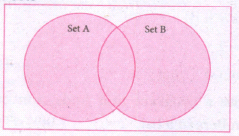
In python, the operator Iis used to union of two sets. The function union ( ) is also used to join two sets in python.
Example:
Program to Join (Union) two sets using union operator
set_A={2,4,6,8}
set_B={'A', 'B', 'C', 'D'}
U_set=set_A l set_B
print (U _set)
Output:
{2, 4, 6, 8, 'A', 'D', 'C', 'B'}
Example:
Program to Join (Union) two sets using union function.
set_A={2,4,6,8}
set_B={'A', 'B', 'C', 'D'}
set_ U=set_ A.Union(set_ B)
print(set_U)
Output:
{'D', 2, 4, 6, 8, 'B', 'C', 'A'}
ii) Intersection:
(i) It includes the common elements in two sets
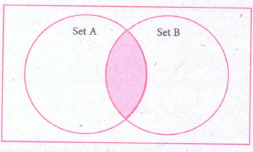
The operator & is used to intersect two sets in python. The function intersection( ) is also used to intersect two sets in python.
Example:
Program to insert two sets using intersection operator
set_A={'A', 2, 4, 'D'}
set_B={'A', 'B', 'C', 'D'}
print(set_A & set_B)
Output:
{'A', 'D'}
Example:
Program to insect two sets using intersection function
set_A={'A', 2, 4, 'D'}
set_B={'A', 'B', 'C', 'D'}
print( set_A.intersection(set_B))
Output:
{'A', 'D'}
iii) Difference
It includes all elements that are in first set (say set A) but not in the second set (say set B)
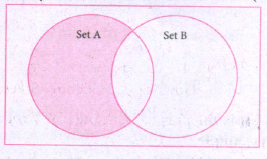
The minus (-) operator is used to difference set operation in python. The function difference() is also sed to difference operation.
Example:
Program to difference of two sets using minus operator
set_A={'A', 2, 4, 'D'}
set_B={'A', 'B', 'C', 'D'}
print(set_A - set B)
Output
{2,4}
Example:
Program to difference of two sets using difference function
set_A={'A', 2, 4, 'D'}
set_B={'A', 'B', 'C', 'D'}
print(set_A.difference( set_B))
Output:
{2,4}
iv) Symmetric difference:
It includes all the elements that are in two sets (say sets A and B) but not the one that are common to two sets.
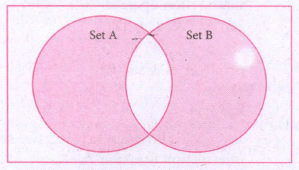
The caret (^) operator is used to symmetric difference set operation in python. The function symmetric_difference( ) is also used to do the same operation.
Example:
Program to symmetric difference of two sets using caret operator
set_A={'A', 2, 4, 'D'}
set_B={'A', 'B', 'C', 'D'}
print(set_A ^ set_B)
Output:
{2, 4, 'B', 'C'}
Example:
Program to difference of two sets using symmetric difference function
set_A={'A', 2, 4, 'D'}
set_B={'A', 'B', 'C', 'D'}
print( se_A.symmetric_ difference (set_B))
Output:
{2, 4, 'B', 'C'}
19.
Inserting elements in a list using insert ( ) :
(i) append ( ) function in Python is used to add more elements in a list. But, it includes elements at the end of a list.
(ii) If you want to include an element at your desired position, you can use insert ( ) function. The insert ( ) function is used to insert an element at any position of a list.
Syntax :
List.insert (position index, element)
Example :
>>> MyList=[34,98,47, Kannan,Gowrisankar','Lenin', 'Sreenivasan' ]
>>> print(MyList)
[34, 98, 47, 'Kannan', 'Gowrisankar', 'Lenin', 'Sreenivasan']
>>> MyList.insert(3, 'Ramakrishnan')
>>> print(MyList)
[34, 98, 47, 'Ramakrishnan', 'Kannan', 'Gowrisankar, 'Lenin', 'Sreenivasan']
Output : [34, 98, 47, 'Ramakrishnan', 'Kannan', 'Gowrisankar', 'Lenin', 'Sreenivasan']
(i) In the above cxample, insert( ) function inserts a new element 'Ramakrishnan' at the index value 3, ie. at the 4th position.
(ii) While inserting a new element in between the existing elements, at a particular location, the existing elements shifts one position to the right.

12th Standard Syllabus & Materials
12th Standard
TN 12th Computer Applications வலையமைப்பு வடமிடல் Sample Question Papers Study Material - QB365 Set A
NEW12th Standard
TN 12th Computer Applications களப்பெயர் முறைமை (DNS) Sample Question Papers Study Material - QB365 Set A
NEW12th Standard
TN 12th Computer Applications வலையமைப்பு எடுத்துக்காட்டுகள் மற்றும் நெறிமுறைகள் Sample Question Papers Study Material - QB365 Set A
NEW12th Standard
TN 12th Computer Applications கணினி வலையமைப்பு ஓர் அறிமுகம் Sample Question Papers Study Material - QB365 Set A



Tamilnadu Stateboard 12th Standard Subjects

Maths

Chemistry

Physics

Biology
Computer Science

Business Maths and Statistics

Economics

Commerce

Accountancy

History

Computer Applications
Biology
Computer Technology
Computer Applications
Computer Science
Business Maths and Statistics
Commerce
Economics
Maths
Chemistry
Physics
Computer Technology
History
Accountancy

Tamil

English

French
Tamilnadu Stateboard Standards
