
 100% FREE ACCESS
12th Standard Syllabus & Materials
12th Standard
TN 12th Maths Applications of Matrices and Determinants Sample Question Papers Study Material - QB365 Set A
NEW12th Standard
TN 12th Computer Applications மின்னணு தரவு பரிமாற்றம் Sample Question Papers Study Material - QB365 Set A
NEW12th Standard
TN 12th Computer Applications மின் - வணிக பாதுகாப்பு அமைப்புகள் Sample Question Papers Study Material - QB365 Set A
NEW12th Standard
TN 12th Computer Applications மின்னணு செலுத்தல் முறைகள் Sample Question Papers Study Material - QB365 Set A
NEW12th Standard
TN 12th Computer Applications மின் - வணிகம் Sample Question Papers Study Material - QB365 Set A
NEW12th Standard
TN 12th Computer Applications திறந்த மூல கருத்துருக்கள் Sample Question Papers Study Material - QB365 Set A

Published on: 17/01/2020
Download Tamil Nadu 12th Standard Computer Science question papers, model tests, one-mark questions, important questions, and public exam papers in PDF format. Free study materials and answer keys for TN State Board students.
Questions + Answers key
Take MCQ Computer Science Test
1.
What is the output for the following?
'mammals'. find ('ma', 2, 5)
0
3
-1
1
2.
Which of the following ensures the accuracy and reliability of the data in the database?
Constraint
Table
Classes
Data types
3.
The numerical data is encoded using
dots
lines
bars
all of these
4.
___________ refers to a set of runtime header files used in compiling and linking the C++ code to be run or window OS?
SWIG
MinGW
Cython
Boost
5.
_______ files are saved with extension.xlsx.
Excel
CSV
Wordpad
Notepad
6.
The program segment' executed based on the test of the condition are called _______
statement
iteration
branding
looping
7.
B = A &C is equivalent to
B = A. union (c)
B = A. intersection (c)
B = A. intersect (c)
B = A. interest (c)
8.
Fill up the blank in assign a variable with________to an object.
=
! =
: =
= =
9.
In object oriented programs, how the object is processed and executed is__________
Implementation
Interface
recursion
function
10.
Which of the following is a control structure used to traverse and fetch the records of the database?
Pointer
Key
Cursor
Insertion point
11.
Which of the following is an RDBMS?
Dbase
Foxpro
Microsoft Access
SQLite
12.
13.
Which of the following keyword is used to define the function testpython(): ?
define
pass
def
while
14.
Time complexity of bubble sort in best case is
θ (n)
θ (nlogn)
θ (n2)
θ (n(logn) 2)
15.
Which of the following allow to name the various parts of a multi-item object?
Tuples
Lists
Classes
quadrats
16.
Write a python program to find HCF of two numbers using recursion.
17.
How will you sort more than one column in a CSV file? Explain with an example.
18.
Explain the concept access control.
19.
Explain in detail the types of pyplots using Matplotlib.
20.
hat is the use of HAVING clause. Give an example python script
21.
Write a SQL statement to create a table for employee having any five fields and create a table constraint for the employee table.
22.
Write a menu driven program to add or delete stationary items. You should use dictionary to store items and the brand.
23.
Explain about string operators in python with suitable example.
24.
Explain input() and print() functions with examples.
25.
How will you access the multi-item. Explain with example.
26.
Find the odd man out. Give reason
(a) A
(b) |
(c) +
(d) -
27.
Name the built - in number objects in python.
28.
Write the output of the following program
a:=10
Disp():
a:=7
print a
Disp 1():
print a
29.
How the concrete level of data abstraction implemented?
30.
What is data consistency?
31.
What is the output of the following program?
Class Sample:
__num=10
def disp(self):
print(self.__num)
S=Sample()
S.disp()
print(S.__num)
32.
33.
Write is the syntax of if..else statement.
34.
35.
Fill up the blank.
(I) A table is known as a _____________
(ii) A table row is known as a __________
(iii) A table column is known as a ________
36.
List the commonly used python interfaces.
37.
Write a note on Tuple assignment.
38.
Fill in the blanks.
(i) _____ statements are ignored by Python interpreter.
(ii) The value of an operator used is called _______
(iii) 100/30 = ______
39.
Explain the syntax of function definitions.
40.
Write any three uses of data visualization.
41.
What is the output of the following program?
class Greeting:
def __init__(self, name):
self.__name = name
def display(self):
print("Good Morning ", self.__name)
obj=Greeting ('Bindu Madhavan')
obj.display()
42.
Write a program to display
A
A B
A B C
A B C D
A B C D E
43.
Write a note on Asymptotic notation.
1.
(b)
3
2.
(a)
Constraint
3.
(d)
all of these
4.
(b)
MinGW
5.
(a)
Excel
6.
(c)
branding
7.
(b)
B = A. intersection (c)
8.
(c)
: =
9.
(a)
Implementation
10.
(c)
Cursor
11.
(d)
SQLite
12.
(b)
13.
(c)
def
14.
(a)
θ (n)
15.
(c)
Classes
16.
# python program to find HCF
def HCF (x,y):
if(x > y):
s = y
else:
s = x
for I inrange (1, s + 1):
if ((x % I = = 0) and (y% i = = 0)):
hcf = i
return hcf
x = int (input ("Enter Number 1"))
y = int (input ("Enter Number 2"))
print (HCF (x, y))
17.
To sort by more than one column you can use itemgetter with multiple indices: operator. itemgetter (1,2).
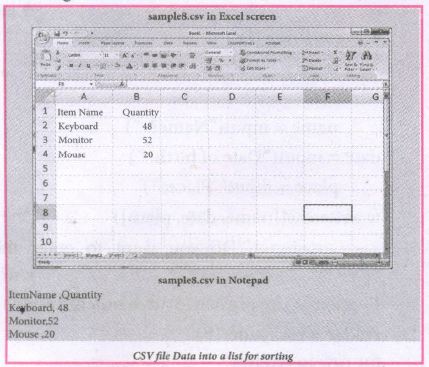
The following program do the task mentioned above using operator.itemgetter(col_no)
Example:
# Program to sort the entire row by using a specified column.
# declaring multiple header files
import csv, operator
#One more way to read the file
data = csv.reader(open('c:\\PYPRG\ \sample8.csv'))
next(data) #(to omit the header)
#using operator module for sorting multiple columns
sortedlist = sorted (data, key=operator.
itemgetter(1) # 1 specifies we want to sort
# according to second column for row in sortedlist:
print(row)
Output:
['Mouse', '20']
['Keyboard', '48']
['Monitor', '52']
18.
(i) Access control is a security technique that regulates who or what can view or use resources in a computing environment.
(ii) It is a fundamental concept in security that minimizes risk to the object.
(iii) In other words access control is a selective restriction of access to data. IN Object oriented programming languages it is implemented through access modifiers.
(iv) Classical object-oriented languages, such as C++ and Java. control the access to class members by public, private and protected keywords.
(v) Private members of a class are denied access from the outside the class. They can be handled only from within the class.
(vi) Public members (generally methods declared in a class) are accessible from outside the class. The object of the same class is required to invoke a public method. This arrangement of private instance variables and public methods ensures the principle of data encapsulation.
(vii) Protected members of a class are accessible from within the class and are also available to its sub-classes. No other process is permitted access to it. This enables specific resources of the parent class to be inherited by the child class.
(viii) Python doesn't have any mechanism that effectively restricts access to any instance variable or method. Python prescribes a convention of prefixing the name of the variable or method with single or double underscore to emulate the behaviour of protected and private access specifiers.
(ix) All members in a Python class are public by default. whereas by default in C++ and java they are private. Any member can be accessed from outside the class environment in Python which is not possible in C++ and java.
19.
Line Chart:
(i) A Line Chart or Line Graph is a type of chart which displays information as a series of data points called 'markers' connected by straight line segments.
(ii) A Line Chart is often used to visualize a trend in data over intervals of time - a time series - thus the line is often drawn chronologically.
Example:
import matplotlib.pyplot as plt
years = [2014, 2015, 2016, 2017, 2018]
total_populations = [8939007, 8954518, 8960387, 8956741, 8943721]
plt. plot ("years, total_populations)
pit. title ("Year vs Population in India")
plt.xlabel ("Year")
pIt.ylabel ("Total Population")
plt.showt (1)
In this program,
Plt.titlet( ) \(\rightarrow\) specifies title to the graph
Plt.xlabelt) \(\rightarrow\) specifies label for X-axis
Plt.ylabel() \(\rightarrow\) specifies label for Y-axis
Output:
.JPG)
Bar Chart:
(i) A Bar Plot (or BarChart) is one of the most common type of plot. It shows the relationship between a numerical variable and a categorical variable
(ii) Bar chart represents categorical data with rectangular bars. Each bar has a height corresponds to the value it represents. The bars can be plotted vertically or horizontally.
(iii) It's useful when we want to compare a given numeric value on different categories. To make a bar chart with Matplotlib, we can use the plt.bar() function.
Example:
import matplotlib.pyplot as plt
# Our data
labels = ["TAMIL", "ENGLISH", "MATHS", "PHYSICS", "CHEMISTRY", "CS"]
usage = [79.8,67.3,77.8,68.4,70.2,88.5]
# Generating the y positions.
y_positions = range (len(labels))
# Creating our bar plot
plt.bar (y_positions, usage)
plt.xticks (y_positions, labels)
plt.ylabel ("RANGE")
plt.title ("MARKS")
plt.show( )
Output:
.JPG)
Labels → specifies labels for the bars.
Usage → Assign values to the labels specified.
Xticks → Display the tick marks along the x - axis at the values represented. Then specify the ladel for each tick mark.
Range → Create sequence of numbers.
Pie Chart:
(i) Pie Chart is probably one of the most common type of chart. It is a circular graphic which is divided into slices to illustrate numerical proportion.
(ii) The point of a pie chart is to show the relationship of parts out of a whole. To make a Pie Chart with Matplotlib, we can use the plt.pief) function.
(iii) The autopct parameter allows us to display the percentage value using the Python string formatting.
Example:
import matplotlib.pyplot as plt
sizes = [89, 80, 90, 100, 75]
labels = ["Tamil", "English", "Maths", "Science", "Social"]
plt.pie (sizes, labels = labels, autopct = "%.2f")
plt.axes().set aspect ("equal")
plt.show( )
Output:
.JPG)
20.
HAVING clause is used to filter data based on7the group functions. This is similar to WHERE condition but can be used , only with group functions. Group functions cannot be used in WHERE Clause but can be used in HAVING clause.
Example:
import sqlite3
connection = sqlite3.connect("Academy.db")
cursor = connection.cursorO
cursor.execute("SELECT GENDER,COUNT(GENDER) FROM Student GROUP BY GENDER HAVING COUNT( GENDER> 3")
result = cursor.fetchall( )
co = [i[o] for i in cursor. description]
print(co)
print(result)
Output:
['gender', 'COUNT(GENDER)']
[('M', 5)]
21.
Table constraint:
Table constraint apply to a group of one or more columns. The Syntax tor a table created with Constraint is given as below:
CREATE TABLE <table_name>
(<column name> <datatype>[<size>]
<column constraint>,
(<column name> <data type> [<size>]
<column constraint).....
<table constraint>(<column name>, [<column name>..........])............);
Following is an example for employee table with "NOT NULL' column constraint. This constraint enforces a field to always contain a value.
CREATE TABLE employee (No int NOT NULL PRIMARY KEY,
NAME varchar(50), Age int (10), Address varchar(50)
PhoneNo int(10), Pincode int (6) PRIMARY KEY (NAME, PhoneNo);
The above command creates a table "employee" in which the field No of integer type is defined NOT NULL, which means this field must have values. The field NAME is of char type. The fields NAME, PhoneNo, have table constraint.
22.
class Mystore:
_prod_code = [ ]
_prod_name = [ ]
_cost price = [ ]
_prod quant = [ ]
def getdata(self):
selt.p= int (input ("Enter no. of products you need to store:"))
for x in range (self.p):
self._prod_code. append (int (input ("Enter Product Code:")))
self._prod_name. append (str (input ("Enter Product Name:"))
self._ cost_price. append (int (input ("Enter cost price:"))
def display (self):
print ("stock in stores")
print ("---------------------")
print ("Product Code\t Product name\t cost price")
print ("------------------")
for x in range (self.p):
print (self._prod_code [x], "\t\t", self._prod_name [x], "It \t", self._cost price [x])
print ("------------------------------")
def print_bill (self):
total_price =0
for x in range (self.p):
q= int(input("Enter the quantity for the product code %d:" %self._prod_code [x]))
self. Prod_quant.append (q)
total_price = total_price + self. _cost_price|x]* self._prod_quant [x]
print ("Invoice Receipt")
print ("---------------")
print ("Product Code\t Product Name\t Cost Price\t Quantity\t Total Amount")
print ("----------------")
for x in range (self.p):
print (self._Prod_code [x), "\t \t", self_prod-name[x], "\t \t",
self._cost_price[x], "\t \t", self._prod-quant [x], "\t \t",
self._prod_quant[x]*self._cost price [x])
print ("-------------------")
print ("Total Amount =", total_price")
S=Mystore ()
S.getdata ()
S.display ()
S.print_bill ()
Output:
Enter no. of products you need to store: 5
Enter Product code: 101
Enter Product Name: Notebook
Enter cost price: 25
Enter Product code: 201
Enter Product Name: pencil
Enter cost price: 35
Enter Product code: 301
Enter Product Name: Pen
Enter cost price: 35
Enter Product code: 401
Enter Product Name: Colour Pencils
Enter cost price: 50
Enter Product code: 501
Enter Product Name: Sketches
Enter cost price: 120
Stock in stores
| Product Code | Product Name | Cost Price |
| 101 | Notebook | 25 |
| 201 | Pencil | 35 |
| 301 | Pen | 35 |
| 401 | Colour pencils | 50 |
| 501 | Sketches | 120 |
Enter the quantity for the product code 101:10
Enter the quantity for the product code 201:15
Enter the quantity for the product code 301:10
Enter the quantity for the product code 401:20
Enter the quantity for the product code 501:10
Invoice Receipt
| Product Code | Product Name | Cost Price | Quantity | Total Amount |
| 101 | Notebook | 25 | 10 | 250 |
| 201 | Pencil | 35 | 15 | 525 |
| 301 | Pen | 35 | 10 | 350 |
| 401 | Colour pencils | 50 | 20 | 1000 |
| 501 | Sketches | 120 | 10 | 1200 |
| Total amount = 3325 |
23.
String Operators:
Python provides the following operators for string operations. These operators are useful to manipulate string.
(i) Concatenation (+):
Joining of two or more strings is called as Concatenation. The plus (+) operator is used to concatenate strings in python.
Example:
>>> "welcome" + "Python"
'welcome python'
(ii) Append (+ =):
Adding more strings at the end of an existing string is known as append. The operator += is used to append a new string with an existing string.
Example:
>>> str1 = "welcome to"
>>> str1 + = "Learn Python"
>>> print (str1)
Welcome to Learn Python
(iii) Repeating (*):
The multiplication operator (*) is used to display a string in multiple number of times.
Example:
>>> str1= "welcome "
>>> print (str1 *4)
Welcome Welcome Welcome Welcome
(iv) String slicing:
Slice is a substring of a main string.
A substring can be taken from the original string by using [ ] operator and index or subscript values. Thus [ ] is also known as slicing operator. Using slice operator, we have to slice one or more substrings from a main string.
General format of slice operation:
str[start:end]
Where start is the beginning index and end is the last index value of a character in the string. Python takes the end value less than one from the actual index specified.
Example: I
Slice a single character from a string
>>>str 1 = "THIRUKKURAL"
>>>print (str 1 [0])
T
(v) Stride when slicing string:
Example :
>>>str1 = "Welcome to learn python"
>>>print(str1[::-2])
Output :
nhy re teolW
24.
1. The print () Function:
ln Python, the print() function is used to display result on the screen. The syntax for print ( ) is as follows:
Example:
print ("String to be displayed as output")
print (variable)
print ("String to be displayed as output", variable)
print ("String1", variable, "string 2", variable, "String 3",....)
Example:
>>> print("Welcome to python Programming'")
welcome to Python Programoming
>>>x = 5
>>> y = 6
>>> z= X+Y
>>> print (z)
>>> print ("The sum =", z)
The sum = 11
>>>print ("The sum of", x, "and", y, "is", z)
The sum of 5 and 6 is 11.
The print () evaluates the expression before printing it on the monitor. The print () displays an entire statement which is specified within print(). Comma(,) is used as a separator in print () to print more than one item.
input () function:
In Python, input) function is used to accept data as input at run time. The syntax for input () function is
Syntax:
Variable = input ("prompt String')
Where, prompt string in the Syntax is a statement or message to the user, to knowwhat input can be given.
If a prompt string is used, it is displayed on the monitor; the user can provide expected data from the input device. The input() takes whatever is typed from the Keyboard and stores the entered data in the given Variable. If prompt string is not given in input() no message is displayed on the screen, then, the user will not know what is to be typed as input.
Example 1:
input () with prompt String
>>>City=input ("Enter your city:")
Enter your city: Madurai
>>>print ("I am from", city)
I am from Madurai
Example 2:
input() without prompt string
>>> city = input ()
Rajarajan
>>>print ("I am from", city)
I am from Rajarajan
in Example 2, the input () is not having any pronmpt string, thus the user will not know what is to be typed as input. If the user inputs irrelevant data as given in the above example then the output will be unexpected. So, to make your program more interactive, provide prompt string with input (). The input () accepts all data as string or characters but not as numbers. Ifa numerical value is entered, the input values should be explicitly converted into numeric data type. The int) function is used to convert string data as integer data explicitly.
Example 3:
X=int (input ("Enter Number 1:"))
Y= int (input ("Enter Number 2:" ))
print ("The Sum =", x + y)
Output:
Enter Number 1: 34
Enter Number 2:56
The Sum =90.
25.
(i) The structure construct (In OOP languages it's called class construct) is used to represent multi-part objects where each part is named (given a name). Consider the following pseudo code:
Class Person:
creation()
first Name:=""
last Name:=""
id :=""
email :=""
The new data type Person is pictorially represented as
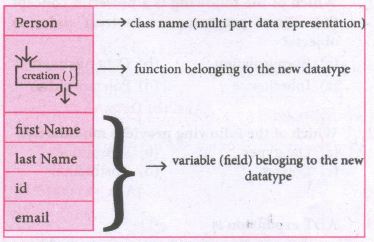
In the case of something more complex, like a person, we have a multí-item object where each item is a named thing: the first name, the last name, the id, and the email. One could use a list to represent a person:
Person = ['padmashri', 'Baskar', '994-222-1234', 'compsci@gmail.com']
| Let main() contains | |
| p1:=Person() | statement creates the object |
| first name:= "padmashri" | setting a field called firstName with value padamashri |
| last name:= "Baskar" | setting a field called last name with value Baskar |
| id:= "994-222-1234" | setting a field called id value 994-222-1234 |
| email="compsci@gmail.com" | setting a field called email with value compsci@gmail.com |
| -- output of firstName: Padmashri | |
(ii) The class (structure) construct defines the from for multi-part objects that represent a person.
(iii) Person is referred to as a class or a type, while pl is referred to as an object or an instance.
(iv) Here class Person as a Cookie cutter, and pl as a particular cookie, Using the cookie cutter you can make many cookies, Same way using class created many objects of that type.
(v) A class defines a data abstraction by grouping related data items. A class is not just data, it has functions defined within it, We say such functions are subordinate to the class because their job is to do thngs with the data of the class.
26.
(c) (+). Because + is not a set operations.
27.
The built-in number objects in Python supports integers, floating point numbers and complex numbers.
28.
The output of the program
7
10
29.
(i) To implement the concrete level of data abstraction, languages like Python provides a compound structure called Pair which is made up of list or Tuple.
(ii) The first way to implement pairs is with the List construct
30.
Data Consistency means that data values are the same at all instances of a database.
31.
Output:
>>>
10
line 7, in <module>
print(S._num)
AttributeError: 'Sample' object has no attribute '_num'
>>>
32.
33.
Syntax:
if < condition >:
statements-block 1
else:
statements-block 2
34.
35.
(i) Relation
(ii) Tuple
(iii) Attribute
36.
The commonly used interfaces are
(i) Python-C-API (API-Application Programming Interface for interfacing with C programs)
(ii) Ctypes (for interfacing with c programs)
(iii) SWIG (Simplified Wrapper Interface Generator- Both C and C++)
(iv) Cython (Cython is both a Python-like language for writing C-extensions)
(v) Boost. Python (a framework for interfacing Python and c++)
(vi) MinGW (Minimalist GNU for Windows)
37.
Tuple assignment is a powerful feature in Python. It allows a tuple variable on the left of the assignment operator to be assigned to the values on the right side of the assignment operator. Each value is assigned to its respective variable.
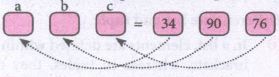
Example:
> > > (a, b, c) = (34, 90, 76)
> > > print(a.b,c)
34 90 76
38.
(i) Comment
(ii) Operands
(iii) 3
39.
(i) The syntax to define functions is close to the mathematical usage: the definition is introduced by the keyword let, followed by the name of the function and its arguments; then the formula that computes the image of the argument is written after an = sign. If you want to define a recursive function: use "let rec" instead of "let".
(ii) Syntax: The syntax for function definitions:
let rec fn a1 a2 ... an :;= k
(iii) Here the 'fn' is a variable indicating an identifier being used as a function name. The names 'a1' to 'an' are variables indicating the identifiers used as parameters. The keyword 'rec' is required if 'fn' is to be a recursive function; otherwise it may be omitted.
40.
(i) Data Visualization help users to analyze and interpret the data easily.
(ii) It makes complex data understandable and usable.
(iii) Various Charts in Data Visualization helps to show relationship in the data for one or more variables.
41.
Good Morning Bindu Madhavan.
42.
for i in range (1, 6) :
for j in range (65, 65 + i)
a = chr(j)
print a
print
43.
Asymptotic Notations are languages that uses meaningful statements about time and space complexity. The following three asymptotic notations are mostly used to represent time complexity of algorithms:
(i) Big O: Big O is often used to describe the worst -case of an algorithm.
(ii) Big \(\Omega \):Big Omega is the reverse Big O, if Big O is used to describe the upper bound (worst - case) of a asymptotic function, Big Omega is used to describe the lower bound (best -case).
(iii) Big \(\Theta \):When an algorithm has complexity with lower bound = upper bound, Say that an algorithm has a complexity O(n log n) and \(\Omega \) (n log n), it's actually has the complexity \(\Theta \) (n log n), which means the running time of that algorithm always falls in n log n in the best-case and worst-case.

12th Standard Syllabus & Materials
12th Standard
TN 12th Computer Applications வலையமைப்பு வடமிடல் Sample Question Papers Study Material - QB365 Set A
NEW12th Standard
TN 12th Computer Applications களப்பெயர் முறைமை (DNS) Sample Question Papers Study Material - QB365 Set A
NEW12th Standard
TN 12th Computer Applications வலையமைப்பு எடுத்துக்காட்டுகள் மற்றும் நெறிமுறைகள் Sample Question Papers Study Material - QB365 Set A
NEW12th Standard
TN 12th Computer Applications கணினி வலையமைப்பு ஓர் அறிமுகம் Sample Question Papers Study Material - QB365 Set A



Tamilnadu Stateboard 12th Standard Subjects

Maths

Chemistry

Physics

Biology
Computer Science

Business Maths and Statistics

Economics

Commerce

Accountancy

History

Computer Applications
Biology
Computer Technology
Computer Applications
Computer Science
Business Maths and Statistics
Commerce
Economics
Maths
Chemistry
Physics
Computer Technology
History
Accountancy

Tamil

English

French
Tamilnadu Stateboard Standards
