
 100% FREE ACCESS
12th Standard Syllabus & Materials
12th Standard
TN 12th Computer Applications மின்னணு தரவு பரிமாற்றம் Sample Question Papers Study Material - QB365 Set A
NEW12th Standard
TN 12th Computer Applications மின் - வணிக பாதுகாப்பு அமைப்புகள் Sample Question Papers Study Material - QB365 Set A
NEW12th Standard
TN 12th Computer Applications மின்னணு செலுத்தல் முறைகள் Sample Question Papers Study Material - QB365 Set A
NEW12th Standard
TN 12th Computer Applications மின் - வணிகம் Sample Question Papers Study Material - QB365 Set A
NEW12th Standard
TN 12th Computer Applications திறந்த மூல கருத்துருக்கள் Sample Question Papers Study Material - QB365 Set A
NEW12th Standard
TN 12th Computer Applications வலையமைப்பு வடமிடல் Sample Question Papers Study Material - QB365 Set A

Published on: 07/09/2019
Python and CSV Files
Download Tamil Nadu 12th Standard Computer Science question papers, model tests, one-mark questions, important questions, and public exam papers in PDF format. Free study materials and answer keys for TN State Board students.
Questions + Answers key
Take MCQ Computer Science Test
1.
2.
Which of the following creates an object which maps data to a dictionary?
listreader()
reader()
tuplereader()
DictReader ()
3.
What is the output of the following program? import csv
d=csv.reader(open('c:\PYPRG\ch13\city.csv'))
next(d)
for row in d:
print(row)
if the file called “city.csv” contain the following details
chennai,mylapore
mumbai,andheri
chennai,mylapore
mumbai,andheri
chennai,mumba
chennai,mylapore,mumbai,andheri
4.
Which of the following is a string used to terminate lines produced by writer()method of csv module?
Line Terminator
Enter key
Form feed
Data Terminator
5.
A CSV file is also known as a ….
Flat File
3D File
String File
Random File
6.
What is use of next() function?
7.
Mention the default modes of the File.
8.
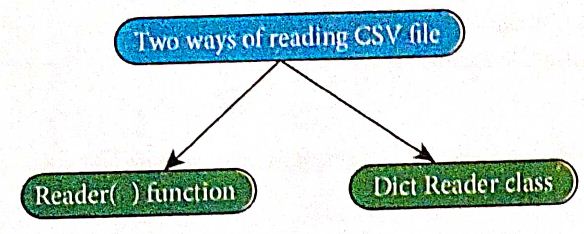
Mention the two ways to read a CSV file using Python.
9.
What is the difference between the write mode and append mode.
10.
Write a Python program to read a CSV file with default delimiter comma (,).
11.
Write a Python program to modify an existing file.
12.
Write the rules to be followed to format the data in a CSV file.
13.
Write a Python program to write a CSV File with custom quotes.
1.
(c)
2.
(d)
DictReader ()
3.
(b)
mumbai,andheri
4.
(a)
Line Terminator
5.
(a)
Flat File
6.
The row heading is get sorted, to avoid the first row should be skipped. This is can be done by using the command "next( )".
7.
The default is reading in text mode. In this mode, while reading from the file the data would be in the format of strings.
8.
9.
Write mode:
Open a file for writing. Creates a new file if it does not exist or truncates the file if it exists.
Append mode:
Open for appending at the end of the file without truncating it. Creates a new file if it does not exist.
10.
Program: To read a csv file with comma (,)
#importing csv
import csv
#opening the csv file which is in different location with read mode
with open('c:\\Pyprg\ \sample1.csv', 'r') as F:
#other way to open the file is
f=('C:\\pyprg\\sample1.csv', 'r')
reader = csv.reader(F))
#printing each line of the Data row by row.
print (row)
F. close( )
Output:
['SNO','NAME', 'CITY']
['12101', 'RAM', 'CHENNAI']
['12102', 'LAVANYA' "TIRUCHY']
['12103', 'LAKSHMAN', 'MADURAI']
11.
Program: To modify an existing file
import csv
row = ['3: 'Meena','Bangalore']
with open('Student.csv', 'r') as read file:
reader = csv.reader (read File)
lines = list (reader)
lines [3] = row
with open ('Student.csv', 'w') as write file:
# returns the writer object which converts the user data with delimiter.
writer = csv.writer(writefile)
#writerows() method writes multiple rows to a csv file
writer. writerows(lines)
readFile.close()
writeFile.close()
Output:
| Roll No | Name | City |
| 1. | Harshini, | Chennai |
| 2. | Adhith, | Mumbai |
| 3. | Meena, | Bangalore |
| 4. | Egiste | Tiruchy |
| 5. | Venkat, | Madurai |
12.
Rules to be followed to format data in a CSV file:
(i) Each record (row of data) is to be located on a separate line, delimited by a line break by pressing enter key.
For example:↲
xxx,yyy↲
↲denotes enter Key to be pressed
(ii) The last record in the file mayor may not have an ending line break.
For example:
ppp, qqq↲
yyy, xxx
(iii) There may be an optional header line appearing as the first line of the file with the same format as normal record lines. The header will contain names corresponding to the fields in the file and should contain the same number of fields as the records in the rest of the file.
For example:
field_name 1, field_name 2, field_name 3↲
aaa,bbb,ccc↲
zzz, yyy, xxx CRLF(Carriage Return and Line Feed)
(iv) Within the header and each record, there may be one or more fields, separated by commas. Spaces are considered part of a field and should not be ignored. The last field in the record must not be followed by a comma.
For example:
Red, Blue
(v) Each field mayor may not be enclosed in double quotes. If fields are not enclosed with double quotes, then double quotes may not appear inside the fields
For example:
"Red","Blue","Green"↲
Black, White, Yellow
(vi) Fields containing line breaks (CRLF), double quotes, and commas should be enclosed in double-quotes.
For example:
Red, ",", Blue CRLF
Red, Blue, Green
(vii) If double-quotes are used to enclose fields, then a double-quote appearing inside a field must be preceded with another double quote.
For example:
"Red, " "Blue", "Green",
White
13.
We can write the csv file with quotes, by registering new dialects using csv.register_dialect() class of csv module.
Program:
import csv
info = [['SNO: 'Person: 'DOB'],
['1', 'Madhu,' '18/12/2001'],
['2', 'Sowmya', '19/2/1998'],
['3', 'Sangeetha', '20/3/1999'],
['4', 'Eshwar', '21/4/2000'],
['5', 'Anand', '22/5/2001']]
csv.register_dialect('MyDialect',quoting=csv.QUOTE_ALL)
with open('c:\\pyprg\\ch13\\person.csv', 'w') as f:
writer = csv.writer(f, dialect='myDialect')
for row in info:
writer. writerow(row)
f.close()
Output
file: "Person.csv"
"SNO","Person", "DOB", "1", "Madhu", "18/12/2001"
"2, "Sowmya", "19/2/1998", "3", "Sangeetha",
"20/3/1999", "4", "Eshwar", "21/4/2000"
"5", "Anand", "22/5/2001".

12th Standard Syllabus & Materials
12th Standard
TN 12th Computer Applications களப்பெயர் முறைமை (DNS) Sample Question Papers Study Material - QB365 Set A
NEW12th Standard
TN 12th Computer Applications வலையமைப்பு எடுத்துக்காட்டுகள் மற்றும் நெறிமுறைகள் Sample Question Papers Study Material - QB365 Set A
NEW12th Standard
TN 12th Computer Applications கணினி வலையமைப்பு ஓர் அறிமுகம் Sample Question Papers Study Material - QB365 Set A
NEW12th Standard
TN 12th Computer Applications PHP-உடன் MySQL-ஐ இணைத்தல் Sample Question Papers Study Material - QB365 Set A



Tamilnadu Stateboard 12th Standard Subjects

Maths

Chemistry

Physics

Biology
Computer Science

Business Maths and Statistics

Economics

Commerce

Accountancy

History

Computer Applications
Biology
Computer Technology
Computer Applications
Computer Science
Business Maths and Statistics
Commerce
Economics
Maths
Chemistry
Physics
Computer Technology
History
Accountancy

Tamil

English

French
Tamilnadu Stateboard Standards
