
 100% FREE ACCESS
12th Standard Syllabus & Materials
12th Standard
TN 12th Computer Applications மின்னணு தரவு பரிமாற்றம் Sample Question Papers Study Material - QB365 Set A
NEW12th Standard
TN 12th Computer Applications மின் - வணிக பாதுகாப்பு அமைப்புகள் Sample Question Papers Study Material - QB365 Set A
NEW12th Standard
TN 12th Computer Applications மின்னணு செலுத்தல் முறைகள் Sample Question Papers Study Material - QB365 Set A
NEW12th Standard
TN 12th Computer Applications மின் - வணிகம் Sample Question Papers Study Material - QB365 Set A
NEW12th Standard
TN 12th Computer Applications திறந்த மூல கருத்துருக்கள் Sample Question Papers Study Material - QB365 Set A
NEW12th Standard
TN 12th Computer Applications வலையமைப்பு வடமிடல் Sample Question Papers Study Material - QB365 Set A

Published on: 22/01/2020
Python and CSV Files
Download Tamil Nadu 12th Standard Computer Science question papers, model tests, one-mark questions, important questions, and public exam papers in PDF format. Free study materials and answer keys for TN State Board students.
Questions + Answers key
Take MCQ Computer Science Test
1.
What are used a dictionary keys?
2.
What are the line terminator accepted by python CSV module?
3.
What is called modification?
4.
What is the use of dict( )?
5.
Write a note is register dialect ( ) method?
6.
What is the use of close ( ) method?
7.
What is the purpose of using 'with' statement along with open ( )?
8.
Differentiate text mode and binary mode.
9.
How the CSV filename represented in open command?
10.
How will prefect the CSV File data contains common by itself?
11.
How will you sort more than one column from a csv file?Give an example statement.
12.
What is use of next() function?
13.
Mention the default modes of the File.
14.
Mention the two ways to read a CSV file using Python.
15.
What is CSV File?
1.
csv.DictReader and csv.DictWriter take additional argument fieldnames that are used as dictionary keys.
2.
\r and \n are the line terminator accepted by Python CSV module.
3.
Making some changes in the data of the existing file or adding more data is called modification.
4.
The function dict ( ) is used to print the data in dictionary format without order
5.
(i) The whitespaces can be removed, by registering new dialects using csv.register_ dialect ( ) class of csv module.
(ii) A dialect describes the format of the csv file that is to be read, In dialects the parameter "skipinitialspace" is used for removing whitespaces after the delimiter.
6.
Closing a file will free up the resources that were tied with the file and is done using Python close ( ) method.
7.
If an exception occurs when you are performing some operation with the file, the code exits without closing the file. The best way to do this is using the "with" statement. This ensures that the file is closed when the block inside with is exited.
8.
| Text mode | Binary mode | |
| i) | The default is reading in text mode. | Binary mode returns bytes. |
| ii) | In this mode, while reading from the file the data would be in the format of strings. | This is the mode to be used when dealing with non-text files like image or exe files |
9.
File name or the complete path name can be represented either with in " " or in ' ' in the open command.
10.
If the fields of data in your CSV file contain commas, you can protect them by enclosing those data fields in double-quotes ("). The commas that are part of your data will then be kept separate from the commas which delimit the fields themselves.
11.
To sort by more than one column you can use itemgetter with multiple indices:
operator.itemgetter
Example:
sortedlist = sorted (data, key = operator. itemgetter(1))
12.
The row heading is get sorted, to avoid the first row should be skipped. This is can be done by using the command "next( )".
13.
The default is reading in text mode. In this mode, while reading from the file the data would be in the format of strings.
14.
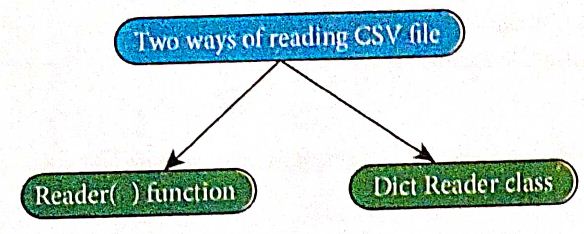
15.
A CSV file is a human readable text file where each line has a number of fields, separated by commas or some other delimiter.

12th Standard Syllabus & Materials
12th Standard
TN 12th Computer Applications களப்பெயர் முறைமை (DNS) Sample Question Papers Study Material - QB365 Set A
NEW12th Standard
TN 12th Computer Applications வலையமைப்பு எடுத்துக்காட்டுகள் மற்றும் நெறிமுறைகள் Sample Question Papers Study Material - QB365 Set A
NEW12th Standard
TN 12th Computer Applications கணினி வலையமைப்பு ஓர் அறிமுகம் Sample Question Papers Study Material - QB365 Set A
NEW12th Standard
TN 12th Computer Applications PHP-உடன் MySQL-ஐ இணைத்தல் Sample Question Papers Study Material - QB365 Set A



Tamilnadu Stateboard 12th Standard Subjects

Maths

Chemistry

Physics

Biology
Computer Science

Business Maths and Statistics

Economics

Commerce

Accountancy

History

Computer Applications
Biology
Computer Technology
Computer Applications
Computer Science
Business Maths and Statistics
Commerce
Economics
Maths
Chemistry
Physics
Computer Technology
History
Accountancy

Tamil

English

French
Tamilnadu Stateboard Standards
