
 100% FREE ACCESS
12th Standard Syllabus & Materials
12th Standard
TN 12th Computer Applications மின்னணு தரவு பரிமாற்றம் Sample Question Papers Study Material - QB365 Set A
NEW12th Standard
TN 12th Computer Applications மின் - வணிக பாதுகாப்பு அமைப்புகள் Sample Question Papers Study Material - QB365 Set A
NEW12th Standard
TN 12th Computer Applications மின்னணு செலுத்தல் முறைகள் Sample Question Papers Study Material - QB365 Set A
NEW12th Standard
TN 12th Computer Applications மின் - வணிகம் Sample Question Papers Study Material - QB365 Set A
NEW12th Standard
TN 12th Computer Applications திறந்த மூல கருத்துருக்கள் Sample Question Papers Study Material - QB365 Set A
NEW12th Standard
TN 12th Computer Applications வலையமைப்பு வடமிடல் Sample Question Papers Study Material - QB365 Set A

Published on: 16/09/2019
Download Tamil Nadu 12th Standard Computer Science question papers, model tests, one-mark questions, important questions, and public exam papers in PDF format. Free study materials and answer keys for TN State Board students.
Questions + Answers key
Take MCQ Computer Science Test
1.
Write a menu driven program to add or delete stationary items. You should use dictionary to store items and the brand.
2.
What is the purpose of range( )? Explain with an example.
3.
Explain about string operators in python with suitable example.
4.
Explain the following built-in functions.
(a) id ()
(b) chr ()
(c) round ()
(d) type ()
(e) pow ()
5.
Write a program to display all 3 digit odd numbers.
6.
Explain the characteristics of an algorithm.
7.
Explain input() and print() functions with examples.
8.
Write any Five Characteristics of Modules.
9.
What is a List? Why List can be called as Pairs. Explain with suitable example.
10.
Explain with example Pure and impure functions.
1.
class Mystore:
_prod_code = [ ]
_prod_name = [ ]
_cost price = [ ]
_prod quant = [ ]
def getdata(self):
selt.p= int (input ("Enter no. of products you need to store:"))
for x in range (self.p):
self._prod_code. append (int (input ("Enter Product Code:")))
self._prod_name. append (str (input ("Enter Product Name:"))
self._ cost_price. append (int (input ("Enter cost price:"))
def display (self):
print ("stock in stores")
print ("---------------------")
print ("Product Code\t Product name\t cost price")
print ("------------------")
for x in range (self.p):
print (self._prod_code [x], "\t\t", self._prod_name [x], "It \t", self._cost price [x])
print ("------------------------------")
def print_bill (self):
total_price =0
for x in range (self.p):
q= int(input("Enter the quantity for the product code %d:" %self._prod_code [x]))
self. Prod_quant.append (q)
total_price = total_price + self. _cost_price|x]* self._prod_quant [x]
print ("Invoice Receipt")
print ("---------------")
print ("Product Code\t Product Name\t Cost Price\t Quantity\t Total Amount")
print ("----------------")
for x in range (self.p):
print (self._Prod_code [x), "\t \t", self_prod-name[x], "\t \t",
self._cost_price[x], "\t \t", self._prod-quant [x], "\t \t",
self._prod_quant[x]*self._cost price [x])
print ("-------------------")
print ("Total Amount =", total_price")
S=Mystore ()
S.getdata ()
S.display ()
S.print_bill ()
Output:
Enter no. of products you need to store: 5
Enter Product code: 101
Enter Product Name: Notebook
Enter cost price: 25
Enter Product code: 201
Enter Product Name: pencil
Enter cost price: 35
Enter Product code: 301
Enter Product Name: Pen
Enter cost price: 35
Enter Product code: 401
Enter Product Name: Colour Pencils
Enter cost price: 50
Enter Product code: 501
Enter Product Name: Sketches
Enter cost price: 120
Stock in stores
| Product Code | Product Name | Cost Price |
| 101 | Notebook | 25 |
| 201 | Pencil | 35 |
| 301 | Pen | 35 |
| 401 | Colour pencils | 50 |
| 501 | Sketches | 120 |
Enter the quantity for the product code 101:10
Enter the quantity for the product code 201:15
Enter the quantity for the product code 301:10
Enter the quantity for the product code 401:20
Enter the quantity for the product code 501:10
Invoice Receipt
| Product Code | Product Name | Cost Price | Quantity | Total Amount |
| 101 | Notebook | 25 | 10 | 250 |
| 201 | Pencil | 35 | 15 | 525 |
| 301 | Pen | 35 | 10 | 350 |
| 401 | Colour pencils | 50 | 20 | 1000 |
| 501 | Sketches | 120 | 10 | 1200 |
| Total amount = 3325 |
2.
The range( ) is a function used to generate a series of values in Python. Using range( ) function, you can create list with series of values. The range( ) function has three arguments.
Syntax:
range (start value, end value, step value)
where,
(i) start value - beginning value of series. Zero is the default beginning value.
(ii) end value - upper limit of series. Python takes the ending value as upper limit - l.
(iii) step value - It is an optional argument, which is used to generate different interval of values.
Example:
Generating whole numbers upto 10.
for x in range (1,11):
print(x)
Output:
1
2
3
4
5
6
7
8
9
10
Creating a list with series of values :
(i) Using the range( ) function, a list can be created with series of values, To convert the result of range( ) function into list, one more function called list ( ). The list ( ) function makes the result of range ( ) as a ist.
(ii) Syntax: List_Varibale = list ( range ( ))
(iii) Example
Generating first 10 even numbers
for x in range (2, 11, 2):
print (x)
Output:
2
4
6
8
10
(iv) In the above code, list( ) function takes the result of range( ) as Even_List elements. Thus, Even_List list has the elements of first five even numbers. Similarly, we can create any serie of values using range( ) function. The following example explains how to create a list with squares of first 10 natural numbers.
Example : Generating squares of first 10 natural numbers
for x in range(1,11) :
S=x**2
squares.append(s)
print (squares)
Output : [1, 4, 9, 16, 25, 36, 49, 64, 81, 100)
3.
String Operators:
Python provides the following operators for string operations. These operators are useful to manipulate string.
(i) Concatenation (+):
Joining of two or more strings is called as Concatenation. The plus (+) operator is used to concatenate strings in python.
Example:
>>> "welcome" + "Python"
'welcome python'
(ii) Append (+ =):
Adding more strings at the end of an existing string is known as append. The operator += is used to append a new string with an existing string.
Example:
>>> str1 = "welcome to"
>>> str1 + = "Learn Python"
>>> print (str1)
Welcome to Learn Python
(iii) Repeating (*):
The multiplication operator (*) is used to display a string in multiple number of times.
Example:
>>> str1= "welcome "
>>> print (str1 *4)
Welcome Welcome Welcome Welcome
(iv) String slicing:
Slice is a substring of a main string.
A substring can be taken from the original string by using [ ] operator and index or subscript values. Thus [ ] is also known as slicing operator. Using slice operator, we have to slice one or more substrings from a main string.
General format of slice operation:
str[start:end]
Where start is the beginning index and end is the last index value of a character in the string. Python takes the end value less than one from the actual index specified.
Example: I
Slice a single character from a string
>>>str 1 = "THIRUKKURAL"
>>>print (str 1 [0])
T
(v) Stride when slicing string:
Example :
>>>str1 = "Welcome to learn python"
>>>print(str1[::-2])
Output :
nhy re teolW
4.
| Function | Description | Syntax | Example |
| (a) id() | id () Return the "identity" of an objects i.e. The address of the object in memory. Note: The address of x and y may differ in your system. |
id(object) | x = 15 y = 'a' print('address of x is :',id(x)) print ('address of y is :',id (y)) Output: address of x is: 1357486752 address of y is: 13480736 |
| (b) Chr() | Returns the Unicode character for the given ASCII value. This function is inverse of ord() function. | Chr(i) | c=65 d=43 print(chr(c)) print(chr(d)) Output: A + |
| (c) round() | Returns the nearest integer to its input. 1. First argument(number) is used to specify the value to be rounded. |
round (number, [ndigits]) | x = 17.9 y = 22.2 z = -18.3 print('x value is rounded to', round(x)) print('y value ic rounded to', round(y)) print ('z value is rounded to', round(z)) |
| (d) type() | Returns the type of object for the given single object. Note: This function used with single object parameter. |
type(object) | x = 15.2 y = 'a' s = true print(type(x)) print(type(y)) print(type(s)) Output: < class 'float' > < class 'str' > < class 'bool' > |
| (e) pow() | Returns the computation of ab i.e. (a**b) a raised to the power of b. | pow(a, b) | a = 5 b = 2 c = 3.0 print(pow(a, b)) print(pow(a, c)) print(pow(a + b, 3)) Output: 25 125.0 343 |
5.
for i in range (100, 1000):
if a%2==1:
print b
Output :
101,103,105,107,...........,997,999
6.
| Input | Zero or more quantities to be supplied. |
| Output | At least one quantityis produced. |
| Finiteness | Algorithms must terminate after finite number of steps. |
| Definiteness | All operations should be well defined. For example operations involving division by zero or taking square root for negative number are unacceptable. |
| Effectiveness | Every instruction must be carried out effectively. |
| Correctness | The algorithms should be error free. |
| Simplicity | East to implement. |
| Unambiguous | Algorithm should be clear and unambiguous. Each of its steps and their inputs/outputs should be clear and must lead to only one meaning. |
| Feasibility | Should be feasible with the avaliable resources. |
| Portable | An algorithm should be generic, independent of any programming language or an operating system able to handle all range of inputs. |
| Independent | An algorithm should have step-by-step directions, which should be independent of any programming code. |
7.
1. The print () Function:
ln Python, the print() function is used to display result on the screen. The syntax for print ( ) is as follows:
Example:
print ("String to be displayed as output")
print (variable)
print ("String to be displayed as output", variable)
print ("String1", variable, "string 2", variable, "String 3",....)
Example:
>>> print("Welcome to python Programming'")
welcome to Python Programoming
>>>x = 5
>>> y = 6
>>> z= X+Y
>>> print (z)
>>> print ("The sum =", z)
The sum = 11
>>>print ("The sum of", x, "and", y, "is", z)
The sum of 5 and 6 is 11.
The print () evaluates the expression before printing it on the monitor. The print () displays an entire statement which is specified within print(). Comma(,) is used as a separator in print () to print more than one item.
input () function:
In Python, input) function is used to accept data as input at run time. The syntax for input () function is
Syntax:
Variable = input ("prompt String')
Where, prompt string in the Syntax is a statement or message to the user, to knowwhat input can be given.
If a prompt string is used, it is displayed on the monitor; the user can provide expected data from the input device. The input() takes whatever is typed from the Keyboard and stores the entered data in the given Variable. If prompt string is not given in input() no message is displayed on the screen, then, the user will not know what is to be typed as input.
Example 1:
input () with prompt String
>>>City=input ("Enter your city:")
Enter your city: Madurai
>>>print ("I am from", city)
I am from Madurai
Example 2:
input() without prompt string
>>> city = input ()
Rajarajan
>>>print ("I am from", city)
I am from Rajarajan
in Example 2, the input () is not having any pronmpt string, thus the user will not know what is to be typed as input. If the user inputs irrelevant data as given in the above example then the output will be unexpected. So, to make your program more interactive, provide prompt string with input (). The input () accepts all data as string or characters but not as numbers. Ifa numerical value is entered, the input values should be explicitly converted into numeric data type. The int) function is used to convert string data as integer data explicitly.
Example 3:
X=int (input ("Enter Number 1:"))
Y= int (input ("Enter Number 2:" ))
print ("The Sum =", x + y)
Output:
Enter Number 1: 34
Enter Number 2:56
The Sum =90.
8.
The following are the desirable characteristics of a module.
(i) Modules contain instructions, processing logic, and data.
(ii) Modules can be separately compiled and stored in a library.
(iii) Modules can be included in a program.
(iv) Module segments can be used by invoking a name and some parameters.
(v) Module segments can be used by other modules.
9.
List :
(i) List is constructed by placing expressions within square brackets separated by commas. Such an expression is called a list literal. List can store multiple values. Each value can be of any type and can even be another list.
Example for List [10, 20].
(ii) The elenments of a list can be accessed in two ways. The first way is via our familiar method of multiple assignment, which unpacks a list into its elements and binds each elenment to a different name.
Ist := [10, 20]
x, y = lst
(iii) In the above example x will become l0 and y will become 20. A second method for accessing the elements in a list is by the element selection operator.
(iv) Unlike a list literal, a square-brackets expression directly following another expression does not evaluate to a list value, but instead selects an element from the value of the preceding expression.
lst [0]
10
Ist [1]
20
(v) In both the example mentioned above mathematically we can represent list similar to a set.
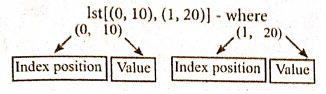
Pair :
Any way of bundling two values together into one can be considered as a pair. Lists are a common methodto do so. Therefore List can be called as Pairs.
10.
Pure functions:
(i) Pure functions are functions which will give exact result when the same arguments are passed.
(ii) For example the mathematical function sin (0) always results 0. This means that every time you call the function with the same arguments, you wil always get the same result.
(iii) A function can be a pure function provided it should not have any external variable which will alter the behavior of that variable.
let us see an Example:
Let square x : =
return: x * x
(iv) The above function square is a pure function because it will not give different results for same input.
(v) There are various theoretical advantages of having pure functions. One advantage is that if a function is pure, then if it is called several times with the same arguments, the compiler only needs to actually call the function once.
Example:
let length s:=
i:= 0
let i:= 0;
if i<strlen (s) then
-- Do something which doesn't affect s
++1
(vi) If it is compiled, strlen (s) is called each time and strlen needs to iterate over the whole of 's'. If the compiler is smart enough to work out that strlen is a pure function and that 's' is not updated in the loop, then it can remove the redundant extra calls to strlen and make the loop to execute only one time.
(vii) From these what we can understand, strlen is a pure function because the function takes one variable as a parameter, and accesses it to find its length. This function reads external memory but does not change it, and the value returned derives from the external memory accessed
Impure functions:
(i) The variables used inside the function may cause side effects through the functions which are not passed with any arguments. In which cases the function is called impure function.
(ii) When a function depends on variable or functions outside of its definition block, you can never be sure that the function will behave the same every time it's called. For example, the mathematical functions random ( ) will give different outputs for the same function call.
Example:
let randomnumber:=
a := random()
if a > 10 then
return: a
else
return: 10
(iii) Here the function Random is impure as it is not sure what will be the result when we call the function

12th Standard Syllabus & Materials
12th Standard
TN 12th Computer Applications களப்பெயர் முறைமை (DNS) Sample Question Papers Study Material - QB365 Set A
NEW12th Standard
TN 12th Computer Applications வலையமைப்பு எடுத்துக்காட்டுகள் மற்றும் நெறிமுறைகள் Sample Question Papers Study Material - QB365 Set A
NEW12th Standard
TN 12th Computer Applications கணினி வலையமைப்பு ஓர் அறிமுகம் Sample Question Papers Study Material - QB365 Set A
NEW12th Standard
TN 12th Computer Applications PHP-உடன் MySQL-ஐ இணைத்தல் Sample Question Papers Study Material - QB365 Set A



Tamilnadu Stateboard 12th Standard Subjects

Maths

Chemistry

Physics

Biology
Computer Science

Business Maths and Statistics

Economics

Commerce

Accountancy

History

Computer Applications
Biology
Computer Technology
Computer Applications
Computer Science
Business Maths and Statistics
Commerce
Economics
Maths
Chemistry
Physics
Computer Technology
History
Accountancy

Tamil

English

French
Tamilnadu Stateboard Standards
