
 100% FREE ACCESS
12th Standard Syllabus & Materials
12th Standard
TN 12th Maths Applications of Matrices and Determinants Sample Question Papers Study Material - QB365 Set A
NEW12th Standard
TN 12th Computer Applications மின்னணு தரவு பரிமாற்றம் Sample Question Papers Study Material - QB365 Set A
NEW12th Standard
TN 12th Computer Applications மின் - வணிக பாதுகாப்பு அமைப்புகள் Sample Question Papers Study Material - QB365 Set A
NEW12th Standard
TN 12th Computer Applications மின்னணு செலுத்தல் முறைகள் Sample Question Papers Study Material - QB365 Set A
NEW12th Standard
TN 12th Computer Applications மின் - வணிகம் Sample Question Papers Study Material - QB365 Set A
NEW12th Standard
TN 12th Computer Applications திறந்த மூல கருத்துருக்கள் Sample Question Papers Study Material - QB365 Set A

Published on: 09/03/2020
12th Standard Computer Application English Medium All Chapter Book Back and Creative Five Mark Questions
Download Tamil Nadu 12th Standard Computer Applications question papers, model tests, one-mark questions, important questions, and public exam papers in PDF format. Free study materials and answer keys for TN State Board students.
Questions + Answers key
Take MCQ Computer Applications Test
1.
What are the Limitations of E-Commerce
2.
List out the Benefits of E-Commerce to a business organisation.
3.
Explain in detail about Open Source Software and Free Software.
4.
Explain in detail about network simulation tool - NS2
5.
Explain the advantages of UPI?
6.
Write in detail about the classification of smart cards
7.
List the steps involved in Crimping process for making Ethernet cables
8.
What are the three types of syntax in PHP? Explain them in detail.
9.
Tabulate the ER diagram notations
10.
Explain the following
1. Primary Key
2. Foreign Key
3. Candidate Key
4. Super Key
5. Composite key
11.
Write the steps to print a document
12.
What are the methods to unthread a threaded block? Explains.
13.
Draw the structure of UN/EDIFACT message
14.
How Multimedia used in Libraries, Information centers and Archives? Explain
15.
How Multimedia is used in Business systems?
16.
What is Distributed Denial of Service (DDoS) Attacks? Or What is network flooding?
17.
Describe the subsets of payment fraud.
18.
Write a notes on Hierarchical name space?
19.
List the basic rules of Domain Name?
20.
Explain file uploading method in PHP.
21.
Write short notes on Fourth Generation of Mobile Networks.
22.
Explain in detailed about Third Generation of Mobile Networks.
23.
Write in detail about The Interner Explosion?
24.
What are the attributes of Social networking?
25.
Write a PHP program to display week days using switch case statement.
26.
Write a PHP code to display the days of weak using switch statement
27.
Write a short note on parameters of mysqli_connect( ) function?
28.
Write about structure of EDIFACT.
29.
30.
Briefly explain SSL.
31.
Explain encryption technology.
32.
Explain in detail : Unified payments interface
33.
34.
35.
Write about the development and growth of Electronic Commerce.
36.
Explain various Open Source License
37.
List out the Benefits of Open Source Software
38.
Explain about RJ45 connector.
39.
What is meant by Registered Jack? Explain briefly the types of Jacks.
40.
Explain the Name server and its types.
41.
Classify and Explain the IP address and its classification.
42.
Explain about the development, merits and demerits in Mobile networks.
43.
Difference between TCP/IP and OSI Reference Model.
44.
Explain the growth of the computer networking
45.
Define computer networking and Internet. Explain different developments on computer network and Internet.
46.
Explain MySQLi Queries with examples.
47.
Explain the Database error handling and management process in PHP?
48.
Explain in detail of File handling functions in PHP.
49.
Discuss in detail about HTML form controls.
50.
Explain working of loops in array
51.
Explain ‘for’ loop with example.
52.
Explain if else statement in PHP. With an example.
53.
Explain the Function of Conditional Statements in PHP.
54.
Explain Indexed array and Associate array in PHP.
55.
Explain Function concepts in PHP.
56.
Discuss in detail about PHP data types.
57.
Explain client side and server side scripting language.
58.
Write a note on open source software tools available in MySQL Administration.
59.
List the basic concepts of ER Model with suitable example
60.
Write the steps to draw a star using polygon tool?
61.
Explain the tools in PageMaker toolbox.
62.
Explain in detail Techniques of Animation.
63.
Explain in detail Process of Multimedia.
1.
(i) E-Commerce also has some limitations. The following are the major drawbacks of E-Commerce for a business organization.
(ii) In E-Commerce, the customer should wait between placing the order and having the product in hand.
(iii) The doubts about the period of returning, will the returned goods reach source in time, refunds, exchange, and postage make one tiresome.
(iv) Privacy issues are serious in E-Commerce.
(v) In E-Commerce generating consumer information is inevitable. Not all the companies use the personal information they obtained to improve services to consumers.
(vi) Many companies misuse the information and make money out of it.
(vii) It is true that privacy concerns are a critical reason why people get cold feet about online shopping Physical product disputes are a major disadvantage in E-Commerce.
(viii) In online shopping, we would see only the pictures the seller had chosen for us.
(ix) The Internet needs to survive the trip from the supplier to the consumer. This makes the customers turn back towards traditional supply chain arrangements.
(x) It is pretty hard to knock on their door to complain or seek legal recourse. Further, even if the item is sent, it is easy to. start bothering whether or not it will ever arrive on time.
2.
(i) The e-commerce system is operated on all days and all day.
(ii) It is able to conduct business 24 x 7.
(iii) People can interact with businesses at the time of their convenience.
(iv) Speed is a major advantage of E-Commerce.
(v) Advanced Electronic communications systems allow messages to reach across the world instantaneously
(vi) The Internet is too easy to 'shop around' for products and services that may be more cheaper and effective It provides an opportunity to bu at reduced costs.
(vii) It is possible to, explore the Internet, identify original manufacturers, thereby bypass wholesalers and achieve a cheaper price.
(viii) Customers can have a wide choice by comparing and evaluating the same product at different websites before making a purchase decision.
(ix) Customers can shop from home or anywhere at their convenience.
(x) Payments can also be made through online.
3.
(i) OSS is slightly different from free software.
(ii) Both deal with the ability to download and modify software without restriction or charge.
(iii) In contrast, the OSS criteria, which the Open Source Initiative developed a decade later, place more emphasis on the modification of software, and the consequences of altering source code, licensing, and distribution.
(iii) Obviously, the two overlap; some would say the differences between OSS and free software are more philosophical than practical.
(iv) However, neither should be confused with freeware.
(v) Freeware usually refers to proprietary software that users can download at no cost, but the whose source code cannot be changed.
4.
Network simulation
In a computer network, network simulation is a method whereby a software program models the activities of a network by calculating the communication between the different network objects such as(routers, nodes, switches, access points, links, etc.).
Network simulator
(i) A network simulator is a software program that replicates the functioning of a computer network.
(ii) In simulators, the computer network is typically demonstrated with devices, traffic, etc. and the performance is evaluated.
Normally, users can then adapt the simulator to accomplish their precise analysis needs.
Network Parameters:
The network parameters define the state of the network (node placement, existing links) and the events (data transmissions, link failures, etc.).
Trace files:
A significant output of the simulation is the trace files. Trace files can document every incident that happened in the simulation and are used for examination.
NS2: NETWORK SIMULATOR version 2.
(i) It was considered explicitly for exploration in network communication and event-driven opensource simulator in computer.
(ii) OTCL and C++ used to create and run NS2.
(iii) NS2 works on Windows and Linux platforms that support wired or wireless network and also use the command line interface as a user interface.
API:
(i) API a pure event base software tool with super simulation design, it has more models which help the user to get desired output easily.
5.
(i) Immediate money transfers through mobile device round the clock 24 x 7.
(ii) Can use single mobile application for accessing multiple bank accounts
(iii) Single Click Authentication for transferring of fund.
(iv) It is not required to enter the details such as Card no, Account number, IFSC etc. for every transaction.
(v) Electronic payments will become much easier without requiring a digital wallet or credit or debit card
6.
(i) Contact smart cards
1. Contact smart cards have a contact area of approximately 1 square centimeter, comprising several gold plated contact pads.
2. These pads provide electrical connectivity only when inserted into a reader, which is also used as a communications medium between the smart card and a host. e.g. a point of sale terminal(POS).
(ii) Contactless smart cards
1. Contactless smart card is empowered by RF induction technology.
2. Unlike contact smart cards, these cards require only near proximity to an antenna to communicate.
3. Smartcards, whether they are contact or contactless cards do not have an internal power source.
4. Instead, they use an inductor to capture some of the interrupting radio-frequency signal, rectify it and power the card's processes.
7.
(i) Cut the cable with desired length
(ii) Strip the insulation sheath about 1 inch from both ends of the cable and expose the twisted pair wires
(iii) After stripping the wire, untwist the smaller wires and arrange them into the proper wiring scheme, T568B preferred generally.
(iv) Bring the wires tighter together and cut them down so that they all have the same length (1/2 inch).
(v) Insert the all 8 colored wires into the eight grooves in the connector. The wires should be inserted until the plastic sheath is also inside the connector.
(vi) Use the crimping tool to lock the RJ45connector on the cable. It should be strong enough to handle manual traction. Now it is ready for data transmission.
(vii) Use a cable tester to verify the proper connectivity of the cable, if need.
8.
Default Syntax:
The default Syntax begins with " < ?php"and closes with "? > ".
.JPG)
Short open Tags
(i) The Short open Tags begins with " < ?" andcloses with "? > " .
(ii) But admin user has to enable Short style tags settings in php.ini file on the server.
.JPG)
HTML Script embed Tags:
HTML Script embed Tags looks just like HTML scripts tags.
.JPG)
9.
| ER Component | Description (how it is represented) | Notation |
|---|---|---|
| Entity - Strong | Simple rectangular box | .JPG) |
| Entity - Weak | Double rectangular boxes | .JPG) |
| Relationships | Rhombus symbol - strong | .JPG) |
| Between Entities | Rhombus within rhombus - Weak | .JPG) |
| Attributes | Ellipse symbol connected to the entity | .JPG) |
| Key Attribute for Entity | Underline the attribute name inside Ellipse | .JPG) |
| Derived Attribute for Entity | Dotted ellipse inside main ellipse | .JPG) |
| Multivalued Attribute for Entity | Double Ellipse | .JPG) |
10.
1. Primary Key:
(i) This key of relational table identifies each record in the table in a unique way.
(ii) A primary key which is a combination of more than one attribute is called a composite primary key.
(iii) The candidate key that is chosen to perform the identification task is called the primary key
2. Foreign Key:
(i) A foreign key is a "copy" of a primary keythat has been exported from one relation into another to represent the existence of a relationship between them
(ii) A foreign key is a copy of the whole of its parent primary key i.e if the primary key is composite, then so is the foreign key.
(iii) Foreign key values do not (usually) have to be unique.
(iv) Foreign keys can also be null.
(v) A composite foreign key cannot have some attribute(s) null and others non-null.
3. Candidate Key:
(i) Each super key is called a candidate key.
(ii) A candidate key is selected from the set of Super Key.
(iii) While selecting candidate key, redundant attributes should not be taken.
(iv) The candidate key is also known as minimal super keys.
4. Super Key:
(i) An attribute or group of attributes, which is sufficient to distinguish every tuple in the relation from every other one is known as Super Key.
5. Composite Key (Compound Key):
(i) A key with more than one attribute to identify rows uniquely in a table is called Composite key.
(ii) This is also known as Compound Key.
11.
1. Choose File > Print in the menu bar (or) Press Ctrl+ P in the keyboard.
The Print Document dialog box appears.
2. Choose the settings in the Print Document dialog box as
a. Select the printer from the Printer drop-down list box.
b. Choose the pages to be printed in the Pages group box by selecting one of the following available options :
All: This option prints the whole document
Ranges: This option prints individual pages by the page number or a range of pages.
12.
Method - 1:
(i) Select the blcok that you wish to unthread with the pointer tool. Click on Edit > Cut in the menu bar. (the block disappear).
(ii) Now click on the Edit ⟶ Paste in the menu bar.
(iii) The block will reappear in the same position, but it is now an unthreaded block
Method - 2:
(i) Select the block that you wish to unthread with the pointer tool
(ii) Then choose the Text tool and select all the menu bar.(the blok disappear).
(iii) Now click the insertion point within an existing threaded block.
(iv) Then click on Edit ⟶ Paste in the menu bar.
(v) The text will be added in this block.
13.
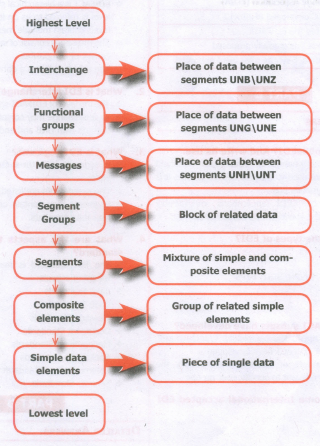
14.
Multimedia technologyis adopted by the libraries in various functions like multimedia kiosks, user orientation programs etc. Following is the brief account of multimedia technology applications in libraries.
1. Multimedia Kiosk
(i) Kiosk is a free-standing furnished equipped multimedia computer that allows users to retrieve information via a touch screen. It is commonly used in airports and other public locations to provide directions and few mandatory information's.
(ii) In an library, Kiosk is usually located nearthe entrance of the library, used for displaying announcements, reading lists, comments and suggestions from library users and other information's about operations and programs of the library.
2. Webcasting and Video Conferencing
(i) The live telecast of real time programs through internet is known as Webcasting.
(ii) Video conferencing isthe process of conducting conference between more than two participants at different sites by using computer networks to transmit audio and video data.
3. User Orientation Program
(i) The role of multimedia plays anvital role in training the librarians in schools, colleges and universities due to its interactivity. Hence, it is used in depth subject training to their faculties .
4. In-house Production of Multimedia Resources and E-publishing
(i) Many libraries produce multimedia resources in-house, to serve the parent organization.Introduction of CD/DVD and their writershas solved few of the problem of libraries in storing or achieving the materials.
(ii) Multimedia tools along with CD-writers is made possible to publish information from dlfferent sources in a most easy to use and acceptable form tolibrary users.
5. Digital Multimedia Libraries
(i) Information's are available indigital formats that include digital books, scann ed images, graphics and digitized audlo-visuat clips etc
(ii) Initially digital library projects were based only on textual data, later it was on all other media elements like images, audio and video recordings were also integrated under the collection of digital library.
15.
(i) Business applications for multimedia include presentations, training, and internet protocols and soon.
(ii) The marketing and advertising agencies are using animation techniques for sales promotion.
(iii) Multimedia is used very commonly for building employee ID.
(iv) High resolution projectors are common for multimedia presentations on the road.
(v) Cell phones and personal digital assistants with Bluetooth and Wi-Fi communication technology makes multimedia communication for business more effiCiently.
16.
(i)It is a process of taking down an E-Commerce site by sending continuous overwhelming request to its server .
(ii) This attack will be conducted from numerous unidentified computers using botnet. This attack will slow down and make the server inoperative.
(iii) DDoS attacks is also called as network flooding.
17.
Payment frauds have subsets like Friendly fraud (when customer demands false reclaim or refund), Clean fraud (when a stolen credit card is used to make a purchase) Triangulation fraud (fake online shops offering cheapest price and collect credit card data) etc.
18.
(i) To avoid the major disadvantage of Flat namespace, hierarchical namespace is used in large
(ii) Hierarchical namespace is where the name is made up of several parts.
a. First part may represent the nature of the organization.
b. Second part may represent the name of the organization, and
c. Third part may represent the department of the organization and so on.
(iii) In this way the power to control the namespace can be decentralized.
(iv) The centralized authority can be given to nature and then to the name of the organization and so on.
(v) To achieve hierarchical namespace, Domain Name Space was designed.
19.
(i) Domain can consist of Alphabets a through z, and the digits 0 through 9.
(ii) Hyphens are allowed, but hyphens can not be used as first character of a domain name.
(iii) Spaces are not allowed
(iv) Special symbols (such as !, $, &, _ and so on) are not permitted .
(v) Domain names have the minimum length of 2, and the maximum length of 63 characters. The entire name may be at most 253 characters long.
(vi) Domain names are not case-sensitive. (It may be upper, lower or mixing of both case letters).
20.
1. File upload is the best feature to select one file from the local machine to server machine.
2. Form tag is used to mention a method as POST or GET and encrypt attribute mentioned as "multipart/form-data".
3. In the < Input > tag mention type="file" attribute shows the input field as a file-select control, with a "Browse" button next to the input control.
4. The form above sends data to a file.
5. In Server machine "php.ini" file, search for the file_uploads directive, and set it to On: "file_uploads = On"
6. After submitting the upload button the request reaches to the file.
7. In the file $FILES variable collects all uploaded file information such as name of the file, size of the file and extension of the file etc.
8. All the details are checked thoroughly and the errors are saved in an array variable.
9. The file finally moves under the image directory if the array error variable is empty.
21.
(i) 4G is at the research stage. 4G was based on an adhoc networking model where there was no need for a fixed infrastructure operation.
(ii) Adhoc networking requires global mobility features (e.g. Mobile IP) and connectivity to a global IPv6 network to support an IP addressfor each mobile device. Logicallyroaming in assorted IP networks (for example: 802.11 WLAN,
(iii) GPRSand UMTS) were be possible with higher data rates, from 2Mbit/s to 10-100Mbit/s, offering reduced delays and newly services.
(iv) Mobile devices will not expect on a fixed infrastructure, they will require enhanced intelligence to self-configure in adhoc networks and having routing capabilities to route over packets switched network.
22.
(i) Third generation of mobile systems merges different mobile technology standards, and uses higher frequency bands for transmission and Code Division Multiple Access to delivery data rates of up to 2Mbit/s supports multimedia services (MMS: voice, video and data) .
(ii) European standard is UMTS(Universal Mobile Telecommunication Systems).
(iii) Mobile phones systems continue to use digital transmission with SIM authentication for billing systems and for data incorruption.
(iv) Data transmission used a WCDMA. WCDMA stands for (Wideband Code Division Multiple Access).
(v) One technique to obtain data rates between 384kbit/s and 2048kbit/s. Few 3G suppliers use ATM (Asynchronous Transfer Mode) for their 'over the air' network with in MPLS(Multiprotocol Label Switching) or IP for theirs backbone network.
(vi) Mobility still supported at layer2, and hence like 2G it still prohibits seamless roaming beyond heterogeneous access networks and routing domains.
(vii) The transmission were band frequencies are between 1900 and 2200 MHz. All UMTS license holders at the UK holds a 20-year license with the condition that 80% population coverage is achieved by 31 December 2007.
(viii) The present third generation licensed operators in the UK can be seen below as at August 2004.
23.
The Internet Explosion
(i) Internet is simply defined as the World Wide Web connection of individual networks which operated by academic, industry, government, and private parties.
(ii) The Internet served to interconnect with laboratories engaged at government research, and from 1994 it is expanded to serve millions of user and a multiple purpose in all parts of this universe.
(iii) In few years, the Internet built itself as a highly powerful platform that changed their way we do business and the way we communicate. Internet promotes as the universal source of information of billions of people, at work, at home, at school. Internet gave high communication medium, has given an international, "Globalised" at all dimension of the world.
(iv) Internet is growing all the time. By two things, have marked its evolution nowadays the mobile technology and social web. These two innovations have been changed the people life style to use Internet. We may find many communities in social web. Facebook was created in 2004 but gowned into world wide network all over more than 2,230 million active users.
(v) Mobile technology on hand made possible to great reach of Internet and increase the Internet user all over the world.
(vi) The Internet allows all to be democratic in mass media. Anyone can have a webpage in
(vii) Internet with very low investment. Similarly any business can reach a very large market directly, economically and fast, no matter of location or size of their business. Almost anyone that who san read and write can have a access and a presence in World Wide Web with very low investment. People everywhere can express and publish their ideas and opinions via blogging.
24.
These social networks share several attributes in common:
Membership.
Social nets all generally requires user to register namesand accounts for avoid duplicate and secrecy so many public networks offer free registration, but some charge fees for their premium services. Private networks (such as BANK ACCOUNT HOLDERS groups) restrict registration to people who meet certain eligibility criteria.
Content contribution.
These networks allow members to easily share comments, movies, music, short films and/or photos with others.
Frequent return visits.
Healthy social net takes a centers around a base of members who check in regularly to contribute theirs and also for new updates.
Human relationship building.
The common goal of most social networks is allowing the interactions that build stronger connections with in communities of people
25.
< ?php
$n = "February";
switch($n) {
case "January":
echo "Its January";
break;
case "February":
echo "Its February";
break;
case "March":
echo "Its- March";
break;
case "April":
echo "Its April";
break;
case "May":
echo "Its May";
break;
case "June":
echo "Its June";
break;
case "July":
echo "Its July";
break;
case "August":
echo "Its August";
break;
case "September":
echo "Its September";
break;
case "October":
echo "Its October";
break;
case "November":
echo "Its November";
break;
case "December":
echo "Its December";
break;
default:
echo "Doesn't exist";
}
? >
26.
< ?php
$today=date("D'') ;
switch($today)
{
case"Mon":
echo"Today is Monday. ";
break;
case''Tue'':
echo''Today is Tuesday.";
break;
case''Wed'':
echo''Today is Wednesday.";
break;
case''Thu'':echo''Today is Thursday.";
break;
case"Fri":
echo''Today is Friday. Party tonight.";
break;
case"Sat":echo''Today is Saturday.";
break;
case"Sun":
echo''Today is Sunday.";
break;
default:
echo"No information available for that day.";
break;
}
? >
27.
(i) Four Parameters are used to connect to the Database server.
(ii) They are
1.$ servername -> Database Server server IP address
2.$ susername -> Database Server User Name
3.$ password -> Database Server Password
4.$ DB_Name -> Database Name
28.
EDIFACT Structure:
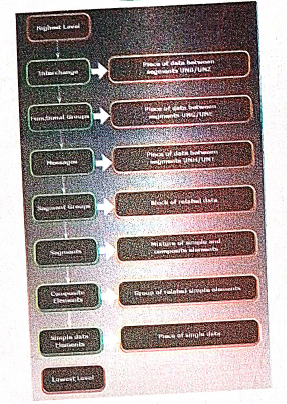
EDIFACT is a hierarchical structure where the top level is referred to as an interchange, and lower levels contain multiple messages. The messages consist of segments, which in turn consist of composites. The final iteration is a data element.
29.
30.
1. The most common cryptographic protocol is Secure Sockets Layers (SSL). SSL is a hybrid encryption protocol for securing transactions over the internet. The SSL standard was developed by Netscape in collaboration with Mastercard, Bank of America, MCI and silicon graphics.
2. Today, all browsers in the market support SSL, and most of the secure communication are proceeded through this protocol. SSL works completely hidden for the users, who does not have to intervene in the protocol.
3. The only thing the user has to do is make sure on URL starts with https://instead of http:// where "s" obviously means secured.
4. SSL was renamed as TLS (Transport Layer Security) in 2001.
31.
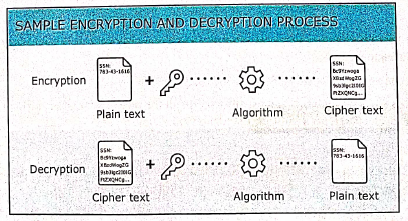
Encryption technology is an effective information security protection. It is defined as converting a plaintext into meaningless ciphertext using encryption algorithm thus ensuring the confidentiality of the data. The encryption or decryption process use a key to encrypt or decrypt the data. At present two encryption technologies are widely used. They are symmetric key encryption system and an asymmetric key encryption system. Thre figure below shows the Data Encryption and Decryption process:
32.
Unified Payments Interface:
(i) Unified Payments Interface (UPI) is a real-time payment system developed by National Payments Corporation of India (NCPI) to facilitate inter-bank transactions. It is simple, secure and instant payment facility.
(ii) This interface is regulated by the Reserve Bank of India and used for transferring funds instantly between two bank accounts through mobile (platform) devices. http://www.npci.org.in/
(iii) It also provides the "peer to peer" collect request which can be scheduled and paid as per requirement and convenience.
(iv) UPI is developed on the basis of Immediate Payment Service (IMPS). To initiate a transaction, UPI applications use two types of address - global and local.
(v) Virtual payment address (VPA) also called as UPI-ID, is a unique ID similar to email id (e.g. name@ bankname) enable us to send and receive money from banks.
(vi) The bank or the financial institution allows the customer to generate VPA using phone number associated with Aadhaar number and bank account number. VPA replaces bank account details thereby completely hides critical information.
(vii) The MPIN (Mobile, banking Personal Identification number) is required to confirm each paymernt.
Advantages :
(i) Immediate money transfers through mobile device round the clock 24 x 7.
(ii) Can use single mobile application for accessing multiple bank accounts
(iii) Single Click Authentication for transferring of fund.
(iv) It is not required to enter the details such as Card no, Account number, IFSC etc. for every transaction.
(v) Electronic payments will become much easier without requiring a digital wallet or credit or debit card.
33.
34.
35.
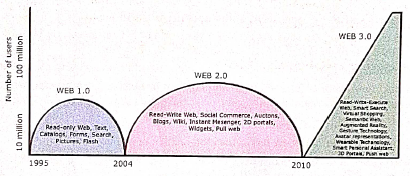
(i) The figure which shows the evolution of E-Commerce. Dotcom companies of first wave are mostly American companies.
(ii) The First Wave of Electronic Commerce 1995-2003: The Dotcom bubble had attracted huge investments to first wave companies.
(iii) Initially when web was 1.0 and network technology was in its starting stage, the band-width and network security was very low.
(iv) Only EDI and unstructured E-mail remained as a mode of information exchange between business.
(v) The Second Wave of Electronic Commerce 2004-2009: The second wave is the rebirth of E-Commerce after the dotcom burst.
(vi) The rapid development of network technologies and web 2.0 (interactive) offered the consumers more choices of buying. The increased web users nourished E-Commerce business (mostly B2C) during the second wave.
(vii) The second wave is the business wave globally considered wave in many countries with many languages. Language translation and currency conversion were focused here.
(viii) The Third Wave of Electronic Commerce 2010 - Present: This wave is brought on by the mobile technologies. It connects users via mobile devices for real-time and on-demand transactions.
(ix) Not only the information is filtered by time, but also the geographic coordinates are used to screen the specific location-tailored information properly.
(x) The term Web 3.0 summarize the various characteristics of the future Internet which include Artificial Intelligence, Semantic Web, Generic Database etc, ...
36.
Types of open source licenses are:
(i) Apache License 2.0
(ii) BSD 3-Clause 'New' or 'Revised' license
(iii) BSD 2-Clause "simplified" or "Free BSD" license
(iv) GNU General Public License (GPL)
(v) GNU Library or "Lesser" General Public License (LGPL)
(vi) MIT license
(vii) Mozilla Public License 2.0
(viii) Common Development and Distribution License
(ix) Eclipse Public License
(i) Apache License:
Apache License version 2.0 rights can be applied to both copyrights and patents. Some of the license can be applied only to copyrights and not patents some details of Apache License and Rights are never ending, Worldwide Authority of Rights, Rights for No few or Royalty, Rights are Irrevocable.
(ii) BSD License:
BSD license is a part of a family of the free software license that have much fewer restrictions in distribution as compared to other free software license. Two important version are:
(1) The New BSD License/The NEW Modified BSD License (3 clause "new" or "Revised" license)
(2) The simplified BSD License/Free BSD License (2-clause "simplified" or "free BSD" license)
Both have been accepted as open source license by the open source initiative.
The primary difference between the New and the simplified BSD License is that simplified BSD license emits this clause.
(iii) GNU General Public License:
The General Public License are copy the software, Distribution, charge a fee, change the code base.
(iv) GNU Lesser General Public License:
It grants fewer right to work than GNU GPL. It's generally appropriate for libraries and projects that want to allow linking from non-GPL and non-open-source software. GPL. requires any other project or source that is using the project under GPL also be licensed as GPL: GPL licensed code can't be used for paid and proprietary software.
(v) MIT License:
It's the shortest and most used popular open source license. The main giving of this licnese are copy, modify, merge, publish, distribute, sublicense, etc.
37.
OSS projects are collaboration opportunities that improve skills and build connections in the field.
Domains that developers can contribute to the open source community include:
1. Communication tools.
2. Distributed revision control systems.
3. Bug trackers and task lists.
4. Testing and debugging tools.
(i) There are many open source softwares. So, we can select and use any software that suits our needs.
(ii) The complete options of the software can be used without any cost and restrictions.
(iii) We can share our ideas with the team. write the required code and share it with many.
(iv) As we can identify the programming techniques of group members, we can learn many ideas and make our program writing skills more efficient.
(v) The coding in open source software are being groomed by many enthusiastical members of the groups. So, if we report problems that we have in the program they are quickly mended by the group's effort.
(vi) As we can make changes to the open source software, we can add the most required features in the software.
(vii) Many open source software are very user friendly.
38.
1. The RJ45 connector is a small plastic-cup which will be used to connect the wire inside the connector and ready to connect the internet.
2. In RJ45 the "RJ" stands for the Registered Jack and the "45" stands for the number of interface standard in the cable.
3. Each RJ45 connector has eight pins and connected to each end of the Ethernet cable.
4. Since it has 8 position, 8-contact (8P8C) modular plug, it is also known as 8P8C connector.
5. These plugs (connectors) are then inserted into Ethernet port of the network card.

6. The RJ45 connector has eight small jack inside to connect eight small wires of the patch cable and these are of eight different colors.
7. Wiring schemes specifies how the wires to be connected with RJ45 connector.
8. There are 2 wiring schemes available to terminate the twisted-pair cable on each end, which are T-568A and T-568B.
9. Although 4 pairs of wires are available in the cable, Ethernet uses only 2 pairs: Orange and Green.
10. The other 2 colors (blue and brown) can be used ISDN (or) phone connections.
39.
Registered Jacks: A Registered Jack commonly known as RJ is a network interface used for network cabling, wiring and jack construction. The primary function of the registered jack is to connect different data equipment and telecommunication devices. The commonly known registered jacks are RJ-11, RJ-45, RJ-21,and RJ-28. The registered jack refers to the male physical connector (Plug), a female physical connector (Jack) and it's wiring.
Types of Registered Jacks:
(i) RJ-11 :
It is the most popular modern form of registered jack. It is found in home and used for landline phones. There are 6 pins where the two pins give the transmission configuration, the two pins give the receiver configuration and the other two pins will be kept for reserved.
(ii) RJ-14 and RJ-61:
The RJ-14 is also used in telephone lines like RJ-11. It has 6 pins whereas the RJ-61 has 8 pins. RJ-61 uses the twisted pair cable to connect the network devices.
(iii) RJ-21:
The RJ-21 connector has 50 pins with 25 pins at one end and 25 pins at the other end. It is also called as champ connector or Amphenol connector. The Amphenol is a connector manufacturer.The RJ-21 interface is typically used for data-communication trucking applications.
40.
Name Server:
(i) Name Server is a main part of the Domain Name System (DNS). It is a software program that run on a physical system.
(ii) It has the DNS database consisting of domain names and their corresponding IP addresses. Name Server translates the domian name to IP address.
(iii) There is a need to store a large number of domain names for worldwide usage, so plenty of servers are used in the hierarchical manner.
(iv) Name servers do the important task of searching the domain names. While you searching for a website, Local Nameserver (provided by ISP) asks the different name servers until one of them finds out the answer.
(v) At last it returns IP address for that domain name. Your computer is now connected to the requested webpage.
Types of Name Servers:
There are three types of Name servers which control the entire Domian Name System:
(i) Root Name Server - top level server which contains entire DNS tree, maintained by ICANN. There are 13 servers.
(ii) Primary Name Server - contains a zone resource records. These records are updatable by domain name holders.
(iii) Secondary Name server - contains a copy of primary server files. This server has no authority to update, but reduce the workload of primary server by sharing the queries.
41.
IP Address:
(i) Internet Protocol (IP) address is simply the logical address in the network layer.
(ii) IP address is used to find the host system in the whole network. Due to increasing the number of systems in a network there is a need of more addresses. It leads to two addressing methods i.e., IPv4 and IPv6.
IPv4 address:
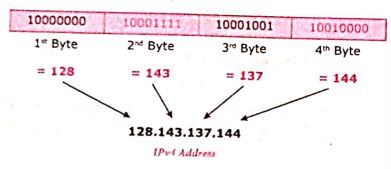
(i) The IPv4 address is a 32-bit unique address given to a computer on the network. So no two systems on the network can have the same IP address.
(ii) If the network has p connactions, then 'p' addresses should be there. An address space is the total number of addresses that can be made by that protocol (IP).
(iii) It is determined by the number of bits that the protocol use. If the protocol uses 'n' bits then the address space of that protocol would be '2nd' addresses.
(iv) So, the number of addresses that can be formed in IPv4 is 232. there are two ways to represent the IP address
(v) In binary notation the address is expressed as 32-bit binary values. For E.g. 0011100110001001 00111000 00000111
(vi) In dotted-decimal notation the address is written in decimal format separated by dots(.). For Eg: 128.143.137.144
IPv6 Address:
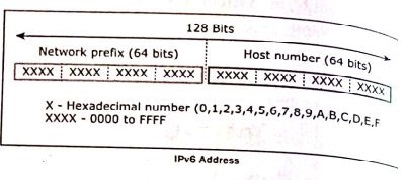
(i) The IPv6 address is a 128-bit unique address given to a computer system. The number of addresses that can be formed IPv6 is 2128.
(ii) In IPv6 address, the 128 bits are divide into eight 16-bits blocks. Each block then changed ito 4-digit Hexadecimal numbers separated by colon symbols.
(iii) E.g. 2001:0000:3231:DFE1:0063:0000:0000:FEFB.
42.
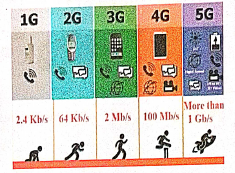
Development of Mobile Networks :
The generations of mobile networks are as follows.
(i) First Generation(1G) 1981- NMT launch
(ii) Second Generation(2G) 1991-GSM Launch
(iii) Second to Third Generation Bridge (2.5)2000 — GPRS launch
(iv) Third Generation( 3G) 2003- UK 3G launch
(v) Fourth Generation (4 G) 2007
(vi) Fifth Generation (5G) 2019+
Merits of Mobile Networks :
(i) It provides both voice/data services.
(ii) It connects both fixed and wireless telephone users.
(iii) It is used in areas where cables cannot be laid out due to its wireless nature.
(iv) It is easy to maintain.
(v) It is easy to upgrade the equipments.
(vi) The ‘mobile and fixed subscribers are connected immediately with cellular network as soon as mobile phones are switched on.
(vii) All the handshake signals between mobile and base station are automatically exchanged.
Demerits of Mobile Networks :
(i) Cost
(ii) Vulnerable to Security risks
(iii) Additional training is needed to use new technology.
(iv) Cyber Crime.
43.
| No. | TCP/IP | OSI |
| 1. | It is client server model. ie. when the client requests for service it is provided by the server. | It is conceptual model. |
| 2. | It is standard protocol used for every network including the internet. | It is not a protocol but a reference model used for understanding and designing the system architecture. |
| 3. | It is four layered model. | It has seven layers. |
| 4. | TCP / IP follows vertical approach. | OSI model supports horizontal approach. |
| 5. | It is Tangible | It is not Tangible |
| 6. | It is follows top to bottom approach | It is follows a bottom-up approach |
44.
1. The uses of the computer networking are:
2. It is used in business and home
3. Growth on popularity of cloud storage and cloud computing.
4. On behalf of buying physical copies of games music and movies, increasingly downloading and buy digital license their need via internet.
5. Developments on mobile networking infrastructure both deployments of 4G and 3G networks that will allow the people in their developed areas.
6. Allows it to their smart mobile phones as video broadcasting system and as mobile television.
7. Some of the people underlying and staying connected all the times, whenever they are at the workplace, via a home network, via publish WiFi hotspots or smart phone.
8. 4G LTE mobile network was not reached by many parts of world, of the industry of telecommunication has been hard working on the development of their next generation :"5G" cellular communication technology. This 5G intense to boost up the speed the mobile connections dramatically.
9. Artificial intelligence will help to maintain, manage, and protect it.
10. This Artificial network powering algorithms with become most intelligent:
11. It might find faster and reliable methods of anticipating threats and cleaning networks.
12. Artificial intelligence able to be a better predict traffic as it collects and analyses data in real time, some of network managers were better prepared for big event such as the world cup, Olympics, Valentines day which often put on the Internet under pressure.
45.
A set of computers connected together for the purpose of sharing resources is called as computer networks.
Internet is the most common resource shared everywhere.
Developments: (Computer networking)
1. Here computer networks were faster, the Internet became full sterength and wireless communications has been transformed the way of business performed.
2. By the usage of latest technologies, such as cloud computing, are being used to allow globally without sacrificing security or limitating user access.
3. In E-banking we can pay or receive money from or to the customer may be easily done via gateways or by online payments were much easier.
4. Company renewals, license, other certificates bill payments, receipts, invoice, stock maintenance, can be done.
5. Network at home plays main role to access all such as E-banking, E-learning, E-governance, E-health, telemedicine, call centre video conferencing, digitalization of memories, can easy to access and use by avoiding lot of times and stacked at queue.
6. From the house we ordered delicious food from various hotels and restaurants at time without delay can be brought via Internet.
7. Mobile computers, such as laptop, tablet, and hand held computers were fastest growing segment.
8. Very fast and easiest way to cover all the people, who they are connected in social network media. For example whatsapp, facebook, twitter blogs, pintrest, linkedIn, classmates and so on. Through the above social media we share our taughts in different formats and different size of files.
Developments: (Internet)
1. Now a days the Internet plays a vital role.
2. Internet provides all the information and services to us.
3. Now a days we order anything and everything (food, clothes, stationaries, vegetables etc) through online (Internet)
4. Online services providers are flipkart, Amazon, snap deal etc to buy products via internet and have the product at door steps.
5. Online payments help in sending and receiving money via payment gateway using this Internet.
6. Internet is running all time 24x7 - 365 days.
7. A person who sale or buy anything and anytime that is main advantage of Internet.
8. E-Governance made easier to collect their certificates through online.
9. E-Banking plays an important role in our day to day life, via Internet.
10. The speed and efficiency was very much better than of done by counter at bank.
11. Now a days online payment were done via Internet.
12. For example on older days internet explorer, yahoo, being were powerful search engine.
13. Google stepped in with user friendly gmail, youtube, googledrive, google maps, etc.. and are useful applications.
46.
Performing Queries: The main goal of MySQL and PHP connectivity is to retrieve and manipulate the data from MySQL database server. The SQL query statements are help in PHP MySQL extension to achieve the objective of MySQL and PHP connection. “mysqli_query” is a function, that helps to execute the SQL query statements in PHP scripting language.
Syntax:
mysqli_query(“Connection Object”,“SQL Query”)
Example:
$con=mysqli_connect(“localhost”,“my_user”,“my_password”,“Student_DB”);

$sql=“SELECT student_name,student_age FROM student”;mysqli_query($con,$sql);
47.
Error handling is the process of catching errors raised by our program and then taking appropriate action.
Different error handling methods are
Simple "die ()" statements;
Custom error and error triggers;
Error reporting.
(i) Using the die () function:-
Example:
$file = fopen("Welcome.txt", "r");
?>
Above example shows a simple script that opens a text file. If the file does not exists you might get an error like this.
Warning:
fopen (welcome.txt) [function.fopen]: failed to open stream: No such file or directory in
C:\webfolder\test.php on line 2
To prevent the user from getting an error message like the one above, test whether the file before we
try to access it.
if (!file_exists ("welcome.txt"))
{
die ("File not found");
} else
{
file = fopen ("Welcome.txt", "r");
}
Now if the file does not exists you get an error like this
File not found
The code above is more efficient than the earlier code, because it uses a simple error handling mechanism to stop the script after the error.
However, simply stopping the script is not always the right way to go. Let's take a look at alternative php functions for handling errors.
(ii) Creating a custom Error Handler
Creating a custom error handler is quite simple. Simply create a special function that can be called when an error occurs in PHP.
This function must be able to handle a minimum of two parameters (error level and error message) but can accept up to five parameters.
Syntax:
error_function (error_level, error_message, error_file, error_line, error_context)
(iii) Error report levels:
These error report levels are the different types of error the user defined error handler can be used for:
E_WARNING, E_NOTICE, E_USER_ERROR, E_USER_WARNING, E_USER_NOTICE,... etc.
Set Error Handler:
The default error handling for PHP is the built-in error handle;
Example:
To use our custom error handle for all errors:
set_error_handler("Custom Error");
48.
File handling is an important activity of all web application development process.
Files are processed for different tasks using the following events :
(i) PHP Open a File,
(ii) PHP Read a File,
(iii) PHP Close a File,
(iv) PHP Write a File,
(v) PHP Appending a File and
(vi) PHP uploading a File.
(1) PHP Open a File : fopen() is a system function available in PHP. This function helps to open a file in the server. It contains two parameters one for the file and the other one specifies in which mode the file should be opened (Read/Write).
Syntax:
$file_Object= fopen("FileName", "Read/
WriteMode") or die("Error Message!");
Example:

$myfile = fopen("Student.txt", "r")
or die("Unable to open file!");
?>
(ii) PHP Read a File: The fread() function reads from an open file. The file object comes from fopen function.
Syntax:
fread($file_Object,filesize("FileName"));
Example:
fread($myfile,filesize("Student.txt"));
?>
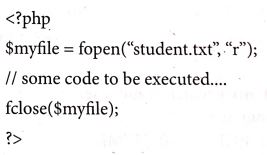
(iii) PHP Close a File: The fclose() function is used to close an opened file. The file object comes from fopen function.
Syntax:
fclose($file_Object);
Example:
(iv) PHP write a File: The fwrite() function is used to write to a file.
Syntax:

49.
The following control are available in HTML forms:
(i) Text inputs
(ii) Buttons
(iii) Checkbox
(iv) Radio box
(v) File Select
(vi) Form Tag
(i) Text inputs contain textbox and text area controls.
(ii) Buttons may contain Submit button, Reset button and Cancel Button.
(iii) Checkbox is a important feature which selects more than one value from the HTML form.
(iv) Radio box is similar to checkbox but one value can be chosen at a time.
(v) File select is the best feature to select one file from the local machine to server machine at a time.
(vi) Form tag is used to mention a method (POST or GET) and control the entire form controls in the HTML document.
50.
1. The array concepts in looping structure is used in for each loop.
2. For each loop is exclusively available in PHP. It works only with arrays.
3. The loop iteration depends on each KEY value pair in the array. In for each, loop iteration the value of the current array element is assigned to $value variable and the array pointer is shifted by one until it reaches the end of the array element.
4. For each works only on arrays and objects, and will issue an error when you try to use it on a variable with a different data type or an uninitialized variable.
Syntax:
for each ($ array as $ value)
{
code to be executed;
}
1. The for each statement is used to loop through arrays.
2. 'For each' pass the value of the current array element is assigned to $value and the array pointer is moved by one and in the next pass next element will be processed.
Example:
$array = array (1, 2, 3);
{
echo "Value is $value
";
}
?>
Output:
Value is 1
Value is 2
Value is 3
51.
'for loop' is called as the entry-check loop.
The for loop is used to execute a block of code a specific number of times.
Syntax:
for (initialization; condition; increment / decrement)
{
//code to be executed;
}
The initialization part is executed only once at the beginning of the loop. It is used to initialize variables. The condition is evaluated before each iteration of the loop. If it is true, the code block is executed. If it is false, the loop is terminated. The increment/ decrement part is executed after each iteration of the loop. It is used to update variables.
Example 1
To print the numbers from 1 to 5 in ascending order
for ( i = 1; i<=5; i++)
{
echo i. "<br>";
}
Output:
1
2
3
4
5
Example 2
To print the numbers from 5 to 1 in descending order
for (i = 5; i<=1; i--)
{
echo i. "<br>";
}
Output:
5
4
3
2
1
52.
If else statement in PHP:
If statement executes a statement or a group of statements if a specific condition is satisfied by the user expectation. When the condition gets false (fail) the else block is executed.
Syntax:
if (condition)
{
Execute statement(s) if condition is true;
}
else
{
Execute statement(s) if condition is false;
}
Example
$Pass_Mark=35;
$Student_Mark= 70;
if ($Student_Mark>= $Pass_Mark){
echo "The Student is eligible for the promotion";
}
else {
echo "The Student is not eligible for the promotion";
} ?>
53.
(i) If statement in PHP: If statement executes a statement or a group of statements if a specific condition is satisfied as per the users expectation. This is the simplest PHP's conditional statement and can be written in the following form.
Syntax:
if (condition)
{
// code to be executed if condition is true;
}
(ii) If else statement in PHP: The if statement evaluates a condition and executes a set of code if the condition is true and another set of code if the condition is false.
Syntax:
if(condition)
{
//True-block;
}
else
{
//False-block;
}
(iii) If-elseif-else statement in PHP: If-elseif-else statement is a combination of if-else statement. Here multiple conditions can be checked and action is based on the result of the condition.
Syntax:
if (Condition 1)
{
//code to be executed if condition 1 is true;
}
elseif (condition2)
{
//code to be executed if condition1 is false and condition2 is true;
}
elseif (condition3)
{
// code to be executed if condition1 and condition2 are false and condition3 is true;
}
else
{
//code to be executed if all conditions are false;
}
Switch case: The switch case is an alternative to the if.. elseif.. else statement which executes a block of code corresponding to the match.
Syntax:
switch (expression)
case value1:
//code to be executed if expression= value1; break;
case value2;
//code to beexecuted if expression = value2; break;
...
default:
//code to be executed if cexpression is not equal to any of the values;
}
54.
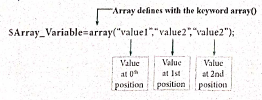
Indexed array:
An indexed array is an array that uses a numeric index to access its elements. The index is a number that starts at 0 for the first element and increases by 1 for each subsequent element.
We can create an indexed array in PHP,
(i) by enclosing a comma-separated list of values in square brackets (or)
(ii) by using the array() function.
Syntax
$array Variable=[element1, element2, element 3, ... elementN];
(or)
$arrayVariable array( element1, element2, element3.... elementN);
Examples
(a) $fruits = ['apple, "banana, 'orange'];
(b) $fruits = array('apple, "banana, 'orange');
Associative array
An associative array is a data structure that store a collection of key-value pairs. The keys are used to identify the values, and the values can be of any data type. The keys in an associative array are often called "labels" because they label or identify the corresponding values.
We can create an associative array in PHP,
(i) by enclosing a comma-separated list of key-value pairs in square brackets (or)
(ii) by using the array() function.
Syntax
| $arrayVariable [ "key1" => "value1", "key2"=>"value2", "key3"=>"value3" "key N=> "valueN" ]; |
Example
$student [
"Name" => "Ram",
"Age" => 25,
"Place" => "Trichy"
];
55.
Function in PHP:
A block of segment in a program that performs a specific operation such as Insert, Execute, Delete, Calculate etc.
A function is a type of sub-routine or procedure in a program.
The function can be divided into three types as follows.
(i) User defined Function
(ii) Pre-defined or System defined or Built-in Function
(iii) Parameterized Function
(i) User defined Function
PHP gives a privilege to user to write own specific operation inside of existing program module.
Two important steps the programmer has to create for users defined functions are
(a) Function Declaration
(b) Function Calling
(a) Function Declaration
A user defined function declaration begins with the keyword "Function".
User can write any custom logic inside in function block.
Syntax:
function functionName()
{
custom logic code to be executed;
}
(b) Function Calling
A function declaration part will be executed by a call to the function.
Programmer has to create function calling part inside the respective program.
Syntax:
functionName();
(ii) Pre-defined or System defined or built-in Function
Built-in functions are functions that exist in PHP installation package.
Functions can either return values when called or can simply perform an operation without returning any value.
Example:
rename_function()
This function renames original name to new name.
Parameter is also called as arguments just like variables.
Arguments are mentioned after the function name and inside the parenthesis.
There is no limit for sending arguments, just separate them with a comma notation.
Examples :
Parameterized function with one argument, two arguments respectively.
(i) function School Name ($sname)
(ii) function School Name ($sname, $strength)
56.
PHP scripting language supports 13 primitive data types.
PHP supports the following data types.
(i) String
(ii) Integer
(iii) Float
(iv) Boolean
(v) Array
(vi) Object
(vii) NULL
(viii) Resource
(i) String
String is a collection of characters within the double quotes ("") or single quotes ().
Space is also considered as a character.
Example:
$x= "Computer Application";
$y='Computer Application';
(ii) Integer
Data type which contains non decimal numbers.
Example (i) $x=59135;
Example (ii)
$x = 59135;
var_dump($x);
The var_dump() function returns type and value about variables in PHP.
(iii) Float
Float is a data type which contains decimal numbers.
Example Sx=19.15;
$x = 19.15;
var_dump($x);
?>
(iv) Boolean
Boolean is a data type which returns two possible states, TRUE or FALSE.
Example:
$x = true;
$y = false;
echo $x;
echo $y;
(v) Array
Array is a data type which has multiple values in single variable.
Example:
$cars
= array("Computer", "Laptop", "Mobile");
var_dump(Scars);
?>
Output:
array(3) {[0]=> string(5) "Computer" [1]=>
string(3) "Laptop" [2]=> string(6) "Mobile"}
(vi) Object
Object is a data type which contains information about data and function inside the class.
Example:
class School {
function marks() {
$this->sec =
}
}
// create an object
$school_obj= new School ();
// show object properties
echo Sschool_obj ->sec;
?>
(vii) NULL
It is a special data type which contains a single value: NULL.
Example:
$x="COMPUTER APPLICATION!";
$x = null;
var_dump($x);
?>
Output: NULL
(viii) Resources
It is a specific variable, it has a reference to an external resource.
These variables hold specific handlers to handle files and database connections.
// Open a file for reading
$handle = fopen("note.txt", "r");
var_dump($handle);
echo "
";
// Connect to MySQL database server with default setting
$link= mysql_connect("localhost", "root", "");
var_dump($link);
?>
57.
Client side scripting language:
1. Code that is present in a client's HTML page.
2. The language used for client scripting is Java script. It is the most widely used language for client-side scripting.
3. It is compatible and has the ability to run on any browsers.
4. The browser then downloads that code temporarily and processes it without the server.
5. As a result, it is now faster and easier to do client side scripting and leaving less word for the server.
Server side scripting language:
1. Server side scripting usually happens on the back-end of a website.
2. Server side scripting creates a path for the website to the database and all behind the scene work which organizes and runs a website. In server side scripting, the responses can be customized based on requirement of the user.
3. Example of server side programming language is PHP scripting language.
4. It can be executed via an interpreter which is installed in the webservers or CGI (Common Gateway Interface).
5. The most of the webservers such as Apache Tomcat, Microsoft IIS (Internet Information Server) supports the PHP interpreter module.
58.
MYSQL is a database management system and it is ease of use.
Types of Software tools:
(i). Many open source tools are available in the market to design the database in a better and efficient manner.
(ii). PhpMyAdmin is most popular for Web-Administration.
(iii). The Popular Desktop Application tools are MySQL Workbench and HeidiSQL.
1. PHPMYADMIN (Web Admin):
(i). This administrative tools of MySQL is a web application written in PHP.
(ii). They are used predominantly in web-hosting.
(iii). The main feature is providing web interface, importing data from CSV and exporting data to various formats.
(iv). It generates live charts for monitoring MySQL server activities like connections, processes and memory usage.
(v). It also helps in making the complex queries easier.
2. MySQL Workbench (Desktop Application)
(i). It is a database tool used by developers and DBA's mainly for visualization.
(ii). This tool helps in data modeling, development of SQL, server configuration and backup for MySQL.
(iii). Its Basic release version is 5.0 and current version 8.0 support all operating systems.
(iv). The SQL editor of this tool is very flexible and comfortable in dealing multiple results set.
3. HeidiSQL (Desktop Application)
(i). This open source tools helps in the administration of better database systems.
(ii). It supports GUI (Graphical User Interface) features for monitoring server host, server connection, Databases, Table, Views, Triggers and Events.
59.
ER Modeling basic concepts: The basic concepts of ER model consists of
1. Entity or Entity type
2. Attributes
3. Relationship
(i) Entity (or) Entity type
(i) An Entity can be real-world object (or) animation which is easily identifiable by anyone even by a common man.
(ii) Example: In a company's database Employee, HR, Manager are considered as entities, where each of these entity will be having their own attributes.An entity is represented by a rectangular box.

Types of Entity:
(a) Strong Entity
(b) Weak Entity
(c) Entity Instance
(i) Strong Entity
1. Strong entity is not depend on other entity and it will have a primary key.
2. It is represented by one rectangle.

3. For Example Roll Number. Everyone Roll Number varies and it will not be same.
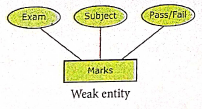
(ii) Weak Entity
1. A weak entity is dependent on other entities and it doesn't have any primary key like strong entity.
2. It is represented by double rectangle.

3. For Example, "Marks" is the weak entity and there is no primary key or unique id. It is depend on the existence of the other entity.
(iii) Entity Instance
1. Instances are the values for the entity. So an Entity Instance denotes the category values for the given entity.
Entities Instances
| Entities | Instances |
| Human | Male, Female |
| Animals | Dog, cats, lion |
| Jobs | Engineer, Doctor, Lawyer |
| Actors | Ajith, Vijay, Vikram |
| Electronics | Laptop, Mobile |
2. Attributes
An attribute is the information about that entity and it will entity describe, quantity, qualify, classify and specify and entity. An attribute will always have a single value, that value can be a number or character or string.
Types of attributes :
(i) Key Attribute
(ii) Simple Attributes
(ii) Composite Attributes
(iv) Single Valued Attribute
(v) Multi Valued Attribute
3. Relationship Type
In ER Model, relationship exists between two entities. Three types of relationships are available and the Entity-Relationship (ER) diagram is based on the three types listed below
(i) One-to-One relationship: Consider two entities A and B. One-to-one (1:1) relationship is said to exist in a relational database design, if 0 or 1 instance of entity A is associated with 0 or 1 instance of entity B, and 0 or 1 instance of entity B is associated with 0 or I instance of entity A.
(ii) One-to-Many relationship: Consider two entities A and B. One-to-many (1:N) relationship is said to exist in a relational database design, for 1 instance of entity A there exists 0 or 1 or many instances of entity B, but for 1 instance of entity B there exists 0 ur 1 instance of entity A.
(iii) Many-to-Many relationship: Consider two entities A and B. many-to-many (M:N) relationship is said to exist in a relational database design, for 1 instance of entity A there exists 0 or 1 or many instances of entity B, and for 1 instance of entity B there exists 0 or 1 or many instance of entity A.
In reality one-to-one are in less usage, where as one-to-many and many-to-many are commonly used. However in relational database, many-to-many are converted into one-to-many relationships.
60.
Drawing a star using polygon tool.
To draw a Star
(i) Click on the Polygon tool from the toolbox. The cursor changes to a crosshair.
(ii) Click and drag anywhere on the screen. As you drag, a Polygon appears.
(iii) Release the mouse button when the Polygon is of the desired size.
(iv) Choose Element → Polygon settings in the menu bar. Now polygon settings dialogue box appears.
(v) Type 5 in the Number of sides text box.
(vi) Type 50% in star inset textbox.
(vii) Click OK. Now the required star appears on the screen.
61.
| Tool | Tool Toolbox | Cursor | Use |
| Pointer tool | .JPG) |
.JPG) |
Used to select, move, and resize text objects and graphics. |
| Text tool | .JPG) |
.JPG) |
Used to type, select, and edit text. |
| Rotating tool | .JPG) |
.JPG) |
Used to select and rotate objects |
| Cropping tool | .JPG) |
.JPG) |
Used to trim imported graphics |
| Line tool | .JPG) |
.JPG) |
Used to draw straight lines in any direction |
| Constrained line Tool | .JPG) |
|
Used to draw vertical or horizontal lines |
| Rectangle tool | .JPG) |
|
Used to draw squares and rectangles |
| Rectangle frame tool | .JPG) |
|
Used to create rectangular place holders for text and graphics |
| Ellipse tool | .JPG) |
|
Used to draw circles and ellipses |
| Ellipse frame tool | .JPG) |
|
Used to create elliptical place holders for text and graphics |
| Polygon tool | .JPG) |
|
Used to draw polygons |
| Polygon frame tool | .JPG) |
|
Used to create polygonal place holders for text and graphics |
| Hand tool | .JPG) |
.JPG) |
Used to scroll the page (an alternative to the scroll bar) |
| Zoom tool | .JPG) |
 |
Used to magnify or reduce an area of the page. |
62.
1. Animation is the process of displaying images with continuous movement.
2. In animation, the screen object is a vector image in animation.
3. Using numerical transformations the movement of that image along its path is calculated for their defining coordinates.
4. The least frame rate of atleast 16 frame/sec gives the impression of smoothness and for natural looking it should be atleast 25 frame/sec.
5. Animations may be in two or three dimensional.
6. The two dimensional animation, bring an image alive, that occur on the flat X and Y axis of the screen, while in three dimensional animation it occurs along the three axis X, Y and Z.
7. The two basic types of animations are (1) Path animation and (2) Frame animation.
(1) Path Animation
It involves moving an object on a screen that has a constant background.
E.g. A cartoon character may move across the screen regardless of any change in the background or the character.
(2) Frame Animation
In frame animations, multiple objects are allowed to travel simultaneously and the background also changes.
63.
Multimedia is the presentation of computer controlled and interactive information using the combination of video, sound, text, pictures and animations.
Steps in Multimedia Production :
i) Conceptual Analysis and Planning
ii) Project Design
iii) Pre Production
iv) Budgeting
v) Multimedia Production Team
vi) Hardware/Software Selection
vii) Defining the Content
viii) Preparing the Structure.
ix) Production
x) Testing
xi) Documentation
xii) Delivering the Multimedia Product
(i) Conceptual analysis identifies a appropriate theme, budget and content availability on that selected projects.
(ii) Project design phase contribute the series of actions performed to implement an objective.
(iii) Based on the planning and design, Budgeting, Hardware / Software selection and the content are necessary to develop the project.
(iv) Production team responsible for script writing, editing, graphics, etc.
(v) Complete the testing of the pilot product before the mass production.
(vi) User documentation is a mandatory feature for all multimedia projects.
(vii) Finally, multimedia application is delivered in more effective way by the integration of two mediams CD-ROM/DVD and Internet.

12th Standard Syllabus & Materials
12th Standard
TN 12th Computer Applications வலையமைப்பு வடமிடல் Sample Question Papers Study Material - QB365 Set A
NEW12th Standard
TN 12th Computer Applications களப்பெயர் முறைமை (DNS) Sample Question Papers Study Material - QB365 Set A
NEW12th Standard
TN 12th Computer Applications வலையமைப்பு எடுத்துக்காட்டுகள் மற்றும் நெறிமுறைகள் Sample Question Papers Study Material - QB365 Set A
NEW12th Standard
TN 12th Computer Applications கணினி வலையமைப்பு ஓர் அறிமுகம் Sample Question Papers Study Material - QB365 Set A



Tamilnadu Stateboard 12th Standard Subjects

Maths

Chemistry

Physics

Biology

Computer Science

Business Maths and Statistics

Economics

Commerce

Accountancy

History
Computer Applications
Biology
Computer Technology
Computer Applications
Computer Science
Business Maths and Statistics
Commerce
Economics
Maths
Chemistry
Physics
Computer Technology
History
Accountancy

Tamil

English

French
Tamilnadu Stateboard Standards
