
 100% FREE ACCESS
12th Standard Syllabus & Materials
12th Standard
TN 12th Computer Applications மின்னணு தரவு பரிமாற்றம் Sample Question Papers Study Material - QB365 Set A
NEW12th Standard
TN 12th Computer Applications மின் - வணிக பாதுகாப்பு அமைப்புகள் Sample Question Papers Study Material - QB365 Set A
NEW12th Standard
TN 12th Computer Applications மின்னணு செலுத்தல் முறைகள் Sample Question Papers Study Material - QB365 Set A
NEW12th Standard
TN 12th Computer Applications மின் - வணிகம் Sample Question Papers Study Material - QB365 Set A
NEW12th Standard
TN 12th Computer Applications திறந்த மூல கருத்துருக்கள் Sample Question Papers Study Material - QB365 Set A
NEW12th Standard
TN 12th Computer Applications வலையமைப்பு வடமிடல் Sample Question Papers Study Material - QB365 Set A

Published on: 01/08/2019
Download Tamil Nadu 12th Standard Computer Applications question papers, model tests, one-mark questions, important questions, and public exam papers in PDF format. Free study materials and answer keys for TN State Board students.
Questions + Answers key
Take MCQ Computer Applications Test
1.
There are _______ rule bar.
1
2
3
4
2.
Multimedia has _________ major components
2
3
4
5
3.
MySQL belongs to which category of DBMS?
Object Oriented
Hierarchical
Relational
Network
4.
_______ is a DTP software.
Lotus 1-2-3
PageMaker
Maya
Flash
5.
__________ refers to any type of application that involves more than one type of media such as text, graphics video animation and sound.
an executable file
desktop publishing
multimedia
hypertext
6.
What is meant by the Designing of databases?
7.
How to Hide the Master Items?
8.
What are the advantages of Vector Images?
9.
What is desktop publishing?
10.
List out Multimedia Production team members.
11.
What are the major the functions performed using SQL?
12.
Write hort note on Master Page
13.
How Multimedia is used in Education?
14.
Write few commands used by DBA to control the entire database.
15.
Briefly explain about Multimedia Components.
16.
Tabulate the ER diagram notations
17.
Write the steps to print a document
18.
19.
________ is a database tool used by developers and DBA's mainly for visualization
20.
Text the flows through one or more threaded blocks is called a _______
21.
________________ techniques are used to reduce the file size of images
22.
The Insert pages option is available on clicking the _________ menu.
23.
Adobe PageMaker is a ___________ software.
1.
(b)
2
2.
(d)
5
3.
(c)
Relational
4.
(b)
PageMaker
5.
(c)
multimedia
6.
The process of creating, implementing and maintaining the enterprise data in a system is known as Designing of databases.
7.
To make the master items invisible on a particular page, switch to the appropriate page, then choose View > Display Masteritems (which is usually ticked).
8.
(i) Relatively small amount of data is required to represent the image and thereby only less memory is needed to store.
(ii) Compression techniques are used to reduce the file size of images that is useful for storing large number of images and speeding transmission for networked application.
9.
Desktop publishing (abbreviated DTP) is the creation of page layouts for documents using DTP software.
10.
The team comprises of members playing various roles and responsibilities like Script writer, Production manager, Editor, Graphics Architect, Multimedia Architect and Web Master.
11.
Few major functions performed using SQL are listed below:
(i) Executes queries against a database.
(ii) Retrieves data from database.
(iii) Inserts and updates records in a database
(iv) Delete records from database
(v) Creates new databases and new tables in a database
12.
(i) Master Pages commonly contain repeating logos, page numbers, headers, and footers. They also contain non printing layout guides, such as column guides, ruler guides, and margin guides
(ii) A master item cannot be selected on a document page
(iii) You can create, modify, and delete objects on master pages just like any other objects, but you must do so from the master pages themselves
13.
(i) Multimedia plays a vital role in offering an excellent alternative method to traditional teching by allowing the students to explore and learn various concepts through animation.
(ii) Students, teachers and the parents enjoy this multimedia mode of learing and multimedia learning materials.
(iii) Many educators accept multimedia introduces new ways of thinking in the classroom.
14.
(i) USE Database: This command is used to select the database in MySQL for working.
Syntax:
mysql>use test:
Database changed
mysql>
(ii) SHOW Database: Lists all the databases available in the database server.
Syntax:
mysql>show databases;
(iii) SHOW Tables: Lists all the tables available in the current database we are working in.
Syntax: mysql>show tables;
15.
They are explained below :
i) Text :
1. Text is the basic components of multimedia and most common ways of communicating information to other person.
2. Text component is classified into two such as (a) Static text (b) Hypertext.
ii) Images:
Images in multimedia are generated in two ways.
a) Raster or Bitmap Images
b) Vector Images.
iii) Animation :
Animation is the process of displaying still images with continuous movement.
The two basic types of animations are (1) Path animation (2) Frame animation.
iv) Sound :
Sound is a meaningful speech in any language and providing the pleasure of music, special effects and so on.
v) Video :
1. Video is defined as the display of recorded event, scene, etc.
2. The video can be categorized in two types as (1) Analog video and (2) Digital video.
16.
| ER Component | Description (how it is represented) | Notation |
|---|---|---|
| Entity - Strong | Simple rectangular box | .JPG) |
| Entity - Weak | Double rectangular boxes | .JPG) |
| Relationships | Rhombus symbol - strong | .JPG) |
| Between Entities | Rhombus within rhombus - Weak | .JPG) |
| Attributes | Ellipse symbol connected to the entity | .JPG) |
| Key Attribute for Entity | Underline the attribute name inside Ellipse | .JPG) |
| Derived Attribute for Entity | Dotted ellipse inside main ellipse | .JPG) |
| Multivalued Attribute for Entity | Double Ellipse | .JPG) |
17.
1. Choose File > Print in the menu bar (or) Press Ctrl+ P in the keyboard.
The Print Document dialog box appears.
2. Choose the settings in the Print Document dialog box as
a. Select the printer from the Printer drop-down list box.
b. Choose the pages to be printed in the Pages group box by selecting one of the following available options :
All: This option prints the whole document
Ranges: This option prints individual pages by the page number or a range of pages.
18.
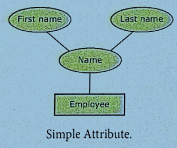
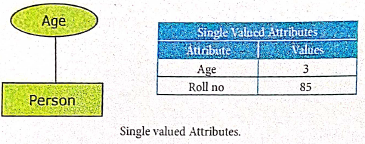
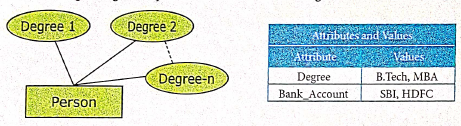
19.
()
MySQL Work bench
20.
()
story
21.
()
Compression
22.
()
Layout
23.
()
DTP

12th Standard Syllabus & Materials
12th Standard
TN 12th Computer Applications களப்பெயர் முறைமை (DNS) Sample Question Papers Study Material - QB365 Set A
NEW12th Standard
TN 12th Computer Applications வலையமைப்பு எடுத்துக்காட்டுகள் மற்றும் நெறிமுறைகள் Sample Question Papers Study Material - QB365 Set A
NEW12th Standard
TN 12th Computer Applications கணினி வலையமைப்பு ஓர் அறிமுகம் Sample Question Papers Study Material - QB365 Set A
NEW12th Standard
TN 12th Computer Applications PHP-உடன் MySQL-ஐ இணைத்தல் Sample Question Papers Study Material - QB365 Set A



Tamilnadu Stateboard 12th Standard Subjects

Maths

Chemistry

Physics

Biology

Computer Science

Business Maths and Statistics

Economics

Commerce

Accountancy

History
Computer Applications
Biology
Computer Technology
Computer Applications
Computer Science
Business Maths and Statistics
Commerce
Economics
Maths
Chemistry
Physics
Computer Technology
History
Accountancy

Tamil

English

French
Tamilnadu Stateboard Standards
