
 100% FREE ACCESS
12th Standard Syllabus & Materials
12th Standard
TN 12th Computer Applications மின்னணு தரவு பரிமாற்றம் Sample Question Papers Study Material - QB365 Set A
NEW12th Standard
TN 12th Computer Applications மின் - வணிக பாதுகாப்பு அமைப்புகள் Sample Question Papers Study Material - QB365 Set A
NEW12th Standard
TN 12th Computer Applications மின்னணு செலுத்தல் முறைகள் Sample Question Papers Study Material - QB365 Set A
NEW12th Standard
TN 12th Computer Applications மின் - வணிகம் Sample Question Papers Study Material - QB365 Set A
NEW12th Standard
TN 12th Computer Applications திறந்த மூல கருத்துருக்கள் Sample Question Papers Study Material - QB365 Set A
NEW12th Standard
TN 12th Computer Applications வலையமைப்பு வடமிடல் Sample Question Papers Study Material - QB365 Set A

Published on: 20/08/2019
Adobe Flash Professional CS6
Download Tamil Nadu 12th Standard Computer Technology question papers, model tests, one-mark questions, important questions, and public exam papers in PDF format. Free study materials and answer keys for TN State Board students.
Questions + Answers key
Take MCQ Computer Technology Test
1.
Which tool magnifies a particular area of a drawing?
The Free Transform Tool
The Rectangle tool
The Zoom tool
The Selection tool
2.
Which of the following tools is not part of the other shape tools grouped together in the Tools panel?
Rectangle Tool
Oval Tool
Line Tool
PolyStar Tool
3.
Any content you generate with Flash is called
A graphic
An interface
An animation
An application
4.
You can create attractive looking advertising banners with
Access
Word
Flash
Excel
5.
The default stage color is white but it can be changed by choosing selecting different color on the Document Properties dialog box?
Modify > Document Properties
Modify > Document
Edit > Document
Edit > Document Properties
6.
File created in Flash automatically gets the __________ extension.
7.
________ Tool used for erasing objects just like a normal eraser
8.
You can also draw a square using the ________Tool
9.
A circle can be drawn using the Oval Tool by pressing and holding the _________ key.
10.
_________ tool is used to create straight line on the stage.
11.
What is the purpose of Timeline?
12.
What is Flash?
13.
Differentiate between Zoom Tool and Hand Tool.
14.
Name tools used to do the following:
(a). Draw lines
(b). Draw free hand drawing
(c). Erase what we have drawn
15.
Explain the components used in Flash Window.
1.
(c)
The Zoom tool
2.
(c)
Line Tool
3.
(d)
An application
4.
(c)
Flash
5.
(b)
Modify > Document
6.
()
.fla
7.
()
Eraser
8.
()
Rectangle
9.
()
Shift
10.
()
Line
11.
(i) Timeline is the record of every frame, layer and scene that makes up a movie.
(ii) It controls and organizes the movie's content over time using layers and frames.
12.
Adobe Flash Professional CS6 is a software used to create animations.
i) It contains tools that can be used to draw basic objects and to create scenes.
ii) It is developed by Adobe systems.
13.
| Hand Tool (H) | Zoom Tool (Z) |
| It is used to move the Stage around the Pasteboard by dragging the Stage. | It is used to change the magnification of an area of the Stage. Clicking an area of the Stage zooms in and holding down Alt Key and clicking zooms out. |
14.
(a). Draw lines - Line tool
(b). Draw free hand drawing - Free transform tool
(c). Erase what we have drawn - Erase tool
15.
The Flash CS6 workspace includes a variety of tools and other components that you work with to create Flash applications.
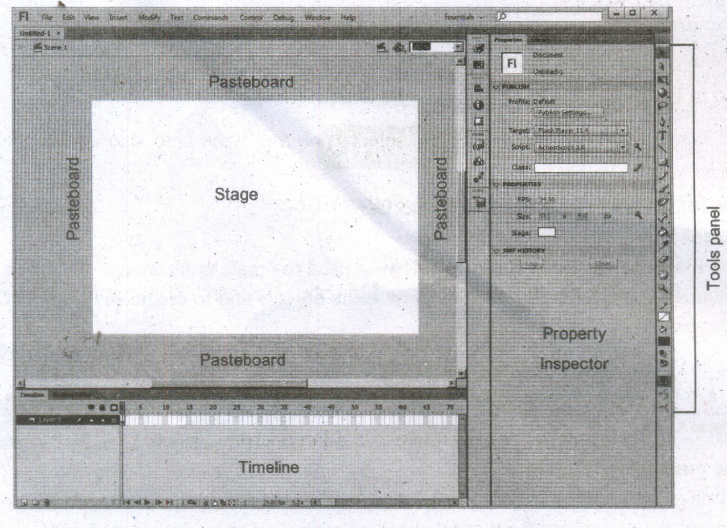
Flash Window Components
The Flash window is divided into four main components. They are
1. Stage and Pasteboard
2. Timeline
3. Tools panel
4. Property Inspector
1. Stage and Pasteboard:
(i) The white rectangle area in the middle of your workspace is called the Stage.
(ii) All the animations, objects and scenes for a Flash movie are created, edited, placed and played back in the stage.
(iii) The gray area surrounding the Stage in Flash is the Pasteboard.
2. Timeline
(i) The time line is one of the most important components of Flash.
(ii) It is located below the Stage. It is used to specify of each element's appearance and animation.
(iii) The Timeline also contains Frames and Layers.
(iv) Flash movies measure time in frames. Frames are the discrete, small slices of time.
3. Tools panel
(i) The Flash Tools panel includes the tools you need to create, select, or edit graphics on the Stage.
(ii) The double arrows at the top of the Tools panel are used to collapse the panel to icon only view, or to expand the panel and see all the tools.
4. Property Inspector
(i) The Property Inspector appears on the right side of your Flash workspace by default.
(ii) It is grouped with the Library panel.
(iii) It displays properties and options for objects selected on the Stage, and also allows you to modify them.
(iv) The object can be text, an image, a line, or any other shape.

12th Standard Syllabus & Materials
12th Standard
TN 12th Computer Applications களப்பெயர் முறைமை (DNS) Sample Question Papers Study Material - QB365 Set A
NEW12th Standard
TN 12th Computer Applications வலையமைப்பு எடுத்துக்காட்டுகள் மற்றும் நெறிமுறைகள் Sample Question Papers Study Material - QB365 Set A
NEW12th Standard
TN 12th Computer Applications கணினி வலையமைப்பு ஓர் அறிமுகம் Sample Question Papers Study Material - QB365 Set A
NEW12th Standard
TN 12th Computer Applications PHP-உடன் MySQL-ஐ இணைத்தல் Sample Question Papers Study Material - QB365 Set A



Tamilnadu Stateboard 12th Standard Subjects

Maths

Chemistry

Physics

Biology

Computer Science

Business Maths and Statistics

Economics

Commerce

Accountancy

History
Computer Applications
Biology
Computer Technology
Computer Applications
Computer Science
Business Maths and Statistics
Commerce
Economics
Maths
Chemistry
Physics
Computer Technology
History
Accountancy

Tamil

English

French
Tamilnadu Stateboard Standards
