
 100% FREE ACCESS
12th Standard Syllabus & Materials
12th Standard
TN 12th Computer Applications மின்னணு தரவு பரிமாற்றம் Sample Question Papers Study Material - QB365 Set A
NEW12th Standard
TN 12th Computer Applications மின் - வணிக பாதுகாப்பு அமைப்புகள் Sample Question Papers Study Material - QB365 Set A
NEW12th Standard
TN 12th Computer Applications மின்னணு செலுத்தல் முறைகள் Sample Question Papers Study Material - QB365 Set A
NEW12th Standard
TN 12th Computer Applications மின் - வணிகம் Sample Question Papers Study Material - QB365 Set A
NEW12th Standard
TN 12th Computer Applications திறந்த மூல கருத்துருக்கள் Sample Question Papers Study Material - QB365 Set A
NEW12th Standard
TN 12th Computer Applications வலையமைப்பு வடமிடல் Sample Question Papers Study Material - QB365 Set A

Published on: 10/09/2022
QB365 provides a detailed and simple solution for every Possible Book Back Questions in Class 12 Computer Applications Subject - DNS (Domain Name System), English Medium. It will help Students to get more practice questions, Students can Practice these question papers in addition to score best marks.
Download Tamil Nadu 12th Standard Computer Applications question papers, model tests, one-mark questions, important questions, and public exam papers in PDF format. Free study materials and answer keys for TN State Board students.
Questions + Answers key
Take MCQ Computer Applications Test
1.
In earlier, websites were accessed through their
Name server
Label
IP address
Resolver
2.
Explain how the DNS is working.
3.
What is domain name space? Explain.
4.
Explain the Name server and its types.
5.
Classify and Explain the IP address and its classification.
1.
(c)
IP address
2.
DNS Works:
(i) When the user enters the URL in the browser, the system first checks it DNS cache for the corresponding IP address.
(ii) If the IP address is found in the cache, then the information is retrieved from cache.
(iii) If not, the system needs to query the resolver about the IP address from Internet Service Provider (ISP).
(iv) Each resolver has its own cache and if it is found in that then that information is retrieved.
(v) If not, then the query is passed to next domain server i.e., TLD (Top Level Domain) which reviews the request and direct the query to name servers associated with that specific domain.
(vi) Unitil the query is solved it is passed to next level domians. finally, the IP address is detected and the corresponding record is sent to the resolver.
(vii) Then the resolver returns the record back to the computer browser. Now the user can view the webpages for the detected IP address.

3.
Domain Name Space :
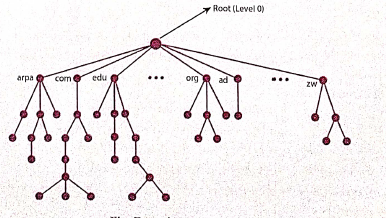
(i) Domain name space was designed to achieve hierarchical name space. In this, the names are represented as a tree like structure with a root element on the top and this tree can have a maximum of 128 levels starting from root element, taking level 0 to level 127
(ii) The above figure represents the domain name space where the root element is present at the top most level i.e., level 0.
(iii) The root element always represents the NULL string. The next level to the root element is node. Each node in the tree has a label and a domain name.
Label:
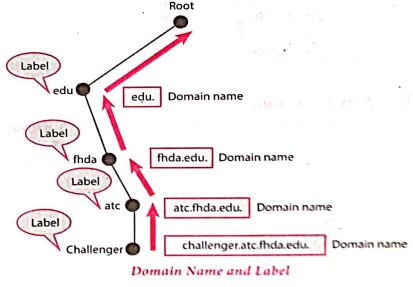
(i) Label is a string having a maximum of 63 characters. Each node in that level should have different labels, thereby assuring the individuality of the domain name.
(ii) In other words, Labels are the names given to domains. Domain is a sub tree in domain name space tree structure. The domain can be further divided into sub domains.
(iii) The domain name which is obtained by reading the labels from bottom to top, separating each label by dot (.).
Domain name :
(i) It is the sequence of labels. In domain name the sequence of labels are separated by dot (.).
(ii) The domain name is always read from the lower level to higher level i.e., from the leaf node to root node. Since the root node always represent NULL string, all the domain name ending with dot.
4.
Name Server:
(i) Name Server is a main part of the Domain Name System (DNS). It is a software program that run on a physical system.
(ii) It has the DNS database consisting of domain names and their corresponding IP addresses. Name Server translates the domian name to IP address.
(iii) There is a need to store a large number of domain names for worldwide usage, so plenty of servers are used in the hierarchical manner.
(iv) Name servers do the important task of searching the domain names. While you searching for a website, Local Nameserver (provided by ISP) asks the different name servers until one of them finds out the answer.
(v) At last it returns IP address for that domain name. Your computer is now connected to the requested webpage.
Types of Name Servers:
There are three types of Name servers which control the entire Domian Name System:
(i) Root Name Server - top level server which contains entire DNS tree, maintained by ICANN. There are 13 servers.
(ii) Primary Name Server - contains a zone resource records. These records are updatable by domain name holders.
(iii) Secondary Name server - contains a copy of primary server files. This server has no authority to update, but reduce the workload of primary server by sharing the queries.
5.
IP Address:
(i) Internet Protocol (IP) address is simply the logical address in the network layer.
(ii) IP address is used to find the host system in the whole network. Due to increasing the number of systems in a network there is a need of more addresses. It leads to two addressing methods i.e., IPv4 and IPv6.
IPv4 address:
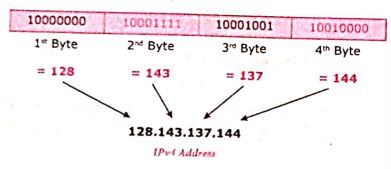
(i) The IPv4 address is a 32-bit unique address given to a computer on the network. So no two systems on the network can have the same IP address.
(ii) If the network has p connactions, then 'p' addresses should be there. An address space is the total number of addresses that can be made by that protocol (IP).
(iii) It is determined by the number of bits that the protocol use. If the protocol uses 'n' bits then the address space of that protocol would be '2nd' addresses.
(iv) So, the number of addresses that can be formed in IPv4 is 232. there are two ways to represent the IP address
(v) In binary notation the address is expressed as 32-bit binary values. For E.g. 0011100110001001 00111000 00000111
(vi) In dotted-decimal notation the address is written in decimal format separated by dots(.). For Eg: 128.143.137.144
IPv6 Address:
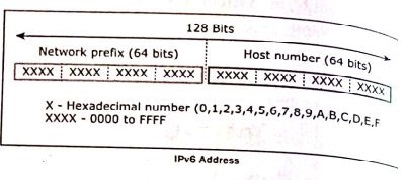
(i) The IPv6 address is a 128-bit unique address given to a computer system. The number of addresses that can be formed IPv6 is 2128.
(ii) In IPv6 address, the 128 bits are divide into eight 16-bits blocks. Each block then changed ito 4-digit Hexadecimal numbers separated by colon symbols.
(iii) E.g. 2001:0000:3231:DFE1:0063:0000:0000:FEFB.

12th Standard Syllabus & Materials
12th Standard
TN 12th Computer Applications களப்பெயர் முறைமை (DNS) Sample Question Papers Study Material - QB365 Set A
NEW12th Standard
TN 12th Computer Applications வலையமைப்பு எடுத்துக்காட்டுகள் மற்றும் நெறிமுறைகள் Sample Question Papers Study Material - QB365 Set A
NEW12th Standard
TN 12th Computer Applications கணினி வலையமைப்பு ஓர் அறிமுகம் Sample Question Papers Study Material - QB365 Set A
NEW12th Standard
TN 12th Computer Applications PHP-உடன் MySQL-ஐ இணைத்தல் Sample Question Papers Study Material - QB365 Set A



Tamilnadu Stateboard 12th Standard Subjects

Maths

Chemistry

Physics

Biology

Computer Science

Business Maths and Statistics

Economics

Commerce

Accountancy

History
Computer Applications
Biology
Computer Technology
Computer Applications
Computer Science
Business Maths and Statistics
Commerce
Economics
Maths
Chemistry
Physics
Computer Technology
History
Accountancy

Tamil

English

French
Tamilnadu Stateboard Standards
