
 100% FREE ACCESS
12th Standard Syllabus & Materials
12th Standard
TN 12th Maths Applications of Matrices and Determinants Sample Question Papers Study Material - QB365 Set A
NEW12th Standard
TN 12th Computer Applications மின்னணு தரவு பரிமாற்றம் Sample Question Papers Study Material - QB365 Set A
NEW12th Standard
TN 12th Computer Applications மின் - வணிக பாதுகாப்பு அமைப்புகள் Sample Question Papers Study Material - QB365 Set A
NEW12th Standard
TN 12th Computer Applications மின்னணு செலுத்தல் முறைகள் Sample Question Papers Study Material - QB365 Set A
NEW12th Standard
TN 12th Computer Applications மின் - வணிகம் Sample Question Papers Study Material - QB365 Set A
NEW12th Standard
TN 12th Computer Applications திறந்த மூல கருத்துருக்கள் Sample Question Papers Study Material - QB365 Set A

Published on: 05/09/2022
QB365 provides a detailed and simple solution for every Possible Creative Questions in Class 12 Computer Applications Subject -Forms and Files, English Medium. It will help Students to get more practice questions, Students can Practice these question papers in addition to score best marks.
Download Tamil Nadu 12th Standard Computer Applications question papers, model tests, one-mark questions, important questions, and public exam papers in PDF format. Free study materials and answer keys for TN State Board students.
Questions + Answers key
Take MCQ Computer Applications Test
1.
Write a simple PHP program to open, close the file and also to write the file.
2.
Write about fclose ( ) function with an example.
3.
Write short note on fread ( ) function and give the example.
4.
Draw the HTML form page which has text field, radio button, check box and button.
5.
How to append a file and What are the parameters used in appending a file?
6.
Write the important feature of Checkbox and Radio box?
7.
Write short notes on Web development process?
8.
Write short note on Appending a File
9.
Explain briefly about fwrite( ) function.
10.
Explain briefly about fclose( ) function.
11.
Explain briefly about fread( ) function.
12.
Explain briefly about fopen( ) function
13.
Write the Validation rules for HTML input fields.
14.
An HTML code to demonstrate From and For controls (Login form)
15.
Sample PHP program to open and closing a file.
1.
<?php
$myfile = fopen ('new_school_file.txt", "w" or die ("unable to open file!");
$txt = "schoolname \n';
fwrite ($myfile. $txt);
$txt= "studentname \n";
fwrite ($myfile, $txt);
fclose ($myfile);
?>
2.
The fclose ( ) function is used to close an opened file. The file odject comes from fopen function.
Syntax:
fclose($file_Object);
Example:
< ?php
$myfile = fopen("student.txt", "r'');
/ / some code to be executed ....
fclose( $myfiIe);
? >
3.
The fread ( ) function, is used read from an open fîle. The file object comes from fopen function.
Syntax:
fread($file_Object,filesize("FileName''));
Example:
< ?php
fread ($myfiIe,filesize("Student. txt''));
? >
4.
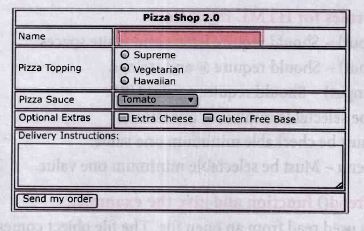
5.
(i) The file_put_contents() function is used to append to a file.
(ii) Parameters used in appending a file are file, data, mode and context.
1. File - Specifies the file to write to. If the file does not exist, this function will create one.
2. data - can be a string, an array or a data stream to write to the file.
3. mode - specifies how to open/write to the file.
4. context - context is a set of options that can modify the behaviour of a stream.
6.
(i) Check box is the important feature which selects more than one value from the HTML form.
(ii) Radio box is similar to checkbox but one value can be chosen at a time.
7.
(i) In the web development, user access website or web pages from remote client machine and feed the data to server.
(ii) These data are collected via HTML form controls like text box" dropdown box and radio button, etc. and sent to server using server side programming like PHP.
8.
The file_put_contents ( ) function is used to Append to a file.
Syntax:
file_put_contents(file,data,mode,context)
Example:
< ?php
$txt = "Student id ";
$myfile = file_put_contents('logs.txt', $txt.
PHP_EOL , FILE_APPEND | LOCK_EX);
? >
9.
PHP write a File:
The fwrite( ) function is used to write to a file.
Syntax:
fwrite($myfile, $txt);
Example:
< ?php
$myfile = fopen("new_schooLfile.
txt", "w'')
or die("Unable to open file!'');
$txt = "School Name\n";
fwrite($myfile, $txt);
$txt = "Student Name\n";
fwrite($myfile, $txt);
fclose($myfile);
? >
10.
PHP Close a File:
The fclose ( ) function is used to close an opened file.
The file object comes from fopen function.
Syntax:
fclose($file_Object);
Example:
< ?php
$myfile = fopen("student.txt", "r'');
/ / some code to be executed ....
fclose( $myfiIe);
? >
11.
PHP Read a File:
The fread ( ) function reads from an open file.
The file object comes from fopen function.
Syntax:
fread($file_Object,filesize("FileName''));
Example:
< ?php
fread ($myfiIe,filesize("Student. txt''));
? >
12.
PHP Open a File
1. fopen( ) is a system function available in PHP.
2. This function helps to open a file in the server.
3. It contains two parameters one for the file and the other one specifies in which mode the file should be opened (Read/Write).
Syntax:
$file_Object= . fopen("FileName", "Read/ WriteMode'') or die("Error Message!'');
Example:
< ?php
$myfile = fopen("Student.txt", "r'') or die("Unable to open file!'');
? >
13.
Validation rules for HTML input field:
| Name (text Input) | : | Must contain letters and white-spaces |
| Email (Text Input) | : | Must contain @ and .strings |
| Website (Text Input) | : | Must contain a valid URL |
| Radio | : | Must be selectable minimum one value |
| Check Box | : | Must be checkable minimum one value |
| Drop Down menu | : | Must be selectable minimum one value |
14.
< html >
< head >
< title > Login Form < /title >
< body >
< h3 align=center > TamiiNadu State Council of
EducationalResearchand Training, Chennai < /h3 >
< Form Action = "mailto:abcd.xyz@com"
method =post >
< p > User Name:
OUTPUT:
< Input type = text name="user_name" size = 20 maxlength = 15 > < /p >
< p > Password:
< Input type = password name="pass" size = 20 maxlength = 15 > < /p >
< Input type = reset value = "Clear" >
< Input type = submit value = "Login" >
< /Form >
< /body >
< /html >
15.
i) Text(Notepad) file:
AJAX = Asynchronous JavaScript and XML
CSS = Cascading Style Sheets
HTML = Hyper Text Markup Language
PHP = PHP Hypertext: Preprocessor
SQL = Structured Query Language
SVG = Scalable Vector Graphics
XML = EXtensible Markup Language
ii) PHP File:
< ?php
$myfile = fopen("webdictionary.txt", "r'') or
die("Unable to open file!'');
echo fread( $myfile, filesize("webdictionary.
txt'')); fclose($myfile);
? >
iii) OUTPUT
AJAX = Asynchronous JavaScript and XML
CSS = Cascading Style Sheets
HTML = Hyper Text Markup Language
PHP = PHP Hypertext Preprocessor
SQL = Structured Query Language
SVG = Scalable Vector Graphics
XML = EXtensible Markup Language

12th Standard Syllabus & Materials
12th Standard
TN 12th Computer Applications வலையமைப்பு வடமிடல் Sample Question Papers Study Material - QB365 Set A
NEW12th Standard
TN 12th Computer Applications களப்பெயர் முறைமை (DNS) Sample Question Papers Study Material - QB365 Set A
NEW12th Standard
TN 12th Computer Applications வலையமைப்பு எடுத்துக்காட்டுகள் மற்றும் நெறிமுறைகள் Sample Question Papers Study Material - QB365 Set A
NEW12th Standard
TN 12th Computer Applications கணினி வலையமைப்பு ஓர் அறிமுகம் Sample Question Papers Study Material - QB365 Set A



Tamilnadu Stateboard 12th Standard Subjects

Maths

Chemistry

Physics

Biology

Computer Science

Business Maths and Statistics

Economics

Commerce

Accountancy

History
Computer Applications
Biology
Computer Technology
Computer Applications
Computer Science
Business Maths and Statistics
Commerce
Economics
Maths
Chemistry
Physics
Computer Technology
History
Accountancy

Tamil

English

French
Tamilnadu Stateboard Standards
