
 100% FREE ACCESS
12th Standard Syllabus & Materials
12th Standard
TN 12th Maths Applications of Matrices and Determinants Sample Question Papers Study Material - QB365 Set A
NEW12th Standard
TN 12th Computer Applications மின்னணு தரவு பரிமாற்றம் Sample Question Papers Study Material - QB365 Set A
NEW12th Standard
TN 12th Computer Applications மின் - வணிக பாதுகாப்பு அமைப்புகள் Sample Question Papers Study Material - QB365 Set A
NEW12th Standard
TN 12th Computer Applications மின்னணு செலுத்தல் முறைகள் Sample Question Papers Study Material - QB365 Set A
NEW12th Standard
TN 12th Computer Applications மின் - வணிகம் Sample Question Papers Study Material - QB365 Set A
NEW12th Standard
TN 12th Computer Applications திறந்த மூல கருத்துருக்கள் Sample Question Papers Study Material - QB365 Set A

Published on: 05/09/2022
QB365 provides a detailed and simple solution for every Possible Creative Questions in Class 12 Computer Applications Subject -Forms and Files, English Medium. It will help Students to get more practice questions, Students can Practice these question papers in addition to score best marks.
Download Tamil Nadu 12th Standard Computer Applications question papers, model tests, one-mark questions, important questions, and public exam papers in PDF format. Free study materials and answer keys for TN State Board students.
Questions + Answers key
Take MCQ Computer Applications Test
1.
Write the process of client validation, give the example for the client validation process and write the output for it
2.
Write the program for Login module using PHP and HTML form handling mechanism and get the output for it.
3.
Explain file uploading method in PHP.
1.
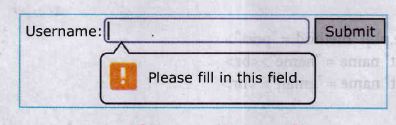
Client validation: The input data validations are performed on the client machine's web browsers using client side script like Java script or additional "required" attribute in HTML input tags.
Before sending the data to server side program (PHP) the programmer can write few validation from browser in the client machine. For this validation, we have to add additional "required" attribute in HTML in input tag.
Example:
<input> required attribute in HTML
<form action = "welcome.php">
Username: <input type = "text" name = "name" required>
<input type = "submit">
</form>
Output
2.
Test.html
< html >
< body >
< form action = "welcome.php" method = "post" >
Name: < input type = "text" name = "name" > < br >
Email < input type = "text" name = "email" > < br >
< input type = "submit" >
< /form >
< /body >
< /html >
Welcome,php
< html >
< bodp >
Welcome <?php echo $_POST["name"]:
?> <br>
Your email address is: <?php echo $_POST ["email"];
?>
</body>
</html>
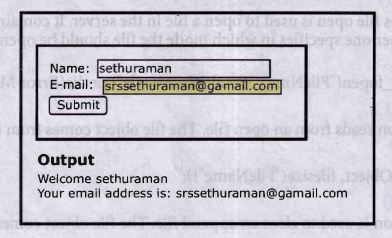
Output:
Explanation:
(i) HTML file contains two text boxes such as Name and Email, one Submit button and one form tag. The remote server PHP file (welcome.php) is mentioned in form tag under the action attribute.
(ii) In "Welcome.php" file, PHP variables such as $_POST and $_GET collect the data and prepares the response accordingly. The user will receive the output response in the client machine's browser screen.
3.
1. File upload is the best feature to select one file from the local machine to server machine.
2. Form tag is used to mention a method as POST or GET and encrypt attribute mentioned as "multipart/form-data".
3. In the < Input > tag mention type="file" attribute shows the input field as a file-select control, with a "Browse" button next to the input control.
4. The form above sends data to a file.
5. In Server machine "php.ini" file, search for the file_uploads directive, and set it to On: "file_uploads = On"
6. After submitting the upload button the request reaches to the file.
7. In the file $FILES variable collects all uploaded file information such as name of the file, size of the file and extension of the file etc.
8. All the details are checked thoroughly and the errors are saved in an array variable.
9. The file finally moves under the image directory if the array error variable is empty.

12th Standard Syllabus & Materials
12th Standard
TN 12th Computer Applications வலையமைப்பு வடமிடல் Sample Question Papers Study Material - QB365 Set A
NEW12th Standard
TN 12th Computer Applications களப்பெயர் முறைமை (DNS) Sample Question Papers Study Material - QB365 Set A
NEW12th Standard
TN 12th Computer Applications வலையமைப்பு எடுத்துக்காட்டுகள் மற்றும் நெறிமுறைகள் Sample Question Papers Study Material - QB365 Set A
NEW12th Standard
TN 12th Computer Applications கணினி வலையமைப்பு ஓர் அறிமுகம் Sample Question Papers Study Material - QB365 Set A



Tamilnadu Stateboard 12th Standard Subjects

Maths

Chemistry

Physics

Biology

Computer Science

Business Maths and Statistics

Economics

Commerce

Accountancy

History
Computer Applications
Biology
Computer Technology
Computer Applications
Computer Science
Business Maths and Statistics
Commerce
Economics
Maths
Chemistry
Physics
Computer Technology
History
Accountancy

Tamil

English

French
Tamilnadu Stateboard Standards
