
 100% FREE ACCESS
12th Standard Syllabus & Materials
12th Standard
TN 12th Maths Applications of Matrices and Determinants Sample Question Papers Study Material - QB365 Set A
NEW12th Standard
TN 12th Computer Applications மின்னணு தரவு பரிமாற்றம் Sample Question Papers Study Material - QB365 Set A
NEW12th Standard
TN 12th Computer Applications மின் - வணிக பாதுகாப்பு அமைப்புகள் Sample Question Papers Study Material - QB365 Set A
NEW12th Standard
TN 12th Computer Applications மின்னணு செலுத்தல் முறைகள் Sample Question Papers Study Material - QB365 Set A
NEW12th Standard
TN 12th Computer Applications மின் - வணிகம் Sample Question Papers Study Material - QB365 Set A
NEW12th Standard
TN 12th Computer Applications திறந்த மூல கருத்துருக்கள் Sample Question Papers Study Material - QB365 Set A

Published on: 05/09/2022
QB365 provides a detailed and simple solution for every Possible Book Back Questions in Class 12 Computer Applications Subject -Introduction to Hypertext Pre-Processor, English Medium. It will help Students to get more practice questions, Students can Practice these question papers in addition to score best marks.
Download Tamil Nadu 12th Standard Computer Applications question papers, model tests, one-mark questions, important questions, and public exam papers in PDF format. Free study materials and answer keys for TN State Board students.
Questions + Answers key
Take MCQ Computer Applications Test
1.
Explain operators in PHP with example.
2.
Discuss in detail about PHP data types.
3.
Explain the process of Webserver installation.
4.
Discuss in detail about Website development activities.
5.
Explain client side and server side scripting language.
1.
An operator is a symbol that performs a given action on a value or group of values. The values the operation is performed upon are known as operands.
The types of operators in PHP are
(i) Arithmetic operators
(ii) Assignment operators
(iii) Comparison operators
(iv) Increment/Decrement operators
(v) Logical operators and
(vi) String operators
1. Arithmetic operators
Arithmetic operators are used to perform math operations, for example, addition, subtraction, multiplication, and division.
| Operator | Operator Name | Example | Output |
|---|---|---|---|
| + | Addition | 5+2 | 7 |
| - | Subtraction | 5-2 | 3 |
| * | Multiplication | 5*2 | 10 |
| / | Division | 5/2 | 2.5 |
| % | Modulus | 5%2 | 1 |
2. Assignment operators
The assignment operator is used to assign a value to a variable. The assignment operator takes the value of its right-hand operand and assigns it to its left-hand operand.
| Operator | Operator Name | Example | Output |
|---|---|---|---|
| = | Assignment operator | $a = 5; | 5 |
3. Comparison operators
Comparison operators are used to compare two values and determine whether a certain condition is true or false.
| Operator | Operator Name | Example | Output |
|---|---|---|---|
| > | Greater than | 5 > 2 | |
| < | less than | 5<2 | False |
| >= | Greater than or equal to | 5>= 2 | True |
| <= | Less than or equal to | 5<=2 | False |
| == | Equal to | 5==5 5 == 5.0 |
True False |
| === | Identical | 5===5 5===5.0 |
True False |
| != | Not equal | 5!=5 5!=6 |
True False |
| !== | Not identical | 5!==5 5!==5.0 |
True False |
4.Logical Operators:
Logical operators are used to perform logical operations on variables and values.
| Operator | Operator Name | Example | Output |
|---|---|---|---|
| && | Logical AND | (5>3) && (5>7) | False |
| II | Logical OR | (5>3) II (5>7) | True |
| xor | XOR | (5>3) xor (5>7) | True |
| ! | Logical NOT | ! (5>3) | False |
5. Increment and Decrement operators
In PHP, the increment operator ++ is used to increase the value of a variable by 1, and the decrement operator is used to decrease the value of a variable by 1. The increment and decrement operators can be used as either prefix or postfix operators.
| Operator | Name | Output |
|---|---|---|
| ++ (increment operator) |
++ $a Pre-increment | $x = ++ $a |
| ++ (increment operator) |
$a + + Post-increment | $x = $a ++ |
| -- (decrement operator) |
--$a Pre-decrement | $x = --$a |
| -- (decrement operator) |
$a-- Post-decrement | $x = $a-- |
6. String operator
String operators have concatenation operator(.) and concatenation assignment operator(-). Concatenation means adding one or more variables to an existing variable.
| Operator | Name | Example | Output |
|---|---|---|---|
| . (Dot) | Concatenation | $a = 'Hello'; $b = 'World'; $c= $a. $b; |
Hello World |
| .= (Dot equal to) | Concatenation | $a= 'Hello': $b = 'World'; $a .= $b; |
Hello World |
2.
PHP scripting language supports 13 primitive data types.
PHP supports the following data types.
(i) String
(ii) Integer
(iii) Float
(iv) Boolean
(v) Array
(vi) Object
(vii) NULL
(viii) Resource
(i) String
String is a collection of characters within the double quotes ("") or single quotes ().
Space is also considered as a character.
Example:
$x= "Computer Application";
$y='Computer Application';
(ii) Integer
Data type which contains non decimal numbers.
Example (i) $x=59135;
Example (ii)
$x = 59135;
var_dump($x);
The var_dump() function returns type and value about variables in PHP.
(iii) Float
Float is a data type which contains decimal numbers.
Example Sx=19.15;
$x = 19.15;
var_dump($x);
?>
(iv) Boolean
Boolean is a data type which returns two possible states, TRUE or FALSE.
Example:
$x = true;
$y = false;
echo $x;
echo $y;
(v) Array
Array is a data type which has multiple values in single variable.
Example:
$cars
= array("Computer", "Laptop", "Mobile");
var_dump(Scars);
?>
Output:
array(3) {[0]=> string(5) "Computer" [1]=>
string(3) "Laptop" [2]=> string(6) "Mobile"}
(vi) Object
Object is a data type which contains information about data and function inside the class.
Example:
class School {
function marks() {
$this->sec =
}
}
// create an object
$school_obj= new School ();
// show object properties
echo Sschool_obj ->sec;
?>
(vii) NULL
It is a special data type which contains a single value: NULL.
Example:
$x="COMPUTER APPLICATION!";
$x = null;
var_dump($x);
?>
Output: NULL
(viii) Resources
It is a specific variable, it has a reference to an external resource.
These variables hold specific handlers to handle files and database connections.
// Open a file for reading
$handle = fopen("note.txt", "r");
var_dump($handle);
echo "
";
// Connect to MySQL database server with default setting
$link= mysql_connect("localhost", "root", "");
var_dump($link);
?>
3.
The following are the steps to install and configure Apache Httpd webserver and PHP module in windows server machine.
Step 1:
Go to Apache foundation website and download the Httpd webserver software.
https://httpd.apache.org/download.cgi.
Step 2:
After downloading MSI file from Apache foundation website, user launches the MSI file and clicks next.
Click on next and next button finish the installation on server machine.
Software takes default port number 130 or 130130.
Once the user finished, webserver software is installed and configured on server hardware machine as a service.
Step 3:
To test the installation of Apache Httpd webserver, enter the following URL. from your web browser which is installed in your client machine.
https://localhost:130/ (or) https://localhost:130130
The output page that says "Its works"
Step 4:
Administrator user can start, stop and restart the webserver service at any time via windows control panel.
Once the services stops, the client machine will not receive the response message from server machine.
Step 5.
Webserver's configuration setting file "httpd.conf" is located in the conf directory under the apache installation directory.
Edit this file and enable the PHP module to run PHP scripting language.
4.
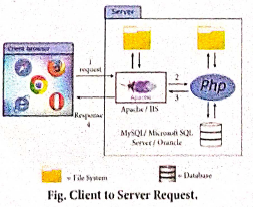
Website development has done by the following activities.
1. Website or webpage is developed by the programmer using PHP script.
2. Entire website codes are moved to web server path in a remote server machine.
3. From the client side, the end user open a browser, types the URL of the website (or) webpage and initiates the request to remote server machine over the network.
4. After receiving the request from client machine the web server tries to compile and interpret the PHP code which is available in remote machine.
5. Response will be generated and sent back to the client machine over the network from webserver.
6. Finally the browser is installed in the client machine receives the response and displays the output to user, as shown in fig.
5.
Client side scripting language:
1. Code that is present in a client's HTML page.
2. The language used for client scripting is Java script. It is the most widely used language for client-side scripting.
3. It is compatible and has the ability to run on any browsers.
4. The browser then downloads that code temporarily and processes it without the server.
5. As a result, it is now faster and easier to do client side scripting and leaving less word for the server.
Server side scripting language:
1. Server side scripting usually happens on the back-end of a website.
2. Server side scripting creates a path for the website to the database and all behind the scene work which organizes and runs a website. In server side scripting, the responses can be customized based on requirement of the user.
3. Example of server side programming language is PHP scripting language.
4. It can be executed via an interpreter which is installed in the webservers or CGI (Common Gateway Interface).
5. The most of the webservers such as Apache Tomcat, Microsoft IIS (Internet Information Server) supports the PHP interpreter module.

12th Standard Syllabus & Materials
12th Standard
TN 12th Computer Applications வலையமைப்பு வடமிடல் Sample Question Papers Study Material - QB365 Set A
NEW12th Standard
TN 12th Computer Applications களப்பெயர் முறைமை (DNS) Sample Question Papers Study Material - QB365 Set A
NEW12th Standard
TN 12th Computer Applications வலையமைப்பு எடுத்துக்காட்டுகள் மற்றும் நெறிமுறைகள் Sample Question Papers Study Material - QB365 Set A
NEW12th Standard
TN 12th Computer Applications கணினி வலையமைப்பு ஓர் அறிமுகம் Sample Question Papers Study Material - QB365 Set A



Tamilnadu Stateboard 12th Standard Subjects

Maths

Chemistry

Physics

Biology

Computer Science

Business Maths and Statistics

Economics

Commerce

Accountancy

History
Computer Applications
Biology
Computer Technology
Computer Applications
Computer Science
Business Maths and Statistics
Commerce
Economics
Maths
Chemistry
Physics
Computer Technology
History
Accountancy

Tamil

English

French
Tamilnadu Stateboard Standards
