
 100% FREE ACCESS
12th Standard Syllabus & Materials
12th Standard
TN 12th Computer Applications மின்னணு தரவு பரிமாற்றம் Sample Question Papers Study Material - QB365 Set A
NEW12th Standard
TN 12th Computer Applications மின் - வணிக பாதுகாப்பு அமைப்புகள் Sample Question Papers Study Material - QB365 Set A
NEW12th Standard
TN 12th Computer Applications மின்னணு செலுத்தல் முறைகள் Sample Question Papers Study Material - QB365 Set A
NEW12th Standard
TN 12th Computer Applications மின் - வணிகம் Sample Question Papers Study Material - QB365 Set A
NEW12th Standard
TN 12th Computer Applications திறந்த மூல கருத்துருக்கள் Sample Question Papers Study Material - QB365 Set A
NEW12th Standard
TN 12th Computer Applications வலையமைப்பு வடமிடல் Sample Question Papers Study Material - QB365 Set A

Published on: 01/10/2020
12th Standard Computer Applications English Medium Model 5 Mark Book Back Questions (New Syllabus 2020)
Download Tamil Nadu 12th Standard Computer Applications question papers, model tests, one-mark questions, important questions, and public exam papers in PDF format. Free study materials and answer keys for TN State Board students.
Questions + Answers key
Take MCQ Computer Applications Test
1.
2.
Briefly explain SSL.
3.
Explain in detail : Unified payments interface
4.
What are the advantages and disadvantages of E-Commerce to a consumer?
5.
Explain various Open Source License
6.
Explain about RJ45 connector.
7.
Explain the Name server and its types.
8.
Discuss about OSI model with its layers
9.
Explain the growth of the computer networking
10.
Explain MySQLi Queries with examples.
11.
Explain concepts of HTTP Uploading process.
12.
Explain working of loops in array
13.
Explain the Function of Conditional Statements in PHP.
14.
Explain Function concepts in PHP.
15.
Explain client side and server side scripting language.
16.
Discuss on various database models available in DBMS.
17.
Write the steps to draw a star using polygon tool?
18.
1.
2.
1. The most common cryptographic protocol is Secure Sockets Layers (SSL). SSL is a hybrid encryption protocol for securing transactions over the internet. The SSL standard was developed by Netscape in collaboration with Mastercard, Bank of America, MCI and silicon graphics.
2. Today, all browsers in the market support SSL, and most of the secure communication are proceeded through this protocol. SSL works completely hidden for the users, who does not have to intervene in the protocol.
3. The only thing the user has to do is make sure on URL starts with https://instead of http:// where "s" obviously means secured.
4. SSL was renamed as TLS (Transport Layer Security) in 2001.
3.
Unified Payments Interface:
(i) Unified Payments Interface (UPI) is a real-time payment system developed by National Payments Corporation of India (NCPI) to facilitate inter-bank transactions. It is simple, secure and instant payment facility.
(ii) This interface is regulated by the Reserve Bank of India and used for transferring funds instantly between two bank accounts through mobile (platform) devices. http://www.npci.org.in/
(iii) It also provides the "peer to peer" collect request which can be scheduled and paid as per requirement and convenience.
(iv) UPI is developed on the basis of Immediate Payment Service (IMPS). To initiate a transaction, UPI applications use two types of address - global and local.
(v) Virtual payment address (VPA) also called as UPI-ID, is a unique ID similar to email id (e.g. name@ bankname) enable us to send and receive money from banks.
(vi) The bank or the financial institution allows the customer to generate VPA using phone number associated with Aadhaar number and bank account number. VPA replaces bank account details thereby completely hides critical information.
(vii) The MPIN (Mobile, banking Personal Identification number) is required to confirm each paymernt.
Advantages :
(i) Immediate money transfers through mobile device round the clock 24 x 7.
(ii) Can use single mobile application for accessing multiple bank accounts
(iii) Single Click Authentication for transferring of fund.
(iv) It is not required to enter the details such as Card no, Account number, IFSC etc. for every transaction.
(v) Electronic payments will become much easier without requiring a digital wallet or credit or debit card.
4.
The pros and cons of E-Commerce affect three major stakeholders: consumers business organisations, and society.
Advantages:
(i) E-Commerce system is operated on all days and all the day (24x7). People can interact with business at the time of their convenience.
(ii) Speed is a major advantage in E-Commerce. Advanced Electronic communications systems allow messages to reach across the world instantaneously.
(iii) The Internet is too easy to 'shop around' for products and services that may be more cheaper. It provides an opportunity to buy at reduced costs and also to identify original manufacturers.
(iv) The whole world becomes a shop for today's customers. They can have wide choice by comparing and evaluating the same product at different websites.
(v) Customers can shop from home or anywhere at their convenience. They can read the details regarding model numbers, prices, features etc., from websites and also the payments can be made through online.
Disadvantages:
(i) E-Commerce is often used to buy goods that are not available locally but from businesses all over the world. Physical goods needs to be transported, which takes time and costs money. Some E-Commerce companies handle this through shipments.
(ii) Unlike returning goods to a traditional shop returning goods through online is believed to be an area of difficulty.
(iii) Privacy issues are serious in E-Commerce. In E-Commerce generating consumer information is inevitable. Privacy concerns are true in order to make people get cold feet about online shopping.
(iv) Physical product disputes are a major disadvantage in E-Commerce. E-Commerce purchases are often made on trust since we don't have physical access to the product.
(v) Delivery ambiguity. Since supplying businesses can be conducted across the world, it can be uncertain whether they are indeed genuine businesses or just going to take our money.
5.
Types of open source licenses are:
(i) Apache License 2.0
(ii) BSD 3-Clause 'New' or 'Revised' license
(iii) BSD 2-Clause "simplified" or "Free BSD" license
(iv) GNU General Public License (GPL)
(v) GNU Library or "Lesser" General Public License (LGPL)
(vi) MIT license
(vii) Mozilla Public License 2.0
(viii) Common Development and Distribution License
(ix) Eclipse Public License
(i) Apache License:
Apache License version 2.0 rights can be applied to both copyrights and patents. Some of the license can be applied only to copyrights and not patents some details of Apache License and Rights are never ending, Worldwide Authority of Rights, Rights for No few or Royalty, Rights are Irrevocable.
(ii) BSD License:
BSD license is a part of a family of the free software license that have much fewer restrictions in distribution as compared to other free software license. Two important version are:
(1) The New BSD License/The NEW Modified BSD License (3 clause "new" or "Revised" license)
(2) The simplified BSD License/Free BSD License (2-clause "simplified" or "free BSD" license)
Both have been accepted as open source license by the open source initiative.
The primary difference between the New and the simplified BSD License is that simplified BSD license emits this clause.
(iii) GNU General Public License:
The General Public License are copy the software, Distribution, charge a fee, change the code base.
(iv) GNU Lesser General Public License:
It grants fewer right to work than GNU GPL. It's generally appropriate for libraries and projects that want to allow linking from non-GPL and non-open-source software. GPL. requires any other project or source that is using the project under GPL also be licensed as GPL: GPL licensed code can't be used for paid and proprietary software.
(v) MIT License:
It's the shortest and most used popular open source license. The main giving of this licnese are copy, modify, merge, publish, distribute, sublicense, etc.
6.
1. The RJ45 connector is a small plastic-cup which will be used to connect the wire inside the connector and ready to connect the internet.
2. In RJ45 the "RJ" stands for the Registered Jack and the "45" stands for the number of interface standard in the cable.
3. Each RJ45 connector has eight pins and connected to each end of the Ethernet cable.
4. Since it has 8 position, 8-contact (8P8C) modular plug, it is also known as 8P8C connector.
5. These plugs (connectors) are then inserted into Ethernet port of the network card.

6. The RJ45 connector has eight small jack inside to connect eight small wires of the patch cable and these are of eight different colors.
7. Wiring schemes specifies how the wires to be connected with RJ45 connector.
8. There are 2 wiring schemes available to terminate the twisted-pair cable on each end, which are T-568A and T-568B.
9. Although 4 pairs of wires are available in the cable, Ethernet uses only 2 pairs: Orange and Green.
10. The other 2 colors (blue and brown) can be used ISDN (or) phone connections.
7.
Name Server:
(i) Name Server is a main part of the Domain Name System (DNS). It is a software program that run on a physical system.
(ii) It has the DNS database consisting of domain names and their corresponding IP addresses. Name Server translates the domian name to IP address.
(iii) There is a need to store a large number of domain names for worldwide usage, so plenty of servers are used in the hierarchical manner.
(iv) Name servers do the important task of searching the domain names. While you searching for a website, Local Nameserver (provided by ISP) asks the different name servers until one of them finds out the answer.
(v) At last it returns IP address for that domain name. Your computer is now connected to the requested webpage.
Types of Name Servers:
There are three types of Name servers which control the entire Domian Name System:
(i) Root Name Server - top level server which contains entire DNS tree, maintained by ICANN. There are 13 servers.
(ii) Primary Name Server - contains a zone resource records. These records are updatable by domain name holders.
(iii) Secondary Name server - contains a copy of primary server files. This server has no authority to update, but reduce the workload of primary server by sharing the queries.
8.
Open System Interconnection (OSI) model was found in the year 1934, general framework that enables network protocols along with software and systems to be developed based on general set of guidelines. It describes the standards for the inter-computer communication.
OSI Layers:
(i) Physical Layer: This is the 1st layer, it defines the electrical and physical specifications for devices.
(ii) Data Link Layer: It is the 2nd layer and it guarantees that the data transmitted are free of errors. This layer has simple protocols like "802.3 for Ethernet" and "802.11 for Wi-Fi".
(iii) Network Layer: It is the 3rd layer determining the path of the data packets. This layer is responsible for routing of data packets using IP Addressing.
(iv) Transport Layer: It is the 4th layer that guarantees the transportation/sending of data succeddfully. It includes the error checking operation.
(v) Session Layer: It is the 5th layer, identifies the established system session between different network entities. It controls dailogues between computers. For instance, while accessing a system remotely, session is created between your computer and the remote system.
(vi) Presentation Layer: It is the 6th layer that does the translation of data to the next layer (Prepare the data to the Application Layer). Encryption and decryption protocols occur in this layer such as, Secure Socket Layer (SSL).
(vii) Application Layer: It is the 7th layer, which acts as the user interface platform comprising of software within the system.
9.
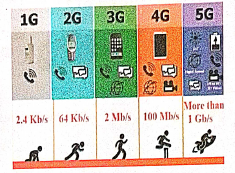
1. The uses of the computer networking are:
2. It is used in business and home
3. Growth on popularity of cloud storage and cloud computing.
4. On behalf of buying physical copies of games music and movies, increasingly downloading and buy digital license their need via internet.
5. Developments on mobile networking infrastructure both deployments of 4G and 3G networks that will allow the people in their developed areas.
6. Allows it to their smart mobile phones as video broadcasting system and as mobile television.
7. Some of the people underlying and staying connected all the times, whenever they are at the workplace, via a home network, via publish WiFi hotspots or smart phone.
8. 4G LTE mobile network was not reached by many parts of world, of the industry of telecommunication has been hard working on the development of their next generation :"5G" cellular communication technology. This 5G intense to boost up the speed the mobile connections dramatically.
9. Artificial intelligence will help to maintain, manage, and protect it.
10. This Artificial network powering algorithms with become most intelligent:
11. It might find faster and reliable methods of anticipating threats and cleaning networks.
12. Artificial intelligence able to be a better predict traffic as it collects and analyses data in real time, some of network managers were better prepared for big event such as the world cup, Olympics, Valentines day which often put on the Internet under pressure.
10.
Performing Queries: The main goal of MySQL and PHP connectivity is to retrieve and manipulate the data from MySQL database server. The SQL query statements are help in PHP MySQL extension to achieve the objective of MySQL and PHP connection. “mysqli_query” is a function, that helps to execute the SQL query statements in PHP scripting language.
Syntax:
mysqli_query(“Connection Object”,“SQL Query”)
Example:
$con=mysqli_connect(“localhost”,“my_user”,“my_password”,“Student_DB”);

$sql=“SELECT student_name,student_age FROM student”;mysqli_query($con,$sql);
11.
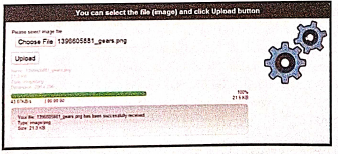
1. File upload is the best feature to select one file from the local machine to server machine.
2. Form tag is used to mention a method as POST or GET and encrypt/attribute mentioned as "multipart /form-data. In the tag mention type = "file" attribute shows the input field as a file select control with a "Browse" button next to the input control.
3. In server machine "php.ini" file search for the file uploads directive, and set it to On : "file uploads = On"
4. After submitting the upload button the request reaches to student_photo_upload.php file.
5. In the file$_FILES variable collects all uploaded file information such as name of the file, size of the file and extension of the file etc. All the details are checked throughly and the error are saved in an array variable The file finally moves under the image directly if the array error variable is empty.
Example:
Fileupload.html:
12.
1. The array concepts in looping structure is used in for each loop.
2. For each loop is exclusively available in PHP. It works only with arrays.
3. The loop iteration depends on each KEY value pair in the array. In for each, loop iteration the value of the current array element is assigned to $value variable and the array pointer is shifted by one until it reaches the end of the array element.
4. For each works only on arrays and objects, and will issue an error when you try to use it on a variable with a different data type or an uninitialized variable.
Syntax:
for each ($ array as $ value)
{
code to be executed;
}
1. The for each statement is used to loop through arrays.
2. 'For each' pass the value of the current array element is assigned to $value and the array pointer is moved by one and in the next pass next element will be processed.
Example:
$array = array (1, 2, 3);
{
echo "Value is $value
";
}
?>
Output:
Value is 1
Value is 2
Value is 3
13.
(i) If statement in PHP: If statement executes a statement or a group of statements if a specific condition is satisfied as per the users expectation. This is the simplest PHP's conditional statement and can be written in the following form.
Syntax:
if (condition)
{
// code to be executed if condition is true;
}
(ii) If else statement in PHP: The if statement evaluates a condition and executes a set of code if the condition is true and another set of code if the condition is false.
Syntax:
if(condition)
{
//True-block;
}
else
{
//False-block;
}
(iii) If-elseif-else statement in PHP: If-elseif-else statement is a combination of if-else statement. Here multiple conditions can be checked and action is based on the result of the condition.
Syntax:
if (Condition 1)
{
//code to be executed if condition 1 is true;
}
elseif (condition2)
{
//code to be executed if condition1 is false and condition2 is true;
}
elseif (condition3)
{
// code to be executed if condition1 and condition2 are false and condition3 is true;
}
else
{
//code to be executed if all conditions are false;
}
Switch case: The switch case is an alternative to the if.. elseif.. else statement which executes a block of code corresponding to the match.
Syntax:
switch (expression)
case value1:
//code to be executed if expression= value1; break;
case value2;
//code to beexecuted if expression = value2; break;
...
default:
//code to be executed if cexpression is not equal to any of the values;
}
14.
Function in PHP:
A block of segment in a program that performs a specific operation such as Insert, Execute, Delete, Calculate etc.
A function is a type of sub-routine or procedure in a program.
The function can be divided into three types as follows.
(i) User defined Function
(ii) Pre-defined or System defined or Built-in Function
(iii) Parameterized Function
(i) User defined Function
PHP gives a privilege to user to write own specific operation inside of existing program module.
Two important steps the programmer has to create for users defined functions are
(a) Function Declaration
(b) Function Calling
(a) Function Declaration
A user defined function declaration begins with the keyword "Function".
User can write any custom logic inside in function block.
Syntax:
function functionName()
{
custom logic code to be executed;
}
(b) Function Calling
A function declaration part will be executed by a call to the function.
Programmer has to create function calling part inside the respective program.
Syntax:
functionName();
(ii) Pre-defined or System defined or built-in Function
Built-in functions are functions that exist in PHP installation package.
Functions can either return values when called or can simply perform an operation without returning any value.
Example:
rename_function()
This function renames original name to new name.
Parameter is also called as arguments just like variables.
Arguments are mentioned after the function name and inside the parenthesis.
There is no limit for sending arguments, just separate them with a comma notation.
Examples :
Parameterized function with one argument, two arguments respectively.
(i) function School Name ($sname)
(ii) function School Name ($sname, $strength)
15.
Client side scripting language:
1. Code that is present in a client's HTML page.
2. The language used for client scripting is Java script. It is the most widely used language for client-side scripting.
3. It is compatible and has the ability to run on any browsers.
4. The browser then downloads that code temporarily and processes it without the server.
5. As a result, it is now faster and easier to do client side scripting and leaving less word for the server.
Server side scripting language:
1. Server side scripting usually happens on the back-end of a website.
2. Server side scripting creates a path for the website to the database and all behind the scene work which organizes and runs a website. In server side scripting, the responses can be customized based on requirement of the user.
3. Example of server side programming language is PHP scripting language.
4. It can be executed via an interpreter which is installed in the webservers or CGI (Common Gateway Interface).
5. The most of the webservers such as Apache Tomcat, Microsoft IIS (Internet Information Server) supports the PHP interpreter module.
16.
The database technology came into existence in terms of models with relational and object- relational behavior. The major database models are listed below:
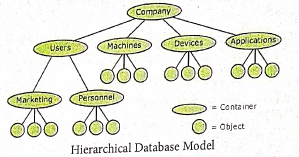
1. Hierarchical Database Model:
(i). The famous Hierarchical database model was IMS (Information Management System), IBM's first DBMS.
(ii). In this model each record has information in parent/child relationship like a tree structure.
(iii). The collection of records was called as record types. This individual records are equal to rows.
Advantages: Less redundant data, efficient search, data-integrity and security.
Limitations: Complex to implement and difficulty in handling many to many relationship.
2. Network model:
(i). The first developed network data model was IDS (Integrated Data Store) at Honeywell.
(ii). Network model is similar to Hierarchical model except that in this model each member can have more than one owner.
(iii). The Many to Many relationships are handled in a better way.
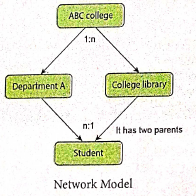
(iv). This model identified by the three database components Network schema, Sub schema and Language for data management.
Network schema: schema defines all about the structure of the data base.
Sub schema: controls on views of the database for the user.
Language: basic procedural for accessing the database.
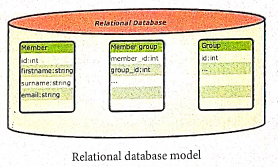
3. Relational model:
Oracle and DB2 are few commercial relational models in use Relational model is defined with two terminologies: Instance and Schema.
Instance: A table consisting of rows and columns.
Schema: Specifies the structure including name and type of each column.
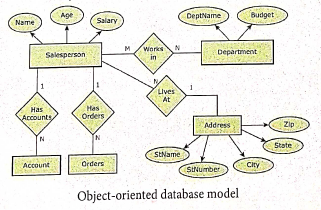
4. Object oriented database model:
(i). This model incorporates the combination of Object Oriented Programming (OOP's) concepts and database technologies.
(ii). Practically, this model serves as the base of Relational model. Object oriented model uses small, reusable software known as Objects.
(iii). These are stored in object oriented database.
17.
Drawing a star using polygon tool.
To draw a Star
(i) Click on the Polygon tool from the toolbox. The cursor changes to a crosshair.
(ii) Click and drag anywhere on the screen. As you drag, a Polygon appears.
(iii) Release the mouse button when the Polygon is of the desired size.
(iv) Choose Element → Polygon settings in the menu bar. Now polygon settings dialogue box appears.
(v) Type 5 in the Number of sides text box.
(vi) Type 50% in star inset textbox.
(vii) Click OK. Now the required star appears on the screen.
18.


12th Standard Syllabus & Materials
12th Standard
TN 12th Computer Applications களப்பெயர் முறைமை (DNS) Sample Question Papers Study Material - QB365 Set A
NEW12th Standard
TN 12th Computer Applications வலையமைப்பு எடுத்துக்காட்டுகள் மற்றும் நெறிமுறைகள் Sample Question Papers Study Material - QB365 Set A
NEW12th Standard
TN 12th Computer Applications கணினி வலையமைப்பு ஓர் அறிமுகம் Sample Question Papers Study Material - QB365 Set A
NEW12th Standard
TN 12th Computer Applications PHP-உடன் MySQL-ஐ இணைத்தல் Sample Question Papers Study Material - QB365 Set A



Tamilnadu Stateboard 12th Standard Subjects

Maths

Chemistry

Physics

Biology

Computer Science

Business Maths and Statistics

Economics

Commerce

Accountancy

History
Computer Applications
Biology
Computer Technology
Computer Applications
Computer Science
Business Maths and Statistics
Commerce
Economics
Maths
Chemistry
Physics
Computer Technology
History
Accountancy

Tamil

English

French
Tamilnadu Stateboard Standards
