
 100% FREE ACCESS
12th Standard Syllabus & Materials
12th Standard
TN 12th Computer Applications மின்னணு தரவு பரிமாற்றம் Sample Question Papers Study Material - QB365 Set A
NEW12th Standard
TN 12th Computer Applications மின் - வணிக பாதுகாப்பு அமைப்புகள் Sample Question Papers Study Material - QB365 Set A
NEW12th Standard
TN 12th Computer Applications மின்னணு செலுத்தல் முறைகள் Sample Question Papers Study Material - QB365 Set A
NEW12th Standard
TN 12th Computer Applications மின் - வணிகம் Sample Question Papers Study Material - QB365 Set A
NEW12th Standard
TN 12th Computer Applications திறந்த மூல கருத்துருக்கள் Sample Question Papers Study Material - QB365 Set A
NEW12th Standard
TN 12th Computer Applications வலையமைப்பு வடமிடல் Sample Question Papers Study Material - QB365 Set A

Published on: 10/09/2022
QB365 provides a detailed and simple solution for every Possible Creative Questions in Class 12 Computer Applications Subject - Network Cabling, English Medium. It will help Students to get more practice questions, Students can Practice these question papers in addition to score best marks.
Download Tamil Nadu 12th Standard Computer Applications question papers, model tests, one-mark questions, important questions, and public exam papers in PDF format. Free study materials and answer keys for TN State Board students.
Questions + Answers key
Take MCQ Computer Applications Test
1.
Explain briefly about Ethernet cards and ports along with RJ45 jack.
2.
Explain about pins details of Ethernet connector.
3.
List the steps involved in Crimping process for making Ethernet cables
1.
(i) Ethernet card is a Network-Interface Card (NIC) that allows computers to connect and transmit data to the device on the network.
(ii) It may be an expansion card (or) builtin-type. expansion card is a separate circuit board also called as PCI Ethernet card which is inserted into PCI slot on motherboard of a computer.
(iii) Now a days, most of the computers come with built-in Ethernet cards which resides on motherboard.
(iv) Wireless Ethernet cards are also available which uses radio waves to transmit data.
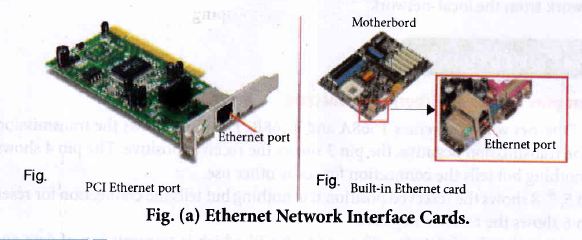
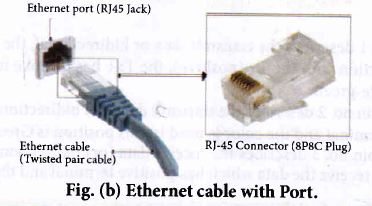
(v) Ethernet port is an opening which is a part of an Ethernet card. It accepts RJ45 connector with an Ethernet cable. It is also called as RJ45 Jack.
(vi) It is found on Personal Computers, Laptops, Routers, Switches, Hubs, and modems,
(vii) We can see an Ethernet port on the backside of a computer (or) a laptop.
(viii) It connects Ethernet cable with Ethernet card mounted on Motherboard.
(ix) Nowadays, most of computers and laptops have a built-in Ethernet port for connecting the device to a wired network. Some of them not having a port use dongles. Devices that use only wifi for networking eliminate both cable and port .
(x) Once we inject the plug into the port the 2 LED lights will glow in the computer. One is green and another is orange. Once orange light starts blinking, referring to an Internet connection.
2.
Figure shows Ethernet wiring schemes T568A and T568B. The pin 1 shows the transmission positive, the pin 2 shows the transmission negative, the pin 3 shows the receiver positive. The pin 4 shows the reserved position it is nothing but tells the connection for some other use.
(i) The pin 5, 7, 8 show the reserved position it is nothing but tells the connection for reserved position.
(ii) The pin 6 shows the receiver negative.
(iii) The two main signals of the pins: The one is the Tx which is transmission of data and Rx which is receiver of data.
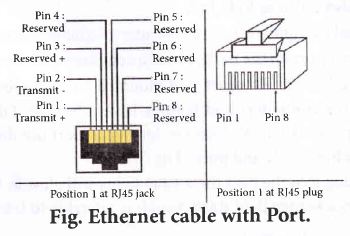
From the figure
1. The position, of Pin 1 describes the transmit data or bidirectional, the bidirectional means it can be sent io both connections with the Tx (positive), the Tx+ has a positive terminal and the color used in this position is white-green.
2. In this position of pin no. 2 describes the transmit data (or) bidirectional with the Tx (negative). The Tx- has a negative terminal and the color is used in this position is Green.
3. In this position of pin no. 3 describes the received data (or) bidirectional with the Rx (positive). The Rx is compatible to receive the data which has positive terminal and the color is used in this position is white orange.
4. In this position of pin no. 4 describes that it is not connected or bidirectional. It means there will be no transmitting (or) receiving will exist But it can be used later for some other connection and the color used is blue.
5. In this position of pin no. 5 describes that it is not connected (or) bidirectional and the color is white blue.
6. In this position of pin no. 6 describes the receive data (or) bidirectional with the Pd (negative) which has a negative terminal and the color used is orange.
7. In this position of pin no. 7 describes that it is not connected or bidirectional and the color is white brown.
8. In this position o fpin no 8 describes that it is not connected or bidirectional and the color is brown.
3.
(i) Cut the cable with desired length
(ii) Strip the insulation sheath about 1 inch from both ends of the cable and expose the twisted pair wires
(iii) After stripping the wire, untwist the smaller wires and arrange them into the proper wiring scheme, T568B preferred generally.
(iv) Bring the wires tighter together and cut them down so that they all have the same length (1/2 inch).
(v) Insert the all 8 colored wires into the eight grooves in the connector. The wires should be inserted until the plastic sheath is also inside the connector.
(vi) Use the crimping tool to lock the RJ45connector on the cable. It should be strong enough to handle manual traction. Now it is ready for data transmission.
(vii) Use a cable tester to verify the proper connectivity of the cable, if need.

12th Standard Syllabus & Materials
12th Standard
TN 12th Computer Applications களப்பெயர் முறைமை (DNS) Sample Question Papers Study Material - QB365 Set A
NEW12th Standard
TN 12th Computer Applications வலையமைப்பு எடுத்துக்காட்டுகள் மற்றும் நெறிமுறைகள் Sample Question Papers Study Material - QB365 Set A
NEW12th Standard
TN 12th Computer Applications கணினி வலையமைப்பு ஓர் அறிமுகம் Sample Question Papers Study Material - QB365 Set A
NEW12th Standard
TN 12th Computer Applications PHP-உடன் MySQL-ஐ இணைத்தல் Sample Question Papers Study Material - QB365 Set A



Tamilnadu Stateboard 12th Standard Subjects

Maths

Chemistry

Physics

Biology

Computer Science

Business Maths and Statistics

Economics

Commerce

Accountancy

History
Computer Applications
Biology
Computer Technology
Computer Applications
Computer Science
Business Maths and Statistics
Commerce
Economics
Maths
Chemistry
Physics
Computer Technology
History
Accountancy

Tamil

English

French
Tamilnadu Stateboard Standards
