
 100% FREE ACCESS
12th Standard Syllabus & Materials
12th Standard
TN 12th Computer Applications மின்னணு தரவு பரிமாற்றம் Sample Question Papers Study Material - QB365 Set A
NEW12th Standard
TN 12th Computer Applications மின் - வணிக பாதுகாப்பு அமைப்புகள் Sample Question Papers Study Material - QB365 Set A
NEW12th Standard
TN 12th Computer Applications மின்னணு செலுத்தல் முறைகள் Sample Question Papers Study Material - QB365 Set A
NEW12th Standard
TN 12th Computer Applications மின் - வணிகம் Sample Question Papers Study Material - QB365 Set A
NEW12th Standard
TN 12th Computer Applications திறந்த மூல கருத்துருக்கள் Sample Question Papers Study Material - QB365 Set A
NEW12th Standard
TN 12th Computer Applications வலையமைப்பு வடமிடல் Sample Question Papers Study Material - QB365 Set A

Published on: 01/10/2020
12th Standard Computer Applications English Medium Sample 5 Mark Book Back Questions (New Syllabus 2020)
Download Tamil Nadu 12th Standard Computer Applications question papers, model tests, one-mark questions, important questions, and public exam papers in PDF format. Free study materials and answer keys for TN State Board students.
Questions + Answers key
Take MCQ Computer Applications Test
1.
2.
Explain encryption technology.
3.
Briefly explain Electronic Account transfer and its types.
4.
5.
List out the Benefits of Open Source Software
6.
7.
Explain how the DNS is working.
8.
Explain about the development, merits and demerits in Mobile networks.
9.
Explain the growth of the computer networking
10.
Discuss in detail about MySQL functions with example.
11.
Explain Form Handling methods.
12.
Explain Looping Structure in PHP.
13.
Explain the working of Conditional Statements in PHP?
14.
Explain the Multidimensional Array.
15.
Explain the process of Webserver installation.
16.
17.
Write the steps to place the text in a frame.
18.
Explain in detail Techniques of Animation.
1.
2.
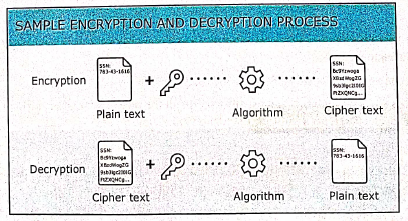
Encryption technology is an effective information security protection. It is defined as converting a plaintext into meaningless ciphertext using encryption algorithm thus ensuring the confidentiality of the data. The encryption or decryption process use a key to encrypt or decrypt the data. At present two encryption technologies are widely used. They are symmetric key encryption system and an asymmetric key encryption system. Thre figure below shows the Data Encryption and Decryption process:
3.
Apart from card based payment systems there are many alternative electronic payment systems. With the advent of computers, network technologies and electronic communications a large number of alternative electronic payment systems have emerged. These include ECS (Electronic Clearing Services), EFT (Electronic funds transfers), Real Time Gross Settlement system (RTGS) etc. These Electronic Payment systems are used in tendering cash in domestic and international transactions.
Electronic Clearing Services (ECS):
Electronic Clearing Service can be defined as repeated transfer of funds from one bank account to multiple bank accounts or vice versa using computer and Internet technology. The payer instructs the bank to debit from his bank account and credit it to one or more payee bank account provided amounts and dates of the payments earlier. This system provides the convenience of paperless payments. ECS can be used for both credit and debit purposes i.e. for making bulk payments or bulk collection of amounts.
Electronic Funds Transfer:
Electronic Funds Transfer (EFT) is the "electronic transfer" of money over an online network. The amount sent from the sender's bank branch is credited to the receiver's bank branch on the same day in batches. Unlike traditional processes, EFT saves the effort of sending a demand draft through post and the inherent delay in reaching the money to the receiver. Banks may charge commission for using this service. EFT is a widely used method for moving funds from one account to another in B2B business models.
Real Time Gross Settlement:
Real Time Gross Settlement System (RTGS) is a payment system particularly used for the settlement of transactions between financial institutions, especially banks. As name indicates, RTGS transactions are processed at the realtime. RTGS payments are also called as push payments that are initiated ("triggered") by the payer. RTGS payments are generally large-value payments, i.e. high-volume transactions.
Real-time gross settlement transactions are:
Unconditional: the beneficiary will receive funds regardless of whether he fulfills his obligations to the buyer or whether he would deliver the goods or perform a service of a quality consistent with the order.
Irrevocable: a correctly processed transaction cannot be reversed and its money cannot get refunded (the so-called settlement finality).
4.
5.
OSS projects are collaboration opportunities that improve skills and build connections in the field.
Domains that developers can contribute to the open source community include:
1. Communication tools.
2. Distributed revision control systems.
3. Bug trackers and task lists.
4. Testing and debugging tools.
(i) There are many open source softwares. So, we can select and use any software that suits our needs.
(ii) The complete options of the software can be used without any cost and restrictions.
(iii) We can share our ideas with the team. write the required code and share it with many.
(iv) As we can identify the programming techniques of group members, we can learn many ideas and make our program writing skills more efficient.
(v) The coding in open source software are being groomed by many enthusiastical members of the groups. So, if we report problems that we have in the program they are quickly mended by the group's effort.
(vi) As we can make changes to the open source software, we can add the most required features in the software.
(vii) Many open source software are very user friendly.
6.
7.
DNS Works:
(i) When the user enters the URL in the browser, the system first checks it DNS cache for the corresponding IP address.
(ii) If the IP address is found in the cache, then the information is retrieved from cache.
(iii) If not, the system needs to query the resolver about the IP address from Internet Service Provider (ISP).
(iv) Each resolver has its own cache and if it is found in that then that information is retrieved.
(v) If not, then the query is passed to next domain server i.e., TLD (Top Level Domain) which reviews the request and direct the query to name servers associated with that specific domain.
(vi) Unitil the query is solved it is passed to next level domians. finally, the IP address is detected and the corresponding record is sent to the resolver.
(vii) Then the resolver returns the record back to the computer browser. Now the user can view the webpages for the detected IP address.

8.
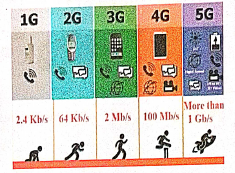
Development of Mobile Networks :
The generations of mobile networks are as follows.
(i) First Generation(1G) 1981- NMT launch
(ii) Second Generation(2G) 1991-GSM Launch
(iii) Second to Third Generation Bridge (2.5)2000 — GPRS launch
(iv) Third Generation( 3G) 2003- UK 3G launch
(v) Fourth Generation (4 G) 2007
(vi) Fifth Generation (5G) 2019+
Merits of Mobile Networks :
(i) It provides both voice/data services.
(ii) It connects both fixed and wireless telephone users.
(iii) It is used in areas where cables cannot be laid out due to its wireless nature.
(iv) It is easy to maintain.
(v) It is easy to upgrade the equipments.
(vi) The ‘mobile and fixed subscribers are connected immediately with cellular network as soon as mobile phones are switched on.
(vii) All the handshake signals between mobile and base station are automatically exchanged.
Demerits of Mobile Networks :
(i) Cost
(ii) Vulnerable to Security risks
(iii) Additional training is needed to use new technology.
(iv) Cyber Crime.
9.
1. The uses of the computer networking are:
2. It is used in business and home
3. Growth on popularity of cloud storage and cloud computing.
4. On behalf of buying physical copies of games music and movies, increasingly downloading and buy digital license their need via internet.
5. Developments on mobile networking infrastructure both deployments of 4G and 3G networks that will allow the people in their developed areas.
6. Allows it to their smart mobile phones as video broadcasting system and as mobile television.
7. Some of the people underlying and staying connected all the times, whenever they are at the workplace, via a home network, via publish WiFi hotspots or smart phone.
8. 4G LTE mobile network was not reached by many parts of world, of the industry of telecommunication has been hard working on the development of their next generation :"5G" cellular communication technology. This 5G intense to boost up the speed the mobile connections dramatically.
9. Artificial intelligence will help to maintain, manage, and protect it.
10. This Artificial network powering algorithms with become most intelligent:
11. It might find faster and reliable methods of anticipating threats and cleaning networks.
12. Artificial intelligence able to be a better predict traffic as it collects and analyses data in real time, some of network managers were better prepared for big event such as the world cup, Olympics, Valentines day which often put on the Internet under pressure.
10.
MySQL function in PHP:
In PHP Scripting language many functions are available for MySQL Database connectivity and executing SQL queries.
MySQLi is extension in PHP scripting language which gives access to the MYSQL database. MySQLi extension was introduced version 5.0.0,
The MySQLi extension contains the following important functions which are related to MySQL database connectivity and management.
i) Mysqli_connect() Function
ii) Mysqli_close() Function
iii) Mysqli_query() Function
(i) Database Connections:
Before accessing MySQL Database, connect to Database Server machine via PHP scripting language using Mysqli_connect() Function.
Syntax :
mysqli_connect("Server Name "User Name","Password"DB Name");
This function requires four parameters to connect to database server. Database Server name, Database username, password anda Database Name.
(ii) Managing Database Connections :
The below code describes managing database connection methods and features.
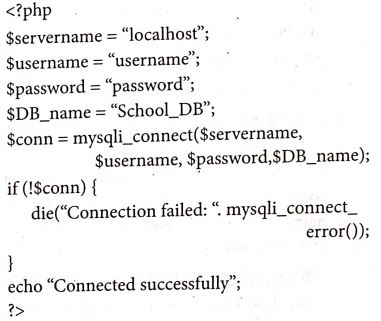
The mysqli_connect function uses these variables to connect Database server to PHP. If connection gets fail, output will be printed with MySQL error code. Otherwise connection is success.
(iii) Performing Queries :
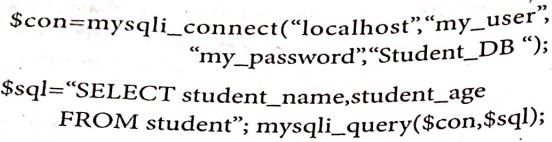
The main goal of MySQL and PHP connectivity is to retrieve and manipulate the data from MYSQL database server. The SQL query statements help in PHP MySQL extension to achieve the objective of MYSQL and PHP connection. "mysqli_query" is a function, that helps to execute the SQL query statements in PHP scripting language.
Syntax:
mysqli_query("Connection Object","SQL Query")
Example:
Closing Connection :
mysqli_close() Function is used to close an existing opened database connection between PHP scripting and MySQL Database Server.
11.
PHP Basic Form Handling:
(i) When the user keys in the input data in HTML controls and clicks the submit button the request will be generated and reaches a PHP file which is mentioned in the FORM tag under the Action attribute.
(ii) All the input values are synchronized and sent to the server via POST method or GET method. Method is an attribute of form tag in HTML.
(iii) Once the data reaches the server,two PHP variables such as \($\)_POST and \($\)_GET collects the data and prepares the response accordingly.
Post Method: The input data sent to the server with POST method is stored in the request body of the client's HTTP request.
Get Method: The input data sent to the server with POST method via URL address is known as query string. All input data are visible by user after they clicks the submit button.
Example:
Test.html:
< html >
< body >
<form action="'welcome.php" method=''post" >
Name: < input type="text" name="name'' > < br >
E-mail: < input type="text" name="email" > < br >
< input type=''submit" >
< /form >
< /body >
< /html >
Welcome.php:
< html >
< body >
Welcome < ?php echo \($\)_POST["name"]; ? > < br >
Your email address is: < ?php echo \($\)_POST["email"]; ? >
< /body >
< /html >
Output
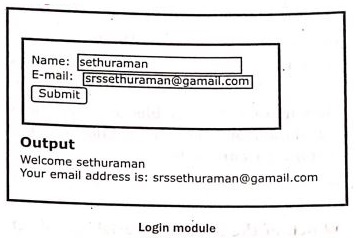
(i) HTML File contains two Text Box (Name and Email), One Button and one form tag. The remote server PHP file (welcome.php) is mentioned in form tag under the Action Attribute.
(ii) In "Welcome.Php" file, PHP variables such as \($\)_POST and \($\)_GET collects the data and prepares the response accordingly.
(iii) Eventually the user will receive the output response in the client machine's browser screen.
12.
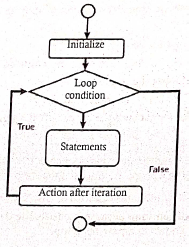
Looping structure are useful for writing iteration logics. It is the most important feature of many programming languages including PHP.
Looping categories are
(i) for loop
(ii) for each loop
(iii) while loop
(iv) Do while loop
(i) for loop:
It is used for iteration logics when the programmer know in advance how many times the loop should run.
Syntax:
for (init counter; test counter; increment counter)
{
code to be executed;
}
Parameters:
init counter: To initialize the loop initial counter value
test counter : Evaluated for every iteration, of the loop.
If it evaluates to TRUE, the loop continues.
If it evaluates to FALSE, the loops ends.
Increment counter:Increases the loop counter value.
(ii) for each loop:
It works only with arrays.
Loop iteration depends on each KEY value pair in the Array.
In loop iteration, value of the current array element is assigned to $value variable and the array
pointer is shifted by one until it reaches the end of the array element.
Syntax:
for each ($array as $value)
{
code to be executed;
}
(iii) While loop:
It is used for simple iteration logics.
It checks the condition, if the condition is true, and it executes the loop.
Syntax:
while (condition is true)
code to be executed;
}
(iv) Do while loop:
Do while loop always run the statement inside the loop block at the first time of execution. It then checks the condition. If the specified condition is true, it executes the loop.
Syntax:
do
{
code to be executed;
}while (condition is true);
}
13.
Conditional statements in PHP are implemented by the following types:
(i) if Statement
(ii) if... else Statement
(iii) if... elseif... else Statement
(iv) switch Statement
(i) If statement in PHP:
If statement executes a statement or a group of statements if a specific condition is satisfied as per the
user expectation.
Syntax:
if (condition)
{
Execute statement(s) if condition is true;
}
(ii) If else statement in PHP:
If statement executes a statement or a group of statements, if a specific condition is satisfied by the user
expectation. When the condition gets false (fail) the else block is executed.
Syntax:
if (condition)
{
Execute statement(s) if condition is true;
}
else
{
Execute statement(s) if condition is false;
(iii) If elseif else statement
It is a combination of if-else statement. More than one statement can execute the condition based on user needs.
Syntax:
if (1st condition)
{
Execute statement(s) if condition is true;
}
elseif (2nd condition)
{
Execute statement(s) if 2nd condition is true;
}
else
{
Execute statement(s) if both conditions are false;
}
(iv) Switch Statement
It is used to perform different actions based on different conditions.
Syntax:
switch (n) {
case label 1:
code to be executed if n-label1;
break;
case label2:
code to be executed if n=label2;
break;
***
default:
code to be executed if n is different from all labels;
}
14.
Multidimensional Arrays:
Array containing one or more arrays is called multidimensional array. PHP accepts array with two, three four or more levels.
Example:
// A two-dimensional array
$student=array
(
array("Iniyan", 100, 96),
array("Kavin", 60, 59),
array("Nilani", 1313, 139)
);
echo $$student [0][0].": Tamil Mark: ".$student [0][1].". English mark: ".$student [0] [2]."< br >";
echo $$student [1][0].": Tamil Mark: ".$student [1][1].". English mark: ".$student [1] [2]."< br >";
echo $$student [2}[0].": Tamil Mark:".$student [2][1].".English mark: ".$student [2] [2]."< br >
? >
15.
The following are the steps to install and configure Apache Httpd webserver and PHP module in windows server machine.
Step 1:
Go to Apache foundation website and download the Httpd webserver software.
https://httpd.apache.org/download.cgi.
Step 2:
After downloading MSI file from Apache foundation website, user launches the MSI file and clicks next.
Click on next and next button finish the installation on server machine.
Software takes default port number 130 or 130130.
Once the user finished, webserver software is installed and configured on server hardware machine as a service.
Step 3:
To test the installation of Apache Httpd webserver, enter the following URL. from your web browser which is installed in your client machine.
https://localhost:130/ (or) https://localhost:130130
The output page that says "Its works"
Step 4:
Administrator user can start, stop and restart the webserver service at any time via windows control panel.
Once the services stops, the client machine will not receive the response message from server machine.
Step 5.
Webserver's configuration setting file "httpd.conf" is located in the conf directory under the apache installation directory.
Edit this file and enable the PHP module to run PHP scripting language.
16.
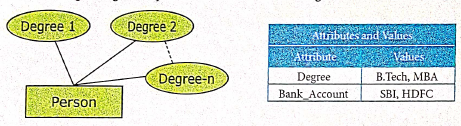
17.
To place text in a Frame
(i) Click on any one Frame tool from the Toolbox.
(ii) Draw a frame with one of PageMaker's Frame tools (Rectangle frame tool (or) Ellipse Frame Tool (or) Polygon frame Tool). Make sure the objects remains selected.
(iii) Click on File > Place. The Place dialog box will appears.
(iv) Locate the document that contains the text you want to place, select it.
(v) Click on Open.
(vi) Click in a frame to place the text in it.The text will be placed in the frame.
18.
1. Animation is the process of displaying images with continuous movement.
2. In animation, the screen object is a vector image in animation.
3. Using numerical transformations the movement of that image along its path is calculated for their defining coordinates.
4. The least frame rate of atleast 16 frame/sec gives the impression of smoothness and for natural looking it should be atleast 25 frame/sec.
5. Animations may be in two or three dimensional.
6. The two dimensional animation, bring an image alive, that occur on the flat X and Y axis of the screen, while in three dimensional animation it occurs along the three axis X, Y and Z.
7. The two basic types of animations are (1) Path animation and (2) Frame animation.
(1) Path Animation
It involves moving an object on a screen that has a constant background.
E.g. A cartoon character may move across the screen regardless of any change in the background or the character.
(2) Frame Animation
In frame animations, multiple objects are allowed to travel simultaneously and the background also changes.

12th Standard Syllabus & Materials
12th Standard
TN 12th Computer Applications களப்பெயர் முறைமை (DNS) Sample Question Papers Study Material - QB365 Set A
NEW12th Standard
TN 12th Computer Applications வலையமைப்பு எடுத்துக்காட்டுகள் மற்றும் நெறிமுறைகள் Sample Question Papers Study Material - QB365 Set A
NEW12th Standard
TN 12th Computer Applications கணினி வலையமைப்பு ஓர் அறிமுகம் Sample Question Papers Study Material - QB365 Set A
NEW12th Standard
TN 12th Computer Applications PHP-உடன் MySQL-ஐ இணைத்தல் Sample Question Papers Study Material - QB365 Set A



Tamilnadu Stateboard 12th Standard Subjects

Maths

Chemistry

Physics

Biology

Computer Science

Business Maths and Statistics

Economics

Commerce

Accountancy

History
Computer Applications
Biology
Computer Technology
Computer Applications
Computer Science
Business Maths and Statistics
Commerce
Economics
Maths
Chemistry
Physics
Computer Technology
History
Accountancy

Tamil

English

French
Tamilnadu Stateboard Standards
