
 100% FREE ACCESS
12th Standard Syllabus & Materials
12th Standard
TN 12th Computer Applications மின்னணு தரவு பரிமாற்றம் Sample Question Papers Study Material - QB365 Set A
NEW12th Standard
TN 12th Computer Applications மின் - வணிக பாதுகாப்பு அமைப்புகள் Sample Question Papers Study Material - QB365 Set A
NEW12th Standard
TN 12th Computer Applications மின்னணு செலுத்தல் முறைகள் Sample Question Papers Study Material - QB365 Set A
NEW12th Standard
TN 12th Computer Applications மின் - வணிகம் Sample Question Papers Study Material - QB365 Set A
NEW12th Standard
TN 12th Computer Applications திறந்த மூல கருத்துருக்கள் Sample Question Papers Study Material - QB365 Set A
NEW12th Standard
TN 12th Computer Applications வலையமைப்பு வடமிடல் Sample Question Papers Study Material - QB365 Set A

Published on: 16/10/2019
Forms and Files
Download Tamil Nadu 12th Standard Computer Applications question papers, model tests, one-mark questions, important questions, and public exam papers in PDF format. Free study materials and answer keys for TN State Board students.
Questions + Answers key
Take MCQ Computer Applications Test
1.
Which of the following functions reads the entire contents of a file?
fgets()
file_get_contents()
fread()
readfile()
2.
How PHP files can be accessed?
Through Web Browser
Through HTML files
Through Web Server
All of Above
3.
PHP is a _________ typed language
User
Loosely
Server
System
4.
Which directive determines whether PHP scripts on the server can accept file uploads?
file_uploads
file_upload
file_input
file_intake
5.
When you use the \$_GET variable to collect data, the data is visible to..
none
only user
everyone
selected few
6.
Write syntax of File open function.
7.
Write Syntax of Browse button in HTML.
8.
Write Syntax of Text box in HTML.
9.
What is Validation in PHP?
10.
Define HTML form controls.
11.
Explain briefly about fwrite( ) function.
12.
Explain briefly about fopen( ) function
13.
Write short on file handling functions.
14.
Explain the difference between the POST method and GET method of sending data to the server in PHP.
15.
Write the features Form Handling.
16.
Explain in detail of File handling functions in PHP.
17.
Explain the process File handling.
18.
Explain Form Handling methods.
19.
Target window
20.
URL address
21.
File Select
22.
Checkbox
23.
Text
1.
(b)
file_get_contents()
2.
(a)
Through Web Browser
3.
(b)
Loosely
4.
(a)
file_uploads
5.
(c)
everyone
6.
Syntax:
\($\)file_Object = fopen("FileName", "Read/WriteMode") or die("Error Message!");
7.
Syntax:
< input type="file" name="myFile" >
8.
Syntax:
<Input type = "text" name = "name">
9.
Validation is a process of checking the input data submitted by the user from client machine.
10.
HTML form controls are used to collect data from user.
11.
PHP write a File:
The fwrite( ) function is used to write to a file.
Syntax:
fwrite($myfile, $txt);
Example:
< ?php
$myfile = fopen("new_schooLfile.
txt", "w'')
or die("Unable to open file!'');
$txt = "School Name\n";
fwrite($myfile, $txt);
$txt = "Student Name\n";
fwrite($myfile, $txt);
fclose($myfile);
? >
12.
PHP Open a File
1. fopen( ) is a system function available in PHP.
2. This function helps to open a file in the server.
3. It contains two parameters one for the file and the other one specifies in which mode the file should be opened (Read/Write).
Syntax:
$file_Object= . fopen("FileName", "Read/ WriteMode'') or die("Error Message!'');
Example:
< ?php
$myfile = fopen("Student.txt", "r'') or die("Unable to open file!'');
? >
13.
PHP provides a convenient way of working with files via collection of built in functions, some of the functions are file open, file read, file close, file write, Appending a file and uploading a file.
(i.e.): fopen(), fread(), fclose(), fwrite(), file_put_contents(), etc.
14.
| Post Method | Get Method |
| The input data sent to the server with POST method is stored in the request body of the client's HTTP request. | The input data sent to the server with POST method via URL address is known as query string. All input data are visible by user after they click the submit button. |
15.
(i) To get form data, we need to use PHP $_GET and S_POST.
(ii) To retrieve data from get request, we need to use $_GET and for post request $_POST.
(iii) We can send limited amount of data through get request and large amount of data through post request.
16.
File handling is an important activity of all web application development process.
Files are processed for different tasks using the following events :
(i) PHP Open a File,
(ii) PHP Read a File,
(iii) PHP Close a File,
(iv) PHP Write a File,
(v) PHP Appending a File and
(vi) PHP uploading a File.
(1) PHP Open a File : fopen() is a system function available in PHP. This function helps to open a file in the server. It contains two parameters one for the file and the other one specifies in which mode the file should be opened (Read/Write).
Syntax:
$file_Object= fopen("FileName", "Read/
WriteMode") or die("Error Message!");
Example:

$myfile = fopen("Student.txt", "r")
or die("Unable to open file!");
?>
(ii) PHP Read a File: The fread() function reads from an open file. The file object comes from fopen function.
Syntax:
fread($file_Object,filesize("FileName"));
Example:
fread($myfile,filesize("Student.txt"));
?>
(iii) PHP Close a File: The fclose() function is used to close an opened file. The file object comes from fopen function.
Syntax:
fclose($file_Object);
Example:
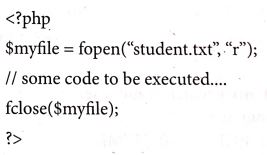
(iv) PHP write a File: The fwrite() function is used to write to a file.
Syntax:

17.
In the file handling process following task can be included
(i) open file for read and write
(ii) close file
(iii) perform operations on file
(iv) write results
With PHP we can handle file easily. There are various in built functions available for file handling for PHP.
Using file handling we can open, create, upload and edit files in PHP before working with file. We must open the file first using fopen() function.fopen() function is used in a following manner to perform this task.
$fp = fopen(
In the above code, we have used two parameters while using fopen() function.
filename to open mode in which file is to be opened.
The function will return a file pointer if the file is successfully opened, otherwise it will return false.
Modes we use in the file handling
| Mode | Description |
| r | Read only mode |
| r+ | Read and write mode |
| W | Write mode only |
| W+ | Write and read model |
| a | Append file mode |
| a+ | Read and append mode |
| x | It used to create and open a file only for writing purpose. |
18.
PHP Basic Form Handling:
(i) When the user keys in the input data in HTML controls and clicks the submit button the request will be generated and reaches a PHP file which is mentioned in the FORM tag under the Action attribute.
(ii) All the input values are synchronized and sent to the server via POST method or GET method. Method is an attribute of form tag in HTML.
(iii) Once the data reaches the server,two PHP variables such as \($\)_POST and \($\)_GET collects the data and prepares the response accordingly.
Post Method: The input data sent to the server with POST method is stored in the request body of the client's HTTP request.
Get Method: The input data sent to the server with POST method via URL address is known as query string. All input data are visible by user after they clicks the submit button.
Example:
Test.html:
< html >
< body >
<form action="'welcome.php" method=''post" >
Name: < input type="text" name="name'' > < br >
E-mail: < input type="text" name="email" > < br >
< input type=''submit" >
< /form >
< /body >
< /html >
Welcome.php:
< html >
< body >
Welcome < ?php echo \($\)_POST["name"]; ? > < br >
Your email address is: < ?php echo \($\)_POST["email"]; ? >
< /body >
< /html >
Output
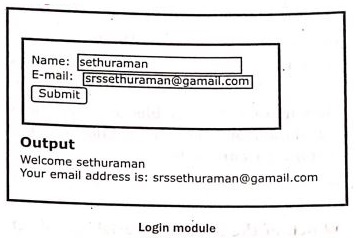
(i) HTML File contains two Text Box (Name and Email), One Button and one form tag. The remote server PHP file (welcome.php) is mentioned in form tag under the Action Attribute.
(ii) In "Welcome.Php" file, PHP variables such as \($\)_POST and \($\)_GET collects the data and prepares the response accordingly.
(iii) Eventually the user will receive the output response in the client machine's browser screen.
19.
_blank, _self, _parent
20.
Query string
21.
Select file
22.
More than one value
23.
Textbox and text area

12th Standard Syllabus & Materials
12th Standard
TN 12th Computer Applications களப்பெயர் முறைமை (DNS) Sample Question Papers Study Material - QB365 Set A
NEW12th Standard
TN 12th Computer Applications வலையமைப்பு எடுத்துக்காட்டுகள் மற்றும் நெறிமுறைகள் Sample Question Papers Study Material - QB365 Set A
NEW12th Standard
TN 12th Computer Applications கணினி வலையமைப்பு ஓர் அறிமுகம் Sample Question Papers Study Material - QB365 Set A
NEW12th Standard
TN 12th Computer Applications PHP-உடன் MySQL-ஐ இணைத்தல் Sample Question Papers Study Material - QB365 Set A



Tamilnadu Stateboard 12th Standard Subjects

Maths

Chemistry

Physics

Biology

Computer Science

Business Maths and Statistics

Economics

Commerce

Accountancy

History
Computer Applications
Biology
Computer Technology
Computer Applications
Computer Science
Business Maths and Statistics
Commerce
Economics
Maths
Chemistry
Physics
Computer Technology
History
Accountancy

Tamil

English

French
Tamilnadu Stateboard Standards
