
 100% FREE ACCESS
12th Standard Syllabus & Materials
12th Standard
TN 12th Maths Applications of Matrices and Determinants Sample Question Papers Study Material - QB365 Set A
NEW12th Standard
TN 12th Computer Applications மின்னணு தரவு பரிமாற்றம் Sample Question Papers Study Material - QB365 Set A
NEW12th Standard
TN 12th Computer Applications மின் - வணிக பாதுகாப்பு அமைப்புகள் Sample Question Papers Study Material - QB365 Set A
NEW12th Standard
TN 12th Computer Applications மின்னணு செலுத்தல் முறைகள் Sample Question Papers Study Material - QB365 Set A
NEW12th Standard
TN 12th Computer Applications மின் - வணிகம் Sample Question Papers Study Material - QB365 Set A
NEW12th Standard
TN 12th Computer Applications திறந்த மூல கருத்துருக்கள் Sample Question Papers Study Material - QB365 Set A

Published on: 14/10/2019
Database Concepts
Download Tamil Nadu 12th Standard Computer Science question papers, model tests, one-mark questions, important questions, and public exam papers in PDF format. Free study materials and answer keys for TN State Board students.
Questions + Answers key
Take MCQ Computer Science Test
1.
Write a note on different types of DBMS users.
2.
Explain Object Model with example.
3.
4.
What is the role of DBA?
5.
What is the difference between Select and Project command?
6.
Explain the components of DBMS.
7.
Explain the characteristics of DBMS.
8.
Differentiate DBMS and RDBMS.
9.
Explain the different types of relationship mapping.
10.
1.
Database Administrators:
Database Administrator or DBA is the one who manages the complete database management system. DBA takes care of the security of the DBMS, managing the license keys, managing user accounts and access etc.
Application Programmers or software Developers:
This user group is involved in developing and designing the parts of DBMS.
End User:
All modern applications, web or mobile, store user data. Applications are programmed in such a way that they collect user data and store the data on DBMS systems running on their server. End users are the one who store, retrieve, update and delete data.
Database designers:
Database designers are responsible for identifying the data to be stored in the database for choosing appropriate structures to represent and store the data.
2.
Object model stores the data in the form of objects, attributes and methods, classes and inheritance. This model handles more complex applications, such as Geographic information System (GIS),sdentific experiments, engineering design and manufacturing. It is used in file Management System. It represents real world objects, attributes and behaviors. It provides a clear modular structure. It is easy to maintain and modify the existing code.
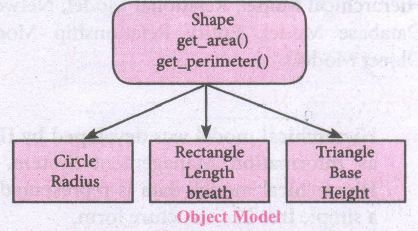
An example of the Object model is Shape, Circle, Rectangle and Triangle are all objects in this model
(i) Circle has the attribute radius.
(ii) Rectangle has the attributes length and breadth.
(iii) Triangle has the attributes base and height.
(iv) The objects Circle, Rectangle and. Triangle inherit from the object Shape
3.
4.
Database Administrator or DBA is the one who manages the complete database management system. DBA takes care of the security of the DBMS, managing the license keys, managing user accounts and access etc.
5.
| Select | Project |
|---|---|
| 1. Symbol - σ | 1. Symbol - π |
| 2. Selecting a subset with tuples | 2. Contains a vertical subset of relation. |
| 3. Select filters out all tuples that don't satisfy the condition. |
3. Projection eliminates all attributes of the input relation except in the projection list. |
6.
The Database Management System can be divided into five major components as follows:
(i) Hardware
(ii) Software
(iii) Data
(iv) Procedures / Methods
(v) Database Access Languages
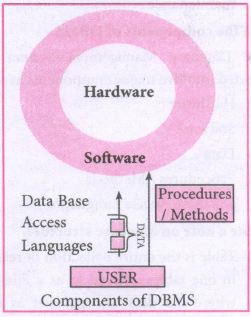
(i) Hardware: The computer, hard disk, I/O channels for data, and any other physical component involved in storage of data
(ii) Software: This main component is a program that controls everything. The DBMS software is capable of understanding the Database Access Languages and interprets into database commands for execution.
(iii) Data: It is that resource for which DBMS is designed. DBMS creation is to store and utilize data.
(iv) Procedures/Methods: They are general instructions to use a database management system such as installation of DBMS, manage databases to take backups, report generation, etc
(v) DataBase Access Languages: They are the languages used to write commands to access, insert, update and delete data stored in any database.
Examples of popular DBMS: Dbase, FoxPro
7.
Characteristics of Database Management System
| 1. Data stored into Table | Data is never directly stored into the database. Data is stored into tables, created inside the database. DBMS also allows to have relationship between tables which makes the data more meaningful and connected. |
| 2. Reduced Redundancy | In the modern world hard drives are very cheap, but earlier when hard drives were too expensive, unnecessary repetition of data in database was a big problem But DBMS follows Normalisation which divides the data in such a way that repetition is minimum. |
| 3. Date Consistency | On live data, it is being continuously updated and added, maintaining the consistency of data can become a challenge. But DBMS handles it by itself. |
| 4. Support Multiple user and Concurrent Access | DBMS allows multiple users to work on it( update, insert, delete data) at the same time and still manages to maintain the data consistency. |
| 5. Query Language | DBMS provides users with a simple query language, using which data can be easily fetched, inserted, deleted and updated in a database. |
| 6. Security | The DBMS also takes care of the security of data, protecting the data from unauthorized access. In a typical DBMS, we can create user accounts with different access permissions, using which we can easily secure our data by restricting user access. |
| 7. DBMS Supports Transactions | It allows us to better handle and manage data integrity in real world applications where multi-threading is extensively used. |
8.
| Basis of Comparison | DBMS | RDBMS |
|---|---|---|
| Expansion | Database Management System | Relational Database Management System |
| Data storage | Navigational model ie data by linked records | Relational model (in tables). ie data in tables as row and column |
| Data redundancy | Exhibit | Not Present |
| Normalization | Not performed | RDBMS uses normalization to reduce redundancy |
| Data access | Consumes more time | Faster, compared to DBMS. |
| Keys and indexes | Does not use. | used to establish relationship. Keys are used in RDBMS. |
| Transaction management | Inefficient, Error prone and insecure | Efficient and secure |
| Distributed Databases | Not supported | Supported by RDBMS. |
| Example | Dbase, FoxPro. | SQL server, Oracle, mysql, MariaDB, SQLite. |
9.
Types of relationships:
(i) One-to-One Relationship
(ii) One-to-Many Relationship
(iii) Many-to-One Relationship
(iv) Many-to-Many Relationship
(i) One-to-One Relationship:
In One-to-One Relationship, one entity is related with : only one other entity. One row in a table is linked with only one row in another table and vice versa.
For example: A student can have only one exam number

(ii) One-to-Many Relationship.
In One-to- Many relationship, one entity is related to many other entities. One row in a table A is linked to many rows in a table B, but one row in a table B is linked to only one row in table A.
For example: One Department has many staff members.
.JPG)
(iii) Many-to-One Relationship:
In Manyto- One Relationship, many entities can be related with only one in the other entity.
For example:
A number of staff members working in one Department.
Multiple rows in staff members table is related with only one row in Department table.
.JPG)
(iv) Many-to-Many Relationship:
A manyto- many relationship occurs when multiple records in a table are associated with multiple records in another table.
(i) Example 1:
Customers and Product
Customers can purchase various products and Products can be purchased by many customers
(ii) Example 2:
Students and Courses
A student can register for many Courses and a Course may include many students
(iii) Example 3:
Books and Student.
Many Books in a Library are issued to many students.
.JPG)
10.
.JPG)
.JPG)
.JPG)
.JPG)

12th Standard Syllabus & Materials
12th Standard
TN 12th Computer Applications வலையமைப்பு வடமிடல் Sample Question Papers Study Material - QB365 Set A
NEW12th Standard
TN 12th Computer Applications களப்பெயர் முறைமை (DNS) Sample Question Papers Study Material - QB365 Set A
NEW12th Standard
TN 12th Computer Applications வலையமைப்பு எடுத்துக்காட்டுகள் மற்றும் நெறிமுறைகள் Sample Question Papers Study Material - QB365 Set A
NEW12th Standard
TN 12th Computer Applications கணினி வலையமைப்பு ஓர் அறிமுகம் Sample Question Papers Study Material - QB365 Set A



Tamilnadu Stateboard 12th Standard Subjects

Maths

Chemistry

Physics

Biology
Computer Science

Business Maths and Statistics

Economics

Commerce

Accountancy

History

Computer Applications
Biology
Computer Technology
Computer Applications
Computer Science
Business Maths and Statistics
Commerce
Economics
Maths
Chemistry
Physics
Computer Technology
History
Accountancy

Tamil

English

French
Tamilnadu Stateboard Standards
