100% FREE ACCESS
12th Standard Syllabus & Materials
12th Standard
TN 12th Computer Applications மின்னணு தரவு பரிமாற்றம் Sample Question Papers Study Material - QB365 Set A
NEW12th Standard
TN 12th Computer Applications மின் - வணிக பாதுகாப்பு அமைப்புகள் Sample Question Papers Study Material - QB365 Set A
NEW12th Standard
TN 12th Computer Applications மின்னணு செலுத்தல் முறைகள் Sample Question Papers Study Material - QB365 Set A
NEW12th Standard
TN 12th Computer Applications மின் - வணிகம் Sample Question Papers Study Material - QB365 Set A
NEW12th Standard
TN 12th Computer Applications திறந்த மூல கருத்துருக்கள் Sample Question Papers Study Material - QB365 Set A
NEW12th Standard
TN 12th Computer Applications வலையமைப்பு வடமிடல் Sample Question Papers Study Material - QB365 Set A

Published on: 09/03/2020
12th Standard Computer Science English Medium All Chapter Book Back and Creative Five Mark Question 2020
Download Tamil Nadu 12th Standard Computer Science question papers, model tests, one-mark questions, important questions, and public exam papers in PDF format. Free study materials and answer keys for TN State Board students.
Questions + Answers key
Take MCQ Computer Science Test
1.
Write a note on
(i) TRUNCATE command.
(ii) DROP TABLE command.
2.
Write the processing skills of SQL.
3.
Write a python program to display the number of vowels and consonants in the given string.
4.
Write a python program to check whether the given string is palindrome or not.
5.
Explain the components of DBMS.
6.
Write the key differences between Histogram and bar graph.
7.
Write a python code to display the following, plot.
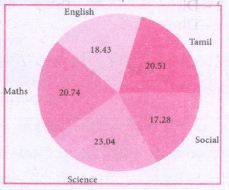
8.
Write a python program to find Fibonacci series of n terms using recursion.
9.
Write a python program to find HCF of two numbers using recursion.
10.
Write a python program to execute the following C++ program
To implement Multilevel Inheritance:
// C++ program to implement Multilevel Inheritance
// Now select File ⟶New in Notepad and type the C++ program
c++ Program.
#include < iostream >
using namespace std;
// base class
class Vehicle
{
public:
Vehicle ( )
{
cout<< "This is a Vehicle" << endl;
}
};
class threeWheeler: public Vehicle
{ public:
three Wheeler ( )
{
cout << "Objects with 3 wheels are vehicles" << endl;
}
};
// sub class derived from two base classes
class Auto: public threeWheeler{
public:
Auto ( )
{
cout<< "Auto has 3 Wheels"<< endl;
};
// main function
int main ( )
{
//creating object of sub class will invoke the constructor of base classes
Auto obj;
return 0;
}
// Save this file as inheri_cpp.cpp
11.
Write a python program to execute the following C++ program.
C++ program:
/*Write a C++ program using a user defined
function to function cube of a number. */
// Now select File⇾New in Notepad and type the C++ program
#include
using namespace std;
// Function declaration
int cube(int num),
int main( )
{
int num;
int c;
cout<< "Enter any number: "<<endl;
cin >>num;
c = cube(num);
cout<< "Cube of" << num<< " is "<< c;
return 0;
}
//Function to find cube of any number
int cube(int num)
{
return (num * num * num);
}
// Save this file as cube_file.cpp
12.
Write a program to accept a string and print the number of uppercase, lowercase, vowels, consonants and spaces in the given string.
13.
Write a python program to check and print if the given number is odd or even using class.
14.
Write a program in python to display he following output.
1
2 2
3 3 3
4 4 4 4
5 5 5 5 5
15.
Write a program in python to display the following output.
1
1 2
1 2 3
1 2 3 4
1 2 3 4 5
16.
How will you write Dictionary into CSV file with custom dialects?
17.
Write a program to read the CSV file and store A column value in A list for sorting.
18.
How will you access elements of a list using for loop? Explain with an example.
19.
How will access all elements of a list? Write the execution table example.
20.
Explain the selection sort Algorithm with an example.
21.
Define efficiency of an algorithm? How the efficiency of an algorithm was determined?
22.
Write the output for the following python code..
x=10
x+=20
print ("The x + = 20 is =",x)
x-=5
print ("The x -= 5 is = ",x)
x*=5
print ("The x *= 5 is = ",x)
x/=2
print ("The x/ = 2 is = ",x)
x%=3
print ("The x %= 3 is = ",x)
x**=2
print ("The x **= 2 is = ",X)
x//=3
print ("The x//= 3 is = ",x)
23.
Explain the concept access control.
24.
Explain the representation of Abstract datatype using rational numbers.
25.
Explain the various buttons in a matplotlib window.
26.
Explain in detail the types of pyplots using Matplotlib.
27.
Write a Python script to create a table called ITEM with following specification.
Add one record to the table.
Name of the database :- ABC
Name of the table :- Item
Column name and specification :-
| I code | :- | Integer and act as primary key |
| Item Name | :- | Character with length 25 |
| Rate | :- | Integer |
| Record to be added | :- | 1008, Monitor, 15000 |
28.
hat is the use of HAVING clause. Give an example python script
29.
30.
Explain each word of the following command.
Python
31.
Write a Python program to write a CSV File with custom quotes.
32.
Write the different methods to read a File in Python.
33.
What are the components of SQL? Write the commands in each.
34.
Consider the following employee table. Write SQL commands for the qtns.(i) to (v).
| EMP CODE | NAME | DESIG | PAY | ALLOWANCE |
| S1001 | Hariharan | Supervisor | 29000 | 12000 |
| P1002 | Shaji | Operator | 10000 | 5500 |
| P1003 | Prasad | Operator | 12000 | 6500 |
| C1004 | Manjima | Clerk | 8000 | 4500 |
| M1005 | Ratheesh | Mechanic | 20000 | 7000 |
(i) To display the details of all employees in descending order of pay.
(ii) To display all employees whose allowance is between 5000 and 7000.
(iii) To remove the employees who are mechanic.
(iv) To add a new row.
(v) To display the details of all employees who are operators.
35.
Explain the characteristics of DBMS.
36.
Explain the different operators in Relational algebra with suitable examples.
37.
Write a menu driven program to add or delete stationary items. You should use dictionary to store items and the brand.
38.
What is nested tuple? Explain with an example.
39.
What is the purpose of range( )? Explain with an example.
40.
Explain about string operators in python with suitable example.
41.
Explain recursive function with an example.
42.
Write a Python code to find the L.C.M. of two numbers.
43.
Write a detail note on if..else..elif statement with suitable example.
44.
Write a detail note on for loop.
45.
Explain the Bubble sort algorithm with example.
46.
Explain the characteristics of an algorithm.
47.
Discuss in detail about Tokens in Python.
48.
Describe in detail the procedure Script mode programming.
49.
Write any Five Characteristics of Modules.
50.
Explain the types of scopes for variable or LEGB rule with example.
51.
How will you access the multi-item. Explain with example.
52.
How will you facilitate data abstraction. Explain it with suitable example.
53.
Explain with an example interface and implementation.
54.
What are called Parameters and write a note on
(i) Parameter without Type
(ii) Parameter with Type
1.
(i) TRUNCATE command: The TRUNCATE command is used to delete all the rows from the table. the structure remains and the space is freed from the table. The syntax for TRUNCATE command is:
TRUNCATE TABLE table-name;
For example to delete all the records of the student table and delete the table the SQL statement is given as follows:
TRUNCATE TABLE Student;
The table Student is removed and the space is freed.
(ii) DROP TABLE command: The DROP TABLE command is used to remove a table from the database. If you drop a table. all the rows in the table is deleted and the table structure is removed from the database. Once a table is dropped we cannot get it back. so be careful while using DROP TABLE command. But there is a condition for dropping a table; it must be an empty table.
Remove all the rows of the table using DELETE command. The DELETE command is already explained.
To delete all rows, the command is given as;
DELETE * FROM Student;
Once all the rows are deleted. the table can be deleted by DROP TABLE command in the following way:
DROP TABLE table-name;
For example to delete the Student table:
DROP TABLE Student;
2.
The various processing skills of SQL are:
(i) Data Definition Language (DDL): The SQL DDL provides commands for defining relation schemas (structure), deleting relations, creating indexes and modifying relation schemas.
(ii) Data Manipulation Language (DML): The SQL DML includes commands to insert, delete, and modify tuples in the database.
(iii) Embedded Data Manipulation Language: The embedded form of SQL is used in high level programming languages.
(iv) View Definition: The SQL also includes commands for defining views of tables.
(v) Authorization: The SQL includes commands for access rights to relations and views of tables.
(vi) Integrity: The SQL provides forms for integrity checking using condition.
(vii) Transaction control: The SQL includes commands for file transactions and control over transaction processing.
3.
str1=input ("Enter a string:")
str2="aAeEiloOuU"
v,c=0,0
for i in str1:
if i in str2:
v+=1
else:
c+=1
print ("The given string contains {} vowels and {} consonants".format(v.c))
Output:
Enter a string: Tamilnadu School Education.
The given string contains 11 vowels and 15 consonants.
4.
str1 = input ("Enter a string:")
str2 ="
index=-1
for i in str1:
str2 += str1[index]
index -=1
print ("'The given string = {} \n The Reversed string = {}".format(str1, str2))
if (str1==str2):
print ("Hence, the given string is Palindrome")
else:
print ("Hence, the given is not a palindrome")
Output:1
Enter a string: malayalam
The given string = malayalam
The Reversed string = malayalam
Hence, the given string is Palindrome
Output: 2
Enter a string: welcome
The given string = welcome
The Reversed string = emoclew
Hence, the given string is not a palindrome
5.
The Database Management System can be divided into five major components as follows:
(i) Hardware
(ii) Software
(iii) Data
(iv) Procedures / Methods
(v) Database Access Languages
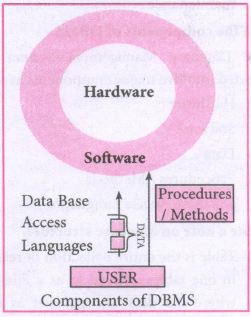
(i) Hardware: The computer, hard disk, I/O channels for data, and any other physical component involved in storage of data
(ii) Software: This main component is a program that controls everything. The DBMS software is capable of understanding the Database Access Languages and interprets into database commands for execution.
(iii) Data: It is that resource for which DBMS is designed. DBMS creation is to store and utilize data.
(iv) Procedures/Methods: They are general instructions to use a database management system such as installation of DBMS, manage databases to take backups, report generation, etc
(v) DataBase Access Languages: They are the languages used to write commands to access, insert, update and delete data stored in any database.
Examples of popular DBMS: Dbase, FoxPro
6.
| S.No | Histogram | Bar graph |
| i) | Histogram refers to a graphical representation; that displays data by way of bars to show the frequency of numerical data. | A bar graph is a pictorial representation of data that uses bars to compare different categories of data. |
| ii) | A histogram represents the frequency distribution of continuous variables. | Conversely, a bar graph is a diagrammatic comparison of discrete variables. |
| iii) | Histogram presents numerical data | Bar graph shows categorical data |
| iv) | Items of the histogram are numbers, which are categorised together, to represent ranges of data. | As opposed to the bar graph, items are considered as individual entities. |
| v) | A histogram, this cannot be done, as they are shown in the sequence of classes. | In the case of a bar graph, it is quite common to rearrange the blocks, from highest to lowest. |
| vi) | The width of rectangular blocks in a histogram mayor may not be same | The width of the bars in a bar graph is always same. |
7.
Program:
import matplotlib.pyplot as plt
sizes = [89, 80, 90, 100, 75]
labels = ["Tamil", "English", "Maths", "Science", "Social"]
plt.pie (sizes, labels = labels, autopct = "%.2f")
plt.axes( ).set aspect ("equal")
pIt.show ( )
8.
# program to find fibonacci series
def fibo (n):
if n < = 1:
return n
else:
return (fibo (n - 1) + fibo (n - 2))
n = int (input ("Enter How manu terms"))
for i in range (n):
print (fibo (i))
9.
# python program to find HCF
def HCF (x,y):
if(x > y):
s = y
else:
s = x
for I inrange (1, s + 1):
if ((x % I = = 0) and (y% i = = 0)):
hcf = i
return hcf
x = int (input ("Enter Number 1"))
y = int (input ("Enter Number 2"))
print (HCF (x, y))
10.
//Now select File ➝ New in Notepad and type the Python program
# Save the File as classpy.py
# Python classpy.py -i inheri_cpp command to execute c++ program
Python Program:
import sys, os, getopt
def main (argv):
cpp_file ="
exe_file ="
opts.args= getopt.getopt (argv, "i:",['ifile='])
for o, a in opts:
1ifile. ("'-"1", --ifile"):
cpp_file = a + '.cpp'
exe_file = a + '.exe'
run (cppfile, exe_file)
def run(cpp_file, exe_file):
print ("Compiling" + cpp_file)
os.system ('g++ ' + cpp_file + '-o' + exe_file)
print ("Running" + exe_file)
print ("------------------- ")
print
os.system (exe_file)
print
if __name__ =='__main__"
main (sys.argv[1:])
11.
# Save the File as fun.py
# Program that compiles and executes a .cpp file
# Python fun.py -i c:\pyprg\cube_file.cpp
Python Program:
import sys, os, getopt
def main(argv):
cpp_file ="
exe_file ="
opts,args = getopt.getopt(argv, "i:",['ifile='])
for 0, a in opts:
if 0 in ("-i", "--ifile"):
cpp_file = a + '.cpp'
exe_file = a + '.exe'
run(cpp_file, exe_file)
def run(cpp_file, exe_file):
print("Compiling" + cpp_file)
os.system('g++ ' + cpp_file + '-o' + exe_ file)
print("Running" + exe_file)
print(" ----------------- ")
print
os.system( exe_file)
print
if _name_ =='_main_':
main(sys.argv[1:])
12.
Class String:
def _init_(self):
self.uppercase=()
self.lowercase=()
self.vowels=()
self.consonants=()
self.spaces=()
self.string= " "
def getstr (self):
self.string=str(input("Enter a String: "))
def count_upper(self):
for ch in self.string:
if (ch.isupper()):
self.uppercase+= 1
def count_Iowert(self):
for ch in self.string:
if (ch.islower()):
self.lowercase+= 1
def count_vowels(self):
for ch in self.string:
if (ch in ('A', 'a', 'e', 'E', 'i', 'I', 'o', 'O', 'u', 'U')):
self.vowels+=1
def count_consonants(self):
for ch in self.string:
if (ch not in ('A', 'a', 'e', 'E', 'i', 'I', 'o', 'O', 'u', 'U')):
self.consonants+= 1
def count_space(self):
for ch in self.string:
if (ch==" ''):
self.spaces+= 1
def execute(self):
self.count_upper()
self.count_lower ()
self.count_vowels ()
self.count_consonants()
self.count_space()
def display(self):
print("The given string contains ...")
print("%d Uppercase letters"%self. uppercase)
print("%d Lowercase letters"%self. lowercase)
print("%d Vowels"%self.vowels)
print("%d Consonants"%self.consonants)
print("%d Spaces"%self.spaces)
S = String()
S.getstr()
S.execute()
S.display()
Output:
Enter a string: Welcome To Learn Computer Science
The given string contains...
5 Uppercase letters
24 Lowercase letters
13 vowels
20 consonants
4 Spaces
13.
class Odd_Even:
even = 0 #class varaiable
def check(self, num):
if num%2==0:
print(num," is Even number")
else:
print(num," is Odd number")
n=Odd Even()
x = int(input("Enter a value:"))
n.check(x)
when we execute this program, Python accepts the value entered by the user and passes it to the method check through object.
Output:1
Enter a value: 4
4 is Even number
Output: 2
Enter a value: 5
5 is Odd number
14.
for i in range (1,6):
for j in range (1, i+1)
print (i, end =' ')
print (end = '\n')
i+ = 1
15.
i=1
while (i < = 6):
for j in range (1,i):
print (j,end='\t')
print (end='\n')
i+=1
Output:
1
1 2
1 2 3
1 2 3 4
1 2 3 4 5
16.
import csv
csv.register_dialect('myDialect', delimiter = '|', quoting=csv.QUOTE_ALL)
with open('c:\\pyprg\\ch13\\ grade.csv', 'w') as csvfile:
fieldnames = ['Name', 'Grade']
writer = csv.DictWriter(csvfile,
fieldnames=fieldnames. dialect ="myDialect")
writer.writeheader()
writer.writerows([{'Grade': 'B', 'Name': Anu'},
{'Grade': 'A', 'Name': 'Beena',},
{Grade': 'C', 'Name': 'Tarun'}])
print("writing completed")
17.
# sort a selected column given by user leaving the header column
import csv
# other way of declaring the filename
inFile= 'c:\\pyprg\\sample6.csv'
# opening the csv file which is in the same location of this
python file
F=open(inFile', 'r')
# reading the File with the help of csv.reader()
reader = csv.reader(F)
# skipping the first row(heading)
next(reader)
# declaring a list
arrayValue = [ ]
a = int(input ("Enter the column number 1 to 3:-"))
# sorting a particular column-cost
for row in reader:
arrayValue.append(row[a])
arrayValue.sort ( )
for row in arrayValue:
print (row)
F.close ( )
18.
(i) In Python, 'for loop' is used to access all the elements in a list one by one. This is just like the for keyword in other programming language such as C++.
(ii) Syntax:
for index_var in list:
print (index_var)
(iii) Here, dex_var represents the index value of each element in the list. Python reads this "for" statement like English: "For (every) element in (the list of) list and print (the name of the) list items"
(iv) Example:
Marks=[23,45, 67, 78,98]
for x in Marks:
print(x)
Output:
23
45
67
78
98
(v) In the above example, Marks list has 5 elements; each element is indexed from 0 to 4.
(vi) The Python reads the for loop and print statements like English: "For (every) element (represented as (x) in (the list of) Marks and print (the values of the) elements.
19.
(i) Loops are used to access all elements from a list. The initial value of the loop must be zero. Zero is the beginning index value of a list.
(ii) Example:
Marks = [10, 23, 41, 75]
i = 0
while i < 4:
print (Marks[i])
i = i + 1
Output:
10
23
41
75
(iii) In the above example, Marks list contains four integer elements i.e., 10, 23, 41, 75. Each element has an index value from 0. The index value of the elements are 0, 1, 2, 3 respectively.
(iv) Here, the while loop is used to read all the elements. The initial value of the loop is zero, and the test condition is < 4, as long as the test condition is true, the loop executes and prints the corresponding output
(iv) During the first iteration, the value of i is zero, where the condition is true. Now, the following statement print (Marks [i] gets executed and prints the value of Marks [0] element ie. 10.
(v) The next statement i = i + 1 increments the value of i from 0 to 1. Now, the flow of control shifts to the while statement for
(vi) checking the test condition. The process repeats to print the remaining elements of Marks list until the test condition of while loop becomes false. The following table shows that the execution of loop and the value to be print.
| Iteration | i | while i < 4 |
print (Marks[i]) | i = i + 1 |
| 1 | 0 | 0< 4 True | Marks [0] =10 | 0+1=1 |
| 2 | 1 | 1 < 4 True | Marks [1]=23 | 1+1=2 |
| 3 | 2 | 2 < 4 True | Marks [2]=41 | 2+1=3 |
| 4 | 3 | 3 < 4 True | Marks [3]=75 | 3+1=4 |
| 5 | 4 | 4 < 4 False |
20.
(i) The selection sort is a simple sorting algorithm that improves on the performance of bubble sort by making only one exchange for every pass through the list.
(ii) This algorithm will first find the smallest elements in array and swap it with the element in the first position of an array, then it will find the second smallest element and swap that element with the element in the second position, and it will continue until the entire array is sorted in respective order.
(iii) This algorithm repeatedly selects the next smallest element and swaps in into the right place for every pass. Hence it is called selection sort.
Pseudo code:
(i) Start from the first element i.e., index-(), we search the smallest element in the array, and replace it with the element in the first position.
(ii) Now we move on to the second element position, and look for smallest element present in the sub-array, from starting index to till the last index of sub - array.
(iii) Now replace the second smallest identified in step-2 at the second position in the or original array, or also called first position in the sub array.
(iv) This is repeated, until the array is completely sorted.
(v) Let's consider an array with values {13, 16, 11, 18, 14, 15}
(vi) Below, we have a pictorial representation of how selection sort will sort the given array respective order.
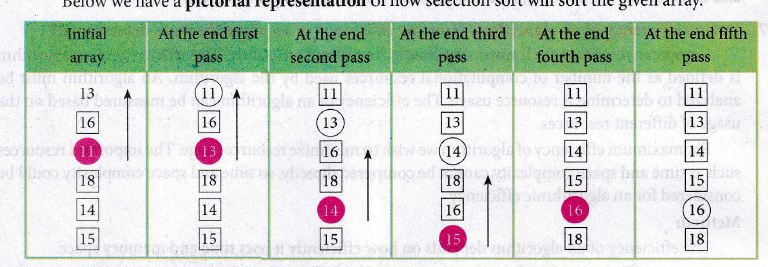
(i) In the first pass, the smallest element will be 11, so it will be placed at the first position.
(ii) After that, next smallest element will be searched from an array.
(iii) Then leaving the first element, next smallest element will be searched. It get 13 as smallest, so it will be placed at the second position.
(iv) Then leaving 11 and 13. It will search for the next smallest element and put it at third position and keep doing this until array is sorted.
(v) Finally, it will get the sorted array end of the pass.
21.
(i) Computer resources are limited that should be utilized efficiently. The efficiency of an algorithm is defined as the number of computational resources used by the algorithm.
(ii) An algorithm must be analyzed to determine its resource usage. The efficiency of an algorithm can be measured based on the usage of different resources.
(iii) For maximum efficiency of algorithm we wish to minimize resource usage. The important resources such as time and space complexity cannot be compared directly, so time and space complexity could be considered for an algorithmic efficiency.
Method for determining Efficiency:
(i) The efficiency of an algorithm depends on how efficiently it uses time and memory space.
(ii) The time efficiency of an algorithm is measured by different factors. For example, write a program for a defined algorithm, execute it by using any programming language, and measure the total time it takes to run.
(iii) The execution time that you measure in this case would depend on a number of factors such as: -
1. Speed of the machine
2. Compiler and other system Software tools
3. Operating System
4. Programming language used
5. Volume of data required
(iv) However, to determine: how efficiently an algorithm solves a given problem, you would like to determine how the execution time is affected by the nature of the algorithm.
(v) Therefore, we need to develop fundamental laws that determine the efficiency of a program in terms of the nature of the underlying algorithm.
22.
Type a Value for X : 10
The x + = 20 is = 30
The x - = 5 is = 25
The x * = 5 is = 125
The x / = 2 is = 62.5
The x % = 3 is = 2.5
The x ** = 2 is = 6.25
The x// = 3 is = 2.0
23.
(i) Access control is a security technique that regulates who or what can view or use resources in a computing environment.
(ii) It is a fundamental concept in security that minimizes risk to the object.
(iii) In other words access control is a selective restriction of access to data. IN Object oriented programming languages it is implemented through access modifiers.
(iv) Classical object-oriented languages, such as C++ and Java. control the access to class members by public, private and protected keywords.
(v) Private members of a class are denied access from the outside the class. They can be handled only from within the class.
(vi) Public members (generally methods declared in a class) are accessible from outside the class. The object of the same class is required to invoke a public method. This arrangement of private instance variables and public methods ensures the principle of data encapsulation.
(vii) Protected members of a class are accessible from within the class and are also available to its sub-classes. No other process is permitted access to it. This enables specific resources of the parent class to be inherited by the child class.
(viii) Python doesn't have any mechanism that effectively restricts access to any instance variable or method. Python prescribes a convention of prefixing the name of the variable or method with single or double underscore to emulate the behaviour of protected and private access specifiers.
(ix) All members in a Python class are public by default. whereas by default in C++ and java they are private. Any member can be accessed from outside the class environment in Python which is not possible in C++ and java.
24.
(i) The basic idea of data abstraction is to structure programs so that they operate on abstract data. That is, our programs should use data in such a way, as to make as few assumptions about the data as possible.
(li) At the same time, a concrete data representation is defined as an independent part of the program.
(iii) Any program consist of two parts. The two parts of a program are, the part that operates on abstract data and the part that defines a concrete representation, is connected by a small set of functions that implement abstract data in terms of the concrete representation.
(iv) To illustrate this technique, let us consider an example to design a set of functions for manipulating rational numbers.
(v) Example: A rational number is a ratio of integers, and rational numbers constitute an important sub-class of real numbers. A rational number such as 8/3 or 19/23 is typically written as : < numerator > /< denominator >
(vi) where both the < numerator > and <denominator>
(vii) However, you can create an exact representation for rational numbers by combining together the numerator and denominator.
(viii) As we know from using functional abstractions, we can start programming productively before you have an implementation of some parts of our program.
(ix) Let us begin by assuming that you already have a way of constructing a rational number from a numerator and a denominator. You also assume that, given a rational number, you have a way of selecting its numerator and its denominator component.
25.
(i) Home Button \(\rightarrow \) The Home Button will help one to begun navigating the chart. If you ever want to return back to the original view, you can click on this.
(ii) Forward/Back buttons \(\rightarrow \) These buttons can be used like the Forward and Back buttons in browser. Click these to move back to the previous point you were at, or forward again.
(iii) Pan Axis \(\rightarrow \) This cross-looking button allows you to click it, and then click and drag graph around.
(iv) Zoom \(\rightarrow \) The Zoom button lets you click on it, then click and drag a square would like to zoom into specifically. Zooming in will require a left click and drag. Zoom out with a right click and drag.
(v) Configure Subplots\(\rightarrow \) This button allows you to configure various spacing options with figure and plot.
(vi) Save Figure \(\rightarrow \)This button will allow you to save figure in various forms
26.
Line Chart:
(i) A Line Chart or Line Graph is a type of chart which displays information as a series of data points called 'markers' connected by straight line segments.
(ii) A Line Chart is often used to visualize a trend in data over intervals of time - a time series - thus the line is often drawn chronologically.
Example:
import matplotlib.pyplot as plt
years = [2014, 2015, 2016, 2017, 2018]
total_populations = [8939007, 8954518, 8960387, 8956741, 8943721]
plt. plot ("years, total_populations)
pit. title ("Year vs Population in India")
plt.xlabel ("Year")
pIt.ylabel ("Total Population")
plt.showt (1)
In this program,
Plt.titlet( ) \(\rightarrow\) specifies title to the graph
Plt.xlabelt) \(\rightarrow\) specifies label for X-axis
Plt.ylabel() \(\rightarrow\) specifies label for Y-axis
Output:
.JPG)
Bar Chart:
(i) A Bar Plot (or BarChart) is one of the most common type of plot. It shows the relationship between a numerical variable and a categorical variable
(ii) Bar chart represents categorical data with rectangular bars. Each bar has a height corresponds to the value it represents. The bars can be plotted vertically or horizontally.
(iii) It's useful when we want to compare a given numeric value on different categories. To make a bar chart with Matplotlib, we can use the plt.bar() function.
Example:
import matplotlib.pyplot as plt
# Our data
labels = ["TAMIL", "ENGLISH", "MATHS", "PHYSICS", "CHEMISTRY", "CS"]
usage = [79.8,67.3,77.8,68.4,70.2,88.5]
# Generating the y positions.
y_positions = range (len(labels))
# Creating our bar plot
plt.bar (y_positions, usage)
plt.xticks (y_positions, labels)
plt.ylabel ("RANGE")
plt.title ("MARKS")
plt.show( )
Output:
.JPG)
Labels → specifies labels for the bars.
Usage → Assign values to the labels specified.
Xticks → Display the tick marks along the x - axis at the values represented. Then specify the ladel for each tick mark.
Range → Create sequence of numbers.
Pie Chart:
(i) Pie Chart is probably one of the most common type of chart. It is a circular graphic which is divided into slices to illustrate numerical proportion.
(ii) The point of a pie chart is to show the relationship of parts out of a whole. To make a Pie Chart with Matplotlib, we can use the plt.pief) function.
(iii) The autopct parameter allows us to display the percentage value using the Python string formatting.
Example:
import matplotlib.pyplot as plt
sizes = [89, 80, 90, 100, 75]
labels = ["Tamil", "English", "Maths", "Science", "Social"]
plt.pie (sizes, labels = labels, autopct = "%.2f")
plt.axes().set aspect ("equal")
plt.show( )
Output:
.JPG)
27.
Program:
import mysql db
db = mysqldb.connect ("local host", "user", "123", "organization'")
cursor = db.cursor()
item table creation
database: ABC, table: Item, lcode: int, ItemName: Char
Rate: int. Record: 1008, Monitor: 15000
cursor.execute ("Create table item(icode int, item Name char (25), Rate int"));
db.close
cursor. execute ("insert into item values ("1008", 'Monitor', '15000" ));
db.commit()
28.
HAVING clause is used to filter data based on7the group functions. This is similar to WHERE condition but can be used , only with group functions. Group functions cannot be used in WHERE Clause but can be used in HAVING clause.
Example:
import sqlite3
connection = sqlite3.connect("Academy.db")
cursor = connection.cursorO
cursor.execute("SELECT GENDER,COUNT(GENDER) FROM Student GROUP BY GENDER HAVING COUNT( GENDER> 3")
result = cursor.fetchall( )
co = [i[o] for i in cursor. description]
print(co)
print(result)
Output:
['gender', 'COUNT(GENDER)']
[('M', 5)]
29.
30.
Python < filename.py > - < i > <C++ filename without cpp extension>
| Python | Keyword to execute the Python program from command-line |
| filename.py- i | Name of the Python program to executed input mode |
| C++ filename without cpp extension | Name of C++ file to be compiled and executed |
For example type Python pycpp.py - i pali in the command prompt and press enter key. If the compilation is successful we will get the desired output. Otherwise the error will be displayed.
31.
We can write the csv file with quotes, by registering new dialects using csv.register_dialect() class of csv module.
Program:
import csv
info = [['SNO: 'Person: 'DOB'],
['1', 'Madhu,' '18/12/2001'],
['2', 'Sowmya', '19/2/1998'],
['3', 'Sangeetha', '20/3/1999'],
['4', 'Eshwar', '21/4/2000'],
['5', 'Anand', '22/5/2001']]
csv.register_dialect('MyDialect',quoting=csv.QUOTE_ALL)
with open('c:\\pyprg\\ch13\\person.csv', 'w') as f:
writer = csv.writer(f, dialect='myDialect')
for row in info:
writer. writerow(row)
f.close()
Output
file: "Person.csv"
"SNO","Person", "DOB", "1", "Madhu", "18/12/2001"
"2, "Sowmya", "19/2/1998", "3", "Sangeetha",
"20/3/1999", "4", "Eshwar", "21/4/2000"
"5", "Anand", "22/5/2001".
32.
1. CSV file - data with default delimiter comma(,)
2. CSV file - data with space at the beginning.
3. CSV file - data with quotes
4. CSV file - data with custom Delimiters
1. CSV file - data with default delimiter comma(,):
The following program read a file called "Sample1.csv" with default delimiter comma (,) and print row by row.
Program:
#importing csv
import csv
#opening the csv file which is in different location with read mode
with opent('c.\\pyprg\\sample1.csv', 'r') as F:
#other way to open the file is f= ('C:\\pyprg\\ sample1.csv', 'r')
reader = csv.reader(F)
# printing each line of the Data row by row
print(row)
F.close()
Output:
['SNO', 'NAME', 'CITY']
['12101', 'RAM', 'CHENNAI']
['12102', 'LAVANYA', 'TIRUCHY']
['12103', 'LAKSHMAN', 'MADURAI']
2. CSV files - data with spaces at the beginning:
Consider the following file "Sample2.csv containing the following data when opened through notepad.
| Topic 1 | Topic 2 | Topic 3 |
| One, | two, | three, |
| Example 1, | Example 2, | Example 3, |
Program:
import csv
csv.register_dialect ['my Dialect', delimiters=', 'Skipinitialspace= True).
F = open ('c:\\Pyprgl\sample2.csv', 'r')
reader = CSV.reader (F, dialect = 'myDialect')
for row in reader:
print (row)
F.close()
Output:
['Topic 1', 'Topic 2', 'Topic 3']
['One', 'two', 'three']
['Example 1', 'Example 2', 'Example 3']
We can see in "Sample 2.csv" there are spaces after the delimiter due to which the output is also displayed with spaces.
These whitespaces can be removed, by registering new dialects using csv. register _dialect( ) class of csv module. A dialect describes the format of the csv file that is to be read. In dialects the Parameter "skipinitialspace" is used for removing whitespaces after the delimiter.
3. CSV File - Data with Quotes:
We can read the csv files with quotes, by registering new dialects using csv. register_dialect( ) class of csv module.
SNO, Quotes
1, "The Secret to getting ahead is getting started".
2, "Excellence is a continuous process and not an accident."
3, "Work hard dream big never give up and believe Yourself"
4, "Failure is the opportunity to begin again more intelligently".
5, "The successful warrior is the average man, with laser-like focus."
Program:
import cSv
csv.register_ dialect ('MyDialect', delimiter =, 'quoting = csv.QUOTE_ALL, skipinitialspace = True)
f=open ('c:\\Pyprg\\ quotes.csv', 'r')
reader = csv.reader (f, dialect = 'myDialect')
for row in reader:
print (row)
Output:
['SNO, 'Quotes']
['1', 'The secret to getting ahead is getting started'.]
['2', 'Excellence is a continuous process and not an accident'.]
['3', 'Work hard dream big never give up and believe yourself'.]
['4', 'Failure is the opportunity to begin again more intelligently':]
['5', 'The successful warrior is the average man with laser- like focus':]
4. CSV files with custom Delimiters:
We can read csv file having custom the delimiter by registering a new dialect with the help of csv.register_dialect( ).
In the following file called "sample4.csv", each column is separated with |(Pipe Symbol)
| Roll No | Name | City |
| 12101 | Arun | Chennai |
| 12102 | Meena | Kovai |
| 12103 | Ram | Nellai |
| 103 | Ayush | M |
| 104 | Abinandh | M |
Program:
import csv
Csv. register_dialect('myDialect', delimiter= '|')
with open (c:\\pyprg\sample 4.csv', 'r') as f:
reader = csv.reader (f, dialect = "my dialect")
for row is reader:
print (row)
f.close()
Output:
['Roll no', 'Name', 'City]
['12101', 'Arun', 'Chennai']
['12102', 'Meena', 'Kovai']
['12103', 'Ram', 'Nellai']
33.
SQL commands are divided into five categories:
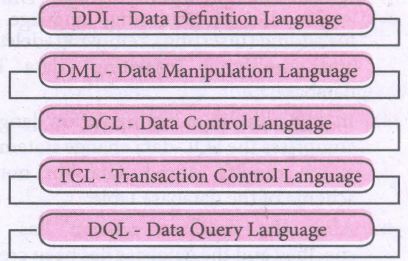
Data Definition Language:
(i) The Data Definition Language (DDL) consist of SQL statements used to define the database structure or schema.
(ii) It simply deals with descriptions of the database schema and is used to create and modify the structure of database objects in databases.
(iii) The DDL provides a set of definitions to specify the storage structure and access methods used by the database system.
DDL performs the following functions:
(i) It should identify the type of data division such as data item, segment, record and database file.
(ii) It gives a unique name to each data item type, record type, file type and data base.
(iii) It should specify the proper data type.
(iv) It should define the size of the data item.
(v) It may define the range of values that a data item may use.
(vi) It may specify privacy locks for preventing unauthorized data entry.
Commands:
| CREATE | To create tables in the database. |
| ALTER | Alters the structure of the database |
| DROP | Data tables from database. |
| TRUNCATE | Remove all records from a table, also release the space occupied bv those records. |
Data Manipulation Language:
This is a computer programming language used for adding, removing and modifying data in a database. This language comprises the SQL-data change statements, which modify stored data but not the schema of the database table
Data Manipulation includes
(i) Insertion of new information into the database
(ii) Retrieval of information stored in a database
(iii) Deletion of information from the database.
(iv) Modification of data stored in the database
The DML is basically of two types:
Procedural DML - Requires a user to specify what data is needed and how to get it.
Non-Procedural DML - Requires a user to specify what data is needed without Specifying how to get it.
Commands:
| INSERT | Inserts data into a table |
| UPDATE | Updates the existing data within a table |
| DELETE | Deletes all records from a table, but not the space occupied by them. |
Data Control Language:
(i) A Data Control Language (DCL) is a programming language used to control the access of data stored in a database. It is used for controlling privileges in the database (Authorization).
(ii) The privileges are required for performing all the database operations such as creating sequences, views of tables etc.
Commands:
| GRANT | Grants permission to one or more users to perform specific tasks. |
| REVOKE | Withdraws the access permission given by the GRANT statement. |
Transactional Control Language:
Transactional control language (TCL) commands are used to manage transactions in the database. These are used to manage the changes made to the data in a table by DML statements.
Commands:
| COMMIT | Saves any transaction into the database permanently. |
| ROLL BACK | Restores the database to last commit state. |
| SAVE POINT | Temporarily save a transaction so that you can rollback. |
Data query language:
The Data Query Language consist of commands used to query or retrieve data from a database. One such SQL command in Data Query Language is
| SELECT | It displays the records from the table. |
34.
(i) SELECT * FROM Employee ORDER BY PAY DESC;
(ii) SELECT * FROM Employee WHERE ALLOWANCE
BETWEEN 5000 AND 7000;
(iii) DELETE FROM Employee WHERE DESIG='Mechanic';
(iv) ALTER TABLE employee ADD Age Varchar(50);
(v) SELECT * FROM Employee WHERE DESIG='Operator';
35.
Characteristics of Database Management System
| 1. Data stored into Table | Data is never directly stored into the database. Data is stored into tables, created inside the database. DBMS also allows to have relationship between tables which makes the data more meaningful and connected. |
| 2. Reduced Redundancy | In the modern world hard drives are very cheap, but earlier when hard drives were too expensive, unnecessary repetition of data in database was a big problem But DBMS follows Normalisation which divides the data in such a way that repetition is minimum. |
| 3. Date Consistency | On live data, it is being continuously updated and added, maintaining the consistency of data can become a challenge. But DBMS handles it by itself. |
| 4. Support Multiple user and Concurrent Access | DBMS allows multiple users to work on it( update, insert, delete data) at the same time and still manages to maintain the data consistency. |
| 5. Query Language | DBMS provides users with a simple query language, using which data can be easily fetched, inserted, deleted and updated in a database. |
| 6. Security | The DBMS also takes care of the security of data, protecting the data from unauthorized access. In a typical DBMS, we can create user accounts with different access permissions, using which we can easily secure our data by restricting user access. |
| 7. DBMS Supports Transactions | It allows us to better handle and manage data integrity in real world applications where multi-threading is extensively used. |
36.
Relational Algebra is divided into various groups
Unary Relational Operations.
(i) SELECT (symbol: σ)
(ii) PROJECT ( symbol: π)
Relational Algebra Operations from Set Theory:
(i) UNION (U)
(ii) INTERSECTION (∩)
(iii) DIFFERENCE (-)
(iv) CARTESIAN PRODUCT (X)
SELECT (symbol: σ)
(i) General from σ (R) with a relation R and a condition C on the attributes of R
(ii) The SELECT operation is used for selecting a subset with tuples according to a given condition.
(iii) Select filters out all tuples that do not satisfy C
STUDENT:
| Studio | Name | Course | Year |
|---|---|---|---|
| CS1 | Kannan | Big Data | II |
| CS2 | Gowri Shankar | R language | I |
| CS3 | Lenin | Big Data | I |
| CS4 | Padmaja | Python Programming | I |
σ course = "Big Data" (STUDENT)
| Studio | Name | Course | Year |
|---|---|---|---|
| CS1 | Kannan | Big Data | II |
| 2 | Lenin | Big Data | I |
PROJECT (symbol: II)
(i) The projection eliminates all attributes of the input relation but those mentioned in the projection list.
(ii) The projection method defines a relation that contains a vertical subset of Relation.
Example: 1
IIcourse (STUDENT)
Result:
| Course |
| Big Data |
| R language |
| Python Programming |
Example 2
IIstudent,course (STUDENT)
Result:
| Stud no | Course |
| CS1 | Big Data |
| CS2 | R language |
| CS3 | Big Data |
| CS4 | Python Programming |
UNION (Symbol: U)
(i) It includes all tuples that are in tables A or in B. It also eliminates duplicates. Set A Union Set B would be expressed as A U B
Example 3:
| Table A | |
|---|---|
| Studio | Name |
| CS1 | Kannan |
| CS2 | Lenin |
| CS3 | Padmaja |
| Table A | |
|---|---|
| Studio | Name |
| CS1 | Kannan |
| CS2 | Gowrishakaran |
| CS3 | Lenin |
Result:
| Table A | |
|---|---|
| Studio | Name |
| CS1 | Kannan |
| CS2 | Gowri Shakaran |
| CS3 | Lenin |
| CS4 | Padmaja |
SET DIFFERENCE (Symbol: -)
(i) The result of A - B, is a relation which includes all tuples that are in A but not in B.
(ii) The attribute name of A has to match with the attribute name in B.
Example: 4
using Table B Example 3
Result:
| Table A - B | |
|---|---|
| CS4 | Padmaja |
INTERSECTION (symbol: ∩) A ∩ B:
(i) Defines a relation consisting of a set of all tuple that are in both in A and B. However, A and.B must be union-compatible.
Example: 5
Using Table in Example 3
Result:
| Table A - B | |
|---|---|
| CS1 | Kannan |
| CS3 | Lenin |
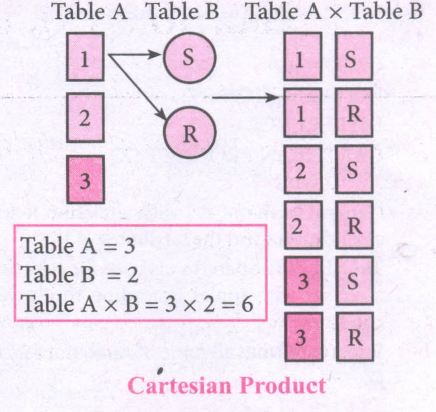
PRODUCT OR CARTESIAN PRODUCT (Symbol: X)
(i) Cross product is a way of combining two relations. The resulting relation contains, both relations being combined.
(ii) A x B means A times B, where the relation A and B have different attributes.
(iii) This type of operation is helpful to merge columns from two relations.
.JPG)
.JPG)
37.
class Mystore:
_prod_code = [ ]
_prod_name = [ ]
_cost price = [ ]
_prod quant = [ ]
def getdata(self):
selt.p= int (input ("Enter no. of products you need to store:"))
for x in range (self.p):
self._prod_code. append (int (input ("Enter Product Code:")))
self._prod_name. append (str (input ("Enter Product Name:"))
self._ cost_price. append (int (input ("Enter cost price:"))
def display (self):
print ("stock in stores")
print ("---------------------")
print ("Product Code\t Product name\t cost price")
print ("------------------")
for x in range (self.p):
print (self._prod_code [x], "\t\t", self._prod_name [x], "It \t", self._cost price [x])
print ("------------------------------")
def print_bill (self):
total_price =0
for x in range (self.p):
q= int(input("Enter the quantity for the product code %d:" %self._prod_code [x]))
self. Prod_quant.append (q)
total_price = total_price + self. _cost_price|x]* self._prod_quant [x]
print ("Invoice Receipt")
print ("---------------")
print ("Product Code\t Product Name\t Cost Price\t Quantity\t Total Amount")
print ("----------------")
for x in range (self.p):
print (self._Prod_code [x), "\t \t", self_prod-name[x], "\t \t",
self._cost_price[x], "\t \t", self._prod-quant [x], "\t \t",
self._prod_quant[x]*self._cost price [x])
print ("-------------------")
print ("Total Amount =", total_price")
S=Mystore ()
S.getdata ()
S.display ()
S.print_bill ()
Output:
Enter no. of products you need to store: 5
Enter Product code: 101
Enter Product Name: Notebook
Enter cost price: 25
Enter Product code: 201
Enter Product Name: pencil
Enter cost price: 35
Enter Product code: 301
Enter Product Name: Pen
Enter cost price: 35
Enter Product code: 401
Enter Product Name: Colour Pencils
Enter cost price: 50
Enter Product code: 501
Enter Product Name: Sketches
Enter cost price: 120
Stock in stores
| Product Code | Product Name | Cost Price |
| 101 | Notebook | 25 |
| 201 | Pencil | 35 |
| 301 | Pen | 35 |
| 401 | Colour pencils | 50 |
| 501 | Sketches | 120 |
Enter the quantity for the product code 101:10
Enter the quantity for the product code 201:15
Enter the quantity for the product code 301:10
Enter the quantity for the product code 401:20
Enter the quantity for the product code 501:10
Invoice Receipt
| Product Code | Product Name | Cost Price | Quantity | Total Amount |
| 101 | Notebook | 25 | 10 | 250 |
| 201 | Pencil | 35 | 15 | 525 |
| 301 | Pen | 35 | 10 | 350 |
| 401 | Colour pencils | 50 | 20 | 1000 |
| 501 | Sketches | 120 | 10 | 1200 |
| Total amount = 3325 |
38.
In Python, a tuple can be defined inside another tuple; called Nested tuple. In a nested tuple, each tuple is considered as an element. The for loop will be useful to access all the elements in a nested tuple.
Example:
Toppers = (("Vinodini", "XII-F", 98.7), ("Soundarya", "XII-H", 97.5),
("Tharani", "XII-F", 95.3), ("Saisri", "XII-G", 93.8))
for i in Toppers:
print(i)
Output:
('Vinodini', 'XII-F', 98.7)
('Soundarya', 'XII-H', 97.5)
('Tharani', 'XII-F', 95.3)
('Saisri', 'XII-G', 93.8)
39.
The range( ) is a function used to generate a series of values in Python. Using range( ) function, you can create list with series of values. The range( ) function has three arguments.
Syntax:
range (start value, end value, step value)
where,
(i) start value - beginning value of series. Zero is the default beginning value.
(ii) end value - upper limit of series. Python takes the ending value as upper limit - l.
(iii) step value - It is an optional argument, which is used to generate different interval of values.
Example:
Generating whole numbers upto 10.
for x in range (1,11):
print(x)
Output:
1
2
3
4
5
6
7
8
9
10
Creating a list with series of values :
(i) Using the range( ) function, a list can be created with series of values, To convert the result of range( ) function into list, one more function called list ( ). The list ( ) function makes the result of range ( ) as a ist.
(ii) Syntax: List_Varibale = list ( range ( ))
(iii) Example
Generating first 10 even numbers
for x in range (2, 11, 2):
print (x)
Output:
2
4
6
8
10
(iv) In the above code, list( ) function takes the result of range( ) as Even_List elements. Thus, Even_List list has the elements of first five even numbers. Similarly, we can create any serie of values using range( ) function. The following example explains how to create a list with squares of first 10 natural numbers.
Example : Generating squares of first 10 natural numbers
for x in range(1,11) :
S=x**2
squares.append(s)
print (squares)
Output : [1, 4, 9, 16, 25, 36, 49, 64, 81, 100)
40.
String Operators:
Python provides the following operators for string operations. These operators are useful to manipulate string.
(i) Concatenation (+):
Joining of two or more strings is called as Concatenation. The plus (+) operator is used to concatenate strings in python.
Example:
>>> "welcome" + "Python"
'welcome python'
(ii) Append (+ =):
Adding more strings at the end of an existing string is known as append. The operator += is used to append a new string with an existing string.
Example:
>>> str1 = "welcome to"
>>> str1 + = "Learn Python"
>>> print (str1)
Welcome to Learn Python
(iii) Repeating (*):
The multiplication operator (*) is used to display a string in multiple number of times.
Example:
>>> str1= "welcome "
>>> print (str1 *4)
Welcome Welcome Welcome Welcome
(iv) String slicing:
Slice is a substring of a main string.
A substring can be taken from the original string by using [ ] operator and index or subscript values. Thus [ ] is also known as slicing operator. Using slice operator, we have to slice one or more substrings from a main string.
General format of slice operation:
str[start:end]
Where start is the beginning index and end is the last index value of a character in the string. Python takes the end value less than one from the actual index specified.
Example: I
Slice a single character from a string
>>>str 1 = "THIRUKKURAL"
>>>print (str 1 [0])
T
(v) Stride when slicing string:
Example :
>>>str1 = "Welcome to learn python"
>>>print(str1[::-2])
Output :
nhy re teolW
41.
(i) When a function calls itself is known as recursion.
(ii) Recursion works like loop but sometimes it makes more sense to use recursion than loop.
(iii) You can convert any loop to recursion. A recursive function calls itself.
(iv) Imagine a process would iterate indefinitely if not stopped by some condition is known as infinite iteration.
(v) The condition that is applied in any recursive function is known as base condition.
(vi) A base condition is must in every recursive function otherwise it will continue to execute like an infinite loop.
Overview of how recursive function works:
(i) Recursive function is called by some external code.
(ii) If the base condition is met then the program gives meaningful output and exits.
(iii) Otherwise, function does some required processing and then calls itself to continue recursion.
Here is an exanmple of recursive function used to calculate factorial.
Example:
def fact(n):
if n == 0:
return 1
else:
return n * fact (n-1)
print (fact (0))
print (fact (5))
Output:
120
42.
Program:
def lcm(x, y):
if x>y:
greater = x
else:
greater = y
while (True):
if ((greater % x == 0) and (greater % y ==0))
lcm = greater
break
greater + = 1
return lcm
a = int (input ("Enter the first number:"))
b = int (input ("Enter the second number: "))
print ("The L.C.M of", a, "and", b, "is", lcm (a, b))
[OR]
Method II: (without using functions)
a = int (input ("Enter the first number:"))
b = int (input ("Enter the second number:"))
if a>b:
mini a
else:
min 1 = b
while (1):
if (min 1% a 0 and mini 1% b=0):
print ("LCM is:", mini)
break
mini = min 1+1
Output:
Enter the first number: 15
Enter the second number: 20
LCM is: 60
43.
Nested if..elif..else statement :
(i) When we need to construct a chain of if statement(s) then 'elif' clause can be used instead of 'if else'.
(ii) Syntax:
if < condition - 1>:
statements-block 1
elif < condition - 2>:
statements-block 2
else:
statements-block n
(iii) In the syntax of if..elif ..else mentioned above, condition -1 is tested if it is true then statements-block 1 is executed, otherwise, the control checks condition-2, if it is true statements-block 2 is executed and even if it fails statements-block n mentioned in else part is executed.
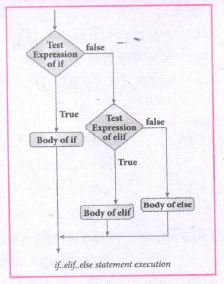
(iv) 'elif' clause combines if..else-if ..else statements to one if..elif ... else. 'elif' can be considered to be abbreviation of 'else if'. In an 'if' statement there is no limit of 'elif' clause that can be used, but an 'else' clause if used should be placed at the end.
(v) Example: # Program to illustrate the use of nested if statement
| Average | Grade |
| > = 80 and above | A |
| > = 70 and < 80 | B |
| > = 60and < 70 | C |
| > = 50 and < 60 | D |
| Otherwise | E |
m1 = int (input("Enter mark in first subject:"))
m2 = int (input("Enter mark in second subject:"))
avg = (m1+m2)/2
if avg > =80:
print ("Grade : A")
elif avg > =70 and avg < 80:
print ("Grade : B")
elif avg > =60 and avg < 70:
print ("Grade : C")
elif avg > =50 and avg < 60:
print ("Gradec: D")
else:
print("Grade : E")
Output 1:
Enter mark in first subject : 34
Enter mark in second subject : 78
Grade : D
Output 2:
Enter mark in first Subject : 67
Enter mark in second subject : 73
Grade: B
44.
(i) for loop : The for loop usually known as a definite loop, because the programmer knows exactly how many times the loop will be executed.
(ii) Syntax:
for counter_variable in sequence:
statements - block 1
[else: # optional block
statements - block 2]
(iii) The for ... in statement is a looping statement used in Python to iterate over a sequence of objects, i.e., it goes through each item in a sequence. Here the sequence is the collection of ordered or unordered values or even a string.
(iv) range (): The range() is a built-in function,to generate series of values between two numeric intervals
(iv) The syntax of range() follows :
range (start, stop, [step])
Where,
start - refers to the initial value
stop - refers to the final values
step - refers to increment value, this is optional part.
Examples for range( ):
range (1,30,1) - will start the range of values from 1 and end at 29
range (2,30,2) - will start the range of values from 2 and end at 28
range (30,3,-3) - will start the range of values from 30 and end at 6.
range (20) - will consider this value 20 as the end value and starts the range count from 0 to 19
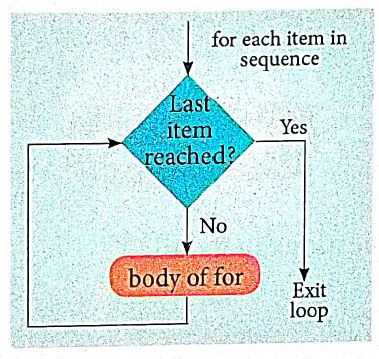
Example :
# Program to illustrate the use of for loop - to print single digit even number
for i in range (2,10,2):
print (i, end=' ')
Output :
2 4 6 8
45.
Bubble sort algorithm:
(i) Bubble sort algorithm simple sorting algorithm. The algorithm starts at the beginning of the list of values stored in an array. It compares each pair of adjacent elements and swaps them if they are in the unsorted order.
(ii) This comparison and passed to be continued until no swaps are needed, which indicates that the list of values stored in an array is sorted. The algorithm is a comparison sort, is named for the way smaller elements "bubble" to the top of the list.
(iii) Although the algorithm is simple, it is too slow and less efficient when compared to insertion sort and other sorting methods.
(iv) Assume list is an array of n elements. The swap function swaps the values of the given array elements.
Procedure :
(i) Start with the first element i.e., index = 0, compare the current element with the next element of the array.
(ii) If the current element is greater than the next element of the array, swap them.
(iii) If the current element is less than the next or right side of the element, move to the next element. Go to Step 1 and repeat until the end of the index is reached.
(iv) Let's consider an array with values {15, 11, 16, 12, 14, 13} Below, we have a pictorial representation of how bubble sort will sort the given array.
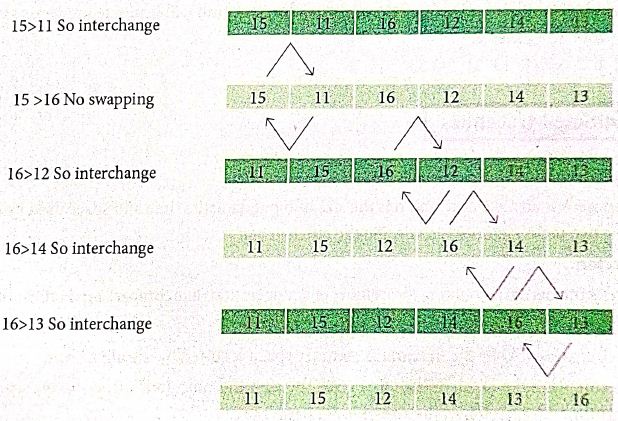
(v) The above pictorial example is for iteration-d. Similarly, remaining iteration can be done. The final iteration will give the sorted array. At the end of all the iterations we will get the sorted values in an array as given below:
| 11 | 12 | 13 | 14 | 15 | 16 |
46.
| Input | Zero or more quantities to be supplied. |
| Output | At least one quantityis produced. |
| Finiteness | Algorithms must terminate after finite number of steps. |
| Definiteness | All operations should be well defined. For example operations involving division by zero or taking square root for negative number are unacceptable. |
| Effectiveness | Every instruction must be carried out effectively. |
| Correctness | The algorithms should be error free. |
| Simplicity | East to implement. |
| Unambiguous | Algorithm should be clear and unambiguous. Each of its steps and their inputs/outputs should be clear and must lead to only one meaning. |
| Feasibility | Should be feasible with the avaliable resources. |
| Portable | An algorithm should be generic, independent of any programming language or an operating system able to handle all range of inputs. |
| Independent | An algorithm should have step-by-step directions, which should be independent of any programming code. |
47.
Python breaks each logical line into a sequence of elementary lexical components known as Tokens. The normal token types are
(i) Identifiers,
(ii) Keywords,
(iii) Operators,
(iv) Delimiters and
(v) Literals.
(i) Identifiers:
1. An Identifier is a name used to identify a variable, function, class, module or object.
2. An identifier must start with an alphabet (A..Z or a..z) or underscore (-).
3. Identifiers may contain digits (0 .. 9).
4. Python identifiers are case sensitive i.e. uppercase and lowercase letters are distinct.
5. Identifiers must not be a python keyword.
6. Python does not allow punctuation character such as %,$, @ etc., within identifiers.
Example of valid identifiers.
Sum, total_marks, regno, num1.
Example of invalid identifiers
12 Name, name $, total-mark, continue.
Keywords:
Keywords are special words used by Python interpreter to recognize the structure of program. As these words have specific meaning for interpreter, they cannot be used for any other purpose.
| false | Class | finally | is | return |
| none | continue | for | lambda | try |
| true | def | from | nonlocal | while |
| and | del | global | not | with |
| as | elif | if | or | yield |
| assert | else | import | pass | |
| break | expect | in | raise |
Operators:
In computer programming languages operators are special symbols which represent computations, conditional matching etc. The value of an operator used is called operands. Operators are categorized as Arithmetic, Relational, Logical, Assignment etc. Value and variables when used with operator are known as operands.
i) Arithmetic operators
An arithmetic operator is a mathematical operator that takes two operands and performs a calculation on them. They are used for simple arithmetic. Most computer languages contain a set of such operators that can be used within equations to perform different types of sequential calculations.
Python supports the following Arithmetic operators.
.JPG)
ii) Relational or Comparative Operators
A Relational operator is also called as comparative operator which checks the relationship between two operands. If the relation is true, it returns True; otherwise it returns False.
Python supports following relational operators.
.JPG)
ii) Logical Operators
In Python, Logical operators are used to perform logical operations on the given relational expressions. There are three logical operators they are and, or and not.
.JPG)
iv) Assignment Operators
In Python, =is a simple assignment operator to assign values to variables Let a=5 and b=10 assigns the value.5 to a and 10 to b these two assignment statement can also be given as a,b=5,10 that assigns the value 5 and 10 on the right to the variables a and b respectively.
There are various compound operators in python Like +=,-=,*=,/=,%=,**= and // = are also available.
| Operator | Description | Example |
| Assume x = 10 | ||
| = | Assigns right side operands to left variable. | >>>X=10 >>>b="computer" |
| += | Added and, assign back the result to left operand i.e, x = 30 |
>>> x + = 20# x = x + 20 |
| -= | Subtracted and assign back the result to left operand i.e, x = 25 |
>>>x- = 5# x = x - 5 |
| *= | Multiplied and assign back the result to left operand ie, x = 125 |
>>>x* = 5# x = x*5 |
| /= | Divided and assign back the result to left operand i.e, x = 62.5 |
>>>x/ = 2# x = x/2 |
| %= | Taken modulus (Remainder) using two operands and assign the result to left assign the result to left | >>> x% = 3 # x = x%3 |
| **= | Performed exponential (power) calculation on operators and assign value to the left operand i.e, x = 6.25 |
>>>x**=2 |
| //= | Performed floor division on Operators and assign value to the left operand i.e, x= 2.0 |
>>>x// = 3 |
v) Conditional Operator
Ternary operator is also known as Conditional operator that evaluate something based on a condition being true or false. It simply allows testing a condition in a single line replacing the multiline if-else making the code compact. The syntax conditional operator is
Variable Name = [on_true] if [Test expression] else [on_false]
Example:
min = 50 if 49<50 else 70 # min = 50
min = 50 if 49>50 else 70 # min = 70
Delimiters:
Python uses the symbols and symbol Combinations as delimiters in expressions, lists, dictionaries and strings following are the delimiters.
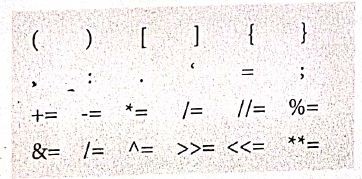
Literals
Literal is a raw data given in a variable or constant. In python, there are various types of literals.
1) Numeric
2) String
3) Boolean
1) Numeric Literals
Numeric literals consists of digits and are immutable (unchangeable). Numeric literals can belong to 3 different numerical types Integer, float and complex.
2) String literals
In python a string literal is a sequence of characters surrounded by quotes. Python supports single, double and triple quotes for a string. A character literal is a single character surrounded by single or double quotes. The value with triple- quote "' "' is used to give multi-line string literal.
3) Boolean literals
A Boolean literal can have any of the two values: True or False.
4) Escape sequences
In python strings, the backslash "\" is a special character, also called the "escape" character. It is used in representing certain white space character: "\t" is a tab, "\n" is a newline, and "\r is a carriage return. For Example to print the message "It's raining"
The python command is
>> print ("It \'s raining")
It's raining
Python supports the following escape sequence characters.
| Escape sequence characters | Description | Example | Output |
| \\ | Backslash | >>> print('\\ test") | \test |
| \' | Single - quote | >>> print("Doesn\'t") | Doesn't |
| \'' | Double - quote | >>>print("\"'python\"") | "python" |
| \n | New line | Print ("python"\n","lang..") | Python lang. |
| \t | Tab | Prlnt ("python'","\t","lang.,") | Python lang |
48.
A script is a text file containing the Python statements. Python Scripts are reusable code. Once the script is created, it can be executed6again and again without retyping. The Scripts are editable
i) Creating Scripts in Python:
1. Choose File → New File or press Ctrl + N in Python shell window.
.JPG)
2. An untitled blank script text editor will be displayed on screen
.JPG)
3. Type the following code in script editor.
a = 100
b= 350
C = a + b
print ("The sum=", c)
.JPG)
ii) Saving Python script:
1. Choose File → Save or press Ctrl+S.
.JPG)
2. Now, Save As dialog box appears on the screen.
.JPG)
3. In the Sare As dialog box, select the location where you want to save your Python code, and type the File name in File Name box. Python files are by default saved will extension • py. Thus, while creating Python Scripts using Pyrhons script editor, no need to specify the file extension.
4. Hinallyiclick save button to save your python script.
iii) Exccuthon Python Script:
1. Choose Run → Run module or Press F5.
.JPG)
2. If your code has any error, it will be shown in red color in the IDLE window, and Python describes the type of error occurred. To correct the errors, go back to Script editor, make corrections, save the file using Ctrl +s or File → Save and execute il again.
3, For all error line code, the output will appear in the IDLL window of Python.
.JPG)
.JPG)
49.
The following are the desirable characteristics of a module.
(i) Modules contain instructions, processing logic, and data.
(ii) Modules can be separately compiled and stored in a library.
(iii) Modules can be included in a program.
(iv) Module segments can be used by invoking a name and some parameters.
(v) Module segments can be used by other modules.
50.
Types of Variable Scope:
There are 4 types of Variable Scope, let's discuss them one by one:
Local Scope:
(i) Local scope refers to variables defined in current function. Always, a function will first look up for a variable name in its local scope. Only if it does not find it there, the outer scopes are checked.
Look at this example
| 1. Disp(): 2. a:=7 3. print a 4. Disp() |
Entire program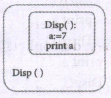 |
Output of the Program 7 |
(ii) On execution of the above code the variable a displays the value 7, because it is defined and available in the local scope.
Global Scope:
(i) A variable which is declared outside of all the functions in a program is known as global variable.
(ii) This means, global variable can be accessed inside or outside of all the functions in a program.
Example:
| 1. a:=10 2. Disp(): 3. a:=7 4. print a 5. Disp() 6. print a |
Entire program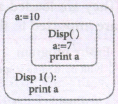 |
Output of the Program 7 10 |
(iii) On execution of the above code the variable 'a' which is defined inside the function displays the value 7 for the function call Disp() and then it displays 10; because a is defined in global scope.
Enclosed Scope:
(i) All programming languages permit functions to be nested. A function (method) with in another function is called nested function.
(ii) A variable which is declared inside a function which contains another function definition with in it, the inner function can also access the variable of the outer function. This scope is called enclosed scope.
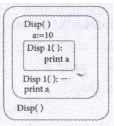
(iii) When a compiler or interpreter search for a variable in a program, it first search Local, and then search Enclosing scopes. Consider
the following example:
| 1. Disp(): 2. a:=10 3. Disp1() 4. print a 5. Disp1() 6. print a 7. Disp() |
Entire Program |
Output of the Program 10 10 |
(iv) In the above example Disp1( ) is defined with in Disp( ). The variable 'a' defined in Disp( ) can be even used by Disp1( ) because it is also a member of Disp( ).
Built-in Scope:
(i) The built-in scope has all the names that are pre-loaded into the program scope when we start the compiler or interpreter.
(ii) Any variable or function which is defined in the modules of a programming language has Built-in or module scope. They are loaded as soon as the library files are imported to the program.Consider the following example.
  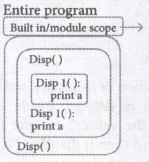 |
Library files associated with the software |
LEGB rule :
The LEGB rule is used to decide the order in which the scopes are to be searched
for scope resolution. The scopes are listed below in terms of hierarchy (highest to
lowest).
.png)
51.
(i) The structure construct (In OOP languages it's called class construct) is used to represent multi-part objects where each part is named (given a name). Consider the following pseudo code:
Class Person:
creation()
first Name:=""
last Name:=""
id :=""
email :=""
The new data type Person is pictorially represented as
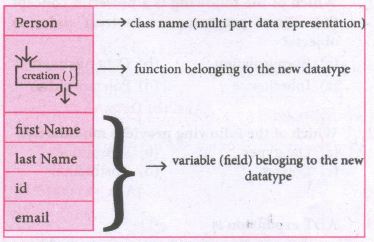
In the case of something more complex, like a person, we have a multí-item object where each item is a named thing: the first name, the last name, the id, and the email. One could use a list to represent a person:
Person = ['padmashri', 'Baskar', '994-222-1234', 'compsci@gmail.com']
| Let main() contains | |
| p1:=Person() | statement creates the object |
| first name:= "padmashri" | setting a field called firstName with value padamashri |
| last name:= "Baskar" | setting a field called last name with value Baskar |
| id:= "994-222-1234" | setting a field called id value 994-222-1234 |
| email="compsci@gmail.com" | setting a field called email with value compsci@gmail.com |
| -- output of firstName: Padmashri | |
(ii) The class (structure) construct defines the from for multi-part objects that represent a person.
(iii) Person is referred to as a class or a type, while pl is referred to as an object or an instance.
(iv) Here class Person as a Cookie cutter, and pl as a particular cookie, Using the cookie cutter you can make many cookies, Same way using class created many objects of that type.
(v) A class defines a data abstraction by grouping related data items. A class is not just data, it has functions defined within it, We say such functions are subordinate to the class because their job is to do thngs with the data of the class.
52.
Data abstraction is used to define an Abstract Data Type (ADT), which is a collection of constructors and selectors. T facilitate data abstraction,you will need to create two types of functions : Constructors and Selectors.
Constructors :
(i) Constructors are functions that build the abstract data type.
(ii) Constructors create an object, bundling together different pieces of information.
(iii) For example, say you have an abstract data type called city.
(iv) This city object will hold the city's name, and its latitude and longitude.
(v) To create a city object, you'd use a function like city = makecity (name, lat, lon).
(vi) Here makecity (name, lat, lon) is the constructor which creates the object city.
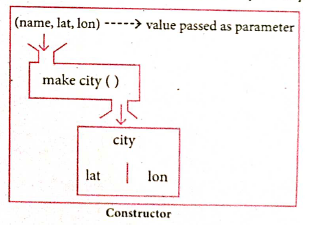
Selectors :
(i) Selectors are functions that retrieve information from the data type.
(ii) Selectors extract individual pieces of information fromn the object.
(iii) To extract the information of a city object, you wouldused functions like
getname(city)
getlat(city)
getlon(city)
These are the selectors because these functions extract the information of the city object.
.png)
53.
Interface:
(i) An interface is a set of action that an object can do. For example when you press a light switch, the light goes on, you may not have cared how it splashed the light. In Object Oriented Programnming language, an Interface is a description of all functions.
(ii) In our example, anything that "ACTS LIKE" a light, should have function definitions like turn_on () and a turn_off (). The purpose of interfaces is to allow the Computer to enforce the properties of the class.
Implementation:
(i) Implementation carries out the instructions defined in the interface.
(ii) How the object is processed and executed is the implementation.
(iii) A class declaration combines the external interface (its local state) with an implementation of that interface (the code that carries out the behaviour).
For example, let's take the example of increasing a car's speed.
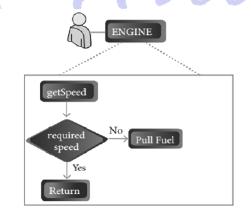
(iv) The person who drives the car doesn't care about the internal working. To increase the speed of the car he just presses the accelerator to get the desired behaviour. Here the accelerator is the interface between the driver (the calling / invoking object) and the engine ( the called object).
(v) In this case, the function call would be speed (70):, this is the interface Internally, the engine of the car is doing all the things but fuel, air, pressure, and electricity come together to create the power to move the vehicle.
(vi) All of these actions are separated from the driver, who just wants to go faster. Thus we separate interface from implementation.
54.
Parameters and arguments:
Parameters are the variable in a function definition and arguments are the values which are passed to a function definition
(i) Parameter without Type: Let us see an example of a function,definition :
(requires: b >=0 )
(returns: a to the power of b)
let rec pow a b:=
if b=0 then 1
else a*powa(b-1)
(i) In the above function definition variable 'b' is the parameter and the value which is passed to the variable 'b' is the argument. The precondition (requires) and postcondition (returns) of the function is given.
(ii) Note we have not mentioned any types (data types). Some language computer solves this type (data type) inference problem algorithmically, but some require the type to be mentioned.
(iii) In, the above function deinition if expression can return 1 in the then branch, shows that as per the typing rule the entire if expression has type int
(iv) Since the if expression is of type 'int', the function's return type also be int. 'b' is compared to 0 with the equality operator. so 'b' is also a type of int: Since 'a' is multiplied with another expression using the operator, 'a' must be an int.
(ii) Parameter with Type: Now let us write the same function definition with types for some reasons:
(requires: b > 0 )
(returns: a to the power of b )
let rec pow (a:int) (b:int): int :=
if b=0 then 1
n else a * pow b (a-1)
(i) When we write the type annotations for ‘a’ and ‘b’ the parentheses are mandatory. Generally, we can leave out these annotations, because it's simpler to let the compiler infer them.
(ii) There are times we may want to explicitly write down types. This is useful on times when you get a type error from the compiler that doesn't make sense. Explicitly annotating the types can help with debugging such an error message.
(iii) The syntax to define functions is close to the mathematical usage: the definition is introduced by the keyword let followed by the name of the function and its arguments; then the formula that computes the image of the argumentis written atter an := sign. If you want to define a recursive function: use "let rec" instead of "let"
Syntax:The syntax for function detinitions: let irec fn al a2 ... an := k
(iv) Here the 'fn' is used as a function name. The nanmes 'a1' to 'an'are variables used as parameters. The keyword 'rec' is required if 'fn' is to be a recursive function; otherwise it may be omitted.

12th Standard Syllabus & Materials
12th Standard
TN 12th Computer Applications களப்பெயர் முறைமை (DNS) Sample Question Papers Study Material - QB365 Set A
NEW12th Standard
TN 12th Computer Applications வலையமைப்பு எடுத்துக்காட்டுகள் மற்றும் நெறிமுறைகள் Sample Question Papers Study Material - QB365 Set A
NEW12th Standard
TN 12th Computer Applications கணினி வலையமைப்பு ஓர் அறிமுகம் Sample Question Papers Study Material - QB365 Set A
NEW12th Standard
TN 12th Computer Applications PHP-உடன் MySQL-ஐ இணைத்தல் Sample Question Papers Study Material - QB365 Set A



Tamilnadu Stateboard 12th Standard Subjects

Maths

Chemistry

Physics

Biology
Computer Science

Business Maths and Statistics

Economics

Commerce

Accountancy

History

Computer Applications
Biology
Computer Technology
Computer Applications
Computer Science
Business Maths and Statistics
Commerce
Economics
Maths
Chemistry
Physics
Computer Technology
History
Accountancy

Tamil

English

French
Tamilnadu Stateboard Standards