
 100% FREE ACCESS
12th Standard Syllabus & Materials
12th Standard
TN 12th Maths Applications of Matrices and Determinants Sample Question Papers Study Material - QB365 Set A
NEW12th Standard
TN 12th Computer Applications மின்னணு தரவு பரிமாற்றம் Sample Question Papers Study Material - QB365 Set A
NEW12th Standard
TN 12th Computer Applications மின் - வணிக பாதுகாப்பு அமைப்புகள் Sample Question Papers Study Material - QB365 Set A
NEW12th Standard
TN 12th Computer Applications மின்னணு செலுத்தல் முறைகள் Sample Question Papers Study Material - QB365 Set A
NEW12th Standard
TN 12th Computer Applications மின் - வணிகம் Sample Question Papers Study Material - QB365 Set A
NEW12th Standard
TN 12th Computer Applications திறந்த மூல கருத்துருக்கள் Sample Question Papers Study Material - QB365 Set A

Published on: 05/09/2022
QB365 provides a detailed and simple solution for every Possible Creative Questions in Class 12 Computer Science Subject - Control Structures , English Medium. It will help Students to get more practice questions, Students can Practice these question papers in addition to score best marks.
Download Tamil Nadu 12th Standard Computer Science question papers, model tests, one-mark questions, important questions, and public exam papers in PDF format. Free study materials and answer keys for TN State Board students.
Questions + Answers key
Take MCQ Computer Science Test
1.
Want to find the index inside a for loop? Wrap an iterable with 'enumerate' and it will yield the item along with its index.
2.
One can use an "else" clause with a "for" loop in Python. It's a special type of syntax that executes only if the for loop exits naturally, without any break statements.
3.
What are jump Statements in Python? Explain briefly about jump statements with its syntax and flowchart.
4.
What are the different types of loops in python with an example?
5.
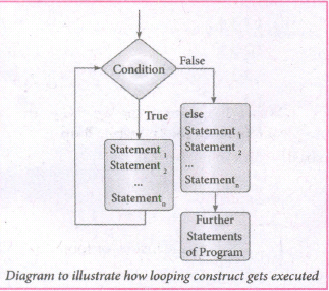
Explain briefly about looping constructs with its syntax and Flowchart.
6.
7.
Explain briefly about the alternative statement with its syntax and flowchart.
8.
Write a program in python to display the following output.
(i) 5 5 5 5 5
4 4 4 4
3 3 3
2 2
1
(ii) 1 2 3 4 5
1 2 3 4
1 2 3
1 2
1
9.
Write a program in python to display he following output.
1
2 2
3 3 3
4 4 4 4
5 5 5 5 5
10.
Write a program in python to display the following output.
1
1 2
1 2 3
1 2 3 4
1 2 3 4 5
11.
Explain Jump statement in python.
1.
Program:
#Know the index faster
vowels = [ 'a', 'e', 'i', 'o', 'u']
for i, letter in enumerate (vowels):
print (i, letter)
Output:
(0, 'a')
(1, 'e')
(2, 'i')
(3, 'o')
(4, 'u')
2.
PROGRAM:
def func(array):
for num in array:
if num % 2==0:
print (num)
break # Case 1: Break is called, so 'else' wouldn't be executed.
else: # Case 2: 'else' executed since break is not called
print("No call for Break. Else os executed")
print(" 1st Case:")
a = [2]
func (a)
print("2nd Case:")
a = [1]
func (a)
Output:
1st Case:
2
2nd Case:
No call for Break. Else is executed.
3.
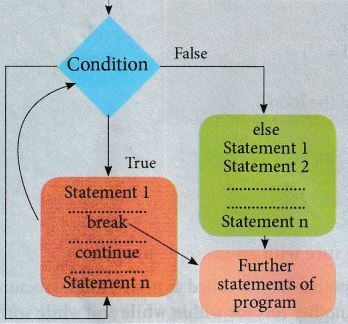
The jump statement in Python is used to unconditionally transfer the control from one part of the program to another. There are three keywords to achieve the jump statement in Python: break, continue, pass. The following flowchart illustrates the use of break and continue.
Break:
The break statement terminates the loop containing it. Control of the program flows to the statement immediately after the body of the loop.
A while or for loop will iterate till the condition is tested false, but one can even transfer the control out of the loop with help of a break statement. When the break statement is executed, the control flow of the program comes out of the loop and starts executing the segment of code after the loop Structure. If the break statement is inside a nested loop, the break will terminate the innermost loop.
Syntax:
break
Flowchart
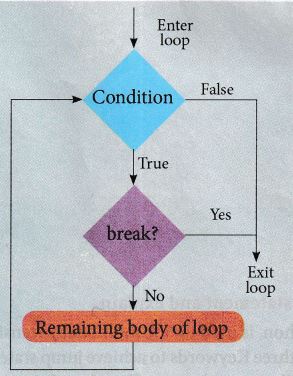
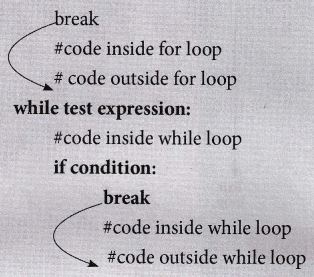
The working of break statement in for loop and while loop is shown in below:
for var in sequence:
if condition
# Program to illustrate the use of break statement inside for loop.
for a word in "Jump Statement":
if word == 'e'
break
print (word, end = ")
else:
print(''End of the loop")
print ("\n End of the program")
Output:
Jump Stat
End of the program
Continue
Continue statement unlike the break statement is used to skip the remaining part of a loop and start with next iteration.
Syntax:
continue
Flowchart:
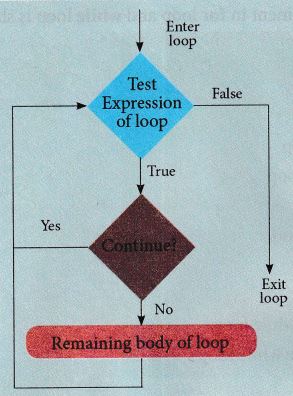
The working continues statement in for and while loop is shown beloe.
for var in sequence:
#code inside for loop
if condition:
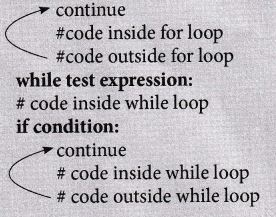
# Program to illustrate the use of continue statement inside for loop.
for word in "Jump statement":
if word == "e":
continue
print (word, end =")
print("\n End of the program")
Output:
Jump statement
End of the program
Pass
Pass statement in Python programming is a null statement. Pass statement when executed by the interpreter it is completely ignored. Nothing happens when pass is executed, it results in no operation.
Pass statement can be used in 'if' clause as well as within loop construct when we do not want any statements or commands within that block to be executed.
Syntax:
pass
Program to illustrate the use of pass statement in for loop.
for val in "Computer":
pass
print ("End of the loop, loop structure will be built in future")
Output:
End of the loop, a loop structure will be built in the future.
4.
Iteration or loops are used in a situation when the user needs to execute a block of code several of times or till the condition is satisfied. A loop statement allows executing a statement or group of statements multiple times.
While loop:
-a.JPG)
The syntax of while loop in Python
While < condition > :
Statements block 1
[else:
Statements block 2]
-b.JPG)
In the while loop, the condition is any valid Boolean expression returning True or False. The else part of while is an optional part of while. The statements block I is kept executed till the condition is true. If the else part is written, it is executed when the condition is tested false. Recall while loop belongs to entry check loop type, that it is not executed even once if the condition is tested false in the beginning.
for loop is the most comfortable loop. It is also an entry check loop. The condition is checked in the beginning and the body of the loop (statements - block 1) is executed if it is only True otherwise the loop is not executed.
Syntax:
for counter - variable sequence:
Statements - block 1
[else: #optional block statements - block 2]
The counter - Variable mentioned in the syntax is similar to the control variable that we used in the for loop of C++ and the sequence refers to the initial, final and increment value. Usually in Python, for loop uses the range( ) function in the sequence to specify the initial, final, and increment values.
range ( ) generates a list of values starting from start till stop -1.
The syntax of range ( ) is as follows:
range (start, stop, [step])
where,
Start - refers to the initial value
Stop - revers to the final value
Step - refers to increment value, this is an optional part.
# Program to illustrate the use of for loop to print single digit even number
for i in range (2,10,2):
print (i, end= ' ')
Output:
2 4 6 8
# Program to illustrate the use of for loop-to print Single-digit even number with else part.
for i in range (2,10,2):
print (i, end= ' ')
else:
print("\n End of the loop")
Output:
2 4 6 8
End of the loop.
5.
Iteration or loops are used in a situation when the user needs to execute a block of code several of times or till the condition is satisfied. A loop statement allows executing a statement or group of statements multiple times.
While loop:
The syntax of while loop in Python.
Syntax:
While < condition > :
Statements block 1
[else:
Statements block 2]
In the while loop, the condition is any valid Boolean expression returning True or False. The else part of while is an optional part of while. The statements block 1 is kept executed till the condition is true. If the else part is written, it is executed when the condition is tested false. Recall while loop belongs to entry check loop type, that it is not executed even once if the condition is tested false in the beginning.
for loop is the most comfortable loop. It is also an entry check loop. The condition is checked in the beginning and the body of the loop (statements - block 1) is executed if it is only True otherwise the loop is not executed.
Syntax:
for counter - variable sequence:
Statements - block 1
[else: #optional block statements - block 2]
The counter - Variable mentioned in the syntax is similar to the control variable that we used in the for loop of C++ and the sequence refers to the initial, final and increment value. Usually in Python, for loop uses the range( ) function in the sequence to specify the initial, final, and increment values.
range ( ) generates a list of values starting from start till stop -1.
The syntax of range ( ) is as follows:
range (start, stop, [step])
where,
Start - refers to the initial value
Stop - revers to the final value
Step - refers to increment value, this is an optional part.
# Program to illustrate the use of for loop to print single digit even number
for i in range (2,10,2):
print (i, end= ' ')
Output:
2 4 6 8
# Program to illustrate the use of for loop-to print Single-digit even number with else part.
for i in range (2,10,2):
print (i, end= ' ')
else:
print("\n End of the loop")
Output:
2 4 6 8
End of the loop.
6.
-a.JPG)
-b.JPG)
7.
Simple if is the simplest of all decision-making statements. The condition should be in the form of relational or logical expression.
Syntax:
if < condition >:
Statements - block 1
#Program to check the age and print whether eligible for voting
x = int (input ("Enter your age:"))
if x > = 18:
print("You are eligible for voting")
Output 1:
Enter your age: 34
You are eligible for voting
Output 2:
Enter your age: 16
>>>
The if..else statement provides control to check the true block as well as the false block.
Syntax:
if < condition >:
Statements - block 1
else:
Statements - block 2
# Program to check if the accepted number odd or even
a = int (input("Enter any number:"))
if a %2 = = 0:
print (a," is an even number")
else:
print(a,"is an odd number")
Output 1:
Enter any number: 56
56 is an even number
Output 2:
Enter any number: 67
67 is an odd number.
When we need to construct a chain of if statement (s) then the 'elif ' clause can be used instead of 'else'.
Syntax:
if < condition-1 >:
Statement-block 1
elif < condition -2>
else:
Statements - block n
In the syntax of if,.elif..else mentioned above, condition- 1 is tested if it is true then statements - block 1 is executed, otherwise, the control checks condition -2 if its true, statements - block 2 is executed and even if it fails statements - block n mentioned in else part is executed.
'elif' clause combines if..else-if..else statement to one if..elif...else. 'elif' can be considered to be abbreviation of 'else if'. In an 'if' statement there is no limit of 'eif' clause that can be used, but an, else' clause if used should be placed at the end.
# Program to illustrate the use of nested if statement
| Average | Grade |
| >=80 and above | A |
| >=70 and <80 | B |
| >=60 and <70 | C |
| >=50 and <60 | D |
| Otherwise | E |
m1 = int (input("Enter mark in first subject:"))
m2 = int (input("Enter mark insecond subject:"))
avg = (m1 + m2)/2
if avg >=80:
print ("Grade :A")
elif avg >= 70 and avg <80:
print ("Grade: B")
elif avg >= 60 and avg <70:
print ("Grade: C")
elif avg >= 50 and avg <60:
print ("Grade: D")
else:
print("Grade: E")
Output 1:
Enter mark in first subject: 34
Enter mark in second subject: 78
Grade :D
Output 2:
Enter mark in first subject: 67
8.
(i) for i in range (5, 0,-1):
for j in range (1, i + 1):
print (i, end =' ')
print (end = '\n')
i+ = 1
(ii) for i in range (5, 0, -1):
for j in range (1, i + 1):
print (j end =' ')
print (i, end = '\n')
i+ = 1
9.
for i in range (1,6):
for j in range (1, i+1)
print (i, end =' ')
print (end = '\n')
i+ = 1
10.
i=1
while (i < = 6):
for j in range (1,i):
print (j,end='\t')
print (end='\n')
i+=1
Output:
1
1 2
1 2 3
1 2 3 4
1 2 3 4 5
11.
The jump statement in Python, is used to unconditionally transfer the control from one part of the program to another. There are three keywords to achieve jump statements in Python: break, continue, pass. The following flowchart illustrates the use of break and continue.
(i) break statement: The break statement terminates the loop containing it. Control of the program flows to the statement immediately after the body of the loop. A while or for loop will iterate till the condition is tested false, but one can even transfer the control out of the loop (terminate) with help of break statement. When the break statement is executed, the control flow of the program comes out of the loop and starts executing the segment of code after the loop structure. If break statement is inside a nested loop (loop inside another loop), break will terminate the innermost loop.
Syntax:
break
(ii) Continue statement: Continue statement unlike the break statement is used to skip the remaining part of a loop and start with next iteration.
Syntax:
continue
(iii) Pass statement: pass statement is generally used as a placeholder. When we have a loop or function that is to be implemented in the future and not now, we cannot develop such functions or loops with empty body segment because the interpreter would raise an error. So, to avoid this we can use pass statement to construct a body that does nothing.
Syntax:
pass

12th Standard Syllabus & Materials
12th Standard
TN 12th Computer Applications வலையமைப்பு வடமிடல் Sample Question Papers Study Material - QB365 Set A
NEW12th Standard
TN 12th Computer Applications களப்பெயர் முறைமை (DNS) Sample Question Papers Study Material - QB365 Set A
NEW12th Standard
TN 12th Computer Applications வலையமைப்பு எடுத்துக்காட்டுகள் மற்றும் நெறிமுறைகள் Sample Question Papers Study Material - QB365 Set A
NEW12th Standard
TN 12th Computer Applications கணினி வலையமைப்பு ஓர் அறிமுகம் Sample Question Papers Study Material - QB365 Set A



Tamilnadu Stateboard 12th Standard Subjects

Maths

Chemistry

Physics

Biology
Computer Science

Business Maths and Statistics

Economics

Commerce

Accountancy

History

Computer Applications
Biology
Computer Technology
Computer Applications
Computer Science
Business Maths and Statistics
Commerce
Economics
Maths
Chemistry
Physics
Computer Technology
History
Accountancy

Tamil

English

French
Tamilnadu Stateboard Standards
