
 100% FREE ACCESS
12th Standard Syllabus & Materials
12th Standard
TN 12th Computer Applications மின்னணு தரவு பரிமாற்றம் Sample Question Papers Study Material - QB365 Set A
NEW12th Standard
TN 12th Computer Applications மின் - வணிக பாதுகாப்பு அமைப்புகள் Sample Question Papers Study Material - QB365 Set A
NEW12th Standard
TN 12th Computer Applications மின்னணு செலுத்தல் முறைகள் Sample Question Papers Study Material - QB365 Set A
NEW12th Standard
TN 12th Computer Applications மின் - வணிகம் Sample Question Papers Study Material - QB365 Set A
NEW12th Standard
TN 12th Computer Applications திறந்த மூல கருத்துருக்கள் Sample Question Papers Study Material - QB365 Set A
NEW12th Standard
TN 12th Computer Applications வலையமைப்பு வடமிடல் Sample Question Papers Study Material - QB365 Set A

Published on: 13/09/2022
QB365 provides a detailed and simple solution for every Possible Book Back Questions in Class 12 Computer Science Subject - Data Visualization Using Pyplot: Line Chart, Pie Chart and Bar Chart , English Medium. It will help Students to get more practice questions, Students can Practice these question papers in addition to score best marks.
Download Tamil Nadu 12th Standard Computer Science question papers, model tests, one-mark questions, important questions, and public exam papers in PDF format. Free study materials and answer keys for TN State Board students.
Questions + Answers key
Take MCQ Computer Science Test
1.
Read the statements given below. Identify the right option from the following for pie chart.
Statement A: To make a pie chart with Matplotlib, we can use the plt.pie() function.
Statement B: The autopct parameter allows us to display the percentage value using the Python string formatting.
Statement A is correct
Statement B is correct
Both the statements are correct
Both the statements are wrong
2.
Identify the right type of chart using the following hints.
Hint 1: This chart is often used to visualize a trend in data over intervals of time.
Hint 2: The line in this type of chart is often drawn chronologically.
Line chart
Bar chart
Pie chart
Scatter plot
3.
Which key is used to run the module?
F6
F4
F3
F5
4.
Read the code:
a. import matplotlib.pyplot as plt
b. plt.plot(3,2)
c. plt.show()
Identify the output for the above coding
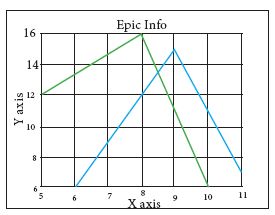
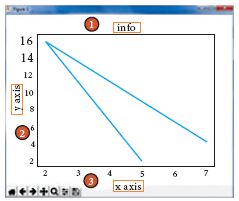
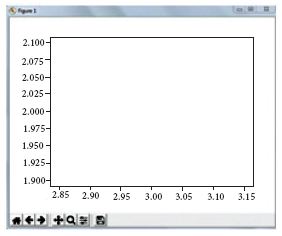
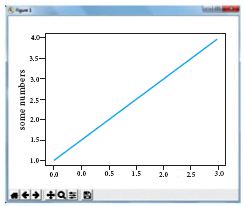
5.
Observe the output figure. Identify the coding for obtaining this output.
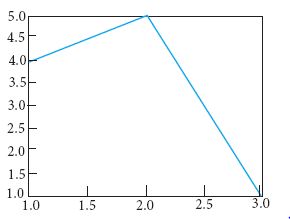
import matplotlib.pyplot as plt
plt.plot([1,2,3],[4,5,1])
plt.show()
import matplotlib.pyplot as plt
plt.plot([1,2],[4,5])
plt.show()
import matplotlib.pyplot as plt
plt.plot([2,3],[5,1])
plt.show()
import matplotlib.pyplot as plt
plt.plot([1,3],[4,1])
plt.show()
6.
To install matplotlib, the following function will be typed in your command prompt. What does “-U”represents?
Python –m pip install –U pip
downloading pip to the latest version
upgrading pip to the latest version
removing pip
upgrading matplotlib to the latest version
7.
Read the following code: Identify the purpose of this code and choose the right option from the following.
C:\Users\Your Name\AppData\Local\Programs\Python\Python36-32\Scripts>pip list
List installed packages
list command
Install PIP
packages installed
8.
Read the following code: Identify the purpose of this code and choose the right option from the following.
C:\Users\YourName\AppData\Local\Programs\Python\Python36-32\Scripts>pip –version
Check if PIP is Installed
Install PIP
Download a Package
Check PIP version
9.
Identify the package manager for Python packages, or modules.
Matplotlib
PIP
plt.show()
python package
10.
Which is a python package used for 2D graphics?
matplotlib.pyplot
matplotlib.pip
matplotlib.numpy
matplotlib.plt
1.
(c)
Both the statements are correct
2.
(a)
Line chart
3.
(d)
F5
4.
(c)
5.
(a)
import matplotlib.pyplot as plt
plt.plot([1,2,3],[4,5,1])
plt.show()
6.
(b)
upgrading pip to the latest version
7.
(d)
packages installed
8.
(d)
Check PIP version
9.
(b)
PIP
10.
(a)
matplotlib.pyplot

12th Standard Syllabus & Materials
12th Standard
TN 12th Computer Applications களப்பெயர் முறைமை (DNS) Sample Question Papers Study Material - QB365 Set A
NEW12th Standard
TN 12th Computer Applications வலையமைப்பு எடுத்துக்காட்டுகள் மற்றும் நெறிமுறைகள் Sample Question Papers Study Material - QB365 Set A
NEW12th Standard
TN 12th Computer Applications கணினி வலையமைப்பு ஓர் அறிமுகம் Sample Question Papers Study Material - QB365 Set A
NEW12th Standard
TN 12th Computer Applications PHP-உடன் MySQL-ஐ இணைத்தல் Sample Question Papers Study Material - QB365 Set A



Tamilnadu Stateboard 12th Standard Subjects

Maths

Chemistry

Physics

Biology
Computer Science

Business Maths and Statistics

Economics

Commerce

Accountancy

History

Computer Applications
Biology
Computer Technology
Computer Applications
Computer Science
Business Maths and Statistics
Commerce
Economics
Maths
Chemistry
Physics
Computer Technology
History
Accountancy

Tamil

English

French
Tamilnadu Stateboard Standards
