
 100% FREE ACCESS
12th Standard Syllabus & Materials
12th Standard
TN 12th Computer Applications மின்னணு தரவு பரிமாற்றம் Sample Question Papers Study Material - QB365 Set A
NEW12th Standard
TN 12th Computer Applications மின் - வணிக பாதுகாப்பு அமைப்புகள் Sample Question Papers Study Material - QB365 Set A
NEW12th Standard
TN 12th Computer Applications மின்னணு செலுத்தல் முறைகள் Sample Question Papers Study Material - QB365 Set A
NEW12th Standard
TN 12th Computer Applications மின் - வணிகம் Sample Question Papers Study Material - QB365 Set A
NEW12th Standard
TN 12th Computer Applications திறந்த மூல கருத்துருக்கள் Sample Question Papers Study Material - QB365 Set A
NEW12th Standard
TN 12th Computer Applications வலையமைப்பு வடமிடல் Sample Question Papers Study Material - QB365 Set A

Published on: 01/10/2020
12th Standard Computer Science English Medium Important 5 Mark Book Back Questions (New Syllabus 2020)
Download Tamil Nadu 12th Standard Computer Science question papers, model tests, one-mark questions, important questions, and public exam papers in PDF format. Free study materials and answer keys for TN State Board students.
Questions + Answers key
Take MCQ Computer Science Test
1.
Explain the various buttons in a matplotlib window.
2.
Consider the following table Supplier and item .Write a python script for (i) to (ii)
| SUPPLIER | ||||
| Suppno | Name | City | Icode | SuppQty |
| S001 | Prasad | Delhi | 1008 | 100 |
| S002 | Anu | Bangalore | 1010 | 200 |
| S003 | Shahid | Bangalore | 1008 | 175 |
| S004 | Akila | Hydrabad | 1005 | 195 |
| S005 | Girish | Hydrabad | 1003 | 25 |
| S006 | Shylaja | Chennai | 1008 | 180 |
| S007 | Lavanya | Mumbai | 1005 | 325 |
i) Display Name, City and Itemname of suppliers who do not reside in Delhi.
ii) Increment the SuppQty of Akila by 40
3.
Write the syntax for getopt( ) and explain its arguments and return values.
4.
Write the different methods to read a File in Python.
5.
What are the components of SQL? Write the commands in each.
6.
7.
What is the purpose of range( )? Explain with an example.
8.
Explain the scope of variables with an example.
9.
Write a program to display all 3 digit odd numbers.
10.
Explain the characteristics of an algorithm.
11.
Discuss in detail about Tokens in Python.
12.
Write any five benefits in using modular programming.
13.
What is a List? Why List can be called as Pairs. Explain with suitable example.
14.
Explain with example Pure and impure functions.
1.
(i) Home Button \(\rightarrow \) The Home Button will help one to begun navigating the chart. If you ever want to return back to the original view, you can click on this.
(ii) Forward/Back buttons \(\rightarrow \) These buttons can be used like the Forward and Back buttons in browser. Click these to move back to the previous point you were at, or forward again.
(iii) Pan Axis \(\rightarrow \) This cross-looking button allows you to click it, and then click and drag graph around.
(iv) Zoom \(\rightarrow \) The Zoom button lets you click on it, then click and drag a square would like to zoom into specifically. Zooming in will require a left click and drag. Zoom out with a right click and drag.
(v) Configure Subplots\(\rightarrow \) This button allows you to configure various spacing options with figure and plot.
(vi) Save Figure \(\rightarrow \)This button will allow you to save figure in various forms
2.
(i) Program to Display Name, city and Item Name of suppliers who do not reside in Delhi:
import mysqldb
db = mysqlkdb.Connect ("Supplier.db")
cursor = db.cursor()
cursor. execute ("'SELECT NAME, CITY, ICode FROM Supplier WHERE CITY <> "Delh")
db. commit()
result=cursor.fetchall()
print ("result, sep = "\n")
db. close()
(ii) Program to Increment the suppQty of Akila by 40:
import mysqldb
db = mysqldb.Connect ("ltem.db"')
cursor = db.cursor()
cursor. execute ("UPDATE Item SET Name = 'Akila' WHERE SuppQty = 235)
db. commit()
cursor. execute ("SELECT * FROM Item")
result = cursor.fetchall()
print ("result, sep ="\n")
db. close()
3.
getopt() method returns value consisting of two elements. Each of these values are stored separately in two different list opts and args. opts contains list of splitted strings like made, path and args contains any string if at all not splitted because of wrong path or mode. args will be an empty array if there is no error in splitting strings by getopt().
Example:
The Python code which is going to execute the C++ file p4 in command line will have the getopt() method.
Syntax:
opts, args = getopt.getopt (argv, "i:", ['ifile ='])
where opts contains ('-i','c:\\pyprg\\p4')]]
-i:- option nothing but mode should be followed by
'c:\\pyprg\\p4' value nothing but the absolute path of C++ file,
Since the entire command-line commands are parsed and no leftover arguments, the second argunent args will be empty[].
4.
1. CSV file - data with default delimiter comma(,)
2. CSV file - data with space at the beginning.
3. CSV file - data with quotes
4. CSV file - data with custom Delimiters
1. CSV file - data with default delimiter comma(,):
The following program read a file called "Sample1.csv" with default delimiter comma (,) and print row by row.
Program:
#importing csv
import csv
#opening the csv file which is in different location with read mode
with opent('c.\\pyprg\\sample1.csv', 'r') as F:
#other way to open the file is f= ('C:\\pyprg\\ sample1.csv', 'r')
reader = csv.reader(F)
# printing each line of the Data row by row
print(row)
F.close()
Output:
['SNO', 'NAME', 'CITY']
['12101', 'RAM', 'CHENNAI']
['12102', 'LAVANYA', 'TIRUCHY']
['12103', 'LAKSHMAN', 'MADURAI']
2. CSV files - data with spaces at the beginning:
Consider the following file "Sample2.csv containing the following data when opened through notepad.
| Topic 1 | Topic 2 | Topic 3 |
| One, | two, | three, |
| Example 1, | Example 2, | Example 3, |
Program:
import csv
csv.register_dialect ['my Dialect', delimiters=', 'Skipinitialspace= True).
F = open ('c:\\Pyprgl\sample2.csv', 'r')
reader = CSV.reader (F, dialect = 'myDialect')
for row in reader:
print (row)
F.close()
Output:
['Topic 1', 'Topic 2', 'Topic 3']
['One', 'two', 'three']
['Example 1', 'Example 2', 'Example 3']
We can see in "Sample 2.csv" there are spaces after the delimiter due to which the output is also displayed with spaces.
These whitespaces can be removed, by registering new dialects using csv. register _dialect( ) class of csv module. A dialect describes the format of the csv file that is to be read. In dialects the Parameter "skipinitialspace" is used for removing whitespaces after the delimiter.
3. CSV File - Data with Quotes:
We can read the csv files with quotes, by registering new dialects using csv. register_dialect( ) class of csv module.
SNO, Quotes
1, "The Secret to getting ahead is getting started".
2, "Excellence is a continuous process and not an accident."
3, "Work hard dream big never give up and believe Yourself"
4, "Failure is the opportunity to begin again more intelligently".
5, "The successful warrior is the average man, with laser-like focus."
Program:
import cSv
csv.register_ dialect ('MyDialect', delimiter =, 'quoting = csv.QUOTE_ALL, skipinitialspace = True)
f=open ('c:\\Pyprg\\ quotes.csv', 'r')
reader = csv.reader (f, dialect = 'myDialect')
for row in reader:
print (row)
Output:
['SNO, 'Quotes']
['1', 'The secret to getting ahead is getting started'.]
['2', 'Excellence is a continuous process and not an accident'.]
['3', 'Work hard dream big never give up and believe yourself'.]
['4', 'Failure is the opportunity to begin again more intelligently':]
['5', 'The successful warrior is the average man with laser- like focus':]
4. CSV files with custom Delimiters:
We can read csv file having custom the delimiter by registering a new dialect with the help of csv.register_dialect( ).
In the following file called "sample4.csv", each column is separated with |(Pipe Symbol)
| Roll No | Name | City |
| 12101 | Arun | Chennai |
| 12102 | Meena | Kovai |
| 12103 | Ram | Nellai |
| 103 | Ayush | M |
| 104 | Abinandh | M |
Program:
import csv
Csv. register_dialect('myDialect', delimiter= '|')
with open (c:\\pyprg\sample 4.csv', 'r') as f:
reader = csv.reader (f, dialect = "my dialect")
for row is reader:
print (row)
f.close()
Output:
['Roll no', 'Name', 'City]
['12101', 'Arun', 'Chennai']
['12102', 'Meena', 'Kovai']
['12103', 'Ram', 'Nellai']
5.
SQL commands are divided into five categories:
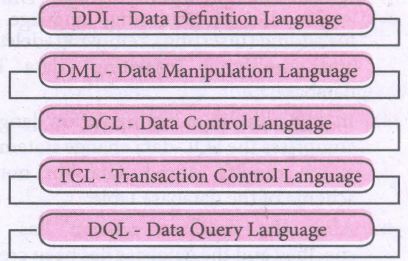
Data Definition Language:
(i) The Data Definition Language (DDL) consist of SQL statements used to define the database structure or schema.
(ii) It simply deals with descriptions of the database schema and is used to create and modify the structure of database objects in databases.
(iii) The DDL provides a set of definitions to specify the storage structure and access methods used by the database system.
DDL performs the following functions:
(i) It should identify the type of data division such as data item, segment, record and database file.
(ii) It gives a unique name to each data item type, record type, file type and data base.
(iii) It should specify the proper data type.
(iv) It should define the size of the data item.
(v) It may define the range of values that a data item may use.
(vi) It may specify privacy locks for preventing unauthorized data entry.
Commands:
| CREATE | To create tables in the database. |
| ALTER | Alters the structure of the database |
| DROP | Data tables from database. |
| TRUNCATE | Remove all records from a table, also release the space occupied bv those records. |
Data Manipulation Language:
This is a computer programming language used for adding, removing and modifying data in a database. This language comprises the SQL-data change statements, which modify stored data but not the schema of the database table
Data Manipulation includes
(i) Insertion of new information into the database
(ii) Retrieval of information stored in a database
(iii) Deletion of information from the database.
(iv) Modification of data stored in the database
The DML is basically of two types:
Procedural DML - Requires a user to specify what data is needed and how to get it.
Non-Procedural DML - Requires a user to specify what data is needed without Specifying how to get it.
Commands:
| INSERT | Inserts data into a table |
| UPDATE | Updates the existing data within a table |
| DELETE | Deletes all records from a table, but not the space occupied by them. |
Data Control Language:
(i) A Data Control Language (DCL) is a programming language used to control the access of data stored in a database. It is used for controlling privileges in the database (Authorization).
(ii) The privileges are required for performing all the database operations such as creating sequences, views of tables etc.
Commands:
| GRANT | Grants permission to one or more users to perform specific tasks. |
| REVOKE | Withdraws the access permission given by the GRANT statement. |
Transactional Control Language:
Transactional control language (TCL) commands are used to manage transactions in the database. These are used to manage the changes made to the data in a table by DML statements.
Commands:
| COMMIT | Saves any transaction into the database permanently. |
| ROLL BACK | Restores the database to last commit state. |
| SAVE POINT | Temporarily save a transaction so that you can rollback. |
Data query language:
The Data Query Language consist of commands used to query or retrieve data from a database. One such SQL command in Data Query Language is
| SELECT | It displays the records from the table. |
6.
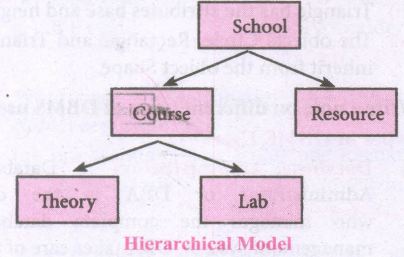
.JPG)
.JPG)
.JPG)
.JPG)
7.
The range( ) is a function used to generate a series of values in Python. Using range( ) function, you can create list with series of values. The range( ) function has three arguments.
Syntax:
range (start value, end value, step value)
where,
(i) start value - beginning value of series. Zero is the default beginning value.
(ii) end value - upper limit of series. Python takes the ending value as upper limit - l.
(iii) step value - It is an optional argument, which is used to generate different interval of values.
Example:
Generating whole numbers upto 10.
for x in range (1,11):
print(x)
Output:
1
2
3
4
5
6
7
8
9
10
Creating a list with series of values :
(i) Using the range( ) function, a list can be created with series of values, To convert the result of range( ) function into list, one more function called list ( ). The list ( ) function makes the result of range ( ) as a ist.
(ii) Syntax: List_Varibale = list ( range ( ))
(iii) Example
Generating first 10 even numbers
for x in range (2, 11, 2):
print (x)
Output:
2
4
6
8
10
(iv) In the above code, list( ) function takes the result of range( ) as Even_List elements. Thus, Even_List list has the elements of first five even numbers. Similarly, we can create any serie of values using range( ) function. The following example explains how to create a list with squares of first 10 natural numbers.
Example : Generating squares of first 10 natural numbers
for x in range(1,11) :
S=x**2
squares.append(s)
print (squares)
Output : [1, 4, 9, 16, 25, 36, 49, 64, 81, 100)
8.
Scope of variable refers to the part of the program, where it is accessible, i.e., area where the variables refer (use). The scope holds the current set of variables and their values. The two types of scopes-local scope and global scope.
Local Scope: A variable declared inside the function's body is known as local variable.
Rules of local variable:
(i) A variable with local scope can be accessed only within the function that it is created in.
(ii) When a variable is created inside the function the variable becomes local to it.
(iii) A local variable only exists while the function is executing.
(iv) The formal parameters are also local to function.
(v) Example: Create a Local Variable
def loc():
y=0 # local scope
print(y)
loc()
Output:
0
Global Scope: A variable, with global scope can be used anywhere in the program. It can be created by defining a variable outside the scope of any function.
Rules of global Keyword:
The basic rules for global keyword in Python are:
(i) When we define a variable outside a function, it's global by default. You don't have to use global keyword.
(li) We use global keyword to modify the value of the global variable inside a function.
(iii) Use of global keyword outside a function has no effect.
Example: Accessing global Variable From Inside a Function
c = 1 # global variable
def add():
print(c)
add()
Output:
1
9.
for i in range (100, 1000):
if a%2==1:
print b
Output :
101,103,105,107,...........,997,999
10.
| Input | Zero or more quantities to be supplied. |
| Output | At least one quantityis produced. |
| Finiteness | Algorithms must terminate after finite number of steps. |
| Definiteness | All operations should be well defined. For example operations involving division by zero or taking square root for negative number are unacceptable. |
| Effectiveness | Every instruction must be carried out effectively. |
| Correctness | The algorithms should be error free. |
| Simplicity | East to implement. |
| Unambiguous | Algorithm should be clear and unambiguous. Each of its steps and their inputs/outputs should be clear and must lead to only one meaning. |
| Feasibility | Should be feasible with the avaliable resources. |
| Portable | An algorithm should be generic, independent of any programming language or an operating system able to handle all range of inputs. |
| Independent | An algorithm should have step-by-step directions, which should be independent of any programming code. |
11.
Python breaks each logical line into a sequence of elementary lexical components known as Tokens. The normal token types are
(i) Identifiers,
(ii) Keywords,
(iii) Operators,
(iv) Delimiters and
(v) Literals.
(i) Identifiers:
1. An Identifier is a name used to identify a variable, function, class, module or object.
2. An identifier must start with an alphabet (A..Z or a..z) or underscore (-).
3. Identifiers may contain digits (0 .. 9).
4. Python identifiers are case sensitive i.e. uppercase and lowercase letters are distinct.
5. Identifiers must not be a python keyword.
6. Python does not allow punctuation character such as %,$, @ etc., within identifiers.
Example of valid identifiers.
Sum, total_marks, regno, num1.
Example of invalid identifiers
12 Name, name $, total-mark, continue.
Keywords:
Keywords are special words used by Python interpreter to recognize the structure of program. As these words have specific meaning for interpreter, they cannot be used for any other purpose.
| false | Class | finally | is | return |
| none | continue | for | lambda | try |
| true | def | from | nonlocal | while |
| and | del | global | not | with |
| as | elif | if | or | yield |
| assert | else | import | pass | |
| break | expect | in | raise |
Operators:
In computer programming languages operators are special symbols which represent computations, conditional matching etc. The value of an operator used is called operands. Operators are categorized as Arithmetic, Relational, Logical, Assignment etc. Value and variables when used with operator are known as operands.
i) Arithmetic operators
An arithmetic operator is a mathematical operator that takes two operands and performs a calculation on them. They are used for simple arithmetic. Most computer languages contain a set of such operators that can be used within equations to perform different types of sequential calculations.
Python supports the following Arithmetic operators.
.JPG)
ii) Relational or Comparative Operators
A Relational operator is also called as comparative operator which checks the relationship between two operands. If the relation is true, it returns True; otherwise it returns False.
Python supports following relational operators.
.JPG)
ii) Logical Operators
In Python, Logical operators are used to perform logical operations on the given relational expressions. There are three logical operators they are and, or and not.
.JPG)
iv) Assignment Operators
In Python, =is a simple assignment operator to assign values to variables Let a=5 and b=10 assigns the value.5 to a and 10 to b these two assignment statement can also be given as a,b=5,10 that assigns the value 5 and 10 on the right to the variables a and b respectively.
There are various compound operators in python Like +=,-=,*=,/=,%=,**= and // = are also available.
| Operator | Description | Example |
| Assume x = 10 | ||
| = | Assigns right side operands to left variable. | >>>X=10 >>>b="computer" |
| += | Added and, assign back the result to left operand i.e, x = 30 |
>>> x + = 20# x = x + 20 |
| -= | Subtracted and assign back the result to left operand i.e, x = 25 |
>>>x- = 5# x = x - 5 |
| *= | Multiplied and assign back the result to left operand ie, x = 125 |
>>>x* = 5# x = x*5 |
| /= | Divided and assign back the result to left operand i.e, x = 62.5 |
>>>x/ = 2# x = x/2 |
| %= | Taken modulus (Remainder) using two operands and assign the result to left assign the result to left | >>> x% = 3 # x = x%3 |
| **= | Performed exponential (power) calculation on operators and assign value to the left operand i.e, x = 6.25 |
>>>x**=2 |
| //= | Performed floor division on Operators and assign value to the left operand i.e, x= 2.0 |
>>>x// = 3 |
v) Conditional Operator
Ternary operator is also known as Conditional operator that evaluate something based on a condition being true or false. It simply allows testing a condition in a single line replacing the multiline if-else making the code compact. The syntax conditional operator is
Variable Name = [on_true] if [Test expression] else [on_false]
Example:
min = 50 if 49<50 else 70 # min = 50
min = 50 if 49>50 else 70 # min = 70
Delimiters:
Python uses the symbols and symbol Combinations as delimiters in expressions, lists, dictionaries and strings following are the delimiters.
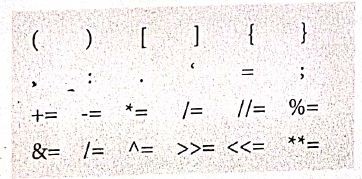
Literals
Literal is a raw data given in a variable or constant. In python, there are various types of literals.
1) Numeric
2) String
3) Boolean
1) Numeric Literals
Numeric literals consists of digits and are immutable (unchangeable). Numeric literals can belong to 3 different numerical types Integer, float and complex.
2) String literals
In python a string literal is a sequence of characters surrounded by quotes. Python supports single, double and triple quotes for a string. A character literal is a single character surrounded by single or double quotes. The value with triple- quote "' "' is used to give multi-line string literal.
3) Boolean literals
A Boolean literal can have any of the two values: True or False.
4) Escape sequences
In python strings, the backslash "\" is a special character, also called the "escape" character. It is used in representing certain white space character: "\t" is a tab, "\n" is a newline, and "\r is a carriage return. For Example to print the message "It's raining"
The python command is
>> print ("It \'s raining")
It's raining
Python supports the following escape sequence characters.
| Escape sequence characters | Description | Example | Output |
| \\ | Backslash | >>> print('\\ test") | \test |
| \' | Single - quote | >>> print("Doesn\'t") | Doesn't |
| \'' | Double - quote | >>>print("\"'python\"") | "python" |
| \n | New line | Print ("python"\n","lang..") | Python lang. |
| \t | Tab | Prlnt ("python'","\t","lang.,") | Python lang |
12.
(i) Less code to be written.
(ii) A single procedure can be developed for reuse, eliminating the need to retype the code many times.
(iii) Programs can be designed more easily because a small teana deals with only a
small part of the entire code.
(iv) Modular programming allowS many programmers to collaborate on the same
application.
(v) The code is stored across multiple files.
(vi) Code is short, sirnple and easy to understand.
(vii) Errors can easily be identified, as they are localized to a subroutine or function.
(viii) The same code can be used in man applications.
(ix) The scoping of variables can easily be controlled.
13.
List :
(i) List is constructed by placing expressions within square brackets separated by commas. Such an expression is called a list literal. List can store multiple values. Each value can be of any type and can even be another list.
Example for List [10, 20].
(ii) The elenments of a list can be accessed in two ways. The first way is via our familiar method of multiple assignment, which unpacks a list into its elements and binds each elenment to a different name.
Ist := [10, 20]
x, y = lst
(iii) In the above example x will become l0 and y will become 20. A second method for accessing the elements in a list is by the element selection operator.
(iv) Unlike a list literal, a square-brackets expression directly following another expression does not evaluate to a list value, but instead selects an element from the value of the preceding expression.
lst [0]
10
Ist [1]
20
(v) In both the example mentioned above mathematically we can represent list similar to a set.
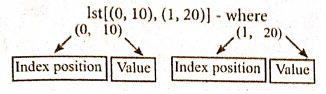
Pair :
Any way of bundling two values together into one can be considered as a pair. Lists are a common methodto do so. Therefore List can be called as Pairs.
14.
Pure functions:
(i) Pure functions are functions which will give exact result when the same arguments are passed.
(ii) For example the mathematical function sin (0) always results 0. This means that every time you call the function with the same arguments, you wil always get the same result.
(iii) A function can be a pure function provided it should not have any external variable which will alter the behavior of that variable.
let us see an Example:
Let square x : =
return: x * x
(iv) The above function square is a pure function because it will not give different results for same input.
(v) There are various theoretical advantages of having pure functions. One advantage is that if a function is pure, then if it is called several times with the same arguments, the compiler only needs to actually call the function once.
Example:
let length s:=
i:= 0
let i:= 0;
if i<strlen (s) then
-- Do something which doesn't affect s
++1
(vi) If it is compiled, strlen (s) is called each time and strlen needs to iterate over the whole of 's'. If the compiler is smart enough to work out that strlen is a pure function and that 's' is not updated in the loop, then it can remove the redundant extra calls to strlen and make the loop to execute only one time.
(vii) From these what we can understand, strlen is a pure function because the function takes one variable as a parameter, and accesses it to find its length. This function reads external memory but does not change it, and the value returned derives from the external memory accessed
Impure functions:
(i) The variables used inside the function may cause side effects through the functions which are not passed with any arguments. In which cases the function is called impure function.
(ii) When a function depends on variable or functions outside of its definition block, you can never be sure that the function will behave the same every time it's called. For example, the mathematical functions random ( ) will give different outputs for the same function call.
Example:
let randomnumber:=
a := random()
if a > 10 then
return: a
else
return: 10
(iii) Here the function Random is impure as it is not sure what will be the result when we call the function

12th Standard Syllabus & Materials
12th Standard
TN 12th Computer Applications களப்பெயர் முறைமை (DNS) Sample Question Papers Study Material - QB365 Set A
NEW12th Standard
TN 12th Computer Applications வலையமைப்பு எடுத்துக்காட்டுகள் மற்றும் நெறிமுறைகள் Sample Question Papers Study Material - QB365 Set A
NEW12th Standard
TN 12th Computer Applications கணினி வலையமைப்பு ஓர் அறிமுகம் Sample Question Papers Study Material - QB365 Set A
NEW12th Standard
TN 12th Computer Applications PHP-உடன் MySQL-ஐ இணைத்தல் Sample Question Papers Study Material - QB365 Set A



Tamilnadu Stateboard 12th Standard Subjects

Maths

Chemistry

Physics

Biology
Computer Science

Business Maths and Statistics

Economics

Commerce

Accountancy

History

Computer Applications
Biology
Computer Technology
Computer Applications
Computer Science
Business Maths and Statistics
Commerce
Economics
Maths
Chemistry
Physics
Computer Technology
History
Accountancy

Tamil

English

French
Tamilnadu Stateboard Standards
