
 100% FREE ACCESS
12th Standard Syllabus & Materials
12th Standard
TN 12th Computer Applications மின்னணு தரவு பரிமாற்றம் Sample Question Papers Study Material - QB365 Set A
NEW12th Standard
TN 12th Computer Applications மின் - வணிக பாதுகாப்பு அமைப்புகள் Sample Question Papers Study Material - QB365 Set A
NEW12th Standard
TN 12th Computer Applications மின்னணு செலுத்தல் முறைகள் Sample Question Papers Study Material - QB365 Set A
NEW12th Standard
TN 12th Computer Applications மின் - வணிகம் Sample Question Papers Study Material - QB365 Set A
NEW12th Standard
TN 12th Computer Applications திறந்த மூல கருத்துருக்கள் Sample Question Papers Study Material - QB365 Set A
NEW12th Standard
TN 12th Computer Applications வலையமைப்பு வடமிடல் Sample Question Papers Study Material - QB365 Set A

Published on: 13/09/2022
QB365 provides a detailed and simple solution for every Possible Creative Questions in Class 12 Computer Science Subject - Importing C++ Programs in Python , English Medium. It will help Students to get more practice questions, Students can Practice these question papers in addition to score best marks.
Download Tamil Nadu 12th Standard Computer Science question papers, model tests, one-mark questions, important questions, and public exam papers in PDF format. Free study materials and answer keys for TN State Board students.
Questions + Answers key
Take MCQ Computer Science Test
1.
Explain in detail about how Python is handle the errors in C++?
2.
Explain in detail about importing of C++ program in Python? Give an example.
3.
Explain detail about wrapping C++ code using if name.
4.
Explain in detail about Python getotp mode.
5.
Explain in detail about python's os module.
6.
Explain in detail about Python sys module.
7.
Explain modular Programming in Python with an example.
8.
Explain how importing modules in Python was done?
9.
Write the steps involved in executing C++ prog through Python.
10.
Explain the steps involved in executing the C; program through python?
11.
Write a python program to execute the following C++ program
To implement Multilevel Inheritance:
// C++ program to implement Multilevel Inheritance
// Now select File ⟶New in Notepad and type the C++ program
c++ Program.
#include < iostream >
using namespace std;
// base class
class Vehicle
{
public:
Vehicle ( )
{
cout<< "This is a Vehicle" << endl;
}
};
class threeWheeler: public Vehicle
{ public:
three Wheeler ( )
{
cout << "Objects with 3 wheels are vehicles" << endl;
}
};
// sub class derived from two base classes
class Auto: public threeWheeler{
public:
Auto ( )
{
cout<< "Auto has 3 Wheels"<< endl;
};
// main function
int main ( )
{
//creating object of sub class will invoke the constructor of base classes
Auto obj;
return 0;
}
// Save this file as inheri_cpp.cpp
12.
Write a python program to execute the following C++ program.
C++ program:
/*Write a C++ program using a user defined
function to function cube of a number. */
// Now select File⇾New in Notepad and type the C++ program
#include
using namespace std;
// Function declaration
int cube(int num),
int main( )
{
int num;
int c;
cout<< "Enter any number: "<<endl;
cin >>num;
c = cube(num);
cout<< "Cube of" << num<< " is "<< c;
return 0;
}
//Function to find cube of any number
int cube(int num)
{
return (num * num * num);
}
// Save this file as cube_file.cpp
13.
Write a python program to execute the following C++ program.
Transpose of a matrix(2 D array) C++ program:
#include < iostream >
using namespace std;
int main ( )
{
int a[3][3], i, j;
for(i=0; i< 3; i++)
{
for(j=0; j<3; j++)
{cout<< "enter the value for
array["<< i+ 1<< "]"<< " ["<< j+ 1<< "] :";
cin >>a[i][j];
}
}
system ("cIs");
cout<< "\n\nOriginal Array\n";
for(i=0; i<3; i++) {
for(j=0; j<3; j++ )
cout<< a[i][j]«' ';
cout<< endl; }
cout<< "\n\n The Transpose of Matrix\n";
for (int i = 0; i < 3; i++)
{
for (int j = 0; j < 3; j++)
cout<< a[j][i]<< ' ';
cout<< endl;
}
return 0;
}
// Save this file as trans_cpp.cpp
14.
Write a python program to execute the following C++ program.
/*. To check whether the number is palindrome or not using while Ioop.*/
// Now select File →New in Notepad and type the C++ program
#include < iostream >
using namespace std;
intmain ( )
{
int n, num, digit, rev = 0;
cout<< "Enter a positive number: ";
cin >>num;
n= num;
while(num)
{digit = num % 10;
rev = (rev * 10) + digit;
num = num / 10; }
cout<< "The reverse of the number is: " << rev <<endl;
if(n == rev)
cout< < "The number is a palindrome";
else
cout << "The number is not a palindrome";
return 0;
}
// Save this file as pali_cpp.cpp
15.
Explain the commands for wrapping C++ code.
1.
Python not only executes the successful C++ program, it also helps to display even errors if any in C++ statements during compilation.
Example:
#include<iostream>
using uamespace std;
int main ( )
{
std:: cout << "hello"
return 0;
}
#save this file
import sys, os, getopt
def main (argv):
cpp_file="
exe-file="
opts,args = getopt.getopt(argv, "i:",['ifile='])
for o, a in opts:
if o in ("-i", "--ifile"):
cpp_file = a + '.cpp'
exe_file = a + '.exe'
run(cpp_file, exe_file)
def run(cpp_file, exe_file):
print("Compiling" + cpp_file)
os.system('g++ ' + cpp_file + '-o' + exe_ file)
print("Running" + exe_file)
print(" ----------------- ")
print
os.system( exe_file)
print
if _name_ =='_main_':
main(sys.argv[1:])
Output:
C: \ Program Files \ openofiice 4 \ program> Python
C: \pyprg\main.py -i c: \ pyprg \ hello [(-i] 'c:\\pyprg \\hello')]
Compiling C;\ pyprg\ hello.cpp
C:\ plprg\ hello.cpp: In function 'int main ( ):
C:\ pyprg \ hello.cpp:6:21 : error: expected ';' before 'return'
Std:: cout <<"hello"
^
;
return 0;
~~~~~~~~~~
Running c:\pyprg\ch 14 \cpp- file.exe
2.
The steps for executing the C++ program to check a given number is palindrome or not is given below:
Step 1: Type the C++ program to check whether the input number is palindrome or not in notepad and save it as "pali_cpp.cpp".
Step 2: Type the Python program and save it as pali.py.
step 3: Click the Run Terminal and open the command window.
Step 4: Go to the folder of Python using cd command.
Step 5: Type the command Python pali.py -i pali_cpp.
Program:
import sys, os, getotp
def main (argv):
cpp_file ="
exe_file ="
opts, args = getotp.getopt (argv,"i:", ['ifile = '])
for o, a in opts :
if o in ('-i","--ifile"):
cpp_file = a + '.cpp'
exe_file = a + '.exe'
run (cpp_file, exe_file)
def run (cpp_file,exe_file):
print("Compiling" + cpp-file)
os. system. ('g++' + cpp_file _ 'o' + exe_file)
print ("Running" + exe_file)
print ("--------------")
print
os.system(exe_file)
print
if_name_ == '-main-':
main (sys. argv[1:]
Output:
Enter a positive number: 56765
The reverse of the number is: 56765
The number is a palindrome.
3.
if_name_ == '_main_':
main (sys.argv[1]:)
_name_ (A special variable) in Python.
Since there is no main() function in Python, when the command to run a Python program is given to the interpreter, the code that is at level 0 indentation is to be executed. The interpreter will define a few special variables._name_is one such special variable which by default stores the name of the file. If the source file is executed as the main program, the interpreter sets the_name_ variable to have a value as "_main_".
_name_ is a built-in variable that evaluates the name of the current module. That it can be used to check whether the current script is being run on its own.
Example:
if_name_=='_main_'
main(sys.argv[1:])
If the command-line Python program itself is going to execute first, then_main_contains the name of that Python program, and the Python Special variable_name_ also contains the Python Program name. If the condition is true it calls the main which is passed with file as argument.
4.
1. Python getotp mode:
The getopt module of python helps to parse command-line options and arguments. This module provides two functions to enable command-line argument parsing.
2. getotp. getotp method:
Syntax:
| argv | This is the argument list of values to be parsed. |
| options | This is a string of option letters that the Python programs recognize as for output with options 'i' or 'o' that followed by a colon (:). |
| Long option | This parameter is passed with a list of strings. The argument of the long options should be followed by an equal sign '='. |
5.
1. Python OS module:
(i) The OS module in Python provides a way of using operating system-dependent functionality.
(ii) The functions that the OS module allows you to interface with the Windows operating system where Python is running on.
(iii) os.system ( ): Execute the c++ compiling command in the shell.
2. Example:
os.system ('g++' +< variable _name1 > '-< mode > '+ < variable_name2 >
| os.system | Function system ( ) degined in a module. |
| g++: | General compiler to compile C++ program under windows Operating system. |
| Variable_name 1: | Name of the C++ file without extension. cpp in string format. |
| Mode: | To specify input or output mode. Here it is o prefixed with hyphen. |
| Variable_name 2: | Name of the executable file without extension.exe in string format. |
6.
1. Python's sys module:
This module provides access to some variables used by the interpreter and to functions that interact strongly with the interpreter.
2. Sys. argv:
Sys. argv is the list of command-line arguments passed to the Python program, argv contains all the items that come along via the command line input it's basically an array holding the command-line arguments of the program.
To use sys. argv, we will first have to import sys. The first argument, sys. argv [0], is always the name of the program as it was invoked, and sys. argv [1] is the first argument we pass to the program.
Example:
| main (sys.argv [1]) | Accepts the program file and input file as an a list. argv [0] contains the Python program is needed not to be passed because by default _main_ contains source code reference and argv [1] contains the name of the C++ file. |
7.
1. Modular programming is a software design technique to split our code into separate parts. These parts are called modules. The focus for this separation should have modules with no or just a few dependencies upon other modules. In other words: minimization of dependencies is the goal.
2. Modules refer to a file containing Python statements and definitions. A file containing Python code, for e.g. factorial.py is called a module and its name would be factorial. We use modules to break down large programs into small manageable and organized files. Modules provide the reusability of code.
Example:
def fact (n):
f = 1
if n ==0:
return 0
elif n ==1:
return 1
else:
for i in range (1, n +1):
f =f*i
print (f)
Output:
>>>fact (5)
120
8.
1. We can import the definitions inside a module to another module. We use the import keyword to do this. To import our previously defined module factorial in the Python prompt.
>>> import factorial
2. Using the module name we can access the functions defined inside the module" The clot (.) operator is used to access the functions.
Syntax:
Example:
>>> factorial . fact (5)
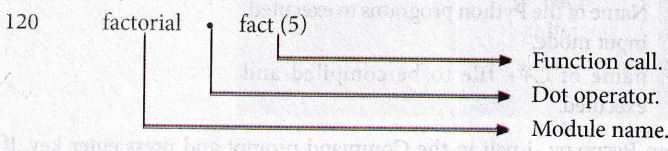
Python has a number of standard modules. Standard modules can be imported the same way as we import our user-defined modules.
9.
1. Double click the run terminal of MinGW.
2. Go to the folder where the Python software is located - Example "Python folder" is located in.
C: Program Files.\Open Office 4\Python.
3. The syntax to change
4. Where 'cd' command refers to change directory and absolute path refers to the complete path where Python is installed.
5. In this example to go to the folder where Python is located we should type the command "cd c:\Program Files\Openoffice 4\Program."
6. Consider the Example Pycpp.py is a Python program that will read the C++ program Pali. cp. The "Pali.cpp" program accepts a number and displays whether it is a "Palindrome or Not." Entered the input number is 232 the output displayed will "Palindrome".
7. To execute our program double click the run terminal change the path to the Python folder location.
Syntax:
Python <filename.py>-i<C++Filename without cpp extension.>
| Python | Keywords to execute the Python program from command line |
| Filename. py-i | Name of the Python program to execute. input mode. |
| C++ Filename without CPP extension. | Name of C++ file to be compiled and executed. |
For example type Python Pycpp.py -i pali in the Command prompt and press enter key. If it is successful we will get the output. Otherwise, the error will be displayed.
10.
1. Double click the run terminal of MinGW.
2. Go to the folder where the Python software is located - Example "Python folder" is located in.
C: Program Files.\Open Office 4\Python.
3. The syntax to change
cd <absolute path>
4. Where 'd' command refers to change directory and absolute path refers to the complete path where Python is installed.
5. In this example to go to the folder where Python is located we should type the command "cd c:\Program Files\Openoffice 4\Program."
6. Consider the Example Pycpp.py is a Python program which will read the C++ program Pali. cp. The "Pali.cpp" program accepts a number and displays whether it is a "Palindrome or Not." Entered the input number is 232 the output displayed will "Palindrome".
7. To execute our program double click the run terminal change the path to the Python folder location.
Syntax:
Python <filename.py>-i<C++Filename without cpp extension.>
| Python | Keywords to execute the Python program from command line |
| Filename. py-i | Name of the Python program to execute. input mode. |
| C++ Filename without CPP extension. | Name of C++ file to be compiled and executed. |
For example type Python Pycpp.py -i pali in the Command prompt and press enter key. If it is successful we will get the output. Otherwise, the error will be displayed.
11.
//Now select File ➝ New in Notepad and type the Python program
# Save the File as classpy.py
# Python classpy.py -i inheri_cpp command to execute c++ program
Python Program:
import sys, os, getopt
def main (argv):
cpp_file ="
exe_file ="
opts.args= getopt.getopt (argv, "i:",['ifile='])
for o, a in opts:
1ifile. ("'-"1", --ifile"):
cpp_file = a + '.cpp'
exe_file = a + '.exe'
run (cppfile, exe_file)
def run(cpp_file, exe_file):
print ("Compiling" + cpp_file)
os.system ('g++ ' + cpp_file + '-o' + exe_file)
print ("Running" + exe_file)
print ("------------------- ")
print
os.system (exe_file)
print
if __name__ =='__main__"
main (sys.argv[1:])
12.
# Save the File as fun.py
# Program that compiles and executes a .cpp file
# Python fun.py -i c:\pyprg\cube_file.cpp
Python Program:
import sys, os, getopt
def main(argv):
cpp_file ="
exe_file ="
opts,args = getopt.getopt(argv, "i:",['ifile='])
for 0, a in opts:
if 0 in ("-i", "--ifile"):
cpp_file = a + '.cpp'
exe_file = a + '.exe'
run(cpp_file, exe_file)
def run(cpp_file, exe_file):
print("Compiling" + cpp_file)
os.system('g++ ' + cpp_file + '-o' + exe_ file)
print("Running" + exe_file)
print(" ----------------- ")
print
os.system( exe_file)
print
if _name_ =='_main_':
main(sys.argv[1:])
13.
//Now select File⟶New in Notepad and type the Python program
# Save the File as transpose.py. Program that compiles and executes a .cpp file
# Python tanspose.py -i trans_cpp
Python Program:
import sys, os, getopt
def main(argv):
cpp_file = "
exe_file = "
opts,args = getopt.getopt(argv, "i:",['ifile='])
for o, a in opts:
if o in ("-i", "< -ifile"):
cpp_file = a + '.cpp'
exe_file = a + '.exe'
run(cpp_file, exe_file)
defrun( cpp _file, exe_file):
print("Compiling" + cpp_file)
'os.system ('g++' + cpp_file + '-o' + exe_file)
print("Running" + exe_file)
print(" -------------------")
print
os.system( exe_file)
print
if __name__ =='__main__"
main( sys.argv[ 1:])
14.
# Save the File as pali.py . Program that compiles and executes a .cpp file
# Python c:\pyprg\pali.py -i c:\pyprg\pali_cpp import sys, os, getopt
def main(argv):
cpp_file ="
exe_file = "
opts, args= getopt.getopt(argv, "i:",['ifile='])
for o, a in opts:
if o in ("-i", "--ifile"):
cpp_file = a + '.cpp'
exe_file = a + '.exe'
run(cpp_file, exe_file)
def run(cpp_file, exe_file):
print("Compiling" + cpp_file)
os.system('g++' + cpp_file + '-o' + exe_file)
print("Running" + exe_file)
print("-----------------")
print
os.system(exe_file)
print
if __name__ =='__main__': # program starts executing from here
main(sys.argv[ 1:])
15.
commands for wrapping C++ code:
if___name___ =='___main___':
main(sys.argv[ 1:])
_name_ (A Special variable) in Python:
(i) Since there is no main ( ) function in Python, when the command to run a Python program is given to the interpreter, the code that is at level 0 indentation is to be executed.
(ii) However, before doing that, interpreter will define a few special variables. __name___ is one such special variable which by default stores the name of the file. If the source file is executed as the main program, the interpreter sets the ___name___ variable to have a value as "___main___".
(iii) __name__ is a built-in variable which evaluates to the name of the current module. Thus it can be used to check whether the current script is being run on its own.
(iv) For example consider the following:
if ___name___ ==' ___main___':
main (sys.argv[1:])
(v) if the command line Python program itself is going to execute first, then _main_ contains the name of that Python program and the Python special variable _name_ also contain the Python program name.
(vi) If the condition is true it calls the main which is passed with C++ file as argument.

12th Standard Syllabus & Materials
12th Standard
TN 12th Computer Applications களப்பெயர் முறைமை (DNS) Sample Question Papers Study Material - QB365 Set A
NEW12th Standard
TN 12th Computer Applications வலையமைப்பு எடுத்துக்காட்டுகள் மற்றும் நெறிமுறைகள் Sample Question Papers Study Material - QB365 Set A
NEW12th Standard
TN 12th Computer Applications கணினி வலையமைப்பு ஓர் அறிமுகம் Sample Question Papers Study Material - QB365 Set A
NEW12th Standard
TN 12th Computer Applications PHP-உடன் MySQL-ஐ இணைத்தல் Sample Question Papers Study Material - QB365 Set A



Tamilnadu Stateboard 12th Standard Subjects

Maths

Chemistry

Physics

Biology
Computer Science

Business Maths and Statistics

Economics

Commerce

Accountancy

History

Computer Applications
Biology
Computer Technology
Computer Applications
Computer Science
Business Maths and Statistics
Commerce
Economics
Maths
Chemistry
Physics
Computer Technology
History
Accountancy

Tamil

English

French
Tamilnadu Stateboard Standards
