
 100% FREE ACCESS
12th Standard Syllabus & Materials
12th Standard
TN 12th Maths Applications of Matrices and Determinants Sample Question Papers Study Material - QB365 Set A
NEW12th Standard
TN 12th Computer Applications மின்னணு தரவு பரிமாற்றம் Sample Question Papers Study Material - QB365 Set A
NEW12th Standard
TN 12th Computer Applications மின் - வணிக பாதுகாப்பு அமைப்புகள் Sample Question Papers Study Material - QB365 Set A
NEW12th Standard
TN 12th Computer Applications மின்னணு செலுத்தல் முறைகள் Sample Question Papers Study Material - QB365 Set A
NEW12th Standard
TN 12th Computer Applications மின் - வணிகம் Sample Question Papers Study Material - QB365 Set A
NEW12th Standard
TN 12th Computer Applications திறந்த மூல கருத்துருக்கள் Sample Question Papers Study Material - QB365 Set A

Published on: 01/10/2020
12th Standard Computer Science English Medium Model 5 Mark Book Back Questions (New Syllabus 2020)
Download Tamil Nadu 12th Standard Computer Science question papers, model tests, one-mark questions, important questions, and public exam papers in PDF format. Free study materials and answer keys for TN State Board students.
Questions + Answers key
Take MCQ Computer Science Test
1.
Explain the various buttons in a matplotlib window.
2.
hat is the use of HAVING clause. Give an example python script
3.
Write in brief about SQLite and the steps used to use it.
4.
Write a Python program to execute the following c++ coding.
#include <iostream>
using namespace std;
int main()
{ cout<<“WELCOME”;
return(0);
}
The above C++ program is saved in a file welcome.cpp
5.
Write the different methods to read a File in Python.
6.
What are the components of SQL? Write the commands in each.
7.
Explain the different operators in Relational algebra with suitable examples.
8.
Write a menu driven program to add or delete stationary items. You should use dictionary to store items and the brand.
9.
What is nested tuple? Explain with an example.
10.
Explain about string operators in python with suitable example.
11.
Explain the following built-in functions.
(a) id ()
(b) chr ()
(c) round ()
(d) type ()
(e) pow ()
12.
Write a detail note on if..else..elif statement with suitable example.
13.
What is Binary search? Discuss with example
14.
Describe in detail the procedure Script mode programming.
15.
Write any Five Characteristics of Modules.
16.
How will you facilitate data abstraction. Explain it with suitable example.
17.
Identify in the following program
| let rec gcd a b:= if b <> 0 then gcd b (a mod b) else return a: |
i) Name of the function
ii) Identify the statement which tells it is a recursive function
iii) Name of the argument variable
iv) Statement which invoke the function recursively
v) Statement which terminates the recursion
1.
(i) Home Button \(\rightarrow \) The Home Button will help one to begun navigating the chart. If you ever want to return back to the original view, you can click on this.
(ii) Forward/Back buttons \(\rightarrow \) These buttons can be used like the Forward and Back buttons in browser. Click these to move back to the previous point you were at, or forward again.
(iii) Pan Axis \(\rightarrow \) This cross-looking button allows you to click it, and then click and drag graph around.
(iv) Zoom \(\rightarrow \) The Zoom button lets you click on it, then click and drag a square would like to zoom into specifically. Zooming in will require a left click and drag. Zoom out with a right click and drag.
(v) Configure Subplots\(\rightarrow \) This button allows you to configure various spacing options with figure and plot.
(vi) Save Figure \(\rightarrow \)This button will allow you to save figure in various forms
2.
HAVING clause is used to filter data based on7the group functions. This is similar to WHERE condition but can be used , only with group functions. Group functions cannot be used in WHERE Clause but can be used in HAVING clause.
Example:
import sqlite3
connection = sqlite3.connect("Academy.db")
cursor = connection.cursorO
cursor.execute("SELECT GENDER,COUNT(GENDER) FROM Student GROUP BY GENDER HAVING COUNT( GENDER> 3")
result = cursor.fetchall( )
co = [i[o] for i in cursor. description]
print(co)
print(result)
Output:
['gender', 'COUNT(GENDER)']
[('M', 5)]
3.
(i) SQLite is a simple relational database system, which saves its data in regular data files or even in the internal memory of the computer.
(ii) It is designed to be embedded in applications, instead of using a separate
database server program such as MySQL or Oracle.
(iii) SQLite is fast, rigorously tested, and flexible, making it easier to work. Python
has a native library for SQLite.
To use SQLite,
Step 1: import sqlite3
Step 2: create a connection using connect() method and pass the name of the database file
Step 3: Set the cursor object cursor = connection. cursor()
(iv) Connecting to a database in step 2 means passing the name of the database to be accessed. If the database already exists the connection will open the same. Otherwise, Python will open a new database file with the specified name.
(v) Cursor in step 3 is a control structure used to traverse and fetch the records of the database.
(vi) Cursor has a major role in working with Python. All the commands will be executed using cursor object only.
(vii) To create a table in the database, create an object and write the SQL command in it.
Example: sql_comm = "SQL statement"
(viii) For executing the command use the cursor method and pass the required sql command as a parameter. Many number of commands can be stored in the sql comm and can be executed one after other.
(ix) Any changes made in the values of the record should be saved by the commend "Commit" before closing the "Table connection" .
4.
Execution Steps:
//save above file as welcome.cpp
#Now select File -> New in Notepad and type the Python program
#save the file as fun.py
#Program that compiles and executes a .cpp file
#Python fun.py- iC: |pyprg| welcome - file.cpp
Program:
import sys, os, getopt
def main (argv):
cpp_file="
exe_file="
opts, args = getopt.getopt(argv, "i:", ['ifile='])
for o a in opts
if o in ("-i, "--ifile"):
cpp_file=a+ .'cpp'
exe_file = a+ 'exe'
run (cpp_file, exe_file)
def run (cpp_file, exe_file):
print("Compiling" + Cpp_file)
os.system ('g++' + cpp_file+'_o'+exe_file)
print("Running" + exe_file)
print("---------------")
print
Os.system(exe_file)
print
if_name_=='_main_':
main (sys.argv [1:])
Output:
welcome.
5.
1. CSV file - data with default delimiter comma(,)
2. CSV file - data with space at the beginning.
3. CSV file - data with quotes
4. CSV file - data with custom Delimiters
1. CSV file - data with default delimiter comma(,):
The following program read a file called "Sample1.csv" with default delimiter comma (,) and print row by row.
Program:
#importing csv
import csv
#opening the csv file which is in different location with read mode
with opent('c.\\pyprg\\sample1.csv', 'r') as F:
#other way to open the file is f= ('C:\\pyprg\\ sample1.csv', 'r')
reader = csv.reader(F)
# printing each line of the Data row by row
print(row)
F.close()
Output:
['SNO', 'NAME', 'CITY']
['12101', 'RAM', 'CHENNAI']
['12102', 'LAVANYA', 'TIRUCHY']
['12103', 'LAKSHMAN', 'MADURAI']
2. CSV files - data with spaces at the beginning:
Consider the following file "Sample2.csv containing the following data when opened through notepad.
| Topic 1 | Topic 2 | Topic 3 |
| One, | two, | three, |
| Example 1, | Example 2, | Example 3, |
Program:
import csv
csv.register_dialect ['my Dialect', delimiters=', 'Skipinitialspace= True).
F = open ('c:\\Pyprgl\sample2.csv', 'r')
reader = CSV.reader (F, dialect = 'myDialect')
for row in reader:
print (row)
F.close()
Output:
['Topic 1', 'Topic 2', 'Topic 3']
['One', 'two', 'three']
['Example 1', 'Example 2', 'Example 3']
We can see in "Sample 2.csv" there are spaces after the delimiter due to which the output is also displayed with spaces.
These whitespaces can be removed, by registering new dialects using csv. register _dialect( ) class of csv module. A dialect describes the format of the csv file that is to be read. In dialects the Parameter "skipinitialspace" is used for removing whitespaces after the delimiter.
3. CSV File - Data with Quotes:
We can read the csv files with quotes, by registering new dialects using csv. register_dialect( ) class of csv module.
SNO, Quotes
1, "The Secret to getting ahead is getting started".
2, "Excellence is a continuous process and not an accident."
3, "Work hard dream big never give up and believe Yourself"
4, "Failure is the opportunity to begin again more intelligently".
5, "The successful warrior is the average man, with laser-like focus."
Program:
import cSv
csv.register_ dialect ('MyDialect', delimiter =, 'quoting = csv.QUOTE_ALL, skipinitialspace = True)
f=open ('c:\\Pyprg\\ quotes.csv', 'r')
reader = csv.reader (f, dialect = 'myDialect')
for row in reader:
print (row)
Output:
['SNO, 'Quotes']
['1', 'The secret to getting ahead is getting started'.]
['2', 'Excellence is a continuous process and not an accident'.]
['3', 'Work hard dream big never give up and believe yourself'.]
['4', 'Failure is the opportunity to begin again more intelligently':]
['5', 'The successful warrior is the average man with laser- like focus':]
4. CSV files with custom Delimiters:
We can read csv file having custom the delimiter by registering a new dialect with the help of csv.register_dialect( ).
In the following file called "sample4.csv", each column is separated with |(Pipe Symbol)
| Roll No | Name | City |
| 12101 | Arun | Chennai |
| 12102 | Meena | Kovai |
| 12103 | Ram | Nellai |
| 103 | Ayush | M |
| 104 | Abinandh | M |
Program:
import csv
Csv. register_dialect('myDialect', delimiter= '|')
with open (c:\\pyprg\sample 4.csv', 'r') as f:
reader = csv.reader (f, dialect = "my dialect")
for row is reader:
print (row)
f.close()
Output:
['Roll no', 'Name', 'City]
['12101', 'Arun', 'Chennai']
['12102', 'Meena', 'Kovai']
['12103', 'Ram', 'Nellai']
6.
SQL commands are divided into five categories:
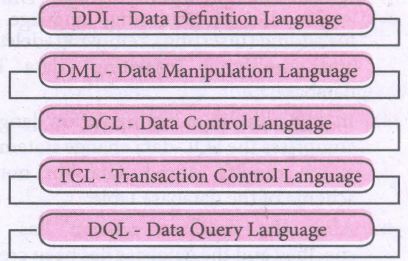
Data Definition Language:
(i) The Data Definition Language (DDL) consist of SQL statements used to define the database structure or schema.
(ii) It simply deals with descriptions of the database schema and is used to create and modify the structure of database objects in databases.
(iii) The DDL provides a set of definitions to specify the storage structure and access methods used by the database system.
DDL performs the following functions:
(i) It should identify the type of data division such as data item, segment, record and database file.
(ii) It gives a unique name to each data item type, record type, file type and data base.
(iii) It should specify the proper data type.
(iv) It should define the size of the data item.
(v) It may define the range of values that a data item may use.
(vi) It may specify privacy locks for preventing unauthorized data entry.
Commands:
| CREATE | To create tables in the database. |
| ALTER | Alters the structure of the database |
| DROP | Data tables from database. |
| TRUNCATE | Remove all records from a table, also release the space occupied bv those records. |
Data Manipulation Language:
This is a computer programming language used for adding, removing and modifying data in a database. This language comprises the SQL-data change statements, which modify stored data but not the schema of the database table
Data Manipulation includes
(i) Insertion of new information into the database
(ii) Retrieval of information stored in a database
(iii) Deletion of information from the database.
(iv) Modification of data stored in the database
The DML is basically of two types:
Procedural DML - Requires a user to specify what data is needed and how to get it.
Non-Procedural DML - Requires a user to specify what data is needed without Specifying how to get it.
Commands:
| INSERT | Inserts data into a table |
| UPDATE | Updates the existing data within a table |
| DELETE | Deletes all records from a table, but not the space occupied by them. |
Data Control Language:
(i) A Data Control Language (DCL) is a programming language used to control the access of data stored in a database. It is used for controlling privileges in the database (Authorization).
(ii) The privileges are required for performing all the database operations such as creating sequences, views of tables etc.
Commands:
| GRANT | Grants permission to one or more users to perform specific tasks. |
| REVOKE | Withdraws the access permission given by the GRANT statement. |
Transactional Control Language:
Transactional control language (TCL) commands are used to manage transactions in the database. These are used to manage the changes made to the data in a table by DML statements.
Commands:
| COMMIT | Saves any transaction into the database permanently. |
| ROLL BACK | Restores the database to last commit state. |
| SAVE POINT | Temporarily save a transaction so that you can rollback. |
Data query language:
The Data Query Language consist of commands used to query or retrieve data from a database. One such SQL command in Data Query Language is
| SELECT | It displays the records from the table. |
7.
Relational Algebra is divided into various groups
Unary Relational Operations.
(i) SELECT (symbol: σ)
(ii) PROJECT ( symbol: π)
Relational Algebra Operations from Set Theory:
(i) UNION (U)
(ii) INTERSECTION (∩)
(iii) DIFFERENCE (-)
(iv) CARTESIAN PRODUCT (X)
SELECT (symbol: σ)
(i) General from σ (R) with a relation R and a condition C on the attributes of R
(ii) The SELECT operation is used for selecting a subset with tuples according to a given condition.
(iii) Select filters out all tuples that do not satisfy C
STUDENT:
| Studio | Name | Course | Year |
|---|---|---|---|
| CS1 | Kannan | Big Data | II |
| CS2 | Gowri Shankar | R language | I |
| CS3 | Lenin | Big Data | I |
| CS4 | Padmaja | Python Programming | I |
σ course = "Big Data" (STUDENT)
| Studio | Name | Course | Year |
|---|---|---|---|
| CS1 | Kannan | Big Data | II |
| 2 | Lenin | Big Data | I |
PROJECT (symbol: II)
(i) The projection eliminates all attributes of the input relation but those mentioned in the projection list.
(ii) The projection method defines a relation that contains a vertical subset of Relation.
Example: 1
IIcourse (STUDENT)
Result:
| Course |
| Big Data |
| R language |
| Python Programming |
Example 2
IIstudent,course (STUDENT)
Result:
| Stud no | Course |
| CS1 | Big Data |
| CS2 | R language |
| CS3 | Big Data |
| CS4 | Python Programming |
UNION (Symbol: U)
(i) It includes all tuples that are in tables A or in B. It also eliminates duplicates. Set A Union Set B would be expressed as A U B
Example 3:
| Table A | |
|---|---|
| Studio | Name |
| CS1 | Kannan |
| CS2 | Lenin |
| CS3 | Padmaja |
| Table A | |
|---|---|
| Studio | Name |
| CS1 | Kannan |
| CS2 | Gowrishakaran |
| CS3 | Lenin |
Result:
| Table A | |
|---|---|
| Studio | Name |
| CS1 | Kannan |
| CS2 | Gowri Shakaran |
| CS3 | Lenin |
| CS4 | Padmaja |
SET DIFFERENCE (Symbol: -)
(i) The result of A - B, is a relation which includes all tuples that are in A but not in B.
(ii) The attribute name of A has to match with the attribute name in B.
Example: 4
using Table B Example 3
Result:
| Table A - B | |
|---|---|
| CS4 | Padmaja |
INTERSECTION (symbol: ∩) A ∩ B:
(i) Defines a relation consisting of a set of all tuple that are in both in A and B. However, A and.B must be union-compatible.
Example: 5
Using Table in Example 3
Result:
| Table A - B | |
|---|---|
| CS1 | Kannan |
| CS3 | Lenin |
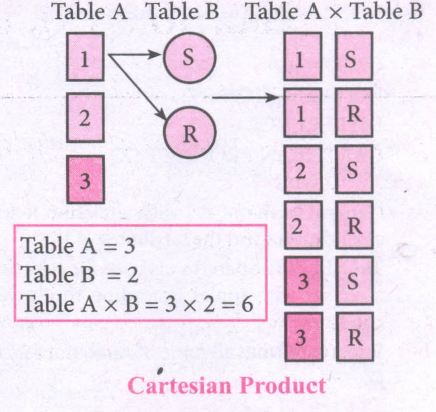
PRODUCT OR CARTESIAN PRODUCT (Symbol: X)
(i) Cross product is a way of combining two relations. The resulting relation contains, both relations being combined.
(ii) A x B means A times B, where the relation A and B have different attributes.
(iii) This type of operation is helpful to merge columns from two relations.
.JPG)
.JPG)
8.
class Mystore:
_prod_code = [ ]
_prod_name = [ ]
_cost price = [ ]
_prod quant = [ ]
def getdata(self):
selt.p= int (input ("Enter no. of products you need to store:"))
for x in range (self.p):
self._prod_code. append (int (input ("Enter Product Code:")))
self._prod_name. append (str (input ("Enter Product Name:"))
self._ cost_price. append (int (input ("Enter cost price:"))
def display (self):
print ("stock in stores")
print ("---------------------")
print ("Product Code\t Product name\t cost price")
print ("------------------")
for x in range (self.p):
print (self._prod_code [x], "\t\t", self._prod_name [x], "It \t", self._cost price [x])
print ("------------------------------")
def print_bill (self):
total_price =0
for x in range (self.p):
q= int(input("Enter the quantity for the product code %d:" %self._prod_code [x]))
self. Prod_quant.append (q)
total_price = total_price + self. _cost_price|x]* self._prod_quant [x]
print ("Invoice Receipt")
print ("---------------")
print ("Product Code\t Product Name\t Cost Price\t Quantity\t Total Amount")
print ("----------------")
for x in range (self.p):
print (self._Prod_code [x), "\t \t", self_prod-name[x], "\t \t",
self._cost_price[x], "\t \t", self._prod-quant [x], "\t \t",
self._prod_quant[x]*self._cost price [x])
print ("-------------------")
print ("Total Amount =", total_price")
S=Mystore ()
S.getdata ()
S.display ()
S.print_bill ()
Output:
Enter no. of products you need to store: 5
Enter Product code: 101
Enter Product Name: Notebook
Enter cost price: 25
Enter Product code: 201
Enter Product Name: pencil
Enter cost price: 35
Enter Product code: 301
Enter Product Name: Pen
Enter cost price: 35
Enter Product code: 401
Enter Product Name: Colour Pencils
Enter cost price: 50
Enter Product code: 501
Enter Product Name: Sketches
Enter cost price: 120
Stock in stores
| Product Code | Product Name | Cost Price |
| 101 | Notebook | 25 |
| 201 | Pencil | 35 |
| 301 | Pen | 35 |
| 401 | Colour pencils | 50 |
| 501 | Sketches | 120 |
Enter the quantity for the product code 101:10
Enter the quantity for the product code 201:15
Enter the quantity for the product code 301:10
Enter the quantity for the product code 401:20
Enter the quantity for the product code 501:10
Invoice Receipt
| Product Code | Product Name | Cost Price | Quantity | Total Amount |
| 101 | Notebook | 25 | 10 | 250 |
| 201 | Pencil | 35 | 15 | 525 |
| 301 | Pen | 35 | 10 | 350 |
| 401 | Colour pencils | 50 | 20 | 1000 |
| 501 | Sketches | 120 | 10 | 1200 |
| Total amount = 3325 |
9.
In Python, a tuple can be defined inside another tuple; called Nested tuple. In a nested tuple, each tuple is considered as an element. The for loop will be useful to access all the elements in a nested tuple.
Example:
Toppers = (("Vinodini", "XII-F", 98.7), ("Soundarya", "XII-H", 97.5),
("Tharani", "XII-F", 95.3), ("Saisri", "XII-G", 93.8))
for i in Toppers:
print(i)
Output:
('Vinodini', 'XII-F', 98.7)
('Soundarya', 'XII-H', 97.5)
('Tharani', 'XII-F', 95.3)
('Saisri', 'XII-G', 93.8)
10.
String Operators:
Python provides the following operators for string operations. These operators are useful to manipulate string.
(i) Concatenation (+):
Joining of two or more strings is called as Concatenation. The plus (+) operator is used to concatenate strings in python.
Example:
>>> "welcome" + "Python"
'welcome python'
(ii) Append (+ =):
Adding more strings at the end of an existing string is known as append. The operator += is used to append a new string with an existing string.
Example:
>>> str1 = "welcome to"
>>> str1 + = "Learn Python"
>>> print (str1)
Welcome to Learn Python
(iii) Repeating (*):
The multiplication operator (*) is used to display a string in multiple number of times.
Example:
>>> str1= "welcome "
>>> print (str1 *4)
Welcome Welcome Welcome Welcome
(iv) String slicing:
Slice is a substring of a main string.
A substring can be taken from the original string by using [ ] operator and index or subscript values. Thus [ ] is also known as slicing operator. Using slice operator, we have to slice one or more substrings from a main string.
General format of slice operation:
str[start:end]
Where start is the beginning index and end is the last index value of a character in the string. Python takes the end value less than one from the actual index specified.
Example: I
Slice a single character from a string
>>>str 1 = "THIRUKKURAL"
>>>print (str 1 [0])
T
(v) Stride when slicing string:
Example :
>>>str1 = "Welcome to learn python"
>>>print(str1[::-2])
Output :
nhy re teolW
11.
| Function | Description | Syntax | Example |
| (a) id() | id () Return the "identity" of an objects i.e. The address of the object in memory. Note: The address of x and y may differ in your system. |
id(object) | x = 15 y = 'a' print('address of x is :',id(x)) print ('address of y is :',id (y)) Output: address of x is: 1357486752 address of y is: 13480736 |
| (b) Chr() | Returns the Unicode character for the given ASCII value. This function is inverse of ord() function. | Chr(i) | c=65 d=43 print(chr(c)) print(chr(d)) Output: A + |
| (c) round() | Returns the nearest integer to its input. 1. First argument(number) is used to specify the value to be rounded. |
round (number, [ndigits]) | x = 17.9 y = 22.2 z = -18.3 print('x value is rounded to', round(x)) print('y value ic rounded to', round(y)) print ('z value is rounded to', round(z)) |
| (d) type() | Returns the type of object for the given single object. Note: This function used with single object parameter. |
type(object) | x = 15.2 y = 'a' s = true print(type(x)) print(type(y)) print(type(s)) Output: < class 'float' > < class 'str' > < class 'bool' > |
| (e) pow() | Returns the computation of ab i.e. (a**b) a raised to the power of b. | pow(a, b) | a = 5 b = 2 c = 3.0 print(pow(a, b)) print(pow(a, c)) print(pow(a + b, 3)) Output: 25 125.0 343 |
12.
Nested if..elif..else statement :
(i) When we need to construct a chain of if statement(s) then 'elif' clause can be used instead of 'if else'.
(ii) Syntax:
if < condition - 1>:
statements-block 1
elif < condition - 2>:
statements-block 2
else:
statements-block n
(iii) In the syntax of if..elif ..else mentioned above, condition -1 is tested if it is true then statements-block 1 is executed, otherwise, the control checks condition-2, if it is true statements-block 2 is executed and even if it fails statements-block n mentioned in else part is executed.
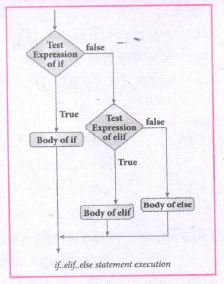
(iv) 'elif' clause combines if..else-if ..else statements to one if..elif ... else. 'elif' can be considered to be abbreviation of 'else if'. In an 'if' statement there is no limit of 'elif' clause that can be used, but an 'else' clause if used should be placed at the end.
(v) Example: # Program to illustrate the use of nested if statement
| Average | Grade |
| > = 80 and above | A |
| > = 70 and < 80 | B |
| > = 60and < 70 | C |
| > = 50 and < 60 | D |
| Otherwise | E |
m1 = int (input("Enter mark in first subject:"))
m2 = int (input("Enter mark in second subject:"))
avg = (m1+m2)/2
if avg > =80:
print ("Grade : A")
elif avg > =70 and avg < 80:
print ("Grade : B")
elif avg > =60 and avg < 70:
print ("Grade : C")
elif avg > =50 and avg < 60:
print ("Gradec: D")
else:
print("Grade : E")
Output 1:
Enter mark in first subject : 34
Enter mark in second subject : 78
Grade : D
Output 2:
Enter mark in first Subject : 67
Enter mark in second subject : 73
Grade: B
13.
Binary Search:
Binary search also called half-interval search algorithm. It finds the position of a search element within a sorted array. The binary search algorithm can be done as a divide- and -conquer search algorithm and executes in logarithmic time.
Pseudo Code:
Start with the middle element:
(i) If the search element is equal to the middle element of the array i.e., the middle value = number of elements in array/2, then return the index of the middle element.
(ii) If not, then compare the middle element with the search value,
(iii) If the search element is greater than the number in the middle index, then select the elements to the right side of the middle index, and go to Step-1.
(iv) If the search element is less than the number in the middle index, then select the elements to the left side of the middle index, and start with Step-1.
(v) When a match is found, display success message with the index of the element matched.
(vi) If no match is found for all comparisons, then display unsuccessful message.
Binary Search Working principles :
(i) List of elements in an array must be sorted first for Binary search. The following example describes the step by step operation of binary search.
(ii) Consider the following array of elements, the array. is being sorted so itenables to do the binary searçh algorithm. Let us assume that the search element is 60 and we need to search the location or index of search element 60 using binary search.

(iii) First, we find index of middle element of. the array byusing this formula:
mid = low + (high - low) /2
(iv) Here it is, 0 + (9-0)/2=4 (fractional part ignored). So, 4 is thè mid value of the array.

(v) Now compare the search element with the value stored at mid value location 4. The value stored at location or index 4 is 50, which is not match with search element. As the search value 60 is greater than 50.

(vi) Now we change our low to mid+1 and find the new mid value again using the formula.
low = mid + 1
mid = low + (high - low) / 2
(vii) Our new mid is 7 now. We compare the value stored at location 7 with our target value 60.

(viii) The value stored at location or index 7 is not a match with search element, rather it is more than what we are looking for. So, the search element must be in the lower part from the current mid value location.

(ix) The search element still not found. Hence, we calculated the mid again by using the formula.
high = mid -1
mid = low +(high - low)/2
Now the mid value is 5.

(x) Now we compare the value stored at location 5 with our search element. We found that it is a match.

(xi) We can conclude that the search element 60 is found at locationor index 5. For example if we take the search element as 95, For this value this binary search algorithm return unsucessful result.
14.
A script is a text file containing the Python statements. Python Scripts are reusable code. Once the script is created, it can be executed6again and again without retyping. The Scripts are editable
i) Creating Scripts in Python:
1. Choose File → New File or press Ctrl + N in Python shell window.
.JPG)
2. An untitled blank script text editor will be displayed on screen
.JPG)
3. Type the following code in script editor.
a = 100
b= 350
C = a + b
print ("The sum=", c)
.JPG)
ii) Saving Python script:
1. Choose File → Save or press Ctrl+S.
.JPG)
2. Now, Save As dialog box appears on the screen.
.JPG)
3. In the Sare As dialog box, select the location where you want to save your Python code, and type the File name in File Name box. Python files are by default saved will extension • py. Thus, while creating Python Scripts using Pyrhons script editor, no need to specify the file extension.
4. Hinallyiclick save button to save your python script.
iii) Exccuthon Python Script:
1. Choose Run → Run module or Press F5.
.JPG)
2. If your code has any error, it will be shown in red color in the IDLE window, and Python describes the type of error occurred. To correct the errors, go back to Script editor, make corrections, save the file using Ctrl +s or File → Save and execute il again.
3, For all error line code, the output will appear in the IDLL window of Python.
.JPG)
.JPG)
15.
The following are the desirable characteristics of a module.
(i) Modules contain instructions, processing logic, and data.
(ii) Modules can be separately compiled and stored in a library.
(iii) Modules can be included in a program.
(iv) Module segments can be used by invoking a name and some parameters.
(v) Module segments can be used by other modules.
16.
Data abstraction is used to define an Abstract Data Type (ADT), which is a collection of constructors and selectors. T facilitate data abstraction,you will need to create two types of functions : Constructors and Selectors.
Constructors :
(i) Constructors are functions that build the abstract data type.
(ii) Constructors create an object, bundling together different pieces of information.
(iii) For example, say you have an abstract data type called city.
(iv) This city object will hold the city's name, and its latitude and longitude.
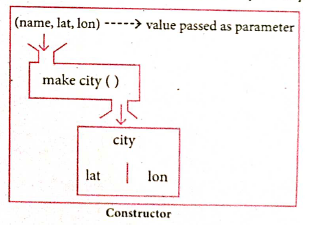
(v) To create a city object, you'd use a function like city = makecity (name, lat, lon).
(vi) Here makecity (name, lat, lon) is the constructor which creates the object city.
Selectors :
(i) Selectors are functions that retrieve information from the data type.
(ii) Selectors extract individual pieces of information fromn the object.
(iii) To extract the information of a city object, you wouldused functions like
getname(city)
getlat(city)
getlon(city)
These are the selectors because these functions extract the information of the city object.
.png)
17.
(i) gcd
(ii) let rec gcd
(iii) a, b
(iv) gcd(a mod b)
(v) return a

12th Standard Syllabus & Materials
12th Standard
TN 12th Computer Applications வலையமைப்பு வடமிடல் Sample Question Papers Study Material - QB365 Set A
NEW12th Standard
TN 12th Computer Applications களப்பெயர் முறைமை (DNS) Sample Question Papers Study Material - QB365 Set A
NEW12th Standard
TN 12th Computer Applications வலையமைப்பு எடுத்துக்காட்டுகள் மற்றும் நெறிமுறைகள் Sample Question Papers Study Material - QB365 Set A
NEW12th Standard
TN 12th Computer Applications கணினி வலையமைப்பு ஓர் அறிமுகம் Sample Question Papers Study Material - QB365 Set A



Tamilnadu Stateboard 12th Standard Subjects

Maths

Chemistry

Physics

Biology
Computer Science

Business Maths and Statistics

Economics

Commerce

Accountancy

History

Computer Applications
Biology
Computer Technology
Computer Applications
Computer Science
Business Maths and Statistics
Commerce
Economics
Maths
Chemistry
Physics
Computer Technology
History
Accountancy

Tamil

English

French
Tamilnadu Stateboard Standards
