
 100% FREE ACCESS
12th Standard Syllabus & Materials
12th Standard
TN 12th Maths Applications of Matrices and Determinants Sample Question Papers Study Material - QB365 Set A
NEW12th Standard
TN 12th Computer Applications மின்னணு தரவு பரிமாற்றம் Sample Question Papers Study Material - QB365 Set A
NEW12th Standard
TN 12th Computer Applications மின் - வணிக பாதுகாப்பு அமைப்புகள் Sample Question Papers Study Material - QB365 Set A
NEW12th Standard
TN 12th Computer Applications மின்னணு செலுத்தல் முறைகள் Sample Question Papers Study Material - QB365 Set A
NEW12th Standard
TN 12th Computer Applications மின் - வணிகம் Sample Question Papers Study Material - QB365 Set A
NEW12th Standard
TN 12th Computer Applications திறந்த மூல கருத்துருக்கள் Sample Question Papers Study Material - QB365 Set A

Published on: 10/09/2022
QB365 provides a detailed and simple solution for every Possible Creative Questions in Class 12 Computer Science Subject - Python and CSV Files , English Medium. It will help Students to get more practice questions, Students can Practice these question papers in addition to score best marks.
Download Tamil Nadu 12th Standard Computer Science question papers, model tests, one-mark questions, important questions, and public exam papers in PDF format. Free study materials and answer keys for TN State Board students.
Questions + Answers key
Take MCQ Computer Science Test
1.
How will you read a csv file and store a column value in a list of sorting?
2.
Write a program to read a csv file and store it in a list.
3.
How will you create a CSV file using Microsoft Excel?
4.
Write a program to set data at runtime and writing it in a CSV file.
5.
How will you write Dictionary into CSV file with custom dialects?
6.
How will you write the CSV file with custom denote characters? Explain with an example.
7.
Write a program to read CSV file with a line Terminator.
8.
Write a program to read CSV file with user Defined Delimiter into a Dictionary.
9.
How will you sort more than one column in a CSV file? Explain with an example.
10.
Write a program to read the CSV file and store A column value in A list for sorting.
11.
Write a program to read the CSV file and store it in a list.
12.
Write a program to read a specific column in a CSV file.
13.
Write a program to read the CSV file with user defined delimiter.
14.
Write a program to read the CSV file which contains spaces after the delimiter.
15.
Write a program to read the CSV file through python using reader ( ) method.
1.
In this program, we are going to read a selected column given by the user. "Sample 6.csv".
Input
| Item Name | Cost-Rs | Quantity | Profit |
| Keyboard | 480 | 12 | 1152 |
| Monitor | 5200 | 10 | 10400 |
| Mouse | 200 | 50 | 2000 |
| Total Profit | 13552 |
Since the row heading is also get sorted, to avoid that the first row should be skipped. This is can be done by using the command "next( )". The list is sorted and displayed.
Program:
# sort a selected column given by user leaving the header column
import csv
# other way of declaring the filename
infile= 'C:\\pyprg\\sample6.csv'
# opening the csv file which is in the same location of this python file
F=open(infile:'r')
# reading the File with the help of csv.reader()
reader = csv.reader(F)
# skipping the first row(heading)
next(reader)
# declaring a list
array value = [ ]
a = int(input ("Enter the column number 1 to 3:-"))
# sorting a particular column-cost
for row in reader:
array value.append(row[ a])
array value.sort ( )
for row in array value:
print (row)
F.close ( )
Output:
Enter column number 1 to 3:- 2
50
12
10
2.
To read a csv file and the contents of the file will be stored as a list. The syntax for storing in the list is list=[ ]
list.append (element)
For example:
All the row values of "sample.csv' file is stored in a list
Program:
import csv
#other way of declaring the filename
infile = 'c:\\pyprg\\sample.csv'
f = open (infile, 'r')
reader = csv.reader (F)
#declaring array
array value = [ ]
#displaying the content of the list for row in reader:
array Value.append (row)
print (row)
F. close( )
Sample.csv opened in MS-Excel
| A | B | C |
| Topic 1 | Topic 2 | Topic 3 |
| One | Two | Three |
| Example 1 | Example 2 | Example 3 |
Output:
['Topic 1'. 'Topic 2', 'Topic 3']
['One', 'two', 'three']
['Example 1', 'Exarnple 2', 'Example 3' ]
3.
1) Create a CSV file using Microsoft Excel, launch Excel
2) Open the file,
3) Save in CSV format.
For example:
The data is contained in our sample Excel worksheet:
| Item Name | Cost-Rs | Quantity | Profit |
| Keyboard | 480 | 12 | 1152 |
| Monitor | 5200 | 10 | 10400 |
| Mouse | 200 | 50 | 2000 |
| Total Profit | 13552 |
1. Once the data is entered in the worksheet, select File ⟶ Save As option, and for the "Save as type option", select CSV or type the file name along with extension.csv. saving excel file as CSV.
2. After we save the file, we are free to open it up in a text editor to view it or to edit it manually. Its contents will resemble the following:
| Item Name, | Cost-Rs, | Quantity, | Profit |
| Keyboard, | 480, | 12, | 1152 |
| Monitor, | 5200, | 10, | 10400 |
| Mouse, | 200, | 50, | 2000 |
| Total Profit =, | 13552 |
4.
import csv
with open ('c\\pyprg\\ch13\\ dynamicfile.csv', 'w') as f:
w = csv.writer(f)
ans= 'y'
while (ans=='y'):
name=input("Name?:")
date=input("Date of birth:")
Place=input ("Place:")
w.writerow([name, date, place])
ans=input("Do you want to enter more y/n?:")
F=open('c:\\pyprg\\ch13\\dynamicfile.csv",r')
reader=csv.reader(F)
for row in reader:
print (row)
F.close()
5.
import csv
csv.register_dialect('myDialect', delimiter = '|', quoting=csv.QUOTE_ALL)
with open('c:\\pyprg\\ch13\\ grade.csv', 'w') as csvfile:
fieldnames = ['Name', 'Grade']
writer = csv.DictWriter(csvfile,
fieldnames=fieldnames. dialect ="myDialect")
writer.writeheader()
writer.writerows([{'Grade': 'B', 'Name': Anu'},
{'Grade': 'A', 'Name': 'Beena',},
{Grade': 'C', 'Name': 'Tarun'}])
print("writing completed")
6.
To write the CSV file with custom quote characters, by registering new dialects using csv. register_dialect( ) class of csv module.
Example:
import csv
csvData = [['SNO",Items'], ['1",Pen'], ['2",Book'], ['3"Pencil']]
csv.register_dialect('myDialect',delimiter = '|',
quotechar = '"', quoting=csv.QUOTE_ALL)
with open('c:\\pyprg\\ch13\\quote.csv', 'w') as csvFile:
writer = csv.writer(csvFile, dialect='myDialect')
writer. writerows( csvData)
print("writing completed")
csvFile.close( )
7.
import csv
Data = [['Fruit', 'Quantity'], ['Apple', '5'], ['Banana', '7']' ['Mango: '8']]
csv.register_dialect('mydialect; delimiter = '|', lineterminator = '\n')
with open('c:\\pyprg\\ch3\\line.csv', 'w') as f:
writer = csv.writer(f, dialect='myDialect')
writer.writerows(Data)
f.close ( )
8.
import csv
csv.register_dialect('myDialect',delimiter = '|',skipinitialspace= True)
filename = 'c:\\pyprg\\ch13\\sample8.csv'
with open(filename, 'r') as csvfile:
reader = csv.DictReader(csvfile, dialect='myDialect')
for row in reader:
print(diet(row))
csvfile.close ( )
9.
To sort by more than one column you can use itemgetter with multiple indices: operator. itemgetter (1,2).
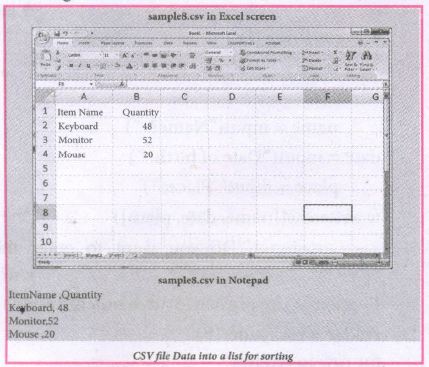
The following program do the task mentioned above using operator.itemgetter(col_no)
Example:
# Program to sort the entire row by using a specified column.
# declaring multiple header files
import csv, operator
#One more way to read the file
data = csv.reader(open('c:\\PYPRG\ \sample8.csv'))
next(data) #(to omit the header)
#using operator module for sorting multiple columns
sortedlist = sorted (data, key=operator.
itemgetter(1) # 1 specifies we want to sort
# according to second column for row in sortedlist:
print(row)
Output:
['Mouse', '20']
['Keyboard', '48']
['Monitor', '52']
10.
# sort a selected column given by user leaving the header column
import csv
# other way of declaring the filename
inFile= 'c:\\pyprg\\sample6.csv'
# opening the csv file which is in the same location of this
python file
F=open(inFile', 'r')
# reading the File with the help of csv.reader()
reader = csv.reader(F)
# skipping the first row(heading)
next(reader)
# declaring a list
arrayValue = [ ]
a = int(input ("Enter the column number 1 to 3:-"))
# sorting a particular column-cost
for row in reader:
arrayValue.append(row[a])
arrayValue.sort ( )
for row in arrayValue:
print (row)
F.close ( )
11.
import csv
# other way of declaring the filename
inFile= 'c:\\pyprg\\sample.csv'
F=open (inFile,' r')
reader = csv.reader(F)
# declaring array
arrayValue = [ ]
# displaying the content of the list for row in reader:
arrayValue.append(row)
print(row)
F.close( )
12.
Import csv
#opening the csv file which is in different location with read mode
f=open("c:\\pyprg\\ch13ample5.csv",'r')
#reading the File with the help of csv.reader( )
readFile=csv.reader(f)
#printing the selected column
for col in readFile:
print col[0],col[3]
f.close ( )
Sample5.csv File in Excel
13.
Import csv
csv.register_dialect('myDialect', delimiter = '|')
with open ('c:\\pyprg\\sample4.csv', 'r') as f:
reader = csv,reader(f, dialect='myDialect')
for row in reader:
print(row)
f.close( )
14.
import csv
csv.register_dialect('myDialect', delimiter = ',',skipinitialspace = True)
F=open('c:\\pyprg\\sample2.csv','r')
reader = csv.reader(F, dialect='myDialect')
for row in reader:
print(row)
F.close ( )
15.
import csv
csv.register_dialect('myDialect', delimiter = ',',skipinitialspace = True)
F=open('c:\\pyprg\\sample2.csv', 'r')
reader = csv.reader(F, dialect = 'myDialect')
for row in reader:
print(row)
F.close( )

12th Standard Syllabus & Materials
12th Standard
TN 12th Computer Applications வலையமைப்பு வடமிடல் Sample Question Papers Study Material - QB365 Set A
NEW12th Standard
TN 12th Computer Applications களப்பெயர் முறைமை (DNS) Sample Question Papers Study Material - QB365 Set A
NEW12th Standard
TN 12th Computer Applications வலையமைப்பு எடுத்துக்காட்டுகள் மற்றும் நெறிமுறைகள் Sample Question Papers Study Material - QB365 Set A
NEW12th Standard
TN 12th Computer Applications கணினி வலையமைப்பு ஓர் அறிமுகம் Sample Question Papers Study Material - QB365 Set A



Tamilnadu Stateboard 12th Standard Subjects

Maths

Chemistry

Physics

Biology
Computer Science

Business Maths and Statistics

Economics

Commerce

Accountancy

History

Computer Applications
Biology
Computer Technology
Computer Applications
Computer Science
Business Maths and Statistics
Commerce
Economics
Maths
Chemistry
Physics
Computer Technology
History
Accountancy

Tamil

English

French
Tamilnadu Stateboard Standards
