
 100% FREE ACCESS
12th Standard Syllabus & Materials
12th Standard
TN 12th Computer Applications மின்னணு தரவு பரிமாற்றம் Sample Question Papers Study Material - QB365 Set A
NEW12th Standard
TN 12th Computer Applications மின் - வணிக பாதுகாப்பு அமைப்புகள் Sample Question Papers Study Material - QB365 Set A
NEW12th Standard
TN 12th Computer Applications மின்னணு செலுத்தல் முறைகள் Sample Question Papers Study Material - QB365 Set A
NEW12th Standard
TN 12th Computer Applications மின் - வணிகம் Sample Question Papers Study Material - QB365 Set A
NEW12th Standard
TN 12th Computer Applications திறந்த மூல கருத்துருக்கள் Sample Question Papers Study Material - QB365 Set A
NEW12th Standard
TN 12th Computer Applications வலையமைப்பு வடமிடல் Sample Question Papers Study Material - QB365 Set A

Published on: 03/02/2021
12th Standard Computer Science English Medium Python and CSV Files Reduced Syllabus Important Questions With Answer Key 2021
Download Tamil Nadu 12th Standard Computer Science question papers, model tests, one-mark questions, important questions, and public exam papers in PDF format. Free study materials and answer keys for TN State Board students.
Questions + Answers key
Take MCQ Computer Science Test
1.
python's CSV module only accepts ________ as line terminator.
\r
\n
\a
\r or \n
2.
A ________ is a string used to terminate lines produced by writer ( )
Line
Custom Delimiters
Line Terminator
Quotes
3.
__________ has a garbage collector to clean up unreferenced objects.
CSV
Excel
Python
Open office
4.
________ provides a module named CSV using this several operations on the CSV file can be done.
Ms-Exeel
Python
Text editor
Open offiee calc
5.
Which method will free up the resources that were tied with the file?
free ( )
open ( )
resources ( )
close ( )
6.
Which method is used to write all the data at once?
write
writer ( )
writerow ( )
allrow ( )
7.
How many rows at a time the writerrow( ) method writes in a CSV file?
1
2
3
many
8.
CSV file can be opened in
Text mode
Binary mode
Application mode
a or b
9.
Which of the following is not a mode used while opening a file?
P
W
r
a
10.
How many ways to read a CSV file?
2
3
4
Only one
11.
In Excel, the default CSV files should open automatically by
Single click
Right click
Double click
None of these
12.
Fields containing line breaks denoted by
CSV
XLS
CLRF
CRLF
13.
Which of the following gives the python programmer the ability to parse CSV files?
CSV data
CSV module
CSV sheet
CSV flat file
14.
Which of the following creates an object which maps data to a dictionary?
listreader()
reader()
tuplereader()
DictReader ()
15.
The expansion of CRLF is
Control Return and Line Feed
Carriage Return and Form Feed
Control Router and Line Feed
Carriage Return and Line Feed
16.
Write is purpose of using skipinitialspace parameter.
17.
What is an Ordered Dict?
18.
How will you read CSV file into a dictionary?
19.
Whatis dialect ?
20.
What is the use of close ( ) method?
21.
How the CSV file operation takes place in python?
22.
How will prefect the CSV File data contains common by itself?
23.
How will you sort more than one column from a csv file?Give an example statement.
24.
What is use of next() function?
25.
What is CSV File?
26.
Write a program to create a new normal CSV file to store data.
27.
What are the different ways of reading a CSV file using reader ( ) method?
28.
Write a program to read a file with default delimiter comma.
29.
Write the syntax of reader( ).
30.
How will you save the CSV file in MS-Excel?
31.
How will you create CSV normal file?
32.
What is the difference between reader() and DictReader() function?
33.
What is the difference between the write mode and append mode.
34.
Write a Python program to read a CSV file with default delimiter comma (,).
35.
Write a note on open() function of python. What is the difference between the two methods?
36.
Write a program to set data at runtime and writing it in a CSV file.
37.
How will you write Dictionary into CSV file with custom dialects?
38.
Write a program to read CSV file with a line Terminator.
39.
How will you sort more than one column in a CSV file? Explain with an example.
40.
Write a program to read the CSV file and store A column value in A list for sorting.
41.
Write a program to read the CSV file with user defined delimiter.
42.
Write a program to read the CSV file through python using reader ( ) method.
1.
(d)
\r or \n
2.
(c)
Line Terminator
3.
(c)
Python
4.
(b)
Python
5.
(d)
close ( )
6.
(c)
writerow ( )
7.
(a)
1
8.
(d)
a or b
9.
(a)
P
10.
(a)
2
11.
(c)
Double click
12.
(d)
CRLF
13.
(b)
CSV module
14.
(d)
DictReader ()
15.
(d)
Carriage Return and Line Feed
16.
The dialect parameter skipinitialspace when it is True, whitespace immediately following the delimiter is ignored. The default is False.
17.
DictReader ( ) gives OrderedDict by default in its output. An OrderedDict is a dictionary subclass which saves the order in which its contents are added. To remove the OrderedDict use dict ( ).
18.
(i) To read a CSV file into a dictionary can be done by using DictReader class of csv module which works similar to the reader ( )class but creates an object which maps data to a dictionary.
(ii) The keys are given by the fieldnames as parameter.
19.
A dialect is a class of csv module which helps to define parameters for reading and writing CSV. It allows to create, store, and re-use various formatting parameters for data.
20.
Closing a file will free up the resources that were tied with the file and is done using Python close ( ) method.
21.
Python, a file operation takes place in the following order
Step 1: Open a file
Step 2 : Perform Read or write operation
Step 3 : Close the file
22.
If the fields of data in your CSV file contain commas, you can protect them by enclosing those data fields in double-quotes ("). The commas that are part of your data will then be kept separate from the commas which delimit the fields themselves.
23.
To sort by more than one column you can use itemgetter with multiple indices:
operator.itemgetter
Example:
sortedlist = sorted (data, key = operator. itemgetter(1))
24.
The row heading is get sorted, to avoid the first row should be skipped. This is can be done by using the command "next( )".
25.
A CSV file is a human readable text file where each line has a number of fields, separated by commas or some other delimiter.
26.
Import csv
csvData = [['Student, 'Age'], [Dhanush', '17'], ['Kalyani', '18'], ['Ram', '15']]
with open('c:\\pyprg\\ch13\\Pupil.csv', 'w') as CF:
writer = csv.writer(CF) # CF is the file object
writer.writerows(csvData) # csvData is the List name
CF.close( )
27.
(i) CSV file - data with default delimiter comma (,)
(ii) CSV file - data with Space at the beginning
(ill) CSV file - data with quotes
(iv) CSV file - data with quotes
28.
#importing csv
import csv
#opening the csv file which is in different location with read mode
with open('c:\\pyprg\\ sample1.csv', 'r') as F:
#other way to open the file is f= ('c:\\pyprg\\ sample1.csv', 'r')
reader = csv.reader(F)
# printing each line of the Data row by row
print(row)
F.close ( )
29.
'The syntax for csv.reader() is
csv.reader(fileobject,delimiter,fmtparams)
where
(i) file object: passes the path and the mode of the file.
(ii) delimiter: an optional parameter containing the standard dilects like , | etc can be omitted
(iii) fmtparams: optional parameter which help to override the default values of the dialects like skipinitialspace, quoting etc. Can be omitted.
30.
To create a CSV file using Microsoft Excel, launch Excel and then open the file you want to save in CSV format. For example. below is the data contained in our sample Excel worksheet:
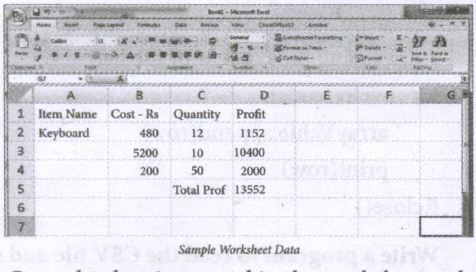
Once the data is entered in the worksheet, select File ⟶ Save As option, and for the "Save as type option" select CSV (Comma delimited) or type the file name along with extension .csv.
31.
To create a CSV file in Notepad,
(i) First open a new file using
File ⟶New or ctrl +N.
(ii) Then enter the data separating each value with a comma and each row with a new line.
(iii) For example consider the following details
Topic1, Topic2, Topic3
one, two, three
Example1, Example2, Example3
(iv) Save this content in a file with the extension.csv.
32.
The main difference between the csv.reader( ) and DictReader( ) is in simple terms csv.reader and csv.writer work with list/ tuple, while csv. DictReader and csv.DictWriter work with dictionary. csv. DictReader and csv. DictWriter take additional argument fieldnames that are used as dictionary keys.
33.
Write mode:
Open a file for writing. Creates a new file if it does not exist or truncates the file if it exists.
Append mode:
Open for appending at the end of the file without truncating it. Creates a new file if it does not exist.
34.
Program: To read a csv file with comma (,)
#importing csv
import csv
#opening the csv file which is in different location with read mode
with open('c:\\Pyprg\ \sample1.csv', 'r') as F:
#other way to open the file is
f=('C:\\pyprg\\sample1.csv', 'r')
reader = csv.reader(F))
#printing each line of the Data row by row.
print (row)
F. close( )
Output:
['SNO','NAME', 'CITY']
['12101', 'RAM', 'CHENNAI']
['12102', 'LAVANYA' "TIRUCHY']
['12103', 'LAKSHMAN', 'MADURAI']
35.
(i) Python has a built-in function open() to open a file. This function returns a file object also called a handle, as it is used to read or modify the file accordingly.
For Example:
>>>f = open ("sample.txt") #open file in current directory # f is file object
>>> f = open ('c:\\Pyprg\ch13 sample5.csv') # specifying full path
(ii) The default is reading in text mode. In this mode, while reading from the file the data would be in the format of strings.
(iii) On the other hand, binary mode returns bytes and this is the mode to be used when dealing with non-text files like image or exe files.
36.
import csv
with open ('c\\pyprg\\ch13\\ dynamicfile.csv', 'w') as f:
w = csv.writer(f)
ans= 'y'
while (ans=='y'):
name=input("Name?:")
date=input("Date of birth:")
Place=input ("Place:")
w.writerow([name, date, place])
ans=input("Do you want to enter more y/n?:")
F=open('c:\\pyprg\\ch13\\dynamicfile.csv",r')
reader=csv.reader(F)
for row in reader:
print (row)
F.close()
37.
import csv
csv.register_dialect('myDialect', delimiter = '|', quoting=csv.QUOTE_ALL)
with open('c:\\pyprg\\ch13\\ grade.csv', 'w') as csvfile:
fieldnames = ['Name', 'Grade']
writer = csv.DictWriter(csvfile,
fieldnames=fieldnames. dialect ="myDialect")
writer.writeheader()
writer.writerows([{'Grade': 'B', 'Name': Anu'},
{'Grade': 'A', 'Name': 'Beena',},
{Grade': 'C', 'Name': 'Tarun'}])
print("writing completed")
38.
import csv
Data = [['Fruit', 'Quantity'], ['Apple', '5'], ['Banana', '7']' ['Mango: '8']]
csv.register_dialect('mydialect; delimiter = '|', lineterminator = '\n')
with open('c:\\pyprg\\ch3\\line.csv', 'w') as f:
writer = csv.writer(f, dialect='myDialect')
writer.writerows(Data)
f.close ( )
39.
To sort by more than one column you can use itemgetter with multiple indices: operator. itemgetter (1,2).
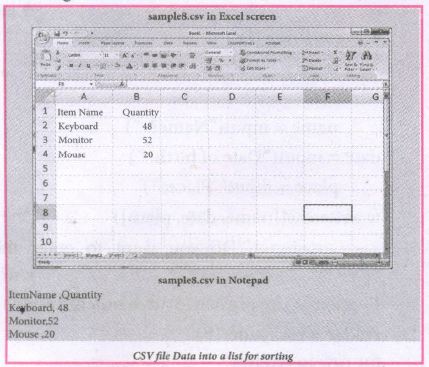
The following program do the task mentioned above using operator.itemgetter(col_no)
Example:
# Program to sort the entire row by using a specified column.
# declaring multiple header files
import csv, operator
#One more way to read the file
data = csv.reader(open('c:\\PYPRG\ \sample8.csv'))
next(data) #(to omit the header)
#using operator module for sorting multiple columns
sortedlist = sorted (data, key=operator.
itemgetter(1) # 1 specifies we want to sort
# according to second column for row in sortedlist:
print(row)
Output:
['Mouse', '20']
['Keyboard', '48']
['Monitor', '52']
40.
# sort a selected column given by user leaving the header column
import csv
# other way of declaring the filename
inFile= 'c:\\pyprg\\sample6.csv'
# opening the csv file which is in the same location of this
python file
F=open(inFile', 'r')
# reading the File with the help of csv.reader()
reader = csv.reader(F)
# skipping the first row(heading)
next(reader)
# declaring a list
arrayValue = [ ]
a = int(input ("Enter the column number 1 to 3:-"))
# sorting a particular column-cost
for row in reader:
arrayValue.append(row[a])
arrayValue.sort ( )
for row in arrayValue:
print (row)
F.close ( )
41.
Import csv
csv.register_dialect('myDialect', delimiter = '|')
with open ('c:\\pyprg\\sample4.csv', 'r') as f:
reader = csv,reader(f, dialect='myDialect')
for row in reader:
print(row)
f.close( )
42.
import csv
csv.register_dialect('myDialect', delimiter = ',',skipinitialspace = True)
F=open('c:\\pyprg\\sample2.csv', 'r')
reader = csv.reader(F, dialect = 'myDialect')
for row in reader:
print(row)
F.close( )

12th Standard Syllabus & Materials
12th Standard
TN 12th Computer Applications களப்பெயர் முறைமை (DNS) Sample Question Papers Study Material - QB365 Set A
NEW12th Standard
TN 12th Computer Applications வலையமைப்பு எடுத்துக்காட்டுகள் மற்றும் நெறிமுறைகள் Sample Question Papers Study Material - QB365 Set A
NEW12th Standard
TN 12th Computer Applications கணினி வலையமைப்பு ஓர் அறிமுகம் Sample Question Papers Study Material - QB365 Set A
NEW12th Standard
TN 12th Computer Applications PHP-உடன் MySQL-ஐ இணைத்தல் Sample Question Papers Study Material - QB365 Set A



Tamilnadu Stateboard 12th Standard Subjects

Maths

Chemistry

Physics

Biology
Computer Science

Business Maths and Statistics

Economics

Commerce

Accountancy

History

Computer Applications
Biology
Computer Technology
Computer Applications
Computer Science
Business Maths and Statistics
Commerce
Economics
Maths
Chemistry
Physics
Computer Technology
History
Accountancy

Tamil

English

French
Tamilnadu Stateboard Standards
