
 100% FREE ACCESS
12th Standard Syllabus & Materials
12th Standard
TN 12th Computer Applications மின்னணு தரவு பரிமாற்றம் Sample Question Papers Study Material - QB365 Set A
NEW12th Standard
TN 12th Computer Applications மின் - வணிக பாதுகாப்பு அமைப்புகள் Sample Question Papers Study Material - QB365 Set A
NEW12th Standard
TN 12th Computer Applications மின்னணு செலுத்தல் முறைகள் Sample Question Papers Study Material - QB365 Set A
NEW12th Standard
TN 12th Computer Applications மின் - வணிகம் Sample Question Papers Study Material - QB365 Set A
NEW12th Standard
TN 12th Computer Applications திறந்த மூல கருத்துருக்கள் Sample Question Papers Study Material - QB365 Set A
NEW12th Standard
TN 12th Computer Applications வலையமைப்பு வடமிடல் Sample Question Papers Study Material - QB365 Set A

Published on: 03/02/2021
12th Standard Computer Science English Medium Python - Variables and Operators Reduced Syllabus Important Questions With Answer Key 2021
Download Tamil Nadu 12th Standard Computer Science question papers, model tests, one-mark questions, important questions, and public exam papers in PDF format. Free study materials and answer keys for TN State Board students.
Questions + Answers key
Take MCQ Computer Science Test
1.
The inputs () accepts all data as _____ or ______
String or characters
String or numbers
Characters or numbers
integers or exponent
2.
Python source file is created using _____ mode.
Interactive
Script
Procedure
Program
3.
In Python the delimiters are not used in
Expressions
functions
dictioncuries
strings
4.
Which of the following can not be identify by an identifier
constant
variable
function
class
5.
From the following statement absence of which one no message is displayed on the screen? variable = input ("prompt string")
Variable
input
"prompt string"
" "
6.
Which function helps to enter data at run time by the user?
input ()
read ()
get ()
Pyinput ()
7.
Which of the following indicates in Python that interpreter is ready to accept instructions?
>>>
<<<
.py
<<
8.
Which mode can also be used as a simple calculator?
Calc mode
Interactive mode
Script mode
Code mode
9.
Which of the following used to develop and run Python code?
GUI
Command prompt
IDLE
CUI
10.
Which of the following mode cannot be written Python program?
(i) Interactive mode
(ii) Script mode
(iii) Calculator mode
(iv) Executable mode
i
ii
i and iii
iii and iv
11.
In Python, the script mode programs can be stored with the extension.
.pyt
.pyh
.py
.pon
12.
13.
Which of the following is not Logical operator?
and
or
not
Assignment
14.
Which operator is also called as Comparative operator?
Arithmetic
Relational
Logical
Assignment
15.
The Python prompt indicates that Interpreter is ready to accept instruction.
>>>
<<<
#
<<
16.
Write the output for the following code.
x,y = 50,150
Z = x if x > y else y
print ("Z is", Z)
17.
Assume a = 50 and b = 40. write the output the following statement.
(i) print ("The a > b or a = := b = ", a > b or a==b)
(ii) print ("The a > b and a == b = ", a > b and a==b)
(iii) print ("The not a > b == ", not a > b)
18.
What are the uses of logical operator? Name the operators.
19.
Find the odd man out? Give reason.
(i) sum = 100
(ii) regno = 12401
(iii) name = "Kannan"
(iv) name = "Kumar"
20.
Name the tokens where the whitespace in necessary in python.
21.
How will you invoke python IDLE?
22.
How will you develop and run Python code?
23.
Write short notes on Exponent data?
24.
What are the different operators that can be used in Python?
25.
What are the different modes that can be used to test Python Program?
26.
Assume a = 1000 b = 10, Evaluate the following expression.
(i) a%30
(ii) a/b
(iii) b**2
(iv) b//3
27.
Fill in the blanks.
(i) _____ statements are ignored by Python interpreter.
(ii) The value of an operator used is called _______
(iii) 100/30 = ______
28.
What are the rules followed while defining python identifier?
29.
Write a note on statement which are ignored by the Python interpreter.
30.
Write a short note on comment statement.
31.
Write a Python programme to get the following output.
Output:
Enter Number 1: 50
Enter Number 2: 50
X = 50 Y = 50
32.
Why the following statement not accept the data as numbers? Give reason and also state what function is used to accept the number.
33.
Fill up the blanks to get the following output from Python code given.
Output:
Enter Number 1: 34
Enter Number 2: 70
The Sum = 104
Code:
X = \(\overset { (1) }{ \_ \_ \_ \_ \_ } \) (input ("Enter Number 1:"))
Y = \(\overset { (2) }{ \_ \_ \_ \_ \_ } \) (\(\overset { (3) }{ \_ \_ \_ \_ \_ } \) ("Enter Number 2 :"))
\(\overset { (4) }{ \_ \_ \_ \_ \_ } \) ("The sum =", \(\overset { (5) }{ \_ \_ \_ \_ \_ } \))
34.
Fill in the blanks.
>>> city = \(\overset { (1) }{ \_ \_ \_ \_ \_ } \) ("Enter your City")
Enter your city \(\overset { (2) }{ \_ \_ \_ \_ \_ } \)
>>> print ("I am from", \(\overset { (3) }{ \_ \_ \_ \_ \_ } \))
I am from Chennai
35.
Write the function of the following
(i) Ctrl + N
(ii) Ctrl + S
(iii) F5
36.
Differentiate two ways in which Python programs can be written.
37.
Write the key features of Python.
38.
What are string literals? Explain.
39.
40.
Write short notes on Arithmetic operator with examples.
41.
Write the output for the following python code..
x=10
x+=20
print ("The x + = 20 is =",x)
x-=5
print ("The x -= 5 is = ",x)
x*=5
print ("The x *= 5 is = ",x)
x/=2
print ("The x/ = 2 is = ",x)
x%=3
print ("The x %= 3 is = ",x)
x**=2
print ("The x **= 2 is = ",X)
x//=3
print ("The x//= 3 is = ",x)
42.
Discuss in detail about Tokens in Python.
43.
Explain input() and print() functions with examples.
44.
Describe in detail the procedure Script mode programming.
1.
(a)
String or characters
2.
(b)
Script
3.
(b)
functions
4.
(a)
constant
5.
(c)
"prompt string"
6.
(a)
input ()
7.
(a)
>>>
8.
(b)
Interactive mode
9.
(c)
IDLE
10.
(d)
iii and iv
11.
(c)
.py
12.
(a)
13.
(d)
Assignment
14.
(b)
Relational
15.
(a)
>>>
16.
Z is 150.
17.
(i) The a > b or a == b = True
(ii) The a > b and a == b = False
(iii)The not a > b = False.
18.
In python, Logical operators are used to perform logical operations on the given relational expressions. There are three logical operators they are and or not.
19.
(iv) name = "Kumar"
Reason: No function character allowed within identifiers.
20.
Whitespace separation is necessary between tokens, identifiers or keywords.
21.
(i) The following command can be used t invoke Python IDLE from Window OS.
(ii) Start ⟶ All Programs ⟶ Python 3.x ⟶ IDL (Python 3.x)
(or)
(iii) Click python  Icon on the Desktop if available.
22.
The version 3. x of Python IDLE (Integrated Development Learning Environment) is used to develop and run Python code.
23.
An Exponent data contains decimal digit part, decimal point, exponent part followed by one or more digits.
24.
The different operators that can be used in python are
(i) Arithmetic operators
(ii) Relational or Comparative operator
(iii) Logical operators
(iv) Assignment operators
(v) Conditional operator
25.
(i) In Python, programs can be written in two namely Interactive mode and script mode.
(ii) Interactive mode allows us to write codes in Python command prompt (>>>).
(iii) Script mode is used to create and edit python source file.
26.
(i) 100
(ii) 100.0
(iii) 100
(iv) 3
27.
(i) Comment
(ii) Operands
(iii) 3
28.
(i) An identifier must start with an alphabet (A..Z or a..z) or underscore (_)..
(ii) Identifiers may contain digits (0 .. 9).
(iii) Python identifiers are case sensitive i.e. uppercase and lowercase letters are distinct. (iv) Identifiers must not be a python keyword.
(v) Python does not allow punctuation character such as %,$, @ etc., within identifiers.
29.
(i) In Python, comments begin with hash symbol (#). The lines that begins with # are considered as comments and ignored by the Python interpreter.
(ii) Comments may be single line or no multilines. The multiline comments should be enclosed within a set of # as given below.
# It is Single line Comment
# It is multiline comment
which contains more than one line #
30.
(i) In Python, comments begin with hash symbol (#). The lines that begins with # are considered as comments and ignored by the Python interpreter.
(ii) Comments may be single line or no multilines. The multiline comments should be enclosed within a set of # as given below.
# It is Single line Comment
# It is multiline comment
which contains more than one line #
31.
x, y = int (input("Enter Number 1:")),
int (input ("Enter Number 2:" ))
print ("X =,x", " Y =, y" )
Output:
Enter Number 1 : 30
Enter Number 2 : 50
X= 30 Y = 50
32.
x = input ("Enter number")
Reason : If a numerical value is entered, the input values should be explicitly converted into numeric data type. The int ( ) function is used to convert string data as integer data explicitly.
33.
(1) int
(2) int
(3) input
(4) print
(5) x + y
34.
(1) input
(2) Chennai
(3) City
35.
(i) to open Python shell window.
(ii) to save the Python file.
(iii) to run the Python program.
36.
(i) In Python, programs can be written in two ways namely Interactive mode and Script mode.
(ii) The Interactive mode allows us to write codes in Python command prompt >>> whereas in script mode programs can be written and stored as separate file with the extension.
(iii) py and executed. Script mode is used to create and edit python source file.
37.
(i) It is a general purpose programming language which can be, used for both scientific and non-scientific programming.
(ii) It is a platform independent programming language.
(iii) The programs written in Python are easily readable and understandable.
38.
(i) In Python, a string literal is a sequence 0 characters surrounded by quotes. Python supports Single, double and triple quotes for a string.
(ii) A character literal is a single character surrounded by single or double quotes. The value with triple-quote u ''' ''' is used to give multi-line string literal.
Program:
To test String Literals:
# Demo Program to test String Literals
strings = "This is Python"
char = "C"
multiline_str = ''''This is a multiline string with more than one line code.'''
print (strings)
print (char)
print (multiline_str)
# End of the Program
Output:
This is Python
C
This is a multiline string with more than one line code.
39.
40.
(i) An arithmetic operator is a mathematical operator that takes two operands and performs a calculation on them. They are used for simple arithmetic.
(ii) Most computer languages contain a set of such operators that can be used within equations to perform different types of sequential calculations.
(iii) Python supports the following Arithmetic operators.
| Operator-Operation | Examples | Result |
| Assume a=100 and b=10 Evaluate the following expressions | ||
| + (Addition) | >>> a+b | 110 |
| - (Subtraction) | >>> a-b | 90 |
| * (Multiplication) | >>> a*b | 1000 |
| / (Division) | >>> a/b | 10.0 |
| % (Modulus) | >>> a%30 | 10 |
| ** (Exponent) | >>> a**2 | 10000 |
| // (Floor Division) | >>> a// 30 (Integer Division) | 3 |
41.
Type a Value for X : 10
The x + = 20 is = 30
The x - = 5 is = 25
The x * = 5 is = 125
The x / = 2 is = 62.5
The x % = 3 is = 2.5
The x ** = 2 is = 6.25
The x// = 3 is = 2.0
42.
Python breaks each logical line into a sequence of elementary lexical components known as Tokens. The normal token types are
(i) Identifiers,
(ii) Keywords,
(iii) Operators,
(iv) Delimiters and
(v) Literals.
(i) Identifiers:
1. An Identifier is a name used to identify a variable, function, class, module or object.
2. An identifier must start with an alphabet (A..Z or a..z) or underscore (-).
3. Identifiers may contain digits (0 .. 9).
4. Python identifiers are case sensitive i.e. uppercase and lowercase letters are distinct.
5. Identifiers must not be a python keyword.
6. Python does not allow punctuation character such as %,$, @ etc., within identifiers.
Example of valid identifiers.
Sum, total_marks, regno, num1.
Example of invalid identifiers
12 Name, name $, total-mark, continue.
Keywords:
Keywords are special words used by Python interpreter to recognize the structure of program. As these words have specific meaning for interpreter, they cannot be used for any other purpose.
| false | Class | finally | is | return |
| none | continue | for | lambda | try |
| true | def | from | nonlocal | while |
| and | del | global | not | with |
| as | elif | if | or | yield |
| assert | else | import | pass | |
| break | expect | in | raise |
Operators:
In computer programming languages operators are special symbols which represent computations, conditional matching etc. The value of an operator used is called operands. Operators are categorized as Arithmetic, Relational, Logical, Assignment etc. Value and variables when used with operator are known as operands.
i) Arithmetic operators
An arithmetic operator is a mathematical operator that takes two operands and performs a calculation on them. They are used for simple arithmetic. Most computer languages contain a set of such operators that can be used within equations to perform different types of sequential calculations.
Python supports the following Arithmetic operators.
.JPG)
ii) Relational or Comparative Operators
A Relational operator is also called as comparative operator which checks the relationship between two operands. If the relation is true, it returns True; otherwise it returns False.
Python supports following relational operators.
.JPG)
ii) Logical Operators
In Python, Logical operators are used to perform logical operations on the given relational expressions. There are three logical operators they are and, or and not.
.JPG)
iv) Assignment Operators
In Python, =is a simple assignment operator to assign values to variables Let a=5 and b=10 assigns the value.5 to a and 10 to b these two assignment statement can also be given as a,b=5,10 that assigns the value 5 and 10 on the right to the variables a and b respectively.
There are various compound operators in python Like +=,-=,*=,/=,%=,**= and // = are also available.
| Operator | Description | Example |
| Assume x = 10 | ||
| = | Assigns right side operands to left variable. | >>>X=10 >>>b="computer" |
| += | Added and, assign back the result to left operand i.e, x = 30 |
>>> x + = 20# x = x + 20 |
| -= | Subtracted and assign back the result to left operand i.e, x = 25 |
>>>x- = 5# x = x - 5 |
| *= | Multiplied and assign back the result to left operand ie, x = 125 |
>>>x* = 5# x = x*5 |
| /= | Divided and assign back the result to left operand i.e, x = 62.5 |
>>>x/ = 2# x = x/2 |
| %= | Taken modulus (Remainder) using two operands and assign the result to left assign the result to left | >>> x% = 3 # x = x%3 |
| **= | Performed exponential (power) calculation on operators and assign value to the left operand i.e, x = 6.25 |
>>>x**=2 |
| //= | Performed floor division on Operators and assign value to the left operand i.e, x= 2.0 |
>>>x// = 3 |
v) Conditional Operator
Ternary operator is also known as Conditional operator that evaluate something based on a condition being true or false. It simply allows testing a condition in a single line replacing the multiline if-else making the code compact. The syntax conditional operator is
Variable Name = [on_true] if [Test expression] else [on_false]
Example:
min = 50 if 49<50 else 70 # min = 50
min = 50 if 49>50 else 70 # min = 70
Delimiters:
Python uses the symbols and symbol Combinations as delimiters in expressions, lists, dictionaries and strings following are the delimiters.
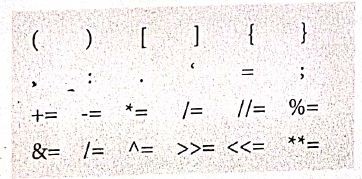
Literals
Literal is a raw data given in a variable or constant. In python, there are various types of literals.
1) Numeric
2) String
3) Boolean
1) Numeric Literals
Numeric literals consists of digits and are immutable (unchangeable). Numeric literals can belong to 3 different numerical types Integer, float and complex.
2) String literals
In python a string literal is a sequence of characters surrounded by quotes. Python supports single, double and triple quotes for a string. A character literal is a single character surrounded by single or double quotes. The value with triple- quote "' "' is used to give multi-line string literal.
3) Boolean literals
A Boolean literal can have any of the two values: True or False.
4) Escape sequences
In python strings, the backslash "\" is a special character, also called the "escape" character. It is used in representing certain white space character: "\t" is a tab, "\n" is a newline, and "\r is a carriage return. For Example to print the message "It's raining"
The python command is
>> print ("It \'s raining")
It's raining
Python supports the following escape sequence characters.
| Escape sequence characters | Description | Example | Output |
| \\ | Backslash | >>> print('\\ test") | \test |
| \' | Single - quote | >>> print("Doesn\'t") | Doesn't |
| \'' | Double - quote | >>>print("\"'python\"") | "python" |
| \n | New line | Print ("python"\n","lang..") | Python lang. |
| \t | Tab | Prlnt ("python'","\t","lang.,") | Python lang |
43.
1. The print () Function:
ln Python, the print() function is used to display result on the screen. The syntax for print ( ) is as follows:
Example:
print ("String to be displayed as output")
print (variable)
print ("String to be displayed as output", variable)
print ("String1", variable, "string 2", variable, "String 3",....)
Example:
>>> print("Welcome to python Programming'")
welcome to Python Programoming
>>>x = 5
>>> y = 6
>>> z= X+Y
>>> print (z)
>>> print ("The sum =", z)
The sum = 11
>>>print ("The sum of", x, "and", y, "is", z)
The sum of 5 and 6 is 11.
The print () evaluates the expression before printing it on the monitor. The print () displays an entire statement which is specified within print(). Comma(,) is used as a separator in print () to print more than one item.
input () function:
In Python, input) function is used to accept data as input at run time. The syntax for input () function is
Syntax:
Variable = input ("prompt String')
Where, prompt string in the Syntax is a statement or message to the user, to knowwhat input can be given.
If a prompt string is used, it is displayed on the monitor; the user can provide expected data from the input device. The input() takes whatever is typed from the Keyboard and stores the entered data in the given Variable. If prompt string is not given in input() no message is displayed on the screen, then, the user will not know what is to be typed as input.
Example 1:
input () with prompt String
>>>City=input ("Enter your city:")
Enter your city: Madurai
>>>print ("I am from", city)
I am from Madurai
Example 2:
input() without prompt string
>>> city = input ()
Rajarajan
>>>print ("I am from", city)
I am from Rajarajan
in Example 2, the input () is not having any pronmpt string, thus the user will not know what is to be typed as input. If the user inputs irrelevant data as given in the above example then the output will be unexpected. So, to make your program more interactive, provide prompt string with input (). The input () accepts all data as string or characters but not as numbers. Ifa numerical value is entered, the input values should be explicitly converted into numeric data type. The int) function is used to convert string data as integer data explicitly.
Example 3:
X=int (input ("Enter Number 1:"))
Y= int (input ("Enter Number 2:" ))
print ("The Sum =", x + y)
Output:
Enter Number 1: 34
Enter Number 2:56
The Sum =90.
44.
A script is a text file containing the Python statements. Python Scripts are reusable code. Once the script is created, it can be executed6again and again without retyping. The Scripts are editable
i) Creating Scripts in Python:
1. Choose File → New File or press Ctrl + N in Python shell window.
.JPG)
2. An untitled blank script text editor will be displayed on screen
.JPG)
3. Type the following code in script editor.
a = 100
b= 350
C = a + b
print ("The sum=", c)
.JPG)
ii) Saving Python script:
1. Choose File → Save or press Ctrl+S.
.JPG)
2. Now, Save As dialog box appears on the screen.
.JPG)
3. In the Sare As dialog box, select the location where you want to save your Python code, and type the File name in File Name box. Python files are by default saved will extension • py. Thus, while creating Python Scripts using Pyrhons script editor, no need to specify the file extension.
4. Hinallyiclick save button to save your python script.
iii) Exccuthon Python Script:
1. Choose Run → Run module or Press F5.
.JPG)
2. If your code has any error, it will be shown in red color in the IDLE window, and Python describes the type of error occurred. To correct the errors, go back to Script editor, make corrections, save the file using Ctrl +s or File → Save and execute il again.
3, For all error line code, the output will appear in the IDLL window of Python.
.JPG)
.JPG)

12th Standard Syllabus & Materials
12th Standard
TN 12th Computer Applications களப்பெயர் முறைமை (DNS) Sample Question Papers Study Material - QB365 Set A
NEW12th Standard
TN 12th Computer Applications வலையமைப்பு எடுத்துக்காட்டுகள் மற்றும் நெறிமுறைகள் Sample Question Papers Study Material - QB365 Set A
NEW12th Standard
TN 12th Computer Applications கணினி வலையமைப்பு ஓர் அறிமுகம் Sample Question Papers Study Material - QB365 Set A
NEW12th Standard
TN 12th Computer Applications PHP-உடன் MySQL-ஐ இணைத்தல் Sample Question Papers Study Material - QB365 Set A



Tamilnadu Stateboard 12th Standard Subjects

Maths

Chemistry

Physics

Biology
Computer Science

Business Maths and Statistics

Economics

Commerce

Accountancy

History

Computer Applications
Biology
Computer Technology
Computer Applications
Computer Science
Business Maths and Statistics
Commerce
Economics
Maths
Chemistry
Physics
Computer Technology
History
Accountancy

Tamil

English

French
Tamilnadu Stateboard Standards
