
 100% FREE ACCESS
12th Standard Syllabus & Materials
12th Standard
TN 12th Computer Applications மின்னணு தரவு பரிமாற்றம் Sample Question Papers Study Material - QB365 Set A
NEW12th Standard
TN 12th Computer Applications மின் - வணிக பாதுகாப்பு அமைப்புகள் Sample Question Papers Study Material - QB365 Set A
NEW12th Standard
TN 12th Computer Applications மின்னணு செலுத்தல் முறைகள் Sample Question Papers Study Material - QB365 Set A
NEW12th Standard
TN 12th Computer Applications மின் - வணிகம் Sample Question Papers Study Material - QB365 Set A
NEW12th Standard
TN 12th Computer Applications திறந்த மூல கருத்துருக்கள் Sample Question Papers Study Material - QB365 Set A
NEW12th Standard
TN 12th Computer Applications வலையமைப்பு வடமிடல் Sample Question Papers Study Material - QB365 Set A

Published on: 02/02/2021
12th Standard Computer Science English Medium Reduced Syllabus Important Questions with Answer key - 2021 Part - 1
Download Tamil Nadu 12th Standard Computer Science question papers, model tests, one-mark questions, important questions, and public exam papers in PDF format. Free study materials and answer keys for TN State Board students.
Questions + Answers key
Take MCQ Computer Science Test
1.
The data in RDBMS, is stored in database objects called
Queries
Languages
Relations
Tables
2.
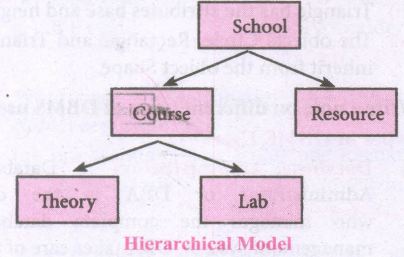
In ____________ data model, the data stores in the form of classes and inheritance.
Hierarchical
Entity relationship
Object
Network
3.
Object model stores the data in the form of
objects
attributes and methods
classes and inheritance
all of these
4.
The basic structure of data in relational model is
Tables
rows
columns
tuples
5.
Which of the following provided an interface to perform various operations to create a database, storing and updating data?
SQL
DBA
DBMS
Algebra
6.
The process of creating object is called as ___________
Class definition
Class declaration
Class instantiation
Class objects
7.
______ and_____ are the key features of object oriented programming.
List and tuples
Set and dictionary
Classes and objects
Variables and methods
8.
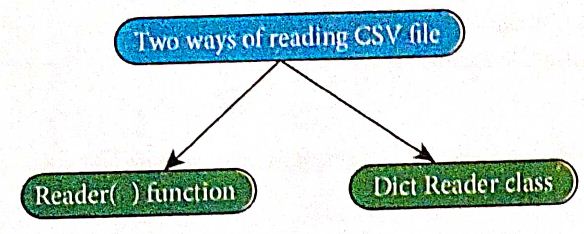
Which of the following is valid syntax for crating objects?
objectname = classname ()
objectname: classname ()
objectname = classname
classname = Objectname ()
9.
Which of the following is way to read a CSV file?
read ()
reader ()
dictreader ()
b and c
10.
A _________ in Python is known as a "sequence datatype"
List
Set
Dictionary
Tuples
11.
Which of the following is an example of data structures?
List
Tuple
Dictionary
All of these.
12.
How the names are mapped with objects in programming language?
name == object
name:: object
name:= object
object:= name
13.
________are the representation for Abstract Data types.
Objects
Classes
Functions
Lists
14.
Which of the following provides modularity?
Datatypes
Subroutines
Classes
Abstraction
15.
Which of the following are the key features of an Object Oriented Programming language?
Constructor and Classes
Constructor and Object
Classes and Objects
Constructor and Destructor
16.
Containers for mapping names of variables to objects is called
Scope
Mapping
Binding
Namespaces
17.
Which of the following is constructed by placing expressions within square brackets?
Tuples
Lists
Classes
quadrats
18.
Which of the following allow to name the various parts of a multi-item object?
Tuples
Lists
Classes
quadrats
19.
A sequence of immutable objects is called
Built in
List
Tuple
Derived data
20.
The functions which cause side effects to the arguments passed are called
Impure function
Partial Functions
Dynamic Functions
Pure functions
21.
List the data types used in SQL.
22.
Write the importance of using data model.
23.
Identity which is a DBMS and RDBMS software from the following.
(i) SQlite
(ii) Foxpro
(iii) MySQL
(iv) Dbase
24.
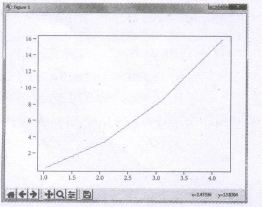
Write a python code to display the following plot.
25.
List the classes used in the SQL SELECT statement.
26.
Write the sqlite steps to connect the database.
27.
List the manipulation manipulated effectively through data structures by algorithm.
28.
How will you represent Octal, hexadecimal and long integer data?
29.
Write a note on Data Abstraction.
30.
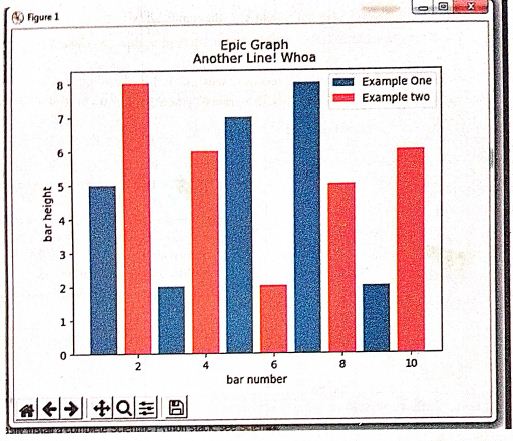
Draw the output for the following data visualization plot.
import matplotlib.pyplot as plt
plt.bar([1,3,5,7,9],[5,2,7,8,2], label="Example one")
plt.bar([2,4,6,8,10],[8,6,2,5,6], label="Example two", color='g')
plt.legend()
plt.xlabel('bar number')
plt.ylabel('bar height')
plt.title('Epic Graph in Another Line! Whoa')
plt.show()
31.
Read the following details.Based on that write a python script to display records in desending order of
Eno
database name :- organization.db
Table name :- Employee
Columns in the table :- Eno, EmpName, Esal, Dept
32.
What is SQLite?What is it advantage?
33.
Write a Python program to read a CSV file with default delimiter comma (,).
34.
Write a SQL statement using DISTINCT keyword.
35.
Write a SQL statement to modify the student table structure by adding a new field.
36.
Differentiate Concrete data type and abstract datatype.
37.
Write the processing skills of SQL.
38.
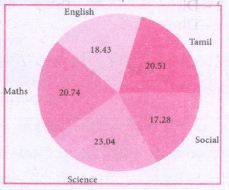
Write a python code to display the following, plot.
39.
Write a program to set data at runtime and writing it in a CSV file.
40.
Write a program to read the CSV file through python using reader ( ) method.
41.
Explain the representation of Abstract datatype using rational numbers.
42.
Explain the various buttons in a matplotlib window.
43.
Explain in detail the types of pyplots using Matplotlib.
44.
Write a Python script to create a table called ITEM with following specification.
Add one record to the table.
Name of the database :- ABC
Name of the table :- Item
Column name and specification :-
| I code | :- | Integer and act as primary key |
| Item Name | :- | Character with length 25 |
| Rate | :- | Integer |
| Record to be added | :- | 1008, Monitor, 15000 |
45.
Write the rules to be followed to format the data in a CSV file.
46.
Differentiate Excel file and CSV file.
47.
Construct the following SQL statements in the student table-
(i) SELECT statement using GROUP BY clause.
(ii) SELECT statement using ORDER BY clause.
48.
Consider the following employee table. Write SQL commands for the qtns.(i) to (v).
| EMP CODE | NAME | DESIG | PAY | ALLOWANCE |
| S1001 | Hariharan | Supervisor | 29000 | 12000 |
| P1002 | Shaji | Operator | 10000 | 5500 |
| P1003 | Prasad | Operator | 12000 | 6500 |
| C1004 | Manjima | Clerk | 8000 | 4500 |
| M1005 | Ratheesh | Mechanic | 20000 | 7000 |
(i) To display the details of all employees in descending order of pay.
(ii) To display all employees whose allowance is between 5000 and 7000.
(iii) To remove the employees who are mechanic.
(iv) To add a new row.
(v) To display the details of all employees who are operators.
49.
50.
Write the syntax of creating table in database.
51.
What is SQL?
52.
Expand
(i) SQL
(ii) DBMS
(iii) RDBMS
53.
How the SQL DISTINCT class is helpful to you?
54.
Write the placeholders which supported by SQlite3 module Execute.
55.
What is a cursor in SQL and databases?
56.
Write the syntax for the following
(i) Creating objects
(ii) Accessing class members
57.
How will prefect the CSV File data contains common by itself?
58.
Why CSV file is known as flat file?
59.
Write a python program to generate the squares of even numbers between 1 and 10 using the concept of list comprehensions.
60.
Name the built - in number objects in python.
61.
List the types of Visualizations in Matplotlib.
62.
Mention the two ways to read a CSV file using Python.
63.
What is CSV File?
64.
What is the difference between SQL and MYSQL?
65.
1.
(d)
Tables
2.
(c)
Object
3.
(d)
all of these
4.
(a)
Tables
5.
(c)
DBMS
6.
(c)
Class instantiation
7.
(c)
Classes and objects
8.
(c)
objectname = classname
9.
(d)
b and c
10.
(a)
List
11.
(d)
All of these.
12.
(c)
name:= object
13.
(b)
Classes
14.
(d)
Abstraction
15.
(c)
Classes and Objects
16.
(d)
Namespaces
17.
(b)
Lists
18.
(c)
Classes
19.
(c)
Tuple
20.
(a)
Impure function
21.
(i) char (Character)
(ii) varchar
(iii) dec (Decimal)
(iv) numeric
(v) int (Integer)
(vi) smallint
(vii) float
(viii) real
(ix) double
22.
(i) A data model describes how the data can be represented and accessed from a software after complete implementation
(ii) It is a simple abstraction of complex real world data gathering environment.
(iii) The main purpose of data model is to give an idea as how the final system or software will look like after development is completed.
23.
(i) RDBMS
(ii) DBMS
(iii) RDBMS
(iv) DBMS
24.
Program:
For example, to plot x versus y, you can issue the command:
import matplotlib. pyplot as plt
pIt.plot([1,2,3,4], [1,4,9,16])
plt.show ( )
Output:
25.
(i) DISTINCT
(ii) WHERE
(iii) GROUP BY
(iv) ORDER BY.
(v) HAVING
26.
Step 1: Import sqlite3
Step 2: Create a connection using connect o method and pass the name of the database File
Step 3: Set the cursor object cursor = connection. cursor ( )
27.
| Search | To search an item in a data structure using linear and binary search. |
|---|---|
| Sort | To sort items in a certain order using the methods such as bubble sort, insertion sort, selection sort, etc. |
| Insert | To insert an item (s) in a data structure. |
| Update | To update an existing item (s) in a data structure. |
| Delete | To delete an existing item (s) in a data structure. |
28.
Integer Data can be decimal, octal or hexadecimal. Octal integer use O (both upper and lower case) to denote octal digits and hexadecimal integer use OX (both upper and lower case) and L (only upper case) to denote long integer.
29.
(i) Data abstraction is supported by defining an abstract data type (ADT) which is a collection of constructors and selectors.
(ii) Constructors create an object, bundling together different pieces of information, while selectors extract individual pieces of information from the object.
30.
31.
Program: Display the records in descending order using python script
import mysqldb
db = mysqldb.connect ("local host", "user", "123", "organization")
cursor = db.cursor()
cursor.execute ("SELECT *FROM Employee ORDER BY Name DESC")
result = cursor.fetchall()
for row in results:
ENO = row[0], EmpName = row[1], EmpDept = row[2]
print ENO, EmpName, EmpDept
db.close()
32.
(i) SQLite is a simple relational database system, which saves its data in regular data files or even in the internal memory of the computer.
(ii) It is designed to be embedded in applications, instead of using a separate database server program such as MySQL or Oracle.
Advantages:
SQLite is fast, rigorously tested, and flexible, making it easier to work.
Python has a native library for SQLite.
33.
Program: To read a csv file with comma (,)
#importing csv
import csv
#opening the csv file which is in different location with read mode
with open('c:\\Pyprg\ \sample1.csv', 'r') as F:
#other way to open the file is
f=('C:\\pyprg\\sample1.csv', 'r')
reader = csv.reader(F))
#printing each line of the Data row by row.
print (row)
F. close( )
Output:
['SNO','NAME', 'CITY']
['12101', 'RAM', 'CHENNAI']
['12102', 'LAVANYA' "TIRUCHY']
['12103', 'LAKSHMAN', 'MADURAI']
34.
(i) The DISTINCT keyword is used along with the SELECT command to eliminate duplicate rows in the table. This helps to eliminate redundant data.
(ii) For Example: SELECT DISTINCT Place FROM Student;
Will display the following data as follows:
Place
Chennai
Banglore
Delhi
35.
ALTER TABLE <table-name> ADD <column- name><data type><size>;
Example: ALTER TABLE Student MODIFY Address char (25)
36.
| S.No | Concrete data type | Abstract data type |
| (i) | Concrete Data Types or structures (CDT's) are direct implementations of a relatively simple concept | Abstract Data Types (ADT's) offer a high level view (and use) of a concept independent of its implementation. |
| (ii) | A concrete data type is a data type whose representation is known. | Abstract data type the representation of a data type is unknown. |
37.
The various processing skills of SQL are:
(i) Data Definition Language (DDL): The SQL DDL provides commands for defining relation schemas (structure), deleting relations, creating indexes and modifying relation schemas.
(ii) Data Manipulation Language (DML): The SQL DML includes commands to insert, delete, and modify tuples in the database.
(iii) Embedded Data Manipulation Language: The embedded form of SQL is used in high level programming languages.
(iv) View Definition: The SQL also includes commands for defining views of tables.
(v) Authorization: The SQL includes commands for access rights to relations and views of tables.
(vi) Integrity: The SQL provides forms for integrity checking using condition.
(vii) Transaction control: The SQL includes commands for file transactions and control over transaction processing.
38.
Program:
import matplotlib.pyplot as plt
sizes = [89, 80, 90, 100, 75]
labels = ["Tamil", "English", "Maths", "Science", "Social"]
plt.pie (sizes, labels = labels, autopct = "%.2f")
plt.axes( ).set aspect ("equal")
pIt.show ( )
39.
import csv
with open ('c\\pyprg\\ch13\\ dynamicfile.csv', 'w') as f:
w = csv.writer(f)
ans= 'y'
while (ans=='y'):
name=input("Name?:")
date=input("Date of birth:")
Place=input ("Place:")
w.writerow([name, date, place])
ans=input("Do you want to enter more y/n?:")
F=open('c:\\pyprg\\ch13\\dynamicfile.csv",r')
reader=csv.reader(F)
for row in reader:
print (row)
F.close()
40.
import csv
csv.register_dialect('myDialect', delimiter = ',',skipinitialspace = True)
F=open('c:\\pyprg\\sample2.csv', 'r')
reader = csv.reader(F, dialect = 'myDialect')
for row in reader:
print(row)
F.close( )
41.
(i) The basic idea of data abstraction is to structure programs so that they operate on abstract data. That is, our programs should use data in such a way, as to make as few assumptions about the data as possible.
(li) At the same time, a concrete data representation is defined as an independent part of the program.
(iii) Any program consist of two parts. The two parts of a program are, the part that operates on abstract data and the part that defines a concrete representation, is connected by a small set of functions that implement abstract data in terms of the concrete representation.
(iv) To illustrate this technique, let us consider an example to design a set of functions for manipulating rational numbers.
(v) Example: A rational number is a ratio of integers, and rational numbers constitute an important sub-class of real numbers. A rational number such as 8/3 or 19/23 is typically written as : < numerator > /< denominator >
(vi) where both the < numerator > and <denominator>
(vii) However, you can create an exact representation for rational numbers by combining together the numerator and denominator.
(viii) As we know from using functional abstractions, we can start programming productively before you have an implementation of some parts of our program.
(ix) Let us begin by assuming that you already have a way of constructing a rational number from a numerator and a denominator. You also assume that, given a rational number, you have a way of selecting its numerator and its denominator component.
42.
(i) Home Button \(\rightarrow \) The Home Button will help one to begun navigating the chart. If you ever want to return back to the original view, you can click on this.
(ii) Forward/Back buttons \(\rightarrow \) These buttons can be used like the Forward and Back buttons in browser. Click these to move back to the previous point you were at, or forward again.
(iii) Pan Axis \(\rightarrow \) This cross-looking button allows you to click it, and then click and drag graph around.
(iv) Zoom \(\rightarrow \) The Zoom button lets you click on it, then click and drag a square would like to zoom into specifically. Zooming in will require a left click and drag. Zoom out with a right click and drag.
(v) Configure Subplots\(\rightarrow \) This button allows you to configure various spacing options with figure and plot.
(vi) Save Figure \(\rightarrow \)This button will allow you to save figure in various forms
43.
Line Chart:
(i) A Line Chart or Line Graph is a type of chart which displays information as a series of data points called 'markers' connected by straight line segments.
(ii) A Line Chart is often used to visualize a trend in data over intervals of time - a time series - thus the line is often drawn chronologically.
Example:
import matplotlib.pyplot as plt
years = [2014, 2015, 2016, 2017, 2018]
total_populations = [8939007, 8954518, 8960387, 8956741, 8943721]
plt. plot ("years, total_populations)
pit. title ("Year vs Population in India")
plt.xlabel ("Year")
pIt.ylabel ("Total Population")
plt.showt (1)
In this program,
Plt.titlet( ) \(\rightarrow\) specifies title to the graph
Plt.xlabelt) \(\rightarrow\) specifies label for X-axis
Plt.ylabel() \(\rightarrow\) specifies label for Y-axis
Output:
.JPG)
Bar Chart:
(i) A Bar Plot (or BarChart) is one of the most common type of plot. It shows the relationship between a numerical variable and a categorical variable
(ii) Bar chart represents categorical data with rectangular bars. Each bar has a height corresponds to the value it represents. The bars can be plotted vertically or horizontally.
(iii) It's useful when we want to compare a given numeric value on different categories. To make a bar chart with Matplotlib, we can use the plt.bar() function.
Example:
import matplotlib.pyplot as plt
# Our data
labels = ["TAMIL", "ENGLISH", "MATHS", "PHYSICS", "CHEMISTRY", "CS"]
usage = [79.8,67.3,77.8,68.4,70.2,88.5]
# Generating the y positions.
y_positions = range (len(labels))
# Creating our bar plot
plt.bar (y_positions, usage)
plt.xticks (y_positions, labels)
plt.ylabel ("RANGE")
plt.title ("MARKS")
plt.show( )
Output:
.JPG)
Labels → specifies labels for the bars.
Usage → Assign values to the labels specified.
Xticks → Display the tick marks along the x - axis at the values represented. Then specify the ladel for each tick mark.
Range → Create sequence of numbers.
Pie Chart:
(i) Pie Chart is probably one of the most common type of chart. It is a circular graphic which is divided into slices to illustrate numerical proportion.
(ii) The point of a pie chart is to show the relationship of parts out of a whole. To make a Pie Chart with Matplotlib, we can use the plt.pief) function.
(iii) The autopct parameter allows us to display the percentage value using the Python string formatting.
Example:
import matplotlib.pyplot as plt
sizes = [89, 80, 90, 100, 75]
labels = ["Tamil", "English", "Maths", "Science", "Social"]
plt.pie (sizes, labels = labels, autopct = "%.2f")
plt.axes().set aspect ("equal")
plt.show( )
Output:
.JPG)
44.
Program:
import mysql db
db = mysqldb.connect ("local host", "user", "123", "organization'")
cursor = db.cursor()
item table creation
database: ABC, table: Item, lcode: int, ItemName: Char
Rate: int. Record: 1008, Monitor: 15000
cursor.execute ("Create table item(icode int, item Name char (25), Rate int"));
db.close
cursor. execute ("insert into item values ("1008", 'Monitor', '15000" ));
db.commit()
45.
Rules to be followed to format data in a CSV file:
(i) Each record (row of data) is to be located on a separate line, delimited by a line break by pressing enter key.
For example:↲
xxx,yyy↲
↲denotes enter Key to be pressed
(ii) The last record in the file mayor may not have an ending line break.
For example:
ppp, qqq↲
yyy, xxx
(iii) There may be an optional header line appearing as the first line of the file with the same format as normal record lines. The header will contain names corresponding to the fields in the file and should contain the same number of fields as the records in the rest of the file.
For example:
field_name 1, field_name 2, field_name 3↲
aaa,bbb,ccc↲
zzz, yyy, xxx CRLF(Carriage Return and Line Feed)
(iv) Within the header and each record, there may be one or more fields, separated by commas. Spaces are considered part of a field and should not be ignored. The last field in the record must not be followed by a comma.
For example:
Red, Blue
(v) Each field mayor may not be enclosed in double quotes. If fields are not enclosed with double quotes, then double quotes may not appear inside the fields
For example:
"Red","Blue","Green"↲
Black, White, Yellow
(vi) Fields containing line breaks (CRLF), double quotes, and commas should be enclosed in double-quotes.
For example:
Red, ",", Blue CRLF
Red, Blue, Green
(vii) If double-quotes are used to enclose fields, then a double-quote appearing inside a field must be preceded with another double quote.
For example:
"Red, " "Blue", "Green",
White
46.
| Excel | CSV |
|---|---|
| Excel is a binary file that holds information about all the worksheets in a file, including both content and formatting | CSV format is a plain text format with a series of values separated by commas. |
| XLS files can only be read by applications that have been especially written to read their format, and can only be written in the same way. | CSV can be opened with any text editor in Windows like notepad, MS Excel, Open Office, etc. |
| Excel is a spreadsheet that saves files into its own proprietary format viz. xls or xlsx | CSV is a format for saving tabular information into a delimited text file with extension .csv |
| Excel consumes-more memory while importing data | Importing CSV files can be much faster, and it also consumes less memory |
47.
1. SELECT * FROM student WHERE gender = Male GROUP BY gender;
2. SELECT * FROM student WHERE Age > 18 ORDER BY DESC;
48.
(i) SELECT * FROM Employee ORDER BY PAY DESC;
(ii) SELECT * FROM Employee WHERE ALLOWANCE
BETWEEN 5000 AND 7000;
(iii) DELETE FROM Employee WHERE DESIG='Mechanic';
(iv) ALTER TABLE employee ADD Age Varchar(50);
(v) SELECT * FROM Employee WHERE DESIG='Operator';
49.
.JPG)
.JPG)
.JPG)
.JPG)
50.
The syntax of CREATE TABLE command is :
CREATE TABLE < table-name >
( < column name > < data type > [ < size > ]
( < column name > < data type> [ < size > ] ..........
);
51.
(i) The Structured Query Language (SQL) is a standard programming language to access and manipulate databases.
(ii) SQL allows the user to create, retrieve, alter, and transfer information among databases.
(iii) It is a language designed for managing and accessing data in a Relational Data Base Management System (RDBMS).
52.
(i) SQL -Structured Query Language
(ii) DBMS-Database Management System
(iii) RDBM - Relational Database Management System
53.
The DISTINCT clause is helpful when there is need of avoiding the duplicate values present in any specific columns/table. When we use distinct keyword only the unique values are fetched.
54.
Execute (sql[, parameters]) :
(i) Executes a single SQL statement. The SQL statement may be parameterized (i.e. placeholders instead of SQL literals).
(ii) The SQlite3 module supports two kinds of placeholders: question marks? ("qmark style") and named placeholders: name ("named style").
55.
(i) A cursor in SQL and databases is a control structure to traverse over the records in a database. So it's used for the fetching of the results.
(ii) The cursor object is created by calling the cursor( ) method of connection. The cursor is used to traverse the records from the result set.
56.
(i) Object - name = class_name ()
(ll) Object - name = class_member
57.
If the fields of data in your CSV file contain commas, you can protect them by enclosing those data fields in double-quotes ("). The commas that are part of your data will then be kept separate from the commas which delimit the fields themselves.
58.
A CSV is known as flat file because files in the CSV format can be imported to and exported from programs that store data in tables, such as Microsoft Excel or OpenOfficeCalc
59.
s = [x **2 for x in range (2,11,2)]
print (s)
60.
The built-in number objects in Python supports integers, floating point numbers and complex numbers.
61.
(i) Line plot
(ii) Scatter plot
(iii) Histogram
(iv) Box plot
(v) Bar chart and
(vi) Pie chart
62.
63.
A CSV file is a human readable text file where each line has a number of fields, separated by commas or some other delimiter.
64.
| SQL | MYSQL |
| Structured Query Language is a language used for accessing database | MySQL is a database | accessing databases. management system, like SQL Server, Oracle, Informix,postgres,etc. |
| SQL is a DBMS | MySQL is a RDBMS |
65.

12th Standard Syllabus & Materials
12th Standard
TN 12th Computer Applications களப்பெயர் முறைமை (DNS) Sample Question Papers Study Material - QB365 Set A
NEW12th Standard
TN 12th Computer Applications வலையமைப்பு எடுத்துக்காட்டுகள் மற்றும் நெறிமுறைகள் Sample Question Papers Study Material - QB365 Set A
NEW12th Standard
TN 12th Computer Applications கணினி வலையமைப்பு ஓர் அறிமுகம் Sample Question Papers Study Material - QB365 Set A
NEW12th Standard
TN 12th Computer Applications PHP-உடன் MySQL-ஐ இணைத்தல் Sample Question Papers Study Material - QB365 Set A



Tamilnadu Stateboard 12th Standard Subjects

Maths

Chemistry

Physics

Biology
Computer Science

Business Maths and Statistics

Economics

Commerce

Accountancy

History

Computer Applications
Biology
Computer Technology
Computer Applications
Computer Science
Business Maths and Statistics
Commerce
Economics
Maths
Chemistry
Physics
Computer Technology
History
Accountancy

Tamil

English

French
Tamilnadu Stateboard Standards
