
 100% FREE ACCESS
12th Standard Syllabus & Materials
12th Standard
TN 12th Maths Applications of Matrices and Determinants Sample Question Papers Study Material - QB365 Set A
NEW12th Standard
TN 12th Computer Applications மின்னணு தரவு பரிமாற்றம் Sample Question Papers Study Material - QB365 Set A
NEW12th Standard
TN 12th Computer Applications மின் - வணிக பாதுகாப்பு அமைப்புகள் Sample Question Papers Study Material - QB365 Set A
NEW12th Standard
TN 12th Computer Applications மின்னணு செலுத்தல் முறைகள் Sample Question Papers Study Material - QB365 Set A
NEW12th Standard
TN 12th Computer Applications மின் - வணிகம் Sample Question Papers Study Material - QB365 Set A
NEW12th Standard
TN 12th Computer Applications திறந்த மூல கருத்துருக்கள் Sample Question Papers Study Material - QB365 Set A

Published on: 02/02/2021
12th Standard Computer Science English Medium Reduced Syllabus Model Question paper - 2021 Part - 2
Download Tamil Nadu 12th Standard Computer Science question papers, model tests, one-mark questions, important questions, and public exam papers in PDF format. Free study materials and answer keys for TN State Board students.
Questions + Answers key
Take MCQ Computer Science Test
1.
Which of the following begin with a keyword and consists of keyword and argument?
Commands
Statement
Clauses
Data
2.
Which of the following keyword is used to define anonymous function?
Def
Alpha
Lambda
Range
3.
In Python, a class is defined by using the _______ class.
Operator
Identifier
Object
Keyword
4.
How many keywords are there to achieve jump statements in python?
2
4
3
5
5.
How many access control keywords are there?
2
3
4
6
6.
Which of the following is a raw data given in a variable or constant?
Information
Delimiters
Literal
Keywords
7.
Which of the following executes the SQL command to perform some action?
Execute()
Key()
Cursor()
run()
8.
Two main measures for the efficiency of an algorithm are
Processor and memory
Complexity and capacity
Time and space
Data and space
9.
Which of the following is constructed by placing expressions within square brackets?
Tuples
Lists
Classes
quadrats
10.
The data type whose representation is known are called
Built in datatype
Derived datatype
Concrete datatype
Abstract datatype
11.
The functions which cause side effects to the arguments passed are called
Impure function
Partial Functions
Dynamic Functions
Pure functions
12.
Which of the following carries out the instructions defined in the interface?
Operating System
Compiler
Implementation
Interpreter
13.
Construct the following SQL statements in the student table-
(i) SELECT statement using GROUP BY clause.
(ii) SELECT statement using ORDER BY clause.
14.
Explain the different types of relationship mapping.
15.
Explain the different set operations supported by python with suitable example.
16.
Explain the following built-in functions.
(a) id ()
(b) chr ()
(c) round ()
(d) type ()
(e) pow ()
17.
Discuss in detail about Tokens in Python.
18.
Write any Five Characteristics of Modules.
19.
Differentiate IN and NOT IN keywords.
20.
What are used a dictionary keys?
21.
Write the syntax of using for keyword to access all elements in the list. Pg 136 x 9.
22.
Name any four keywords in Python.
23.
Name the tokens where the whitespace in necessary in python.
24.
Write the importance of using data model.
25.
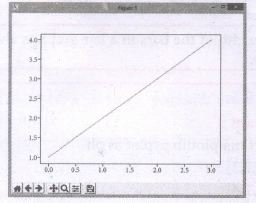
Write a python code to display the following plot.
26.
Write the sqlite steps to connect the database.
27.
Read the following program. Answer the following question. Class sample:
x, y= 10, 20
s= sample ()
print (s. x + s. y)
1. What does sample denotes?
2. What does x, y denotes?
3. What does s denotes?
28.
Why the following program give an error while displaying the value of n2. Give Reason.
29.
What are the ways to write a new or edit are existing CSV file in python?
1.
(c)
Clauses
2.
(c)
Lambda
3.
(d)
Keyword
4.
(c)
3
5.
(b)
3
6.
(c)
Literal
7.
(a)
Execute()
8.
(c)
Time and space
9.
(b)
Lists
10.
(c)
Concrete datatype
11.
(a)
Impure function
12.
(c)
Implementation
13.
1. SELECT * FROM student WHERE gender = Male GROUP BY gender;
2. SELECT * FROM student WHERE Age > 18 ORDER BY DESC;
14.
Types of relationships:
(i) One-to-One Relationship
(ii) One-to-Many Relationship
(iii) Many-to-One Relationship
(iv) Many-to-Many Relationship
(i) One-to-One Relationship:
In One-to-One Relationship, one entity is related with : only one other entity. One row in a table is linked with only one row in another table and vice versa.
For example: A student can have only one exam number

(ii) One-to-Many Relationship.
In One-to- Many relationship, one entity is related to many other entities. One row in a table A is linked to many rows in a table B, but one row in a table B is linked to only one row in table A.
For example: One Department has many staff members.
.JPG)
(iii) Many-to-One Relationship:
In Manyto- One Relationship, many entities can be related with only one in the other entity.
For example:
A number of staff members working in one Department.
Multiple rows in staff members table is related with only one row in Department table.
.JPG)
(iv) Many-to-Many Relationship:
A manyto- many relationship occurs when multiple records in a table are associated with multiple records in another table.
(i) Example 1:
Customers and Product
Customers can purchase various products and Products can be purchased by many customers
(ii) Example 2:
Students and Courses
A student can register for many Courses and a Course may include many students
(iii) Example 3:
Books and Student.
Many Books in a Library are issued to many students.
.JPG)
15.
The python supports the set operations such as Union, Intersection, difference and Symmetric difference.
i) Union:
It includes all elements from two or more sets
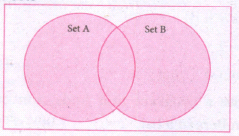
In python, the operator Iis used to union of two sets. The function union ( ) is also used to join two sets in python.
Example:
Program to Join (Union) two sets using union operator
set_A={2,4,6,8}
set_B={'A', 'B', 'C', 'D'}
U_set=set_A l set_B
print (U _set)
Output:
{2, 4, 6, 8, 'A', 'D', 'C', 'B'}
Example:
Program to Join (Union) two sets using union function.
set_A={2,4,6,8}
set_B={'A', 'B', 'C', 'D'}
set_ U=set_ A.Union(set_ B)
print(set_U)
Output:
{'D', 2, 4, 6, 8, 'B', 'C', 'A'}
ii) Intersection:
(i) It includes the common elements in two sets
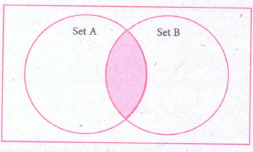
The operator & is used to intersect two sets in python. The function intersection( ) is also used to intersect two sets in python.
Example:
Program to insert two sets using intersection operator
set_A={'A', 2, 4, 'D'}
set_B={'A', 'B', 'C', 'D'}
print(set_A & set_B)
Output:
{'A', 'D'}
Example:
Program to insect two sets using intersection function
set_A={'A', 2, 4, 'D'}
set_B={'A', 'B', 'C', 'D'}
print( set_A.intersection(set_B))
Output:
{'A', 'D'}
iii) Difference
It includes all elements that are in first set (say set A) but not in the second set (say set B)
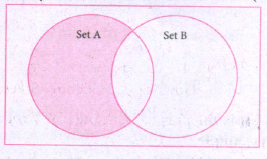
The minus (-) operator is used to difference set operation in python. The function difference() is also sed to difference operation.
Example:
Program to difference of two sets using minus operator
set_A={'A', 2, 4, 'D'}
set_B={'A', 'B', 'C', 'D'}
print(set_A - set B)
Output
{2,4}
Example:
Program to difference of two sets using difference function
set_A={'A', 2, 4, 'D'}
set_B={'A', 'B', 'C', 'D'}
print(set_A.difference( set_B))
Output:
{2,4}
iv) Symmetric difference:
It includes all the elements that are in two sets (say sets A and B) but not the one that are common to two sets.
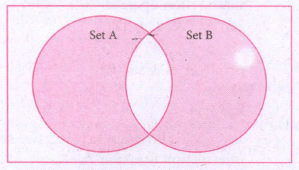
The caret (^) operator is used to symmetric difference set operation in python. The function symmetric_difference( ) is also used to do the same operation.
Example:
Program to symmetric difference of two sets using caret operator
set_A={'A', 2, 4, 'D'}
set_B={'A', 'B', 'C', 'D'}
print(set_A ^ set_B)
Output:
{2, 4, 'B', 'C'}
Example:
Program to difference of two sets using symmetric difference function
set_A={'A', 2, 4, 'D'}
set_B={'A', 'B', 'C', 'D'}
print( se_A.symmetric_ difference (set_B))
Output:
{2, 4, 'B', 'C'}
16.
| Function | Description | Syntax | Example |
| (a) id() | id () Return the "identity" of an objects i.e. The address of the object in memory. Note: The address of x and y may differ in your system. |
id(object) | x = 15 y = 'a' print('address of x is :',id(x)) print ('address of y is :',id (y)) Output: address of x is: 1357486752 address of y is: 13480736 |
| (b) Chr() | Returns the Unicode character for the given ASCII value. This function is inverse of ord() function. | Chr(i) | c=65 d=43 print(chr(c)) print(chr(d)) Output: A + |
| (c) round() | Returns the nearest integer to its input. 1. First argument(number) is used to specify the value to be rounded. |
round (number, [ndigits]) | x = 17.9 y = 22.2 z = -18.3 print('x value is rounded to', round(x)) print('y value ic rounded to', round(y)) print ('z value is rounded to', round(z)) |
| (d) type() | Returns the type of object for the given single object. Note: This function used with single object parameter. |
type(object) | x = 15.2 y = 'a' s = true print(type(x)) print(type(y)) print(type(s)) Output: < class 'float' > < class 'str' > < class 'bool' > |
| (e) pow() | Returns the computation of ab i.e. (a**b) a raised to the power of b. | pow(a, b) | a = 5 b = 2 c = 3.0 print(pow(a, b)) print(pow(a, c)) print(pow(a + b, 3)) Output: 25 125.0 343 |
17.
Python breaks each logical line into a sequence of elementary lexical components known as Tokens. The normal token types are
(i) Identifiers,
(ii) Keywords,
(iii) Operators,
(iv) Delimiters and
(v) Literals.
(i) Identifiers:
1. An Identifier is a name used to identify a variable, function, class, module or object.
2. An identifier must start with an alphabet (A..Z or a..z) or underscore (-).
3. Identifiers may contain digits (0 .. 9).
4. Python identifiers are case sensitive i.e. uppercase and lowercase letters are distinct.
5. Identifiers must not be a python keyword.
6. Python does not allow punctuation character such as %,$, @ etc., within identifiers.
Example of valid identifiers.
Sum, total_marks, regno, num1.
Example of invalid identifiers
12 Name, name $, total-mark, continue.
Keywords:
Keywords are special words used by Python interpreter to recognize the structure of program. As these words have specific meaning for interpreter, they cannot be used for any other purpose.
| false | Class | finally | is | return |
| none | continue | for | lambda | try |
| true | def | from | nonlocal | while |
| and | del | global | not | with |
| as | elif | if | or | yield |
| assert | else | import | pass | |
| break | expect | in | raise |
Operators:
In computer programming languages operators are special symbols which represent computations, conditional matching etc. The value of an operator used is called operands. Operators are categorized as Arithmetic, Relational, Logical, Assignment etc. Value and variables when used with operator are known as operands.
i) Arithmetic operators
An arithmetic operator is a mathematical operator that takes two operands and performs a calculation on them. They are used for simple arithmetic. Most computer languages contain a set of such operators that can be used within equations to perform different types of sequential calculations.
Python supports the following Arithmetic operators.
.JPG)
ii) Relational or Comparative Operators
A Relational operator is also called as comparative operator which checks the relationship between two operands. If the relation is true, it returns True; otherwise it returns False.
Python supports following relational operators.
.JPG)
ii) Logical Operators
In Python, Logical operators are used to perform logical operations on the given relational expressions. There are three logical operators they are and, or and not.
.JPG)
iv) Assignment Operators
In Python, =is a simple assignment operator to assign values to variables Let a=5 and b=10 assigns the value.5 to a and 10 to b these two assignment statement can also be given as a,b=5,10 that assigns the value 5 and 10 on the right to the variables a and b respectively.
There are various compound operators in python Like +=,-=,*=,/=,%=,**= and // = are also available.
| Operator | Description | Example |
| Assume x = 10 | ||
| = | Assigns right side operands to left variable. | >>>X=10 >>>b="computer" |
| += | Added and, assign back the result to left operand i.e, x = 30 |
>>> x + = 20# x = x + 20 |
| -= | Subtracted and assign back the result to left operand i.e, x = 25 |
>>>x- = 5# x = x - 5 |
| *= | Multiplied and assign back the result to left operand ie, x = 125 |
>>>x* = 5# x = x*5 |
| /= | Divided and assign back the result to left operand i.e, x = 62.5 |
>>>x/ = 2# x = x/2 |
| %= | Taken modulus (Remainder) using two operands and assign the result to left assign the result to left | >>> x% = 3 # x = x%3 |
| **= | Performed exponential (power) calculation on operators and assign value to the left operand i.e, x = 6.25 |
>>>x**=2 |
| //= | Performed floor division on Operators and assign value to the left operand i.e, x= 2.0 |
>>>x// = 3 |
v) Conditional Operator
Ternary operator is also known as Conditional operator that evaluate something based on a condition being true or false. It simply allows testing a condition in a single line replacing the multiline if-else making the code compact. The syntax conditional operator is
Variable Name = [on_true] if [Test expression] else [on_false]
Example:
min = 50 if 49<50 else 70 # min = 50
min = 50 if 49>50 else 70 # min = 70
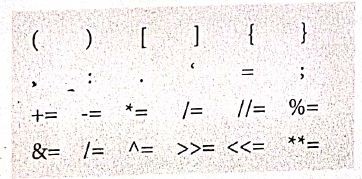
Delimiters:
Python uses the symbols and symbol Combinations as delimiters in expressions, lists, dictionaries and strings following are the delimiters.
Literals
Literal is a raw data given in a variable or constant. In python, there are various types of literals.
1) Numeric
2) String
3) Boolean
1) Numeric Literals
Numeric literals consists of digits and are immutable (unchangeable). Numeric literals can belong to 3 different numerical types Integer, float and complex.
2) String literals
In python a string literal is a sequence of characters surrounded by quotes. Python supports single, double and triple quotes for a string. A character literal is a single character surrounded by single or double quotes. The value with triple- quote "' "' is used to give multi-line string literal.
3) Boolean literals
A Boolean literal can have any of the two values: True or False.
4) Escape sequences
In python strings, the backslash "\" is a special character, also called the "escape" character. It is used in representing certain white space character: "\t" is a tab, "\n" is a newline, and "\r is a carriage return. For Example to print the message "It's raining"
The python command is
>> print ("It \'s raining")
It's raining
Python supports the following escape sequence characters.
| Escape sequence characters | Description | Example | Output |
| \\ | Backslash | >>> print('\\ test") | \test |
| \' | Single - quote | >>> print("Doesn\'t") | Doesn't |
| \'' | Double - quote | >>>print("\"'python\"") | "python" |
| \n | New line | Print ("python"\n","lang..") | Python lang. |
| \t | Tab | Prlnt ("python'","\t","lang.,") | Python lang |
18.
The following are the desirable characteristics of a module.
(i) Modules contain instructions, processing logic, and data.
(ii) Modules can be separately compiled and stored in a library.
(iii) Modules can be included in a program.
(iv) Module segments can be used by invoking a name and some parameters.
(v) Module segments can be used by other modules.
19.
| IN Keyword | NOT IN keyword |
|---|---|
| The IN keyword is used to specify a list of values which must be matched with the record values. In other words it is used to compare a column with more than one value. It is similar to an OR condition. | The NOT IN keyword displays only those records that do not match in the list |
20.
csv.DictReader and csv.DictWriter take additional argument fieldnames that are used as dictionary keys.
21.
Syntax:
for index_var in list:
print (index_ var)
22.
| false | class | finally | Is | return |
| none | continue | For | Lambda | try |
23.
Whitespace separation is necessary between tokens, identifiers or keywords.
24.
(i) A data model describes how the data can be represented and accessed from a software after complete implementation
(ii) It is a simple abstraction of complex real world data gathering environment.
(iii) The main purpose of data model is to give an idea as how the final system or software will look like after development is completed.
25.
Program:
import matplotlib.pyplot as plt
pIt.plot([1, 2, 3, 4]) ,
plt.show ( )
Output:
26.
Step 1: Import sqlite3
Step 2: Create a connection using connect o method and pass the name of the database File
Step 3: Set the cursor object cursor = connection. cursor ( )
27.
1. It denotes class name
2. x, y is a class variables of the class
3. S is an object created to access the members of the class
28.
class Sample:
def _init_(self, n1, n2):
self.n1=n1
self._n2=n2
def display(self):
print("Class variable 1 = ", self.n1)
print("Class variable 2 = ", self._n2)
S=Sample(12,14)
S.display()
print("Value 1 = ", S.n1)
print("Value 2 = ". S._n2)
Reason: The print statements defined within class will successfully display the values of n1 and n2, even though the class variable n2 is private because, in this case, n2 is called by a method defined inside the class. But, when we try to access the value of n2 from outside the class Python throws an error because, private variable cannot be accessed from outside the class.
29.
(i) Creating A New Normal CSV File
(ii) Modifying An Existing File
(iii) Writing on a CSV File with Quotes
(iv) Writing on a CSV File with Custom Delimiters
(v) Writing on a CSV File with Lineterminator
(vi) Writing on a CSV File with Quotechars
(vii) Writing CSV File Into A Dictionary
(viii) Getting Data At Runtime And Writing In a File

12th Standard Syllabus & Materials
12th Standard
TN 12th Computer Applications வலையமைப்பு வடமிடல் Sample Question Papers Study Material - QB365 Set A
NEW12th Standard
TN 12th Computer Applications களப்பெயர் முறைமை (DNS) Sample Question Papers Study Material - QB365 Set A
NEW12th Standard
TN 12th Computer Applications வலையமைப்பு எடுத்துக்காட்டுகள் மற்றும் நெறிமுறைகள் Sample Question Papers Study Material - QB365 Set A
NEW12th Standard
TN 12th Computer Applications கணினி வலையமைப்பு ஓர் அறிமுகம் Sample Question Papers Study Material - QB365 Set A



Tamilnadu Stateboard 12th Standard Subjects

Maths

Chemistry

Physics

Biology
Computer Science

Business Maths and Statistics

Economics

Commerce

Accountancy

History

Computer Applications
Biology
Computer Technology
Computer Applications
Computer Science
Business Maths and Statistics
Commerce
Economics
Maths
Chemistry
Physics
Computer Technology
History
Accountancy

Tamil

English

French
Tamilnadu Stateboard Standards
