
 100% FREE ACCESS
12th Standard Syllabus & Materials
12th Standard
TN 12th Maths Applications of Matrices and Determinants Sample Question Papers Study Material - QB365 Set A
NEW12th Standard
TN 12th Computer Applications மின்னணு தரவு பரிமாற்றம் Sample Question Papers Study Material - QB365 Set A
NEW12th Standard
TN 12th Computer Applications மின் - வணிக பாதுகாப்பு அமைப்புகள் Sample Question Papers Study Material - QB365 Set A
NEW12th Standard
TN 12th Computer Applications மின்னணு செலுத்தல் முறைகள் Sample Question Papers Study Material - QB365 Set A
NEW12th Standard
TN 12th Computer Applications மின் - வணிகம் Sample Question Papers Study Material - QB365 Set A
NEW12th Standard
TN 12th Computer Applications திறந்த மூல கருத்துருக்கள் Sample Question Papers Study Material - QB365 Set A

Published on: 03/02/2021
12th Standard Computer Science English Medium ReducedSyllabus Model Question paper With Answer Key- 2021 Part-2
Download Tamil Nadu 12th Standard Computer Science question papers, model tests, one-mark questions, important questions, and public exam papers in PDF format. Free study materials and answer keys for TN State Board students.
Questions + Answers key
Take MCQ Computer Science Test
1.
Which of the following DBMS components controls everything in a database?
Hardware
Square
Methods
Procedures
2.
Which is a programming language designed for integrating and communicating with other programming languages?
Modular language
Procedural language
Scripting language
Procedural language
3.
How many components required to find the space required by an algorithm?
4
3
6
2
4.
___________is a selective restriction of access to data in a program?
Control variable
System authentication
Access control
Module
5.
________are the representation for Abstract Data types.
Objects
Classes
Functions
Lists
6.
Which of the following are functions that build the abstract datatypet?
Constructors
Destructors
Selectors
All of these
7.
Which of the following provides modularity?
Datatypes
Subroutines
Classes
Abstraction
8.
Identify the right type of chart using the following hints.
Hint 1: This chart is often used to visualize a trend in data over intervals of time.
Hint 2: The line in this type of chart is often drawn chronologically.
Line chart
Bar chart
Pie chart
Scatter plot
9.
Read the following code: Identify the purpose of this code and choose the right option from the following.
C:\Users\Your Name\AppData\Local\Programs\Python\Python36-32\Scripts>pip list
List installed packages
list command
Install PIP
packages installed
10.
Which of the following is not a scripting language?
JavaScript
PHP
Perl
HTML
11.
12.
Which of the following creates an object which maps data to a dictionary?
listreader()
reader()
tuplereader()
DictReader ()
13.
Which of the following is a string used to terminate lines produced by writer()method of csv module?
Line Terminator
Enter key
Form feed
Data Terminator
14.
What is the use of type() function in python?
To create a Tuple
To know the type of an element in tuple.
To know the data type of python object
To create a list.
15.
Pick odd one in connection with collection data type
List
Tuple
Dictionary
Loop
16.
Write the processing skills of SQL.
17.
Write a program to read the CSV file with user defined delimiter.
18.
Write in brief about SQLite and the steps used to use it.
19.
Write a Python program to write a CSV File with custom quotes.
20.
Consider the following employee table. Write SQL commands for the qtns.(i) to (v).
| EMP CODE | NAME | DESIG | PAY | ALLOWANCE |
| S1001 | Hariharan | Supervisor | 29000 | 12000 |
| P1002 | Shaji | Operator | 10000 | 5500 |
| P1003 | Prasad | Operator | 12000 | 6500 |
| C1004 | Manjima | Clerk | 8000 | 4500 |
| M1005 | Ratheesh | Mechanic | 20000 | 7000 |
(i) To display the details of all employees in descending order of pay.
(ii) To display all employees whose allowance is between 5000 and 7000.
(iii) To remove the employees who are mechanic.
(iv) To add a new row.
(v) To display the details of all employees who are operators.
21.
Write the different categories of SQL commands.
22.
List the components of DBMS
23.
List the classes used in the SQL SELECT statement.
24.
How will you save the CSV file in MS-Excel?
25.
What is SQLite?What is it advantage?
26.
Write a Python program to read a CSV file with default delimiter comma (,).
27.
How will assign a default value for the table field in a data base?
28.
Write a note on data query language.
29.
Differentiate data and information.
30.
List some scripting language
31.
Name the four collections of data types in python programming language.
32.
What is the theoretical difference between Scripting language and other programming language?
1.
(b)
Square
2.
(a)
Modular language
3.
(d)
2
4.
(c)
Access control
5.
(b)
Classes
6.
(a)
Constructors
7.
(d)
Abstraction
8.
(a)
Line chart
9.
(d)
packages installed
10.
(d)
HTML
11.
(c)
12.
(d)
DictReader ()
13.
(a)
Line Terminator
14.
(c)
To know the data type of python object
15.
(d)
Loop
16.
The various processing skills of SQL are:
(i) Data Definition Language (DDL): The SQL DDL provides commands for defining relation schemas (structure), deleting relations, creating indexes and modifying relation schemas.
(ii) Data Manipulation Language (DML): The SQL DML includes commands to insert, delete, and modify tuples in the database.
(iii) Embedded Data Manipulation Language: The embedded form of SQL is used in high level programming languages.
(iv) View Definition: The SQL also includes commands for defining views of tables.
(v) Authorization: The SQL includes commands for access rights to relations and views of tables.
(vi) Integrity: The SQL provides forms for integrity checking using condition.
(vii) Transaction control: The SQL includes commands for file transactions and control over transaction processing.
17.
Import csv
csv.register_dialect('myDialect', delimiter = '|')
with open ('c:\\pyprg\\sample4.csv', 'r') as f:
reader = csv,reader(f, dialect='myDialect')
for row in reader:
print(row)
f.close( )
18.
(i) SQLite is a simple relational database system, which saves its data in regular data files or even in the internal memory of the computer.
(ii) It is designed to be embedded in applications, instead of using a separate
database server program such as MySQL or Oracle.
(iii) SQLite is fast, rigorously tested, and flexible, making it easier to work. Python
has a native library for SQLite.
To use SQLite,
Step 1: import sqlite3
Step 2: create a connection using connect() method and pass the name of the database file
Step 3: Set the cursor object cursor = connection. cursor()
(iv) Connecting to a database in step 2 means passing the name of the database to be accessed. If the database already exists the connection will open the same. Otherwise, Python will open a new database file with the specified name.
(v) Cursor in step 3 is a control structure used to traverse and fetch the records of the database.
(vi) Cursor has a major role in working with Python. All the commands will be executed using cursor object only.
(vii) To create a table in the database, create an object and write the SQL command in it.
Example: sql_comm = "SQL statement"
(viii) For executing the command use the cursor method and pass the required sql command as a parameter. Many number of commands can be stored in the sql comm and can be executed one after other.
(ix) Any changes made in the values of the record should be saved by the commend "Commit" before closing the "Table connection" .
19.
We can write the csv file with quotes, by registering new dialects using csv.register_dialect() class of csv module.
Program:
import csv
info = [['SNO: 'Person: 'DOB'],
['1', 'Madhu,' '18/12/2001'],
['2', 'Sowmya', '19/2/1998'],
['3', 'Sangeetha', '20/3/1999'],
['4', 'Eshwar', '21/4/2000'],
['5', 'Anand', '22/5/2001']]
csv.register_dialect('MyDialect',quoting=csv.QUOTE_ALL)
with open('c:\\pyprg\\ch13\\person.csv', 'w') as f:
writer = csv.writer(f, dialect='myDialect')
for row in info:
writer. writerow(row)
f.close()
Output
file: "Person.csv"
"SNO","Person", "DOB", "1", "Madhu", "18/12/2001"
"2, "Sowmya", "19/2/1998", "3", "Sangeetha",
"20/3/1999", "4", "Eshwar", "21/4/2000"
"5", "Anand", "22/5/2001".
20.
(i) SELECT * FROM Employee ORDER BY PAY DESC;
(ii) SELECT * FROM Employee WHERE ALLOWANCE
BETWEEN 5000 AND 7000;
(iii) DELETE FROM Employee WHERE DESIG='Mechanic';
(iv) ALTER TABLE employee ADD Age Varchar(50);
(v) SELECT * FROM Employee WHERE DESIG='Operator';
21.
(i) DDL - Data Definition Language
(ii) DML - Data Manipulation Language
(iii) DCL - Data Control Language
(iv) TCL - Transaction Control Language
(v) DQL - Data Query Language
22.
The Database Management System can be divided into five major components as follows:
(i) Hardware
(ii) Software
(iii) Data
(iv) Procedures / Methods
(v) Database Access Languages
23.
(i) DISTINCT
(ii) WHERE
(iii) GROUP BY
(iv) ORDER BY.
(v) HAVING
24.
To create a CSV file using Microsoft Excel, launch Excel and then open the file you want to save in CSV format. For example. below is the data contained in our sample Excel worksheet:
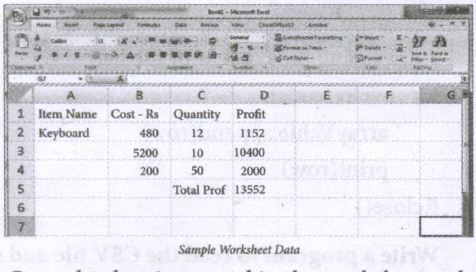
Once the data is entered in the worksheet, select File ⟶ Save As option, and for the "Save as type option" select CSV (Comma delimited) or type the file name along with extension .csv.
25.
(i) SQLite is a simple relational database system, which saves its data in regular data files or even in the internal memory of the computer.
(ii) It is designed to be embedded in applications, instead of using a separate database server program such as MySQL or Oracle.
Advantages:
SQLite is fast, rigorously tested, and flexible, making it easier to work.
Python has a native library for SQLite.
26.
Program: To read a csv file with comma (,)
#importing csv
import csv
#opening the csv file which is in different location with read mode
with open('c:\\Pyprg\ \sample1.csv', 'r') as F:
#other way to open the file is
f=('C:\\pyprg\\sample1.csv', 'r')
reader = csv.reader(F))
#printing each line of the Data row by row.
print (row)
F. close( )
Output:
['SNO','NAME', 'CITY']
['12101', 'RAM', 'CHENNAI']
['12102', 'LAVANYA' "TIRUCHY']
['12103', 'LAKSHMAN', 'MADURAI']
27.
The DEFAULT constraint is used to assign a default value for the field. When no value is given for the specified field having DEFAULT constraint, automatically the default value will be assigned to the field.
Example showing DEFAULT Constraint in the student table:
CREATE TABLE Student
(
Admno integer NOT NULL PRIMARY KEY,
Name char(20)NOT NULL,
Gender char(1),
Age integer DEFAULT = "17", ⟶ Default Constraint
Place char(10),
);
28.
Data query language: The Data Query Language consist of commands used to query or retrieve data from a database. One such SQL command in Data Query Language is
Select - It displays the records from the table.
29.
(i) Data are raw facts stored in a computer. A data may contain any character, text, word or a number.
(ii) Information is formatted data, which allows to be utilized in a significant way.
30.
The most widely used scripting languages are JavaScript, VBScript, PHP, Perl, Python, Ruby, ASP and Tcl.
31.
Python programming language has four collections of data types such as List, Tuples, Set and Dictionary.
32.
(i) The theoretical difference between the two is that scripting languages do not require the compilation step and are rather interpreted.
(ii) For example, normally, a C++ program needs to be compiled before running whereas, a scripting language like JavaScript or Python need not be compiled.
(iii) A scripting language requires an interpreter while a programming language requires a compiler.

12th Standard Syllabus & Materials
12th Standard
TN 12th Computer Applications வலையமைப்பு வடமிடல் Sample Question Papers Study Material - QB365 Set A
NEW12th Standard
TN 12th Computer Applications களப்பெயர் முறைமை (DNS) Sample Question Papers Study Material - QB365 Set A
NEW12th Standard
TN 12th Computer Applications வலையமைப்பு எடுத்துக்காட்டுகள் மற்றும் நெறிமுறைகள் Sample Question Papers Study Material - QB365 Set A
NEW12th Standard
TN 12th Computer Applications கணினி வலையமைப்பு ஓர் அறிமுகம் Sample Question Papers Study Material - QB365 Set A



Tamilnadu Stateboard 12th Standard Subjects

Maths

Chemistry

Physics

Biology
Computer Science

Business Maths and Statistics

Economics

Commerce

Accountancy

History

Computer Applications
Biology
Computer Technology
Computer Applications
Computer Science
Business Maths and Statistics
Commerce
Economics
Maths
Chemistry
Physics
Computer Technology
History
Accountancy

Tamil

English

French
Tamilnadu Stateboard Standards
