100% FREE ACCESS
12th Standard Syllabus & Materials
12th Standard
TN 12th Maths Applications of Matrices and Determinants Sample Question Papers Study Material - QB365 Set A
NEW12th Standard
TN 12th Computer Applications மின்னணு தரவு பரிமாற்றம் Sample Question Papers Study Material - QB365 Set A
NEW12th Standard
TN 12th Computer Applications மின் - வணிக பாதுகாப்பு அமைப்புகள் Sample Question Papers Study Material - QB365 Set A
NEW12th Standard
TN 12th Computer Applications மின்னணு செலுத்தல் முறைகள் Sample Question Papers Study Material - QB365 Set A
NEW12th Standard
TN 12th Computer Applications மின் - வணிகம் Sample Question Papers Study Material - QB365 Set A
NEW12th Standard
TN 12th Computer Applications திறந்த மூல கருத்துருக்கள் Sample Question Papers Study Material - QB365 Set A

Published on: 01/10/2020
12th Standard Computer Science English Medium Sample 5 Mark Book Back Questions (New Syllabus 2020)
Download Tamil Nadu 12th Standard Computer Science question papers, model tests, one-mark questions, important questions, and public exam papers in PDF format. Free study materials and answer keys for TN State Board students.
Questions + Answers key
Take MCQ Computer Science Test
1.
Explain the various buttons in a matplotlib window.
2.
Consider the following table Supplier and item .Write a python script for (i) to (ii)
| SUPPLIER | ||||
| Suppno | Name | City | Icode | SuppQty |
| S001 | Prasad | Delhi | 1008 | 100 |
| S002 | Anu | Bangalore | 1010 | 200 |
| S003 | Shahid | Bangalore | 1008 | 175 |
| S004 | Akila | Hydrabad | 1005 | 195 |
| S005 | Girish | Hydrabad | 1003 | 25 |
| S006 | Shylaja | Chennai | 1008 | 180 |
| S007 | Lavanya | Mumbai | 1005 | 325 |
i) Display Name, City and Itemname of suppliers who do not reside in Delhi.
ii) Increment the SuppQty of Akila by 40
3.
Write in brief about SQLite and the steps used to use it.
4.
5.
Tabulate the different mode with its meaning.
6.
Construct the following SQL statements in the student table-
(i) SELECT statement using GROUP BY clause.
(ii) SELECT statement using ORDER BY clause.
7.
Explain the different types of relationship mapping.
8.
What is nested tuple? Explain with an example.
9.
Explain about string operators in python with suitable example.
10.
Explain the scope of variables with an example.
11.
Write a detail note on if..else..elif statement with suitable example.
12.
Discuss about Linear search algorithm.
13.
Explain input() and print() functions with examples.
14.
Explain the types of scopes for variable or LEGB rule with example.
15.
What is a List? Why List can be called as Pairs. Explain with suitable example.
16.
What are called Parameters and write a note on
(i) Parameter without Type
(ii) Parameter with Type
1.
(i) Home Button \(\rightarrow \) The Home Button will help one to begun navigating the chart. If you ever want to return back to the original view, you can click on this.
(ii) Forward/Back buttons \(\rightarrow \) These buttons can be used like the Forward and Back buttons in browser. Click these to move back to the previous point you were at, or forward again.
(iii) Pan Axis \(\rightarrow \) This cross-looking button allows you to click it, and then click and drag graph around.
(iv) Zoom \(\rightarrow \) The Zoom button lets you click on it, then click and drag a square would like to zoom into specifically. Zooming in will require a left click and drag. Zoom out with a right click and drag.
(v) Configure Subplots\(\rightarrow \) This button allows you to configure various spacing options with figure and plot.
(vi) Save Figure \(\rightarrow \)This button will allow you to save figure in various forms
2.
(i) Program to Display Name, city and Item Name of suppliers who do not reside in Delhi:
import mysqldb
db = mysqlkdb.Connect ("Supplier.db")
cursor = db.cursor()
cursor. execute ("'SELECT NAME, CITY, ICode FROM Supplier WHERE CITY <> "Delh")
db. commit()
result=cursor.fetchall()
print ("result, sep = "\n")
db. close()
(ii) Program to Increment the suppQty of Akila by 40:
import mysqldb
db = mysqldb.Connect ("ltem.db"')
cursor = db.cursor()
cursor. execute ("UPDATE Item SET Name = 'Akila' WHERE SuppQty = 235)
db. commit()
cursor. execute ("SELECT * FROM Item")
result = cursor.fetchall()
print ("result, sep ="\n")
db. close()
3.
(i) SQLite is a simple relational database system, which saves its data in regular data files or even in the internal memory of the computer.
(ii) It is designed to be embedded in applications, instead of using a separate
database server program such as MySQL or Oracle.
(iii) SQLite is fast, rigorously tested, and flexible, making it easier to work. Python
has a native library for SQLite.
To use SQLite,
Step 1: import sqlite3
Step 2: create a connection using connect() method and pass the name of the database file
Step 3: Set the cursor object cursor = connection. cursor()
(iv) Connecting to a database in step 2 means passing the name of the database to be accessed. If the database already exists the connection will open the same. Otherwise, Python will open a new database file with the specified name.
(v) Cursor in step 3 is a control structure used to traverse and fetch the records of the database.
(vi) Cursor has a major role in working with Python. All the commands will be executed using cursor object only.
(vii) To create a table in the database, create an object and write the SQL command in it.
Example: sql_comm = "SQL statement"
(viii) For executing the command use the cursor method and pass the required sql command as a parameter. Many number of commands can be stored in the sql comm and can be executed one after other.
(ix) Any changes made in the values of the record should be saved by the commend "Commit" before closing the "Table connection" .
4.
5.
| Python file modes | Description |
|---|---|
| 'r' | open a file for reading (default) |
| 'w' | Open a file for writing. Creates a new file if it does not exist or truncates the file if it exists. |
| 'x' | Open a file for exclusive creation. If the file already exists, the operation fails. |
| 'a' | Open for appending at the end of the file without truncating it. Creates a new file if it does not exist. |
| 't' | Open in text mode. default |
| 'b' | Open in binary mode. |
| '+' | Open a file for updating (reading and Writing) |
6.
1. SELECT * FROM student WHERE gender = Male GROUP BY gender;
2. SELECT * FROM student WHERE Age > 18 ORDER BY DESC;
7.
Types of relationships:
(i) One-to-One Relationship
(ii) One-to-Many Relationship
(iii) Many-to-One Relationship
(iv) Many-to-Many Relationship
(i) One-to-One Relationship:
In One-to-One Relationship, one entity is related with : only one other entity. One row in a table is linked with only one row in another table and vice versa.
For example: A student can have only one exam number

(ii) One-to-Many Relationship.
In One-to- Many relationship, one entity is related to many other entities. One row in a table A is linked to many rows in a table B, but one row in a table B is linked to only one row in table A.
For example: One Department has many staff members.
.JPG)
(iii) Many-to-One Relationship:
In Manyto- One Relationship, many entities can be related with only one in the other entity.
For example:
A number of staff members working in one Department.
Multiple rows in staff members table is related with only one row in Department table.
.JPG)
(iv) Many-to-Many Relationship:
A manyto- many relationship occurs when multiple records in a table are associated with multiple records in another table.
(i) Example 1:
Customers and Product
Customers can purchase various products and Products can be purchased by many customers
(ii) Example 2:
Students and Courses
A student can register for many Courses and a Course may include many students
(iii) Example 3:
Books and Student.
Many Books in a Library are issued to many students.
.JPG)
8.
In Python, a tuple can be defined inside another tuple; called Nested tuple. In a nested tuple, each tuple is considered as an element. The for loop will be useful to access all the elements in a nested tuple.
Example:
Toppers = (("Vinodini", "XII-F", 98.7), ("Soundarya", "XII-H", 97.5),
("Tharani", "XII-F", 95.3), ("Saisri", "XII-G", 93.8))
for i in Toppers:
print(i)
Output:
('Vinodini', 'XII-F', 98.7)
('Soundarya', 'XII-H', 97.5)
('Tharani', 'XII-F', 95.3)
('Saisri', 'XII-G', 93.8)
9.
String Operators:
Python provides the following operators for string operations. These operators are useful to manipulate string.
(i) Concatenation (+):
Joining of two or more strings is called as Concatenation. The plus (+) operator is used to concatenate strings in python.
Example:
>>> "welcome" + "Python"
'welcome python'
(ii) Append (+ =):
Adding more strings at the end of an existing string is known as append. The operator += is used to append a new string with an existing string.
Example:
>>> str1 = "welcome to"
>>> str1 + = "Learn Python"
>>> print (str1)
Welcome to Learn Python
(iii) Repeating (*):
The multiplication operator (*) is used to display a string in multiple number of times.
Example:
>>> str1= "welcome "
>>> print (str1 *4)
Welcome Welcome Welcome Welcome
(iv) String slicing:
Slice is a substring of a main string.
A substring can be taken from the original string by using [ ] operator and index or subscript values. Thus [ ] is also known as slicing operator. Using slice operator, we have to slice one or more substrings from a main string.
General format of slice operation:
str[start:end]
Where start is the beginning index and end is the last index value of a character in the string. Python takes the end value less than one from the actual index specified.
Example: I
Slice a single character from a string
>>>str 1 = "THIRUKKURAL"
>>>print (str 1 [0])
T
(v) Stride when slicing string:
Example :
>>>str1 = "Welcome to learn python"
>>>print(str1[::-2])
Output :
nhy re teolW
10.
Scope of variable refers to the part of the program, where it is accessible, i.e., area where the variables refer (use). The scope holds the current set of variables and their values. The two types of scopes-local scope and global scope.
Local Scope: A variable declared inside the function's body is known as local variable.
Rules of local variable:
(i) A variable with local scope can be accessed only within the function that it is created in.
(ii) When a variable is created inside the function the variable becomes local to it.
(iii) A local variable only exists while the function is executing.
(iv) The formal parameters are also local to function.
(v) Example: Create a Local Variable
def loc():
y=0 # local scope
print(y)
loc()
Output:
0
Global Scope: A variable, with global scope can be used anywhere in the program. It can be created by defining a variable outside the scope of any function.
Rules of global Keyword:
The basic rules for global keyword in Python are:
(i) When we define a variable outside a function, it's global by default. You don't have to use global keyword.
(li) We use global keyword to modify the value of the global variable inside a function.
(iii) Use of global keyword outside a function has no effect.
Example: Accessing global Variable From Inside a Function
c = 1 # global variable
def add():
print(c)
add()
Output:
1
11.
Nested if..elif..else statement :
(i) When we need to construct a chain of if statement(s) then 'elif' clause can be used instead of 'if else'.
(ii) Syntax:
if < condition - 1>:
statements-block 1
elif < condition - 2>:
statements-block 2
else:
statements-block n
(iii) In the syntax of if..elif ..else mentioned above, condition -1 is tested if it is true then statements-block 1 is executed, otherwise, the control checks condition-2, if it is true statements-block 2 is executed and even if it fails statements-block n mentioned in else part is executed.
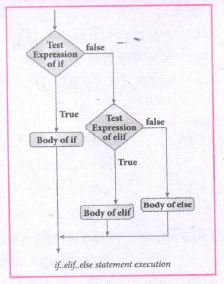
(iv) 'elif' clause combines if..else-if ..else statements to one if..elif ... else. 'elif' can be considered to be abbreviation of 'else if'. In an 'if' statement there is no limit of 'elif' clause that can be used, but an 'else' clause if used should be placed at the end.
(v) Example: # Program to illustrate the use of nested if statement
| Average | Grade |
| > = 80 and above | A |
| > = 70 and < 80 | B |
| > = 60and < 70 | C |
| > = 50 and < 60 | D |
| Otherwise | E |
m1 = int (input("Enter mark in first subject:"))
m2 = int (input("Enter mark in second subject:"))
avg = (m1+m2)/2
if avg > =80:
print ("Grade : A")
elif avg > =70 and avg < 80:
print ("Grade : B")
elif avg > =60 and avg < 70:
print ("Grade : C")
elif avg > =50 and avg < 60:
print ("Gradec: D")
else:
print("Grade : E")
Output 1:
Enter mark in first subject : 34
Enter mark in second subject : 78
Grade : D
Output 2:
Enter mark in first Subject : 67
Enter mark in second subject : 73
Grade: B
12.
(i) Linear search also called sequential search is a sequential method for finding a particular value in a list.
(ii) This method checks the search element with each element in sequence until the desired element is found or the list is exhausted. In this searching algorithm, list need not be ordered.
procedure :
1. Traverse the array using for loop
2. In every iteration, compare the target search key value with the current value of the list.
(i) If the values do not match, move on to the next array element.
(ii) If the values match, display the current index and value of the array.
3. If no match is found, display the search element not found.
(iii) To search the number 25 in the array given below, a linear search will go step by step in a sequential order starting from the first element in the given array if the search element is found that index is returned otherwise the search is continued till the last index of the array. In this example number 25 is found at index number 3.
| index | 0 | 1 | 2 | 3 | 4 |
| values | 10 | 12 | 20 | 25 | 30 |
Example 1:
Input: values[] = {5, 34, 65, 12, 77, 35)
target = 77
Output: 4
Example 2:
Input: values[] = [101, 392, 1, 54, 32, 22, 90, 93) target = 200
Output: -1 (not found)
13.
1. The print () Function:
ln Python, the print() function is used to display result on the screen. The syntax for print ( ) is as follows:
Example:
print ("String to be displayed as output")
print (variable)
print ("String to be displayed as output", variable)
print ("String1", variable, "string 2", variable, "String 3",....)
Example:
>>> print("Welcome to python Programming'")
welcome to Python Programoming
>>>x = 5
>>> y = 6
>>> z= X+Y
>>> print (z)
>>> print ("The sum =", z)
The sum = 11
>>>print ("The sum of", x, "and", y, "is", z)
The sum of 5 and 6 is 11.
The print () evaluates the expression before printing it on the monitor. The print () displays an entire statement which is specified within print(). Comma(,) is used as a separator in print () to print more than one item.
input () function:
In Python, input) function is used to accept data as input at run time. The syntax for input () function is
Syntax:
Variable = input ("prompt String')
Where, prompt string in the Syntax is a statement or message to the user, to knowwhat input can be given.
If a prompt string is used, it is displayed on the monitor; the user can provide expected data from the input device. The input() takes whatever is typed from the Keyboard and stores the entered data in the given Variable. If prompt string is not given in input() no message is displayed on the screen, then, the user will not know what is to be typed as input.
Example 1:
input () with prompt String
>>>City=input ("Enter your city:")
Enter your city: Madurai
>>>print ("I am from", city)
I am from Madurai
Example 2:
input() without prompt string
>>> city = input ()
Rajarajan
>>>print ("I am from", city)
I am from Rajarajan
in Example 2, the input () is not having any pronmpt string, thus the user will not know what is to be typed as input. If the user inputs irrelevant data as given in the above example then the output will be unexpected. So, to make your program more interactive, provide prompt string with input (). The input () accepts all data as string or characters but not as numbers. Ifa numerical value is entered, the input values should be explicitly converted into numeric data type. The int) function is used to convert string data as integer data explicitly.
Example 3:
X=int (input ("Enter Number 1:"))
Y= int (input ("Enter Number 2:" ))
print ("The Sum =", x + y)
Output:
Enter Number 1: 34
Enter Number 2:56
The Sum =90.
14.
Types of Variable Scope:
There are 4 types of Variable Scope, let's discuss them one by one:
Local Scope:
(i) Local scope refers to variables defined in current function. Always, a function will first look up for a variable name in its local scope. Only if it does not find it there, the outer scopes are checked.
Look at this example
| 1. Disp(): 2. a:=7 3. print a 4. Disp() |
Entire program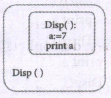 |
Output of the Program 7 |
(ii) On execution of the above code the variable a displays the value 7, because it is defined and available in the local scope.
Global Scope:
(i) A variable which is declared outside of all the functions in a program is known as global variable.
(ii) This means, global variable can be accessed inside or outside of all the functions in a program.
Example:
| 1. a:=10 2. Disp(): 3. a:=7 4. print a 5. Disp() 6. print a |
Entire program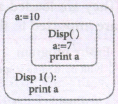 |
Output of the Program 7 10 |
(iii) On execution of the above code the variable 'a' which is defined inside the function displays the value 7 for the function call Disp() and then it displays 10; because a is defined in global scope.
Enclosed Scope:
(i) All programming languages permit functions to be nested. A function (method) with in another function is called nested function.
(ii) A variable which is declared inside a function which contains another function definition with in it, the inner function can also access the variable of the outer function. This scope is called enclosed scope.
(iii) When a compiler or interpreter search for a variable in a program, it first search Local, and then search Enclosing scopes. Consider
the following example:
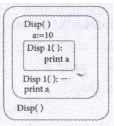
| 1. Disp(): 2. a:=10 3. Disp1() 4. print a 5. Disp1() 6. print a 7. Disp() |
Entire Program |
Output of the Program 10 10 |
(iv) In the above example Disp1( ) is defined with in Disp( ). The variable 'a' defined in Disp( ) can be even used by Disp1( ) because it is also a member of Disp( ).
Built-in Scope:
(i) The built-in scope has all the names that are pre-loaded into the program scope when we start the compiler or interpreter.
(ii) Any variable or function which is defined in the modules of a programming language has Built-in or module scope. They are loaded as soon as the library files are imported to the program.Consider the following example.
  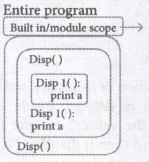 |
Library files associated with the software |
LEGB rule :
The LEGB rule is used to decide the order in which the scopes are to be searched
for scope resolution. The scopes are listed below in terms of hierarchy (highest to
lowest).
.png)
15.
List :
(i) List is constructed by placing expressions within square brackets separated by commas. Such an expression is called a list literal. List can store multiple values. Each value can be of any type and can even be another list.
Example for List [10, 20].
(ii) The elenments of a list can be accessed in two ways. The first way is via our familiar method of multiple assignment, which unpacks a list into its elements and binds each elenment to a different name.
Ist := [10, 20]
x, y = lst
(iii) In the above example x will become l0 and y will become 20. A second method for accessing the elements in a list is by the element selection operator.
(iv) Unlike a list literal, a square-brackets expression directly following another expression does not evaluate to a list value, but instead selects an element from the value of the preceding expression.
lst [0]
10
Ist [1]
20
(v) In both the example mentioned above mathematically we can represent list similar to a set.
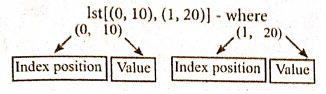
Pair :
Any way of bundling two values together into one can be considered as a pair. Lists are a common methodto do so. Therefore List can be called as Pairs.
16.
Parameters and arguments:
Parameters are the variable in a function definition and arguments are the values which are passed to a function definition
(i) Parameter without Type: Let us see an example of a function,definition :
(requires: b >=0 )
(returns: a to the power of b)
let rec pow a b:=
if b=0 then 1
else a*powa(b-1)
(i) In the above function definition variable 'b' is the parameter and the value which is passed to the variable 'b' is the argument. The precondition (requires) and postcondition (returns) of the function is given.
(ii) Note we have not mentioned any types (data types). Some language computer solves this type (data type) inference problem algorithmically, but some require the type to be mentioned.
(iii) In, the above function deinition if expression can return 1 in the then branch, shows that as per the typing rule the entire if expression has type int
(iv) Since the if expression is of type 'int', the function's return type also be int. 'b' is compared to 0 with the equality operator. so 'b' is also a type of int: Since 'a' is multiplied with another expression using the operator, 'a' must be an int.
(ii) Parameter with Type: Now let us write the same function definition with types for some reasons:
(requires: b > 0 )
(returns: a to the power of b )
let rec pow (a:int) (b:int): int :=
if b=0 then 1
n else a * pow b (a-1)
(i) When we write the type annotations for ‘a’ and ‘b’ the parentheses are mandatory. Generally, we can leave out these annotations, because it's simpler to let the compiler infer them.
(ii) There are times we may want to explicitly write down types. This is useful on times when you get a type error from the compiler that doesn't make sense. Explicitly annotating the types can help with debugging such an error message.
(iii) The syntax to define functions is close to the mathematical usage: the definition is introduced by the keyword let followed by the name of the function and its arguments; then the formula that computes the image of the argumentis written atter an := sign. If you want to define a recursive function: use "let rec" instead of "let"
Syntax:The syntax for function detinitions: let irec fn al a2 ... an := k
(iv) Here the 'fn' is used as a function name. The nanmes 'a1' to 'an'are variables used as parameters. The keyword 'rec' is required if 'fn' is to be a recursive function; otherwise it may be omitted.

12th Standard Syllabus & Materials
12th Standard
TN 12th Computer Applications வலையமைப்பு வடமிடல் Sample Question Papers Study Material - QB365 Set A
NEW12th Standard
TN 12th Computer Applications களப்பெயர் முறைமை (DNS) Sample Question Papers Study Material - QB365 Set A
NEW12th Standard
TN 12th Computer Applications வலையமைப்பு எடுத்துக்காட்டுகள் மற்றும் நெறிமுறைகள் Sample Question Papers Study Material - QB365 Set A
NEW12th Standard
TN 12th Computer Applications கணினி வலையமைப்பு ஓர் அறிமுகம் Sample Question Papers Study Material - QB365 Set A



Tamilnadu Stateboard 12th Standard Subjects

Maths

Chemistry

Physics

Biology
Computer Science

Business Maths and Statistics

Economics

Commerce

Accountancy

History

Computer Applications
Biology
Computer Technology
Computer Applications
Computer Science
Business Maths and Statistics
Commerce
Economics
Maths
Chemistry
Physics
Computer Technology
History
Accountancy

Tamil

English

French
Tamilnadu Stateboard Standards