
 100% FREE ACCESS
12th Standard Syllabus & Materials
12th Standard
TN 12th Computer Applications மின்னணு தரவு பரிமாற்றம் Sample Question Papers Study Material - QB365 Set A
NEW12th Standard
TN 12th Computer Applications மின் - வணிக பாதுகாப்பு அமைப்புகள் Sample Question Papers Study Material - QB365 Set A
NEW12th Standard
TN 12th Computer Applications மின்னணு செலுத்தல் முறைகள் Sample Question Papers Study Material - QB365 Set A
NEW12th Standard
TN 12th Computer Applications மின் - வணிகம் Sample Question Papers Study Material - QB365 Set A
NEW12th Standard
TN 12th Computer Applications திறந்த மூல கருத்துருக்கள் Sample Question Papers Study Material - QB365 Set A
NEW12th Standard
TN 12th Computer Applications வலையமைப்பு வடமிடல் Sample Question Papers Study Material - QB365 Set A

Published on: 01/10/2020
12th Standard Computer Science English Medium Sample 5 Mark Creative Questions (New Syllabus 2020)
Download Tamil Nadu 12th Standard Computer Science question papers, model tests, one-mark questions, important questions, and public exam papers in PDF format. Free study materials and answer keys for TN State Board students.
Questions + Answers key
Take MCQ Computer Science Test
1.
Explain ALTER command in detail.
2.
Write a python program to print the following pattern
*
**
***
****
*****
3.
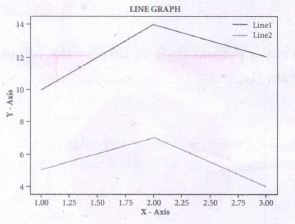
Write s python code to display to following plot.
Program
4.
Explain different types arguments used in python with an example.
5.
Write a python program to execute the following C++ program
To implement Multilevel Inheritance:
// C++ program to implement Multilevel Inheritance
// Now select File ⟶New in Notepad and type the C++ program
c++ Program.
#include < iostream >
using namespace std;
// base class
class Vehicle
{
public:
Vehicle ( )
{
cout<< "This is a Vehicle" << endl;
}
};
class threeWheeler: public Vehicle
{ public:
three Wheeler ( )
{
cout << "Objects with 3 wheels are vehicles" << endl;
}
};
// sub class derived from two base classes
class Auto: public threeWheeler{
public:
Auto ( )
{
cout<< "Auto has 3 Wheels"<< endl;
};
// main function
int main ( )
{
//creating object of sub class will invoke the constructor of base classes
Auto obj;
return 0;
}
// Save this file as inheri_cpp.cpp
6.
Write a python program to execute the following C++ program.
/*. To check whether the number is palindrome or not using while Ioop.*/
// Now select File →New in Notepad and type the C++ program
#include < iostream >
using namespace std;
intmain ( )
{
int n, num, digit, rev = 0;
cout<< "Enter a positive number: ";
cin >>num;
n= num;
while(num)
{digit = num % 10;
rev = (rev * 10) + digit;
num = num / 10; }
cout<< "The reverse of the number is: " << rev <<endl;
if(n == rev)
cout< < "The number is a palindrome";
else
cout << "The number is not a palindrome";
return 0;
}
// Save this file as pali_cpp.cpp
7.
Write a program to check and print if the given number is negative or positive using class.
8.
Write a program in python to display he following output.
1
2 2
3 3 3
4 4 4 4
5 5 5 5 5
9.
Write a program in python to display the following output.
1
1 2
1 2 3
1 2 3 4
1 2 3 4 5
10.
Write a program to read CSV file with user Defined Delimiter into a Dictionary.
11.
Write a program to read a specific column in a CSV file.
12.
Write a program to create a list of numbers in the range 1 to 10. Then delete all the even numbers from the list and print the final list.
13.
Write a program to create a list of numbers in the range 1 to 10. Then delete all the odd numbers from the list and print the final list.
14.
Differentiate Algorithm and program
15.
Explain the concept access control.
1.
ALTER Command:
(i) The ALTER command is used to alter the table structure like adding a column, renaming the existing column, change the data type of any column or size of the column or delete the column from the table. It is used in the following way:
(ii) ALTER TABLE <table-name>
(iii) To add a new column "Address" of type 'char' to the Student table, the command is used as
(iv) ALTER TABLE Student ADD Address char;
To modify, existing column of table, the ALTER TABLE command can be used with MODIFY clause like wise:
(v) ALTER < table-name > MODIFY < column-name > < data type > < size >;
ALTER TABLE Student MODIFY Address char (25);
(vi) The above command will modify the address column of the Student table to now hold 25 characters.
(vii) The ALTER command can be used to rename an existing column in the following way:
(viii) ALTER < table-name > RENAME old-column- name TO new-column-name;
(ix) For example to rename the column Address to City, the command is used as :
(x) ALTER TABLE Student RENAME Address TO City;
(xi) The ALTER command can also be used to remove a column or all columns. for example to remove a particular column, the DROP COLUMN is used with the ALTER TABLE to remove a particular field, the command can be used as:
ALTER < table-name > DROP COLUMN < column-name >;
(xii) To remove the column City from the Student table, the command is used as :
ALTER TABLE Student DROP COLUMN City;
2.
strl=' * '
i=1
while i< = 5:
print (strl*i)
i+=1
3.
Program:
import matplotlib.pyplot as plt
x = [1,2,3]
Y = [5,7,4]
x2 = [1,2,3]
y2 = [10,14,12]
plt.plot(x, y, Iabel='Line 1')
plt.plot(x2, y2, Iabel='Line 2')
pIt.xlabel('X -Axis')
pIt.yIabel('Y- Axis')
pIt.title('LINE GRAPH')
plt.legend ( )
plt.show ( )
4.
(i) Required Arguments:
"Required Arguments" are the arguments passed to a function in correct positional order. Here, the number of arguments in the function call should match exactly with the function definition. Atleast one parameter to prevent syntax errors to get the required output.
(ii) Example:
def printstring(str):
print ("Example - Required arguments")
print (str)
return
# Now you can call printstring() function
printstring ("Welcome")
Output:
Example - Required arguments
Welcome
(iii) When the above code is executed, it produces the following error.
Traceback (most recent call last):
File "Req-arg.py", line 10, in
printstring()
TypeError: printstring() missing 1 required positional argument: 'str'
(iv) Instead of printstring() in the above code if we use printstring ("Welcome") then the output is
Output:
Example - Required arguments
Welcome
Keyword Arguments:
Keyword arguments will invoke the function after the parameters are recognized by their parameter names. The value of the keyword argument is matched with the parameter name and so, one can also put arguments in improper order (not in order).
(ii) Example:
def printdata (name):
print ("Example-1 Keyword arguments")
print ("Name :":name)
return
# Now you can call printdatat() function
printdata(name = "Gshan")
(iii) When the above code is executed, it produces the following output:
Output:
Example-1 Keyword arguments
Name:Gshan
Default Arguments:
In Python the default argument is an argument that takes a default value if no value is provided in the function call. The following example uses default arguments, that prints default salary when no argument is passed.
Example:
def printinfo( name, salary = 3500):
print ("Name: ", name)
print ("Salary: ", salary)
return
printinfo("Mani")
(iii) When the above code is executed, it produces the following output
Output:
Name: Mani
Salary: 3500
(iv) When the above code is changed as print info("Ram,":2000) it produces the following output:
Output:
Name: Ram
Salary: 2000
Syntax - Variable-Length Arguments:
(i) def function_name(*args):
function_body
return_statement
(ii) Example:
def printnos (*nos):
for n in nos:
print(n)
return
# now invoking the printnos() function
print ('Printing two values')
printnos (1,2)
print ('Printing three values')
printnos (10,20,30)
Output:
Printing two values
1
2
Printing three values
10
20
30
5.
//Now select File ➝ New in Notepad and type the Python program
# Save the File as classpy.py
# Python classpy.py -i inheri_cpp command to execute c++ program
Python Program:
import sys, os, getopt
def main (argv):
cpp_file ="
exe_file ="
opts.args= getopt.getopt (argv, "i:",['ifile='])
for o, a in opts:
1ifile. ("'-"1", --ifile"):
cpp_file = a + '.cpp'
exe_file = a + '.exe'
run (cppfile, exe_file)
def run(cpp_file, exe_file):
print ("Compiling" + cpp_file)
os.system ('g++ ' + cpp_file + '-o' + exe_file)
print ("Running" + exe_file)
print ("------------------- ")
print
os.system (exe_file)
print
if __name__ =='__main__"
main (sys.argv[1:])
6.
# Save the File as pali.py . Program that compiles and executes a .cpp file
# Python c:\pyprg\pali.py -i c:\pyprg\pali_cpp import sys, os, getopt
def main(argv):
cpp_file ="
exe_file = "
opts, args= getopt.getopt(argv, "i:",['ifile='])
for o, a in opts:
if o in ("-i", "--ifile"):
cpp_file = a + '.cpp'
exe_file = a + '.exe'
run(cpp_file, exe_file)
def run(cpp_file, exe_file):
print("Compiling" + cpp_file)
os.system('g++' + cpp_file + '-o' + exe_file)
print("Running" + exe_file)
print("-----------------")
print
os.system(exe_file)
print
if __name__ =='__main__': # program starts executing from here
main(sys.argv[ 1:])
7.
class test;
def check (self, num)
if num> 0:
print (num, "is positive number")
else:
print (num, "is negative number")
n = test ()
x = int (input("Enter the number"))
n. check (x)
8.
for i in range (1,6):
for j in range (1, i+1)
print (i, end =' ')
print (end = '\n')
i+ = 1
9.
i=1
while (i < = 6):
for j in range (1,i):
print (j,end='\t')
print (end='\n')
i+=1
Output:
1
1 2
1 2 3
1 2 3 4
1 2 3 4 5
10.
import csv
csv.register_dialect('myDialect',delimiter = '|',skipinitialspace= True)
filename = 'c:\\pyprg\\ch13\\sample8.csv'
with open(filename, 'r') as csvfile:
reader = csv.DictReader(csvfile, dialect='myDialect')
for row in reader:
print(diet(row))
csvfile.close ( )
11.
Import csv
#opening the csv file which is in different location with read mode
f=open("c:\\pyprg\\ch13ample5.csv",'r')
#reading the File with the help of csv.reader( )
readFile=csv.reader(f)
#printing the selected column
for col in readFile:
print col[0],col[3]
f.close ( )
Sample5.csv File in Excel
12.
Program:
Num = []
for x in range(1, 11):
Num.append(x)
print("The list of numbers from 1 to 10 = ",Num)
for index, i in enumerate(Num):
if(i%2==0):
del Num[index]
print("The list after deleting even numbers = ", Num)
Output:
The list of numbers from 1 to 10 = [1, 2, 3, 4, 5, 6, 7, 8, 9, 10]
The list after deleting even numbers =. [1, 3, 5, 7, 9]
13.
Program:
n=[]
for x in range (1, 11)
n = append (x)
for x, i in enumerate (n):
if(i %2! = 0):
del n [x]
print (n)
14.
| Algorithm | Program |
|---|---|
| Algorithm helps to solve a given problem logically and it can be contrasted with the program | Program is an expression of algorithm in a programming language. |
| Algorithm can be categorized based on their implementation methods, design techniques etc | Algorithm can be implemented by structured or object oriented programming approach |
| There is no specific rules for algorithm writing but some guidelines should be followed. | Program should be written for the selected language with specific syntax |
| Algorithm resembles a pseudo code which can be implemented in any language | Program is more specific to a programming language |
15.
(i) Access control is a security technique that regulates who or what can view or use resources in a computing environment.
(ii) It is a fundamental concept in security that minimizes risk to the object.
(iii) In other words access control is a selective restriction of access to data. IN Object oriented programming languages it is implemented through access modifiers.
(iv) Classical object-oriented languages, such as C++ and Java. control the access to class members by public, private and protected keywords.
(v) Private members of a class are denied access from the outside the class. They can be handled only from within the class.
(vi) Public members (generally methods declared in a class) are accessible from outside the class. The object of the same class is required to invoke a public method. This arrangement of private instance variables and public methods ensures the principle of data encapsulation.
(vii) Protected members of a class are accessible from within the class and are also available to its sub-classes. No other process is permitted access to it. This enables specific resources of the parent class to be inherited by the child class.
(viii) Python doesn't have any mechanism that effectively restricts access to any instance variable or method. Python prescribes a convention of prefixing the name of the variable or method with single or double underscore to emulate the behaviour of protected and private access specifiers.
(ix) All members in a Python class are public by default. whereas by default in C++ and java they are private. Any member can be accessed from outside the class environment in Python which is not possible in C++ and java.

12th Standard Syllabus & Materials
12th Standard
TN 12th Computer Applications களப்பெயர் முறைமை (DNS) Sample Question Papers Study Material - QB365 Set A
NEW12th Standard
TN 12th Computer Applications வலையமைப்பு எடுத்துக்காட்டுகள் மற்றும் நெறிமுறைகள் Sample Question Papers Study Material - QB365 Set A
NEW12th Standard
TN 12th Computer Applications கணினி வலையமைப்பு ஓர் அறிமுகம் Sample Question Papers Study Material - QB365 Set A
NEW12th Standard
TN 12th Computer Applications PHP-உடன் MySQL-ஐ இணைத்தல் Sample Question Papers Study Material - QB365 Set A



Tamilnadu Stateboard 12th Standard Subjects

Maths

Chemistry

Physics

Biology
Computer Science

Business Maths and Statistics

Economics

Commerce

Accountancy

History

Computer Applications
Biology
Computer Technology
Computer Applications
Computer Science
Business Maths and Statistics
Commerce
Economics
Maths
Chemistry
Physics
Computer Technology
History
Accountancy

Tamil

English

French
Tamilnadu Stateboard Standards
