
 100% FREE ACCESS
12th Standard Syllabus & Materials
12th Standard
TN 12th Maths Applications of Matrices and Determinants Sample Question Papers Study Material - QB365 Set A
NEW12th Standard
TN 12th Computer Applications மின்னணு தரவு பரிமாற்றம் Sample Question Papers Study Material - QB365 Set A
NEW12th Standard
TN 12th Computer Applications மின் - வணிக பாதுகாப்பு அமைப்புகள் Sample Question Papers Study Material - QB365 Set A
NEW12th Standard
TN 12th Computer Applications மின்னணு செலுத்தல் முறைகள் Sample Question Papers Study Material - QB365 Set A
NEW12th Standard
TN 12th Computer Applications மின் - வணிகம் Sample Question Papers Study Material - QB365 Set A
NEW12th Standard
TN 12th Computer Applications திறந்த மூல கருத்துருக்கள் Sample Question Papers Study Material - QB365 Set A

Published on: 03/09/2019
CorelDRAW 2018
Download Tamil Nadu 12th Standard Computer Technology question papers, model tests, one-mark questions, important questions, and public exam papers in PDF format. Free study materials and answer keys for TN State Board students.
Questions + Answers key
Take MCQ Computer Technology Test
1.
How many types of Spirals are there?
5
3
2
7
2.
Which tool is used to draw a circle?
Shape tool
Ellipse tool
Rectangle tool
Crop tool
3.
Which tool is used to select an object?
Shape tool
Zoom tool
Pick tool
Crop tool
4.
Vector graphics are made of __________.
Lines and curves
only lines
pixels
None of these
5.
_____________ is a vector graphics application
PageMaker
Photoshop
CorelDRAW
MS Word
6.
What is a property bar in CorelDRAW?
7.
What is an object in CorelDRAW?
8.
Write the steps to start CorelDRAW.
9.
How to create duplication objects and Cloning objects? Write the difference between them.
10.
To correct your mistake in CorelDRAW what should you do? What is the keyboard shortcut to do it?
11.
Write the steps to draw a circle in CorelDRAW.
12.
Write the steps to draw a grid.
13.
Write the steps to draw a spiral.
1.
(c)
2
2.
(b)
Ellipse tool
3.
(c)
Pick tool
4.
(a)
Lines and curves
5.
(c)
CorelDRAW
6.
The property bar is next to Standard toolbar.
(i) It displays the most commonly used functions that are relevant to the active tool.
(ii) Even though it looks like a toolbar, the property bar content changes depending on the tool or task.
7.
An object is an element in a drawing such as an image, shape, line, text, curve, symbol, or layer.
8.
Using the Start Menu
(i) Choose Start > All Programs > CoreIDRAW Graphics Suite 2018 > CoreIDRAW 2018.
(ii) The CorelDRAW 2018 - Welcome Screen window will appear.
9.
Cloning Objects
(i) To create a clone of a selected object.
Choose Edit > Clone from the menu bar.
(ii) The clone will be offset slightly to the upper right of the original and placed on top as shown below. The new copy is automatically selected.
(iii) Cloning differs from duplication in that most changes made to the original object (the "master") are automatically applied to the clone.
10.
To specify the Undo settings
1. Choose Tools > Options in the menu bar.
2. In the Workspace list of categories, click General
3. In the Undo levels area, type a value in one or both of the following boxes:
(i) Regular - specifies the number of actions that can be reversed when you use the Undo command with vector objects.
(ii) Bitmap effects - specifies the number of actions that can be reversed when you work with bitmap effects.
The keyboard shortcut is
(i) To Undo an action, press Ctrl + Z.
11.
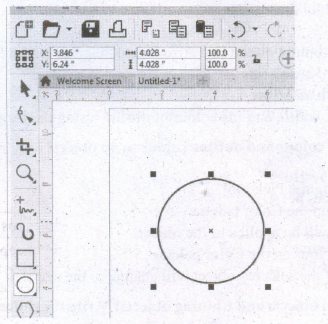
Creating Circles
(i) To draw a circle, select the Ellipse tool in the toolbox.
(ii) The mouse pointer changes to a crosshair with a small ellipse beneath it.
(iii) Click on anywhere in the drawing area and hold down the Ctrl key while dragging the mouse pointer.
(iv) Release the mouse button where you like the end of the circle.
12.
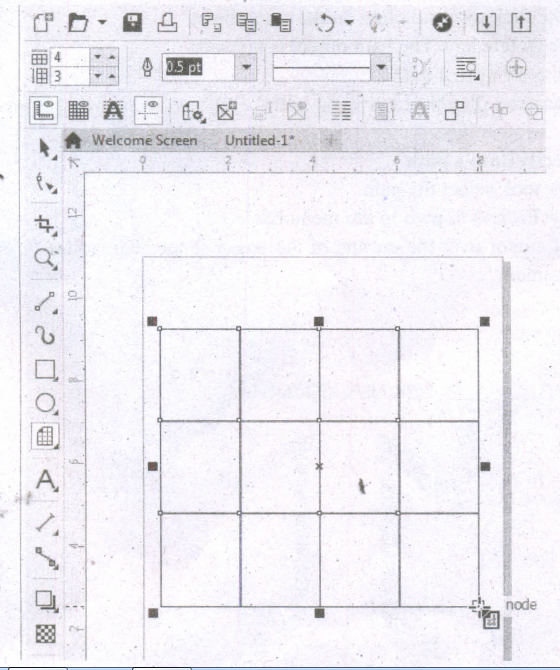
Drawing Grids
Using Graph Paper tool, you can draw a grid and set the number of rows and columns. A grid is a grouped set of rectangles that you can break apart.
To draw a grid,
1. Click and hold the Polygon tool. A flyout menu will appear.
2. Select the Graph Paper tool from the flyout menu.
3. Now type values in the top and bottom portions of the Columns and rows box on the property bar. The value you type in the top portion of the Columns and rows box specifies the number of columns; the value you type in the bottom portion specifies the number of rows.
4. Click on anywhere in the drawing area where you want the grid to appear.
5. Drag diagonally to draw the required grid.
If you want to draw the grid from its center point outward, hold down Shift key as you drag; if you want to draw a grid with square cells, hold down Ctrl key as you drag.
13.
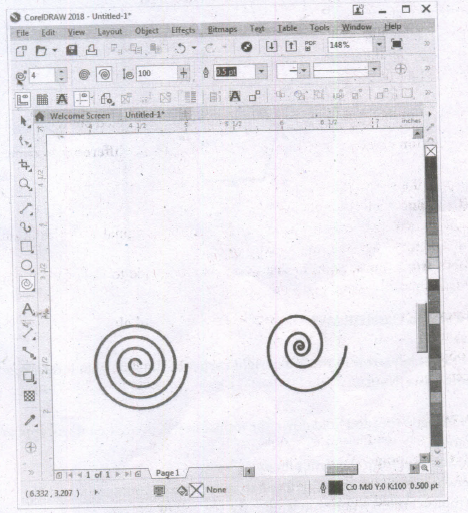
To draw a spiral,
(i) Click and hold the Polygon tool. A flyout menu will appear.
(ii) Click on the Spiral tool from the flyout menu.
(iii) Now you should type a value in the Spiral revolutions box on the property bar to set the number of full-circle revolutions to appear in the new spiral object.
(iv) Next, click one of the following buttons on the property bar:
1. Symmetrical spiral
2. Logarithmic spiral
If you want to change the amount by which the spiral expands as it moves outward, move the Spiral expansion slide. Drag diagonally in the drawing window until the spiral is the required size.

12th Standard Syllabus & Materials
12th Standard
TN 12th Computer Applications வலையமைப்பு வடமிடல் Sample Question Papers Study Material - QB365 Set A
NEW12th Standard
TN 12th Computer Applications களப்பெயர் முறைமை (DNS) Sample Question Papers Study Material - QB365 Set A
NEW12th Standard
TN 12th Computer Applications வலையமைப்பு எடுத்துக்காட்டுகள் மற்றும் நெறிமுறைகள் Sample Question Papers Study Material - QB365 Set A
NEW12th Standard
TN 12th Computer Applications கணினி வலையமைப்பு ஓர் அறிமுகம் Sample Question Papers Study Material - QB365 Set A



Tamilnadu Stateboard 12th Standard Subjects

Maths

Chemistry

Physics

Biology

Computer Science

Business Maths and Statistics

Economics

Commerce

Accountancy

History
Computer Applications
Biology
Computer Technology
Computer Applications
Computer Science
Business Maths and Statistics
Commerce
Economics
Maths
Chemistry
Physics
Computer Technology
History
Accountancy

Tamil

English

French
Tamilnadu Stateboard Standards
