
 100% FREE ACCESS
12th Standard Syllabus & Materials
12th Standard
TN 12th Computer Applications மின்னணு தரவு பரிமாற்றம் Sample Question Papers Study Material - QB365 Set A
NEW12th Standard
TN 12th Computer Applications மின் - வணிக பாதுகாப்பு அமைப்புகள் Sample Question Papers Study Material - QB365 Set A
NEW12th Standard
TN 12th Computer Applications மின்னணு செலுத்தல் முறைகள் Sample Question Papers Study Material - QB365 Set A
NEW12th Standard
TN 12th Computer Applications மின் - வணிகம் Sample Question Papers Study Material - QB365 Set A
NEW12th Standard
TN 12th Computer Applications திறந்த மூல கருத்துருக்கள் Sample Question Papers Study Material - QB365 Set A
NEW12th Standard
TN 12th Computer Applications வலையமைப்பு வடமிடல் Sample Question Papers Study Material - QB365 Set A

Published on: 05/09/2022
QB365 provides a detailed and simple solution for every Possible Creative Questions in Class 12 Computer Technology Subject - AutoCAD 2016, English Medium. It will help Students to get more practice questions, Students can Practice these question papers in addition to score best marks.
Download Tamil Nadu 12th Standard Computer Technology question papers, model tests, one-mark questions, important questions, and public exam papers in PDF format. Free study materials and answer keys for TN State Board students.
Questions + Answers key
Take MCQ Computer Technology Test
1.
What is meant by start tab?
2.
What are the two states of panel?
3.
Name the icons in quick access toolbar?
4.
What is meant by title bar?
5.
Write about the search bar?
6.
List out some of the file related commands?
7.
What is meant by application button?
8.
Name some places where the AutoCAD is used?
9.
Who are the persons use auto cad software?
10.
What do you know about Autocad 2016?
1.
(i) When you click the Start tab at any moment, you will get the AutoCAD 2016 Initial screen again.
(ii) Using it, you can start a new drawing, open an existing drawing, etc.
2.
Panels have two states-either docked or floating. By default all panels in the Ribbon are docked in their respective tab.
3.
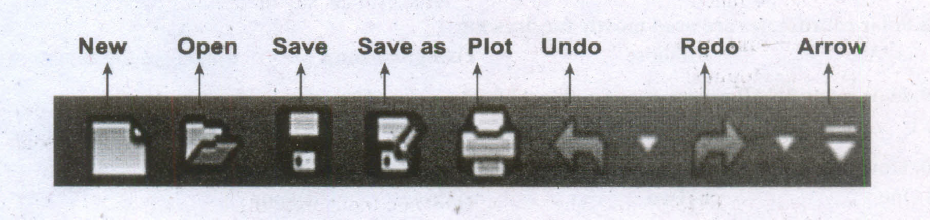
4.
The title bar contains the program name (Autodesk AutoCAD 2016) and the title of the current drawing.
5.
(i) The Search bar displays at the top of the Application menu.
(ii) It is used to search for any command.
6.
File-related commands such as
(i) creating a new file,
(ii) opening an existing file,
(iii) saving the current file, saving the current file under a new name and in a different folder,
(iv) exporting the current file to a different file format,
(v) printing and publishing the current file, etc.
7.
The Application menu appears when you click the red "A" called the Application Button.
8.
AutoCAD managers in a variety of industries, including the manufacturing, building, civil, and mapping industries.
9.
AutoCAD software is used by architects, CAD technicians, designers, engineers, project managers, and CAD.
10.
AutoCAD is a commercial Computer-Aided Design (CAD) and drafting software application. It is developed and marketed by Autodesk, Inc.

12th Standard Syllabus & Materials
12th Standard
TN 12th Computer Applications களப்பெயர் முறைமை (DNS) Sample Question Papers Study Material - QB365 Set A
NEW12th Standard
TN 12th Computer Applications வலையமைப்பு எடுத்துக்காட்டுகள் மற்றும் நெறிமுறைகள் Sample Question Papers Study Material - QB365 Set A
NEW12th Standard
TN 12th Computer Applications கணினி வலையமைப்பு ஓர் அறிமுகம் Sample Question Papers Study Material - QB365 Set A
NEW12th Standard
TN 12th Computer Applications PHP-உடன் MySQL-ஐ இணைத்தல் Sample Question Papers Study Material - QB365 Set A



Tamilnadu Stateboard 12th Standard Subjects

Maths

Chemistry

Physics

Biology

Computer Science

Business Maths and Statistics

Economics

Commerce

Accountancy

History
Computer Applications
Biology
Computer Technology
Computer Applications
Computer Science
Business Maths and Statistics
Commerce
Economics
Maths
Chemistry
Physics
Computer Technology
History
Accountancy

Tamil

English

French
Tamilnadu Stateboard Standards
