
 100% FREE ACCESS
12th Standard Syllabus & Materials
12th Standard
TN 12th Computer Applications மின்னணு தரவு பரிமாற்றம் Sample Question Papers Study Material - QB365 Set A
NEW12th Standard
TN 12th Computer Applications மின் - வணிக பாதுகாப்பு அமைப்புகள் Sample Question Papers Study Material - QB365 Set A
NEW12th Standard
TN 12th Computer Applications மின்னணு செலுத்தல் முறைகள் Sample Question Papers Study Material - QB365 Set A
NEW12th Standard
TN 12th Computer Applications மின் - வணிகம் Sample Question Papers Study Material - QB365 Set A
NEW12th Standard
TN 12th Computer Applications திறந்த மூல கருத்துருக்கள் Sample Question Papers Study Material - QB365 Set A
NEW12th Standard
TN 12th Computer Applications வலையமைப்பு வடமிடல் Sample Question Papers Study Material - QB365 Set A

Published on: 05/09/2022
QB365 provides a detailed and simple solution for every Possible Creative Questions in Class 12 Computer Technology Subject - CorelDRAW 2018, English Medium. It will help Students to get more practice questions, Students can Practice these question papers in addition to score best marks.
Download Tamil Nadu 12th Standard Computer Technology question papers, model tests, one-mark questions, important questions, and public exam papers in PDF format. Free study materials and answer keys for TN State Board students.
Questions + Answers key
Take MCQ Computer Technology Test
1.
How will you save a drawing?
2.
How will you create an ellipse?
3.
Name some flyout in shape tools?
4.
Name the shapes which can be drawn using corel draw?
5.
What is meant by flyout?
6.
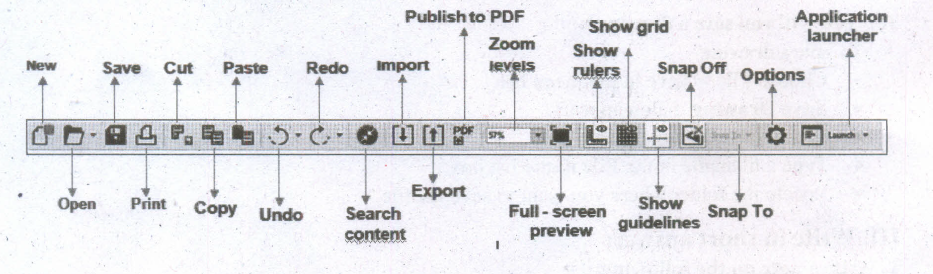
Mention the buttons and controls in standard toolbar?
7.
How will you start a corel draw using the shortcuts?
8.
Mention the any three terms in corel draw?
9.
What is meant by bitmaps?
10.
What is meant by corel draw?
1.
To save a drawing
1. Choose File > Save in the menu bar.
2. Save Drawing dialog appears.
3. In the Save Drawing dialog box.
4. Type a filename in the File name list box.
5. Locate the folder where you want to save the file.
2.
Creating ellipses
(i) To draw an ellipse (also known as an oval), select the Ellipse tool in the toolbox. The mouse pointer changes to a crosshair with a small ellipse beneath it.
(ii) Click on anywhere in the drawing area and drag the mouse pointer.
(iii) Release the mouse button where you like the end of the ellipse.
3.
1. Shape
2. Smooth
3. Smear
4. Twirl
5. Attract
6. Repel
7. Smudge
8. Roughen
4.
1. Pick tool
2. Shape tool
3. Crop tool
4. Zoom tool
5. Freehand tool
5.
The toolbox contains a range of tools that can be used for specific drawing and editing tasks.
(i) Some tools are used to draw shapes, and other tools are used to apply colors, patterns, or
(ii) fills to objects, Some tools belong to flyouts.
(iii) They are groups of related tools.
(iv) A small arrow which is in the lower right comer of a toolbox button indicates that the tool belongs to a flyout.
(v) The last-used tool in the flyout appears on the button.
6.
7.
Using the Shortcut
(i) First, locate the CorelDRAW 2018 shortcut icon. This is a colourful balloon shaped icon with CorelDRAW 2018 written beneath it.
(ii) When you find it, position the mouse over the CorelDRAW 2018 icon and double click to open the CorelDRAW 2018.
8.
Object: An object is an element in a drawing such as an image, shape, line, text, curve, symbol, or layer.
Drawing: Drawing is the work you create in CorelDRAW, for example, custom artwork, logos, posters, and newsletters.
Vector graphic: Vector graphic is an image generated from mathematical descriptions that determine the position, length, and direction in which lines are drawn.
9.
(i) Bitmaps are also known as raster images.
(ii) They are composed of small squares called pixels.
(iii) Each pixel is mapped to a location in an image and has numerical colour values.
10.
CorelDraw (styled CorelDRAW) is a vector graphics application.
(i) It is developed and marketed by Corel Corporation.
(ii) Corel Corporation is a Canadian software company.
(iii) The latest version of CorelDRAW is CorelDraw Graphics Suite 2018.
(iv) It was released in April 10, 2018.

12th Standard Syllabus & Materials
12th Standard
TN 12th Computer Applications களப்பெயர் முறைமை (DNS) Sample Question Papers Study Material - QB365 Set A
NEW12th Standard
TN 12th Computer Applications வலையமைப்பு எடுத்துக்காட்டுகள் மற்றும் நெறிமுறைகள் Sample Question Papers Study Material - QB365 Set A
NEW12th Standard
TN 12th Computer Applications கணினி வலையமைப்பு ஓர் அறிமுகம் Sample Question Papers Study Material - QB365 Set A
NEW12th Standard
TN 12th Computer Applications PHP-உடன் MySQL-ஐ இணைத்தல் Sample Question Papers Study Material - QB365 Set A



Tamilnadu Stateboard 12th Standard Subjects

Maths

Chemistry

Physics

Biology

Computer Science

Business Maths and Statistics

Economics

Commerce

Accountancy

History
Computer Applications
Biology
Computer Technology
Computer Applications
Computer Science
Business Maths and Statistics
Commerce
Economics
Maths
Chemistry
Physics
Computer Technology
History
Accountancy

Tamil

English

French
Tamilnadu Stateboard Standards
