
 100% FREE ACCESS
12th Standard Syllabus & Materials
12th Standard
TN 12th Computer Applications மின்னணு தரவு பரிமாற்றம் Sample Question Papers Study Material - QB365 Set A
NEW12th Standard
TN 12th Computer Applications மின் - வணிக பாதுகாப்பு அமைப்புகள் Sample Question Papers Study Material - QB365 Set A
NEW12th Standard
TN 12th Computer Applications மின்னணு செலுத்தல் முறைகள் Sample Question Papers Study Material - QB365 Set A
NEW12th Standard
TN 12th Computer Applications மின் - வணிகம் Sample Question Papers Study Material - QB365 Set A
NEW12th Standard
TN 12th Computer Applications திறந்த மூல கருத்துருக்கள் Sample Question Papers Study Material - QB365 Set A
NEW12th Standard
TN 12th Computer Applications வலையமைப்பு வடமிடல் Sample Question Papers Study Material - QB365 Set A

Published on: 31/12/2022
QB365 provides a detailed and simple solution for every Possible Questions in Class 12 Computer Technology Subject - Important 2 Mark English Medium. It will help Students to get more practice questions, Students can Practice these question papers in addition to score best marks.
Download Tamil Nadu 12th Standard Computer Technology question papers, model tests, one-mark questions, important questions, and public exam papers in PDF format. Free study materials and answer keys for TN State Board students.
Questions + Answers key
Take MCQ Computer Technology Test
1.
What is meant by title bar?
2.
What is meant by application button?
3.
What do you know about Autocad 2016?
4.
How to display a frame's content on the Stage, you should move the play head to that frame in the Timeline?
5.
How will you create a document?
6.
What Is Mean By Rigging?
7.
What Is Multimedia?
8.
Name the shapes which can be drawn using corel draw?
9.
What is meant by corel draw?
10.
What is meant by document window?
11.
What is meant by page layout software?
12.
What are the main components of the window?
13.
List any six keyboard shortcuts for tools in pagemaker?
14.
How do you exit AutoCAD?
15.
How do you terminate a command in progress in AutoCAD?
16.
How do you get rid of the UCS icon?
17.
Write steps to start Adobe Professional Flash CS6?
18.
List out Multimedia Production team members.
19.
List out image file formats.
20.
Classify the TEXT component in multimedia.
21.
Write the steps to ungroup a grouped object.
22.
What is an object in CorelDRAW?
23.
Write the steps to create a New Document in CorelDRAW.
24.
What is CorelDRAW used for?
25.
How do you insert a page in PageMaker?
26.
Write about the Menu bar of PageMaker
27.
How do you create a New document in PageMaker?
28.
Write the steps to open PageMaker
29.
Give some examples of DTP software
30.
What is desktop publishing?
1.
The title bar contains the program name (Autodesk AutoCAD 2016) and the title of the current drawing.
2.
The Application menu appears when you click the red "A" called the Application Button.
3.
AutoCAD is a commercial Computer-Aided Design (CAD) and drafting software application. It is developed and marketed by Autodesk, Inc.
4.
(i) Layers help you organize the artwork in your movie.
(ii) Each layer can contain a different image that appears on the Flash Stage.
(iii) To draw and edit objects on one layer without affecting objects on another layer of Timeline.
(iv) We can hide, lock, or show the contents of layers by clicking the dots in the layer under the layer option icons.
5.
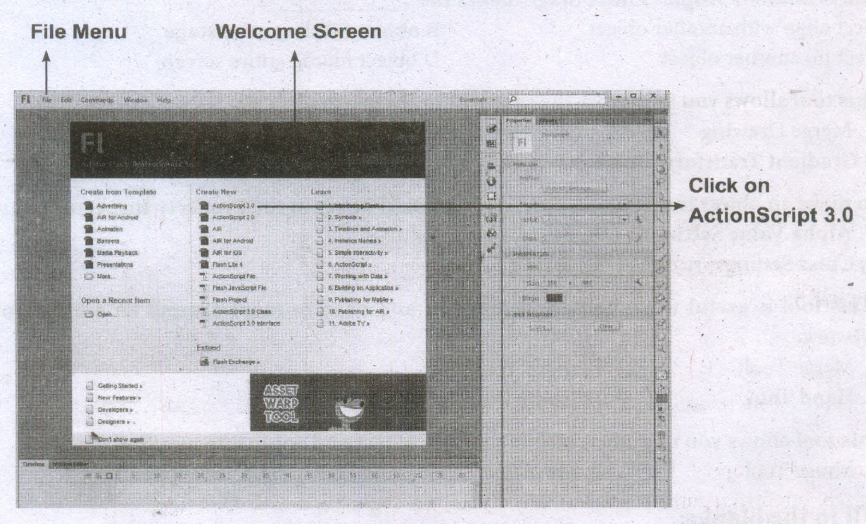
The Welcome Screen of the Flash is the launch pad for creating and opening files. It appears when Flash is first launched or when no documents are open in the application. From the Create New column in the middle of the Welcome Screen, click on Action Script 3.0.
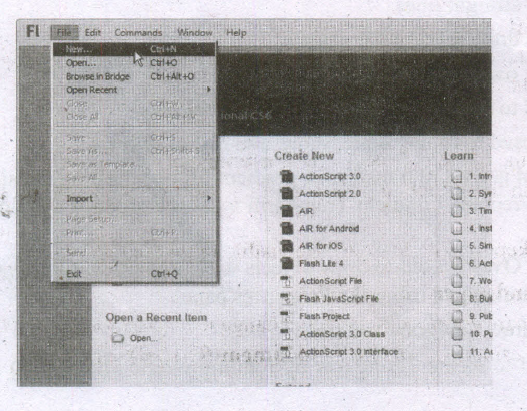
2. From the File menu, choose File> New to create a new document.
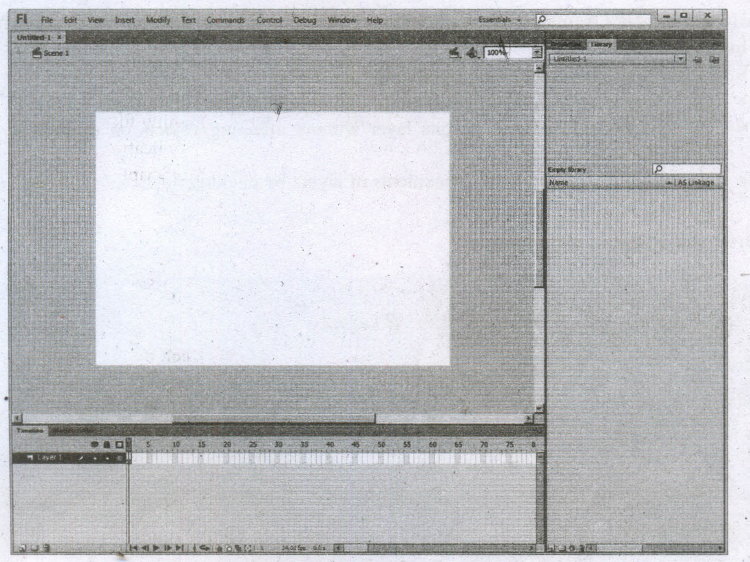
The New Document dialog box appears. Under the General tab, choose ActionScript 3.0.,and press OK to create a new document.
6.
(i) Rigging is a method of attaching bones or biped to a 'modeled character' or object in order to make them animate or 'perform' actions.
(ii) By attaching bones or biped the 'character' can walk, talk and make bodily movements.
7.
Multimedia is simply multiple forms of media integrated together. Media can be text, graphics, audio, animation, video, data, etc
8.
1. Pick tool
2. Shape tool
3. Crop tool
4. Zoom tool
5. Freehand tool
9.
CorelDraw (styled CorelDRAW) is a vector graphics application.
(i) It is developed and marketed by Corel Corporation.
(ii) Corel Corporation is a Canadian software company.
(iii) The latest version of CorelDRAW is CorelDraw Graphics Suite 2018.
(iv) It was released in April 10, 2018.
10.
(i) The document window is the central area that represents the open InDesign document.
(ii) It resembles a piece of paper and is surrounded by a black border. The black border represents the page border.
11.
lnDesign is a page layout software program used to design and produce documents that can be printed or used on the Web.
12.
The main components of the above window are Title bar, Menu bar, Toolbar, Ruler, Scroll bars and Text area .
13.
| S.No | Tools | Keyboard Shortcut |
| 1. | Pointer Tool | F9 |
| 2. | Rotating Tool | Shift+F2 |
| 3. | Line Tool | Shjift+F3 |
| 4. | Rectangle Tool | Shift+F4 |
| 5. | Ellipse Tool | Shift+F5 |
| 6. | Polygon Tool | Shift+F6 |
14.
You can close the current drawing file without actually quitting AutoCAD by choosing Close > Current Drawing from the Application Menu or by entering CLOSE at the Command prompt. To close the current opened file or all opened files,
(i) Click on the Application button. Now Application menu appears.
(ii) Move the mouse to the Close button, then select either Current Drawing to dose the current file, or All Drawings to close all the opened files in single command.
15.
By pressing ESC while an operation is in progress, it terminates the command.
16.
you can turn it off with the UCSICON command. Type the command name, and then enter the Off option, as follows:
(i) Command: ucsicon (Press ENTER.)
(ii) Enter an option [ON/OFF/All/No origin/Origin/Properties ]
17.
To start Adobe Flash Professional CS6, choose Start > All Programs > Adobe Flash Professional CS6.
18.
(i) The production team for a high end multimedia project requires a team efforts.
(ii) The team comprises of members playing various roles and responsibilities like Script writer, Production manager, Editor, Graphics Architect, Multimedia Architect and Web Master.
19.
Compression formats used for this purpose are GIF, TIFF and JPEG.
20.
(i) Text is the basic components of multimedia and most common ways of communicating information to other person.
(ii) Even though multimedia includes images, video, audio and graphics, Text is the basic components used in multimedia.
21.
To ungroup a group object
(i) Select the grouped object using the Pick tool.
(ii) Choose Object > Group > Ungroup
(iii) Objects on the menu Bar. (or)
(iv) Press Ctrl + U in the keyboard (or)
(v) Click on the Ungroup Objects button on the Property Bar.
(vi) The grouped object will break into its component objects
22.
An object is an element in a drawing such as an image, shape, line, text, curve, symbol, or layer.
23.
To create a New Document
(i) Click on New Document button in the Welcome Screen window.
(ii) Now Create a New Document dialog box appears. It lets you specify a wide range of document properties.
(iii) You can name the document, set the page size, select a color mode such as CMYK or ROB, and set color profiles.
(iv) Click on OK button.
24.
CorelDraw is a versatile graphics application for creating high quality vector illustrations, logo designs, and page layouts.
25.
Inserting a page
1. Click on Layout in the menu bar. The Layout menu will appear.
2. Click on Insert page. The Insert Page dialog box will appear.
3. Type the number of pages you want to add to the Insert Page dialog box.
4. Click on Before or After to specify where you want to add the page relative to the active page.
5. In multi-page documents, type a new page number in the Existing Page Box to change the relative page.
6. Click on OK button. The page will be inserted in your document.
26.

i) It contains the following menus File, Edit, Layout, Type, Element, Utilities, View, Window, Help.
ii) When you click on a menu item, a pulldown menu appears.
iii) There may be sub-menus under certain options in the pull-down menus.
27.
To create a new document,
1. Choose File> New in the menu bar. (or) Press Ctrl + N in the keyboard. Now Document Setup dialog box appears.
2. Enter the appropriate settings for your new document in the Document Setup dialog box.
3. Click on OK button.
28.
(i) In the Windows 7 operating system, we can open Adobe PageMaker using the command sequence.
(ii) Start➝All Programs ⇾ Adobe⇾Pagemaker 7.0⇾Adobe PageMaker 7.0.
29.
(i) Adobe PageMaker,
(ii) Adobe InDesign,
(iii) QuarkXPress,
30.
Desktop publishing (abbreviated DTP) is the creation of page layouts for documents using DTP software.

12th Standard Syllabus & Materials
12th Standard
TN 12th Computer Applications களப்பெயர் முறைமை (DNS) Sample Question Papers Study Material - QB365 Set A
NEW12th Standard
TN 12th Computer Applications வலையமைப்பு எடுத்துக்காட்டுகள் மற்றும் நெறிமுறைகள் Sample Question Papers Study Material - QB365 Set A
NEW12th Standard
TN 12th Computer Applications கணினி வலையமைப்பு ஓர் அறிமுகம் Sample Question Papers Study Material - QB365 Set A
NEW12th Standard
TN 12th Computer Applications PHP-உடன் MySQL-ஐ இணைத்தல் Sample Question Papers Study Material - QB365 Set A



Tamilnadu Stateboard 12th Standard Subjects

Maths

Chemistry

Physics

Biology

Computer Science

Business Maths and Statistics

Economics

Commerce

Accountancy

History
Computer Applications
Biology
Computer Technology
Computer Applications
Computer Science
Business Maths and Statistics
Commerce
Economics
Maths
Chemistry
Physics
Computer Technology
History
Accountancy

Tamil

English

French
Tamilnadu Stateboard Standards
