
 100% FREE ACCESS
12th Standard Syllabus & Materials
12th Standard
TN 12th Computer Applications மின்னணு தரவு பரிமாற்றம் Sample Question Papers Study Material - QB365 Set A
NEW12th Standard
TN 12th Computer Applications மின் - வணிக பாதுகாப்பு அமைப்புகள் Sample Question Papers Study Material - QB365 Set A
NEW12th Standard
TN 12th Computer Applications மின்னணு செலுத்தல் முறைகள் Sample Question Papers Study Material - QB365 Set A
NEW12th Standard
TN 12th Computer Applications மின் - வணிகம் Sample Question Papers Study Material - QB365 Set A
NEW12th Standard
TN 12th Computer Applications திறந்த மூல கருத்துருக்கள் Sample Question Papers Study Material - QB365 Set A
NEW12th Standard
TN 12th Computer Applications வலையமைப்பு வடமிடல் Sample Question Papers Study Material - QB365 Set A

Published on: 01/09/2020
12th Standard Computer Technology Important 3 Mark Book Back Questions (New Syllabus) 2020
Download Tamil Nadu 12th Standard Computer Technology question papers, model tests, one-mark questions, important questions, and public exam papers in PDF format. Free study materials and answer keys for TN State Board students.
Questions + Answers key
Take MCQ Computer Technology Test
1.
Explain the use of the LINE Undo option.
2.
Differentiate between Zoom Tool and Hand Tool.
3.
Write roles and responsibilities of Production team members.
4.
Flyout of which tool has star tool in it? What is that tool’s keyboard shortcut?
5.
Write all the keyboard shortcuts for functions associated with zooming.
Fill
Stroke
Paint
In-Color
6.
Write the use of any three tools in PageMaker along with symbols
1.
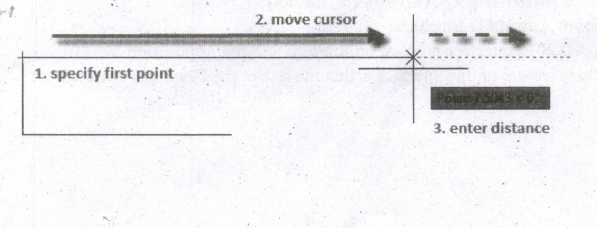
The following prompts are displayed.
Specify first point
(i) Sets the starting point for the line.
(ii) Click a point location.
(iii) With object snaps or grid snap turned on, the points will be placed precisely.
(iv) You can also enter coordinates.
(v) If instead, you press Enter at the prompt, a new line starts from the endpoint of the most recently created line, polyline, or arc.
(vi) If the most recently created object is an arc, its endpoint defines the starting point of the line.
(viii) The line is tangent to the arc.
Specify next point
(i) Specifies the endpoint of the line segment.
(ii) You can also use polar and object snap tracking together with direct distance entry.
Close
Connects the first and last segments.
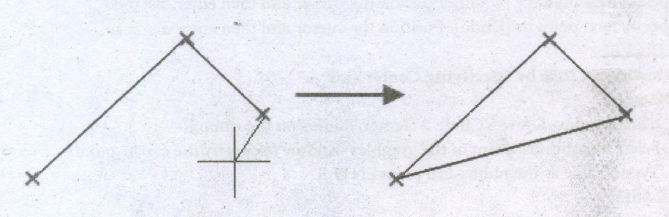
Undo
Removes the most recent segment of a line sequence.
2.
| Hand Tool (H) | Zoom Tool (Z) |
| It is used to move the Stage around the Pasteboard by dragging the Stage. | It is used to change the magnification of an area of the Stage. Clicking an area of the Stage zooms in and holding down Alt Key and clicking zooms out. |
3.
Production Manager
(i) In a multimedia production, the role of production manager is to define, and coordinate, the production of the multimedia project in time and with full quality.
(ii) The production manager should be an expertise in the technology expert, good at proposal writing, good communication skills and budget management skills.
(iii) Also must have experience in human resource management and act as an efficient team leader.
Content Specialist
(i) Content specialist is responsible for performing all research activities concerned with the proposed application's content.
(ii) Program content refers to projects information, graphics, data or facts presented through the multimedia production.
Script Writer
(i) Video and film scripts represents a linear sequence of events.
(ii) The script writer visualizes the concepts in three dimensional environments and if needed uses the virtual reality integration into the program.
4.
(i) Flyout of polygon tool has star tool in it.
(ii) The tool's keyboard shortcut is (Y).
5.
Using the keyboard
(i) Press Ctrl + = to zoom in.
(ii) Press Ctrl + - to zoom out.
(iii) Press Ctrl + 1 to view a page at actual size.
(iv) Press Ctrl + 2 to view a page at 200%.
(v) Press Ctrl + 0 to fit the entire page in the document window.
(vi) Press Alt + Ctrl + 0 to fit the entire spread in the document window.
(vii) Press Ctrl + Spacebar or Ctrl + Alt + Spacebar to temporarily access the Zoom tool and zoom in or out.
6.
i) Pointer Tool Used to select, move, and resize text objects and graphics.
ii) Text tool Used to type, select, and edit text.
iii) Rotating tool Used to select and rotate objects.

12th Standard Syllabus & Materials
12th Standard
TN 12th Computer Applications களப்பெயர் முறைமை (DNS) Sample Question Papers Study Material - QB365 Set A
NEW12th Standard
TN 12th Computer Applications வலையமைப்பு எடுத்துக்காட்டுகள் மற்றும் நெறிமுறைகள் Sample Question Papers Study Material - QB365 Set A
NEW12th Standard
TN 12th Computer Applications கணினி வலையமைப்பு ஓர் அறிமுகம் Sample Question Papers Study Material - QB365 Set A
NEW12th Standard
TN 12th Computer Applications PHP-உடன் MySQL-ஐ இணைத்தல் Sample Question Papers Study Material - QB365 Set A



Tamilnadu Stateboard 12th Standard Subjects

Maths

Chemistry

Physics

Biology

Computer Science

Business Maths and Statistics

Economics

Commerce

Accountancy

History
Computer Applications
Biology
Computer Technology
Computer Applications
Computer Science
Business Maths and Statistics
Commerce
Economics
Maths
Chemistry
Physics
Computer Technology
History
Accountancy

Tamil

English

French
Tamilnadu Stateboard Standards
