
 100% FREE ACCESS
12th Standard Syllabus & Materials
12th Standard
TN 12th Maths Applications of Matrices and Determinants Sample Question Papers Study Material - QB365 Set A
NEW12th Standard
TN 12th Computer Applications மின்னணு தரவு பரிமாற்றம் Sample Question Papers Study Material - QB365 Set A
NEW12th Standard
TN 12th Computer Applications மின் - வணிக பாதுகாப்பு அமைப்புகள் Sample Question Papers Study Material - QB365 Set A
NEW12th Standard
TN 12th Computer Applications மின்னணு செலுத்தல் முறைகள் Sample Question Papers Study Material - QB365 Set A
NEW12th Standard
TN 12th Computer Applications மின் - வணிகம் Sample Question Papers Study Material - QB365 Set A
NEW12th Standard
TN 12th Computer Applications திறந்த மூல கருத்துருக்கள் Sample Question Papers Study Material - QB365 Set A

Published on: 01/09/2020
12th Standard Computer Technology Model 3 Mark Book Back Questions (New Syllabus) 2020
Download Tamil Nadu 12th Standard Computer Technology question papers, model tests, one-mark questions, important questions, and public exam papers in PDF format. Free study materials and answer keys for TN State Board students.
Questions + Answers key
Take MCQ Computer Technology Test
1.
Explain the use of the LINE Undo option.
2.
Differentiate between Zoom Tool and Hand Tool.
3.
Describe the features and techniques of animation.
4.
What are the two types of spirals? Explain.
5.
Explain briefly how you can create an object.
6.
What are the view commands in InDesign?
Spot colors
Color Dye
Color Styles
Laser ink
7.
What is the use of Master Page?
8.
Mention three tools in PageMaker and write their keyboard shortcuts.
1.
The following prompts are displayed.
Specify first point
(i) Sets the starting point for the line.
(ii) Click a point location.
(iii) With object snaps or grid snap turned on, the points will be placed precisely.
(iv) You can also enter coordinates.
(v) If instead, you press Enter at the prompt, a new line starts from the endpoint of the most recently created line, polyline, or arc.
(vi) If the most recently created object is an arc, its endpoint defines the starting point of the line.
(viii) The line is tangent to the arc.
Specify next point
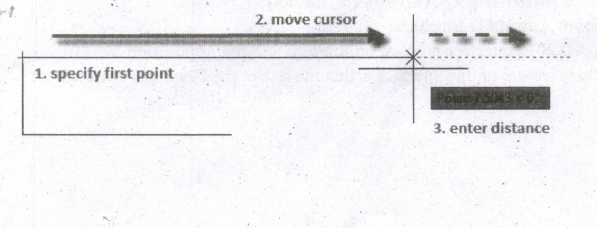
(i) Specifies the endpoint of the line segment.
(ii) You can also use polar and object snap tracking together with direct distance entry.
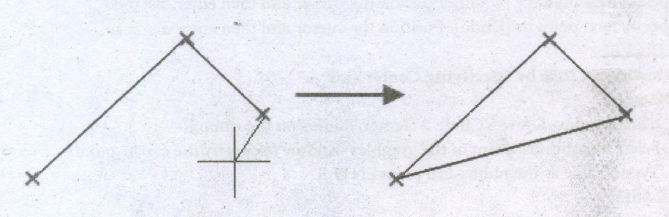
Close
Connects the first and last segments.
Undo
Removes the most recent segment of a line sequence.
2.
| Hand Tool (H) | Zoom Tool (Z) |
| It is used to move the Stage around the Pasteboard by dragging the Stage. | It is used to change the magnification of an area of the Stage. Clicking an area of the Stage zooms in and holding down Alt Key and clicking zooms out. |
3.
Animation is the process displaying still images so quickly so that they give the impression of continuous movement.
(i) In animation the screen object is a vector image in animation.
(ii) Using numerical transformations the movement of that image along its paths is calculated for their defining coordinates.
(iii) The least frame rate of at least 16 frames per second gives the impression of smoothness and for natural looking it should be at least 25 frames per second.
(iv) Animations may be in two or three dimensional.
(v) The two dimensional animation, bring an image alive, that occur on the flat X and Y axis of the screen.
(vi) While in three dimensional animation it occurs along the three axis X, Y and Z. Animation tools are very powerful and effective.
(vii) The two basic types of animations are Path animation and Frame animation.
4.
There are two types of spirals. They are
(i) Symmetrical spiral:
A Symmetrical spiral expands evenly so that the distance between each revolution is equal.
(ii) Logarithmic spiral:
A Logarithmic spiral expands with increasingly larger distances between revolutions.
5.
Creating an Object:
(i) Shapes can add visual interest to a document and serve as a background for text.
(ii) The tools for creating shapes include the Rectangle, Ellipse, and Polygon tools.
(iii) To select a shape tool, click and hold down the mouse button on the Rectangle tool (or currently selected shape tool) on the Tools panel, and then select the shape tool you want to use.
(iv) With a shape tool selected, you can create a shape manually by dragging in the document, or you can click in the document to open the shape's dialog box and define its settings.
(v) You use the Swatches panel to add color to the fill and stroke (border) of your shape, and the Stroke panel to change the weight (thickness) and style of the stroke.
6.
Using the view commands
(i) Choose View > Zoom In for magnifying to the next preset percentage.
(ii) Choose View > Zoom Out for reducing and retracting to the previous preset percentage.
(iii) Choose View > Actual Size for the document to be displayed at 100%.
(iv) Choose View > Fit page in Window for scaling the view size to match the monitor size.
(v) Choose View > Fit Spread in Window for displaying the targeted spread in the window.
(vi) Choose View > Entire Pasteboard for displaying the current page or spread and its surrounding pasteboard that ().revisible within the document window.
7.
⇢ Master Pages commonly contain repeating logos, page numbers, headers, and footers.
⇢ They also contain non printing layout guides, such as column guides, ruler guides, and margin guides.
8.
| S. No. | Tools | Keyboard Shortcut |
| 1 | Pointer Tool | F9 |
| 2 | Rotating Tool | Shift + F2 |
| 3 | Line Tool | Shift + F3 |
| 4 | Rectangle Tool | Shift + F4 |
| 5 | Ellipse Tool | Shift + F5 |
| 6 | Polygon Tool | Shift + F6 |

12th Standard Syllabus & Materials
12th Standard
TN 12th Computer Applications வலையமைப்பு வடமிடல் Sample Question Papers Study Material - QB365 Set A
NEW12th Standard
TN 12th Computer Applications களப்பெயர் முறைமை (DNS) Sample Question Papers Study Material - QB365 Set A
NEW12th Standard
TN 12th Computer Applications வலையமைப்பு எடுத்துக்காட்டுகள் மற்றும் நெறிமுறைகள் Sample Question Papers Study Material - QB365 Set A
NEW12th Standard
TN 12th Computer Applications கணினி வலையமைப்பு ஓர் அறிமுகம் Sample Question Papers Study Material - QB365 Set A



Tamilnadu Stateboard 12th Standard Subjects

Maths

Chemistry

Physics

Biology

Computer Science

Business Maths and Statistics

Economics

Commerce

Accountancy

History
Computer Applications
Biology
Computer Technology
Computer Applications
Computer Science
Business Maths and Statistics
Commerce
Economics
Maths
Chemistry
Physics
Computer Technology
History
Accountancy

Tamil

English

French
Tamilnadu Stateboard Standards
