
 100% FREE ACCESS
12th Standard Syllabus & Materials
12th Standard
TN 12th Maths Applications of Matrices and Determinants Sample Question Papers Study Material - QB365 Set A
NEW12th Standard
TN 12th Computer Applications மின்னணு தரவு பரிமாற்றம் Sample Question Papers Study Material - QB365 Set A
NEW12th Standard
TN 12th Computer Applications மின் - வணிக பாதுகாப்பு அமைப்புகள் Sample Question Papers Study Material - QB365 Set A
NEW12th Standard
TN 12th Computer Applications மின்னணு செலுத்தல் முறைகள் Sample Question Papers Study Material - QB365 Set A
NEW12th Standard
TN 12th Computer Applications மின் - வணிகம் Sample Question Papers Study Material - QB365 Set A
NEW12th Standard
TN 12th Computer Applications திறந்த மூல கருத்துருக்கள் Sample Question Papers Study Material - QB365 Set A

Published on: 01/03/2021
12th Standard English Medium Computer Applications Reduced Syllabus Five mark Important Questions - 2021(Public Exam)
Download Tamil Nadu 12th Standard Computer Applications question papers, model tests, one-mark questions, important questions, and public exam papers in PDF format. Free study materials and answer keys for TN State Board students.
Questions + Answers key
Take MCQ Computer Applications Test
1.
Explain in detail about Open NMS.
2.
Explain In detail about Credit card Number.
3.
Tabulate the ER diagram notations
4.
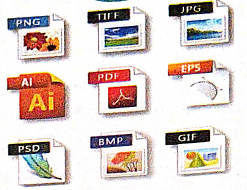
Write the steps To draw a Dotted line
5.
How Multimedia used in Libraries, Information centers and Archives? Explain
6.
Write short note on Malicious code threats..
7.
Explain in detailed about Third Generation of Mobile Networks.
8.
Write about structure of EDIFACT.
9.
Define Secure Electronic Transaction (SET) and its features.
10.
11.
12.
Explain various Open Source License
13.
What is meant by Registered Jack? Explain briefly the types of Jacks.
14.
Difference between TCP/IP and OSI Reference Model.
15.
Mention some uses of network at business, home, mobile, social application
16.
Explain the Database error handling and management process in PHP?
17.
Explain concepts of HTTP Uploading process.
18.
Explain the process Do while loop.
19.
Explain if else statement in PHP. With an example.
20.
Explain the Multidimensional Array.
21.
Discuss in detail about Website development activities.
22.
Write a note on open source software tools available in MySQL Administration.
23.
Write the steps to place the text in a frame.
24.
25.
In earlier, websites were accessed through their
Name server
Label
IP address
Resolver
1.
(i) Open NMS (Network Management System) is a free and open-source initiative grade network monitoring and management platform.
(ii) It is established and maintained by a community of users, developers and by the Open NMS Group.
(iii) It offering services, training, and support.
The goal is for Open NMS
(i) The goal is for Open NMS to be an actually distributed, scalable management application platform for all features of the FCAPS (Fault, Configuration, Accounting, Performance, Security) network management model.
(ii) Presently the emphasis is on Fault and Performance Management.
It was intended to cope tens of thousands of devices from a single server as well as achieve unlimited devices using a cluster of servers.
Features:
(i) OpenNMS comprises a discovery engine to routinely configure and manage network devices without operator intervention. It is written in Java and is issued under the GNU (General Public License.)
(ii) OpenNMS is the World's first software for Network monitor and management with opensource options.
OpenNMS- Types:
There are two types in this Meridian and Horizon.
Meridian: When we need stability and long term support choose Meridian which is best for Enterprises as well as businesses.
Horizon:
(i) It is used where innovation occurs frequently.
(ii) It is Best for IT-ecosystem, new technology monitoring.
History:
(i) OpenNMS was Released in 1999 by Steve Giles, Brian Weaver, and Luke Rindfuss.
(ii) In 2004 OpenNMS Group was created by Balog, Matt Brozowski, and David Hustace.
(iii) It is written in Java and can run on all type of platform.
(iv) It gives us Event management & Notification, Discovery & Provisioning, service monitoring, and Data Collection.
(v) Won a lot of awards for best of opensource software.
2.
1. Credit card number: The modern credit card number has 16-digit unique identification number.
2. The first digit of the credit card number is Major Industry Identifier (MII).
i) It identifies the issuer category.
ii) e.g. 1 - Airlines,4 - Banks
3. The next 5 digits uniquely identify the issuing organization
4. The first 6 digits together called as Issuer Identifier number (IlN) or Bank Identification number (BIN).
5. The next 9 digits are the account number.
6. The last digit is a check digit (based to the Luhn algorithm).
3.
| ER Component | Description (how it is represented) | Notation |
|---|---|---|
| Entity - Strong | Simple rectangular box | .JPG) |
| Entity - Weak | Double rectangular boxes | .JPG) |
| Relationships | Rhombus symbol - strong | .JPG) |
| Between Entities | Rhombus within rhombus - Weak | .JPG) |
| Attributes | Ellipse symbol connected to the entity | .JPG) |
| Key Attribute for Entity | Underline the attribute name inside Ellipse | .JPG) |
| Derived Attribute for Entity | Dotted ellipse inside main ellipse | .JPG) |
| Multivalued Attribute for Entity | Double Ellipse | .JPG) |
4.
1. Double click the Line tool from the toolbox. A Custom Stroke dialogue box appears.
2. Select the required Stroke style in the drop-down list box.
3. Then click OK button. Now the cursor changes to a crosshair.
4. Click and drag on the screen to draw your dotted line. As you drag, the line appears
5. Release the mouse button and the line will be drawn and selected, with sizing handles on either end. Resize the line by clicking and dragging the handles, if necessary.
5.
Multimedia technologyis adopted by the libraries in various functions like multimedia kiosks, user orientation programs etc. Following is the brief account of multimedia technology applications in libraries.
1. Multimedia Kiosk
(i) Kiosk is a free-standing furnished equipped multimedia computer that allows users to retrieve information via a touch screen. It is commonly used in airports and other public locations to provide directions and few mandatory information's.
(ii) In an library, Kiosk is usually located nearthe entrance of the library, used for displaying announcements, reading lists, comments and suggestions from library users and other information's about operations and programs of the library.
2. Webcasting and Video Conferencing
(i) The live telecast of real time programs through internet is known as Webcasting.
(ii) Video conferencing isthe process of conducting conference between more than two participants at different sites by using computer networks to transmit audio and video data.
3. User Orientation Program
(i) The role of multimedia plays anvital role in training the librarians in schools, colleges and universities due to its interactivity. Hence, it is used in depth subject training to their faculties .
4. In-house Production of Multimedia Resources and E-publishing
(i) Many libraries produce multimedia resources in-house, to serve the parent organization.Introduction of CD/DVD and their writershas solved few of the problem of libraries in storing or achieving the materials.
(ii) Multimedia tools along with CD-writers is made possible to publish information from dlfferent sources in a most easy to use and acceptable form tolibrary users.
5. Digital Multimedia Libraries
(i) Information's are available indigital formats that include digital books, scann ed images, graphics and digitized audlo-visuat clips etc
(ii) Initially digital library projects were based only on textual data, later it was on all other media elements like images, audio and video recordings were also integrated under the collection of digital library.
6.
(i) Within an E-Commerce site, there are multiple vulnerable areas that can serve as an intrusion point for a hacker to gain payment and user information.
(ii) Using malware, Cross Site Scripting or SQL Injection, an attacker will extract the credit card information and sell the acquired data on black markets.
Fraud is then committed to extract the greatest value possible through E-Commerce transactions or ATM withdrawals, etc.
7.
(i) Third generation of mobile systems merges different mobile technology standards, and uses higher frequency bands for transmission and Code Division Multiple Access to delivery data rates of up to 2Mbit/s supports multimedia services (MMS: voice, video and data) .
(ii) European standard is UMTS(Universal Mobile Telecommunication Systems).
(iii) Mobile phones systems continue to use digital transmission with SIM authentication for billing systems and for data incorruption.
(iv) Data transmission used a WCDMA. WCDMA stands for (Wideband Code Division Multiple Access).
(v) One technique to obtain data rates between 384kbit/s and 2048kbit/s. Few 3G suppliers use ATM (Asynchronous Transfer Mode) for their 'over the air' network with in MPLS(Multiprotocol Label Switching) or IP for theirs backbone network.
(vi) Mobility still supported at layer2, and hence like 2G it still prohibits seamless roaming beyond heterogeneous access networks and routing domains.
(vii) The transmission were band frequencies are between 1900 and 2200 MHz. All UMTS license holders at the UK holds a 20-year license with the condition that 80% population coverage is achieved by 31 December 2007.
(viii) The present third generation licensed operators in the UK can be seen below as at August 2004.
8.
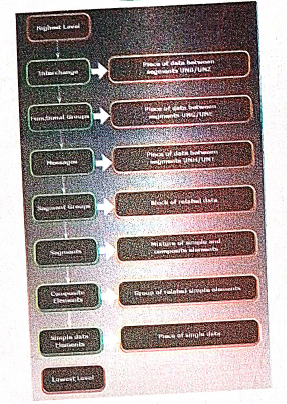
EDIFACT Structure:
EDIFACT is a hierarchical structure where the top level is referred to as an interchange, and lower levels contain multiple messages. The messages consist of segments, which in turn consist of composites. The final iteration is a data element.
9.
Secure Electronic Transaction (SET) is a security protocol for electronic payments with credit cards, in particular via the internet.
SET system incorporates the following key features.
1. Using public key encryption and private key encryption, ensure data confidentiality.
2. Use information digest technology to ensure the integrity of information.
3. Dual signature technology to ensure the identity of both parties in the transaction.
10.
11.
12.
Types of open source licenses are:
(i) Apache License 2.0
(ii) BSD 3-Clause 'New' or 'Revised' license
(iii) BSD 2-Clause "simplified" or "Free BSD" license
(iv) GNU General Public License (GPL)
(v) GNU Library or "Lesser" General Public License (LGPL)
(vi) MIT license
(vii) Mozilla Public License 2.0
(viii) Common Development and Distribution License
(ix) Eclipse Public License
(i) Apache License:
Apache License version 2.0 rights can be applied to both copyrights and patents. Some of the license can be applied only to copyrights and not patents some details of Apache License and Rights are never ending, Worldwide Authority of Rights, Rights for No few or Royalty, Rights are Irrevocable.
(ii) BSD License:
BSD license is a part of a family of the free software license that have much fewer restrictions in distribution as compared to other free software license. Two important version are:
(1) The New BSD License/The NEW Modified BSD License (3 clause "new" or "Revised" license)
(2) The simplified BSD License/Free BSD License (2-clause "simplified" or "free BSD" license)
Both have been accepted as open source license by the open source initiative.
The primary difference between the New and the simplified BSD License is that simplified BSD license emits this clause.
(iii) GNU General Public License:
The General Public License are copy the software, Distribution, charge a fee, change the code base.
(iv) GNU Lesser General Public License:
It grants fewer right to work than GNU GPL. It's generally appropriate for libraries and projects that want to allow linking from non-GPL and non-open-source software. GPL. requires any other project or source that is using the project under GPL also be licensed as GPL: GPL licensed code can't be used for paid and proprietary software.
(v) MIT License:
It's the shortest and most used popular open source license. The main giving of this licnese are copy, modify, merge, publish, distribute, sublicense, etc.
13.
Registered Jacks: A Registered Jack commonly known as RJ is a network interface used for network cabling, wiring and jack construction. The primary function of the registered jack is to connect different data equipment and telecommunication devices. The commonly known registered jacks are RJ-11, RJ-45, RJ-21,and RJ-28. The registered jack refers to the male physical connector (Plug), a female physical connector (Jack) and it's wiring.
Types of Registered Jacks:
(i) RJ-11 :
It is the most popular modern form of registered jack. It is found in home and used for landline phones. There are 6 pins where the two pins give the transmission configuration, the two pins give the receiver configuration and the other two pins will be kept for reserved.
(ii) RJ-14 and RJ-61:
The RJ-14 is also used in telephone lines like RJ-11. It has 6 pins whereas the RJ-61 has 8 pins. RJ-61 uses the twisted pair cable to connect the network devices.
(iii) RJ-21:
The RJ-21 connector has 50 pins with 25 pins at one end and 25 pins at the other end. It is also called as champ connector or Amphenol connector. The Amphenol is a connector manufacturer.The RJ-21 interface is typically used for data-communication trucking applications.
14.
| No. | TCP/IP | OSI |
| 1. | It is client server model. ie. when the client requests for service it is provided by the server. | It is conceptual model. |
| 2. | It is standard protocol used for every network including the internet. | It is not a protocol but a reference model used for understanding and designing the system architecture. |
| 3. | It is four layered model. | It has seven layers. |
| 4. | TCP / IP follows vertical approach. | OSI model supports horizontal approach. |
| 5. | It is Tangible | It is not Tangible |
| 6. | It is follows top to bottom approach | It is follows a bottom-up approach |
15.
Network in Business:
(i) Communication is very important factor for successful business operations. There by with the growth of computer network and speedy Internet services, business also developed drastically.
(ii) Internet conversation made conversation faster, quick decision making and money saving e-banking paying methods for easy transactions.
(iii) Cheap marketing price and easy selection of products through internet with customers satisfaction can also be done. Company license, renewals, other certificates, bill payments, receipts, invoice, stock maintenance, can be done without any geographical boundaries via Internet and computer networks.
(iv) Government subsidies are available for their business to promote their business by digitization.
Network at Home:
(i) Network has become common as it facilitates communication among devices with in the close vivinity of a home.
(ii) Devices in this network can be smart devices, mobile computers, network printers which are caable of interacting and there by increase the quality of life inside home in a variety of ways like automation of repetitive tasks, increased personal productivity, enhanced home security and easier access to entertainment.
(iii) Network at home helps us to perform e-banking, e-learning, e-goverance, e-health, telemedicine, call centers, video conferencing, digitalization of memories, etc.
Network at Social Application:
(i) To get connected to with people around the world through social network media, applications like Whatsapp, Facebook, Twitter, Blogs, Pinterest, Classmate and so on are in full fledge use.
(ii) Through the social meida we share our thoughts, ideas, files and also chats.
16.
Error handling is the process of catching errors raised by our program and then taking appropriate action.
Different error handling methods are
Simple "die ()" statements;
Custom error and error triggers;
Error reporting.
(i) Using the die () function:-
Example:
$file = fopen("Welcome.txt", "r");
?>
Above example shows a simple script that opens a text file. If the file does not exists you might get an error like this.
Warning:
fopen (welcome.txt) [function.fopen]: failed to open stream: No such file or directory in
C:\webfolder\test.php on line 2
To prevent the user from getting an error message like the one above, test whether the file before we
try to access it.
if (!file_exists ("welcome.txt"))
{
die ("File not found");
} else
{
file = fopen ("Welcome.txt", "r");
}
Now if the file does not exists you get an error like this
File not found
The code above is more efficient than the earlier code, because it uses a simple error handling mechanism to stop the script after the error.
However, simply stopping the script is not always the right way to go. Let's take a look at alternative php functions for handling errors.
(ii) Creating a custom Error Handler
Creating a custom error handler is quite simple. Simply create a special function that can be called when an error occurs in PHP.
This function must be able to handle a minimum of two parameters (error level and error message) but can accept up to five parameters.
Syntax:
error_function (error_level, error_message, error_file, error_line, error_context)
(iii) Error report levels:
These error report levels are the different types of error the user defined error handler can be used for:
E_WARNING, E_NOTICE, E_USER_ERROR, E_USER_WARNING, E_USER_NOTICE,... etc.
Set Error Handler:
The default error handling for PHP is the built-in error handle;
Example:
To use our custom error handle for all errors:
set_error_handler("Custom Error");
17.
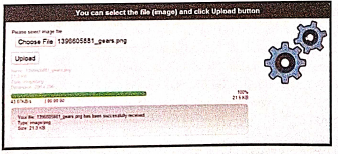
1. File upload is the best feature to select one file from the local machine to server machine.
2. Form tag is used to mention a method as POST or GET and encrypt/attribute mentioned as "multipart /form-data. In the tag mention type = "file" attribute shows the input field as a file select control with a "Browse" button next to the input control.
3. In server machine "php.ini" file search for the file uploads directive, and set it to On : "file uploads = On"
4. After submitting the upload button the request reaches to student_photo_upload.php file.
5. In the file$_FILES variable collects all uploaded file information such as name of the file, size of the file and extension of the file etc. All the details are checked throughly and the error are saved in an array variable The file finally moves under the image directly if the array error variable is empty.
Example:
Fileupload.html:
18.
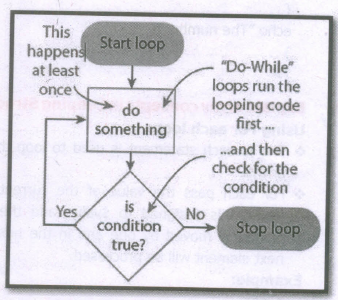
Do while loop always run the statement inside of the loop block at the first time of execution. Then it checks the condition whether true or false. It executes the loop, if the specified condition is true.
Syntax:
do
{
code to be executed;
} while (condition is true);
Example
\(\$\)Student_count = 10;
\(\$\)student_number= 1;
do
{
echo "The student number is: \(\$\)student_number
";
\(\$\)student_number++ ;
}
while(\(\$\)student_number< = \(\$\)Student_count);
?>
19.
If else statement in PHP:
If statement executes a statement or a group of statements if a specific condition is satisfied by the user expectation. When the condition gets false (fail) the else block is executed.
Syntax:
if (condition)
{
Execute statement(s) if condition is true;
}
else
{
Execute statement(s) if condition is false;
}
Example
$Pass_Mark=35;
$Student_Mark= 70;
if ($Student_Mark>= $Pass_Mark){
echo "The Student is eligible for the promotion";
}
else {
echo "The Student is not eligible for the promotion";
} ?>
20.
Multidimensional Arrays:
Array containing one or more arrays is called multidimensional array. PHP accepts array with two, three four or more levels.
Example:
// A two-dimensional array
$student=array
(
array("Iniyan", 100, 96),
array("Kavin", 60, 59),
array("Nilani", 1313, 139)
);
echo $$student [0][0].": Tamil Mark: ".$student [0][1].". English mark: ".$student [0] [2]."< br >";
echo $$student [1][0].": Tamil Mark: ".$student [1][1].". English mark: ".$student [1] [2]."< br >";
echo $$student [2}[0].": Tamil Mark:".$student [2][1].".English mark: ".$student [2] [2]."< br >
? >
21.
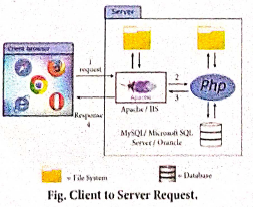
Website development has done by the following activities.
1. Website or webpage is developed by the programmer using PHP script.
2. Entire website codes are moved to web server path in a remote server machine.
3. From the client side, the end user open a browser, types the URL of the website (or) webpage and initiates the request to remote server machine over the network.
4. After receiving the request from client machine the web server tries to compile and interpret the PHP code which is available in remote machine.
5. Response will be generated and sent back to the client machine over the network from webserver.
6. Finally the browser is installed in the client machine receives the response and displays the output to user, as shown in fig.
22.
MYSQL is a database management system and it is ease of use.
Types of Software tools:
(i). Many open source tools are available in the market to design the database in a better and efficient manner.
(ii). PhpMyAdmin is most popular for Web-Administration.
(iii). The Popular Desktop Application tools are MySQL Workbench and HeidiSQL.
1. PHPMYADMIN (Web Admin):
(i). This administrative tools of MySQL is a web application written in PHP.
(ii). They are used predominantly in web-hosting.
(iii). The main feature is providing web interface, importing data from CSV and exporting data to various formats.
(iv). It generates live charts for monitoring MySQL server activities like connections, processes and memory usage.
(v). It also helps in making the complex queries easier.
2. MySQL Workbench (Desktop Application)
(i). It is a database tool used by developers and DBA's mainly for visualization.
(ii). This tool helps in data modeling, development of SQL, server configuration and backup for MySQL.
(iii). Its Basic release version is 5.0 and current version 8.0 support all operating systems.
(iv). The SQL editor of this tool is very flexible and comfortable in dealing multiple results set.
3. HeidiSQL (Desktop Application)
(i). This open source tools helps in the administration of better database systems.
(ii). It supports GUI (Graphical User Interface) features for monitoring server host, server connection, Databases, Table, Views, Triggers and Events.
23.
To place text in a Frame
(i) Click on any one Frame tool from the Toolbox.
(ii) Draw a frame with one of PageMaker's Frame tools (Rectangle frame tool (or) Ellipse Frame Tool (or) Polygon frame Tool). Make sure the objects remains selected.
(iii) Click on File > Place. The Place dialog box will appears.
(iv) Locate the document that contains the text you want to place, select it.
(v) Click on Open.
(vi) Click in a frame to place the text in it.The text will be placed in the frame.
24.
25.
(c)
IP address

12th Standard Syllabus & Materials
12th Standard
TN 12th Computer Applications வலையமைப்பு வடமிடல் Sample Question Papers Study Material - QB365 Set A
NEW12th Standard
TN 12th Computer Applications களப்பெயர் முறைமை (DNS) Sample Question Papers Study Material - QB365 Set A
NEW12th Standard
TN 12th Computer Applications வலையமைப்பு எடுத்துக்காட்டுகள் மற்றும் நெறிமுறைகள் Sample Question Papers Study Material - QB365 Set A
NEW12th Standard
TN 12th Computer Applications கணினி வலையமைப்பு ஓர் அறிமுகம் Sample Question Papers Study Material - QB365 Set A



Tamilnadu Stateboard 12th Standard Subjects

Maths

Chemistry

Physics

Biology

Computer Science

Business Maths and Statistics

Economics

Commerce

Accountancy

History
Computer Applications
Biology
Computer Technology
Computer Applications
Computer Science
Business Maths and Statistics
Commerce
Economics
Maths
Chemistry
Physics
Computer Technology
History
Accountancy

Tamil

English

French
Tamilnadu Stateboard Standards
