
 100% FREE ACCESS
12th Standard Syllabus & Materials
12th Standard
TN 12th Computer Applications மின்னணு தரவு பரிமாற்றம் Sample Question Papers Study Material - QB365 Set A
NEW12th Standard
TN 12th Computer Applications மின் - வணிக பாதுகாப்பு அமைப்புகள் Sample Question Papers Study Material - QB365 Set A
NEW12th Standard
TN 12th Computer Applications மின்னணு செலுத்தல் முறைகள் Sample Question Papers Study Material - QB365 Set A
NEW12th Standard
TN 12th Computer Applications மின் - வணிகம் Sample Question Papers Study Material - QB365 Set A
NEW12th Standard
TN 12th Computer Applications திறந்த மூல கருத்துருக்கள் Sample Question Papers Study Material - QB365 Set A
NEW12th Standard
TN 12th Computer Applications வலையமைப்பு வடமிடல் Sample Question Papers Study Material - QB365 Set A

Published on: 01/03/2021
12th Standard English Medium Computer Applications Reduced Syllabus Five mark Important Questions with Answer key - 2021(Public Exam)
Download Tamil Nadu 12th Standard Computer Applications question papers, model tests, one-mark questions, important questions, and public exam papers in PDF format. Free study materials and answer keys for TN State Board students.
Questions + Answers key
Take MCQ Computer Applications Test
1.
Explain in detail about network simulation tool - NS2
2.
Explain the advantages of UPI?
3.
Explain In detail about Credit card Number.
4.
Explain the following
1. Primary Key
2. Foreign Key
3. Candidate Key
4. Super Key
5. Composite key
5.
Write the steps to Drawing a Rounded Corner Rectangle
6.
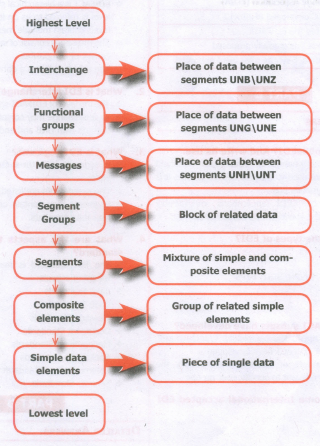
Draw the structure of UN/EDIFACT message
7.
How Multimedia is used in Business systems?
8.
Write short note on Malicious code threats..
9.
Write a short note on parameters of mysqli_connect( ) function?
10.
Briefly explain various types of EDI.
11.
Explain encryption technology.
12.
Explain in detail : Unified payments interface
13.
How would you differentiate a traditional commerce and E-Commerce?
14.
Differentiate Proprietary and open source software
15.
Explain wiring techniques used in Ethernet cabling.
16.
Classify and Explain the IP address and its classification.
17.
Explain about Internet, Intranet and Extranet
18.
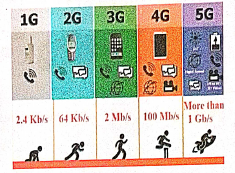
Explain the growth of the computer networking
19.
Explain MySQLi Queries with examples.
20.
Discuss in detail about HTML form controls.
21.
Discuss in detail about For each loop.
22.
Explain the if elseif else statement. With suitable example.
23.
Explain the Multidimensional Array.
24.
Discuss in detail about PHP data types.
25.
Write a note on open source software tools available in MySQL Administration.
1.
Network simulation
In a computer network, network simulation is a method whereby a software program models the activities of a network by calculating the communication between the different network objects such as(routers, nodes, switches, access points, links, etc.).
Network simulator
(i) A network simulator is a software program that replicates the functioning of a computer network.
(ii) In simulators, the computer network is typically demonstrated with devices, traffic, etc. and the performance is evaluated.
Normally, users can then adapt the simulator to accomplish their precise analysis needs.
Network Parameters:
The network parameters define the state of the network (node placement, existing links) and the events (data transmissions, link failures, etc.).
Trace files:
A significant output of the simulation is the trace files. Trace files can document every incident that happened in the simulation and are used for examination.
NS2: NETWORK SIMULATOR version 2.
(i) It was considered explicitly for exploration in network communication and event-driven opensource simulator in computer.
(ii) OTCL and C++ used to create and run NS2.
(iii) NS2 works on Windows and Linux platforms that support wired or wireless network and also use the command line interface as a user interface.
API:
(i) API a pure event base software tool with super simulation design, it has more models which help the user to get desired output easily.
2.
(i) Immediate money transfers through mobile device round the clock 24 x 7.
(ii) Can use single mobile application for accessing multiple bank accounts
(iii) Single Click Authentication for transferring of fund.
(iv) It is not required to enter the details such as Card no, Account number, IFSC etc. for every transaction.
(v) Electronic payments will become much easier without requiring a digital wallet or credit or debit card
3.
1. Credit card number: The modern credit card number has 16-digit unique identification number.
2. The first digit of the credit card number is Major Industry Identifier (MII).
i) It identifies the issuer category.
ii) e.g. 1 - Airlines,4 - Banks
3. The next 5 digits uniquely identify the issuing organization
4. The first 6 digits together called as Issuer Identifier number (IlN) or Bank Identification number (BIN).
5. The next 9 digits are the account number.
6. The last digit is a check digit (based to the Luhn algorithm).
4.
1. Primary Key:
(i) This key of relational table identifies each record in the table in a unique way.
(ii) A primary key which is a combination of more than one attribute is called a composite primary key.
(iii) The candidate key that is chosen to perform the identification task is called the primary key
2. Foreign Key:
(i) A foreign key is a "copy" of a primary keythat has been exported from one relation into another to represent the existence of a relationship between them
(ii) A foreign key is a copy of the whole of its parent primary key i.e if the primary key is composite, then so is the foreign key.
(iii) Foreign key values do not (usually) have to be unique.
(iv) Foreign keys can also be null.
(v) A composite foreign key cannot have some attribute(s) null and others non-null.
3. Candidate Key:
(i) Each super key is called a candidate key.
(ii) A candidate key is selected from the set of Super Key.
(iii) While selecting candidate key, redundant attributes should not be taken.
(iv) The candidate key is also known as minimal super keys.
4. Super Key:
(i) An attribute or group of attributes, which is sufficient to distinguish every tuple in the relation from every other one is known as Super Key.
5. Composite Key (Compound Key):
(i) A key with more than one attribute to identify rows uniquely in a table is called Composite key.
(ii) This is also known as Compound Key.
5.
To draw a rounded-corner rectangle:
1. Double-click the Rectangle tool in the toolbox. The Rounded Corners dialog box appears
2. Choose a corner setting from the preset shapes
3. Click on OK. The cursor changes to a crosshair.
4. Click and drag anywhere on the screen
5. Release the mouse button when the rectangle is the desired size. Press the Shift key as you draw to constrain the shape to a rounded corner square.
6.
7.
(i) Business applications for multimedia include presentations, training, and internet protocols and soon.
(ii) The marketing and advertising agencies are using animation techniques for sales promotion.
(iii) Multimedia is used very commonly for building employee ID.
(iv) High resolution projectors are common for multimedia presentations on the road.
(v) Cell phones and personal digital assistants with Bluetooth and Wi-Fi communication technology makes multimedia communication for business more effiCiently.
8.
(i) Within an E-Commerce site, there are multiple vulnerable areas that can serve as an intrusion point for a hacker to gain payment and user information.
(ii) Using malware, Cross Site Scripting or SQL Injection, an attacker will extract the credit card information and sell the acquired data on black markets.
Fraud is then committed to extract the greatest value possible through E-Commerce transactions or ATM withdrawals, etc.
9.
(i) Four Parameters are used to connect to the Database server.
(ii) They are
1.$ servername -> Database Server server IP address
2.$ susername -> Database Server User Name
3.$ password -> Database Server Password
4.$ DB_Name -> Database Name
10.
The types of EDI were constructed based on how EDI communication connections and the conversion were organized. Thus based on the medium used for transmitting EDI documents the following are the major EDI types:
(i) Direct EDI
(ii) EDI via VAN
(iii) EDI via FTP/VPN, SFTP, FTPS
(iv) Web EDI
(v) Mobile EDI
1. Direct EDI/point-to-point : It is also called as Point-to-Point EDI. It establishes a direct connection between various business stakeholders and partners individually. This type of EDI suits to larger businesses with a lot of day to day business transactions.
2. EDI via VAN : EDI via VAN (Value Added Network) is where EDI documents are transferred with the support of third party network service providers.Many businesses prefer this network model to protect them from the updating ongoing complexities of network technologies.
3. EDI via FTP/VPN, SFTP, FTPS : When protocols like FTP/VPN, SFTP and FTPS are used to exchange of EDI based documents through the Internet or Intranet it is called as EDI via FTP/VPN, SFTP, FTPS.
4. Web EDI : Web based EDI conducts EDI using an web browser via the Internet. Here the businesses are allowed to use any browser to transfer data to their business partners.Web based EDI is easy and convenient for small and medium organizations.
5. Mobile EDI - When smartphones or other such handheld devices are used to transfer EDI documents it is called as mobile EDI.Mobile EDI applications considerably increase the speed of EDI transactions.
11.
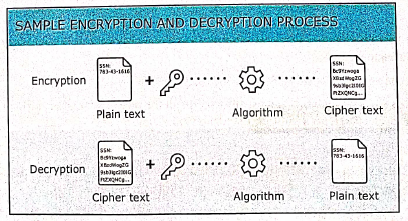
Encryption technology is an effective information security protection. It is defined as converting a plaintext into meaningless ciphertext using encryption algorithm thus ensuring the confidentiality of the data. The encryption or decryption process use a key to encrypt or decrypt the data. At present two encryption technologies are widely used. They are symmetric key encryption system and an asymmetric key encryption system. Thre figure below shows the Data Encryption and Decryption process:
12.
Unified Payments Interface:
(i) Unified Payments Interface (UPI) is a real-time payment system developed by National Payments Corporation of India (NCPI) to facilitate inter-bank transactions. It is simple, secure and instant payment facility.
(ii) This interface is regulated by the Reserve Bank of India and used for transferring funds instantly between two bank accounts through mobile (platform) devices. http://www.npci.org.in/
(iii) It also provides the "peer to peer" collect request which can be scheduled and paid as per requirement and convenience.
(iv) UPI is developed on the basis of Immediate Payment Service (IMPS). To initiate a transaction, UPI applications use two types of address - global and local.
(v) Virtual payment address (VPA) also called as UPI-ID, is a unique ID similar to email id (e.g. name@ bankname) enable us to send and receive money from banks.
(vi) The bank or the financial institution allows the customer to generate VPA using phone number associated with Aadhaar number and bank account number. VPA replaces bank account details thereby completely hides critical information.
(vii) The MPIN (Mobile, banking Personal Identification number) is required to confirm each paymernt.
Advantages :
(i) Immediate money transfers through mobile device round the clock 24 x 7.
(ii) Can use single mobile application for accessing multiple bank accounts
(iii) Single Click Authentication for transferring of fund.
(iv) It is not required to enter the details such as Card no, Account number, IFSC etc. for every transaction.
(v) Electronic payments will become much easier without requiring a digital wallet or credit or debit card.
13.
| Traditional Commerce | E-Commerce |
|---|---|
| Traditional commerce is buying or selling of products and services physically. | E-Commerce carries out commercial transactions electronically on the Internet. |
| Customer can easily identify, authenticate and talk to the merchant. | Neither customer nor merchant see the other. |
| Physical stores are not feasible to be open all the times. | It is always available on all time and all days of the year. |
| Products can be inspected physically before purchase. | Products can't be inspected physically before purchase. |
| Scope of business is limited to a particular area. | Scope of business is global. Vendors can expand their business worldwide. |
| Resource focuses Supply side. | Resource focuses Demand side. |
| Business Relationship is Linear. | Business Relationship is End-to-end. |
| Marketing is one way marketing | One-to-one marketing. |
| Payment is made by cash, cheque, cards, etc. | Payment system is mostly credit card and through fund transfer. |
| Most goods are delivered instantly. | It takes time to transport goods. |
14.
| Open Source Software | Proprietary Software |
|---|---|
| It refers to the software that is developed and tested through open collaboration. | It refers to the software that is solely owned by the individual or the organization that developed it. |
| Anyone with the academic knowledge can access, inspect modify and redistribute the source code. | Only the owner or publisher who holds the legal property rights of the source code can access it. |
| The project is managed by an open source community of developers and programmers. | The project is managed by a closed group of individuals or team that developed it. |
| They are not aimed at unskilled users outside of the programming community. | They are focused on a limited market of both skilled and unskilled and users. |
| It provides better flexibility which means more freedom which encourages innovation. | There is a very limited scope of innovation with the restrictions and all. |
| Examples: Android, Firefox, Libreoffice, Ubuntu, Gname etc.. | Examples: Windows, mac Os, iTunes, Google earth. Adobe flash etc. |
15.
There are 3 types of wiring techniques to construct the Ethernet cable. It is also known as color coding techniques. They are:
(a) Straight-Through wiring:
(b) Cross-Over wiring; and
(c) Roll-Over wiring.
(a) Straight-Through Wiring:
1. Ethernet cables used for Ethernet connections are "straight-through cables" and these cable wires are in the same sequence at both ends sof the cable.
2. The straight-through wiring cables are mostly used for connecting PC/NIC card to a hub.
3. This is a simple physical connection used in printers, computers and other network interfaces.

(b) Cross-Over Wiring:
1. We need a cross-over cable when ever we connect two computers (or) Ethernet devices directly together without a hub, we use crossover cable.
2. Then the pairs (Tx and Rx lines) will be crossed which means pin 1 & 2 of the plug on one end are connected with pin 3 & 6 of the plug on other end and vice-versa.
3. The easiest way to make a cross-over cable is to make one end to T568A colour coding and the other end to T568B.

(c) Roll-Over Wiring:
1. Roll-over cable is a type of null-modem cable that is often used to connect a device console port to make programming changes to the device.
2. This wire has opposite pin arrangements, all the cables are rolled over to different arrangements.
3. In this cable, the coloured wires are reversed on other end. (i.e.,) The pins in one end are connected with other end in reverse order. (i.e.) (Pin 1 to 8, 2 to 7, 3 to 6, 4 to 5, 5 to 4, 6 to 3, 7 to 2, 8 to 1)
4. It is also known as Yost cable (or) console cable. It is typically flat to distinguish it from other types of network cabling.
5. These all 3 arrangements are used to perform an interface change. But all these 3 arrangements transmits the data at same speed only.

16.
IP Address:
(i) Internet Protocol (IP) address is simply the logical address in the network layer.
(ii) IP address is used to find the host system in the whole network. Due to increasing the number of systems in a network there is a need of more addresses. It leads to two addressing methods i.e., IPv4 and IPv6.
IPv4 address:
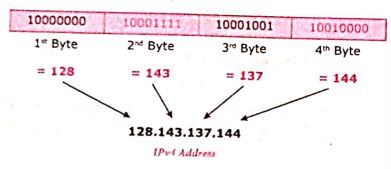
(i) The IPv4 address is a 32-bit unique address given to a computer on the network. So no two systems on the network can have the same IP address.
(ii) If the network has p connactions, then 'p' addresses should be there. An address space is the total number of addresses that can be made by that protocol (IP).
(iii) It is determined by the number of bits that the protocol use. If the protocol uses 'n' bits then the address space of that protocol would be '2nd' addresses.
(iv) So, the number of addresses that can be formed in IPv4 is 232. there are two ways to represent the IP address
(v) In binary notation the address is expressed as 32-bit binary values. For E.g. 0011100110001001 00111000 00000111
(vi) In dotted-decimal notation the address is written in decimal format separated by dots(.). For Eg: 128.143.137.144
IPv6 Address:
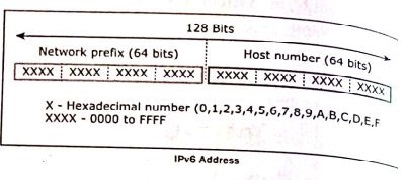
(i) The IPv6 address is a 128-bit unique address given to a computer system. The number of addresses that can be formed IPv6 is 2128.
(ii) In IPv6 address, the 128 bits are divide into eight 16-bits blocks. Each block then changed ito 4-digit Hexadecimal numbers separated by colon symbols.
(iii) E.g. 2001:0000:3231:DFE1:0063:0000:0000:FEFB.
17.
INTERNET:
(i) The Internet is a worldwide system of computer networks- A network of networks where the users at any one computer can get information from any other computer.
(ii) The Internet is a network of global connections - comprising private, public, business, academic and government networks connected by guided, wireless and fiber-optic technologies.
(iii) The unique aim was to generate a network that would permit users of a research computer from one university to "talk to" research computers on other universities.
(iv) The Internet denotes to the global communication system, including infrastructure and hardware, whereas the web is one of the services interconnected over the Internet.
INTRANET:
(i) Intranet is a private network within an enterprise to share company data and computing resources between the employees.
(ii) It may consist of many interlinked local area networks.
(iii) It includes connections through one or more gateway (connects two networks using different protocols together known as protocol convertor) computers to outside Internet.
EXTRANET: Extranet is a private network that uses Internet technology and the public telecommunication system to securely share business information with suppliers, vendors, partners, customers, or other business.
18.
1. The uses of the computer networking are:
2. It is used in business and home
3. Growth on popularity of cloud storage and cloud computing.
4. On behalf of buying physical copies of games music and movies, increasingly downloading and buy digital license their need via internet.
5. Developments on mobile networking infrastructure both deployments of 4G and 3G networks that will allow the people in their developed areas.
6. Allows it to their smart mobile phones as video broadcasting system and as mobile television.
7. Some of the people underlying and staying connected all the times, whenever they are at the workplace, via a home network, via publish WiFi hotspots or smart phone.
8. 4G LTE mobile network was not reached by many parts of world, of the industry of telecommunication has been hard working on the development of their next generation :"5G" cellular communication technology. This 5G intense to boost up the speed the mobile connections dramatically.
9. Artificial intelligence will help to maintain, manage, and protect it.
10. This Artificial network powering algorithms with become most intelligent:
11. It might find faster and reliable methods of anticipating threats and cleaning networks.
12. Artificial intelligence able to be a better predict traffic as it collects and analyses data in real time, some of network managers were better prepared for big event such as the world cup, Olympics, Valentines day which often put on the Internet under pressure.
19.
Performing Queries: The main goal of MySQL and PHP connectivity is to retrieve and manipulate the data from MySQL database server. The SQL query statements are help in PHP MySQL extension to achieve the objective of MySQL and PHP connection. “mysqli_query” is a function, that helps to execute the SQL query statements in PHP scripting language.
Syntax:
mysqli_query(“Connection Object”,“SQL Query”)
Example:
$con=mysqli_connect(“localhost”,“my_user”,“my_password”,“Student_DB”);

$sql=“SELECT student_name,student_age FROM student”;mysqli_query($con,$sql);
20.
The following control are available in HTML forms:
(i) Text inputs
(ii) Buttons
(iii) Checkbox
(iv) Radio box
(v) File Select
(vi) Form Tag
(i) Text inputs contain textbox and text area controls.
(ii) Buttons may contain Submit button, Reset button and Cancel Button.
(iii) Checkbox is a important feature which selects more than one value from the HTML form.
(iv) Radio box is similar to checkbox but one value can be chosen at a time.
(v) File select is the best feature to select one file from the local machine to server machine at a time.
(vi) Form tag is used to mention a method (POST or GET) and control the entire form controls in the HTML document.
21.
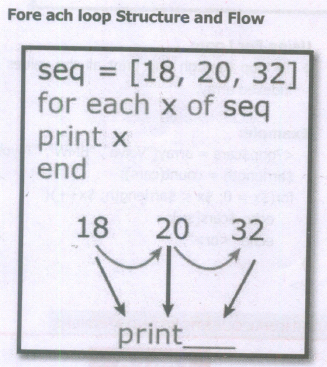
1. The foreach statement is used to loop through arrays.
2. The loop iteration depends on KEY value pair in the array.
3. In the loop iteration, the value of the current array element is assigned to $value and the array pointer is shifted by one until it reaches the end of the array element.
Syntax
for each ($array as $value)
{
code to be ex
}
Examples:
for each ($student_name as $value)
{
echo $value
";
}
?>
Output:
Sriakshaya
Sriram
Srisai
Srivatchan
22.
If elseif else statement in PHP:
If-elseif-else statement is a combination of if-else statement. More than one statement can execute the condition based on user needs.
Syntax:
if (1st condition)
{
Execute statement(s) if condition is true;
}
elseif(2nd condition)
{
Execute statement(s) if 2nd condition is true;
}
else
{
Execute statement(s) if both conditions are false;
}
Example Program:
$Pass_Mark=35;
$first_class=60;
$Student_Mark= 70;
if ($Student_Mark > = $first_ class){
echo "The Student is eligible for the promotion with First Class";
}
elseif ($Student_Mark >= $Pass_Mark){
echo "The Student is eligible for the promotion";
}
else {
echo "The Student is not eligible for the promotion";
} ?>
23.
Multidimensional Arrays:
Array containing one or more arrays is called multidimensional array. PHP accepts array with two, three four or more levels.
Example:
// A two-dimensional array
$student=array
(
array("Iniyan", 100, 96),
array("Kavin", 60, 59),
array("Nilani", 1313, 139)
);
echo $$student [0][0].": Tamil Mark: ".$student [0][1].". English mark: ".$student [0] [2]."< br >";
echo $$student [1][0].": Tamil Mark: ".$student [1][1].". English mark: ".$student [1] [2]."< br >";
echo $$student [2}[0].": Tamil Mark:".$student [2][1].".English mark: ".$student [2] [2]."< br >
? >
24.
PHP scripting language supports 13 primitive data types.
PHP supports the following data types.
(i) String
(ii) Integer
(iii) Float
(iv) Boolean
(v) Array
(vi) Object
(vii) NULL
(viii) Resource
(i) String
String is a collection of characters within the double quotes ("") or single quotes ().
Space is also considered as a character.
Example:
$x= "Computer Application";
$y='Computer Application';
(ii) Integer
Data type which contains non decimal numbers.
Example (i) $x=59135;
Example (ii)
$x = 59135;
var_dump($x);
The var_dump() function returns type and value about variables in PHP.
(iii) Float
Float is a data type which contains decimal numbers.
Example Sx=19.15;
$x = 19.15;
var_dump($x);
?>
(iv) Boolean
Boolean is a data type which returns two possible states, TRUE or FALSE.
Example:
$x = true;
$y = false;
echo $x;
echo $y;
(v) Array
Array is a data type which has multiple values in single variable.
Example:
$cars
= array("Computer", "Laptop", "Mobile");
var_dump(Scars);
?>
Output:
array(3) {[0]=> string(5) "Computer" [1]=>
string(3) "Laptop" [2]=> string(6) "Mobile"}
(vi) Object
Object is a data type which contains information about data and function inside the class.
Example:
class School {
function marks() {
$this->sec =
}
}
// create an object
$school_obj= new School ();
// show object properties
echo Sschool_obj ->sec;
?>
(vii) NULL
It is a special data type which contains a single value: NULL.
Example:
$x="COMPUTER APPLICATION!";
$x = null;
var_dump($x);
?>
Output: NULL
(viii) Resources
It is a specific variable, it has a reference to an external resource.
These variables hold specific handlers to handle files and database connections.
// Open a file for reading
$handle = fopen("note.txt", "r");
var_dump($handle);
echo "
";
// Connect to MySQL database server with default setting
$link= mysql_connect("localhost", "root", "");
var_dump($link);
?>
25.
MYSQL is a database management system and it is ease of use.
Types of Software tools:
(i). Many open source tools are available in the market to design the database in a better and efficient manner.
(ii). PhpMyAdmin is most popular for Web-Administration.
(iii). The Popular Desktop Application tools are MySQL Workbench and HeidiSQL.
1. PHPMYADMIN (Web Admin):
(i). This administrative tools of MySQL is a web application written in PHP.
(ii). They are used predominantly in web-hosting.
(iii). The main feature is providing web interface, importing data from CSV and exporting data to various formats.
(iv). It generates live charts for monitoring MySQL server activities like connections, processes and memory usage.
(v). It also helps in making the complex queries easier.
2. MySQL Workbench (Desktop Application)
(i). It is a database tool used by developers and DBA's mainly for visualization.
(ii). This tool helps in data modeling, development of SQL, server configuration and backup for MySQL.
(iii). Its Basic release version is 5.0 and current version 8.0 support all operating systems.
(iv). The SQL editor of this tool is very flexible and comfortable in dealing multiple results set.
3. HeidiSQL (Desktop Application)
(i). This open source tools helps in the administration of better database systems.
(ii). It supports GUI (Graphical User Interface) features for monitoring server host, server connection, Databases, Table, Views, Triggers and Events.

12th Standard Syllabus & Materials
12th Standard
TN 12th Computer Applications களப்பெயர் முறைமை (DNS) Sample Question Papers Study Material - QB365 Set A
NEW12th Standard
TN 12th Computer Applications வலையமைப்பு எடுத்துக்காட்டுகள் மற்றும் நெறிமுறைகள் Sample Question Papers Study Material - QB365 Set A
NEW12th Standard
TN 12th Computer Applications கணினி வலையமைப்பு ஓர் அறிமுகம் Sample Question Papers Study Material - QB365 Set A
NEW12th Standard
TN 12th Computer Applications PHP-உடன் MySQL-ஐ இணைத்தல் Sample Question Papers Study Material - QB365 Set A



Tamilnadu Stateboard 12th Standard Subjects

Maths

Chemistry

Physics

Biology

Computer Science

Business Maths and Statistics

Economics

Commerce

Accountancy

History
Computer Applications
Biology
Computer Technology
Computer Applications
Computer Science
Business Maths and Statistics
Commerce
Economics
Maths
Chemistry
Physics
Computer Technology
History
Accountancy

Tamil

English

French
Tamilnadu Stateboard Standards
