
 100% FREE ACCESS
12th Standard Syllabus & Materials
12th Standard
TN 12th Computer Applications மின்னணு தரவு பரிமாற்றம் Sample Question Papers Study Material - QB365 Set A
NEW12th Standard
TN 12th Computer Applications மின் - வணிக பாதுகாப்பு அமைப்புகள் Sample Question Papers Study Material - QB365 Set A
NEW12th Standard
TN 12th Computer Applications மின்னணு செலுத்தல் முறைகள் Sample Question Papers Study Material - QB365 Set A
NEW12th Standard
TN 12th Computer Applications மின் - வணிகம் Sample Question Papers Study Material - QB365 Set A
NEW12th Standard
TN 12th Computer Applications திறந்த மூல கருத்துருக்கள் Sample Question Papers Study Material - QB365 Set A
NEW12th Standard
TN 12th Computer Applications வலையமைப்பு வடமிடல் Sample Question Papers Study Material - QB365 Set A

Published on: 05/06/2021
QB365 provides detailed and simple solution for every book back questions in class 12 Computer Applications subject.It will helps to get more idea about question pattern in every book back questions with solution.
Download Tamil Nadu 12th Standard Computer Applications question papers, model tests, one-mark questions, important questions, and public exam papers in PDF format. Free study materials and answer keys for TN State Board students.
Questions + Answers key
Take MCQ Computer Applications Test
1.
Briefly explain SSL.
2.
What are the advantages and disadvantages of E-Commerce to a consumer?
3.
Explain about RJ45 connector.
4.
What is meant by Registered Jack? Explain briefly the types of Jacks.
5.
Discuss about OSI model with its layers
6.
Mention some uses of network at business, home, mobile, social application
7.
Define computer networking and Internet. Explain different developments on computer network and Internet.
8.
Explain in details types of MySQL connection method in PHP.
9.
Explain concepts of HTTP Uploading process.
10.
Discuss in detail about HTML form controls.
11.
Explain working of loops in array
12.
Explain the process Do while loop.
13.
Explain the if elseif else statement. With suitable example.
14.
Explain the Function of Conditional Statements in PHP.
15.
Explain the Multidimensional Array.
16.
Explain Function concepts in PHP.
17.
Discuss in detail about PHP data types.
18.
Discuss in detail about Website development activities.
19.
Explain the DDL command of their functions in SQL.
20.
21.
Discuss on various database models available in DBMS.
22.
How can you convert text in a text block to a frame?
23.
Explain the tools in PageMaker toolbox.
24.
Explain in detail about production team Roles and Responsibilities.
25.
Explain in detail Techniques of Animation.
1.
1. The most common cryptographic protocol is Secure Sockets Layers (SSL). SSL is a hybrid encryption protocol for securing transactions over the internet. The SSL standard was developed by Netscape in collaboration with Mastercard, Bank of America, MCI and silicon graphics.
2. Today, all browsers in the market support SSL, and most of the secure communication are proceeded through this protocol. SSL works completely hidden for the users, who does not have to intervene in the protocol.
3. The only thing the user has to do is make sure on URL starts with https://instead of http:// where "s" obviously means secured.
4. SSL was renamed as TLS (Transport Layer Security) in 2001.
2.
The pros and cons of E-Commerce affect three major stakeholders: consumers business organisations, and society.
Advantages:
(i) E-Commerce system is operated on all days and all the day (24x7). People can interact with business at the time of their convenience.
(ii) Speed is a major advantage in E-Commerce. Advanced Electronic communications systems allow messages to reach across the world instantaneously.
(iii) The Internet is too easy to 'shop around' for products and services that may be more cheaper. It provides an opportunity to buy at reduced costs and also to identify original manufacturers.
(iv) The whole world becomes a shop for today's customers. They can have wide choice by comparing and evaluating the same product at different websites.
(v) Customers can shop from home or anywhere at their convenience. They can read the details regarding model numbers, prices, features etc., from websites and also the payments can be made through online.
Disadvantages:
(i) E-Commerce is often used to buy goods that are not available locally but from businesses all over the world. Physical goods needs to be transported, which takes time and costs money. Some E-Commerce companies handle this through shipments.
(ii) Unlike returning goods to a traditional shop returning goods through online is believed to be an area of difficulty.
(iii) Privacy issues are serious in E-Commerce. In E-Commerce generating consumer information is inevitable. Privacy concerns are true in order to make people get cold feet about online shopping.
(iv) Physical product disputes are a major disadvantage in E-Commerce. E-Commerce purchases are often made on trust since we don't have physical access to the product.
(v) Delivery ambiguity. Since supplying businesses can be conducted across the world, it can be uncertain whether they are indeed genuine businesses or just going to take our money.
3.
1. The RJ45 connector is a small plastic-cup which will be used to connect the wire inside the connector and ready to connect the internet.
2. In RJ45 the "RJ" stands for the Registered Jack and the "45" stands for the number of interface standard in the cable.
3. Each RJ45 connector has eight pins and connected to each end of the Ethernet cable.
4. Since it has 8 position, 8-contact (8P8C) modular plug, it is also known as 8P8C connector.
5. These plugs (connectors) are then inserted into Ethernet port of the network card.

6. The RJ45 connector has eight small jack inside to connect eight small wires of the patch cable and these are of eight different colors.
7. Wiring schemes specifies how the wires to be connected with RJ45 connector.
8. There are 2 wiring schemes available to terminate the twisted-pair cable on each end, which are T-568A and T-568B.
9. Although 4 pairs of wires are available in the cable, Ethernet uses only 2 pairs: Orange and Green.
10. The other 2 colors (blue and brown) can be used ISDN (or) phone connections.
4.
Registered Jacks: A Registered Jack commonly known as RJ is a network interface used for network cabling, wiring and jack construction. The primary function of the registered jack is to connect different data equipment and telecommunication devices. The commonly known registered jacks are RJ-11, RJ-45, RJ-21,and RJ-28. The registered jack refers to the male physical connector (Plug), a female physical connector (Jack) and it's wiring.
Types of Registered Jacks:
(i) RJ-11 :
It is the most popular modern form of registered jack. It is found in home and used for landline phones. There are 6 pins where the two pins give the transmission configuration, the two pins give the receiver configuration and the other two pins will be kept for reserved.
(ii) RJ-14 and RJ-61:
The RJ-14 is also used in telephone lines like RJ-11. It has 6 pins whereas the RJ-61 has 8 pins. RJ-61 uses the twisted pair cable to connect the network devices.
(iii) RJ-21:
The RJ-21 connector has 50 pins with 25 pins at one end and 25 pins at the other end. It is also called as champ connector or Amphenol connector. The Amphenol is a connector manufacturer.The RJ-21 interface is typically used for data-communication trucking applications.
5.
Open System Interconnection (OSI) model was found in the year 1934, general framework that enables network protocols along with software and systems to be developed based on general set of guidelines. It describes the standards for the inter-computer communication.
OSI Layers:
(i) Physical Layer: This is the 1st layer, it defines the electrical and physical specifications for devices.
(ii) Data Link Layer: It is the 2nd layer and it guarantees that the data transmitted are free of errors. This layer has simple protocols like "802.3 for Ethernet" and "802.11 for Wi-Fi".
(iii) Network Layer: It is the 3rd layer determining the path of the data packets. This layer is responsible for routing of data packets using IP Addressing.
(iv) Transport Layer: It is the 4th layer that guarantees the transportation/sending of data succeddfully. It includes the error checking operation.
(v) Session Layer: It is the 5th layer, identifies the established system session between different network entities. It controls dailogues between computers. For instance, while accessing a system remotely, session is created between your computer and the remote system.
(vi) Presentation Layer: It is the 6th layer that does the translation of data to the next layer (Prepare the data to the Application Layer). Encryption and decryption protocols occur in this layer such as, Secure Socket Layer (SSL).
(vii) Application Layer: It is the 7th layer, which acts as the user interface platform comprising of software within the system.
6.
Network in Business:
(i) Communication is very important factor for successful business operations. There by with the growth of computer network and speedy Internet services, business also developed drastically.
(ii) Internet conversation made conversation faster, quick decision making and money saving e-banking paying methods for easy transactions.
(iii) Cheap marketing price and easy selection of products through internet with customers satisfaction can also be done. Company license, renewals, other certificates, bill payments, receipts, invoice, stock maintenance, can be done without any geographical boundaries via Internet and computer networks.
(iv) Government subsidies are available for their business to promote their business by digitization.
Network at Home:
(i) Network has become common as it facilitates communication among devices with in the close vivinity of a home.
(ii) Devices in this network can be smart devices, mobile computers, network printers which are caable of interacting and there by increase the quality of life inside home in a variety of ways like automation of repetitive tasks, increased personal productivity, enhanced home security and easier access to entertainment.
(iii) Network at home helps us to perform e-banking, e-learning, e-goverance, e-health, telemedicine, call centers, video conferencing, digitalization of memories, etc.
Network at Social Application:
(i) To get connected to with people around the world through social network media, applications like Whatsapp, Facebook, Twitter, Blogs, Pinterest, Classmate and so on are in full fledge use.
(ii) Through the social meida we share our thoughts, ideas, files and also chats.
7.
A set of computers connected together for the purpose of sharing resources is called as computer networks.
Internet is the most common resource shared everywhere.
Developments: (Computer networking)
1. Here computer networks were faster, the Internet became full sterength and wireless communications has been transformed the way of business performed.
2. By the usage of latest technologies, such as cloud computing, are being used to allow globally without sacrificing security or limitating user access.
3. In E-banking we can pay or receive money from or to the customer may be easily done via gateways or by online payments were much easier.
4. Company renewals, license, other certificates bill payments, receipts, invoice, stock maintenance, can be done.
5. Network at home plays main role to access all such as E-banking, E-learning, E-governance, E-health, telemedicine, call centre video conferencing, digitalization of memories, can easy to access and use by avoiding lot of times and stacked at queue.
6. From the house we ordered delicious food from various hotels and restaurants at time without delay can be brought via Internet.
7. Mobile computers, such as laptop, tablet, and hand held computers were fastest growing segment.
8. Very fast and easiest way to cover all the people, who they are connected in social network media. For example whatsapp, facebook, twitter blogs, pintrest, linkedIn, classmates and so on. Through the above social media we share our taughts in different formats and different size of files.
Developments: (Internet)
1. Now a days the Internet plays a vital role.
2. Internet provides all the information and services to us.
3. Now a days we order anything and everything (food, clothes, stationaries, vegetables etc) through online (Internet)
4. Online services providers are flipkart, Amazon, snap deal etc to buy products via internet and have the product at door steps.
5. Online payments help in sending and receiving money via payment gateway using this Internet.
6. Internet is running all time 24x7 - 365 days.
7. A person who sale or buy anything and anytime that is main advantage of Internet.
8. E-Governance made easier to collect their certificates through online.
9. E-Banking plays an important role in our day to day life, via Internet.
10. The speed and efficiency was very much better than of done by counter at bank.
11. Now a days online payment were done via Internet.
12. For example on older days internet explorer, yahoo, being were powerful search engine.
13. Google stepped in with user friendly gmail, youtube, googledrive, google maps, etc.. and are useful applications.
8.
Database Connections: Before accessing MYSQL Database, connect to Database Server machine via PHP scripting language using Mysqli_connect() Function.
Syntax:
mysqli_connect(“Server Name”,“User Name”,“Password”,“DB Name”);
This function requires four parameters to connect to database server. Database Server name, Database username, password and Database Name.
Managing Database Connections: The below code describes managing database connection methods and features.
<?php
 $servername = “localhost”;

$username = “username”;

$password = “password”;

SDB_name = “School_DB”;

$conn = mysqli_connect($servername, $username, $password,$DB_name);

if(!$conn){

die(“Connection failed: “ . mysqli_connect_error( ));

}

echo “Connected successfully”;

?>
In the above code snippet, four variables are used to connect to the Database server. They are
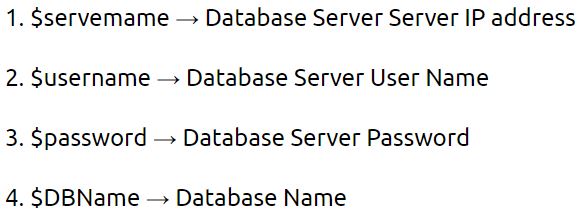
The mysqli_connect function uses these variables and connect Database server to PHP. If connection gets fail, output will be printed with MySQL error code. Otherwise connection is success.
9.
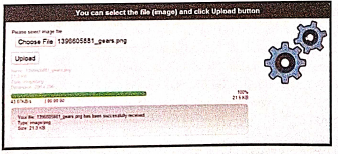
1. File upload is the best feature to select one file from the local machine to server machine.
2. Form tag is used to mention a method as POST or GET and encrypt/attribute mentioned as "multipart /form-data. In the tag mention type = "file" attribute shows the input field as a file select control with a "Browse" button next to the input control.
3. In server machine "php.ini" file search for the file uploads directive, and set it to On : "file uploads = On"
4. After submitting the upload button the request reaches to student_photo_upload.php file.
5. In the file$_FILES variable collects all uploaded file information such as name of the file, size of the file and extension of the file etc. All the details are checked throughly and the error are saved in an array variable The file finally moves under the image directly if the array error variable is empty.
Example:
Fileupload.html:
10.
The following control are available in HTML forms:
(i) Text inputs
(ii) Buttons
(iii) Checkbox
(iv) Radio box
(v) File Select
(vi) Form Tag
(i) Text inputs contain textbox and text area controls.
(ii) Buttons may contain Submit button, Reset button and Cancel Button.
(iii) Checkbox is a important feature which selects more than one value from the HTML form.
(iv) Radio box is similar to checkbox but one value can be chosen at a time.
(v) File select is the best feature to select one file from the local machine to server machine at a time.
(vi) Form tag is used to mention a method (POST or GET) and control the entire form controls in the HTML document.
11.
1. The array concepts in looping structure is used in for each loop.
2. For each loop is exclusively available in PHP. It works only with arrays.
3. The loop iteration depends on each KEY value pair in the array. In for each, loop iteration the value of the current array element is assigned to $value variable and the array pointer is shifted by one until it reaches the end of the array element.
4. For each works only on arrays and objects, and will issue an error when you try to use it on a variable with a different data type or an uninitialized variable.
Syntax:
for each ($ array as $ value)
{
code to be executed;
}
1. The for each statement is used to loop through arrays.
2. 'For each' pass the value of the current array element is assigned to $value and the array pointer is moved by one and in the next pass next element will be processed.
Example:
$array = array (1, 2, 3);
{
echo "Value is $value
";
}
?>
Output:
Value is 1
Value is 2
Value is 3
12.
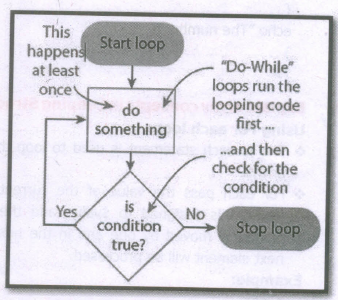
Do while loop always run the statement inside of the loop block at the first time of execution. Then it checks the condition whether true or false. It executes the loop, if the specified condition is true.
Syntax:
do
{
code to be executed;
} while (condition is true);
Example
\(\$\)Student_count = 10;
\(\$\)student_number= 1;
do
{
echo "The student number is: \(\$\)student_number
";
\(\$\)student_number++ ;
}
while(\(\$\)student_number< = \(\$\)Student_count);
?>
13.
If elseif else statement in PHP:
If-elseif-else statement is a combination of if-else statement. More than one statement can execute the condition based on user needs.
Syntax:
if (1st condition)
{
Execute statement(s) if condition is true;
}
elseif(2nd condition)
{
Execute statement(s) if 2nd condition is true;
}
else
{
Execute statement(s) if both conditions are false;
}
Example Program:
$Pass_Mark=35;
$first_class=60;
$Student_Mark= 70;
if ($Student_Mark > = $first_ class){
echo "The Student is eligible for the promotion with First Class";
}
elseif ($Student_Mark >= $Pass_Mark){
echo "The Student is eligible for the promotion";
}
else {
echo "The Student is not eligible for the promotion";
} ?>
14.
(i) If statement in PHP: If statement executes a statement or a group of statements if a specific condition is satisfied as per the users expectation. This is the simplest PHP's conditional statement and can be written in the following form.
Syntax:
if (condition)
{
// code to be executed if condition is true;
}
(ii) If else statement in PHP: The if statement evaluates a condition and executes a set of code if the condition is true and another set of code if the condition is false.
Syntax:
if(condition)
{
//True-block;
}
else
{
//False-block;
}
(iii) If-elseif-else statement in PHP: If-elseif-else statement is a combination of if-else statement. Here multiple conditions can be checked and action is based on the result of the condition.
Syntax:
if (Condition 1)
{
//code to be executed if condition 1 is true;
}
elseif (condition2)
{
//code to be executed if condition1 is false and condition2 is true;
}
elseif (condition3)
{
// code to be executed if condition1 and condition2 are false and condition3 is true;
}
else
{
//code to be executed if all conditions are false;
}
Switch case: The switch case is an alternative to the if.. elseif.. else statement which executes a block of code corresponding to the match.
Syntax:
switch (expression)
case value1:
//code to be executed if expression= value1; break;
case value2;
//code to beexecuted if expression = value2; break;
...
default:
//code to be executed if cexpression is not equal to any of the values;
}
15.
Multidimensional Arrays:
Array containing one or more arrays is called multidimensional array. PHP accepts array with two, three four or more levels.
Example:
// A two-dimensional array
$student=array
(
array("Iniyan", 100, 96),
array("Kavin", 60, 59),
array("Nilani", 1313, 139)
);
echo $$student [0][0].": Tamil Mark: ".$student [0][1].". English mark: ".$student [0] [2]."< br >";
echo $$student [1][0].": Tamil Mark: ".$student [1][1].". English mark: ".$student [1] [2]."< br >";
echo $$student [2}[0].": Tamil Mark:".$student [2][1].".English mark: ".$student [2] [2]."< br >
? >
16.
Function in PHP:
A block of segment in a program that performs a specific operation such as Insert, Execute, Delete, Calculate etc.
A function is a type of sub-routine or procedure in a program.
The function can be divided into three types as follows.
(i) User defined Function
(ii) Pre-defined or System defined or Built-in Function
(iii) Parameterized Function
(i) User defined Function
PHP gives a privilege to user to write own specific operation inside of existing program module.
Two important steps the programmer has to create for users defined functions are
(a) Function Declaration
(b) Function Calling
(a) Function Declaration
A user defined function declaration begins with the keyword "Function".
User can write any custom logic inside in function block.
Syntax:
function functionName()
{
custom logic code to be executed;
}
(b) Function Calling
A function declaration part will be executed by a call to the function.
Programmer has to create function calling part inside the respective program.
Syntax:
functionName();
(ii) Pre-defined or System defined or built-in Function
Built-in functions are functions that exist in PHP installation package.
Functions can either return values when called or can simply perform an operation without returning any value.
Example:
rename_function()
This function renames original name to new name.
Parameter is also called as arguments just like variables.
Arguments are mentioned after the function name and inside the parenthesis.
There is no limit for sending arguments, just separate them with a comma notation.
Examples :
Parameterized function with one argument, two arguments respectively.
(i) function School Name ($sname)
(ii) function School Name ($sname, $strength)
17.
PHP scripting language supports 13 primitive data types.
PHP supports the following data types.
(i) String
(ii) Integer
(iii) Float
(iv) Boolean
(v) Array
(vi) Object
(vii) NULL
(viii) Resource
(i) String
String is a collection of characters within the double quotes ("") or single quotes ().
Space is also considered as a character.
Example:
$x= "Computer Application";
$y='Computer Application';
(ii) Integer
Data type which contains non decimal numbers.
Example (i) $x=59135;
Example (ii)
$x = 59135;
var_dump($x);
The var_dump() function returns type and value about variables in PHP.
(iii) Float
Float is a data type which contains decimal numbers.
Example Sx=19.15;
$x = 19.15;
var_dump($x);
?>
(iv) Boolean
Boolean is a data type which returns two possible states, TRUE or FALSE.
Example:
$x = true;
$y = false;
echo $x;
echo $y;
(v) Array
Array is a data type which has multiple values in single variable.
Example:
$cars
= array("Computer", "Laptop", "Mobile");
var_dump(Scars);
?>
Output:
array(3) {[0]=> string(5) "Computer" [1]=>
string(3) "Laptop" [2]=> string(6) "Mobile"}
(vi) Object
Object is a data type which contains information about data and function inside the class.
Example:
class School {
function marks() {
$this->sec =
}
}
// create an object
$school_obj= new School ();
// show object properties
echo Sschool_obj ->sec;
?>
(vii) NULL
It is a special data type which contains a single value: NULL.
Example:
$x="COMPUTER APPLICATION!";
$x = null;
var_dump($x);
?>
Output: NULL
(viii) Resources
It is a specific variable, it has a reference to an external resource.
These variables hold specific handlers to handle files and database connections.
// Open a file for reading
$handle = fopen("note.txt", "r");
var_dump($handle);
echo "
";
// Connect to MySQL database server with default setting
$link= mysql_connect("localhost", "root", "");
var_dump($link);
?>
18.
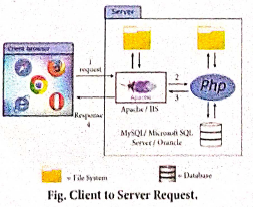
Website development has done by the following activities.
1. Website or webpage is developed by the programmer using PHP script.
2. Entire website codes are moved to web server path in a remote server machine.
3. From the client side, the end user open a browser, types the URL of the website (or) webpage and initiates the request to remote server machine over the network.
4. After receiving the request from client machine the web server tries to compile and interpret the PHP code which is available in remote machine.
5. Response will be generated and sent back to the client machine over the network from webserver.
6. Finally the browser is installed in the client machine receives the response and displays the output to user, as shown in fig.
19.
SQL - Structured Query Language is a stand. language used for accessing and manipulating databases.
Data Definition Language (DDL)
The DDL commands are used to define database schema (Structure). Also to create and modify the structure of the database object in the database. CREATE, ALTER, DROP,RENAME and TRUNCATE commands belongs to this category.
SOL DDL COMMANDS LIST
| Command | Description |
| CREATE | Used to create database or tables |
| ALTER | Modifies the existing structure of database or table |
| DROP | Deletes a database or table. |
| RENAME | Used to rename an existing object in the database |
| TRUNCATE | Used to delete all table records |
Create Database used to create new SQL Database.
Syntax: CREATE database databasename;
Example: mysql>create database studentDB;
Drop Database - used to remove any of the existing SQL Database.
Syntax: DROP database databasename;
Example: mysql>DROP database studentDB;
TRUNCATE Command:
Syntax: TRUNCATE table tablename;
Example: TRUNCATE table studentDB;
ALTER Command:
Syntax:
ALTER TABLE table_name
ADD column_name column_definition;
Example:
ALTER TABLE student
ADD student_name char(50);
20.
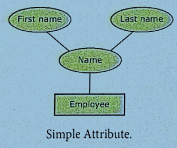
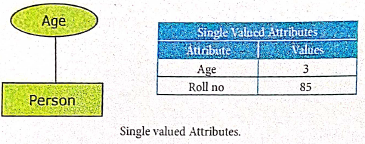
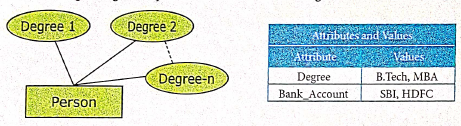
21.
The database technology came into existence in terms of models with relational and object- relational behavior. The major database models are listed below:
1. Hierarchical Database Model:
(i). The famous Hierarchical database model was IMS (Information Management System), IBM's first DBMS.
(ii). In this model each record has information in parent/child relationship like a tree structure.
(iii). The collection of records was called as record types. This individual records are equal to rows.
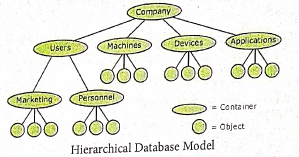
Advantages: Less redundant data, efficient search, data-integrity and security.
Limitations: Complex to implement and difficulty in handling many to many relationship.
2. Network model:
(i). The first developed network data model was IDS (Integrated Data Store) at Honeywell.
(ii). Network model is similar to Hierarchical model except that in this model each member can have more than one owner.
(iii). The Many to Many relationships are handled in a better way.
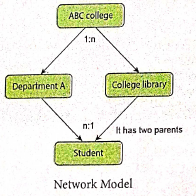
(iv). This model identified by the three database components Network schema, Sub schema and Language for data management.
Network schema: schema defines all about the structure of the data base.
Sub schema: controls on views of the database for the user.
Language: basic procedural for accessing the database.
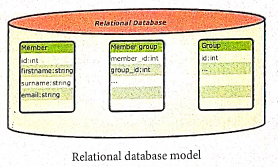
3. Relational model:
Oracle and DB2 are few commercial relational models in use Relational model is defined with two terminologies: Instance and Schema.
Instance: A table consisting of rows and columns.
Schema: Specifies the structure including name and type of each column.
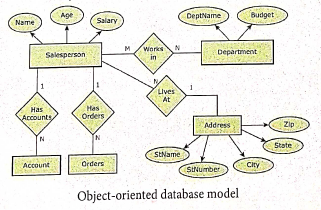
4. Object oriented database model:
(i). This model incorporates the combination of Object Oriented Programming (OOP's) concepts and database technologies.
(ii). Practically, this model serves as the base of Relational model. Object oriented model uses small, reusable software known as Objects.
(iii). These are stored in object oriented database.
22.
Converting text in a Text block to a Frame.
(i) Draw the frame of your choice using one of the PageMaker's Frame tool.
(ii) Select the text block you want to insert in the frame.
(iii) Click the frame while pressing the Shift key. Now both elements will be selected.
(iv) Choose Element > Frame> Attach Content on the Menu bar.
(v) Now the text appears in the frame.
23.
| Tool | Tool Toolbox | Cursor | Use |
| Pointer tool | .JPG) |
.JPG) |
Used to select, move, and resize text objects and graphics. |
| Text tool | .JPG) |
.JPG) |
Used to type, select, and edit text. |
| Rotating tool | .JPG) |
.JPG) |
Used to select and rotate objects |
| Cropping tool | .JPG) |
.JPG) |
Used to trim imported graphics |
| Line tool | .JPG) |
.JPG) |
Used to draw straight lines in any direction |
| Constrained line Tool | .JPG) |
|
Used to draw vertical or horizontal lines |
| Rectangle tool | .JPG) |
|
Used to draw squares and rectangles |
| Rectangle frame tool | .JPG) |
|
Used to create rectangular place holders for text and graphics |
| Ellipse tool | .JPG) |
|
Used to draw circles and ellipses |
| Ellipse frame tool | .JPG) |
|
Used to create elliptical place holders for text and graphics |
| Polygon tool | .JPG) |
|
Used to draw polygons |
| Polygon frame tool | .JPG) |
|
Used to create polygonal place holders for text and graphics |
| Hand tool | .JPG) |
.JPG) |
Used to scroll the page (an alternative to the scroll bar) |
| Zoom tool | .JPG) |
 |
Used to magnify or reduce an area of the page. |
24.
1. Production Manager:
(i) In a multimedia production, the role of production manager is to define, and coordinate, the production of the multimedia project in time and with full quality.
(ii) The production manager should be an expertise in the technology, good at proposal writing,good communication skills and budget management skills.
2. Content Specialist:
(i) Content specialist is responsible for performing all research activities concerned with the proposed application's content.
(ii) Program content refers to projects information, graphics, data or facts presented through the multimedia production.
3. Script Writer:
(i) Video and film scripts represents a linear sequence of events.
(ii) The script writer visualizes the concepts in three dimensional environment and if needed uses the virtual reality integration into the program.
4. Text Editor:
(i) The content of a multimedia production always must flow logically and the text should always be structured and correct grammatically.
(ii) Text and narration is an integrated part of the application.
5. Multimedia Architect:
The multimedia architect integrates all the multimedia building blocks like graphics, text, audio, music, video, photos and animation by using an authoring software.
6. Audio and Video Specialist:
(i) The roles of these specialists are needed for dealing with narration and digitized videos to be added in a multimedia presentation.
(ii) They are responsible for recording, editing sound effects and digitizing
25.
1. Animation is the process of displaying images with continuous movement.
2. In animation, the screen object is a vector image in animation.
3. Using numerical transformations the movement of that image along its path is calculated for their defining coordinates.
4. The least frame rate of atleast 16 frame/sec gives the impression of smoothness and for natural looking it should be atleast 25 frame/sec.
5. Animations may be in two or three dimensional.
6. The two dimensional animation, bring an image alive, that occur on the flat X and Y axis of the screen, while in three dimensional animation it occurs along the three axis X, Y and Z.
7. The two basic types of animations are (1) Path animation and (2) Frame animation.
(1) Path Animation
It involves moving an object on a screen that has a constant background.
E.g. A cartoon character may move across the screen regardless of any change in the background or the character.
(2) Frame Animation
In frame animations, multiple objects are allowed to travel simultaneously and the background also changes.

12th Standard Syllabus & Materials
12th Standard
TN 12th Computer Applications களப்பெயர் முறைமை (DNS) Sample Question Papers Study Material - QB365 Set A
NEW12th Standard
TN 12th Computer Applications வலையமைப்பு எடுத்துக்காட்டுகள் மற்றும் நெறிமுறைகள் Sample Question Papers Study Material - QB365 Set A
NEW12th Standard
TN 12th Computer Applications கணினி வலையமைப்பு ஓர் அறிமுகம் Sample Question Papers Study Material - QB365 Set A
NEW12th Standard
TN 12th Computer Applications PHP-உடன் MySQL-ஐ இணைத்தல் Sample Question Papers Study Material - QB365 Set A



Tamilnadu Stateboard 12th Standard Subjects

Maths

Chemistry

Physics

Biology

Computer Science

Business Maths and Statistics

Economics

Commerce

Accountancy

History
Computer Applications
Biology
Computer Technology
Computer Applications
Computer Science
Business Maths and Statistics
Commerce
Economics
Maths
Chemistry
Physics
Computer Technology
History
Accountancy

Tamil

English

French
Tamilnadu Stateboard Standards


