
 100% FREE ACCESS
12th Standard Syllabus & Materials
12th Standard
TN 12th Computer Applications மின்னணு தரவு பரிமாற்றம் Sample Question Papers Study Material - QB365 Set A
NEW12th Standard
TN 12th Computer Applications மின் - வணிக பாதுகாப்பு அமைப்புகள் Sample Question Papers Study Material - QB365 Set A
NEW12th Standard
TN 12th Computer Applications மின்னணு செலுத்தல் முறைகள் Sample Question Papers Study Material - QB365 Set A
NEW12th Standard
TN 12th Computer Applications மின் - வணிகம் Sample Question Papers Study Material - QB365 Set A
NEW12th Standard
TN 12th Computer Applications திறந்த மூல கருத்துருக்கள் Sample Question Papers Study Material - QB365 Set A
NEW12th Standard
TN 12th Computer Applications வலையமைப்பு வடமிடல் Sample Question Papers Study Material - QB365 Set A

Published on: 05/06/2021
QB365 provides detailed and simple solution for every book back questions in class 12 Computer Applications subject.It will helps to get more idea about question pattern in every book back questions with solution.
Download Tamil Nadu 12th Standard Computer Applications question papers, model tests, one-mark questions, important questions, and public exam papers in PDF format. Free study materials and answer keys for TN State Board students.
Questions + Answers key
Take MCQ Computer Applications Test
1.
What is cryptocurrency? Explain the same.
2.
What is credit card? Explain the key players of a credit card payment system and bring out the merits of it.
3.
How would you differentiate a traditional commerce and E-Commerce?
4.
5.
Differentiate Proprietary and open source software
6.
Explain the components used in Ethernet cabling.
7.
Explain wiring techniques used in Ethernet cabling.
8.
Explain the Name server and its types.
9.
Difference between TCP/IP and OSI Reference Model.
10.
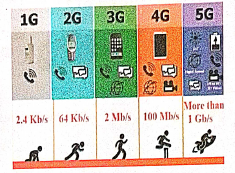
Explain the growth of the computer networking
11.
Explain the Database error handling and management process in PHP?
12.
Explain in detail of File handling functions in PHP.
13.
Explain the process File handling.
14.
Explain ‘for’ loop with example.
15.
Discuss in detail about For each loop.
16.
Explain if else statement in PHP. With an example.
17.
Explain Array concepts and their types.
18.
Explain operators in PHP with example.
19.
Explain the process of Webserver installation.
20.
Write a note on open source software tools available in MySQL Administration.
21.
List the basic concepts of ER Model with suitable example
22.
Write the steps to draw a star using polygon tool?
23.
Write the steps to place the text in a frame.
24.
25.
Explore the opportunities of Animation field in movie industry.
1.
1. A cryptocurrency is a unique virtual (digital) asset designed to work as a medium of exchange using cryptographic algorithm.
2. This algorithm secures the transactions by recording it in blockchain and controls the creation of additional units of the currency.
3. Cryptocurrency is also called as cryptocoins, e-cash, alternative currencies or virtual currencies and are classified as a subset of digital currencies.
4. The function of cryptocurrency is based on technologies such as Mining, Blockchain, Directed Acyclic Graph, Distributed register (ledger), etc. The information about the transaction is usually not encrypted and is available in clear text.
5. The term "cryptocurrency" began to be used after the appearance of the Bitcoin. Bitcoin is the most popular and the first decentralized cryptocurrency. Bitcoin payment system, was developed in 2009 by an unknown person or a group under the pseudonym "SatosiNakamoto".
6. Currently, more than 1300 cryptocurrencies are listed over 200 special cryptocurrency stock exchanges. Most (not all) are based on different types of blockchain technology.
7. Many cryptocurrencies operate on the basis of the same source code, in which the authors make only a few minor changes in parameters like time, date, distribution of blocks, number of coins, etc. These currencies are called as fork. In fork, both cryptocurrencies can share a common transaction history in blockchain until the split.
8. Altcoins is the collective name for all cryptocurrencies that appeared after Bitcoin. The early Altcoins, Litecoin and Namecoin appeared in 2011. Their miners sought to overcome a number of problems inherent in Bitcoin (for example, Litecoin has a higher transaction rate) or use blockchain technology in other areas
9. Many altcoins are inherently very similar to Bitcoin in characteristics and structure.
10. The cryptocurrency units are created by the solution of cryptographic tasks called mining.
11. Blockchains are an open distributed book that records transactions of cryptocurrencies between any two parties in an efficient and verifiable manner.
2.
Credit card is an electronic payment system normally used for retail transactions. A credit card enables the bearer to buy goods or services from a vendor, based on the cardholder's promise to the card issuer to payback the value later with an agreed interest. Every credit card account has a purchased limit set by the issuing bank or the firm. A credit card is different from a debit card where the credit card issuer lends money to customer instead of deducting it from customer's bank account instantly.
Key players in operations of credit card:
Bearer: The holder of the credit card account who is responsible for payment of invoices in full (transactor) or a portion of the balance (revolver) the rest accrues interest and carried forward.
Merchant: Storekeeper or vendor who sell or providing service, receiving payment made by its customers through the credit card.
Acquirer: Merchant's bank that is responsible for receiving payment on behalf of merchant send authorization requests to the issuing bank through the appropriate channels.
Credit Card Network: It acts as the intermediate between the banks. The Company responsible for communicating the transaction between the acquirer and the credit card issuer. These entities operate the networks that process credit card payments worldwide and levy interchange fees.
E.g. Visa, MasterCard, Rupay
Issuer: Bearer's bank, that issue the credit card, set limit of purchases, decides the approval of transactions, issues invoices for payments, charges the holders in case of default and offer card- linked products such as insurance, additional cards and rewards plan.
Advantages of credit card:
1. Most credit cards are accepted worldwide.
2. It is not necessary to pay physical money at the time of purchase. The customer gets an extra period to pay the purchase.
3. Depending on the card, there is no need to pay annuity.
4. Allows purchases over the Internet in installments.
5. Some issuers allows "round up" the purchase price and pay the difference in cash to make the transactions easy.
3.
| Traditional Commerce | E-Commerce |
|---|---|
| Traditional commerce is buying or selling of products and services physically. | E-Commerce carries out commercial transactions electronically on the Internet. |
| Customer can easily identify, authenticate and talk to the merchant. | Neither customer nor merchant see the other. |
| Physical stores are not feasible to be open all the times. | It is always available on all time and all days of the year. |
| Products can be inspected physically before purchase. | Products can't be inspected physically before purchase. |
| Scope of business is limited to a particular area. | Scope of business is global. Vendors can expand their business worldwide. |
| Resource focuses Supply side. | Resource focuses Demand side. |
| Business Relationship is Linear. | Business Relationship is End-to-end. |
| Marketing is one way marketing | One-to-one marketing. |
| Payment is made by cash, cheque, cards, etc. | Payment system is mostly credit card and through fund transfer. |
| Most goods are delivered instantly. | It takes time to transport goods. |
4.
5.
| Open Source Software | Proprietary Software |
|---|---|
| It refers to the software that is developed and tested through open collaboration. | It refers to the software that is solely owned by the individual or the organization that developed it. |
| Anyone with the academic knowledge can access, inspect modify and redistribute the source code. | Only the owner or publisher who holds the legal property rights of the source code can access it. |
| The project is managed by an open source community of developers and programmers. | The project is managed by a closed group of individuals or team that developed it. |
| They are not aimed at unskilled users outside of the programming community. | They are focused on a limited market of both skilled and unskilled and users. |
| It provides better flexibility which means more freedom which encourages innovation. | There is a very limited scope of innovation with the restrictions and all. |
| Examples: Android, Firefox, Libreoffice, Ubuntu, Gname etc.. | Examples: Windows, mac Os, iTunes, Google earth. Adobe flash etc. |
6.
Ethernet cabling is the process of connecting the computers with other devices using Ethernet cables.
the four main components are used in Ethernet cabling components are
(i) Patch cable [Twisted pair]
(ii) RJ45 connector
(iii) Ethernet ports
(iv) Crimping tool.
(i) Patch Cable (Twisted Pair):
(i) These cables are generally made up of 8 wires in different colors. Four of them are solid colours, and the others are striped.
(ii) Ethernet cables are normally manufactured in several industrial standards such as Cat 3, Cat 5, Cat 6, Cat 6e and Cat 7. "Cat" simply stands for "Category," and the following number indicates the version.
(iii) Latest version denotes faster and higher frequencies, measured in Mhz.
(ii) RJ45 Connector:
(i) The RJ45 connector looks similar like a telephone jack but it looks a slightly wider. In RJ45 the "R" stands for the Registered Jack and the "45" simply refers to the interface standard.
(ii)The RJ45 connector is a small plastic cube. It has eight pins.
(iii) It is connected to each end of the Ethernet cable. It is also known as 8P8C connector.
(iii) Ethernet port:
(i) Ethernet port is an opening which is a part of an Ethernet card.It accepts RJ45 connector with Ethernet cable. It is also called as RJ45 jack.
(ii) It is found on personal computers, laptops routers, switches, hubs and modems.
(iii) Once you inject the plug into the port the two led lights will glow in the computer, one is green and another one is orange. The orange light will start blinking which indicates that the Internet is connected.
(iv) Crimping tool:
(i) Crimping is the process of joining two or more pieces of wire to hold each other.
(ii) The crimping tool is a physical tool which is used to connect the patch wire and the Ethernet connector.
(iii) The crimping looks like a small cutting handle with two mold of Ethernet port.
7.
There are 3 types of wiring techniques to construct the Ethernet cable. It is also known as color coding techniques. They are:
(a) Straight-Through wiring:
(b) Cross-Over wiring; and
(c) Roll-Over wiring.
(a) Straight-Through Wiring:
1. Ethernet cables used for Ethernet connections are "straight-through cables" and these cable wires are in the same sequence at both ends sof the cable.
2. The straight-through wiring cables are mostly used for connecting PC/NIC card to a hub.
3. This is a simple physical connection used in printers, computers and other network interfaces.

(b) Cross-Over Wiring:
1. We need a cross-over cable when ever we connect two computers (or) Ethernet devices directly together without a hub, we use crossover cable.
2. Then the pairs (Tx and Rx lines) will be crossed which means pin 1 & 2 of the plug on one end are connected with pin 3 & 6 of the plug on other end and vice-versa.
3. The easiest way to make a cross-over cable is to make one end to T568A colour coding and the other end to T568B.

(c) Roll-Over Wiring:
1. Roll-over cable is a type of null-modem cable that is often used to connect a device console port to make programming changes to the device.
2. This wire has opposite pin arrangements, all the cables are rolled over to different arrangements.
3. In this cable, the coloured wires are reversed on other end. (i.e.,) The pins in one end are connected with other end in reverse order. (i.e.) (Pin 1 to 8, 2 to 7, 3 to 6, 4 to 5, 5 to 4, 6 to 3, 7 to 2, 8 to 1)
4. It is also known as Yost cable (or) console cable. It is typically flat to distinguish it from other types of network cabling.
5. These all 3 arrangements are used to perform an interface change. But all these 3 arrangements transmits the data at same speed only.

8.
Name Server:
(i) Name Server is a main part of the Domain Name System (DNS). It is a software program that run on a physical system.
(ii) It has the DNS database consisting of domain names and their corresponding IP addresses. Name Server translates the domian name to IP address.
(iii) There is a need to store a large number of domain names for worldwide usage, so plenty of servers are used in the hierarchical manner.
(iv) Name servers do the important task of searching the domain names. While you searching for a website, Local Nameserver (provided by ISP) asks the different name servers until one of them finds out the answer.
(v) At last it returns IP address for that domain name. Your computer is now connected to the requested webpage.
Types of Name Servers:
There are three types of Name servers which control the entire Domian Name System:
(i) Root Name Server - top level server which contains entire DNS tree, maintained by ICANN. There are 13 servers.
(ii) Primary Name Server - contains a zone resource records. These records are updatable by domain name holders.
(iii) Secondary Name server - contains a copy of primary server files. This server has no authority to update, but reduce the workload of primary server by sharing the queries.
9.
| No. | TCP/IP | OSI |
| 1. | It is client server model. ie. when the client requests for service it is provided by the server. | It is conceptual model. |
| 2. | It is standard protocol used for every network including the internet. | It is not a protocol but a reference model used for understanding and designing the system architecture. |
| 3. | It is four layered model. | It has seven layers. |
| 4. | TCP / IP follows vertical approach. | OSI model supports horizontal approach. |
| 5. | It is Tangible | It is not Tangible |
| 6. | It is follows top to bottom approach | It is follows a bottom-up approach |
10.
1. The uses of the computer networking are:
2. It is used in business and home
3. Growth on popularity of cloud storage and cloud computing.
4. On behalf of buying physical copies of games music and movies, increasingly downloading and buy digital license their need via internet.
5. Developments on mobile networking infrastructure both deployments of 4G and 3G networks that will allow the people in their developed areas.
6. Allows it to their smart mobile phones as video broadcasting system and as mobile television.
7. Some of the people underlying and staying connected all the times, whenever they are at the workplace, via a home network, via publish WiFi hotspots or smart phone.
8. 4G LTE mobile network was not reached by many parts of world, of the industry of telecommunication has been hard working on the development of their next generation :"5G" cellular communication technology. This 5G intense to boost up the speed the mobile connections dramatically.
9. Artificial intelligence will help to maintain, manage, and protect it.
10. This Artificial network powering algorithms with become most intelligent:
11. It might find faster and reliable methods of anticipating threats and cleaning networks.
12. Artificial intelligence able to be a better predict traffic as it collects and analyses data in real time, some of network managers were better prepared for big event such as the world cup, Olympics, Valentines day which often put on the Internet under pressure.
11.
Error handling is the process of catching errors raised by our program and then taking appropriate action.
Different error handling methods are
Simple "die ()" statements;
Custom error and error triggers;
Error reporting.
(i) Using the die () function:-
Example:
$file = fopen("Welcome.txt", "r");
?>
Above example shows a simple script that opens a text file. If the file does not exists you might get an error like this.
Warning:
fopen (welcome.txt) [function.fopen]: failed to open stream: No such file or directory in
C:\webfolder\test.php on line 2
To prevent the user from getting an error message like the one above, test whether the file before we
try to access it.
if (!file_exists ("welcome.txt"))
{
die ("File not found");
} else
{
file = fopen ("Welcome.txt", "r");
}
Now if the file does not exists you get an error like this
File not found
The code above is more efficient than the earlier code, because it uses a simple error handling mechanism to stop the script after the error.
However, simply stopping the script is not always the right way to go. Let's take a look at alternative php functions for handling errors.
(ii) Creating a custom Error Handler
Creating a custom error handler is quite simple. Simply create a special function that can be called when an error occurs in PHP.
This function must be able to handle a minimum of two parameters (error level and error message) but can accept up to five parameters.
Syntax:
error_function (error_level, error_message, error_file, error_line, error_context)
(iii) Error report levels:
These error report levels are the different types of error the user defined error handler can be used for:
E_WARNING, E_NOTICE, E_USER_ERROR, E_USER_WARNING, E_USER_NOTICE,... etc.
Set Error Handler:
The default error handling for PHP is the built-in error handle;
Example:
To use our custom error handle for all errors:
set_error_handler("Custom Error");
12.
File handling is an important activity of all web application development process.
Files are processed for different tasks using the following events :
(i) PHP Open a File,
(ii) PHP Read a File,
(iii) PHP Close a File,
(iv) PHP Write a File,
(v) PHP Appending a File and
(vi) PHP uploading a File.
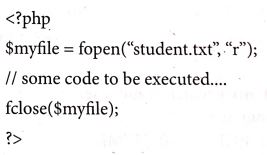
(1) PHP Open a File : fopen() is a system function available in PHP. This function helps to open a file in the server. It contains two parameters one for the file and the other one specifies in which mode the file should be opened (Read/Write).
Syntax:
$file_Object= fopen("FileName", "Read/
WriteMode") or die("Error Message!");
Example:

$myfile = fopen("Student.txt", "r")
or die("Unable to open file!");
?>
(ii) PHP Read a File: The fread() function reads from an open file. The file object comes from fopen function.
Syntax:
fread($file_Object,filesize("FileName"));
Example:
fread($myfile,filesize("Student.txt"));
?>
(iii) PHP Close a File: The fclose() function is used to close an opened file. The file object comes from fopen function.
Syntax:
fclose($file_Object);
Example:
(iv) PHP write a File: The fwrite() function is used to write to a file.
Syntax:

13.
In the file handling process following task can be included
(i) open file for read and write
(ii) close file
(iii) perform operations on file
(iv) write results
With PHP we can handle file easily. There are various in built functions available for file handling for PHP.
Using file handling we can open, create, upload and edit files in PHP before working with file. We must open the file first using fopen() function.fopen() function is used in a following manner to perform this task.
$fp = fopen(
In the above code, we have used two parameters while using fopen() function.
filename to open mode in which file is to be opened.
The function will return a file pointer if the file is successfully opened, otherwise it will return false.
Modes we use in the file handling
| Mode | Description |
| r | Read only mode |
| r+ | Read and write mode |
| W | Write mode only |
| W+ | Write and read model |
| a | Append file mode |
| a+ | Read and append mode |
| x | It used to create and open a file only for writing purpose. |
14.
'for loop' is called as the entry-check loop.
The for loop is used to execute a block of code a specific number of times.
Syntax:
for (initialization; condition; increment / decrement)
{
//code to be executed;
}
The initialization part is executed only once at the beginning of the loop. It is used to initialize variables. The condition is evaluated before each iteration of the loop. If it is true, the code block is executed. If it is false, the loop is terminated. The increment/ decrement part is executed after each iteration of the loop. It is used to update variables.
Example 1
To print the numbers from 1 to 5 in ascending order
for ( i = 1; i<=5; i++)
{
echo i. "<br>";
}
Output:
1
2
3
4
5
Example 2
To print the numbers from 5 to 1 in descending order
for (i = 5; i<=1; i--)
{
echo i. "<br>";
}
Output:
5
4
3
2
1
15.
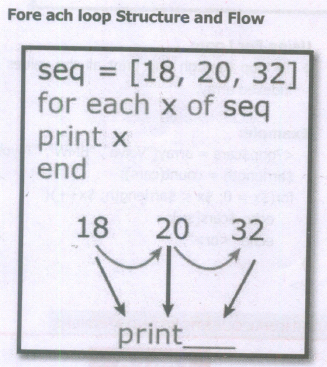
1. The foreach statement is used to loop through arrays.
2. The loop iteration depends on KEY value pair in the array.
3. In the loop iteration, the value of the current array element is assigned to $value and the array pointer is shifted by one until it reaches the end of the array element.
Syntax
for each ($array as $value)
{
code to be ex
}
Examples:
for each ($student_name as $value)
{
echo $value
";
}
?>
Output:
Sriakshaya
Sriram
Srisai
Srivatchan
16.
If else statement in PHP:
If statement executes a statement or a group of statements if a specific condition is satisfied by the user expectation. When the condition gets false (fail) the else block is executed.
Syntax:
if (condition)
{
Execute statement(s) if condition is true;
}
else
{
Execute statement(s) if condition is false;
}
Example
$Pass_Mark=35;
$Student_Mark= 70;
if ($Student_Mark>= $Pass_Mark){
echo "The Student is eligible for the promotion";
}
else {
echo "The Student is not eligible for the promotion";
} ?>
17.
Array is a concept that stores more than one value of same data type in single array variable.
They are 3 types of array concepts in PHP.
(i) Indexed Arrays
(ii) Associative Array and
(iii) Multi-Dimensional Array
(i) Indexed Arrays
Array defines with the keyword array()
Syntax:
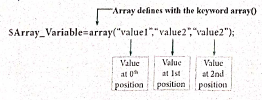
Array with numeric index for the available values in array variable which contains key value pair as user can take the value using keys.
Example:
$teacher_name=array("Iniyan", "Kavin", "Nilani");
echo "The students name are".$teacher_name[0].$teacher_name[1]..
(ii) Associative Arrays
Associative arrays are a key-value pair data structure.
Syntax:
array (key=> value, key =>, value, key => Value, etc.);
key=Specifies the key (numeric or string)
Valme - Specifies the value
Example
<$ php
$Marks
array"Student1"=>"35","Student2"=>"17"Student3"=>"43");
echo "Studenti mark is. $Marks("Student1]." is eligible for qualification";
echo "Student2 mark is. $Marks Student2"]." is not eligible for qualification";
?>
(iii) Multidimensional Arrays:
Array containing one or more arrays is called multidimensional array. PHP accepts array with two, three four or more levels.
Example:
< ?php
// A two-dimensional array
$student=array
(
array("Iniyan", 100, 96),
array("Kavin", 60, 59),
array("Nilani", 1313, 139)
);
echo $$student [0][0].": Tamil Mark: ".$student [0][1].". English mark: ".$student [0] [2]."< br > ";
echo $$student [1][0].": Tamil Mark: ".$student [1][1].". English mark: ".$student [1] [2]."< br > ";
echo $$student [2}[0].": Tamil Mark:".$student [2][1].".English mark: ".$student [2] [2]."< br >
? >
18.
An operator is a symbol that performs a given action on a value or group of values. The values the operation is performed upon are known as operands.
The types of operators in PHP are
(i) Arithmetic operators
(ii) Assignment operators
(iii) Comparison operators
(iv) Increment/Decrement operators
(v) Logical operators and
(vi) String operators
1. Arithmetic operators
Arithmetic operators are used to perform math operations, for example, addition, subtraction, multiplication, and division.
| Operator | Operator Name | Example | Output |
|---|---|---|---|
| + | Addition | 5+2 | 7 |
| - | Subtraction | 5-2 | 3 |
| * | Multiplication | 5*2 | 10 |
| / | Division | 5/2 | 2.5 |
| % | Modulus | 5%2 | 1 |
2. Assignment operators
The assignment operator is used to assign a value to a variable. The assignment operator takes the value of its right-hand operand and assigns it to its left-hand operand.
| Operator | Operator Name | Example | Output |
|---|---|---|---|
| = | Assignment operator | $a = 5; | 5 |
3. Comparison operators
Comparison operators are used to compare two values and determine whether a certain condition is true or false.
| Operator | Operator Name | Example | Output |
|---|---|---|---|
| > | Greater than | 5 > 2 | |
| < | less than | 5<2 | False |
| >= | Greater than or equal to | 5>= 2 | True |
| <= | Less than or equal to | 5<=2 | False |
| == | Equal to | 5==5 5 == 5.0 |
True False |
| === | Identical | 5===5 5===5.0 |
True False |
| != | Not equal | 5!=5 5!=6 |
True False |
| !== | Not identical | 5!==5 5!==5.0 |
True False |
4.Logical Operators:
Logical operators are used to perform logical operations on variables and values.
| Operator | Operator Name | Example | Output |
|---|---|---|---|
| && | Logical AND | (5>3) && (5>7) | False |
| II | Logical OR | (5>3) II (5>7) | True |
| xor | XOR | (5>3) xor (5>7) | True |
| ! | Logical NOT | ! (5>3) | False |
5. Increment and Decrement operators
In PHP, the increment operator ++ is used to increase the value of a variable by 1, and the decrement operator is used to decrease the value of a variable by 1. The increment and decrement operators can be used as either prefix or postfix operators.
| Operator | Name | Output |
|---|---|---|
| ++ (increment operator) |
++ $a Pre-increment | $x = ++ $a |
| ++ (increment operator) |
$a + + Post-increment | $x = $a ++ |
| -- (decrement operator) |
--$a Pre-decrement | $x = --$a |
| -- (decrement operator) |
$a-- Post-decrement | $x = $a-- |
6. String operator
String operators have concatenation operator(.) and concatenation assignment operator(-). Concatenation means adding one or more variables to an existing variable.
| Operator | Name | Example | Output |
|---|---|---|---|
| . (Dot) | Concatenation | $a = 'Hello'; $b = 'World'; $c= $a. $b; |
Hello World |
| .= (Dot equal to) | Concatenation | $a= 'Hello': $b = 'World'; $a .= $b; |
Hello World |
19.
The following are the steps to install and configure Apache Httpd webserver and PHP module in windows server machine.
Step 1:
Go to Apache foundation website and download the Httpd webserver software.
https://httpd.apache.org/download.cgi.
Step 2:
After downloading MSI file from Apache foundation website, user launches the MSI file and clicks next.
Click on next and next button finish the installation on server machine.
Software takes default port number 130 or 130130.
Once the user finished, webserver software is installed and configured on server hardware machine as a service.
Step 3:
To test the installation of Apache Httpd webserver, enter the following URL. from your web browser which is installed in your client machine.
https://localhost:130/ (or) https://localhost:130130
The output page that says "Its works"
Step 4:
Administrator user can start, stop and restart the webserver service at any time via windows control panel.
Once the services stops, the client machine will not receive the response message from server machine.
Step 5.
Webserver's configuration setting file "httpd.conf" is located in the conf directory under the apache installation directory.
Edit this file and enable the PHP module to run PHP scripting language.
20.
MYSQL is a database management system and it is ease of use.
Types of Software tools:
(i). Many open source tools are available in the market to design the database in a better and efficient manner.
(ii). PhpMyAdmin is most popular for Web-Administration.
(iii). The Popular Desktop Application tools are MySQL Workbench and HeidiSQL.
1. PHPMYADMIN (Web Admin):
(i). This administrative tools of MySQL is a web application written in PHP.
(ii). They are used predominantly in web-hosting.
(iii). The main feature is providing web interface, importing data from CSV and exporting data to various formats.
(iv). It generates live charts for monitoring MySQL server activities like connections, processes and memory usage.
(v). It also helps in making the complex queries easier.
2. MySQL Workbench (Desktop Application)
(i). It is a database tool used by developers and DBA's mainly for visualization.
(ii). This tool helps in data modeling, development of SQL, server configuration and backup for MySQL.
(iii). Its Basic release version is 5.0 and current version 8.0 support all operating systems.
(iv). The SQL editor of this tool is very flexible and comfortable in dealing multiple results set.
3. HeidiSQL (Desktop Application)
(i). This open source tools helps in the administration of better database systems.
(ii). It supports GUI (Graphical User Interface) features for monitoring server host, server connection, Databases, Table, Views, Triggers and Events.
21.
ER Modeling basic concepts: The basic concepts of ER model consists of
1. Entity or Entity type
2. Attributes
3. Relationship
(i) Entity (or) Entity type
(i) An Entity can be real-world object (or) animation which is easily identifiable by anyone even by a common man.
(ii) Example: In a company's database Employee, HR, Manager are considered as entities, where each of these entity will be having their own attributes.An entity is represented by a rectangular box.

Types of Entity:
(a) Strong Entity
(b) Weak Entity
(c) Entity Instance
(i) Strong Entity
1. Strong entity is not depend on other entity and it will have a primary key.
2. It is represented by one rectangle.

3. For Example Roll Number. Everyone Roll Number varies and it will not be same.
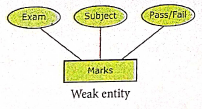
(ii) Weak Entity
1. A weak entity is dependent on other entities and it doesn't have any primary key like strong entity.
2. It is represented by double rectangle.

3. For Example, "Marks" is the weak entity and there is no primary key or unique id. It is depend on the existence of the other entity.
(iii) Entity Instance
1. Instances are the values for the entity. So an Entity Instance denotes the category values for the given entity.
Entities Instances
| Entities | Instances |
| Human | Male, Female |
| Animals | Dog, cats, lion |
| Jobs | Engineer, Doctor, Lawyer |
| Actors | Ajith, Vijay, Vikram |
| Electronics | Laptop, Mobile |
2. Attributes
An attribute is the information about that entity and it will entity describe, quantity, qualify, classify and specify and entity. An attribute will always have a single value, that value can be a number or character or string.
Types of attributes :
(i) Key Attribute
(ii) Simple Attributes
(ii) Composite Attributes
(iv) Single Valued Attribute
(v) Multi Valued Attribute
3. Relationship Type
In ER Model, relationship exists between two entities. Three types of relationships are available and the Entity-Relationship (ER) diagram is based on the three types listed below
(i) One-to-One relationship: Consider two entities A and B. One-to-one (1:1) relationship is said to exist in a relational database design, if 0 or 1 instance of entity A is associated with 0 or 1 instance of entity B, and 0 or 1 instance of entity B is associated with 0 or I instance of entity A.
(ii) One-to-Many relationship: Consider two entities A and B. One-to-many (1:N) relationship is said to exist in a relational database design, for 1 instance of entity A there exists 0 or 1 or many instances of entity B, but for 1 instance of entity B there exists 0 ur 1 instance of entity A.
(iii) Many-to-Many relationship: Consider two entities A and B. many-to-many (M:N) relationship is said to exist in a relational database design, for 1 instance of entity A there exists 0 or 1 or many instances of entity B, and for 1 instance of entity B there exists 0 or 1 or many instance of entity A.
In reality one-to-one are in less usage, where as one-to-many and many-to-many are commonly used. However in relational database, many-to-many are converted into one-to-many relationships.
22.
Drawing a star using polygon tool.
To draw a Star
(i) Click on the Polygon tool from the toolbox. The cursor changes to a crosshair.
(ii) Click and drag anywhere on the screen. As you drag, a Polygon appears.
(iii) Release the mouse button when the Polygon is of the desired size.
(iv) Choose Element → Polygon settings in the menu bar. Now polygon settings dialogue box appears.
(v) Type 5 in the Number of sides text box.
(vi) Type 50% in star inset textbox.
(vii) Click OK. Now the required star appears on the screen.
23.
To place text in a Frame
(i) Click on any one Frame tool from the Toolbox.
(ii) Draw a frame with one of PageMaker's Frame tools (Rectangle frame tool (or) Ellipse Frame Tool (or) Polygon frame Tool). Make sure the objects remains selected.
(iii) Click on File > Place. The Place dialog box will appears.
(iv) Locate the document that contains the text you want to place, select it.
(v) Click on Open.
(vi) Click in a frame to place the text in it.The text will be placed in the frame.
24.

25.
1. Some of the opportunities are available in animation and gaming are as Graphic Designer, Web Designer, 2D/3D Animator, 2D/3D Designer, AV Editor, Technicial Trainer, 3D Modeler, etc.
2. Video on demand or movies on demand is a service that provides movies to television sets on an individual basis at homes.
3. Movies are stored in a central server and transmitted through a communication network.

12th Standard Syllabus & Materials
12th Standard
TN 12th Computer Applications களப்பெயர் முறைமை (DNS) Sample Question Papers Study Material - QB365 Set A
NEW12th Standard
TN 12th Computer Applications வலையமைப்பு எடுத்துக்காட்டுகள் மற்றும் நெறிமுறைகள் Sample Question Papers Study Material - QB365 Set A
NEW12th Standard
TN 12th Computer Applications கணினி வலையமைப்பு ஓர் அறிமுகம் Sample Question Papers Study Material - QB365 Set A
NEW12th Standard
TN 12th Computer Applications PHP-உடன் MySQL-ஐ இணைத்தல் Sample Question Papers Study Material - QB365 Set A



Tamilnadu Stateboard 12th Standard Subjects

Maths

Chemistry

Physics

Biology

Computer Science

Business Maths and Statistics

Economics

Commerce

Accountancy

History
Computer Applications
Biology
Computer Technology
Computer Applications
Computer Science
Business Maths and Statistics
Commerce
Economics
Maths
Chemistry
Physics
Computer Technology
History
Accountancy

Tamil

English

French
Tamilnadu Stateboard Standards


